
MOSISO Compatible with MacBook Neo Case 13 inch 2026 A3404 A18 Pro Chip
4.5Editor score
Crystal clear hard shell
Includes keyboard and screen covers
Slim profile design
Finding the right MacBook Neo accessories can transform your daily workflow and protect your investment. Whether you need robust protection, enhanced productivity tools, or privacy features, the market offers countless options tailored to the new 2026 model.
We have evaluated a wide range of products based on compatibility, build quality, and user feedback. Our team analyzed specifications, real-world performance, and design aesthetics to compile this definitive list of the most reliable accessories available today.
Each pick highlights specific strengths and ideal use cases to guide your decision. Please note that availability and pricing can change frequently, so we recommend checking current listings before finalizing your purchase to ensure you get the best value.
4.5Editor score
4.6Editor score

4.2Editor score
As an Amazon Associate we earn from qualifying purchases.
This side-by-side comparison highlights the key specifications and features of each top-rated accessory. Use this overview to quickly identify which products best match your specific needs for protection, connectivity, or workflow enhancement.


This macOS shortcuts sticker is a simple yet powerful tool for boosting productivity on your MacBook Neo. With a high rating, it delivers essential commands directly to your palm rest. Users appreciate the curated selection that focuses on practical tasks.
We may earn a commission when you buy through this link, at no additional cost to you.
The sticker features 52 essential shortcuts grouped by task such as Basics Navigation and Finder. Its matte vinyl material is water repellent and fade resistant. The adhesive lifts off cleanly without damaging your device's surface.
Installation requires care to avoid air bubbles. The ultra-thin profile ensures it does not interfere with typing. While limited to specific color combinations the visual clarity remains excellent for quick reference during work.
Ideal for students and professionals new to macOS. This accessory helps build muscle memory for frequent commands. It is a cost-effective way to streamline your workflow without software changes.
Keep frequently used shortcuts visible to reduce reliance on memory or online searches during critical work sessions.
High-quality vinyl ensures the sticker stays sharp and clean while allowing easy removal without leaving glue marks.
We may earn a commission when you buy through this link, at no additional cost to you.
This MOSISO hard shell case offers affordable full-body protection for the 2026 MacBook Neo. It wraps the device in engineering polycarbonate to guard against daily scratches and dust. The kit includes a screen protector and keyboard covers.
We may earn a commission when you buy through this link, at no additional cost to you.
The crystal-clear shell maintains the laptop's aesthetic while providing a durable barrier. Installation is tool-free and secure. The slim design adds minimal bulk. It is designed specifically for model A3404 to ensure precise compatibility.
Some users report the clear plastic may show fingerprints over time. The kit provides all essential protections in one package. Removing the case is straightforward when needed for cleaning or resale.
Perfect for students seeking reliable protection without high costs. The comprehensive kit ensures your screen and keyboard remain safe. It is a practical choice for daily commuting and study sessions.
Receive a hard shell case keyboard covers and a screen protector all designed to shield your device from common daily hazards.
The transparent polycarbonate shell protects your laptop while allowing its original color and finish to remain fully visible.
We may earn a commission when you buy through this link, at no additional cost to you.
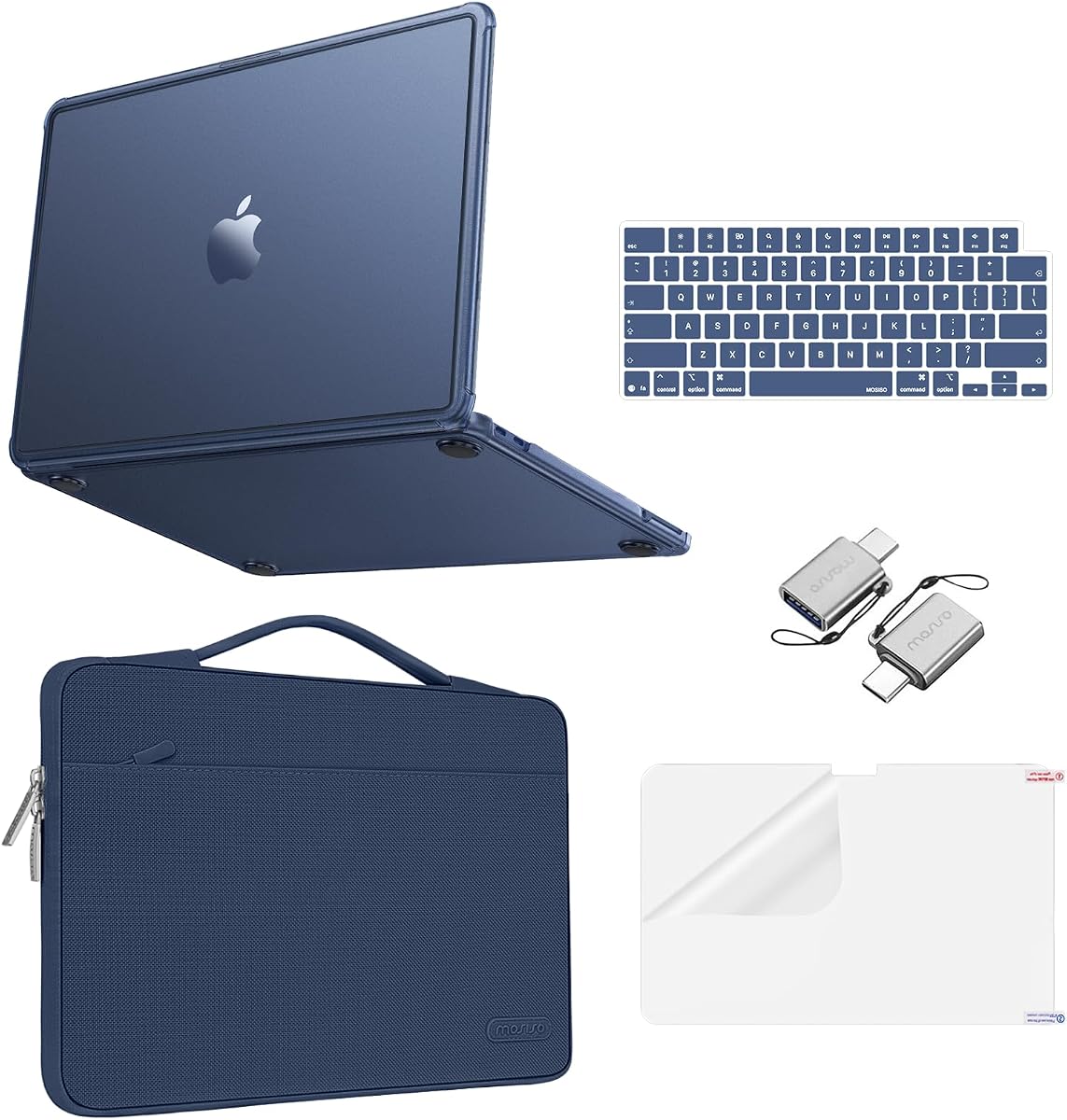
This premium MOSISO case offers enhanced durability with a matte fingerprint-resistant finish. It includes a 360-degree protective sleeve for added transport safety. The set provides full-body protection including keyboard and screen covers.
We may earn a commission when you buy through this link, at no additional cost to you.
The engineered surface actively repels smudges and daily scuffs. The matte look keeps the laptop looking pristine longer. The carrying bag cushions the device against bumps and accidental spills during travel.
The sleeve adds bulk but improves portability. The case is designed for model A3404. The included accessories ensure no part of the device remains unprotected from potential damage or debris.
Recommended for professionals who value aesthetics and durability. The investment covers both protection and convenient transport. It is ideal for frequent travelers and office users alike.
The engineered matte finish reduces visible smudges and fingerprints keeping your laptop looking professional throughout the workday.
A built-in carrying sleeve cushions your laptop against shocks and spills making it safer to carry in bags and backpacks.
We may earn a commission when you buy through this link, at no additional cost to you.
This set combines a crack-resistant case with a distinctive quilted puffy sleeve. It guards against daily scratches and minor bumps effectively. The plush interior cushions your device against shocks during transit.
We may earn a commission when you buy through this link, at no additional cost to you.
The puffy bag adds a unique style while protecting your laptop from accidental spills. The case itself is thin and easy to remove. It is designed specifically for the 2026 MacBook Neo model.
The sleeve fits easily into briefcases but may add weight. The hard shell prevents surface damage from keys or dust. It includes keyboard covers and a screen protector for total coverage.
Ideal for those who want style alongside function. The cushioned sleeve offers extra peace of mind during travel. It is a solid choice for daily commuters.
The unique square quilted pattern adds a fashionable touch while providing soft cushioning against bumps and drops.
Includes keyboard covers and a screen protector to shield key surfaces from scratches, spills, and debris.
We may earn a commission when you buy through this link, at no additional cost to you.
The EooCoo case features a transparent PC material that showcases your MacBook Neo's design. Its ultra-slim lightweight profile adds minimal bulk while offering durable scratch resistance. It includes a matching keyboard cover and USB-C to USB-A adaptors.
We may earn a commission when you buy through this link, at no additional cost to you.
This case is designed for the 2026 MacBook Neo. The clear shell allows full visibility of the original color. The hard plastic exterior shields against minor bumps and dust.
It is lightweight for daily use but may require careful cleaning. The included adaptors add value for users with legacy USB devices. Overall it provides a clean look with functional protection.
Best for users prioritizing aesthetics and weight. The slim fit does not hinder portability. It is a great choice for students and professionals seeking lightweight protection.
The ultra-thin design adds minimal bulk making it ideal for carrying your laptop daily without adding extra weight.
Receive versatile USB-C to USB-A adaptors with the case allowing you to connect older peripherals easily.
We may earn a commission when you buy through this link, at no additional cost to you.
The VENTION USB-C hub offers blazing-fast transmission with up to 80Gbps bandwidth. It supports 8K@240Hz video output and 140W pass-through charging. The detachable magnetic connector ensures effortless attachment without frequent plugging.
We may earn a commission when you buy through this link, at no additional cost to you.
It fits your laptop parameters with an aluminum alloy shell for heat dissipation. Note that the magnetic plug may not fit if you use a bottom case. It works well with external monitors for meetings.
The magnetic connection can be tricky with certain cases. It provides versatile USB-A and HDMI ports. It is fully compatible with Windows Mac and Android systems.
Ideal for power users needing high-speed data and video. The hub expands connectivity options significantly. It is perfect for presentations and heavy multitasking.
Experience ultra-fast data transfer rates up to 80Gbps for seamless file sharing and external drive access.
Maintain charge while using connected devices with up to 140W pass-through charging for efficient power management.
We may earn a commission when you buy through this link, at no additional cost to you.
This magnetic privacy screen protector is custom-designed for the 2026 MacBook Neo. It uses strong magnets for one-second installation without adhesive residue. It blocks side views beyond 30 degrees ensuring data safety.
We may earn a commission when you buy through this link, at no additional cost to you.
The high-transparency PET material maintains screen brightness and clarity. It effectively reduces glare and reflects light less. The anti-blue light technology relieves eye strain during long work hours.
It fits most protective cases and is ultra-thin. Installation is simple but alignment must be precise. The material is scratch-resistant but requires careful handling.
Best for public spaces like cafes and airports. It protects your confidential data from prying eyes easily. Ideal for remote workers and travelers.
The 30-degree privacy filter ensures only you can see the screen content protecting sensitive information in public areas.
Reduces harmful blue light exposure to lower eye strain and discomfort during extended screen time sessions.
We may earn a commission when you buy through this link, at no additional cost to you.
The Peslv privacy screen uses Japanese filters to reduce 95% of blue light and 92% of UV light. It corrects viewing angles to ensure privacy. The magnetic strip reinforces attachment strength for tight fit.
We may earn a commission when you buy through this link, at no additional cost to you.
The light-transmitting layer maintains high definition visuals close to the original. The matte surface intercepts reflected light for better visibility in bright settings. It is designed for the 2026 MacBook Neo model.
It may slightly reduce overall brightness. The reinforced magnetic strip ensures secure placement. It offers superior eye protection compared to standard filters.
Recommended for those working in bright or public environments. It balances privacy with visual quality. Ideal for designers and developers sensitive to eye strain.
High-quality filters reduce 95% of blue light to protect your eyes during long hours of focused work.
Advanced light-transmitting materials maintain super high definition visuals ensuring your screen looks close to original.
We may earn a commission when you buy through this link, at no additional cost to you.
This Synerlogic sticker is designed for MacBooks Air and Pro. It uses laminated vinyl for durability and a stronger hold. Note that it does not fit the new MacBook Neo model as per the product description.
We may earn a commission when you buy through this link, at no additional cost to you.
It helps beginners and power users learn commands instantly. The adhesive leaves a light residue if removed but wipes clean easily. It includes clear application instructions for a smooth finish.
The universal fit covers many older models. It is printed in the USA with responsive support. However check your model before buying to avoid compatibility issues.
Best for users with older MacBooks. It remains a reliable tool for learning shortcuts. Ensure model compatibility before purchase.
Lamination protects the text from wear ensuring the shortcuts remain legible and durable over time.
Designed printed and packaged in the USA ensuring high manufacturing standards and responsive customer support.
We may earn a commission when you buy through this link, at no additional cost to you.
This 7-pack set offers comprehensive port protection for the 2026 MacBook Neo. It includes silicone dust plugs for USB-C HDMI and headphone ports. It also includes webcam covers and a storage case.
We may earn a commission when you buy through this link, at no additional cost to you.
The soft silicone protects ports from scratches and liquid splashes. The low-profile design maintains the laptop's minimal aesthetic. Plugs stay securely in place during daily use.
The webcam covers add extra privacy. Insertion and removal are effortless. The package provides all essential port covers in one set.
Ideal for protecting against dust and debris. The included storage keeps small parts safe. A must-have for careful users.
Made of high-quality flexible silicone to protect ports from scratches debris and liquid splashes without damage.
Includes plugs for multiple ports plus webcam covers ensuring all entry points on your laptop remain protected.
We may earn a commission when you buy through this link, at no additional cost to you.
Selecting the right accessories requires understanding your workflow needs and compatibility. This guide breaks down key factors to consider when choosing products for your 2026 MacBook Neo.
Always verify the model number on your device before purchasing. The 2026 MacBook Neo often carries specific model codes like A3404 which differ from older Air or Pro models. Accessories designed for older devices may not fit ports or buttons correctly.
Double check the product title and description to ensure it explicitly lists your model number. Mismatched accessories can lead to poor fit or damage to the device.
Consider how you use your laptop daily. A hard shell case offers excellent scratch resistance while a soft sleeve protects against drops during transit. For maximum security look for kits that include screen protectors and keyboard covers.
Choose based on your environment. Commuters benefit from rugged bags while office users may prefer slim hard cases that preserve the device's profile.
Modern laptops often lack legacy ports. A USB-C hub can add HDMI USB-A or SD card slots for peripherals. Ensure the hub supports your charging wattage to avoid slowing down your workflow.
Look for hubs that match your display requirements. High refresh rates like 4K@240Hz require specific bandwidth support found in premium models.
If you work in public spaces a magnetic privacy screen can prevent side viewing. These accessories filter light so only the person in front sees the content. They should be scratch resistant and easy to remove.
Consider blue light filtering features if you work long hours. Some screen protectors reduce eye strain while maintaining visual clarity.
Opt for accessories that install without tools or strong adhesives. Magnetic designs allow quick removal for cleaning or shipping. This reduces the risk of accidental damage during installation.
Residue-free adhesives are crucial for skins and stickers. They ensure your device remains clean if you ever decide to change your accessory.
High-quality materials like polycarbonate and PET plastic resist yellowing and cracking over time. Avoid cheap plastics that may feel brittle or attract fingerprints excessively. Matte finishes generally hide smudges better.
Invest in items with durable construction. Quality materials extend the life of the accessory and protect your expensive device effectively.
Dust and debris can damage internal components. A set of silicone dust plugs ensures all open ports stay clean when not in use. Look for sets that include HDMI USB-C and headphone jacks specifically.
Choose low-profile designs that don't interfere with closing your laptop. Effective port protection maintains resale value and device longevity.
Products like shortcut stickers help build muscle memory for frequent commands. They reduce reliance on search engines and speed up daily tasks. Ensure the layout matches your specific macOS version or model needs.
Select accessories that integrate smoothly into your routine. Tools that enhance productivity without adding clutter are ideal for long-term use.
Install protective cases carefully to ensure proper alignment with ports and buttons. Align the corners gently before snapping the rest of the shell into place to avoid cracking.
Clean your screen protectors and skins with a microfiber cloth to remove dust before application. This prevents bubbles and ensures a smooth finish without debris trapped underneath.
Regularly remove dust plugs and wipe the interior of ports to prevent buildup. Clean cases and sleeves with mild soap and water to maintain hygiene and material integrity.
Most products are specifically designed for the 2026 MacBook Neo model. You must check the model number to ensure compatibility. Using accessories meant for older models may result in fit issues.
High-quality privacy screens maintain clarity while blocking side views. Some may slightly reduce brightness but advanced technology keeps visuals sharp. Choose ones with anti-glare for better visibility.
Peel the backing slowly and align one edge first before pressing down. Use a smooth tool to push air out towards the edges. Avoid peeling the entire backing at once.
Some magnetic hubs may not fit if a bottom case covers the connector. Check the product notes for case compatibility. You might need an angled adapter instead.
Silicone dust plugs are durable but can wear over time. If they feel loose or cracked replace them to maintain effective protection. They are generally inexpensive to replace.
Silicone covers protect against spills but may add slight key resistance. Ensure they fit precisely to avoid affecting trackpad usage. Remove periodically to clean underneath.
Choosing the right accessories significantly impacts your productivity and device longevity. This guide highlights top-rated options including protective cases hubs and privacy screens tailored to your workflow needs.
Prioritize compatibility and build quality when selecting items. A combination of a hard case screen protector and a reliable hub ensures comprehensive coverage against daily wear and tear.
Remember to verify current availability and pricing before buying. Our guide reflects expert insights and real user feedback to help you make informed decisions.