
Arduino Uno REV3
4.8Editor score
Classic ATmega328P Core
Widely Used Standard
Simple USB Programming
This comprehensive guide compares the top ten Arduino Uno Q boards and kits to help you choose the best hybrid development platform for your AI and IoT
The Arduino Uno Q represents a significant leap in hybrid computing for makers and developers. It combines a powerful Linux-based system with real-time microcontroller capabilities. This dual architecture allows for complex AI tasks alongside precise hardware control.
We have evaluated ten top options including the official board and various kits. Our analysis covers performance, connectivity, software support, and included accessories. This ensures you find a solution that matches your specific project needs and skill level.
Each pick highlights unique strengths from pure prototyping to advanced robotics. We focus on real-world usability and ecosystem compatibility. Please note that prices and availability may fluctuate over time so verify details before purchase.
4.8Editor score

4.4Editor score
3.7Editor score
This side-by-side comparison highlights the key specifications and unique selling points of each board and kit. Use this overview to quickly identify the model that best fits your technical requirements and project scope.


The Arduino UNO Q 4GB stands out as the premier hybrid board for advanced makers. It scores 4.4 stars on Amazon and delivers unmatched processing power. This board combines a Qualcomm MPU for high-level tasks with a STM32 MCU for real-time control.
We may earn a commission when you buy through this link, at no additional cost to you.
Its dual-brain architecture enables complex AI applications like object recognition and voice commands. Running Linux Debian OS allows you to use Python and access the vast Arduino ecosystem. The built-in 4GB RAM and 32GB storage support demanding single-board computer tasks seamlessly.
While powerful, the board may be overkill for simple LED blink projects. The complexity of managing two processors requires a steeper learning curve. However, for robotics and IoT, these trade-offs are acceptable given the performance gains.
Experts and serious developers should choose this board for scalable projects. It bridges the gap between microcontroller simplicity and computer power. This makes it the definitive choice for next-generation embedded systems.
The integrated AI acceleration hardware allows for edge AI models to run locally without cloud dependency.
Compatible with Arduino shields and featuring Qwiic connectors ensures easy hardware expansion for any project.
We may earn a commission when you buy through this link, at no additional cost to you.
This kit offers the core UNO Q experience with a crucial power supply included. It targets developers needing reliable power for heavy workloads. The 45W USB-C supply ensures stable operation during intensive AI processing tasks.
We may earn a commission when you buy through this link, at no additional cost to you.
The board itself matches the high performance of the standard UNO Q with 4GB RAM. It supports multitasking and advanced AI models effectively. Connectivity features like Wi-Fi 5 and Bluetooth 5.1 are standard for modern IoT needs.
Without a formal rating, user feedback is limited at this stage. However, the inclusion of regulated power adds significant value. It reduces the need for separate purchases and potential compatibility issues.
Engineers and developers building scalable systems will appreciate this bundle. It provides a solid foundation for industrial IoT without extra cost. This represents a smart choice for those needing immediate deployment readiness.
The 45W USB-C power supply ensures reliable operation during heavy workloads and peripheral usage.
Built-in Wi-Fi and Bluetooth enable seamless wireless communication for smart devices and IoT ecosystems.
We may earn a commission when you buy through this link, at no additional cost to you.
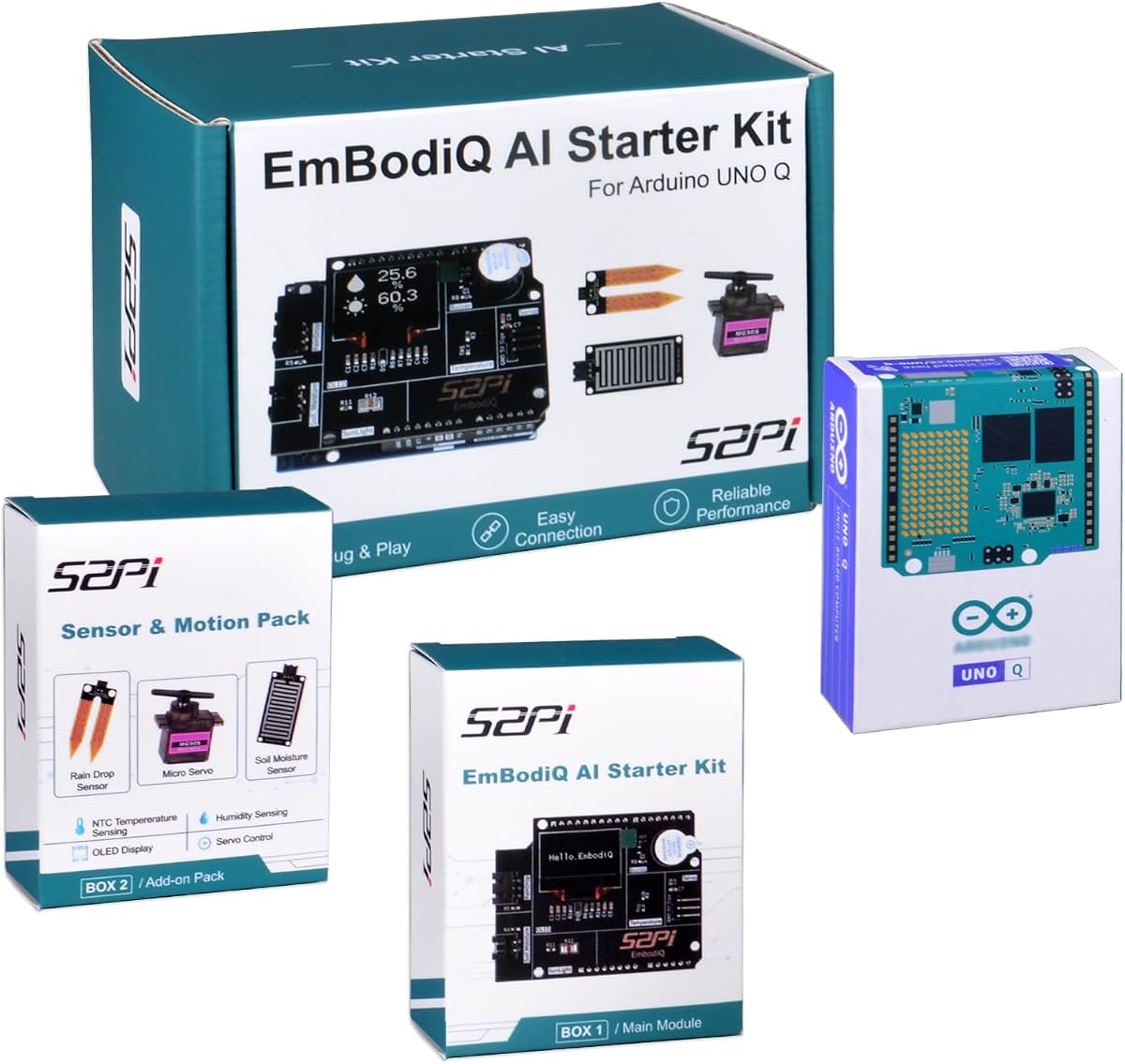
This kit transforms the UNO Q into an accessible AI device using natural language. It allows you to control hardware by simply telling the AI what to do. This removes barriers for users who want AI without writing complex code.
We may earn a commission when you buy through this link, at no additional cost to you.
The EmbodiQ AI Agent HAT runs real-time reasoning and multi-step tasks. It supports various providers like OpenAI for flexibility. The included soil moisture and raindrop sensors make it perfect for smart gardening or weather stations.
The current rating suggests some users may find setup challenging. However, the unique capability to use voice or text commands is groundbreaking. This trade-off is worth it for education and rapid prototyping.
Educators and AI enthusiasts should consider this kit for teaching. It demonstrates how AI can interact with physical worlds intuitively. This makes it the best option for natural language control.
Control sensors, servos, and displays using natural language without complex coding requirements.
Works with OpenAI and compatible APIs allowing you to choose your preferred model easily.
We may earn a commission when you buy through this link, at no additional cost to you.
The Uno REV3 remains the gold standard for beginners and hobbyists. With 4.8 stars it proves its reliability and ease of use. It is perfect for learning the fundamentals of electronics and programming.
We may earn a commission when you buy through this link, at no additional cost to you.
Powered by the ATmega328P it offers ample resources for basic projects. It supports a vast array of libraries and community examples. The USB connectivity ensures simple connection for sketch uploading and debugging.
Modern AI tasks are beyond its scope compared to newer boards. However, for prototyping and teaching it is unbeatable. The simplicity is a feature rather than a flaw for many users.
Students and makers needing a robust foundation should choose this. It prepares you well for more advanced hardware later. This makes it the best classic board for learning.
Compatible with Arduino IDE ensuring easy access to libraries and community-driven projects.
Widely used in education for learning and teaching electronics and programming effectively.
We may earn a commission when you buy through this link, at no additional cost to you.
The UNO R4 WiFi bridges the gap between basic and advanced boards. It offers dual-core processing with Renesas RA4M1 and ESP32-S3. This enables robust wireless communication and real-time data processing.
We may earn a commission when you buy through this link, at no additional cost to you.
Features like CAN bus support and 12-bit DAC make it suitable for industrial use. The built-in LED matrix allows for dynamic visual feedback. It is a significant upgrade from the classic UNO for IoT needs.
While not as powerful as the Q series it is more affordable. The complexity of dual cores may require some study. However the connectivity features justify the cost for connected devices.
Developers needing Wi-Fi and Bluetooth without external shields will love this. It is ideal for smart devices and remote sensors. This makes it the best mid-range IoT solution.
Equipped with Wi-Fi and Bluetooth 5.0 for robust wireless communication for IoT projects.
The USB-C port enables efficient power delivery and fast programming for improved ease of use.
We may earn a commission when you buy through this link, at no additional cost to you.
This kit provides a comprehensive start for UNO Q users. It includes the UNO Q with 2GB RAM and 16GB eMMC for embedded projects. The rugged aluminum case protects the board from dust and impacts.
We may earn a commission when you buy through this link, at no additional cost to you.
Accessories like USB-C hub with Ethernet and HDMI expand connectivity significantly. This allows the board to function as a standalone computer easily. The power supply ensures stable operation out of the box.
While it has less RAM than the 4GB model it is sufficient for many tasks. The included accessories save time and extra costs. This makes it a practical choice for professional applications.
Users needing immediate plug-and-play experience should choose this. It offers a balanced mix of performance and protection. This makes it the best accessory bundle for beginners.
The sturdy aluminum housing protects the board from dust, impacts, and static electricity while ensuring efficient heat dissipation.
The included USB-C hub with an Ethernet port significantly expands the UNO Q's connectivity options for professional applications.
We may earn a commission when you buy through this link, at no additional cost to you.
This kit is designed to turn code into real-world results easily. It includes 22 guided lessons to teach fundamental electronics and programming. The solderless breadboard and pre-soldered LCD help beginners focus on code.
We may earn a commission when you buy through this link, at no additional cost to you.
It comes with a wide variety of components including motors and sensors. This allows for learning digital input and motor control without extra buying. The PDF tutorial ensures structured learning and testing.
While it uses the classic UNO R3 it is excellent for education. It does not have the AI power of UNO Q. However the learning value is high for those starting from zero.
Homeschool units and coding clubs should choose this kit. It provides a complete foundation for future projects. This makes it the best learning kit for beginners.
Follow 22+ guided lessons to make LEDs blink and read temperature for a family weekend build.
Plug-in modules and a solderless breadboard help beginners focus on wiring, code and testing.
We may earn a commission when you buy through this link, at no additional cost to you.
This board offers a cost-effective way to start with Arduino. It features the reliable ATmega328P core for everyday projects. The included USB cable ensures you can code immediately upon arrival.
We may earn a commission when you buy through this link, at no additional cost to you.
It supports the Arduino IDE and has clear wiring labels. This simplifies connections to jumper wires and modules. The board can be powered via USB or external supply easily.
It lacks the advanced features of modern boards. However for simple tasks and learning it is sufficient. The value is high for those needing multiple boards for classes.
Students and educators on a budget should choose this. It provides a solid foundation for many projects. This makes it the best value board for classrooms.
A 16 MHz clock and 14 digital I/O pins provide a versatile foundation for LEDs and sensors.
The ATmega16U2 USB interface supports sketch uploads and serial communication effectively.
We may earn a commission when you buy through this link, at no additional cost to you.
This board offers the standard UNO R3 experience. It operates at 16MHz and has 32KB of flash memory. It is designed for full compatibility with standard Arduino IDE.
We may earn a commission when you buy through this link, at no additional cost to you.
It provides extensive I/O options with PWM support. This allows for precise control of motors and LEDs. Documentation and support are available for setup and troubleshooting.
The lower rating may reflect generic quality variations. However it remains a functional option for prototyping. It is a good choice for basic smart home tasks.
Users needing a standard board for testing should choose this. It provides reliable performance for simple applications. This makes it the best standard board for quick setup.
Features the ATmega328P microcontroller unit operating at a 16MHz clock speed.
Provides 14 digital input/output pins and 6 analog input pins for versatile connectivity.
We may earn a commission when you buy through this link, at no additional cost to you.
This board offers a versatile alternative for DIY projects. It features the ATmega328P core with full Arduino compatibility. The open-source design allows for customization and integration with many sensors.
We may earn a commission when you buy through this link, at no additional cost to you.
It provides broad compatibility with shields and other boards. This enables seamless integration with the ecosystem. The robust communication interfaces help connect wide range of devices.
As a third-party board it may have slight variations. However users report high satisfaction with performance. It is a good choice for budget-conscious builders.
Hobbyists needing flexibility should choose this board. It offers endless potential for interactive systems. This makes it the best alternative for custom projects.
Explore endless possibilities in electronics projects with its user-friendly Arduino development environment.
Seamless integration with the Arduino ecosystem provides access to a vast library of code and resources.
We may earn a commission when you buy through this link, at no additional cost to you.
Selecting the right board involves balancing power, connectivity, and budget. This guide outlines key factors to consider for your specific needs.
The UNO Q uses a hybrid architecture combining a Linux-capable MPU and a real-time MCU. This dual setup allows for both high-level AI tasks and low-level hardware control.
Look for boards that offer this split if you need advanced computing alongside precise sensor control.
RAM and storage determine how complex your models can be. The UNO Q comes in 2GB and 4GB RAM variants with different storage sizes.
For serious AI work choose models with 4GB RAM and 32GB eMMC storage to handle large datasets.
Modern projects require robust wireless and wired connections. Check for Wi-Fi 5 Bluetooth and Ethernet support.
Ensure the board has USB-C and compatible headers for shields and sensors to expand capabilities easily.
Operating system support is crucial for development. The UNO Q runs Debian Linux allowing Python usage.
Confirm compatibility with Arduino IDE and your preferred development tools before purchasing.
The classic UNO form factor ensures compatibility with existing shields and projects.
Choose boards that maintain this standard size to avoid redesigning your hardware setup.
Kits often include power supplies, hubs, and cases which save costs.
Look for bundles that provide everything you need to start building immediately.
Connect the board to your computer via USB-C and install the latest Arduino IDE drivers. Use the App Lab to quickly set up your development environment for coding in Python or C++.
Ensure you use a regulated power supply if running heavy workloads to prevent voltage drops. This protects the processor and ensures stable operation during intensive AI processing tasks.
Keep the board in a cool, dry place to maintain hardware longevity. Use the provided case or aluminum housing to protect against dust and static electricity during long-term use.
Yes the Arduino Uno Q maintains the classic UNO form factor which ensures compatibility with most existing Arduino shields. This allows you to use your current hardware accessories without needing new adapters.
Yes the Arduino Uno Q runs Linux Debian OS which allows you to write and execute Python scripts directly on the board. This provides flexibility for complex logic and AI integration alongside standard Arduino sketches.
The main difference is the amount of memory available for running applications. The 4GB version handles more complex models and multitasking while the 2GB version is suitable for lighter embedded tasks.
Yes the Arduino Uno Q features dual-band Wi-Fi 5 and Bluetooth 5.1 built directly onto the board. This provides robust wireless communication for IoT projects without needing external modules.
Absolutely the dual-Brain architecture makes it ideal for robotics as it combines high-level logic with real-time motor control. You can integrate voice commands and vision processing seamlessly.
While USB-C can power simple tasks a regulated external supply is recommended for heavy workloads. Some kits include a 45W USB-C power supply to ensure stability.
The Arduino Uno Q offers a powerful leap forward for makers needing advanced AI capabilities. Whether you choose the standalone board or a bundle depends on your immediate needs and accessories.
Prioritize processors and connectivity features based on your project complexity. For pure learning the classic UNO R3 remains a solid budget option but the Q offers future-proofing.
Always verify current availability and pricing before making a final decision. This ensures you get the right components for your next innovative build.