
DIERYA T68SE 60% Gaming Mechanical Keyboard
4.5Editor score
Tri-Mode connectivity options
Linear Red switches included
Full anti-ghosting support
This guide compares the top 60 percent percent keyboard models for performance, layout, and features to help you choose the perfect compact mechanical device
Finding the right compact input device can transform your workspace efficiency. A 60 percent percent keyboard offers essential keys in a minimal footprint. This balance saves desk space while maintaining full functionality for typing and gaming tasks.
We evaluated ten leading models based on switch quality, build durability, and customization options. Our analysis focuses on real-world performance metrics and user feedback. Each selection represents a distinct value proposition for different user preferences.
Every pick highlights specific strengths like hot-swap capability or unique lighting. These reviews show what matters most for daily use. Please note that product availability and pricing may change frequently across retailers.
4.5Editor score

4.6Editor score
4.6Editor score
This side-by-side comparison highlights key specifications across all ten models. You will see differences in switch types, connectivity options, and build materials at a glance.





The HITIME x XVX H61 stands out as a top-tier compact mechanical option with its premium aluminum chassis and hot-swap capability. It delivers a satisfying typing experience through pre-lubed linear switches and sound-absorbing pads. Users appreciate the unique Kanagawa anime theme that adds visual flair to any desk setup.
We may earn a commission when you buy through this link, at no additional cost to you.
Its durability is highlighted by the corrosion-resistant aluminum shell and high-quality PBT keycaps that resist wear over time. The dynamic RGB system offers extensive customization via software, allowing you to tailor lighting effects to your preference. The foam layers inside significantly reduce key noise for a quieter operation.
While the unit is slightly heavier due to the metal frame, this adds to its stability during intense gaming sessions. The only notable limitation is the lack of wireless connectivity, which may inconvenience users seeking a wireless setup. However, the build quality compensates for this trade-off effectively.
This keyboard is ideal for enthusiasts who value customizability and aesthetics without breaking the bank. It suits both gamers and typists looking for a tactile yet smooth input device with strong visual appeal. We recommend it for anyone wanting a high-end feel in a 60 percent form factor.
The aluminum body ensures durability while the custom shell design offers unique visual appeal in changing light conditions.
Hot-swappable PCB supports various switches while internal foam minimizes noise for a cleaner typing experience.
We may earn a commission when you buy through this link, at no additional cost to you.
The DIERYA T68SE offers exceptional value with its versatile Tri-Mode connectivity supporting Bluetooth and wired modes. It features smooth linear red switches ideal for both rapid gaming inputs and long typing sessions. This model prioritizes function over flashy features, making it a practical choice for daily work.
We may earn a commission when you buy through this link, at no additional cost to you.
Its full anti-ghosting system ensures every keypress registers accurately even during complex combos. The classic blue LED backlight provides adequate visibility in low light while maintaining a professional look. Compatibility extends across multiple operating systems including Windows and Linux for broad utility.
While it lacks RGB color options and hot-swap capabilities, the stability and battery life for wireless use make up for these simplifications. The price point remains highly competitive without sacrificing core functionality. Users focused on utility will find the limited features acceptable given the cost.
We recommend this for budget-conscious gamers or professionals needing a reliable secondary device. It is best suited for those who prioritize connectivity options and switch smoothness over aesthetic customization. Overall it delivers a solid entry-level experience in the compact market.
Switch between Bluetooth and wired modes easily to manage multiple devices across your workspace efficiently.
The red switches offer a fatigue-free typing experience with consistent frictionless travel for high speed inputs.
We may earn a commission when you buy through this link, at no additional cost to you.
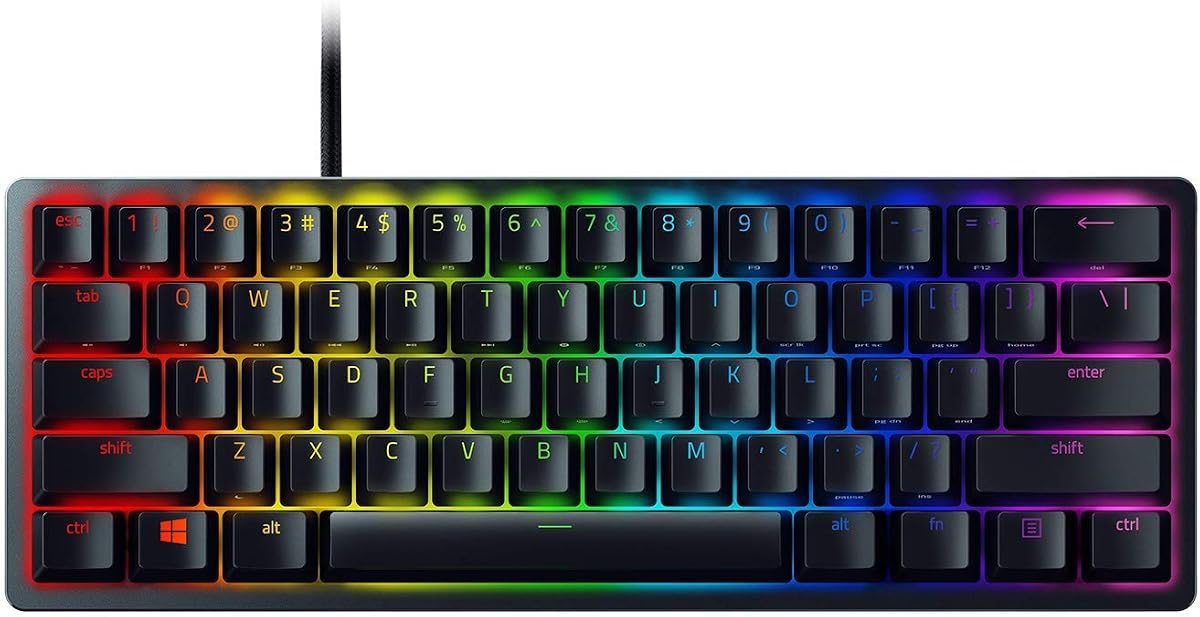
This Razer Huntsman Mini utilizes optical switches that register keypresses faster than traditional mechanical ones. The clicky feedback offers satisfying tactile confirmation for every keystroke which many gamers prefer for precision. It features a durable aluminum frame and high-grade PBT keycaps for long-lasting performance.
We may earn a commission when you buy through this link, at no additional cost to you.
Razer Chroma RGB provides extensive personalization with millions of colors and syncing across games and other hardware. The programmable macros via Razer Hypershift allow for complex command execution. This level of immersion and customization is unmatched in many other compact keyboards.
The renewed version ensures a lower price while maintaining full performance standards. However, the loud clicky sound might disturb quiet environments or colleagues. Additionally, full functionality relies on Razer software which some users may prefer to avoid for simplicity.
This keyboard is perfect for dedicated gamers seeking the fastest response times and immersive lighting. It suits those who enjoy a distinct auditory click and robust build quality. We recommend it for users who value cutting-edge technology and brand ecosystem integration.
Light-based actuation reduces actuation distance significantly for quicker responses compared to standard switches.
Sync lighting with games and other devices for a cohesive gaming setup that enhances visual immersion.
We may earn a commission when you buy through this link, at no additional cost to you.
The Redragon K617 is designed for gamers who need extra mouse space while retaining full functionality. It features a hot-swap socket allowing easy upgrades to preferred mechanical switches. The upgraded socket accepts most 3-pin or 5-pin switches for broad compatibility options.
We may earn a commission when you buy through this link, at no additional cost to you.
Its vibrant RGB system supports up to 20 preset modes that create a dedicated gaming vibe. Pro software enables deep customization for lighting effects and advanced macros. The stock linear switches are optimized to be quiet for shared environments.
Durability is assured with switches rated for 50 million keypresses ensuring long-term reliability. The white and grey colorway offers a fresh alternative to standard black peripherals. However, the lack of wireless support limits mobility for users on the go.
We recommend this for competitive gamers prioritizing desk space and customization. It is ideal for those who want to experiment with different switches without soldering. The combination of software power and physical durability makes it a strong contender.
Ditching the numpad frees up room for wider mouse movements improving accuracy during intense gameplay.
Design your own lighting effects and program macros to adapt the keyboard to your specific playstyle.
We may earn a commission when you buy through this link, at no additional cost to you.
The RK ROYAL KLUDGE R65 introduces a gasket mount structure for superior sound and comfort. It includes a high-quality metal volume knob for quick audio adjustments during work or play. The five layers of sound-absorbing material optimize the acoustic signature significantly.
We may earn a commission when you buy through this link, at no additional cost to you.
Support for QMK VIA allows deep firmware-level customization for advanced users. The custom pre-lubed cream switches provide a smooth and unique thocky sound. PBT keycaps in MDA profile offer a tactile feel distinct from standard profiles.
While the software learning curve can be steep, it offers unlimited redefining potential for keybindings. The indicator lights next to arrow keys provide clear status at a glance. The only drawback is the reliance on wired connection for stability.
We recommend this for enthusiasts who love to tinker with firmware and sound. It is perfect for those seeking a unique acoustic profile with physical media control. This keyboard bridges the gap between custom builds and ready-to-use devices.
Gasket mounting and foam layers reduce vibration to produce a richer and deeper sound profile.
QMK VIA support enables endless key redefinition and custom profiles for complex workflows.
We may earn a commission when you buy through this link, at no additional cost to you.
This TMKB keyboard maximizes desk space with a streamlined ANSI design suitable for on-the-go use. It features ultra-responsive linear red switches optimized for rapid keystrokes in competitive play. The foldable feet provide ergonomic tilt for extended comfort during sessions.
We may earn a commission when you buy through this link, at no additional cost to you.
A detachable USB-C cable ensures easy storage and replacement for transport. The white finish enhances workspace aesthetics while resisting grime accumulation. Anti-ghosting supports full 61-key rollover ensuring every press registers during complex commands.
The lighting options are simpler compared to higher-end models but sufficient for visibility. Durability is maintained with double-shot keycaps that resist fading over time. However, the lack of wireless connectivity limits its portability benefits somewhat.
We recommend this for users needing a reliable portable keyboard for travel. It is best suited for gamers or workers who need a clean white aesthetic. The balance of ergonomics and compactness makes it a practical daily driver.
Detachable cable and compact layout make this easy to pack for trips without sacrificing performance.
Foldable feet allow you to adjust the tilt for better hand positioning and reduced fatigue.
We may earn a commission when you buy through this link, at no additional cost to you.
This model features blue mechanical switches that offer a satisfying click and tactile resistance. The rainbow LED backlight provides visibility and aesthetic appeal with 18 effects. Its stair-up keycap design brings maximum comfort by minimizing hand fatigue.
We may earn a commission when you buy through this link, at no additional cost to you.
The long detachable Type-C cable ensures safe transport and secure connection for FPS gamers. Double injection ABS engineered keycaps bring uniform backlight clarity for accuracy at night. Plug and play functionality means no drivers are required for setup.
While the clicky sound is satisfying for typists it may be too loud for shared spaces. The ABS keycaps may show shine over time compared to PBT alternatives. However, the included keycap puller adds value for maintenance users.
We recommend this for budget buyers seeking tactile feedback without complex software. It suits office workers or copywriters who value audible confirmation. The ergonomic layout ensures comfort during long typing sessions.
Blue switches provide a distinct click that helps confirm keystrokes for precise typing.
Rainbow LED backlight ensures you can see keys clearly in low light conditions.
We may earn a commission when you buy through this link, at no additional cost to you.
The linear optical switches in this model register presses at the speed of light. Snap Tap technology allows prioritizing inputs for responsive in-game movement. This creates a distinct advantage in fast-paced competitive scenarios requiring quick reactions.
We may earn a commission when you buy through this link, at no additional cost to you.
Razer Synapse 4 enables full macro programming for complex command execution. The matte aluminum frame ensures structural integrity over years of use. Oil-resistant doubleshot PBT keycaps keep the surface clean and textured longer.
The higher price reflects the advanced optical technology and brand prestige. However, software dependency may limit users who prefer standalone hardware. The lack of wireless connectivity means it stays tethered to your PC.
We recommend this for competitive gamers needing maximum response speed. It suits users invested in the Razer ecosystem for lighting sync. The unique features justify the cost for serious players.
Prioritize the latest input between assigned keys for smoother movement without toggling.
Shorter actuation distance allows for faster key registration than standard mechanical switches.
We may earn a commission when you buy through this link, at no additional cost to you.
The RK61 concentrates all key functions into a minimalist design for space saving. It features a hot-swappable PCB supporting both 3-pin and 5-pin switches. The linear red switches provide a smooth quiet stroke perfect for offices.
We may earn a commission when you buy through this link, at no additional cost to you.
QMK/VIA programmability offers extensive customization for advanced users. RGB lighting includes 18 modes plus 8 monochrome options. The detachable Type-C cable ensures stable connections with low latency.
Even beginners can swap switches easily without soldering which is a major benefit. However, some advanced customization relies on specific software. Wired connection ensures reliability but reduces mobility options.
We recommend this for those wanting to customize their board without technical hurdles. It suits office users who value quiet typing. This keyboard balances simplicity with powerful customization potential.
Hot-swap design allows effortless changes to switches for different feel without tools.
Multiple RGB modes let you adjust colors and effects for any mood or task.
We may earn a commission when you buy through this link, at no additional cost to you.
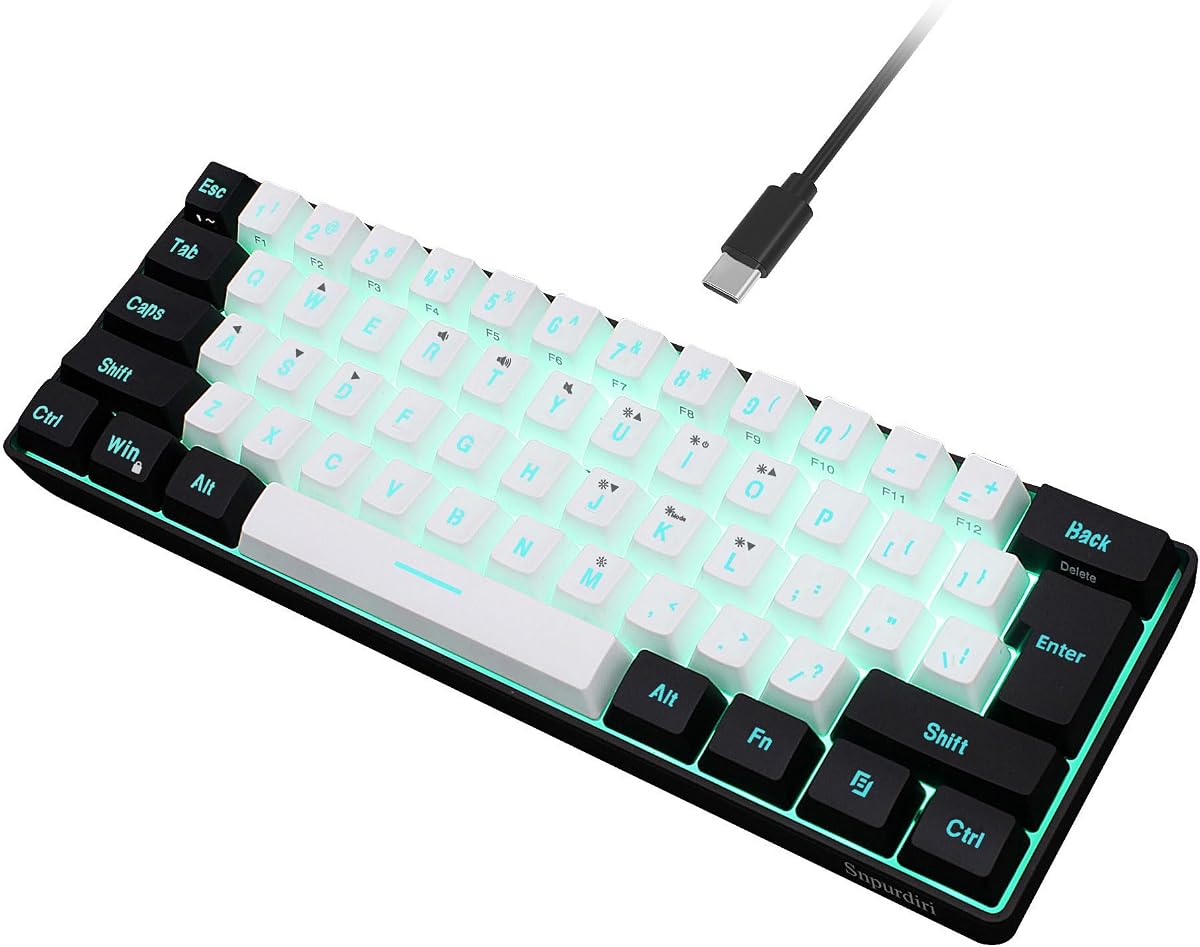
The Snpurdiri offers ergonomic key height to reduce fatigue during long use. It uses imitation mechanical technology to provide a tactile feel at a lower cost. The double-color injection molding ensures character transparency for clear backlighting.
We may earn a commission when you buy through this link, at no additional cost to you.
Its elegant black and white matching suits mature business or home setups. RGB backlight includes 6 effects with adjustable speed and level. USB Type-C connection provides stable transmission with a detachable cable.
Since it uses membrane-like technology it is quieter than full mechanical options. However, the tactile response may lack the durability of true mechanical switches. Quality upgrades in recent models show continuous improvement efforts.
We recommend this for users seeking a mechanical look on a tight budget. It suits office environments where silence is preferred over clicky feedback. The aesthetic balance makes it a solid everyday choice.
Designed according to ergonomics to minimize hand fatigue after long-term use.
Black and white matching style provides an elegant look for any professional setup.
We may earn a commission when you buy through this link, at no additional cost to you.
Selecting the right compact keyboard depends on several technical factors. We outline the key considerations to ensure you find the best match for your needs.
The switch determines the tactile feel and sound of your keystrokes. Linear switches offer smooth travel while clicky switches provide audible feedback. Consider your environment when choosing between silent or loud options.
Choose switches that match your preference for sound and resistance.
Materials like aluminum add durability and reduce unwanted vibration during typing. Plastic models are lighter but may feel less premium. A solid case improves stability during intense gaming sessions.
Look for reinforced frames if you want a sturdy device.
Wired models ensure zero latency while wireless options offer flexibility. Tri-mode connectivity allows switching between Bluetooth and wired easily. Check if you need battery life for portable use.
Prioritize wired connections for competitive gaming performance.
Hot-swap sockets allow you to change switches without soldering. This future-proofs your device for upgrades over time. It is a valuable feature for enthusiasts who like customization.
Ensure compatibility with standard pin switches before buying.
RGB lighting adds aesthetics and visibility in dark spaces. Many models support macros to simplify complex tasks. Software integration allows deep personalization of keys and effects.
Check software requirements to avoid unnecessary complexity.
PBT keycaps resist shine better than ABS over time. Texture affects grip and typing comfort significantly. Double-shot legends ensure characters do not fade with use.
Opt for PBT caps for longer lasting appearance.
Features like volume knobs or gasket mounts enhance usability. Volume knobs allow quick audio control without software. Gasket mounts improve sound quality by isolating key presses.
Consider these extras based on your daily workflow needs.
Prices vary significantly based on build materials and features. Determine which features matter most to your specific use. Balance cost against performance requirements for the best value.
Set a budget that covers your essential needs first.
Start by connecting your keyboard to your computer via USB or Bluetooth. Ensure the correct driver or software is installed for RGB and macros to function properly. Adjust lighting settings to your preference immediately.
Keep your keyboard clean by using compressed air to remove dust from switches. Wipe the keycaps regularly with a soft cloth to prevent grime buildup. Avoid eating over the keyboard to reduce spill risks.
Store your keyboard in a dry cool place when not in use. Avoid exposing it to extreme temperatures or humidity which can damage electronic components. Regularly check cable connections to ensure optimal performance.
The main benefit is the compact footprint that frees up desk space for mouse movement. This layout removes the numpad and navigation cluster to create a streamlined typing zone. It is ideal for FPS gamers who need wide mouse swipes.
Yes they are excellent for gaming due to reduced hand travel distances. The compact layout allows better desk ergonomics during long sessions. Many models include features like anti-ghosting and fast switches for competitive play.
Most basic functions work out of the box without software. However, features like RGB customization and macro programming often require specific apps. Check the product page to see if drivers are needed for advanced features.
This depends on whether the board has a hot-swap PCB. If it does you can replace switches without soldering easily. Otherwise, you would need technical skills to solder new switches into the board.
Linear switches offer a smooth press without tactile bump or noise. Clicky switches provide an audible click and tactile bump on actuation. Linear is better for quiet rooms while clicky is preferred for typing feedback.
Use compressed air to blow dust out from under the keycaps. Gently wipe the tops with a slightly damp cloth. For deep cleaning, remove keycaps to scrub them individually and let dry before reassembling.
We highlighted ten models ranging from affordable picks to high-end premium options. Each serves different needs whether you prioritize speed, sound, or style. The HITIME x XVX H61 and Razer Huntsman Mini stand out for build and features.
Prioritize the switch type and build material that match your daily habits. Consider hot-swap options if you enjoy experimenting with hardware customization. Balance connectivity needs with desk space constraints effectively.
Remember that availability and pricing change frequently on online retailers. Always check current stock and offers before making your final decision. This ensures you get the best value for your investment today.