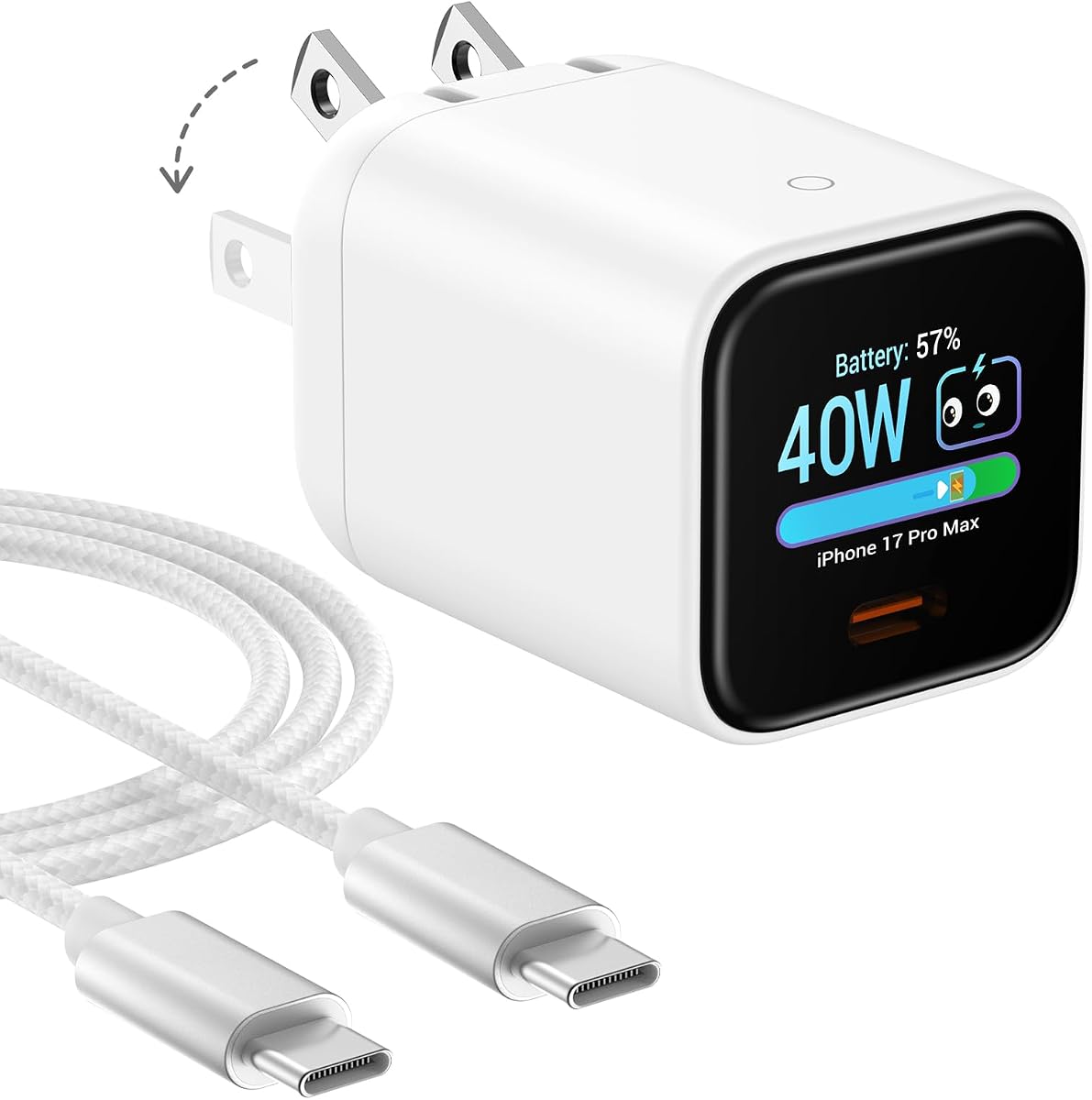
Smart Charging Butler 45W
4.5Editor score
AI Powered Battery Care Mode
Compact Pocket Sized Design
Smart Display Controls
This guide compares the top 10 GaN chargers with smart displays, evaluating power output, port counts, safety features, and real-time monitoring for modern
Finding a reliable GaN charger with a display helps you monitor power output and device status in real time. These modern blocks combine high wattage efficiency with visual feedback, ensuring your electronics charge safely and quickly without guesswork.
We evaluated ten leading models based on port configurations, total power delivery, display clarity, and safety certifications. Our analysis covers everything from compact travel units to high capacity desktop stations to help you find the right fit for your setup.
Each pick highlights key strengths, pros, and cons to guide your decision. Note that availability and pricing may vary over time, so always check current listings before purchasing to ensure you get the best deal available today.
4.5Editor score

4.7Editor score

4.6Editor score
The following table provides a side by side comparison of all ten selected chargers. Review the specifications to understand how each model differs in power delivery, port layout, and display functionality.




The UGREEN Nexode Pro Charger stands out as a top contender for users needing high wattage with visual feedback. It delivers a total of 160W across five ports, making it ideal for powering laptops, phones, and tablets simultaneously.
We may earn a commission when you buy through this link, at no additional cost to you.
Its standout feature is the rotatable touch digital display, which shows real-time output wattage and internal temperature. This transparency helps users manage power distribution effectively without guessing which port is active or how much power remains.
While it is slightly heavier than smaller 45W options, the build quality justifies the weight. The foldable plug and compact design still make it portable enough for travel, though it is best suited for users who prioritize power over minimal size.
This charger is perfect for professionals with multiple devices who want to see exactly how much power they are drawing. It balances performance and functionality well, making it a reliable choice for daily desktop use or business trips.
The smart display provides clear visuals of total output and per-port data, ensuring you always know the charging status without needing to check your device.
With four USB-C ports and one USB-A port, this unit supports a wide range of devices, eliminating the need for multiple adapters in your bag.
We may earn a commission when you buy through this link, at no additional cost to you.
The Anker Prime Charger delivers 160W in a package as small as an AirPods Pro case. It is designed for users who need maximum power without the bulk of traditional desktop bricks.
We may earn a commission when you buy through this link, at no additional cost to you.
It supports up to 140W on a single port, ensuring laptops charge at full speed. The AnkerSense View feature allows real-time monitoring via the built-in display or Bluetooth app for added convenience.
One trade-off is the limited port count compared to other 160W models. With only three ports, it may not suit setups requiring simultaneous charging for four or more devices, but it excels for dual device needs.
This charger is best for Apple users who want a sleek, powerful solution. It offers excellent portability and performance, making it a strong choice for professionals on the go who value size and speed.
Using advanced GaN technology, this charger packs 160W into a tiny frame, reducing travel weight significantly while maintaining full charging speeds.
The companion app unlocks custom charging modes and real-time tracking, giving you more control over how your devices receive power.
We may earn a commission when you buy through this link, at no additional cost to you.
This Anker model offers a balanced mix of power and port count. At 140W, it handles most modern laptops easily while providing four ports for simultaneous device charging.
We may earn a commission when you buy through this link, at no additional cost to you.
The high definition color display shows charging status and temperature details clearly. This helps users track performance and safety without needing to touch the charger itself.
ActiveShield 4.0 monitors temperature millions of times daily, adding an extra layer of protection. While the overall rating is slightly lower than other models, the safety features are robust and reliable.
It is a good middle ground for those who need more ports than the 160W models offer but do not need extreme power. It fits well for home office setups where port variety matters.
The charger constantly monitors temperatures to prevent overheating, ensuring your devices stay safe even during extended charging sessions.
The color screen provides a detailed view of power distribution, helping you understand how much energy each device is receiving.
We may earn a commission when you buy through this link, at no additional cost to you.
The Anker 100W Max 3 Port charger is designed for daily carry. It provides enough power for most ultrabooks while remaining small enough to fit in a coat pocket.
We may earn a commission when you buy through this link, at no additional cost to you.
Its HD smart display gives real-time details on charging status and temperature. This ensures you are aware of the charger state at all times without checking your phone.
The 100W capacity is sufficient for laptops like the MacBook Air. It also supports low-current mode for earbuds, making it versatile for small devices too.
With a high rating and compact design, this is a great choice for students or travelers. It balances size and function effectively for everyday use without unnecessary bulk.
Weighing significantly less than traditional chargers, this model slips easily into bags or pockets, making it perfect for on-the-go power needs.
The ability to detect and adjust for low power devices ensures small accessories charge safely without draining the main battery.
We may earn a commission when you buy through this link, at no additional cost to you.
The Smart Charging Butler offers impressive features at a budget-friendly price. It includes an AI-powered battery care mode that monitors temperature and adjusts charging speed to extend battery life.
We may earn a commission when you buy through this link, at no additional cost to you.
It supports 45W output, which is ideal for phones and tablets. The included braided cable ensures durability, a feature often missing from cheaper chargers. The display is simple to use with just a few taps.
While it cannot power high performance laptops, it excels for mobile devices. The AI care mode is a standout benefit, helping to maintain device health over time without extra costs.
This is the best pick for budget conscious users who want display tech. It offers great value for phone charging with smart features that typically appear on higher-end models.
The built-in AI monitors battery health to prevent overheating and extend the lifespan of your device during long charging cycles.
Priced significantly lower than competitors, this charger delivers smart display capabilities and durability that exceed expectations for its cost.
We may earn a commission when you buy through this link, at no additional cost to you.
The Anker Prime Charging Station is a powerhouse for desks needing maximum connectivity. It delivers 250W across six ports, capable of charging multiple laptops and devices at once.
We may earn a commission when you buy through this link, at no additional cost to you.
Its LCD display and control dial allow personalized power settings. Users can adjust energy output to ensure each device charges at its optimal speed, enhancing efficiency.
Because it is designed for desktop use only, it lacks portability. The size and weight make it unsuitable for travel, but it is perfect for a home office or workstation setup.
This is the ultimate choice for power users with many devices. It eliminates cable clutter and provides top-tier monitoring, justifying the higher price for professional environments.
The control dial lets you manage energy distribution manually, giving you precise control over how each device receives power.
With 250W total output, you can charge several high-power laptops simultaneously without needing multiple separate adapters.
We may earn a commission when you buy through this link, at no additional cost to you.
The MOKiN 70W USB C charger is built for travelers. Its ultra-compact size makes it easy to slip into a bag, and the interactive touch screen offers useful monitoring tools.
We may earn a commission when you buy through this link, at no additional cost to you.
It supports up to 70W, which is enough for most 13-inch laptops. The display shows port-by-port details and temperature, keeping you informed about charging performance at all times.
One drawback is the lack of a included cable. You will need to bring your own, which adds to the travel load. Otherwise, the design and power are solid for daily use.
This charger is great for those who want a small footprint without sacrificing speed. It fits easily in travel kits and provides reliable power for phones and laptops.
Designed to be significantly smaller than standard chargers, this unit saves space in luggage while still offering fast charging capabilities.
The touch screen allows you to rotate views and check summaries, making it easy to monitor status without extra steps.
We may earn a commission when you buy through this link, at no additional cost to you.
This MOKiN charger offers rapid charging with a color display. It delivers 140W total, enabling fast refueling for MacBooks and other high-power laptops while maintaining four ports.
We may earn a commission when you buy through this link, at no additional cost to you.
The live screen provides instant visibility of power output and temperature. Active safety monitoring ensures that the charger stays cool even under heavy load, protecting connected devices.
While the brand is less recognized than others, the performance is strong. It includes a USB-C to USB-C cable, adding value to the package and saving the need for separate purchases.
It is a solid option for those who want high wattage with a visual interface. If you prioritize speed and monitoring, this model offers excellent features for the price.
The color screen keeps you updated on real-time charging data, allowing you to see exactly what is happening with your devices.
Power distribution is optimized to ensure devices get the right amount of charge, avoiding waste and keeping temperatures low.
We may earn a commission when you buy through this link, at no additional cost to you.
The DJI Power 140W Combo stands out for its unique digital display cable. While the charger itself has three ports, the cable shows power status, offering a different way to monitor charging.
We may earn a commission when you buy through this link, at no additional cost to you.
It delivers 140W with stable operation thanks to GaN tech. The cable includes a 7A high-current design, ensuring durability and resistance to wear during daily use.
This is ideal for DJI users or those needing a reliable charger with a display cable. The focus on specific brands makes it niche, but the quality and ratings are top notch.
If you want a reliable cable that shows power, this is a great choice. It combines standard charging needs with a unique visual element that is hard to find elsewhere.
The included cable shows real-time power data, letting you verify charging status without looking at the charger block itself.
High-density braided material ensures the cable lasts longer, withstanding daily tugs and wear without tangling easily.
We may earn a commission when you buy through this link, at no additional cost to you.
The Anker Nano Smart Display Charger is one of the smallest options available. It fits easily in a pocket and features a display that shows charging status with simple taps.
We may earn a commission when you buy through this link, at no additional cost to you.
It supports Care Mode for iPhones to extend battery life. By lowering charging temperature, it helps maintain device health, which is a key benefit for daily smartphone users.
The display is not a touchscreen but uses buttons for navigation. This keeps the device simple and robust. It also recognizes compatible iPhone models to adjust charging automatically.
For iPhone users who want a tiny display charger, this is ideal. It prioritizes health and portability over raw power, making it a smart choice for phone charging needs.
The charger detects compatible iPhone models to optimize power delivery, ensuring safe and efficient charging for your device.
Smaller than most 30W chargers, this unit fits effortlessly into any pocket, allowing you to charge on the go without bulk.
We may earn a commission when you buy through this link, at no additional cost to you.
Choosing the right charger requires balancing power needs with display features and port counts. This section outlines key factors to consider for making an informed decision.
Ensure the total wattage meets your laptop and device requirements. High-end laptops need 100W or more, while phones work well with 45W. Check the max output to avoid undercharging.
Pick a charger that matches your highest power device to ensure fast and efficient charging without throttling.
Displays vary from simple LCDs to touch screens. Some show temperature and power per port while others just show status. Choose based on how much detail you want.
A clear display helps you monitor heat and power usage effectively, preventing potential issues with overheating.
Count how many devices you need to charge at once. Models range from single port to six port setups. More ports increase flexibility but may reduce power per port.
Select a port count that aligns with your typical daily charging needs for phones, tablets, and laptops.
Look for certifications like active temperature monitoring and short circuit prevention. High safety ratings ensure that your devices are protected during long charging cycles.
Safety features are critical when running high wattage to prevent damage to your electronics.
Desktop models offer more power and ports but are too large for travel. Travel models are smaller but may have fewer ports. Decide where you plan to use the charger.
Prioritize foldable prongs and lightweight designs if you travel frequently.
Choose brands with strong histories of quality and customer support. Well established brands often provide better warranty coverage and software integration for displays.
Trusted brands reduce risk and ensure better long term reliability for your investment.
Some chargers include a cable while others do not. If a cable is required, check the included quality and length to avoid extra purchases.
An included braided cable adds value and ensures you can start using the charger immediately.
Advanced models offer app control for settings and monitoring. If you like customizing charging modes, ensure the app is user friendly and compatible with your phone.
App features enhance the utility of the display by allowing deeper insights into charging stats.
Connect your devices to the USB ports securely to ensure proper contact. The display will activate once a device is detected, showing power distribution and status details.
Avoid leaving the charger in direct sunlight or enclosed spaces. Good airflow helps the internal cooling system work efficiently and maintains display readability.
Clean the display gently with a soft cloth to avoid scratches. Regularly check for dust on ports and wipe them to ensure safe charging connections.
A GaN charger uses gallium nitride for higher efficiency and smaller size. The display provides real-time feedback on power usage, temperature, and charging status for better device management.
A display is useful if you want to monitor power draw and temperature. It helps prevent overheating and ensures you know when devices are fully charged without checking the device itself.
Yes, most models support both. High wattage options power laptops while lower wattage ones charge phones. They intelligently adjust output to suit each connected device.
Yes, they include safety features like temperature monitoring and short circuit protection. These systems ensure the device stays cool and protects your electronics from power surges.
Count your active devices like phones, tablets, and laptops. Choose a charger with enough ports to connect all of them at once without needing multiple adapters.
The display consumes minimal power. It is designed to turn off automatically when idle to save energy while still providing essential information when needed.
We have reviewed ten top chargers with displays for varying needs. From the 160W UGREEN to the budget-friendly Smart Butler, each offers unique benefits for power and monitoring.
Prioritize total wattage and port count based on your primary devices. Safety features and brand reliability should also guide your choice to ensure long-term durability.
Prices and availability may change so verify current specs before buying. Choosing the right display charger helps keep your devices charged and protected efficiently.