
ASUS Pro WS W890E-SAGE SE
5.0Editor score
Intel Xeon 600 Ready
NitroPath DRAM Technology
Advanced AI PC Connectivity
This guide compares ten top ASUS Server Motherboard models for enterprise and workstation needs, evaluating connectivity, power, and stability for 2026
Selecting the right ASUS Server Motherboard is critical for building reliable enterprise systems. These boards support high core counts and ECC memory for demanding workloads like AI and virtualization.
We compared ten models based on socket support, PCIe lanes, and remote management features. Our analysis focuses on stability, expansion options, and thermal design for 24/7 operation.
Each pick details key specs and ideal use cases to help you choose wisely. Prices fluctuate due to market conditions, so verify current listings before purchasing your next server.
5.0Editor score

3.7Editor score
4.3Editor score
The table below provides a side-by-side technical overview of all ten ASUS Server Motherboard models evaluated in this guide to help you match specifications to your infrastructure requirements.


This motherboard is designed for high-end AMD Threadripper PRO systems requiring massive GPU and storage expansion. It supports up to 96 cores and offers seven full-speed PCIe 5.0 x16 slots for demanding workloads.
We may earn a commission when you buy through this link, at no additional cost to you.
The board features a robust 32-stage power delivery system with active cooling fans to manage thermal output under heavy loads. This ensures stability during long rendering or training sessions without throttling.
While it offers incredible expansion, the EEB form factor limits case compatibility to large server chassis. The high price reflects its server-grade build quality and extensive feature set for professionals.
Buyers requiring maximum GPU density for AI training or scientific computing should prioritize this model. It balances performance and manageability better than any other workstation board available today.
Seven x16 slots allow for eight high-end GPUs to run simultaneously without bandwidth bottlenecks.
The IPMI controller with dedicated LAN port allows secure remote administration of the server.
We may earn a commission when you buy through this link, at no additional cost to you.
This Intel workstation board prepares you for advanced AI computing with support for Xeon 600 processors. It features NitroPath DRAM technology to enhance memory performance for demanding applications.
We may earn a commission when you buy through this link, at no additional cost to you.
Like its AMD counterpart, it offers seven PCIe 5.0 x16 slots and dual 10Gb LAN ports for ultrafast connectivity. The active cooling system ensures the VRM stays cool under sustained loads.
The requirement for an EEB chassis and high price limit it to enterprise deployments. However, the build quality and feature set justify the investment for mission-critical workstations.
Professionals building next-gen AI PCs or high-performance render farms should consider this board. It offers superior memory tech and expansion compared to standard server motherboards.
Exclusive tech optimizes signal integrity for ECC R-DIMM DDR5 memory overclocking.
Newer storage connectors ensure compatibility with future enterprise NVMe drives.
We may earn a commission when you buy through this link, at no additional cost to you.
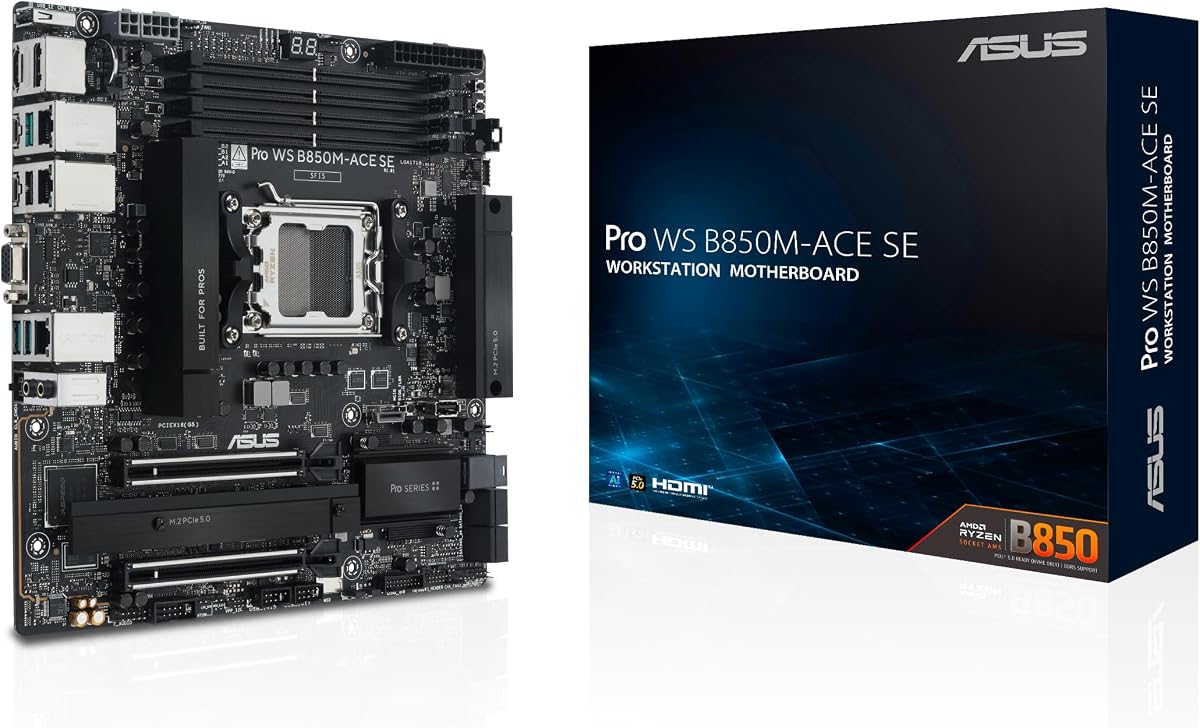
This MicroATX board brings enterprise features to smaller workstations without the cost of EEB boards. It supports AMD Ryzen 9000 and EPYC 4005 series for flexible performance options.
We may earn a commission when you buy through this link, at no additional cost to you.
Despite its size, it includes the crucial AST2600 BMC for server-grade remote management. Dual network ports provide redundancy and speed for business critical applications.
Users looking for a compact yet powerful solution for small offices will find this ideal. It balances cost and features well, though it lacks the massive GPU support of larger boards.
Small businesses needing remote manageability on a budget should choose this model. It proves you don't need a full rack chassis to have server reliability.
Smaller footprint saves space while retaining essential server management features.
Front USB 20Gbps Type-C ensures fast peripheral data transfer.
We may earn a commission when you buy through this link, at no additional cost to you.
This CEB motherboard offers a middle ground between standard ATX and massive EEB systems. It allows for expansion card customization specifically for IPMI management needs.
We may earn a commission when you buy through this link, at no additional cost to you.
With seven PCIe 5.0 slots and support for Xeon 600 processors, it handles demanding workstation tasks well. The dual LAN setup ensures network redundancy without extra PCIe cards.
Budget constraints or specific IPMI needs might make the onboard solution more convenient for some. However, this offers a solid base for custom server builds.
System integrators building custom small servers might prefer this flexible design. It balances expansion capability with size for unique deployment scenarios.
Ready for IPMI expansion gives you choice over management controller features.
Supports SlimSAS for compact high speed NVMe storage arrays.
We may earn a commission when you buy through this link, at no additional cost to you.
This board stands out by integrating WiFi 7 directly into a workstation board. It supports Threadripper PRO 7000 WX processors with a robust 36 power stage design.
We may earn a commission when you buy through this link, at no additional cost to you.
Wireless connectivity is rare at this level, offering convenience for specific setups needing flexibility alongside heavy compute power. The IPMI remote management is included for server control.
While WiFi 7 hardware is still maturing, being ready for it ensures future proofing. However, wired connections remain the primary choice for stable server environments.
Designers needing mobility or temporary setups might value the wireless option. It offers top tier performance without sacrificing the convenience of wireless networking.
Integrated WiFi 7 provides next-gen wireless bandwidth for remote access.
Supports up to 1TB ECC memory for huge data sets.
We may earn a commission when you buy through this link, at no additional cost to you.
This model supports the latest 9000 series Threadripper processors alongside the older 7000 line. It offers significant storage expansion with four M.2 slots supporting PCIe 5.0.
We may earn a commission when you buy through this link, at no additional cost to you.
With four USB4 ports, it provides massive bandwidth for external drives or eGPU setups. The 20 power stage design ensures stability for demanding CPU loads.
While it lacks the massive GPU count of the EEB variants, it balances well for general workstations. It is ideal for those needing high-speed storage connectivity.
Professionals needing rapid data access should consider this storage-focused design. It delivers strong performance without the extreme cost of full EEB server boards.
Four M.2 PCIe 5.0 slots offer massive internal storage capacity.
Two USB4 ports provide 40Gbps bandwidth for external devices.
We may earn a commission when you buy through this link, at no additional cost to you.
This ATX board brings server manageability to standard desktop chassis. It includes an IPMI expansion card in the box for immediate remote management capabilities.
We may earn a commission when you buy through this link, at no additional cost to you.
Support for Thunderbolt 4 adds professional connectivity for high-speed video or storage. It fits in standard cases, making deployment easier than EEB systems.
The limited PCIe 5.0 slots restrict GPU counts but suffice for most workstation tasks. The bundled IPMI saves hassle and costs for setup.
Workstations requiring enterprise features in standard cases should choose this board. It simplifies deployment for professional creative or engineering environments.
IPMI expansion card is bundled for immediate out of box use.
Includes header for Thunderbolt 4 high speed connectivity.
We may earn a commission when you buy through this link, at no additional cost to you.
This server motherboard prioritizes compact size and reliability for entry-level deployments. It supports Xeon E-2300 processors suitable for small office applications.
We may earn a commission when you buy through this link, at no additional cost to you.
Dual 10Gb Ethernet ports provide high speed networking for storage or virtualization. The MicroATX form factor allows integration into smaller enclosures easily.
While it uses an older chipset, it remains a reliable option for basic tasks. The cost effectiveness makes it attractive for budget constrained IT managers.
Small businesses needing a reliable server for file or web services might choose this. It delivers essential server features in a compact package.
MicroATX size saves rack space while delivering dual 10Gb network ports.
Designed for 24/7 operation with stable server grade components.
We may earn a commission when you buy through this link, at no additional cost to you.
This board is designed for heavy enterprise virtualization requiring massive memory capacity. It supports up to 4TB RAM using 16 DDR5 slots for data intensive workloads.
We may earn a commission when you buy through this link, at no additional cost to you.
Dual Xeon processor support allows for high core counts and throughput. The dual 10Gbps LAN ensures the storage and network are never a bottleneck.
The E-ATX size limits installation to large server chassis with adequate cooling. It is best for data centers needing raw capacity and processing power.
Enterprises needing high memory capacity for virtualization should consider this board. It delivers the scale required for modern cloud and database services.
Supports up to 4TB of RAM for massive virtual environments.
Dual sockets allow for maximum core count configurations.
We may earn a commission when you buy through this link, at no additional cost to you.
This ATX board offers a solid foundation for entry level server needs on a budget. It includes an IPMI expansion bundle for managing the system remotely.
We may earn a commission when you buy through this link, at no additional cost to you.
While it uses 2.5Gb Ethernet, it offers flexibility with SlimSAS for storage upgrades. Multiple video outputs support different display configurations for workstations.
User feedback varies, but the feature set provides good value for small setups. It bridges the gap between consumer boards and full server solutions.
Users needing a standard ATX board with basic management should consider this. It is a versatile option for small business servers on a budget.
SlimSAS support allows for future high speed NVMe expansion.
Fits standard cases for easy installation and cooling.
We may earn a commission when you buy through this link, at no additional cost to you.
Selecting the right motherboard requires understanding your CPU compatibility and expansion needs for your specific use case.
Ensure the motherboard matches your processor generation such as AM5 or LGA 4710. Mismatched sockets prevent installation and void warranties immediately.
Choose a socket that supports future upgrades to extend hardware life cycles.
Server workloads often require ECC memory for data integrity. Check if the board supports ECC R-DIMMs and sufficient capacity.
Max RAM support determines how many virtual machines you can run simultaneously.
Count how many GPUs or NICs you need. Boards like the WRX90E offer seven slots while others offer two.
Ensure slots run at full x16 speed if using multiple high performance cards.
Look for 10Gb LAN for fast storage access or file transfer. Avoid standard 2.5Gb if handling large data volumes.
Dual ports allow link aggregation for redundancy and better bandwidth.
IPMI allows control of the system when it is powered off. This is critical for remote sites.
Check if the board includes the BMC onboard or needs an expansion card.
EBB boards need custom cases. ATX and MicroATX fit standard racks easily.
Verify your chassis supports the board length and mounting holes.
Look for boards with active VRM cooling to handle thermal loads. Passive cooling may throttle during sustained heavy workloads.
More power phases ensure stable power under high core loads.
Check support for NVMe M.2 or SlimSAS for fast boot and data. SATA is slower but compatible with legacy drives.
More M.2 slots reduce need for expensive PCIe adapters.
Install the board into a grounded case and connect all power cables firmly. Ensure the CPU is seated correctly and the I/O shield is in place.
Update the BIOS to the latest version using ASUS EZ Flash. Newer versions improve stability and expand supported CPU lists.
Monitor temperatures using ASUS Control Center software. Keep fans running to avoid thermal throttling and hardware failure.
Some like the W680-ACE support 13th Gen Core processors. However, others require Xeon or Threadripper PRO chips for maximum stability.
Workstation boards often require ECC R-DIMM DDR5. Standard non-ECC memory may work but lacks server reliability for heavy loads.
Most boards support IPMI but some need an expansion card. Check if the BMC is onboard before purchase for remote management needs.
EBB is larger for massive GPU density while CEB is smaller. EEB requires custom cases while CEB fits some large ATX chassis.
Yes, models like the Z13PE-D16 support multiple GPUs. Verify the PCIe slot layout for lane width if running three full speed cards.
Use the IPMI software for OS updates while offline. The dedicated LAN port allows secure administration even when the OS is down.
The ASUS Pro WS WRX90E-SAGE SE stands out as the top pick for massive GPU expansion and AMD power. It delivers professional stability and server-grade management out of the box.
For Intel users, the W890E-SAGE SE offers future-proof connectivity and AI readiness. Budget seekers should consider the B850M-ACE SE for value.
Verify current pricing and compatibility before purchasing to ensure the best fit for your setup. Regular checks of the QVL list prevent memory compatibility issues.