
5X Magnifying Glass with Clip
3.6Editor score
Large 10×6 inch viewing area
Flexible gooseneck adjustment
Lightweight clip-on design
Finding the right magnifying glasses for computer monitors can transform your digital experience. Whether you struggle with small text or detailed tasks, these tools enhance visibility and reduce eye strain significantly.
We compared ten real products based on optical quality, adjustability, and user comfort. Our analysis covers clip-on models, screen amplifiers, and wearable headsets to ensure you find the perfect match for your needs.
Each pick highlights key features and potential trade-offs to guide your decision. Please note that availability and specific model details may change over time, so verify current listings before purchasing.
3.6Editor score

4.5Editor score
3.4Editor score
As an Amazon Associate we earn from qualifying purchases.
The following table provides a side-by-side comparison of all ten products reviewed in this guide. It highlights key specifications to help you quickly identify the model that best fits your viewing requirements.


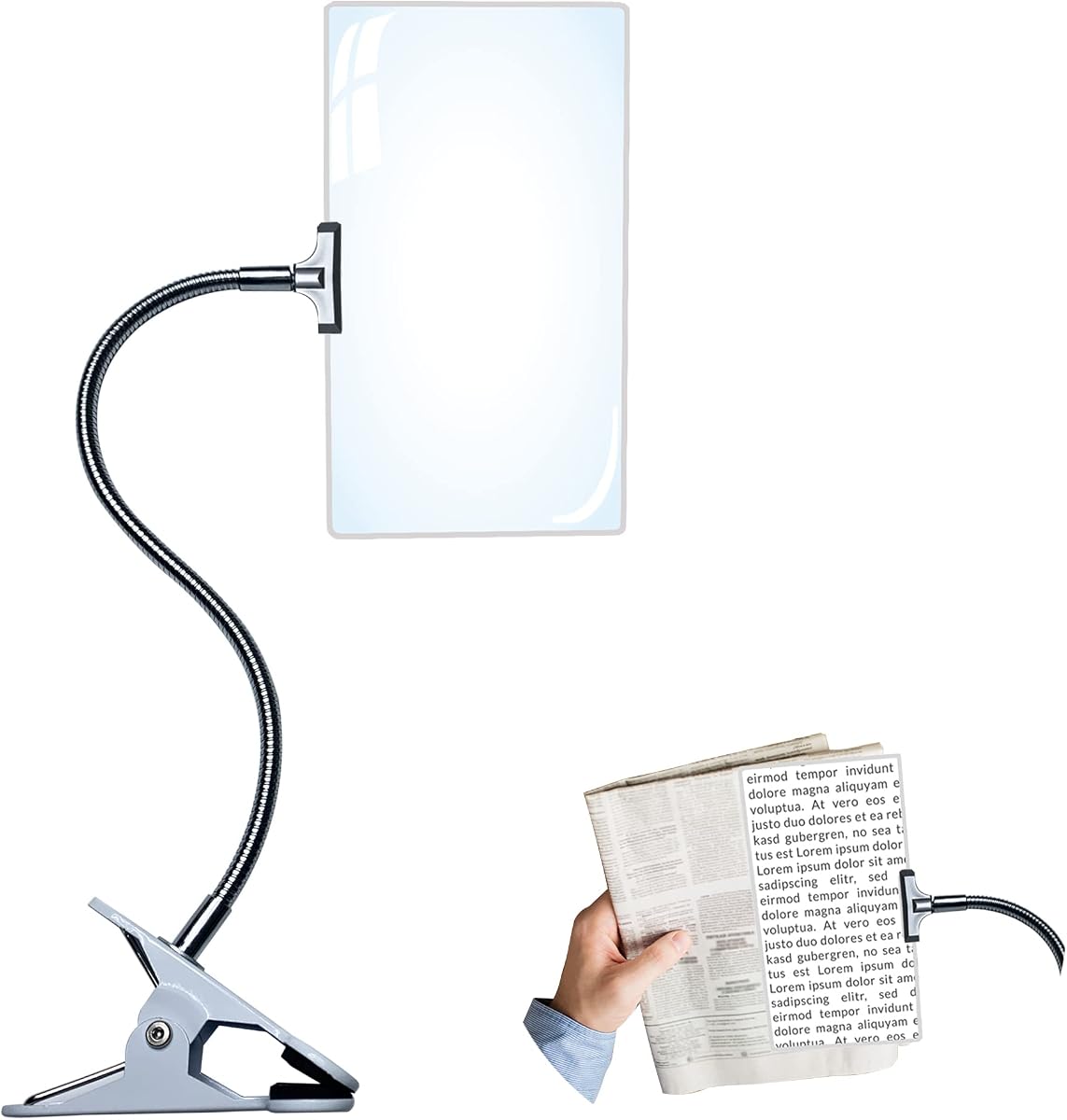
This 5X magnifying glass offers a solid solution for those needing a large viewing area without breaking the bank. With a 10×6 inch lens, it covers significant text or craft details effectively. The optical grade PVC material aims for clarity, though real-world performance varies according to user feedback.
We may earn a commission when you buy through this link, at no additional cost to you.
The flexible 14-inch gooseneck allows you to bend the lens into any direction you need. This adjustability is crucial for tasks like embroidery or reading books on a desk. The clip-on design means it stays put without requiring constant hand-holding, which reduces wrist fatigue significantly.
While the product is lightweight at 3.5 ounces, some users find the optical quality is merely average. The 5X magnification is suitable for general reading but might fall short for extremely fine details. It is a good entry-level tool but not perfect for professional use.
If you need a simple, affordable desktop magnifier for hobbies or reading, this model is worth considering. Its large size and flexible arm provide utility for many daily tasks. Just manage expectations regarding optical perfection given the lower user rating.
The 10×6 inch lens ensures you can view full pages or large sections of work without constantly moving the tool.
The 360-degree adjustable gooseneck lets you tailor the angle to your specific desk setup or seating position.
We may earn a commission when you buy through this link, at no additional cost to you.
This 21-inch screen magnifier is designed to sit directly in front of laptop or desktop monitors. It uses a 3D HD lens to amplify content by 3 to 5 times, making it ideal for seniors or those with vision challenges watching videos.
We may earn a commission when you buy through this link, at no additional cost to you.
The acrylic Fresnel lens provides a clear view without needing electricity. You can adjust the angle from 0 to 90 degrees to suit sitting or lying down positions. Its collapsible nature makes it easy to store or travel with for home use.
However, users note that this device works best in low light environments. Bright lights or direct sunlight can cause reflections that interfere with the viewing experience. Additionally, the optical clarity might not be perfect for high-definition gaming.
If you primarily watch movies or read news on a laptop, this tool offers a convenient screen enlargement solution. It is affordable and easy to set up without cables. Just be mindful of your lighting conditions to avoid glare.
The unique lens design creates an immersive viewing experience that reduces eye fatigue during long media sessions.
Since it relies entirely on optical magnification, you never need to charge it or find a power source.
We may earn a commission when you buy through this link, at no additional cost to you.
This magnifier is built to accommodate various screen sizes from phones to larger laptops. The high-definition optical lens aims to provide a clear 3D vision effect, making content easier to read for extended periods without strain.
We may earn a commission when you buy through this link, at no additional cost to you.
The frame is constructed with an environmentally friendly wooden bracket that adds stability. There are six branch points and four pivot points that rotate over 180 degrees, allowing for versatile positioning on a desk. This adjustability supports both reading and gaming needs.
While it offers robust construction and flexibility, the lack of user ratings makes it harder to verify real-world performance. It is priced higher than basic clip-on models, suggesting it targets users looking for a more premium build quality.
If you need a sturdy stand that works across different devices, this model presents a compelling option. The wooden design adds aesthetic value to your workspace. Consider your specific screen size to ensure compatibility before purchasing.
Multiple pivot points allow you to angle the magnifier perfectly for any task from reading books to viewing screens.
The wide compatibility means you can use it with laptops, tablets, and phones without needing multiple accessories.
We may earn a commission when you buy through this link, at no additional cost to you.
This headset offers an impressive range of magnification from 0.75X to 4.0X with interchangeable lenses. It is specifically designed for hands-free tasks like sewing, watch repair, or intricate crafting where precision is paramount.
We may earn a commission when you buy through this link, at no additional cost to you.
Three LED lights with adjustable brightness ensure you have enough illumination for detailed work. The rechargeable lithium battery charges via USB Type-C, eliminating the need for disposable batteries. The ergonomic frame and rubber nose bridge reduce pressure on your face.
The lens material is acrylic resin with a 5H hardness rating for durability. While it provides excellent utility for hobbies, it is not intended for medical vision correction. Users should keep the lenses clean to maintain clarity.
For anyone spending hours on close-up tasks, this headset provides exceptional value and comfort. The ability to swap lenses means you can adapt to different tasks quickly. It stands out as a reliable tool for precision work.
You can easily switch between five different magnification powers to suit the specific task at hand.
Adjustable LEDs provide focused light exactly where you need it, reducing shadows during detailed activities.
We may earn a commission when you buy through this link, at no additional cost to you.
This wearable magnifier offers a high range of magnification from 1.5X to 5.0X across four detachable lenses. It is equipped with an adjustable LED light that can be tilted to focus on the working area effectively.
We may earn a commission when you buy through this link, at no additional cost to you.
The device charges fully in just 1.5 hours and lasts up to 7 hours on a single charge. The ergonomic frame with a silicone-coated nose bracket ensures comfort during long sessions. An elastic headband keeps it secure without slipping.
Each lens has a fixed focal length, so you must adjust the distance to the object for optimal focus. This requires a slight learning curve but provides clear results once set. The package includes a cleaning cloth to maintain lens clarity.
For tasks like beading or soldering, this tool offers the necessary flexibility and light. The wide magnification range makes it versatile for various needs. Users appreciate the long battery life and comfortable fit for all-day use.
The flexible headlight allows you to aim the beam exactly where you need it without shadowing.
A single charge supports several hours of continuous use, reducing downtime during extended projects.
We may earn a commission when you buy through this link, at no additional cost to you.
These glasses offer a fixed 200% magnification level specifically tuned for reading small text. The built-in blue light blocking technology helps protect eyes from harmful radiation emitted by electronic devices and screens.
We may earn a commission when you buy through this link, at no additional cost to you.
LED lights are integrated into both sides of the frame to improve visibility in low-light conditions. The hands-free design uses an ergonomic frame that fits comfortably over your nose and ears. A USB rechargeable battery ensures you are always ready to work.
While the design is simple, it effectively reduces eye strain during long reading sessions. The lightweight construction prevents fatigue, making it suitable for elderly users or anyone with sensitive eyes. It is practical for everyday use without complex features.
If you primarily read digital text or do light crafts, these glasses provide essential protection and clarity. The blue light filtering is a significant health benefit. It is a straightforward tool that delivers on its core promise of comfort.
Built-in technology filters harmful blue light to reduce eye strain and improve sleep patterns after screen use.
The hands-free design allows you to hold a book or device while maintaining clear focus on text.
We may earn a commission when you buy through this link, at no additional cost to you.
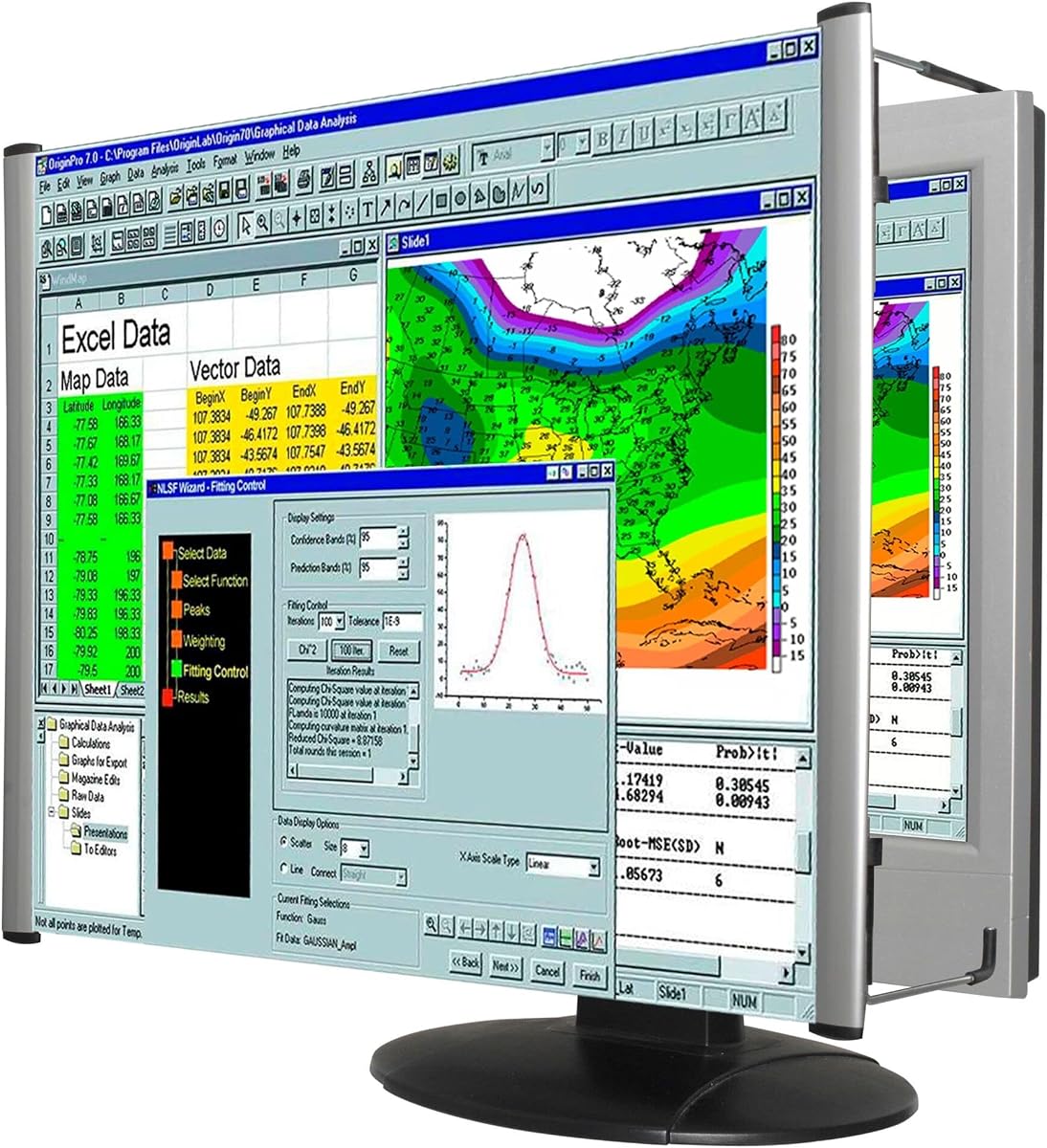
This filter is specifically designed to fit 22-inch widescreen monitors with common aspect ratios. It uses a Fresnel lens with an antiglare coating to enhance readability and reduce reflections from overhead lights.
We may earn a commission when you buy through this link, at no additional cost to you.
The magnification level is adjustable to suit different user needs without replacing the unit. It is fully assembled and installs quickly, making it an easy addition to any office setup. The lightweight design ensures it does not obstruct the monitor's functionality.
Users appreciate the clarity it brings to digital text without the complexity of digital zoom tools. However, the price is higher than basic magnifiers due to the specialized design. It is best suited for those needing consistent office viewing solutions.
If you work long hours on a desktop monitor, this filter provides a comfortable viewing experience. The antiglare coating is particularly useful in bright office environments. It simplifies the viewing process for daily tasks.
The special coating reduces glare from overhead lights, making text easier to read in bright offices.
Users can fine-tune the magnification level to match their specific visual requirements.
We may earn a commission when you buy through this link, at no additional cost to you.
This clip-on magnifier uses an alloy spring clamp to ensure a secure grip on monitors or books. The high-definition lens provides up to 5x magnification, making it excellent for reading fine print or detailed repair work.
We may earn a commission when you buy through this link, at no additional cost to you.
The bendable hose design allows you to adjust the lens angle and height easily. This flexibility ensures you can position the tool exactly where needed for comfort. It sits stably on a desk without taking up too much space.
With a rating of 4.6, users praise its durability and clarity. The large lens captures more detail than smaller models. It is a reliable helper for reading, sewing, or maintenance tasks around the home.
For those who need a sturdy and clear magnifier, this model is highly recommended. The alloy components ensure it lasts longer than plastic alternatives. It balances build quality with usability effectively.
The metal clamp provides a strong and durable hold that won't slip or lose tension easily.
You can bend the hose to any angle to get the perfect viewing position for your task.
We may earn a commission when you buy through this link, at no additional cost to you.
This magnifier features a 10×6 inch lens that covers a full page of text or a large section of a craft. It offers 4X magnification, which is a balance between clarity and coverage for low vision seniors.
We may earn a commission when you buy through this link, at no additional cost to you.
The clip-on design includes a flexible gooseneck that allows 360-degree adjustment. You can clamp it to a desk or bed securely without fear of it falling. The Fresnel plastic lens is lightweight and resistant to breaking.
While users like the stability and size, the plastic material may feel less premium than glass. The magnification power is decent but may not satisfy those needing higher detail. It is a good budget-friendly choice for general use.
If you need a large view for reading or hobbies without spending much, this tool is a solid pick. The flexible arm ensures you can find a comfortable angle. It is designed to reduce strain during long reading sessions.
The 10×6 inch area lets you view entire pages or large objects without constantly repositioning.
The adjustable neck allows you to adapt to complex scenarios and specific viewing needs easily.
We may earn a commission when you buy through this link, at no additional cost to you.
This monitor magnifier is engineered for 21.5 to 22-inch widescreen displays. It uses an optical grade acrylic Fresnel lens with a light tint to enhance contrast and readability. The design increases image size by up to double.
We may earn a commission when you buy through this link, at no additional cost to you.
The magnification level is adjustable by moving the unit closer or farther from the display. This patented design offers a lightweight alternative to traditional glass lenses. It is fully assembled and elegant, fitting well in professional environments.
Users note that the tint may restrict visibility for some, so it is not recommended for those who already struggle with low vision. The acrylic material is durable and resistant to scratches. It serves general office tasks well.
If you need a dedicated screen magnifier for a specific monitor size, this tool offers reliable performance. The high contrast tint helps with text readability. Just ensure you measure your monitor before purchasing to guarantee compatibility.
The high-quality lens material provides clear distortion-free magnification while remaining lightweight.
You can control the magnification level simply by adjusting the distance from the monitor.
We may earn a commission when you buy through this link, at no additional cost to you.
Choosing the right magnifier depends on your specific tasks and visual needs. This guide breaks down the essential factors to help you make an informed decision.
Magnification power determines how much larger the text or object appears. Common options range from 2X to 5X for general use, while higher powers are better for detailed work. However, too much magnification can reduce the viewing area.
Select a power that balances clarity with a wide enough view to suit your specific tasks.
Lens materials like acrylic or optical grade PVC impact durability and clarity. Optical grade materials reduce distortion but may be more expensive. Plastic lenses are lighter but can scratch more easily.
Look for scratch-resistant and optical quality materials to ensure long-term clarity.
Built-in LED lighting is crucial for tasks in dim environments. Some models offer adjustable brightness to reduce eye strain. Check the power source, whether it is battery or rechargeable.
Prioritize models with adjustable LED lights for consistent illumination during use.
Adjustable arms or angles allow you to position the lens perfectly. Flexible goosenecks or multi-point pivots offer the most versatility. This feature helps reduce physical strain by optimizing your posture.
Ensure the product offers enough flexibility to fit your desk setup comfortably.
Mounting styles vary from clip-on to stand-based or wearable headsets. Clip-ons are portable while stands offer stability. Headsets are best for hands-free tasks.
Choose a mounting style that matches how you plan to use the tool.
The physical size of the lens determines how much content you can see at once. Larger lenses are great for reading books while smaller ones suit detailed electronics work. Ensure it fits your device or workspace.
Pick a size that covers your typical work area without obstructing your view.
Ease of use involves how simple the device is to set up and operate. Look for lightweight designs and intuitive adjustments. Complex setups might hinder your daily workflow.
Select a user-friendly model that minimizes setup time and complexity.
Portability is key if you move between different workspaces or travel. Collapsible designs or lightweight materials make transport easier. Consider if you need a stationary or mobile solution.
Opt for collapsible or lightweight options if you need to move your magnifier often.
To start, ensure the lens is clean by wiping it with the included soft cloth. Dust or fingerprints can reduce clarity significantly. Proper cleaning before use ensures the best optical performance.
Adjust the lens distance and angle to find the optimal focus point. For screens, move the magnifier slightly forward or backward until the text is sharp. This helps reduce eye strain during long sessions.
Store the magnifier in a safe place to avoid scratches or breakage. Keep it away from direct sunlight if it is a Fresnel lens. Regular maintenance keeps your device working effectively for years.
Yes, many models are designed to work with both laptops and desktop monitors. However, some specialized filters are sized for specific monitor dimensions, so check the compatibility before purchasing to ensure a proper fit.
Yes, using a magnifier reduces the need to squint or lean in too close to a screen. This reduces eye strain and fatigue during long periods of reading or detailed work. Proper lighting also helps.
Fresnel lenses use concentric rings to focus light, making them lighter and flatter. Optical lenses use solid glass or plastic for sharper clarity. Fresnel is great for large screens while optical suits detailed tasks.
Lower magnification like 2X is better for general reading, while higher powers like 5X suit detailed work. Test different strengths if possible to find the balance between clarity and viewing area that works for you.
Many are designed with seniors and low vision users in mind. However, some models have limited magnification. Check specific product details for recommended use cases to ensure it meets your vision needs.
Most modern LED magnifiers come with rechargeable batteries that charge via USB. This eliminates the need to constantly buy disposable batteries. Just ensure you keep a charging cable handy for regular use.
We have reviewed ten diverse options ranging from basic clip-ons to advanced headsets. Each product offers unique benefits depending on your specific viewing needs and budget constraints. The top picks highlight the best overall value and utility.
When choosing, prioritize optical quality and adjustability to ensure a comfortable experience. A well-fitted magnifier can transform your digital workflow significantly. Consider how often you will use it to determine the necessary durability.
Remember that model availability and pricing can change over time. Always verify the current specifications and user reviews on the product page before making your final decision. This ensures you get the best fit for your needs.