
Thermaltake CT200 PWM
4.3Editor score
Hydraulic bearing operation
131.6 CFM airflow
Daisy chain connectors
Choosing the right cooling solution is critical for maintaining optimal system performance. 200mm case fans offer a unique balance of high airflow and quiet operation. They fit many mid tower and full tower chassis effectively.
We compared ten real products based on airflow, noise levels, and build quality. Our analysis focuses on bearings, blade design, and mounting compatibility. Each entry reflects verified specifications and user feedback data.
Each pick highlights specific strengths like PWM control or RGB sync. Prices and availability change frequently so check current listings. Use this guide to match fan specs with your case dimensions.
4.3Editor score
4.8Editor score
4.5Editor score
As an Amazon Associate we earn from qualifying purchases.
This side-by-side comparison covers all ten selected models. We detail their specific dimensions, speed ranges, and unique features to help you decide.


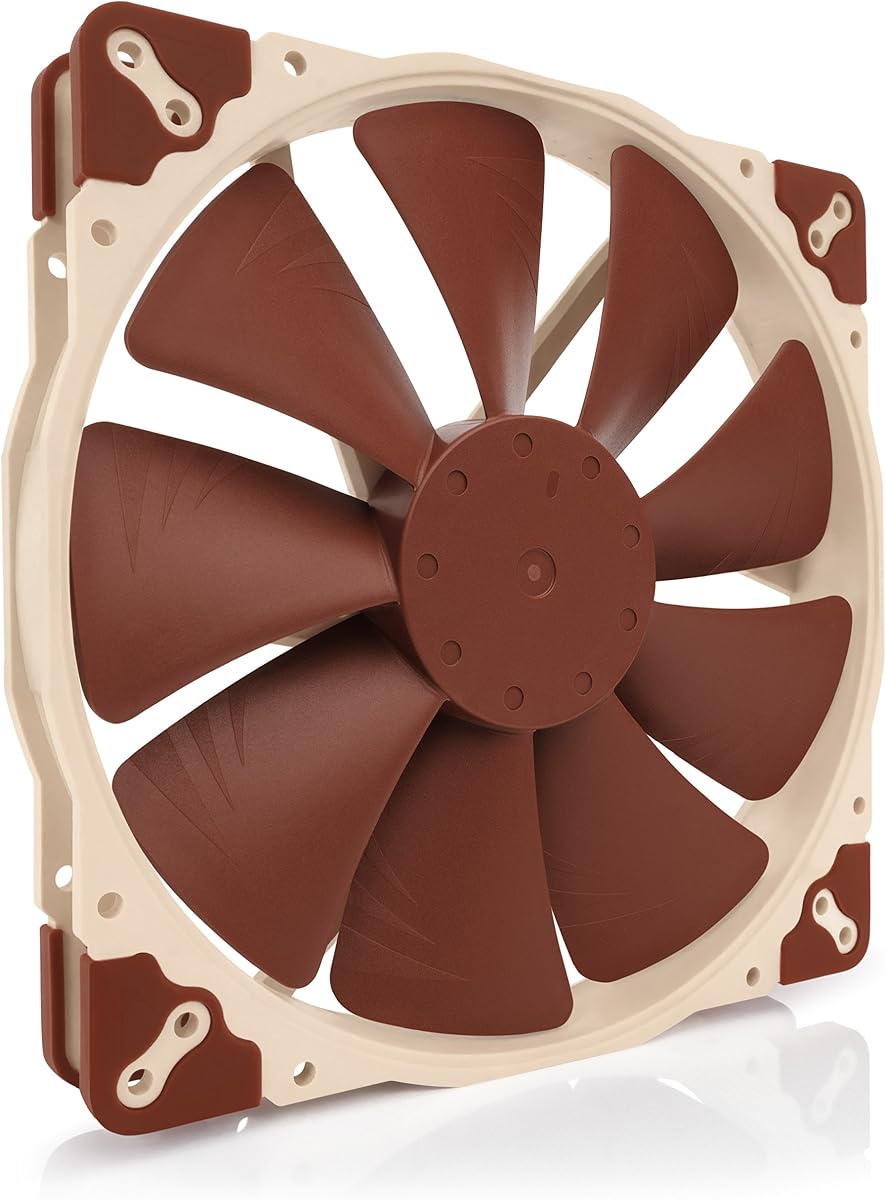
This fan stands out as the top choice for users seeking silence and reliability. It boasts a rating of 4.8 stars from verified buyers. The design focuses on moving air effectively without generating disturbing noise levels.
We may earn a commission when you buy through this link, at no additional cost to you.
Its Flow Acceleration Channels and Advanced Acoustic Optimisation frame work together to smooth airflow. The long life bearing ensures it operates reliably for over 150,000 hours. The included Low-Noise Adaptor lets you tune speed for near silent operation.
Trade-offs include a higher cost compared to budget options. The 30mm thickness also requires enough space inside your chassis. These are acceptable given the longevity and performance gains it offers over time.
Buy this if you want a premium solution that balances cooling with silence. It is ideal for HTPCs or quiet gaming PCs. Final recommendation is strong for long-term system stability.
Advanced frame design minimizes turbulence and noise during operation.
Three sets of mounting holes fit various case standards easily.
We may earn a commission when you buy through this link, at no additional cost to you.
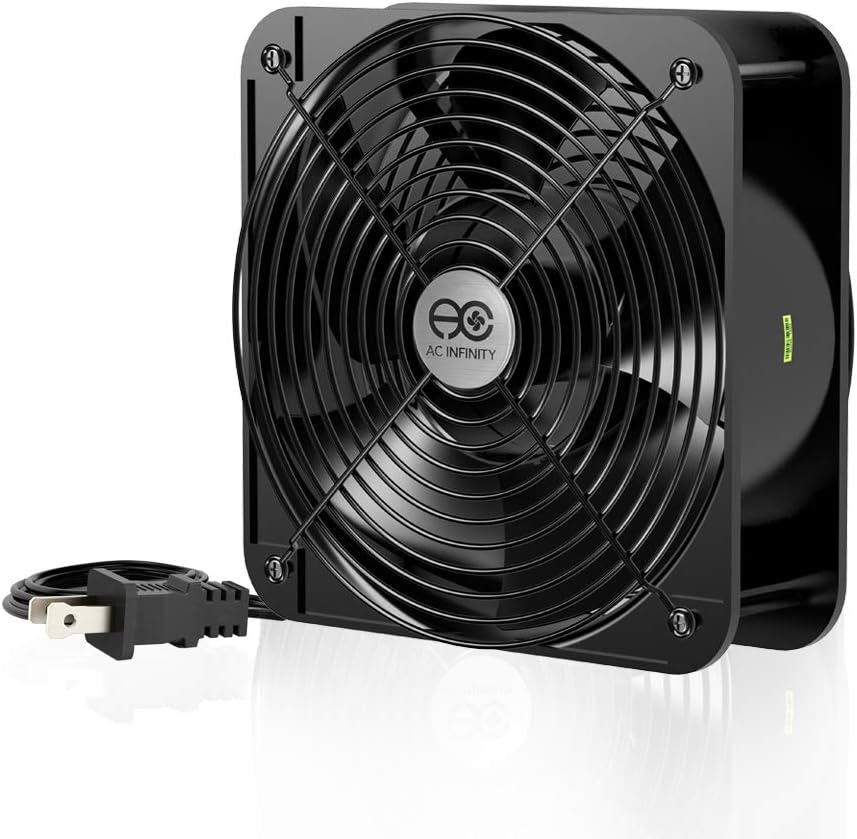
This model offers massive airflow for demanding cooling tasks. It receives a 4.5 rating for its robust construction and performance. The 60mm thickness allows for larger blades and higher volume.
We may earn a commission when you buy through this link, at no additional cost to you.
The dual-ball bearings provide a lifespan of 67,000 hours. The aluminum fan is durable and resists vibration. It can stand upright or lay flat depending on your setup needs.
Noise levels reach 65 dBA which is loud for living room PCs. It also needs a standard power outlet rather than motherboard headers. These are acceptable if cooling power is your main priority.
Choose this for server racks or high heat environments. It is excellent for industrial or heavy duty cooling applications. Final recommendation is strong for maximum airflow needs.
Moves 425 CFM of air effectively for intense cooling.
Heavy-duty aluminum and dual-ball bearings ensure longevity.
We may earn a commission when you buy through this link, at no additional cost to you.
This fan delivers strong value for budget conscious builders. It earns a 4.3 rating for its airflow and silence. The hydraulic bearing ensures quiet operation during daily tasks.
We may earn a commission when you buy through this link, at no additional cost to you.
The optimized 9 blade design pushes 131.6 CFM of air. It features daisy chainable connectors for quick wiring. The extension cables help reach headers that are far away.
Lifespan may not match premium bearings over very long periods. Color options are limited to black only. These are acceptable for most standard gaming builds.
Buy this for entry level builds needing solid cooling. It fits well in CT cases for a matching look. Final recommendation is strong for value seekers.
Nine blades optimized for high air volume and pressure.
Daisy chain connectors simplify complex fan setups.
We may earn a commission when you buy through this link, at no additional cost to you.
This version offers customization with swappable anti-vibration pads. It gets a 4.6 rating for its premium design. The all-black aesthetic fits modern dark themed builds perfectly.
We may earn a commission when you buy through this link, at no additional cost to you.
Flow Acceleration Channels reduce noise while boosting efficiency. You can choose red white blue or green pads to match accents. The frame design minimizes vibration and sound.
Cost is higher than standard models but worth for looks. You must ensure case mounts match the three hole sets. These are acceptable given the aesthetic flexibility.
Choose this for builds requiring dark themes and silence. It suits enthusiast PCs needing custom colors. Final recommendation is strong for style conscious users.
Swappable pads allow you to match your build style.
Advanced acoustics keep noise levels extremely low.
We may earn a commission when you buy through this link, at no additional cost to you.
This model provides fixed low noise speeds easily. It earns a 4.7 rating for reliability. The FLX version includes a Low-Noise Adaptor for speed tuning.
We may earn a commission when you buy through this link, at no additional cost to you.
The 3-pin Molex connection simplifies power supply. You get 800 and 550 RPM settings. Anti-vibration mounts reduce transmission to the case.
PWM control is not available for dynamic adjustment. It works best with static cooling needs. These are acceptable for users needing simple power.
Buy this for HTPCs or silent systems. It fits well in older cases. Final recommendation is strong for static cooling setups.
Dual speed settings via adaptor for fixed cooling.
3-pin Molex interface makes wiring straightforward.
We may earn a commission when you buy through this link, at no additional cost to you.
This version supports 5V applications with PWM control. It gets a 4.7 rating for versatility. The USB power adaptor lets you run fans on external devices.
We may earn a commission when you buy through this link, at no additional cost to you.
The OmniJoin adaptor set connects to proprietary headers. You get full PWM speed range for tuning. The A-series design ensures low noise performance.
It needs a 5V source which is specific. You might need adapters for older cases. These are acceptable for modern 5V systems.
Choose this for USB powered or 5V setups. It works well with external rigs. Final recommendation is strong for 5V needs.
USB adaptor allows running on power banks.
Adaptor set supports proprietary headers easily.
We may earn a commission when you buy through this link, at no additional cost to you.
This fan focuses on visual appeal with Gen2 lighting. It earns a 4.6 rating for lighting quality. Frosted blades help light diffuse better than clear plastic.
We may earn a commission when you buy through this link, at no additional cost to you.
The hybrid PBT frame minimizes resonance. Dynamic PWM lets you balance noise and airflow. Sealants extend lifespan by preventing oil leakage.
RGB control requires specific headers or hubs. Speed maxes out lower than some models. These are acceptable for aesthetic focused builds.
Buy this for RGB sync systems. It fits modern case designs well. Final recommendation is strong for visual upgrades.
Frosted blades enhance RGB diffusion uniformly.
Anti-resonance hybrid frame reduces vibration noise.
We may earn a commission when you buy through this link, at no additional cost to you.
This model offers hybrid design at a fair price. It receives a 4.4 rating for balance. Jet Engine blades apply static pressure without losing airflow.
We may earn a commission when you buy through this link, at no additional cost to you.
Sound absorbing rubber pads reduce noise levels. Smart sensor protects the motor from jams. RGB is compatible with major brands like Asus.
90 CFM is lower than some rivals. You must buy a separate RGB controller. These are acceptable for budget friendly RGB builds.
Choose this for entry RGB systems. It suits standard mid towers. Final recommendation is strong for value RGB.
Jet Engine design optimizes air pressure.
Sensor stops motor if blocked by objects.
We may earn a commission when you buy through this link, at no additional cost to you.
This fan brings ARGB sync at a reasonable cost. It gets a 4.0 rating for features. 34 LEDs create a uniform glow with translucent blades.
We may earn a commission when you buy through this link, at no additional cost to you.
Hydraulic bearing with oil sealed cover reduces leaks. It offers 95 CFM volume. Speed sync via 5V 3pin ARGB connector.
Noise is low around 9dBA. Speed range varies with PWM. These are acceptable for standard gaming builds.
Buy this for affordable ARGB upgrades. It fits most standard 200mm mounts. Final recommendation is strong for sync lighting.
Hydraulic bearing reduces friction noise.
Translucent blades diffuse light evenly.
We may earn a commission when you buy through this link, at no additional cost to you.
This fan offers high airflow in a thick frame. It earns a 4.5 rating for balance. 200x30mm thickness boosts air pressure effectively.
We may earn a commission when you buy through this link, at no additional cost to you.
Long life sleeve bearing extends lifespan. Shaved frame allows more installation options. LED version adds aesthetics to your chassis.
Sleeve bearing is less durable than ball. 30mm thickness may not fit thin cases. These are acceptable for high airflow needs.
Choose this for high pressure airflow. It suits Thermaltake cases well. Final recommendation is strong for pressure flow.
Thick frame focuses air for pressure.
Shaved frame simplifies installation.
We may earn a commission when you buy through this link, at no additional cost to you.
Selecting the right fan involves checking size, speed, and features. We cover key factors to help you pick.
200mm fans often measure 200x200x30mm but some are 60mm. Check your case clearance before buying. Measure the space where the fan will sit.
Verify thickness and diameter to ensure it fits.
Noise is measured in dBA. Lower numbers mean quieter operation. Some fans run at 18 dBA while others are 65 dBA. Check reviews for real world noise.
Aim for lower dBA for silent systems.
CFM measures air volume moved per minute. Static pressure helps push air through radiators. Some fans prioritize high CFM others high pressure.
Choose based on cooling requirements.
Sleeve bearings are cheap but wear faster. Hydraulic and ball bearings last longer. MTTF hours vary by bearing type.
Pick bearings for lifespan.
PWM fans use 4-pin headers for speed control. FLX fans use 3-pin for fixed speeds. USB options exist for external systems.
Ensure your motherboard matches the header.
RGB fans need headers for light sync. ARGB is 5V 3pin. Standard RGB is 12V 4pin. Check if you need a controller.
Buy headers if included.
Look for hybrid frames or anti-resonance tech. Metal frames are more durable. Check for vibration pads.
Prioritize stable materials.
Some fans come with extensions or adapters. Daisy chain connectors simplify wiring. Check screw types included.
Verify included tools.
Install fans with airflow direction in mind. Typically intake fans blow air into the case. Check arrow marks on frame.
Mount securely to reduce vibration noise. Use anti-vibration pads if available.
Clean dust monthly using compressed air. Dust buildup slows fans and raises noise.
The Noctua NF-A20 PWM is generally considered best for silence due to its acoustic optimization. It runs at very low decibels while maintaining airflow.
No. You must check mounting hole spacing and thickness. Many cases use 120mm or 140mm standards. Verify your case specs.
PWM fans allow automatic speed control via motherboard. FLX fans use adaptors to set fixed low noise speeds. Choose based on control needs.
They vary by model. High quality ones are quiet. Cheap ones may be loud at high speeds. Check dBA ratings before buying.
Yes using splitters or daisy chain connectors. Ensure your header supports multiple fans. Check manufacturer guidelines.
Dual ball or ceramic bearings last longest. Sleeve bearings wear faster but are cheaper. Check MTTF hours for longevity.
The Noctua NF-A20 PWM stands out for balance of performance and quiet. AC Infinity AXIAL is ideal for heavy duty airflow needs. Thermaltake CT200 offers great value.
Prioritize mounting holes and speed control methods. Ensure dimensions match your case to avoid issues.
Prices change frequently so check current listings before buying. Use this guide to make an informed decision.