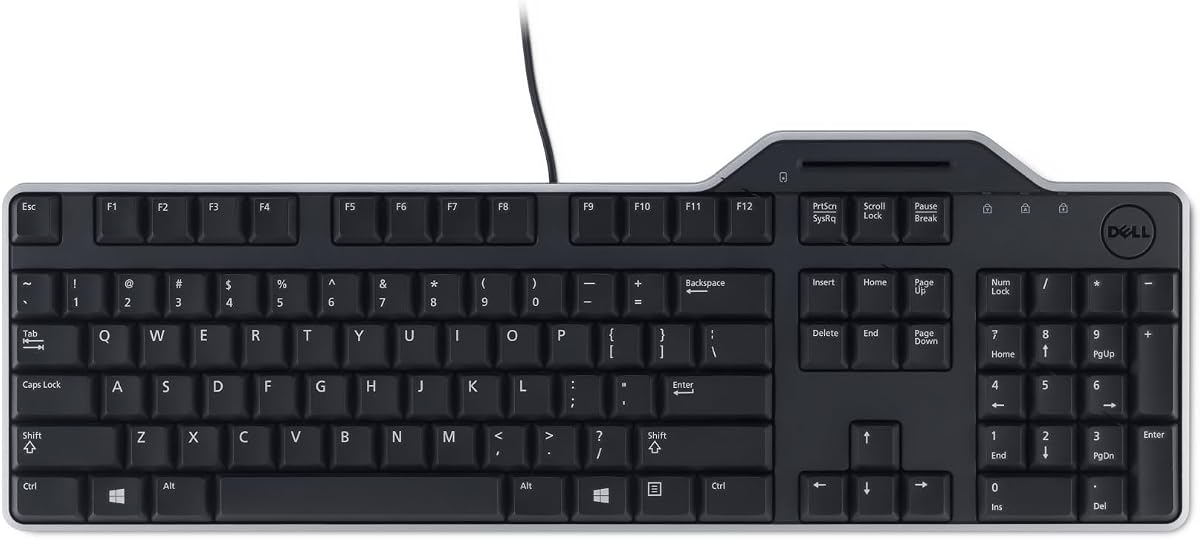
Dell KB813
4.6Editor score
Spill-resistant durable design
Integrated smartcard reader
Ergonomic detachable palm rest
Discover the top 10 keyboards with built-in smart card readers for secure login. We compare features, durability, and compliance to help you choose the right
In today's digital landscape, securing access to sensitive systems is more critical than ever. A keyboard with smart card reader integration offers a seamless way to combine typing with strong authentication. These devices streamline workflows for enterprises, government agencies, and healthcare providers by reducing the need for external hardware dongles.
We evaluated ten distinct models based on their security certifications, ergonomic design, and overall build quality. Our analysis focuses on compatibility with major operating systems, the reliability of the built-in card readers, and the user experience during extended typing sessions. Each product was assessed for its ability to meet industry standards like FIPS 201 and PC/SC.
Every pick in this list highlights specific strengths, whether it is budget-friendly reliability or advanced mechanical switching. We include detailed breakdowns of features and potential trade-offs to guide your decision. Please note that product availability and pricing can fluctuate, so verify current stock before making a purchase decision.
4.6Editor score

4.6Editor score

4.6Editor score
This side-by-side comparison highlights the key specifications and capabilities of each model. We focus on connectivity, security standards, and layout differences to help you identify which device aligns best with your specific organizational or personal security requirements.


The Dell KB813 stands out as an affordable option for organizations needing secure input devices. With a strong rating from users, it delivers reliable performance for daily administrative tasks. Its integrated smart card reader simplifies login processes without requiring external hardware peripherals.
We may earn a commission when you buy through this link, at no additional cost to you.
This keyboard features a spill-resistant design that protects internal components from accidental liquid damage. The detachable palm rest offers ergonomic support during long shifts. Connectivity is handled via a simple USB interface, ensuring broad compatibility with existing systems.
While the keys are quiet and low-profile, they lack the tactile feedback of mechanical switches. There are also fewer multimedia hotkeys compared to more consumer-focused models. These trade-offs are acceptable given its focus on security and durability in professional environments.
Ideally suited for budget-conscious enterprises and government offices, this keyboard provides essential security features without breaking the bank. It is a practical choice for users who prioritize reliability and cost-effectiveness over advanced gaming or multimedia functionalities.
Combining a smart card reader directly into the keyboard reduces the need for separate peripheral hubs.
The water-resistant construction ensures the device remains functional even after minor spills.
We may earn a commission when you buy through this link, at no additional cost to you.
The Adesso TruForm AKB-150SB is designed with government compliance and ergonomic comfort in mind. It carries TAA compliance, making it eligible for federal procurement. The built-in smart card reader supports secure web applications and identification systems essential for regulated industries.
We may earn a commission when you buy through this link, at no additional cost to you.
This model features a split ergonomic design intended to improve hand posture and reduce strain. The integrated palm rest keeps hands in a natural position. It includes numerous internet and multimedia hotkeys for quick access to common tools during work hours.
The split layout might require an adjustment period for users accustomed to standard keyboards. The price is higher than basic models, reflecting its specialized features and compliance certifications. However, for organizations needing federal-compliant gear, this investment pays off in reliability.
Best for government contractors and agencies requiring strict adherence to trade agreements. It suits professionals who spend long hours typing and value ergonomics alongside robust security protocols for accessing sensitive data.
TAA compliance ensures the device meets U.S. trade agreement specifications for government sales.
The split zones encourage a more natural wrist position to reduce discomfort over time.
We may earn a commission when you buy through this link, at no additional cost to you.
The Cherry KC 1000 is a wired security keyboard that meets high industry standards like FIPS 201. It includes a dedicated smart card terminal for secure PIN entry. This model is ideal for environments where data protection is paramount and regulatory compliance is mandatory.
We may earn a commission when you buy through this link, at no additional cost to you.
Its thin design features a low smart card contacting unit for ease of use. The card module supports one-handed operation, which can improve workflow efficiency. Driver support extends to Windows, macOS, and Linux, ensuring versatility across different operating systems.
While highly secure, the keyboard is more specialized than general-purpose models. Users may find the layout different from standard office keyboards. These compromises are justified by the robust security protocols and the ability to read/write ISO compliant smartcards.
This keyboard is perfect for IT administrators and security officers handling sensitive government or corporate data. It offers a balance of thin design and high-level authentication features that are critical for secure workstation environments.
Support for Linux and macOS broadens its utility in diverse IT environments.
Protocols like T=0 and T=1 ensure secure and efficient card communication.
We may earn a commission when you buy through this link, at no additional cost to you.
The Adesso EasyTouch 130SB brings mechanical keyboard durability to the secure input category. It features red mechanical switches rated for fifty million keystrokes, ensuring long-lasting use. The built-in smart card reader is certified for multiple banking and security standards.
We may earn a commission when you buy through this link, at no additional cost to you.
A dedicated Copilot AI hotkey allows instant access to Microsoft Copilot, aiding in coding or creative tasks. The keycaps have large print size for excellent contrast, helping users read characters easily in low light. This makes it accessible for those needing improved legibility.
Mechanical switches can be louder than membrane ones, which might distract in quiet offices. The unit is larger due to the mechanical build and security components. Despite this, the combination of AI hotkeys and robust security makes it a standout premium choice.
Ideal for technical professionals who need both high performance typing and secure authentication. It suits developers or data analysts who spend hours typing and require features like AI assistants alongside strong identity verification.
The Copilot hotkey streamlines access to productivity tools without breaking typing flow.
Mechanical switches provide a long lifecycle suitable for intensive daily usage.
We may earn a commission when you buy through this link, at no additional cost to you.
This Dell Smartcard USB keyboard is praised for its reliability and quiet performance. It connects via a simple wired USB link, eliminating battery concerns. The built-in card reader helps secure access while maintaining a standard full-size layout for productivity.
We may earn a commission when you buy through this link, at no additional cost to you.
Users appreciate the spill-resistant design that safeguards against beverage mishaps. The detachable palm rest adds comfort during long work sessions. The low-profile keys provide a smooth typing experience that minimizes noise distractions in shared spaces.
The lack of extra multimedia keys means fewer shortcuts for media control. The design is minimal, which might not appeal to users seeking flashy aesthetics. However, these features ensure a distraction-free focus on core typing and security tasks.
Best for office workers and admins who want a dependable tool without unnecessary bells and whistles. It is a solid choice for environments where stability and silence are more important than advanced feature sets.
Quiet keys help maintain focus in collaborative work environments.
Wired USB ensures consistent power and data transfer without interruption.
We may earn a commission when you buy through this link, at no additional cost to you.
The Kensington KB201C is designed for organizations requiring Common Access Card (CAC) support. It is TAA compliant and meets strict government security standards. This ensures secure and efficient access for federal employees and government contractors.
We may earn a commission when you buy through this link, at no additional cost to you.
It features a full-size layout with a numeric keypad for professionals working with numbers. The quiet-click mechanism allows for a peaceful workspace. A three-year limited warranty adds peace of mind for long-term use in institutional settings.
Some users report mixed experiences regarding key feel and build quality compared to competitors. The design is straightforward and functional rather than modern or stylish. These factors may affect overall satisfaction for those expecting a premium typing feel.
This keyboard is tailored for federal agencies and contractors needing specific CAC functionality. It serves as a practical solution for environments where compliance and warranty coverage are top priorities for IT procurement teams.
Support for PIV and ISO standards ensures alignment with federal security requirements.
The three-year coverage provides reliability for long-term organizational deployments.
We may earn a commission when you buy through this link, at no additional cost to you.
The Lenovo Smartcard Wired Keyboard II offers a compact option for secure input needs. It features a standard US English layout with a built-in smart card reader. The package dimensions are relatively small, making it easier to store or transport.
We may earn a commission when you buy through this link, at no additional cost to you.
Weighing just over two pounds, it is lightweight and easy to handle. The wired USB connection ensures stable performance without battery maintenance. This model is a straightforward choice for users needing basic secure typing capabilities.
Information on specific features is limited compared to other models. It lacks advanced multimedia keys or ergonomic splits. However, its simplicity makes it an effective tool for users who do not require extra functionality beyond secure typing.
Suitable for small teams or mobile workstations needing basic security. It fits well in environments where portability and standard functionality are more important than specialized ergonomic features.
Compact dimensions free up desk space in tight workstations.
Provides essential smart card functionality without complex setup.
We may earn a commission when you buy through this link, at no additional cost to you.
The HP USB Business Slim Smartcard Keyboard is designed for enterprise environments requiring a slim form factor. It includes key light indicators to show status clearly. The built-in spill drain system protects electronics from liquid damage.
We may earn a commission when you buy through this link, at no additional cost to you.
It features a standard 104-key layout with membrane switches for quiet operation. The six-foot cable provides flexibility in cable routing. The smart card reader is integrated for seamless authentication on compatible systems.
The keyboard lacks multimedia keys, focusing purely on productivity and security. The standard membrane switches may feel less premium than mechanical options. Still, the practical features make it a strong contender for busy office setups.
Best for corporate IT departments needing reliable, no-nonsense security keyboards. It suits users who prioritize functionality and spill protection over aesthetic or tactile upgrades.
Spill drainage helps prevent damage from accidental liquid exposure.
LED indicators help users verify lock status at a glance.
We may earn a commission when you buy through this link, at no additional cost to you.
The Cherry Secure Board 1.0 includes an NFC interface for reading cards and tags wirelessly. It supports ISO 14443 standards alongside ISO 7816. This broad compatibility makes it suitable for organizations using both chip and contactless cards.
We may earn a commission when you buy through this link, at no additional cost to you.
It features a secure mode for authentication and encryption, especially useful with thin clients. The device is approved for specific government standards, ensuring regulatory compliance. The wired USB connection maintains a stable and secure link.
The NFC feature adds complexity but also versatility for varied card types. It may be more than what simple setups require. However, for high-security sectors, this flexibility ensures it works with existing infrastructure.
Ideal for security managers needing support for both contact and contactless cards. It fits well in environments where thin clients and strong encryption are critical for protecting sensitive information.
RF/NFC capability allows interaction with modern contactless cards.
Designed to work well with thin client environments requiring secure authentication.
We may earn a commission when you buy through this link, at no additional cost to you.
The NEW OEM Dell KB813t is a sealed unit ready for direct deployment. It features the same core attributes as previous Dell models with a built-in smart card reader. This makes it a reliable choice for replacing older units without changing workflow.
We may earn a commission when you buy through this link, at no additional cost to you.
It maintains a standard black English layout and USB connectivity. The smart card reader supports secure authentication for systems requiring identity verification. Its unopened condition ensures no prior use or potential wear.
As a basic model, it does not offer advanced ergonomic or mechanical features. It is purely functional for security and typing needs. This simplicity can be a plus for organizations standardized on Dell hardware.
Best for IT teams managing Dell-centric networks who need consistent replacement hardware. It offers a straightforward path to maintaining secure login capabilities across an existing infrastructure.
Provides the exact same functionality as existing Dell units for uniform deployment.
Unopened packaging ensures the product is ready for immediate installation.
We may earn a commission when you buy through this link, at no additional cost to you.
Selecting the right secure keyboard involves evaluating several technical and practical factors. We break down the key elements to consider to help you find a device that fits your security and ergonomic needs.
Ensure the keyboard supports necessary standards like FIPS 201, PC/SC, or ISO7816. These protocols guarantee secure authentication and data protection required by many industries.
Look for devices that clearly state their compliance to avoid integration issues with your current security infrastructure.
Check if the built-in reader supports magnetic stripe, chip cards, or contactless NFC. Some models offer broader compatibility for different card types used in your organization.
A reader supporting ISO 14443 is useful if your staff uses contactless badges alongside standard smartcards.
Consider whether a split ergonomic design or a standard layout suits your team's comfort. Ergonomic features can reduce strain during long shifts, improving productivity.
A detachable palm rest adds comfort and is worth prioritizing for users who type for extended periods.
Most models use wired USB, but verify driver support for your operating system. Ensure compatibility with Windows, macOS, or Linux as needed.
Wired connections are generally preferred in secure environments for reliability and consistent data transfer.
Look for spill-resistant designs and robust construction to protect against workplace accidents. A sturdy build extends the lifespan of the device.
Durability is key for keyboards in busy office or industrial settings where drops or spills might occur.
Choose between membrane and mechanical switches based on user preference. Mechanical offers better tactile feedback but can be louder.
Quiet membrane switches are often better for shared office spaces where noise is a concern.
Check for multimedia hotkeys, AI assistance keys, or large print keycaps. These features can improve efficiency depending on your tasks.
Prioritize features that directly benefit your workflow rather than adding unnecessary complexity to the device.
A longer warranty indicates manufacturer confidence in the product. Look for options offering at least one year of coverage.
Reliable support channels ensure quick resolution of issues, minimizing downtime for your team.
To get started, plug the USB connector into an available port on your computer. Install any necessary drivers or software provided by the manufacturer to enable the smart card reader functionality.
Insert your smart card into the designated slot or slide it in depending on the model. Follow your system prompts to complete authentication. For best results, handle the card gently to avoid damaging the internal contacts.
Clean the keyboard regularly with a soft, dry cloth. Avoid harsh chemicals or excessive moisture. Ensure the card reader slot remains free of dust to maintain reliable connections and prolong the device's lifespan.
This is a keyboard that has a built-in slot for reading smart cards directly. It combines typing input with secure authentication, removing the need for an external card reader.
Many models like the Cherry KC 1000 support Windows, macOS, and Linux. Always check the product specifications for driver support on your specific operating system before buying.
Some systems require middleware or specific drivers to read smart cards. Your IT department may provide necessary software to enable secure login processes on your machine.
Most models are designed for chip cards inserted into the slot. However, some advanced models like the Cherry Secure Board support RF/NFC for contactless cards.
Many professional models include spill-resistant designs or drainage systems. While they offer protection against small accidents, they are not fully waterproof.
Wired connections offer more stability and are preferred for security to prevent wireless interception. They also do not require battery replacements.
Use compressed air to remove dust gently. Avoid inserting metal objects into the slot to prevent damage to the contacts.
TAA compliance means the product meets U.S. Trade Agreement Act specifications. This is essential for purchasing equipment for federal government agencies.
Our top picks include the Dell KB813 for budget efficiency, the Cherry KC 1000 for security standards, and the Adesso EasyTouch 130SB for premium features.
Prioritize compliance and ergonomics when selecting a model. Ensure the device meets your organizational requirements to avoid future upgrades.
Always check current prices and availability before purchasing. Inventory changes frequently so verify stock on the product pages to ensure timely delivery.