
SABRENT 74 in 1 3.5 Inch Internal Flash Media Card Reader/Writer with USB Port (CR-USNT)
4.0Editor score
Supports 74 card types
Internal power connector included
Plus one USB 2.0 port
This guide compares the top internal media card readers for desktop PCs, evaluating speed, compatibility, and build quality to help you choose the right model.
Internal media card readers provide a seamless way to transfer files from cameras and phones directly to your desktop without bulky cables. They fit neatly into drive bays and offer fast data speeds for professionals and enthusiasts who need reliable access to storage cards.
We analyzed ten top-rated models based on supported card formats, connection speeds, build quality, and ease of installation. Our comparison covers both 3.5 inch and 5.25 inch options, ensuring you find a unit that matches your case layout and specific storage needs.
Each pick highlights unique strengths like USB 3.0 performance or wide format support. While prices fluctuate, these models represent the best value and performance available today for anyone upgrading their workstation with integrated card reading capabilities.
4.0Editor score

4.5Editor score

5.0Editor score
The following table provides a side-by-side comparison of all ten internal media card readers. It highlights key specifications such as supported card types, interface speeds, and unique features to help you make an informed decision based on your specific hardware requirements.


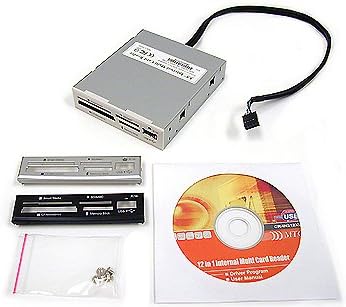
The SABRENT 74 in 1 Internal Flash Media Card Reader is a budget-friendly solution for users who need extensive format support. With a rating of 4.0 stars, it offers a wide array of slots for various memory cards. It is designed to fit into a standard 3.5 inch drive bay and includes an internal power connector to ensure stable operation.
We may earn a commission when you buy through this link, at no additional cost to you.
Its standout quality is the sheer number of supported card types, including M2, XD, SD, CF, and MS. This makes it ideal for photographers working with legacy equipment. The inclusion of a USB 2.0 port adds extra connectivity options for your desktop. The internal power connector ensures that the reader gets sufficient power without straining your USB controller.
However, the USB 2.0 interface limits data transfer speeds compared to modern USB 3.0 models. If you frequently move large video files, this might be a bottleneck. The design is also somewhat bulky due to the high number of slots, which could be an issue in compact cases.
You should buy this if you need a cost-effective way to read many different card formats without spending much. It is perfect for hobbyists or those with mixed legacy gear. The combination of compatibility and price makes it a strong contender in the budget category.
Supports 74 different types of memory cards including M2, XD, SD, CF, and more with adapters.
Features an extra USB 2.0 port for connecting other peripheral devices directly from the front panel.
We may earn a commission when you buy through this link, at no additional cost to you.
The StarTech Internal Card Reader is a top-tier choice for professionals who demand speed and reliability. Rated at 4.5 stars, it features USB 3.0 connectivity and supports UHS-II cards for rapid data transfers. It fits into a 3.5 inch drive bay and connects via a 20-pin motherboard header. It is also TAA compliant, making it suitable for government procurement.
We may earn a commission when you buy through this link, at no additional cost to you.
Its key strengths include simultaneous access to four different card slots, which speeds up workflow when copying files between cards. The front-facing USB 3.0 port provides easy access without opening your case. It works across Windows, macOS, and Linux without needing drivers. The activity LEDs give visual feedback on power and data transfer status.
The main trade-off is the price, which is higher than basic readers. It also requires an internal connection to the motherboard, which might not be present in all older systems. However, for IT pros and power users, the performance and features justify the investment.
This reader is best for photographers, videographers, and IT professionals who need consistent high-speed access. The TAA compliance makes it a rare find for enterprise environments. If you value speed and durability over cost, this is a fantastic option.
Supports access to four different card slots simultaneously to copy files between media cards at the same time.
TAA compliant design with two-year warranty and 24/7 multi-lingual technical support for IT professionals.
We may earn a commission when you buy through this link, at no additional cost to you.
The Vantec Link USB 3.0 Multi-LUN Memory Internal Card Reader stands out with a perfect 5.0 rating. It is designed for high-performance needs with support for CompactFlash and Secure Digital cards. The Multi-LUN technology allows for independent access to multiple cards. It uses a USB 20 pin header for stable internal connection.
We may earn a commission when you buy through this link, at no additional cost to you.
Its strengths lie in its ability to handle high-capacity cards up to 144PB for CF and 2TB for SD. It supports various speed classes including UHS-I and DDR50. The independent access feature means you can read from one card while writing to another. This is crucial for large data migration tasks.
The premium price reflects its specialized capabilities and robust build. It is not as versatile for older card types like XD or MS compared to others. However, for those focused on SD and CF workflows, it is unmatched in performance.
Buy this if you need a reliable, high-speed reader for professional SD and CF workflows. The 5.0 rating suggests high user satisfaction with its reliability. It is ideal for studios or offices where data integrity and speed are paramount.
Independent access to multiple card slots allows simultaneous reading and writing for increased productivity.
Supports up to 144PB for CompactFlash and 2TB for Secure Digital cards ensuring future-proof storage handling.
We may earn a commission when you buy through this link, at no additional cost to you.
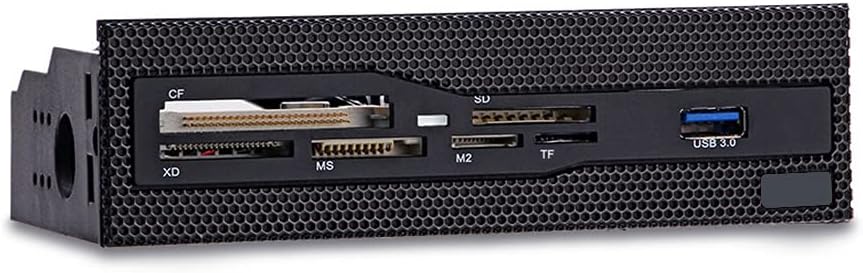
This 5.25 Internal Card Reader offers a modern front panel solution for desktops with larger drive bays. Rated 4.3 stars, it features USB 3.0 speeds for quick transfers. It has six slots supporting common formats like CF, XD, MS, and TF. The copper-plated slots ensure stability during data transmission.
We may earn a commission when you buy through this link, at no additional cost to you.
Its strengths include the durable grid panel design that integrates well with mesh case fronts. The USB 3.0 interface enables efficient data transmission for large files. It is designed for easy installation in 5.25 drive bays. The copper plating helps maintain consistent electrical contact.
The trade-off is that it requires a 5.25 inch bay, which is less common in modern cases. It also supports fewer types than the 74-in-1 models. However, for users with available bays, the speed and build quality are strong.
This is a solid choice for tech enthusiasts with older or custom cases that have 5.25 space. The copper slots and USB 3.0 make it reliable for daily use. If you have the space, it offers great value and performance.
Copper plated card slots ensure stability and reliable connections during high-speed data transmission.
Durable grid panel design allows the unit to integrate perfectly with cases that have front mesh panels.
We may earn a commission when you buy through this link, at no additional cost to you.
The 5.25inch Media Dashboard is a comprehensive front panel solution combining a card reader with a USB hub and eSATA ports. It has a 3.8 rating. It supports TF, M2, SD, and CF cards. It includes dedicated audio jacks for speakers and microphone. The panel is designed for 5.25 drive bays in ATX cases.
We may earn a commission when you buy through this link, at no additional cost to you.
Its strengths are the versatility of connectivity options like eSATA and multiple USB ports. This makes it a replacement for multiple front connectors. The audio jacks solve the issue of reaching back ports. It includes necessary cables for installation.
The lower rating suggests some users may find the build quality or compatibility issues. The setup involves multiple cables which can be tedious. However, for those needing a full I/O upgrade, it offers significant value.
This dashboard is best for PC builders wanting to replace old ports with modern options. The combination of card reader, audio, and eSATA is unique. If you have a 5.25 bay and need extra ports, this is a practical choice.
Combines card reader, USB hub, eSATA, and audio jacks into a single panel to reduce cable clutter.
Dedicated front panel audio jacks eliminate the need to reach behind your chassis for speakers and mic.
We may earn a commission when you buy through this link, at no additional cost to you.
The TCC-QL5E is a multifunction dashboard designed for 5.25 inch bays. It includes USB 3.0 and USB 2.0 ports along with eSATA. It supports a five-in-one card reader for SD, MMC, CF, and more. The unit comes with audio ports and LED status indicators.
We may earn a commission when you buy through this link, at no additional cost to you.
Its strengths include the ability to connect multiple peripherals simultaneously. The SATA data cables allow for drive connections. This makes it a hub for your front panel needs. It works with various operating systems.
The lack of a clear rating makes it harder to judge reliability. The setup is complex with many cables. However, for users needing maximum connectivity, it provides a comprehensive solution.
Choose this if you need a full front panel replacement with multiple port options. The inclusion of SATA and eSATA adds to its utility. It is best for advanced users comfortable with complex setups.
Features USB 3.0, USB 2.0, eSATA, and audio ports to support a wide range of peripherals.
Built-in LEDs indicate power status and hard disk read/write activity for easy monitoring.
We may earn a commission when you buy through this link, at no additional cost to you.
The Sony MRW620/U1/181 is a legacy reader known for its solid build and 17-in-1 compatibility. It comes with black and ivory faceplates. It supports Windows XP and Vista systems. It includes drive letter recognition software for easy mapping.
We may earn a commission when you buy through this link, at no additional cost to you.
Its strengths are the reliable connection and simple design. It fits a 3.5 inch bay. The dual faceplate option allows you to match your case color. It is a straightforward solution for older cameras.
The main limitation is the older interface speed which is slower than USB 3.0. It may not support newer high-speed cards well. However, for basic file transfers it still functions well.
This is a good pick for maintaining legacy systems or older Sony gear. If you need a simple reader that works, this is a safe choice. It is ideal for casual users with small files.
Includes both black and ivory colored faceplates to match the style of your desktop PC.
Comes with software that ensures drive letter recognition for easier file management on older Windows OS.
We may earn a commission when you buy through this link, at no additional cost to you.
The MTG All-In-One Internal Card Reader is a simple, reliable unit. It has a perfect 5.0 rating. It supports 2.5 inch internal mounting. It comes with black, silver, and white bezels. It is noted for high quality and reliability.
We may earn a commission when you buy through this link, at no additional cost to you.
Its strengths are its simplicity and fit. The multiple bezel options allow for better customization. It is designed for internal placement to keep your case clean. Users appreciate its reliability for basic tasks.
There is limited technical detail available for this model. It might lack modern high-speed features. However, for basic card reading it is effective.
This is a good choice for those with 2.5 inch drive bays. The perfect rating suggests high user satisfaction with its function. If you need a simple reliable reader this is a strong candidate.
Retail package includes black, silver, and white bezels to match your desktop case style.
Built with high-quality materials to ensure consistent performance for daily flash card transfers.
We may earn a commission when you buy through this link, at no additional cost to you.
The Akasa AK-ICR-07 is a 6-port media card reader that fits a 3.5 inch PC bay. It has a 4.2 rating. It supports high-capacity SDHC cards. It includes dedicated ports for adapters. It comes with two front fascia panels.
We may earn a commission when you buy through this link, at no additional cost to you.
Its strengths include the additional USB port for mobile phones or sticks. The LED indicators show power and data status. The two panels offer color options. It is designed for front-of-PC convenience.
The build is mostly plastic which may be less durable than metal. It does not support the newest UHS speeds. However, for general use it is effective.
This is a good pick for desktop users wanting quick access to common cards. The extra USB port is a useful bonus. If you need a compact reader with indicators this fits the bill.
Contains two front fascia panels allowing you to choose between black or classic white to match your case.
Two LEDs indicate power status, card insertion, and data transfer activity for visual monitoring.
We may earn a commission when you buy through this link, at no additional cost to you.
The MTG CR-IN212XU-1 is a 22-in-1 USB 2.0 Internal Card Reader. It supports CompactFlash, SD, and Memory Stick cards. It has a metal case. It fits a 3.5 inch bay. It is bus powered and hot swappable.
We may earn a commission when you buy through this link, at no additional cost to you.
Its strengths are the extensive format support and metal casing. It does not need an external power supply. It offers four slots for simultaneous use. It includes multiple bezel options.
There is no clear rating for this model. The USB 2.0 speed is slower than 3.0. However, for affordable and functional reading it is a solid choice.
This is ideal for users wanting basic card access on a budget. The metal case adds durability. If you need a plug-and-play solution for mixed cards this is a practical option.
Metal case construction ensures the unit can withstand regular use in your desktop drive bay.
Operates on bus power without requiring an external power supply for simpler installation.
We may earn a commission when you buy through this link, at no additional cost to you.
Choosing the right internal media card reader requires evaluating several technical factors to ensure compatibility and performance.
Internal readers are designed to fit into specific drive bays inside your PC case. Most desktops have 3.5 inch and 5.25 inch bays. You must check which space is available in your chassis before purchasing. Some units fit 3.5 inch bays which are common in smaller cases. Others require the larger 5.25 inch slots found in mid-tower or full-tower cases.
Always measure your available space or check your case specifications to avoid buying a unit that does not fit your hardware.
Connection speed impacts how fast you can transfer large files. USB 2.0 is slower and may bottleneck high-resolution video or image transfers. USB 3.0 and UHS-II support provide significantly faster rates which are essential for professional workflows. Check if your motherboard supports the specific version you plan to use.
For best performance look for USB 3.0 or higher to ensure your data moves efficiently without delays.
Different models support different sets of memory card formats. Some cover a wide range including SD, CF, MS, and XD while others focus on SD and microSD only. Consider the cards you currently use and those you might need in the future. If you have legacy cameras you may need a reader that supports older formats.
Ensure the selected reader covers the formats you need most to avoid the need for separate external units.
Some readers allow you to access multiple card slots at once. This is useful when you need to copy files from one card to another directly. Single slot readers require you to swap cards or use a PC intermediary which slows down workflow. Look for models that mention multi-LUN or simultaneous access capabilities.
Prioritize readers with simultaneous access if you frequently move data between different memory cards.
Some models include extra USB ports or audio jacks on the front panel. This can expand your desktop's connectivity without needing a separate hub. Internal connection headers are typically 20-pin or similar. Ensure your motherboard has the required headers for power and data.
Opt for models with extra ports if you want to reduce cable clutter and have easy access to peripherals.
Metal cases generally offer better durability and heat dissipation than plastic ones. Check the product description for mentions of metal or high-quality construction. A sturdy build ensures the card slots remain aligned over time. Look for units with robust internal connectors.
A durable build ensures the reader can withstand frequent card swapping and long-term use in your desktop.
Most modern readers are plug-and-play and work with Windows macOS and Linux. Some older models may require drivers or specific software for drive letter assignment. Check the supported operating systems to ensure it will work without issues on your PC. Driver support is critical for stability.
Verify that the reader is OS independent to avoid installation hassles on your specific system setup.
Prices vary based on features and brand. Higher-end models often include better support and longer warranties. Consider the cost relative to the benefits like speed and format support. A longer warranty can protect against manufacturing defects. Professional grade products often come with better support lines.
Balance your budget against the features you need to find the best value for your specific use case.
To install your internal card reader, shut down your PC and disconnect the power cable. Open the case and locate an available 3.5 or 5.25 inch drive bay. Secure the reader in place using screws or tool-less tabs. Connect the USB header and power cable to the motherboard ensuring correct alignment.
Once installed, power on your system and insert a memory card into the appropriate slot. The reader will mount automatically and appear as a drive in your file explorer. You can copy files between the card and your hard drive using standard drag and drop methods or specialized software.
To care for your reader, eject cards safely before removing them to prevent data corruption. Keep the card slots clean by gently using compressed air to remove dust. Avoid inserting cards at an angle to prevent damage to the internal contacts. Regularly update your drivers if required for optimal compatibility.
Most internal card readers draw power from the motherboard header and do not need an external supply. However some larger models or those with USB hubs may require an internal power connector for stability. Always check the manual to see if extra connections are needed.
Internal card readers are designed for desktop towers with drive bays so they are not compatible with laptops. Laptops lack the internal space and headers required for these units. For laptops use an external USB reader instead.
Most modern readers are plug-and-play and work with drivers built into Windows macOS and Linux. Older models may require specific software for drive letter recognition. Check the product details to confirm if driver installation is necessary for your OS.
USB 3.0 readers transfer data up to ten times faster than USB 2.0 models. This is important for moving large video or photo files quickly. If speed matters to your workflow choose a USB 3.0 reader over an older 2.0 one.
Many modern internal readers support SDXC cards up to 2TB capacity. Check the specifications for SDXC compatibility and supported size limits. Older readers may only support SDHC cards up to 32GB which limits capacity.
You should always eject the card safely through the operating system before removing it. This prevents file system corruption and data loss. Simply pulling the card out while active can cause errors on the card or PC.
Most internal card readers are OS independent and will work with macOS if you have the correct interface headers. macOS typically recognizes these units automatically once installed. Verify driver support in the product description for Mac compatibility.
Inserting a card backwards can damage both the card and the reader slots. Always follow the orientation markings on the slot to ensure correct insertion. If the card does not fit easily do not force it to avoid physical damage.
We reviewed ten top internal media card readers ranging from budget models to high-speed professional options. The StarTech USB 3.0 UHS-II reader stands out for its performance and features. The SABRENT 74 in 1 offers incredible format support for those on a tight budget.
When making your choice prioritize speed and format compatibility. If you work with large files USB 3.0 is essential. If you have legacy cards ensure the unit supports those specific formats to avoid needing extra adapters or readers.
Prices and availability can change quickly so check current listings before purchasing. Ensure you have the correct drive bay and motherboard headers before installing. With the right reader you will enjoy smooth and fast data transfers directly from your desktop.