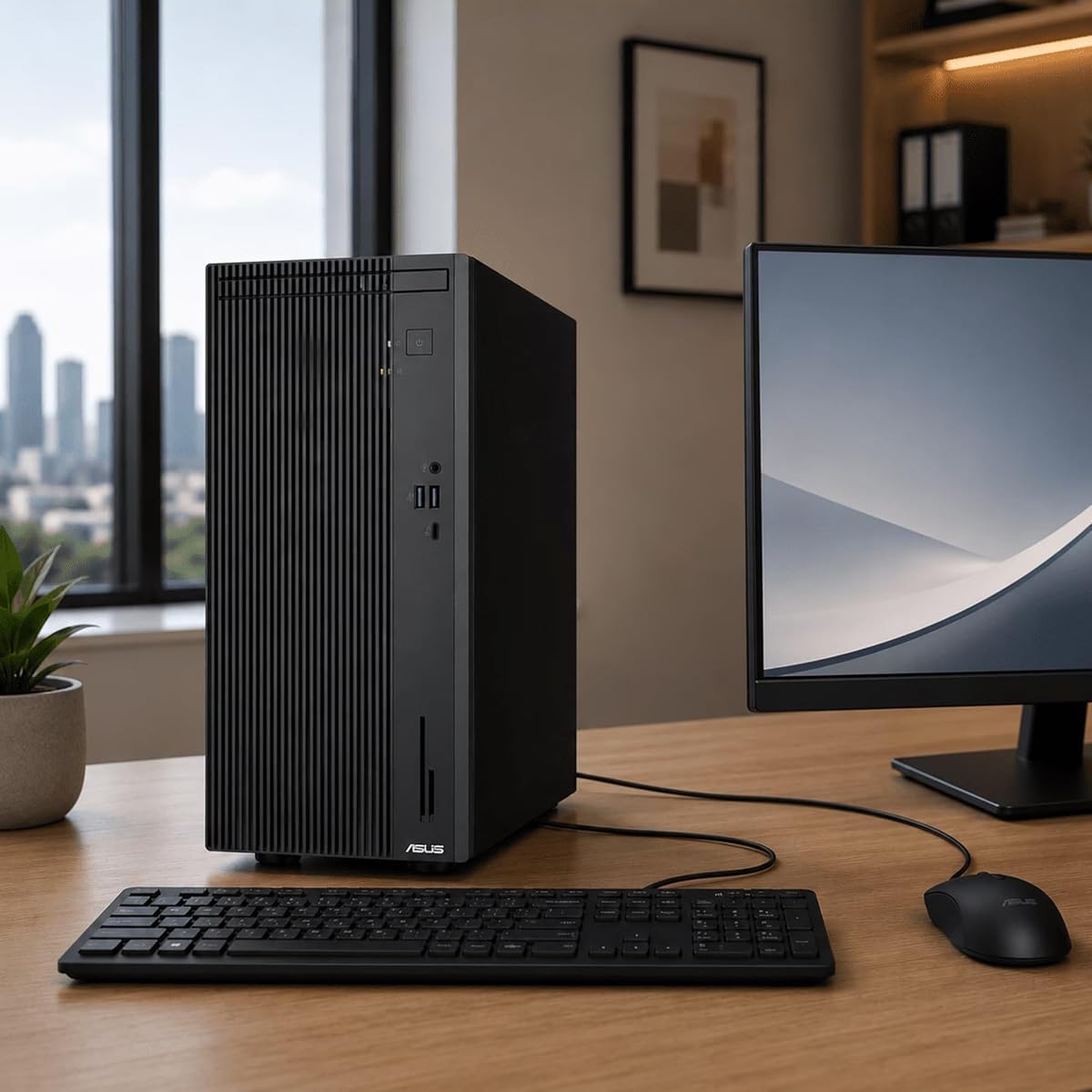
ASUS V500 Business Tower
5.0Editor score
Intel Core i7-13620H Processor
16GB DDR5 RAM Capacity
Wi-Fi 6 Connectivity
This guide compares the top ASUS Desktop PC models available in October 2026, evaluating performance, build quality, and value for various user needs and
Choosing the right desktop computer can significantly impact your productivity and entertainment experience. ASUS offers a wide range of options catering to businesses, gamers, and creative professionals alike. This guide explores the most compelling models to help you find the perfect fit for your specific requirements.
We have analyzed ten distinct ASUS desktop configurations based on processor power, memory capacity, storage speed, and graphical capabilities. Our evaluation considers real-world usage scenarios ranging from office multitasking to high-end gaming and content creation tasks. Each model brings unique strengths to the table.
Every selection in this list highlights specific use cases and performance characteristics you should consider before purchasing. Please note that product availability and pricing can fluctuate frequently due to market demand and supply chain factors. Always verify current details directly with the retailer before finalizing your decision.
5.0Editor score

4.7Editor score

5.0Editor score
The following table provides a side-by-side comparison of all ten ASUS desktop models featured in this guide. We have extracted key specifications to help you quickly identify which system aligns best with your performance expectations and budgetary constraints.


The ASUS V500 Business Tower stands out as a highly capable workstation for general office tasks and light creative work. With a perfect rating from users, this system delivers reliable performance without breaking the bank. Its combination of modern architecture and practical features makes it an ideal choice for small businesses and home offices.
We may earn a commission when you buy through this link, at no additional cost to you.
Powered by a 10-core Intel Core i7-13620H processor, this desktop handles multiple applications smoothly. The 16GB of DDR5 RAM ensures that web browsing, video conferencing, and document editing happen without noticeable lag. Additionally, the inclusion of Office 365 for the Web adds immediate value for productivity-focused users who need access to Word and Excel online.
While it lacks a dedicated GPU, the integrated graphics are sufficient for 4K video playback and standard display output via HDMI and DisplayPort. The dual-drive storage setup provides flexibility, offering both a fast SSD for the operating system and an external drive for backups. The wired keyboard and mouse bundle ensures you can start working immediately upon unboxing.
This model is best suited for professionals who prioritize stability and efficiency over heavy gaming or 3D rendering. If you need a dependable machine for daily operations, communication, and light media consumption, the V500 offers excellent value. Its compact design fits well on any desk, and the robust port selection supports all your essential peripherals.
The upgrade to DDR5 RAM significantly improves data throughput compared to previous generations. This translates to faster application loading times and smoother transitions between multiple open windows during heavy multitasking sessions.
With Wi-Fi 6 support and multiple USB ports, staying connected is effortless. You can easily attach printers, external drives, and secondary monitors without needing additional dongles or adapters.
We may earn a commission when you buy through this link, at no additional cost to you.
The ASUS ROG G700 Gaming Desktop is engineered for enthusiasts who demand high frame rates and seamless streaming capabilities. Boasting a powerful Intel Core Ultra 7 265F processor and an NVIDIA RTX 5060 graphics card, this system excels in demanding AAA titles. Its polished design and included accessories make it a complete package right out of the box.
We may earn a commission when you buy through this link, at no additional cost to you.
Gaming performance is the highlight here, with the RTX 5060 supporting ray tracing and DLSS technology for realistic visuals at 1080p and 1440p resolutions. The 32GB of DDR5 RAM ensures that running game clients alongside streaming software does not bottleneck performance. The 1TB NVMe SSD provides quick load times, keeping you in the action without long waits.
Beyond gaming, the system is well-suited for content creation tasks like video editing and 3D modeling due to its high multi-core performance. The 600W gold-rated PSU provides efficient power delivery, while the air-cooled thermal design maintains stability under load. The included RGB keyboard and mouse add a touch of style to any setup.
This desktop is an excellent choice for gamers and creators looking for a balance of power and aesthetics. While it comes at a premium price, the performance-to-value ratio remains strong given the high-end components. The extended protection plan offers additional peace of mind, covering mechanical failures beyond the standard warranty period.
The combination of the Core Ultra 7 processor and RTX 5060 allows for cutting-edge graphical features. You can enjoy realistic lighting effects and smooth frame rates in modern games without compromising on visual fidelity.
Air cooling is utilized to keep internal temperatures in check during intense sessions. The chassis design facilitates good airflow, ensuring that components do not overheat even during extended usage periods.
We may earn a commission when you buy through this link, at no additional cost to you.
The ASUS ROG Strix G700 represents the pinnacle of workstation and gaming performance with its extreme specifications. Featuring an Intel Core Ultra 9 processor with a turbo boost up to 6.00GHz and a staggering 128GB of DDR5 RAM, this machine is built for the most intensive workloads. It is perfect for professionals who need raw computing power combined with extensive storage capabilities.
We may earn a commission when you buy through this link, at no additional cost to you.
The 11TB total storage configuration is unique, blending a fast 1TB SSD for system speed with a massive 10TB HDD for archival data. This setup eliminates the need for external drives and ensures that large video projects or game libraries are stored locally. Windows 11 Pro adds enterprise-level security and management tools suitable for high-end work environments.
While the graphics card is slightly less powerful than other gaming-specific models, the CPU and RAM ensure that tasks like rendering, compiling code, or virtualization run smoothly. The extensive port selection on the rear allows for complex setups involving multiple displays and peripherals. Wi-Fi 6E ensures that network connections are fast and stable for large file transfers.
This model is ideal for power users who require maximum performance and storage space. It is not just a gaming PC but a full-fledged workstation capable of handling professional-grade tasks efficiently. If your workflow demands the highest speeds and largest capacities available, this desktop delivers exceptional results.
With a 15th gen Core Ultra 9 processor, multitasking is effortless. You can run heavy simulations or video editing software alongside other applications without any system slowdown or lag.
The hybrid storage setup ensures you have both speed and capacity. The SSD handles the operating system and active projects, while the HDD stores your vast media library and backups.
We may earn a commission when you buy through this link, at no additional cost to you.
The ASUS S501MER Desktop brings modern connectivity options to the standard home and office setup. With its 14th Gen Intel Core i7-14700 processor and Wi-Fi 6E support, it offers fast wireless speeds and reliable performance. The inclusion of a front-facing USB-C port makes it convenient to connect smartphones or external drives without reaching behind the machine.
We may earn a commission when you buy through this link, at no additional cost to you.
The processor features a substantial 33MB cache and speeds up to 5.3GHz, which benefits applications that rely on single-threaded performance. The 1TB PCIe 4.0 SSD ensures quick boot times and responsive system behavior. Additionally, the rear I/O includes both HDMI and DisplayPort, allowing for flexible multi-monitor setups for enhanced productivity.
While the GPU is integrated, the system is capable of handling 4K content and light creative tasks efficiently. The dimensions are compact enough to fit in smaller workspaces while still offering a robust set of ports on the front and rear. The included keyboard and mouse provide immediate usability for office tasks and general computing needs.
This desktop is a great choice for users who value connectivity and modern standards. It balances performance with convenience, making it suitable for streaming, browsing, and light productivity work. The black finish gives it a professional look that blends well in both home and corporate environments.
Wi-Fi 6E provides access to the 6GHz band, reducing interference and boosting speeds. The front USB-C port ensures quick data transfer for modern devices like phones and tablets.
With HDMI and DisplayPort outputs, you can easily expand your workspace. The system supports multiple monitors to help you manage complex workflows or enjoy extended entertainment experiences.
We may earn a commission when you buy through this link, at no additional cost to you.
The ASUS V500 Home & Business Desktop is designed to handle heavy multitasking with ease thanks to its generous 32GB of RAM. This configuration allows you to keep dozens of browser tabs, applications, and virtual machines running simultaneously without performance drops. It is an excellent choice for power users who work with large datasets or complex workflows.
We may earn a commission when you buy through this link, at no additional cost to you.
Powered by the Intel Core i7-13620H processor, this system delivers efficient performance for business applications and entertainment needs. The 1TB PCIe SSD provides ample storage space and fast read/write speeds, ensuring that your files are accessible instantly. The integrated Intel UHD Graphics are capable of smooth 4K streaming, making it ideal for media consumption.
Connectivity is comprehensive, with multiple USB ports, HDMI, and DisplayPort options that support two 4K monitors. This dual-monitor capability significantly boosts productivity by allowing you to reference documents while working on other tasks. The compact design saves desk space while maintaining the robustness required for daily business use.
This model is best suited for professionals who need a reliable workstation with substantial memory. Whether you are editing photos, coding, or managing multiple communication channels, the V500 handles it all smoothly. It balances performance with cost-effectiveness, providing a high-spec machine without unnecessary bloat or premium features.
The 32GB RAM upgrade significantly improves multitasking capabilities. You can run heavy software alongside browser applications without experiencing slowdowns or system freezes.
Support for two 4K displays allows for a wider workspace. This feature is particularly useful for traders, designers, and developers who need multiple views open at once.
We may earn a commission when you buy through this link, at no additional cost to you.
The ASUS ROG G700 (2026) is a powerful gaming desktop built to handle high-fidelity graphics and fast connectivity. With an Intel Core Ultra 7 265KF processor and an NVIDIA RTX 5070 GPU, it is ready to run modern titles with ray tracing enabled. The dual-glass chassis and RGB lighting create a visually striking setup for any gaming room.
We may earn a commission when you buy through this link, at no additional cost to you.
The quad-fan system combined with a 240mm liquid cooler ensures that the components stay cool even during intense gaming sessions. This thermal management helps maintain performance over long periods. The 2.5Gbps Ethernet port provides a fast and stable wired connection, reducing lag and improving online multiplayer experiences significantly.
Audio quality is enhanced with Dolby Atmos and AI noise cancellation, providing immersive sound and clear communication. The 16GB DDR5 RAM and 1TB SSD offer a balanced configuration for gaming and light content creation. Tool-less access makes it easy to upgrade components in the future, ensuring long-term performance.
This desktop is ideal for gamers who prioritize visual quality and cooling efficiency. The aesthetic design and advanced features make it a standout option in the market. If you want a machine that looks great and performs exceptionally in competitive titles, this model is a strong contender for your setup.
The liquid cooler and multi-fan setup keep the CPU and GPU cool. This ensures consistent performance during long gaming marathons or heavy rendering tasks.
The dual-glass chassis showcases the internal components and lighting. It adds a touch of elegance to your gaming space while protecting the internals from dust.
We may earn a commission when you buy through this link, at no additional cost to you.
The ASUS ROG GM700 (2025) offers an all-AMD powerhouse for gamers and creators seeking high performance. The AMD Ryzen 7 9800X3D processor and Radeon RX 9070 XT Prime OC GPU work together to deliver smooth gameplay and fast creative workflows. This system is built to handle the most demanding workloads with confidence.
We may earn a commission when you buy through this link, at no additional cost to you.
With 32GB of DDR5 RAM and a spacious 2TB PCIe Gen 4.0 SSD, you have plenty of room for your library and projects. The GPU supports AV1 encoding and enhanced ray tracing, which improves video quality and visual fidelity. Windows 11 Home is optimized to keep you ahead of the competition with advanced gaming features.
The design focuses on performance and reliability, ensuring that you can game and stream without interruption. The 2TB storage means you do not need to constantly manage space for large titles. The interface is user-friendly, making it easy to customize settings for your specific needs and preferences.
This desktop is best suited for those who prefer AMD components and want high-end gaming performance. It handles intense gaming, streaming, and editing with ease. If you need a machine that offers robust power and ample storage, this model is a solid choice for your high-end setup.
The Ryzen 7 9800X3D processor ensures fast processing. It allows for seamless multitasking and high frame rates in competitive and AAA titles.
The Radeon RX 9070 XT GPU delivers stunning graphics. Enhanced ray tracing and AV1 encoding create immersive environments and high-quality video output.
We may earn a commission when you buy through this link, at no additional cost to you.
The ASUS V500 Home & Business Tower Desktop is configured for professional environments requiring secure and reliable computing. It comes with Windows 11 Pro, which offers advanced security features and system management tools. The inclusion of an A-DATA 64GB USB Flash Drive adds immediate value for portable storage and data transfer needs.
We may earn a commission when you buy through this link, at no additional cost to you.
Powered by a 10-core Intel Core i7-13620H processor, this system handles business applications and multitasking efficiently. The 16GB DDR5 RAM ensures smooth performance for daily operations like video calls and spreadsheet management. HDMI and DisplayPort outputs allow you to create an organized workstation with multiple monitors for better productivity.
The bundle includes a wired keyboard and mouse, ensuring you have everything needed to start working right away. The secure and business-ready features of Windows 11 Pro protect your data and allow for professional-grade support. This makes it a practical choice for small offices and home offices focused on productivity.
This model is best for business users who need a reliable and secure workstation. The inclusion of Pro features and a flash drive makes it a complete package for office needs. If you require a system that supports multi-display setups and offers strong security, this desktop is a viable option for your business.
Windows 11 Pro provides advanced security and management tools. This ensures your data is protected and your system is manageable in professional environments.
Multiple monitor outputs allow for efficient workflows. You can display documents and data side-by-side to save time and reduce errors.
We may earn a commission when you buy through this link, at no additional cost to you.
The ASUS V500 Home & Business Desktop with 64GB RAM is a powerhouse for heavy multitasking and professional workflows. This massive memory capacity allows for running virtual machines and high-resolution media editing simultaneously. It is designed for users who need to keep large applications open without experiencing any system slowdown or lag.
We may earn a commission when you buy through this link, at no additional cost to you.
With an Intel Core i7-13620H processor and 1TB PCIe SSD, performance remains fast and responsive. The integrated Intel UHD Graphics are capable of smooth 4K streaming, making it suitable for media consumption as well. The connectivity options include USB-C and DisplayPort, ensuring seamless integration with various peripherals and external devices.
The 4K monitor support enhances the visual experience, allowing for sharp and detailed display output. This feature is useful for designers and professionals who need accurate color representation and clarity. The compact design fits well in any office setting, saving space while delivering professional-grade performance.
This model is ideal for professionals who need maximum RAM for complex tasks. Whether you are managing large databases or editing high-definition videos, the V500 handles it with ease. If you require a workstation with top-tier memory and solid performance, this desktop is an excellent choice for your needs.
The 64GB RAM ensures smooth multitasking. You can run multiple high-performance applications without any performance drops or system lag.
4K monitor support provides sharp visuals. This is essential for designers and professionals who need clarity and accurate color representation.
We may earn a commission when you buy through this link, at no additional cost to you.
The ASUS Business Desktop PC is a compact and efficient solution designed for modern office environments. It balances performance and space efficiency with its compact tower design that fits easily on any desk. With Windows 11 Pro pre-installed, it offers enhanced security and productivity tools needed for daily business tasks.
We may earn a commission when you buy through this link, at no additional cost to you.
Powered by the Intel Core i7-13620H processor and 16GB DDR5 5600MT/s memory, this system ensures fast boot times and quick file access. The 1TB PCIe NVMe SSD provides reliable storage for your files and documents. The integrated Intel UHD Graphics support multi-display setups, ideal for productivity and data management.
Connectivity is rich, featuring USB-C, multiple USB-A ports, Ethernet, and Wi-Fi 6. This ensures flexible connections for all your peripherals and networks. The included wired keyboard and mouse make it ready to use right out of the box. This makes it a reliable choice for small offices and home businesses.
This desktop is best suited for business users who need a reliable and efficient machine. The compact design and professional features make it a great option for office work. If you require a secure and fast system that saves space, this desktop is an ideal choice for your business needs.
The compact tower design balances performance and space. It fits well in modern office environments without taking up too much desk space.
The 5600MT/s DDR5 memory ensures quick file access. This helps in maintaining smooth performance for business workloads and applications.
We may earn a commission when you buy through this link, at no additional cost to you.
Selecting the right desktop computer involves evaluating several critical factors to ensure it meets your specific performance needs and budget constraints. This guide breaks down the essential components and considerations to help you make an informed decision.
The processor is the brain of your computer, and choosing the right one is crucial. For general office work, a 10-core i7 processor is sufficient, but for heavy multitasking or content creation, look for Ultra 7 or Ultra 9 chips. These processors offer higher turbo speeds and more threads for smoother performance.
Always prioritize processors with modern cache sizes and high base frequencies to ensure your system runs efficiently under load.
RAM determines how many applications you can run simultaneously. 16GB is the standard for most users, but if you work with large files or virtual machines, consider 32GB or 64GB options. DDR5 memory provides faster speeds and better efficiency than previous generations.
Investing in higher RAM capacity ensures your system remains responsive even when you have many tabs and programs open.
A fast PCIe NVMe SSD is essential for quick boot times and application launches. Look for at least 1TB of storage to accommodate your OS and files. Some models offer hybrid solutions with both SSDs and HDDs for a balance of speed and large storage.
Ensure the storage type is modern (PCIe 4.0) to maximize data transfer rates and system responsiveness.
If you plan to play modern games or do 3D rendering, a dedicated GPU is necessary. Models with RTX graphics cards offer superior performance with features like ray tracing. Integrated graphics are suitable for 4K media playback but not for intensive gaming.
Check the VRAM size and GPU model to ensure it meets the requirements of your specific software or games.
A desktop with diverse ports saves you from needing extra hubs. Look for USB-C, HDMI, and DisplayPort options for flexibility. Wi-Fi 6E support ensures fast and stable wireless connections which is vital for remote work or streaming.
Verify that the system has enough USB ports to connect all your peripherals without frequent swapping.
Windows 11 Pro offers better security and management features compared to Home editions, making it ideal for business. Some bundles include Office 365 or extended protection plans. Ensure the OS version matches your security and compliance requirements.
Always check if the software included adds value to your workflow or if it requires additional purchases later.
A compact tower saves space on your desk while a larger chassis may offer better airflow and upgradeability. Look for systems with robust cooling solutions like liquid or multi-fan setups to prevent overheating during heavy use.
Consider the aesthetics and size to ensure it fits well in your workspace and matches your setup preferences.
Choosing a system with accessible internals allows you to upgrade components later. Tool-less access and multiple expansion slots for RAM or storage mean you can extend the system's lifespan without buying a new unit.
Review the available slots and power supply capacity to ensure future upgrades are possible if needed.
Start by placing your desktop on a stable, flat surface with adequate ventilation. Ensure that the ventilation slots are not blocked by walls or objects to prevent overheating. Connect your peripherals and monitor using the appropriate cables provided in the box.
Regularly update your operating system and drivers to maintain performance and security. Use the included software tools to check system health and update BIOS settings if necessary. Keep the system free of dust by using compressed air to clean vents occasionally.
Use power management settings to optimize energy usage and extend component lifespan. Avoid shutting down the system abruptly by using the Start menu instead. Follow the manufacturer's guidelines for warranty claims if you encounter any hardware issues.
Yes, many of these models like the ROG G700 and V500 with high RAM are suitable for video editing. The 32GB or 64GB RAM configurations ensure smooth handling of high-resolution footage. Just ensure you have a dedicated GPU for complex rendering tasks.
Most models support RAM upgrades up to 64GB or more. Check the specific motherboard details in the product description to confirm the maximum supported RAM. This allows you to increase performance without buying a new system.
Most of the listed products include a wired keyboard and mouse bundle. This ensures you can set up your workstation immediately upon delivery. Always check the product details to confirm which accessories are included.
Windows 11 Pro offers advanced security features and system management tools. It includes features like BitLocker and Remote Desktop which are useful for businesses. Home is sufficient for general personal and entertainment use.
Yes, most models support dual-monitor setups via HDMI and DisplayPort. This is ideal for multitasking and increasing productivity. Check the specific ports available on your chosen model to plan your display configuration.
Manufacturer warranties are usually transferable but may require proof of purchase. The extended protection plans may have different transfer terms. Always review the warranty policy document included with your purchase for details.
We have explored ten distinct ASUS desktop models, each offering unique strengths for different needs. The V500 Business Tower provides value for general tasks while the ROG G700 stands out for gaming enthusiasts.
Prioritize the features that matter most to your daily workflow such as RAM, storage, and connectivity. Whether you need raw power for content creation or reliable performance for office work, there is a model to fit your criteria.
Remember that prices and availability can change rapidly so always verify the latest details before purchasing. Choose the system that offers the best balance of performance and future-proofing for your specific requirements.