
HP Everyday Slim Laptop
5.0Editor score
Intel N150 Processor
HP True Vision 720p Camera
Long Battery Life
This guide compares the best laptop for Zoom calls including webcams and lighting kits to help you find the perfect setup for clear and professional virtual
Finding the right laptop for Zoom calls is essential for remote work and online learning. A good device ensures clear audio and video without lagging during important meetings.
We compared top models based on camera quality, microphone performance, and processing power. Each product offers unique features to enhance your virtual communication experience.
Each pick shows key specs and real-world benefits for daily use. Please note that prices change frequently so check current listings before buying your new device.
5.0Editor score

5.0Editor score
4.6Editor score
Here is a side by side comparison of all ten products to help you see differences in specs and features at a glance.






This HP 14 inch Laptop is a solid budget option for daily Zoom calls and basic tasks. It has a 4.5 rating from users who appreciate its simplicity and portability.
We may earn a commission when you buy through this link, at no additional cost to you.
The Intel N150 processor handles video meetings well without overheating. Its slim profile makes it easy to carry between rooms or offices for work.
While the 4GB RAM might limit heavy multitasking it is enough for Zoom and a few browser tabs. The storage is modest but cloud access helps compensate.
Buy this if you need an affordable laptop for occasional meetings and light work. It offers great value for students or remote workers on a tight budget.
Weighing just 3.24 pounds this laptop is easy to transport anywhere you need to join a call.
The 14 inch anti glare display ensures you can see shared content clearly during meetings.
We may earn a commission when you buy through this link, at no additional cost to you.
The Cyezcor kit is a simple yet effective way to improve your lighting for Zoom calls. It earns a 4.3 rating for its ease of use and bright output.
We may earn a commission when you buy through this link, at no additional cost to you.
You can adjust the color temperature and brightness to match your room. The clip on design keeps it secure on your monitor without taking desk space.
It relies on USB power which means you need a free port but that makes it versatile. The light is soft and reduces shadows on your face.
Consider this if your current room lighting is too dark or uneven. It is a quick fix to look more professional on camera without buying a new webcam.
Five brightness levels and three color temperatures let you customize the light for any time of day.
No drivers or complex setup are needed just clip it on and plug it into USB.
We may earn a commission when you buy through this link, at no additional cost to you.
This HP Everyday Slim Laptop stands out for its focus on meeting quality with a 5.0 rating. It features a True Vision camera and dual mics for clear calls.
We may earn a commission when you buy through this link, at no additional cost to you.
The hardware is tuned for reliability and battery life which is key for long work days. It runs smoothly for Zoom and Office tasks without slowdowns.
You get a slim chassis and good keyboard for typing notes during meetings. The storage is small but sufficient for documents and apps you use daily.
Pick this for a balanced laptop that prioritizes video quality and portability. It is a great choice for remote workers who need a dependable daily driver.
The 720p HD camera with noise reduction ensures you look clear even in less than ideal lighting.
Two microphones capture your voice accurately while reducing background noise for clearer audio.
We may earn a commission when you buy through this link, at no additional cost to you.
The NIMO laptop delivers premium performance with 16GB RAM and a 512GB SSD for a 5.0 rating. It handles multiple browser tabs and Zoom simultaneously without lag.
We may earn a commission when you buy through this link, at no additional cost to you.
Its 15.6 inch FHD screen shows detailed content and works well for sharing during calls. The build includes useful ports and a fast fingerprint unlock for security.
Battery life supports full workdays so you stay connected even away from an outlet. The hinge allows flat laying for easy sharing in group settings.
Choose this if you need more power and storage for multitasking during meetings. It is ideal for students or professionals who juggle many apps at once.
With 16GB RAM you can run Zoom and dozens of browser tabs without performance drops.
The 512GB NVMe SSD boots Windows in seconds and loads apps instantly.
We may earn a commission when you buy through this link, at no additional cost to you.
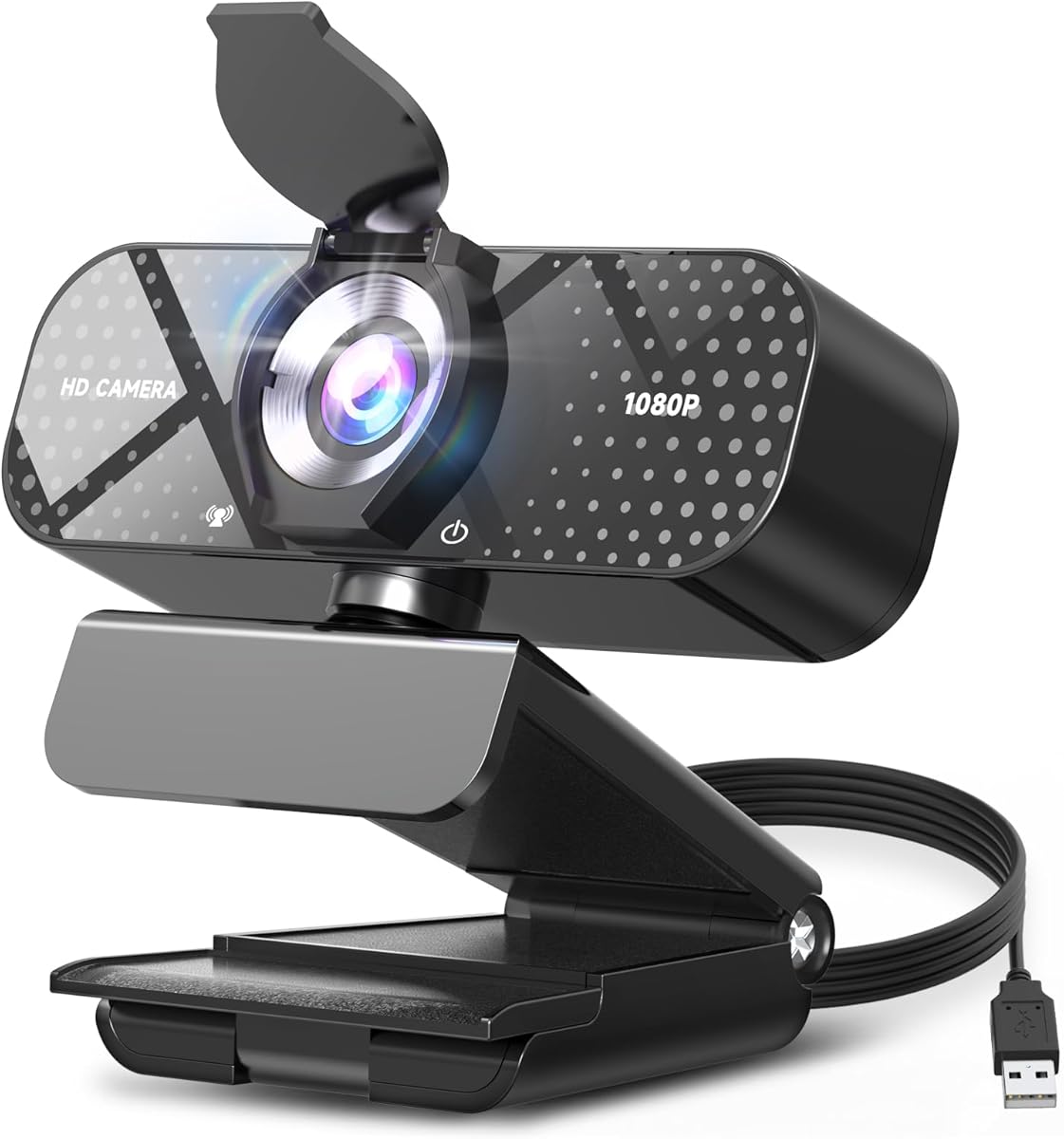
The TRAUSI webcam is a top rated upgrade for laptop video with a 4.6 rating. It provides 1080P clarity and an automatic light correction to look your best.
We may earn a commission when you buy through this link, at no additional cost to you.
The built in mic cancels background noise so your voice comes through clearly. A wide angle lens captures more of the room if you need it.
Privacy is protected with a slide cover when not in use. The plug and play setup means no drivers are required for quick installation.
Get this to drastically improve your video quality over built in camera. It is a smart investment for anyone on frequent video calls.
Technology adjusts brightness and color dynamically so you look good in any lighting.
The physical cover lets you block the lens instantly for peace of mind.
We may earn a commission when you buy through this link, at no additional cost to you.
This desk light offers a high CRI for natural color on video with a 4.4 rating. It is designed to sit on your desk and illuminate you evenly.
We may earn a commission when you buy through this link, at no additional cost to you.
You can adjust height and angle to fit your setup. The soft illumination reduces glare and eye strain during long work sessions.
It works for reading or streaming too so it is versatile beyond calls. The base is sturdy and will not tip over easily.
Buy this if you want dedicated lighting that sits beside your monitor. It adds a professional touch to your home office setup.
Colors appear natural and vibrant so you look more realistic on camera.
Adjusting height lets you find the perfect angle to reduce shadows.
We may earn a commission when you buy through this link, at no additional cost to you.
This ring light clips directly to your monitor and delivers soft illumination with a 4.4 rating. It is a compact way to add light without taking desk space.
We may earn a commission when you buy through this link, at no additional cost to you.
The circular design avoids harsh shadows and protects your eyes from glare. You can dim it or change modes to suit your environment.
It is simple to use with a mode switch for different tones. The light output is enough to brighten your face effectively.
Choose this for an affordable clip on solution for better video. It is great for small desks where space is limited.
The curved lampshade creates a soft glow that flatters your appearance.
Accurate color rendering makes your skin tones look natural.
We may earn a commission when you buy through this link, at no additional cost to you.
The HP 14 Business Laptop comes with Office 365 for productivity and a 4.1 rating. It is designed for small businesses and professionals needing a simple device.
We may earn a commission when you buy through this link, at no additional cost to you.
The Intel processor and 4GB RAM handle standard tasks like meetings and email. It includes useful ports for connecting accessories without adapters.
The screen has an anti glare coating which helps in bright environments. It includes earphones for private listening when on calls.
Opt for this if you need Office included and a business look. It is suitable for those who need a basic reliable machine.
One year of Office 365 is included which saves immediate setup time for documents.
Multiple USB and HDMI ports let you connect peripherals easily.
We may earn a commission when you buy through this link, at no additional cost to you.
This HP laptop emphasizes cloud storage with 1TB of space for a 3.3 rating. It features a Copilot key for quick AI access during work.
We may earn a commission when you buy through this link, at no additional cost to you.
The battery life allows full days of work without charging. Office 365 is included so you can start creating documents right away.
Local storage is small so you must rely on the cloud for files. It is a stylish device available in several colors.
Buy this if you like cloud first workflows and need long battery. It is a solid choice for users who keep files online.
One terabyte of cloud space means you can keep many files without local limits.
A dedicated key gives you fast access to AI features for assistance.
We may earn a commission when you buy through this link, at no additional cost to you.
The yAyusi kit uses two light bars for even coverage with a 4.2 rating. It includes a remote and touch controls for easy operation.
We may earn a commission when you buy through this link, at no additional cost to you.
The lights can rotate horizontally and vertically to match your angle. Setup is quick and they are stable on most monitors.
The dual design helps reduce shadows more than a single ring. It is a good choice for streaming or recording too.
Get this for extra brightness and control over your lighting. It is useful if you need a well lit environment for calls.
Two bars of light provide broader coverage and fewer shadows on your face.
The remote lets you adjust settings without reaching for the lights.
We may earn a commission when you buy through this link, at no additional cost to you.
Selecting the right device involves looking at camera, audio, performance and more for smooth meetings.
The camera is the most important part for video calls. Look for at least 720p resolution and features like noise reduction. Better quality means you appear more professional.
Always check the camera specs before buying to ensure clear video.
Audio clarity matters as much as video. Dual array mics are common in better laptops and reduce background noise. Some devices include external mics for better audio.
Choose a model with multiple mics or plan to use a headset.
Processors like the N150 are enough for Zoom and basic apps. If you run many browser tabs or apps consider a stronger CPU. Speed helps prevent lag during meetings.
A modern processor ensures smooth performance during calls.
At least 8GB RAM is ideal for multitasking but 4GB works for light use. Storage should be fast like an SSD for quick app loads. More space means you keep more files.
Look for 8GB RAM and 256GB SSD if possible.
Long battery life lets you join calls from anywhere. Aim for at least 8 hours to survive a work day without plugging in. Portable power is key for travelers.
Check battery specs to ensure all day use.
A 14 inch screen balances portability and readability. 15 inch displays offer more space for shared content. Choose based on where you work most.
Larger screens help when sharing documents during calls.
Ports like USB and HDMI let you connect webcams or monitors. Good Wi-Fi ensures stable video without drops. Ensure the laptop supports your needs.
Verify ports and Wi-Fi standards before purchasing.
Set a budget and compare features to find value. Cheaper models work for calls but may lack power. Invest in what matters for your workflow.
Balance cost with the features you truly need.
Keep your laptop clean to avoid dust affecting performance. Use a soft cloth to wipe the screen and keyboard regularly. This extends the life of your device.
Update your software often to fix bugs and improve security. Zoom works better with the latest OS updates. This prevents unexpected issues during calls.
Store your laptop in a safe bag when moving. Use a sleeve to protect it from bumps. This keeps your device in good condition for work.
The HP Everyday Slim Laptop is a top choice under $300. It has a good camera and dual mics for clear calls. It is lightweight and has decent battery life.
Not always but an external webcam like the TRAUSI 1080P offers better clarity. If your laptop camera is poor an external one helps. Otherwise built in cameras work.
You need at least 4GB of RAM for Zoom to run smoothly. Eight GB is better if you use other apps at once. More RAM helps avoid lag.
Yes a ring light improves your visibility on camera. Models like Cyezcor clip on easily and adjust brightness. This helps you look clear in any room.
The Intel N150 is good for basic video calls. It handles Zoom without overheating. For heavy tasks consider a faster Intel Core i5.
Yes 1TB of cloud storage helps save files without local limits. It is useful if you access documents from multiple places. It keeps your device clean.
Use headphones or a headset for clearer audio. Ensure your mic settings are set correctly. A good environment reduces background noise too.
Physical privacy covers block cameras when not in use. Hardware security protects your data from access. Look for these to stay safe online.
We reviewed ten options from budget laptops to lighting kits. The NIMO laptop and HP Everyday Slim are top picks for their balance of features.
Prioritize camera quality and battery life for daily calls. These affect how professional and reliable you appear to others on the network.
Always check current prices before buying since they change often. This ensures you get the best value for your money today.