
Captel MDL 200
Affordable captioned phone option
Simple corded design
Basic caption functionality
Compare the top captioned telephones for hearing impaired users to find the best options for clear real-time captioning and amplified sound features.
Finding the right captioned telephone can transform how you communicate daily. These devices display real-time text of conversations, making calls clearer for those with hearing loss. Choosing the right model ensures comfort and reliability.
We evaluated leading models based on caption accuracy, sound amplification, and ease of use. Our guide covers corded and cordless options designed specifically for seniors and hard-of-hearing individuals. Each product offers unique features to meet diverse needs.
Each pick highlights key strengths and potential limitations to help you decide. While prices may fluctuate, the core features remain consistent across models. Review the detailed breakdown to find the perfect phone for your home setup.

4.3Editor score

4.1Editor score
This table provides a quick side-by-side look at the key specifications of each product. Compare features like amplification levels, display types, and additional alerts to find the best fit for your hearing needs.




The Hamilton CapTel 2400iSPNBT stands out as a top choice for those needing visual aids during calls. With a rating of 4.3 stars, users appreciate the large, clear touchscreen that displays real-time captions. This device transforms everyday phone calls into confident conversations.
We may earn a commission when you buy through this link, at no additional cost to you.
Key strengths include its ability to turn standard calls into captioned experiences without missing words. You can select auto captions or assisted captions with live operator support for better accuracy. The voicemail feature also displays text directly on the screen, ensuring you never miss important messages.
While the need for high-speed internet and FCC registration might seem like trade-offs, they enable reliable nationwide captioning services. The 40dB amplified gain ensures the sound is loud enough for those with hearing loss. Customizable tone control further helps tailor the experience.
This phone is ideal for seniors or hard-of-hearing individuals who want clarity and ease of use. If you value reading along while listening and want robust support options, this model is a strong recommendation. It bridges the gap between audio and text communication effectively.
The large touchscreen allows for easy navigation and clear reading of captions. Customizable sizes ensure comfort for different vision levels.
Access to 24/7 US nationwide captioning service ensures help is always available. Assisted captions provide an extra layer of accuracy when needed.
We may earn a commission when you buy through this link, at no additional cost to you.
The Geemarc Ampli550 is a powerful option for those who need extreme loudness. With a rating of 4.1 stars, it delivers up to 55dB of TrueSound amplification. This model helps hard-of-hearing individuals make and hear calls easier than ever.
We may earn a commission when you buy through this link, at no additional cost to you.
It features an extra-large keypad with easy-to-read numbers and three color-coded emergency keys. The loud ringer and flashing strobe ensure you never miss an incoming call at home. Talking caller ID and keys add convenience for users with low vision.
The only trade-off is that it is a corded phone, limiting mobility compared to cordless models. However, the standard internal phone book and one-touch memory dial buttons offer plenty of convenience. It supports various audio jacks for headsets or neck loops.
Consider this phone if you need maximum volume and visual alerts. It is an excellent gift for loved ones who want a reliable, easy-to-use landline. The award-winning brand reputation adds trust to this high-performance device.
Up to 55dB amplification ensures speech is clear even with significant hearing loss. The 95dB ringer guarantees alerts are heard anywhere in the room.
Flashing strobes and talking keys provide multiple ways to know a call is coming. This multi-sensory approach is vital for safety and connection.
We may earn a commission when you buy through this link, at no additional cost to you.
The Captel MDL 200 serves as an entry-level option for those needing captioned services. While specific reviews are sparse, its existence in the catalog suggests utility for budget-conscious shoppers. It offers a basic approach to captioned communication.
We may earn a commission when you buy through this link, at no additional cost to you.
Key strengths include its simple design and lower price point compared to advanced models. Users looking for essential captioning without extra bells and whistles might find it suitable. It keeps the focus on core functionality for hearing impaired users.
Trade-offs involve a lack of advanced features like amplified sound or visual alerts. It may not satisfy everyone needs for loudness or ease of use. However, for basic captioning tasks, it remains a viable choice.
This phone is best for those on a strict budget who need basic captioning. If you need more robust amplification or visual aids, consider other options. It remains a functional tool for staying connected via text and voice.
This model provides an affordable way to access captioned services. It helps reduce the cost barrier for users needing visual call support.
With fewer features, setup and daily use are straightforward. This simplicity can be reassuring for seniors new to captioning technology.
We may earn a commission when you buy through this link, at no additional cost to you.
The Clarity AltoPlus is certified for mild to severe hearing loss and offers up to 53dB amplification. It features ergonomic tone and volume controls designed specifically for people with arthritis. This focus on physical usability makes it a strong contender.
We may earn a commission when you buy through this link, at no additional cost to you.
It includes a 100dB ringer with a visual indicator, ensuring calls are seen and heard. The outgoing speech amplification allows your voice to be heard clearly by others. Talking keypad and caller ID add extra layers of accessibility for daily use.
Trade-offs include the lack of a cordless handset option and battery backup requirements. The bed shaker accessory is also sold separately. However, the TIA certification ensures it meets high standards for hearing aid compatibility.
Choose this phone if you need reliable amplification and easy-to-turn knobs. It is great for seniors with limited dexterity who want a clear line. The combination of sound and visual features provides comprehensive support.
Controls are designed for easy turning, helpful for those with arthritis. This ensures volume adjustments are simple without straining hands.
Outgoing speech amplification helps the other caller hear you clearly. This reduces the back and forth often caused by soft speaking.
We may earn a commission when you buy through this link, at no additional cost to you.
The Serene Innovations SI-CL-65 offers a cordless solution for amplified phone needs. It features HD audio quality and talking caller ID for easier identification. This setup allows for movement around the home while staying connected.
We may earn a commission when you buy through this link, at no additional cost to you.
Key strengths include the convenience of a cordless handset for users who do not stay in one spot. The talking caller ID helps visually impaired users know who is calling without reading a screen. It integrates well with standard landline services.
Trade-offs involve charging the handset and the lack of detailed specs on amplification levels. However, for those who need freedom of movement, this remains a valuable feature. It balances mobility with essential landline functions.
This model is best for seniors who want to move freely during calls. If you struggle to stay near a wall, a cordless option helps you stay reachable. It supports connection while offering flexibility in placement.
Cordless handsets allow you to answer calls from any room. This flexibility reduces the stress of rushing to a fixed location.
HD audio ensures voices sound natural and clear. This helps distinguish between callers and reduces listening fatigue.
We may earn a commission when you buy through this link, at no additional cost to you.
The VTech SN5147 combines a reliable corded base with a cordless handset for flexibility. With a 4-star rating, it serves seniors and hard-of-hearing users well. The hybrid design ensures reliability during power outages.
We may earn a commission when you buy through this link, at no additional cost to you.
It features oversized buttons and a large backlit display for easy dialing. Photo speed dial slots allow one-touch calling to loved ones. Visual ringers and 50dB audio assist help you catch calls easily even in noisy environments.
Trade-offs include the need to manage batteries for the cordless handset. However, the call blocker and answering machine add security and convenience. You can expand the system with additional handsets as needed.
Consider this if you need both stationary and mobile calling options. It is excellent for households where different family members may need different features. The photo dialing is particularly useful for memory-friendly calling.
Combines corded reliability with cordless mobility. The base works during power outages to keep you connected when others don't.
Photo dial slots make it easy to recognize contacts. Visual ringers ensure you see calls even when the ringer is quiet.
We may earn a commission when you buy through this link, at no additional cost to you.
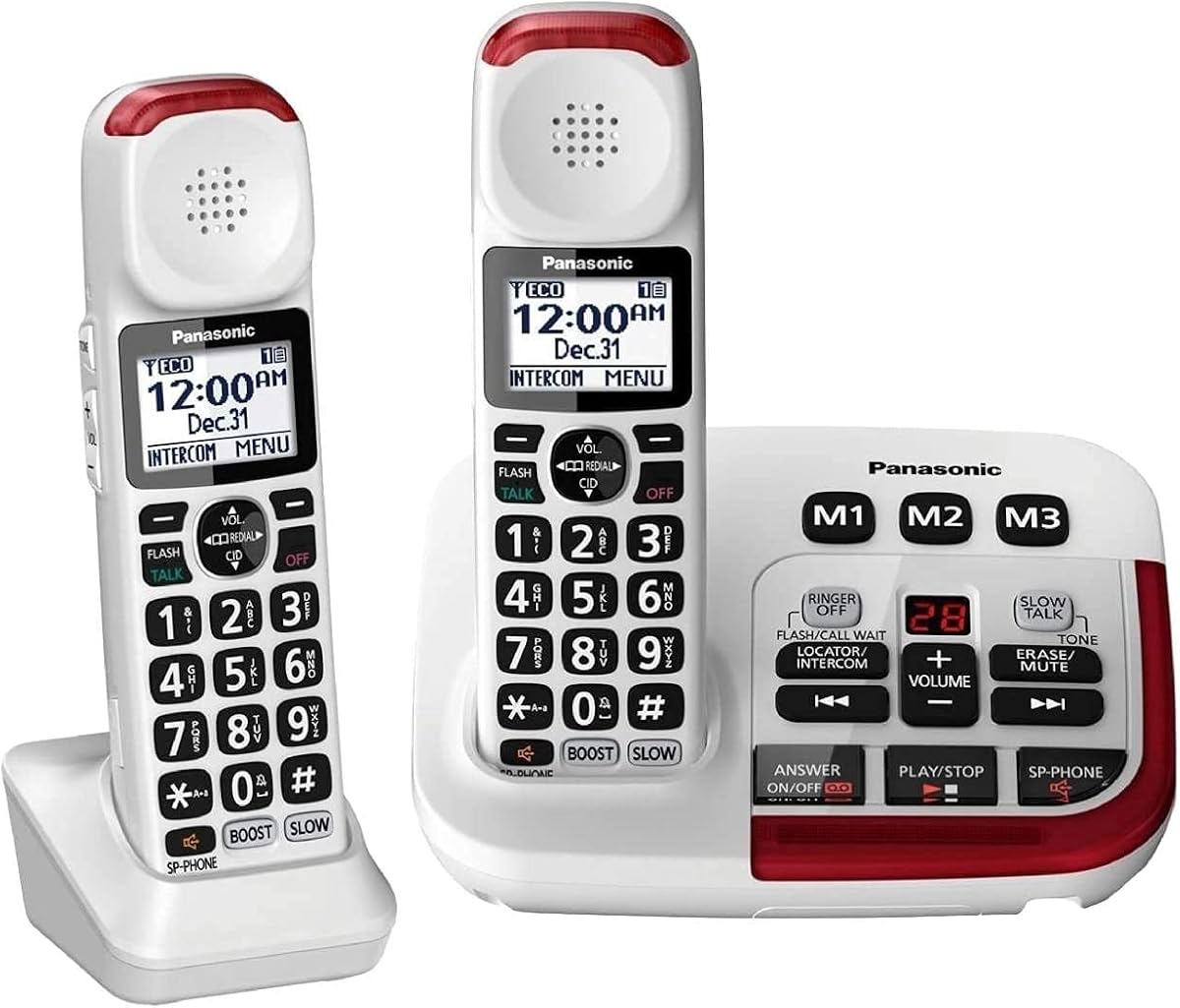
The Panasonic KX-TGM420W comes with one additional handset and features a volume booster up to 40dB. With a 4.3-star rating, it helps users hear clearly even in noisy places. Noise reduction technology suppresses background interference effectively.
We may earn a commission when you buy through this link, at no additional cost to you.
It includes a slow talk function that slows down speech in real time. This is useful for understanding rapid speech or checking voice messages. The big white backlit LCD and red LED visual ringers enhance visibility.
Trade-offs include the complexity of managing multiple handsets and settings. However, the intercom and speed dial features offer plenty of utility. It supports up to 6 handsets for large homes.
Choose this if you need help understanding fast speakers or reducing noise. The slow talk feature is a unique benefit for clarity. It is a robust choice for tech-savvy seniors seeking flexibility.
Slows speech speed in real time for better understanding. This is helpful for users who process audio at a slower pace.
Reduces background noise interference for clearer calls. It makes conversations easier in busy or noisy home environments.
We may earn a commission when you buy through this link, at no additional cost to you.
The SWISSVOICE Big Button phone includes photo memory buttons and an extra cordless handset. It is designed to simplify lives for the hard-of-hearing. With 90dB ringer volume, alerts are loud enough to catch attention.
We may earn a commission when you buy through this link, at no additional cost to you.
It allows users to see who they are calling by displaying photos. This makes dialing easy for elderly friends and relatives with unsteady hands. The SOS button ensures emergency numbers are just a click away.
Trade-offs involve a lower user rating compared to other models. Some may find the setup basic compared to digital options. However, the visual aid of photo buttons is a strong plus for simplicity.
This model is best for those prioritizing visual cues and ease. If seeing photos of family is important, this offers a good solution. It helps keep families connected through familiar faces and simple buttons.
Photo buttons let you see who you are dialing. This visual cue helps memory and reduces dialing errors.
A dedicated SOS button ensures help is easy to reach. Visual and loud alerts mean emergencies are handled quickly.
We may earn a commission when you buy through this link, at no additional cost to you.
This model includes two extra handsets for better coverage. With a 4.3-star rating, it supports families needing multiple handsets. The 40dB volume booster ensures everyone can hear calls clearly.
We may earn a commission when you buy through this link, at no additional cost to you.
It features noise reduction and slow talk functions for better clarity. Visual ringers and talking keys help identify calls easily. The expandable system allows for up to six handsets in total.
Trade-offs include the complexity of managing more handsets and settings. However, for households with multiple users, this is efficient. It ensures every room has a working station.
Consider this if you need multiple stations at home. It is ideal for large families or shared living spaces. The extra handsets mean no one misses a call.
Includes multiple handsets for different rooms. Everyone gets their own station for easy, private calls.
You can add up to six handsets total. This scalability fits homes with growing communication needs.
We may earn a commission when you buy through this link, at no additional cost to you.
This landline phone features a powerful 100dB ringer and 80dB receiver gain. With a 3.9-star rating, it targets seniors with mild to moderate hearing loss. The LED flashing light ensures you never miss a call.
We may earn a commission when you buy through this link, at no additional cost to you.
It includes photo buttons to store family members for quick dialing. Speakerphone functionality allows hands-free conversations. The large button design makes dialing effortless even for those with arthritis.
Trade-offs involve limitations for those with profound hearing loss. It also lacks advanced captioning. But the visual and volume alerts offer strong support for daily calling.
Choose this for reliable alerts and easy photo dialing. It is great for users who need to be sure of incoming calls. Visual indicators are a huge help for low hearing.
Bright LED flashes ensure you see calls clearly. This helps when hearing ringer volumes is difficult.
Photos make contacts easy to recognize. One-touch dialing saves time and effort for users.
We may earn a commission when you buy through this link, at no additional cost to you.
Selecting the right captioned telephone requires understanding your specific hearing needs and home setup. This section explores key factors to ensure you choose a device that offers clarity, ease of use, and reliability.
Look for systems that offer real-time captions with minimal lag. High accuracy ensures you read the text as the speaker talks without delay. Some models offer assisted captioning with live operators for better precision.
Prioritize systems that minimize errors and provide quick text updates.
Check the maximum decibel gain the phone provides. Models offering 40dB to 60dB amplification help most hearing loss cases. Higher amplification ensures softer voices are heard clearly without distortion.
Ensure the gain level matches the severity of your hearing loss for comfort.
Visual cues like flashing lights or loud ringers help you notice incoming calls. These are vital for those who might miss audio-only signals. Some phones include strobe lights or bed shakers for extra alerts.
Choose phones with bright visual alerts to prevent missed calls effectively.
Large buttons and high-contrast displays simplify dialing and reading. Look for customizable font sizes on screens to accommodate vision needs. Simple menus reduce the learning curve for seniors.
Opt for simple interfaces with readable screens to avoid frustration.
Ensure the phone is hearing aid compatible to avoid feedback loops. Many modern phones support T-coil technology or work with specific loops. Compatibility reduces static noise and improves call quality.
Verify compatibility specs before buying to ensure a smooth experience.
Corded phones work during power outages but limit movement. Cordless options offer mobility but require charging. Consider your need for freedom versus reliability when choosing.
Decide based on whether you stay in one room or move around.
Features like photo speed dial, slow talk, and talking caller ID add convenience. These features support memory and clarity during calls. Extra alerts like call blockers help reduce unwanted interruptions.
Look for extra features that address your daily communication challenges.
Many captioned phones require a high-speed internet connection. Ensure your home has reliable Wi-Fi before purchasing. Some services need FCC registration which might take time to process.
Check your internet setup to confirm compatibility with captioning services.
Start by connecting the phone to a power source and internet if required. Follow the setup guide to register your account for captioning services. This process ensures the device is ready for real-time text display.
Adjust volume and tone settings to match your comfort level. Use large buttons or photo dialing to call family members easily. Explore the caption size options on screen to improve readability.
Clean the device with a soft dry cloth to avoid damage. Avoid using harsh chemicals that might ruin the screen. Keep the area around the phone free of clutter to maintain easy access for everyone.
Most advanced captioned phones require an internet connection to display real-time text. Without internet, the captions may not load properly. However, standard amplified phones work independently for sound but lack text support.
In the US, the federal government funds free captioning services for qualifying users. The hardware itself may have a cost, but the service often comes at no charge. Check local programs to find free phone options.
Caption accuracy depends on clear speech and proper setup. Most services use advanced AI and operators to ensure precision. Background noise or fast talkers might occasionally slow the process.
Yes, most captioned and amplified phones are designed to be hearing aid compatible. They support T-coil connections to prevent feedback and improve audio clarity. Always check the product specs for specific compatibility.
Voicemail captioning displays messages as text directly on your screen. You can review missed calls and listen to them at your own pace. Visual ringers also ensure you do not miss incoming calls.
Phones with high amplification and visual alerts are suitable for severe loss. Captioned phones add a text layer to audio which helps significantly. Choose models offering both sound and text for best results.
Yes, federal regulations require registration to ensure services are used by those with hearing loss. Registration is free and usually done through the phone manufacturer or provider. It allows you to access nationwide captioning.
If internet fails, captioning services may stop working temporarily. However, basic sound features often still work. Use a standard corded line for emergencies to ensure you stay reachable.
Choosing the right captioned telephone improves daily communication significantly. Models like the Hamilton CapTel 2400iSPNBT offer robust features for most users. Compare options based on your specific visual and audio needs.
Prioritize features like amplification, visual alerts, and ease of use. Ensure the device fits your home internet setup for best performance. Balancing budget with essential features leads to a better experience.
Remember to verify current prices and promotions before purchasing. Prices change frequently so checking online retailers is smart. Stay connected with loved ones using the technology that suits you best.