
M.2 Heatsink Cooler 2280 SSD Double-Sided Heat Sink with Thermal Silicone pad for PS5/PC PCIE NVME M2 SSD(Black))
4.6Editor score
Aluminum alloy construction
Double-sided clip design
Compatible with PS5
This guide compares the top M2 2280 SSD Heatsink options for PS5 and PC builds focusing on thermal performance compatibility and ease of installation.
Modern storage drives generate significant heat under heavy loads requiring effective cooling solutions to maintain peak performance and prevent thermal throttling issues.
We analyzed ten leading heatsink models comparing materials design features and user feedback to identify the most reliable options for your specific storage setup.
Each selection highlights key benefits and potential drawbacks helping you choose the right cooling solution while noting that prices fluctuate based on market demand.
4.6Editor score

4.7Editor score

4.7Editor score
The following table provides a side-by-side comparison of all ten selected heatsinks highlighting their unique specifications and cooling capabilities for informed decision making.


This affordable heatsink delivers solid cooling performance for budget builds and PS5 upgrades with its durable aluminum construction.
We may earn a commission when you buy through this link, at no additional cost to you.
It features double-sided clips for stable mounting and comes with thermal silicone pads ensuring reliable heat transfer without damaging components.
The simple design means it lacks advanced heat pipes but provides sufficient cooling for most standard NVMe drives under typical workloads.
Ideal for gamers and casual users seeking reliable thermal management without spending heavily on premium cooling solutions or complex installations.
The dimensions and mounting style meet Sony specifications for seamless integration into the PlayStation 5 expansion bay.
At this price point it offers exceptional value for protecting valuable storage investments against thermal throttling risks.
We may earn a commission when you buy through this link, at no additional cost to you.
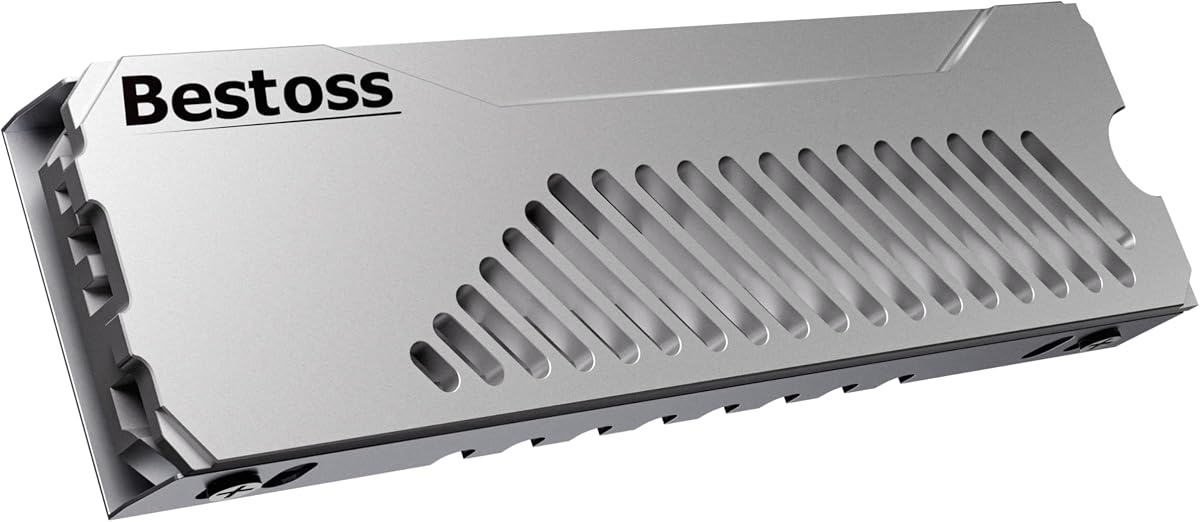
Bestoss brings a unique hollowed-out design to the heatsink market aiming to maximize surface area for improved thermal dissipation.
We may earn a commission when you buy through this link, at no additional cost to you.
Its thermal pads reach conductivity levels up to 3 W per meter Kelvin effectively bridging microscopic gaps between SSD controllers and the sink.
While performance varies based on enclosure airflow the design ensures heat spreads rapidly across the surface preventing localized hot spots.
This option suits builders who value both aesthetics and function seeking a clean look without compromising on essential cooling capabilities.
The hollow design allows air to circulate around more surface area increasing overall cooling efficiency compared to solid blocks.
High conductivity pads ensure minimal resistance at the interface allowing heat to move quickly from drive to heatsink.
We may earn a commission when you buy through this link, at no additional cost to you.
SABRENT offers a well-engineered heatsink combining copper and aluminum for maximum heat transfer efficiency in desktop computer environments.
We may earn a commission when you buy through this link, at no additional cost to you.
The package includes all necessary mounting hardware including screws and a screwdriver making the setup process straightforward for any user.
Users appreciate the dual-material construction which leverages copper conductivity and aluminum light weight for balanced thermal performance.
Best suited for desktop PCs this model ensures your storage stays cool during intensive gaming or content creation workloads reliably.
Copper pulls heat away quickly while aluminum disperses it into the air providing a winning combination for sustained performance.
Having all tools included in the box saves time and ensures you have the correct fitment for your specific SSD model.
We may earn a commission when you buy through this link, at no additional cost to you.
be quiet! delivers professional-grade cooling with an integrated heatpipe that ensures efficient heat dissipation even under heavy workloads.
We may earn a commission when you buy through this link, at no additional cost to you.
Its sleek matte black finish enhances modern PC builds while providing excellent thermal conductivity to maintain maximum read and write speeds.
The cooler supports both single and double-sided modules offering flexible compatibility with a wide range of NVMe SSD drives available.
Ideal for enthusiasts seeking top-tier reliability this product prevents thermal throttling ensuring your storage performs at peak levels consistently.
By keeping temperatures low the heatpipe technology ensures your drive does not slow down during long gaming sessions or rendering.
The matte black design matches high-end PC components perfectly adding a professional look to your internal system hardware.
We may earn a commission when you buy through this link, at no additional cost to you.
This value-packed kit provides five identical heatsinks perfect for workstations or users needing cooling for multiple drives at once.
We may earn a commission when you buy through this link, at no additional cost to you.
Each unit uses thermal conductive silicone pads with a conductivity of 200 W per meter Kelvin ensuring efficient heat transfer across surfaces.
The silicone elastic bands allow tool-free installation securing the heatsink firmly to the SSD without damaging delicate components nearby.
An excellent choice for bulk upgrades or multi-drive setups this set ensures every storage unit maintains safe operating temperatures effectively.
With five units in the box you can cool multiple NVMe drives simultaneously without buying individual separate kits for each one.
The elastic band system removes the need for screws or clips making installation faster and less prone to striping threads.
We may earn a commission when you buy through this link, at no additional cost to you.
ARCTIC meets Sony specifications for PS5 cooling with a click mechanism that eliminates screws for quick and secure installation.
We may earn a commission when you buy through this link, at no additional cost to you.
Included TP-3 thermal pads adapt perfectly to height differences ensuring optimal contact between the controller RAM and heatsink surface.
The additional mass helps dissipate heat rapidly reducing the risk of thermal throttling during intensive read and write processes.
Gamers and console users will appreciate the seamless integration and reliable performance that keeps storage drives cool during play.
The design meets official PS5 Slim requirements making it a safe and effective upgrade for expanding console storage capacity.
Without screws or bands the click system lets you secure the SSD and heatsink in seconds without tools or complexity.
We may earn a commission when you buy through this link, at no additional cost to you.
Thermalright delivers high-performance cooling with anodized sandblasting that greatly increases the heat dissipation area of the M.2 SSD.
We may earn a commission when you buy through this link, at no additional cost to you.
The double-sided clips combined with screws provide a tighter fit to the SSD enhancing thermal conductivity for optimal cooling performance.
This model is specifically designed for desktop PC M.2 interfaces ensuring compatibility with popular brands without interfering with other components.
Users benefit from proven cooling efficiency and a robust build quality that stands up well to continuous high-speed data transfers.
The sandblasted and anodized finish not only looks professional but also enhances surface area for better heat release into air.
Using clips and screws ensures the heatsink stays firmly in place reducing vibration risks and maintaining consistent contact.
We may earn a commission when you buy through this link, at no additional cost to you.
This model features an 8mm pure copper heatpipe sandwiched between aluminum alloy to provide superior heat transfer compared to solid blocks.
We may earn a commission when you buy through this link, at no additional cost to you.
The solid radiator design uses anode sandblasting processes ensuring durability while allowing heat to move rapidly across the surface.
Users appreciate the fine workmanship and strict testing that Thermalright applies before shipping ensuring every unit meets high standards.
Ideal for heavy users needing reliable performance this heatsink handles continuous loads without significant temperature spikes affecting speed.
The 8mm pure copper pipe pulls heat away from the controller efficiently moving it to the fins for air dissipation.
Every unit undergoes strict testing before shipping guaranteeing consistent quality and performance across every product you receive.
We may earn a commission when you buy through this link, at no additional cost to you.
Thermalright HR09 pushes boundaries with advanced thermal pads reaching 14.8 W per meter Kelvin ensuring minimal resistance for heat transfer.
We may earn a commission when you buy through this link, at no additional cost to you.
The 4500mm² heat dissipation area combines with a reverse gravity heat pipe to manage heat even when the PC is horizontal.
Its Nano Silicon Grease material adapts perfectly to uneven surfaces offering low viscosity and no damage to warranty labels on drives.
For power users demanding ultimate cooling performance this model delivers consistent results even under the most intense workload conditions.
With 4500mm² of surface area this heatsink has massive capacity to release heat preventing hot spots effectively.
Nano silicon grease fills microscopic gaps perfectly ensuring maximum thermal contact without risking damage to sensitive drive parts.
We may earn a commission when you buy through this link, at no additional cost to you.
Thermaltake offers active cooling with an 8000 RPM micro blower fan ensuring heat is forcibly moved away from the storage drive.
We may earn a commission when you buy through this link, at no additional cost to you.
The integrated molding high-quality aluminum heatsink works with a copper heat pipe to maintain efficiency even in warm enclosures.
A stainless steel reinforced backplate adds durability and protection while supporting the active cooling mechanism during operation.
This solution suits compact builds where passive cooling might struggle providing an extra layer of protection against overheating risks.
The micro blower fan actively pushes air across fins providing consistent cooling even when case airflow is restricted.
Stainless steel components add structural integrity ensuring the fan and sink stay secure during long-term use in desktop cases.
We may earn a commission when you buy through this link, at no additional cost to you.
Selecting the right heatsink involves evaluating several critical factors to ensure compatibility and optimal thermal management.
Aluminum is lightweight and corrosion resistant while copper offers superior conductivity. Premium models often blend both to balance weight and cooling efficiency.
Look for anodized finishes that enhance durability and heat dissipation surface area without affecting performance.
Installation can be screw-based clip-based or tool-free. PS5 users often prefer clip or click systems that meet console specifications without complex hardware.
Ensure the mounting method secures the sink firmly to maintain contact without stressing delicate components on the SSD.
High-quality pads like Nano or TP-3 ensure low thermal resistance. Check conductivity ratings to ensure they match your heat transfer needs effectively.
Thermal pads bridge microscopic air gaps preventing hot spots that could otherwise lead to throttling under load.
A larger surface area means more room for heat to release into the air. Look for designs with increased area or hollowed-out features.
Fins or grooves enhance surface area without increasing bulk helping maintain safe temperatures even during long sessions.
Passive sinks rely on airflow while active models use micro fans. Active cooling is useful for hot enclosures but introduces noise and power requirements.
Choose based on your specific environment and whether your PC already has sufficient airflow to support passive cooling needs.
Confirm the heatsink supports both single and double-sided SSDs if you own both types. Ensure it fits your specific slot size like 2280 accurately.
Check for interference with other components like PCI-E slots to avoid fitment issues during installation in crowded cases.
Robust construction like stainless steel reinforcements or sandblasted finishes extends the lifespan of the sink. Quality control matters for long-term reliability.
Look for brands with testing protocols to ensure every unit performs consistently across different usage scenarios and conditions.
Assess whether the price aligns with the features offered. Budget options may lack heat pipes while premium models offer advanced thermal solutions.
For most users a mid-range option provides the best balance between cost and cooling efficiency without unnecessary spending.
Always shut down your PC and unplug all power sources before handling internal components to ensure personal safety during installation.
Remove old thermal pads from your SSD with a soft cloth and alcohol before attaching new heatsinks to ensure a clean bonding surface.
Clean dust from your heatsink fins regularly using compressed air to maintain optimal airflow and prevent overheating issues over time.
Not all but high-speed Gen4 and Gen5 drives generate significant heat. A heatsink prevents throttling and maintains performance during sustained transfers.
Yes provided the heatsink meets Sony size and mounting specs. Many models specifically designed for PS5 are available to ensure compatibility.
They are usually silicone-based materials filled with conductive particles. High-quality pads use nano grease or specialized formulas to maximize heat transfer.
Performance varies but typical models reduce temps by 10 to 20 degrees Celsius. Advanced cooling with pipes can achieve even lower temperatures.
No as long as the pads do not damage the controller or NAND. Many manufacturers support third-party cooling solutions.
It is best not to reuse them since they lose conductivity after compression. Always replace pads when installing new heatsinks.
Lightweight designs prevent stress on PCBs. Aluminum is preferred for balancing weight while maintaining effective cooling performance.
Active cooling with fans provides better heat removal but adds noise. It is ideal for enclosed spaces where airflow is restricted.
This roundup highlights the top M2 2280 SSD Heatsink options balancing performance and value for varied storage and system requirements.
Prioritize models with high conductivity materials and secure mounting to protect your data and drive life against thermal throttling.
Check current prices and availability as these factors change regularly helping you secure the best deal on your chosen cooling solution.