
Thibault Aluminum Laptop Stand
4.6Editor score
Sturdy aluminum alloy build
Ventilated design for airflow
Easy assembly required
Laptop overheating is a common issue that can slow down performance and shorten device lifespan. Finding the right solution helps maintain optimal operating temperatures during heavy tasks like gaming or video editing.
We evaluated ten top-rated cooling solutions based on airflow efficiency, build quality, ergonomics, and user feedback. Each product offers unique features to address heat buildup across different laptop sizes and usage scenarios.
This guide highlights standout picks for budget buyers, gamers, and professionals. Note that pricing and availability may change over time, so verify current details before making your final purchase decision today.
4.6Editor score
4.4Editor score

4.4Editor score
As an Amazon Associate we earn from qualifying purchases.
This comparison table outlines key specifications for every selected product. Review features like fan count, compatibility range, and ergonomic adjustments to find the perfect match for your setup.


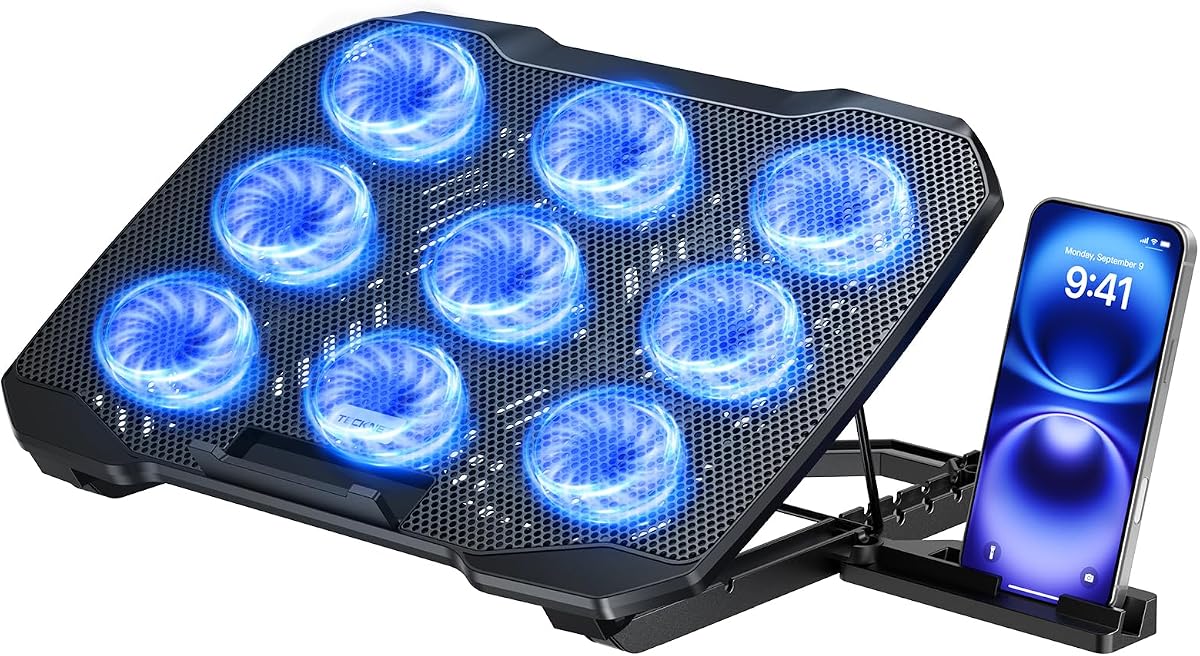
This cooling pad ranks as our top choice for its powerful nine-fan design and ergonomic versatility. With a 4.4 rating, users praise its ability to handle intense gaming sessions without noise distractions.
We may earn a commission when you buy through this link, at no additional cost to you.
The standout feature is the 360-degree surround airflow that quickly dissipates heat from all sides. The stepless speed control lets you adjust fan intensity up to 2600 RPM based on your thermal needs.
While it requires USB power and costs more than basic stands, the performance gains justify the investment for power users. The auto-syncing LED indicators provide clear visual feedback on operational status at a glance.
If you need reliable cooling for a 12 to 15.6-inch laptop during long work or gaming sessions, this model offers the best balance of performance and comfort in its class today.
The nine high-performance fans work together to create a powerful airflow system that targets hotspots effectively without overwhelming noise levels.
Five adjustable height settings allow you to tilt the stand up to 34 degrees, reducing neck strain during extended typing or viewing periods.
We may earn a commission when you buy through this link, at no additional cost to you.
For those seeking a passive cooling solution, this aluminum stand delivers exceptional value with a 4.6 user rating. Its ventilated design lifts your laptop to allow natural air circulation beneath the chassis.
We may earn a commission when you buy through this link, at no additional cost to you.
Constructed from robust aluminum alloy, it ensures stability while maintaining a lightweight profile. The soft rubber pads protect both your desk and laptop from scratches while preventing any unwanted sliding during use.
Though it lacks powered fans, raising the device significantly improves heat dissipation in well-ventilated environments. The simple assembly means you can set it up within moments without needing tools or complex instructions.
This is the ideal pick for budget-conscious users who want an elegant, durable way to improve airflow without spending much. It works great for general office work or light usage scenarios.
By elevating the laptop, you allow efficient airflow beneath it right where the exhaust fans are located to keep the device cool.
Raising the laptop to a comfortable height reduces neck and shoulder pain while providing a stable typing experience with reduced vibrations.
We may earn a commission when you buy through this link, at no additional cost to you.
This cooling mat stands out for its unique soft neoprene base, making it perfect for lap use without discomfort. With a 4.4 rating, it balances comfort with functional cooling performance for larger laptops.
We may earn a commission when you buy through this link, at no additional cost to you.
The dual fans powered via USB-A connection help disperse heat effectively during extended use. Four rubber stops on the face prevent your laptop from slipping, ensuring stability even when moving around.
While not the most portable option due to its size, it offers superior comfort for stationary or semi-stationary use. The open mesh top allows airflow to move away from the laptop quickly for constant cooling.
Choose this if you frequently work from a couch or bed and need a cushioned surface that cools your device. It is a premium choice for those prioritizing comfort alongside thermal management.
Soft neoprene material on the bottom provides cushioned comfort while the Chill Mat is sitting on your lap for longer sessions.
Open mesh top allows airflow to quickly move away from your laptop ensuring constant cooling when you need to work actively.
We may earn a commission when you buy through this link, at no additional cost to you.
The havit HV-F2056 is a solid choice for users needing a quiet cooling solution for larger 15.6 to 17-inch laptops. Its three ultra-quiet fans create a noise-free environment for focused work or gaming.
We may earn a commission when you buy through this link, at no additional cost to you.
Designed with ultra-portability in mind, this slim pad fits easily into bags without adding bulk. It doubles as an ergonomic stand with two adjustable height settings to improve your viewing angle while working.
While it lacks advanced features like phone holders, it provides stable metal mesh support and an extra USB port for connecting more devices. The included cable is USB to USB, requiring adapters for Type-C devices.
This model is best suited for travelers or office users who prioritize quiet operation and simple functionality. It offers a dependable way to protect your investment wherever you go daily.
Three ultra-quiet fans create a noise-free environment allowing you to focus on your work without audio distractions.
Doubles as an ergonomic stand with two adjustable height settings for a more comfortable viewing angle during long sessions.
We may earn a commission when you buy through this link, at no additional cost to you.
This TECKNET model boasts a 4.5 rating for its triple efficient fans working at 1200 RPM to pull cool air from the bottom. It prevents overheating during extended use or intense gaming across 12 to 17-inch laptops.
We may earn a commission when you buy through this link, at no additional cost to you.
Powered directly by your laptop's USB port, it operates quietly without needing external adapters. The dedicated on/off switch and blue LED indicators confirm when fans are running, ensuring you can verify status instantly.
While the included cable is USB-A to USB-A which might require adapters for newer devices, the lifetime support adds value to your purchase. Integrated rubber pads keep your laptop securely in place during heavy typing.
Ideal for those seeking a reliable cooler with broad compatibility and strong airflow, this pad is a great value. It works well for various brands including Apple MacBook Pro Air and Dell laptops effectively.
Three powerful fans work at 1200 RPM to pull in cool air from the bottom to prevent your laptop from overheating.
Compatible with various laptop sizes from 12 up to 17 inches including Apple MacBook Pro Air HP and Dell laptops.
We may earn a commission when you buy through this link, at no additional cost to you.
Featuring five built-in fans with blue LEDs, this pad offers enhanced cooling performance through multiple fan configurations. The 4.4 rating reflects its ability to keep laptops cool during gaming or extended work sessions comfortably.
We may earn a commission when you buy through this link, at no additional cost to you.
With 2 On/Off switches, you can select one fan, four fans, or all five working together based on your needs. The dual USB hub allows you to connect additional devices like keyboards or mice easily to your setup.
Six adjustable height settings provide excellent ergonomic customization for optimal comfort during gaming or movie watching. The front stoppers prevent laptops from slipping, keeping 12 to 17-inch devices secure throughout use.
This stand is ideal for users who want customizable cooling power and extra connectivity options in one device. It serves as a great gift for both the back-to-school season and Father's Day annually.
The laptop cooling pad features 5 built-in fans all with blue LEDs enabling simultaneous control for effective heat dissipation.
The laptop cooling stand also serves as an ergonomic stand offering 6 adjustable height settings for optimal comfort.
We may earn a commission when you buy through this link, at no additional cost to you.
Designed for laptops up to 15.6 inches, this pad uses two strong fans and a metal mesh to keep devices cool quickly. It is lightweight and portable making it easy to carry around home or office.
We may earn a commission when you buy through this link, at no additional cost to you.
Five adjustable height stands let you set the stand up or flat to hold your laptop in a suitable position. Two baffle panels prevent your laptop from sliding down or falling off during intense use sessions.
A hideable mobile phone holder on the side releases your hand while you type or game. The blue LED indicator helps to notice the active status of the cooling pad at a glance easily.
This is a great option for users needing a compact cooler with basic ergonomic adjustments and phone storage. It meets your needs when using a laptop for work or entertainment without taking up much space.
KeiBn Laptop Cooling Pad is with two strong fans and metal mesh provides airflow to keep your laptop cool quickly.
Five adjustable heights designed to put the stand up or flat and hold your laptop in a suitable position.
We may earn a commission when you buy through this link, at no additional cost to you.
These magnetic foot stands offer a discreet way to elevate your laptop and improve bottom air circulation. With a 4.6 rating, users appreciate how these tiny balls reduce laptop temperature simply and efficiently.
We may earn a commission when you buy through this link, at no additional cost to you.
Made with Nd-Fe-B magnets, they provide durable and strong suction that is readily adsorbable on your laptop base. The two stands weigh about 1.76oz, making them small and exquisite for easy pocket or bag transport.
Silicone pads on top and bottom ensure your laptop or iPad will not be scratched while preventing any sliding. This physical heat dissipation method is perfect for users who want to lift without bulk or wires.
If you prioritize a minimal setup that still offers cooling benefits, these magnetic feet are a smart choice. They facilitate typing and operation by elevating the laptop so you can keep an appropriate angle.
Nd-Fe-B magnet provides durable and strong suction readily adsorbable to the base of your laptop for easy connection.
The two stands weigh about 1.76oz and can be easily put into pants pockets or bags for transport anywhere.
We may earn a commission when you buy through this link, at no additional cost to you.
This cooler features a small central fan with two big fans on each side for a total of five low noise fans. With a 4.4 rating, it provides ample airflow to keep laptops cool down during heavy usage tasks.
We may earn a commission when you buy through this link, at no additional cost to you.
A switch wheel at the back lets you control fans on and off while a metal bar provides an elevation mechanism for ergonomics. The 5 adjustable stand height settings add more room for your laptop and desk setup.
Compatible with various laptop sizes from 12 up to 15.6 inches, it also works for tablets or game consoles. The package includes a USB cable user manual, and 12-month warranty for peace of mind.
Ideal for users seeking a balanced cooling solution with good adjustability, this pad is a reliable choice. AIMIUZI provides each customer with excellent support if there is any problem with the product.
The laptop cooling stand is set with a small central fan with two big fans on each side providing more airflow.
The laptop cooling fan has a metal bar for ergonomic design at the bottom providing an elevation mechanism.
We may earn a commission when you buy through this link, at no additional cost to you.
This cooler focuses on targeted airflow directly to the CPU hot spot using an internal channel design. With a 4.3 rating, it draws air from the sides and bottom for efficient cooling during work or gaming.
We may earn a commission when you buy through this link, at no additional cost to you.
It features two 110mm adjustable powerful fans with a side switch letting you freely adjust laptop fan speed from 0 to maximum. The lowest speed is sufficient for daily use with minimal noise while max speed prevents heat buildup.
Equipped with two common USB ports, it supports USB-C for MacBooks and USB-A for most laptops. The flat base allows it to rest comfortably on your lap isolating heat between your computer and legs effectively.
This pad is ideal for students or office workers who want a comfortable lap experience with solid cooling. Purchasing comes with a 30-Day Return Policy and a Full 3-Year Warranty for confidence.
The TECKNET cooling pad for laptop features two large fans paired with an internal channel design for efficient cooling.
This laptop cooler has a smooth surface and is thin portable and lightweight allowing you to easily carry it.
We may earn a commission when you buy through this link, at no additional cost to you.
Selecting the right cooling solution requires understanding your specific needs regarding laptop size, usage patterns, and portability. This guide breaks down the essential factors to help you make an informed decision.
Ensure the cooling pad or stand supports your laptop's dimensions. Many models cover 12 to 17 inches, but some smaller stands may not support larger gaming machines.
Check the product specifications for maximum and minimum width limits to guarantee a stable fit for your device.
Active cooling uses fans to force air under the device, while passive cooling relies on elevation and material conductivity. Active pads are better for gaming, whereas passive stands suit office work.
Choose active cooling if you run heat-intensive applications and passive cooling if you prefer silent operation.
High-speed fans can be noisy, which might disturb you in quiet environments. Look for descriptions mentioning 'whisper-quiet' or specific decibel ratings to assess noise output.
Prioritize quiet fans if you work in shared spaces or need a distraction-free environment.
Adjustable height and angle settings help reduce neck strain and improve posture. Models with multiple tilt positions offer greater flexibility for different work setups.
Select a model with enough height options to align the screen with your eye level comfortably.
Materials like metal mesh or aluminum alloy provide better heat dissipation and structural support than plastic. Durability ensures the device lasts through daily use without bending or breaking.
Invest in sturdy materials if you plan to use the cooler daily or travel with it frequently.
Extra USB ports allow you to connect peripherals without blocking your laptop's built-in ports. Some models offer USB-C compatibility for newer devices.
Ensure the cooler has the necessary ports to maintain your workflow connectivity without using extra hubs.
If you travel often, lightweight and slim designs are crucial for easy packing. Heavy stands might add unnecessary bulk to your laptop bag.
Opt for portable solutions if you move between home and office regularly for flexibility.
A good warranty protects your investment against defects. Look for companies offering at least a year of support to resolve issues quickly.
Prioritize brands with clear return policies and reliable customer service channels for peace of mind.
Place your laptop securely on the cooling pad or stand to ensure stability. Align the vents with any fans or open spaces to maximize airflow efficiency during use.
Clean the fans and surface regularly to remove dust buildup. Use a soft brush or compressed air to prevent debris from clogging the cooling mechanisms over time.
If using a fan-powered model, connect the USB cable to a powered port for consistent operation. Monitor your laptop temperatures after setup to confirm the cooling effect is working effectively.
Yes, cooling pads actively reduce internal temperatures by increasing airflow under the device. They are especially effective when laptops are used on soft surfaces like beds that block ventilation. Active pads with fans typically lower temperatures by 5 to 10 degrees compared to passive stands.
Modern cooling pads are safe and designed with low-voltage USB power to prevent electrical hazards. Ensure you place them on stable surfaces to avoid tipping. Regular cleaning keeps them operating safely without overheating the fan motors themselves.
It depends on your needs. Cooling pads with fans are better for high-performance tasks like gaming. Laptop stands are better for ergonomics and general office work where silence is preferred. Some models combine both features.
Prices vary based on features and brand. Basic stands start around 10 to 20 dollars. Fan-equipped pads typically range from 25 to 50 dollars. Premium models with advanced controls can cost slightly more for extra functionality.
Yes, most cooling pads support MacBooks. However, ensure compatibility with USB-C ports if your model lacks USB-A. Some stands are specifically designed with aluminum finishes to match Apple aesthetics perfectly.
It is recommended to clean your cooling pad every few months. Use compressed air to blow dust out of the fan blades. A soft cloth works for the metal mesh surface to maintain optimal airflow performance.
No, cooling pads generally protect laptops by preventing overheating. Just ensure the surface is smooth and padded to avoid scratches. Check that fans do not vibrate excessively to avoid mechanical wear on the device.
Prioritize models with high-speed fans and adjustable tilt angles. Look for dual USB ports to connect peripherals without hassle. Large surface areas ensure even coverage for powerful gaming laptops with wide chassis.
We highlighted ten effective cooling options ranging from affordable passive stands to powerful active fan pads. The TECKNET model with nine fans stands out for performance, while the Thibault aluminum offer offers great budget value.
Consider your primary use case when choosing. If you game often, prioritize active cooling with adjustable speeds. For general office work, a sturdy stand may suffice and save you money on unnecessary features.
Prices and availability fluctuate frequently so check current listings before finalizing your purchase. We hope this guide helps you find the perfect solution to keep your laptop cool and running smoothly.