
Desk Grommet Power Outlet
4.5Editor score
2.5 inch standard fit
20W USB-C fast charging
Includes AC outlet
A clean workspace starts with hidden power. Desk grommets with USB C bring charging ports directly into your surface, eliminating clutter and keeping cables organized.
We compared ten models based on power output, installation ease, and build quality. Each pick offers unique features like fast charging and flush mounting for modern desks.
Every section details specs, pros, and cons to guide your choice. Note that prices change frequently, so check current listings before finalizing your purchase decision.
4.5Editor score
4.8Editor score

4.6Editor score
As an Amazon Associate we earn from qualifying purchases.
This side-by-side comparison highlights key differences in power, size, and features across all ten selected desk grommets with USB C.


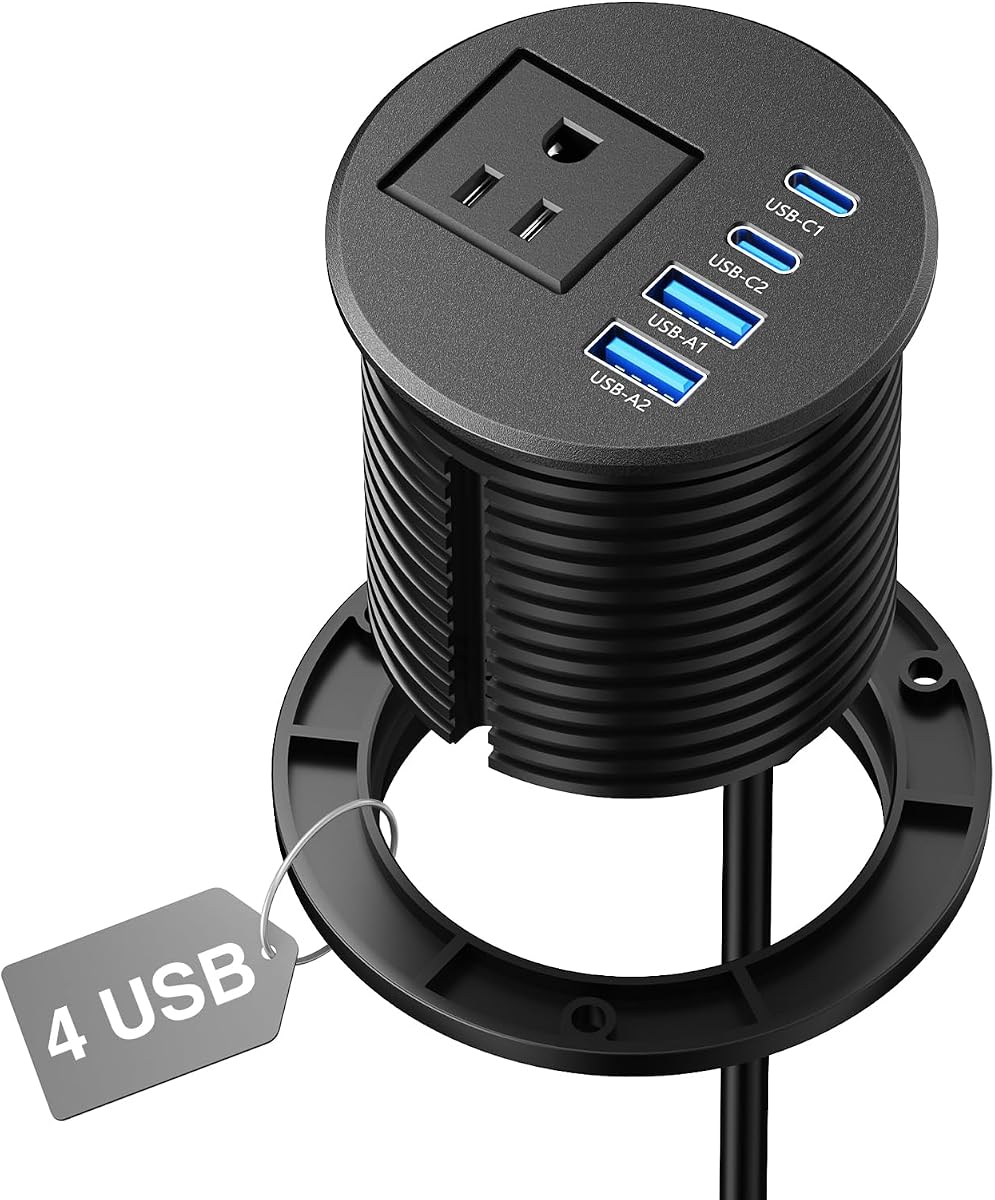
This Desk Grommet Power Outlet stands out as a top choice for budget-conscious users needing reliable power integration. It holds a 4.5-star rating and delivers essential 20W fast charging via USB-C alongside standard AC outlets.
We may earn a commission when you buy through this link, at no additional cost to you.
The unit fits 2.5-inch cable holes, making it versatile for various desks and countertops. Its flush mount design keeps surfaces tidy, while the 6ft cord ensures reach without clutter. It supports QC3.0 and PD3.0 protocols for efficient device charging.
While the 20W limit means laptops charge slower, it handles phones and tablets effectively. Lack of surge protection is a trade-off, but the price makes it accessible. It balances function and form well for basic office needs.
Anyone seeking an easy upgrade for conference rooms or home offices should consider this. It simplifies wiring and reduces adapter clutter. Check current pricing before buying to ensure it fits your budget today.
Simply drill a 2.5-inch hole or use an existing one to insert the outlet. Secure it with the included locking ring for a stable finish.
With one AC outlet and multiple USB ports, you can charge laptops and phones simultaneously. This flexibility supports diverse device needs in one spot.
We may earn a commission when you buy through this link, at no additional cost to you.
This grommet receives a 4.8-star rating for its user-friendly design and reliable power delivery. It focuses on USB ports, offering two 20W USB-C and two 18W USB-A connections for accessories.
We may earn a commission when you buy through this link, at no additional cost to you.
Ideal for home offices, it sits flush to maintain a clean look. The 6ft cord provides ample reach for devices. While it lacks AC outlets, the USB concentration suits phone and tablet users best.
Trade-offs include no direct laptop charging capability. However, the high rating reflects strong build quality and ease of installation. It is perfect where AC power is already available nearby.
Buy this if you prioritize USB convenience over AC needs. It reduces cable clutter effectively. Verify current prices to confirm value for your specific desk setup today.
Focus on phones and tablets with dedicated fast charging ports. This setup minimizes adapter use and keeps your workspace sleek.
The top rating comes from reliable performance and simple installation. Users appreciate the clean aesthetic and consistent power output.
We may earn a commission when you buy through this link, at no additional cost to you.
This premium grommet supports up to 100W USB-C PD, ideal for powering laptops directly. It earns a 4.6 rating for its robust features including double-sided access and surge protection.
We may earn a commission when you buy through this link, at no additional cost to you.
The double-side design offers four USB ports and five AC outlets total. It fits 4-inch holes and uses GaN technology for efficiency. Safety features like fire-resistant materials add peace of mind.
Cost and size are considerations compared to simpler models. But the power output justifies the investment for heavy users. It transforms your desk into a full charging station.
Choose this for power-intensive setups or offices with many devices. It maximizes utility per square inch. Ensure your desk allows a 4-inch cutout before ordering.
With 100W output, you can charge work laptops efficiently. This reduces the need for separate chargers under the desk.
Built-in surge protection and fire-resistant shells safeguard your equipment. This premium feature ensures long-term reliability.
We may earn a commission when you buy through this link, at no additional cost to you.
This unit offers a balanced mix of speed and safety with 65W USB-C support. It holds a 4.5 rating for its reliable performance and integrated surge protection.
We may earn a commission when you buy through this link, at no additional cost to you.
Designed for 3-inch holes, it keeps plugs flush to the surface. The 6ft cord and durable materials ensure longevity. It suits users needing moderate power for laptops and phones.
Trade-offs include the need for a specific hole size. However, the protection features make it worthwhile. It is a solid middle ground between basic and premium options.
Ideal for home offices or L-shaped desks. It organizes power without clutter. Check compatibility with your existing desk aperture first.
Integrated 1200J surge protection shields devices from power spikes. This adds a layer of safety often missing in basic models.
65W output supports fast charging for most modern laptops. This reduces the need for extra bulky adapters on the desk.
We may earn a commission when you buy through this link, at no additional cost to you.
This grommet provides 65W power for efficient device charging. It has a 4.1 rating reflecting steady performance but fewer standout features than top picks.
We may earn a commission when you buy through this link, at no additional cost to you.
The 6.6ft cord offers extended reach for flexibility. It fits 3-inch holes and uses heat-resistant materials. It is suitable for general office use without complex needs.
Trade-offs include fewer advanced features. However, it delivers on core charging functions. The extra cord length helps in larger spaces.
Best for standard desks needing reliable power. It keeps cables hidden and tidy. Verify fit with your desk hole before purchase.
The longer cord allows more flexibility in device placement. This helps in spacious desks or conference tables.
Heat-resistant materials withstand frequent use over time. This ensures the unit stays functional for years.
We may earn a commission when you buy through this link, at no additional cost to you.
This unique model features a retractable cable for added convenience. It earns a 4.6 rating for its space-saving design and 35W fast charging capabilities.
We may earn a commission when you buy through this link, at no additional cost to you.
The built-in cable extends to 2.2ft and retracts smoothly. It fits 3.25-inch holes and includes two AC outlets. This setup minimizes loose cables significantly.
Trade-offs include the hole size and complexity. But the organization benefits are clear. It is great for users wanting a clean desktop without extra cords.
Choose this for organized workspaces. It keeps power hidden yet accessible. Confirm your hole size matches the requirements.
The retractable cable pulls out and retracts instantly. This reduces tangle risks and keeps the area tidy.
By integrating the cable, you avoid external adapters. This maintains a minimalist aesthetic on your desk.
We may earn a commission when you buy through this link, at no additional cost to you.
This unit maximizes connectivity with eight USB ports and two AC outlets. It holds a 4.6 rating for supporting many devices simultaneously.
We may earn a commission when you buy through this link, at no additional cost to you.
It fits 3.15-inch holes and includes surge protection. The 20W USB-C ports offer reliable charging. This is ideal for multi-device environments like shared offices.
Trade-offs include the specific hole size. But the port density is unmatched. It reduces under-desk power strip reliance effectively.
Buy this for high-density charging needs. It streamlines power management. Ensure your desk matches the cutout specs.
With eight USB ports, you can charge many devices at once. This is useful for shared workspaces or creative studios.
Surge protection safeguards your connected equipment. This feature is essential when powering multiple electronics.
We may earn a commission when you buy through this link, at no additional cost to you.
This option offers two units for multi-location power. It has a 4.6 rating for its value and safety certifications like ETL.
We may earn a commission when you buy through this link, at no additional cost to you.
Both units fit 3-inch holes and offer 20W USB-C charging. The wiring harness stays hidden for a clean look. This is perfect for pairing outlets across a large desk.
Trade-offs include the cost of two units. But coverage is broader. It ensures power access at multiple points in your workspace.
Ideal for dual-desk setups or multiple chairs. It centralizes charging without clutter. Check your hole dimensions before installing.
Two units let you split power sources. This reduces cable runs across long desks or tables.
ETL certification ensures electrical compliance. This provides peace of mind for long-term use.
We may earn a commission when you buy through this link, at no additional cost to you.
This compact unit fits small 2-inch holes easily. It earns a 4.7 rating for its minimal profile and reliable performance.
We may earn a commission when you buy through this link, at no additional cost to you.
With one AC outlet and three USB ports, it offers essential power. The 5mm raised profile ensures a flush look. It works well for nightstands and small tables.
Trade-offs include lower power output. But its size is a major advantage. It saves space where larger models won't fit.
Best for smaller furniture or tight spots. It delivers needed power efficiently. Measure your hole before buying.
The slim 5mm design keeps plugs hidden. This ensures your tabletop remains smooth and professional.
Fits 2-inch holes perfect for tight spaces. This makes it ideal for bedside tables or smaller desks.
We may earn a commission when you buy through this link, at no additional cost to you.
This pack of two grommets fits 2-inch holes. It has a 4.7 rating for safety and straightforward design.
We may earn a commission when you buy through this link, at no additional cost to you.
Each unit offers a 20W USB-C port. They flush mount neatly. The lack of AC means they pair well with existing power sources.
Trade-offs include no AC outlet. But for small devices, it is ideal. The two-pack adds value for multi-area use.
Choose for minimal charging needs. It keeps spaces neat. Ensure your desk matches the 2-inch cutout.
Two units provide coverage for the cost of one. This value is perfect for shared spaces.
ETL certification ensures reliable performance. This standard protects against electrical hazards.
We may earn a commission when you buy through this link, at no additional cost to you.
Selecting the right desk grommet requires checking hole size, power output, and safety certifications. This guide breaks down key factors to help you choose wisely.
Most grommets fit 2 to 4-inch holes. Measure your existing desk cutout carefully to ensure a snug fit.
Always verify the required diameter before purchase to avoid re-drilling or damage.
Power varies from 20W to 100W. Higher wattage supports laptops, while lower suffices for phones and tablets.
Choose output that matches your heaviest daily device needs.
Some models include AC outlets for plugs. Others focus solely on USB ports for streamlined charging.
Decide if you need plug power or just USB for your setup.
Standard cords range from 6 to 6.6 feet. Longer cords offer more reach to walls or power sources.
Ensure the cord length is sufficient for your desk placement.
Look for ETL or UL certification. These ensure electrical safety and compliance with standards.
Never compromise on safety certifications to avoid risks.
Surge protection guards against spikes. Units with built-in protection save your devices from power issues.
Prioritize models with surge features if your region has unstable power.
Most use a locking ring for simple install. Check if tools are needed or if it is tool-free.
Ensure you have the proper drill bit for your chosen model.
Materials like PC+Aluminum or fireproof plastic affect longevity. Higher-quality builds resist wear and heat.
Invest in durable materials for long-term reliability.
Install the grommet by drilling a hole matching its specified diameter. Place it flush and secure with the locking ring underneath.
Plug the included cord into a wall outlet to power the unit. Ensure the cable is not pinched under furniture or heavy items.
Regularly clean ports with a dry cloth to remove dust. Avoid liquids near the outlets to prevent electrical damage.
No, they extend power to your desk. They still require a standard wall outlet via their cord. They simply move power access closer to devices for convenience.
Sizes vary from 2 to 4 inches. Check your product specs for exact diameter requirements before drilling. Use a drill bit that matches the specified size exactly.
Yes if they support 65W or higher output. Models with 100W PD are best for full laptop charging. Lower wattage works for phones but not powerful laptops.
No, only specific premium units include them. Always check product specs for surge protection features. It is safer to select models with this feature included.
Use a soft brush or compressed air gently. Avoid inserting objects that could damage contacts. Keeping ports clean ensures reliable connectivity.
Yes, wood desks work best for drilling holes. Ensure the surface is thick enough for the ring to lock. Always test fit before final installation.
Most units come with 6 to 6.6-foot cords. This standard length reaches most wall outlets. Longer cords reduce strain on power connections.
Yes, they are ideal for L-shaped setups. Install on one corner to centralize charging. Ensure the cord reaches a wall outlet comfortably.
The ten options reviewed cover every need from budget to premium power. Whether you need laptop charging or just phone power, there is a fit.
Prioritize hole size and power output for your specific devices. Ensure safety certifications match your requirements for reliable use.
Prices change often so verify current listings before buying. These grommets transform your workspace into a clean organized charging hub.