
ASUS Vivobook Go 15.6” FHD Slim Laptop
4.3Editor score
AMD Ryzen 3 7320U Processor
8GB DDR5 RAM for multitasking
Military Grade Durability Design
Finding the right portable computer can be challenging when you need power without the bulk. Lightweight ASUS laptops offer a perfect balance of mobility and performance for daily tasks. They are designed to keep up with your busy schedule while fitting easily into any bag.
We have carefully selected ten models that stand out in the current market. Each option was evaluated based on processing power, screen quality, and build durability. Our goal is to help you find a machine that meets your specific needs without weighing you down.
Every pick in this list highlights unique strengths and potential trade-offs. We cover everything from budget-friendly options to premium ultrabooks with advanced AI features. Please note that prices and availability can change frequently, so check current listings before buying.
4.3Editor score

4.8Editor score
3.7Editor score
As an Amazon Associate we earn from qualifying purchases.
This side-by-side comparison breaks down the key specifications of all ten selected models to help you make an informed decision quickly.





This laptop stands out as an excellent entry-level option for those seeking portability without breaking the bank. It holds a solid rating of 4.3 stars from users who appreciate its balance of cost and functionality. The design emphasizes durability with military-grade testing ensuring it can withstand daily wear and tear.
We may earn a commission when you buy through this link, at no additional cost to you.
The AMD Ryzen 3 7320U processor provides sufficient power for everyday tasks like web browsing and document editing. Paired with 8GB of DDR5 RAM, multitasking remains smooth even with multiple tabs open. The inclusion of fast charging means you can get back to work quickly during short breaks.
While the 128GB SSD is limited, it is sufficient for cloud storage users or those who keep local files minimal. The 15.6-inch display offers a good viewing experience with a 60Hz refresh rate suitable for general media consumption. The privacy shutter on the webcam adds a nice touch for security-conscious users.
This model is ideal for students or casual users who need a reliable machine for schoolwork or light productivity. It delivers on the promise of a lightweight and durable device at a competitive price. We recommend this for anyone prioritizing portability and build quality over heavy processing power.
The military-grade construction ensures this laptop can handle the rigors of commuting or travel without damage.
The Ryzen 3 processor and DDR5 RAM work together to keep common applications running smoothly.
We may earn a commission when you buy through this link, at no additional cost to you.
This variant builds on the foundation of the Go series by offering significantly more storage and a slightly more capable processor. Users rate it highly for its ability to handle light gaming alongside productivity tasks. The cool silver finish gives it a modern look that appeals to professionals.
We may earn a commission when you buy through this link, at no additional cost to you.
The AMD Ryzen 5 7520U brings faster performance compared to the Ryzen 3 model, making it better suited for heavier workloads. With 512GB of storage, you have ample room for files and applications without needing immediate cloud solutions. The battery life is also optimized for longer usage periods.
Despite the upgrade, it maintains the slim profile that defines the Go line. The SonicMaster audio system provides crisp sound which enhances multimedia experiences. The webcam shield remains a key feature for privacy ensuring you stay in control of your digital presence.
Ideal for users who need more space than the base model offers without jumping to premium pricing. It is a strong choice for students or professionals who store files locally and need consistent performance. Consider this if storage capacity is a priority for your daily workflow.
The 512GB SSD allows you to keep large files and media collections locally accessible at all times.
Upgrading to the Ryzen 5 means faster load times and smoother multitasking for demanding applications.
We may earn a commission when you buy through this link, at no additional cost to you.
This model represents the cutting edge of mobile computing with its Snapdragon X processor and AI capabilities. It holds an impressive 4.8 rating due to its efficiency and modern feature set. The Copilot+ PC designation signals readiness for next-generation software tools and workflows.
We may earn a commission when you buy through this link, at no additional cost to you.
The Snapdragon X processor is designed specifically for AI tasks offering unmatched power efficiency. Combined with 16GB of RAM it handles multitasking effortlessly. The Adreno GPU ensures smooth visuals for content consumption and light creative work. The quiet blue color adds a professional touch.
One of the standout features is the battery life allowing for multi-day usage on a single charge. The 512GB SSD provides fast boot times and ample space for essential data. The FHD+ screen offers crisp visuals with a resolution of 1920 x 1200 for clear text and images.
This laptop is perfect for early adopters and professionals who want the latest in AI technology. It balances performance and portability better than most competitors in its class. We recommend it for users who value battery life and future-proofing in their computing investment.
Built-in Copilot+ features transform how you interact with your laptop using natural language and context.
The efficient architecture allows you to work unplugged for extended periods without carrying a charger.
We may earn a commission when you buy through this link, at no additional cost to you.
This laptop offers a rare combination of a large 16-inch screen and a lightweight design. It leverages the Snapdragon X chip to deliver power without the heat typically associated with larger displays. The WUXGA resolution ensures text and images look sharp and detailed.
We may earn a commission when you buy through this link, at no additional cost to you.
The 16-inch display is great for productivity tasks like spreadsheet work or coding where screen real estate matters. The Snapdragon X processor supports AI workflows and ensures fast performance across applications. The 16GB RAM allows for seamless switching between programs without lag.
Despite the larger size it maintains a slim profile suitable for travel. The 300-nit brightness makes it visible in various lighting conditions. The design includes essential ports like HDMI and USB-C so you can connect peripherals easily without dongles.
Ideal for professionals who need more screen space but still prioritize mobility. It is a great choice for data analysts or writers who benefit from viewing more content at once. Consider this if you want a larger workspace without the bulk of a traditional workstation.
The 16-inch screen provides ample room to keep multiple windows open side by side comfortably.
Snapdragon X technology ensures the larger screen does not compromise battery life or cooling.
We may earn a commission when you buy through this link, at no additional cost to you.
This is the most budget-friendly option in our list designed for basic tasks and light study. It features an Intel Celeron processor which is sufficient for web browsing and word processing. The star black finish keeps it looking sleek despite the entry-level specs.
We may earn a commission when you buy through this link, at no additional cost to you.
While the 4GB RAM limits heavy multitasking it is adequate for single-task workflows. The 128GB eMMC storage is small but works for those who store most data online. The 15.6-inch display offers a full HD experience for watching videos or reading documents comfortably.
The battery life is decent allowing for several hours of use on a single charge. Fast charging is included to minimize downtime during long days. The ergonomic keyboard and precision touchpad make input comfortable even during extended use.
Best suited for young students or secondary computers used primarily for basic tasks. It offers a functional computing experience at a very accessible price point. Consider this if your needs are limited to light browsing and document editing without demanding software.
Windows 11 in S Mode provides enhanced security and streamlined performance for everyday users.
The slim profile makes it easy to carry in a backpack for school or casual travel.
We may earn a commission when you buy through this link, at no additional cost to you.
This model strikes a great balance between performance and affordability with its 16GB RAM. The Intel i3 processor handles daily tasks with ease while the SSD ensures quick boot times. The blue color gives it a distinct look among standard grey or black laptops.
We may earn a commission when you buy through this link, at no additional cost to you.
The 16GB of RAM is a significant advantage for multitasking allowing you to run many apps smoothly. The 512GB PCIe NVMe drive provides fast storage performance which is essential for modern applications. Wi-Fi 6 ensures stable and fast internet connectivity wherever you go.
The 14-inch FHD display is anti-glare which reduces eye strain during long work sessions. It includes essential ports like HDMI and USB-C so you can connect to external monitors easily. The webcam and microphone are integrated for seamless video conferencing.
This laptop is perfect for small business owners or home users who need reliability. It offers enough power for professional work without the high cost of premium models. We recommend it for anyone who values performance and speed in a compact package.
With 16GB of RAM you can switch between heavy applications without slowing down your system.
Wi-Fi 6 support means faster downloads and more stable connections in crowded networks.
We may earn a commission when you buy through this link, at no additional cost to you.
This compact laptop brings advanced AI features to a smaller 14-inch form factor. It utilizes the Snapdragon X processor to offer efficient performance and long battery life. The cool silver finish adds a touch of elegance to the overall design.
We may earn a commission when you buy through this link, at no additional cost to you.
The WUXGA display provides a crisp viewing experience with a 16:10 aspect ratio that shows more vertical content. With 16GB of RAM you get smooth performance for productivity and light creative work. The Snapdragon X supports AI tools that enhance creativity and communication.
The 512GB SSD ensures you have plenty of space for applications and files. The 60Hz refresh rate makes scrolling and animations look smooth on the screen. The build quality is solid ensuring the device remains durable over time.
Ideal for users who want the latest tech in a highly portable package. It works well for digital nomads or students who need a small yet powerful machine. Consider this if you prioritize screen quality and battery efficiency in a small frame.
This 14-inch model packs high-end specs into a size that fits easily in any bag.
The WUXGA resolution ensures text and images are sharp and easy on the eyes.
We may earn a commission when you buy through this link, at no additional cost to you.
This 2026 edition brings the latest Intel 13th Gen processor to the table for improved speed. It features a 6-core configuration that outperforms older generations significantly. The quiet blue finish keeps the look professional and timeless.
We may earn a commission when you buy through this link, at no additional cost to you.
The 16GB RAM allows for heavy multitasking and complex workflow management. The 13th Gen CPU provides fast clock speeds which help in rendering and compiling code. The 256GB SSD offers fast boot times but might require external storage for larger datasets.
It is designed to be thin and light making it easy to carry around daily. The privacy shutter on the webcam adds a layer of security for remote workers. The display is bright enough for indoor use and has an anti-glare coating.
Best for professionals who need raw CPU power without the cost of premium ultrabooks. It serves well for business tasks and moderate content creation. Consider this if you prefer Intel architecture and need high processing speeds.
The 13th Gen CPU provides a noticeable speed boost over previous generations for heavy tasks.
Weighing just over 3 pounds it is easy to transport between home and office.
We may earn a commission when you buy through this link, at no additional cost to you.
This model improves on the base Go series by offering double the storage at a similar price point. It maintains the reliable AMD Ryzen 3 processor which is perfect for basic daily tasks. The black design is classic and professional for any setting.
We may earn a commission when you buy through this link, at no additional cost to you.
With 256GB SSD you get twice the space for your files compared to the 128GB model. The battery life is rated up to 11 hours which supports a full day of work on campus or at a cafe. The fast charging ensures you can get back to work quickly if you run low.
The keyboard is designed for quiet typing which is great for shared spaces. Military-grade durability means it can withstand bumps and drops during travel. The webcam shield allows you to physically block the camera when not in use for privacy.
This is a great choice for students who need more storage without paying premium prices. It offers solid performance for schoolwork and light entertainment. We recommend it for anyone needing a reliable 15-inch budget laptop with enough space for local files.
The 256GB SSD provides a practical middle ground for users who need more than the base model.
Up to 11 hours of battery life ensures you can work unplugged all day without interruption.
We may earn a commission when you buy through this link, at no additional cost to you.
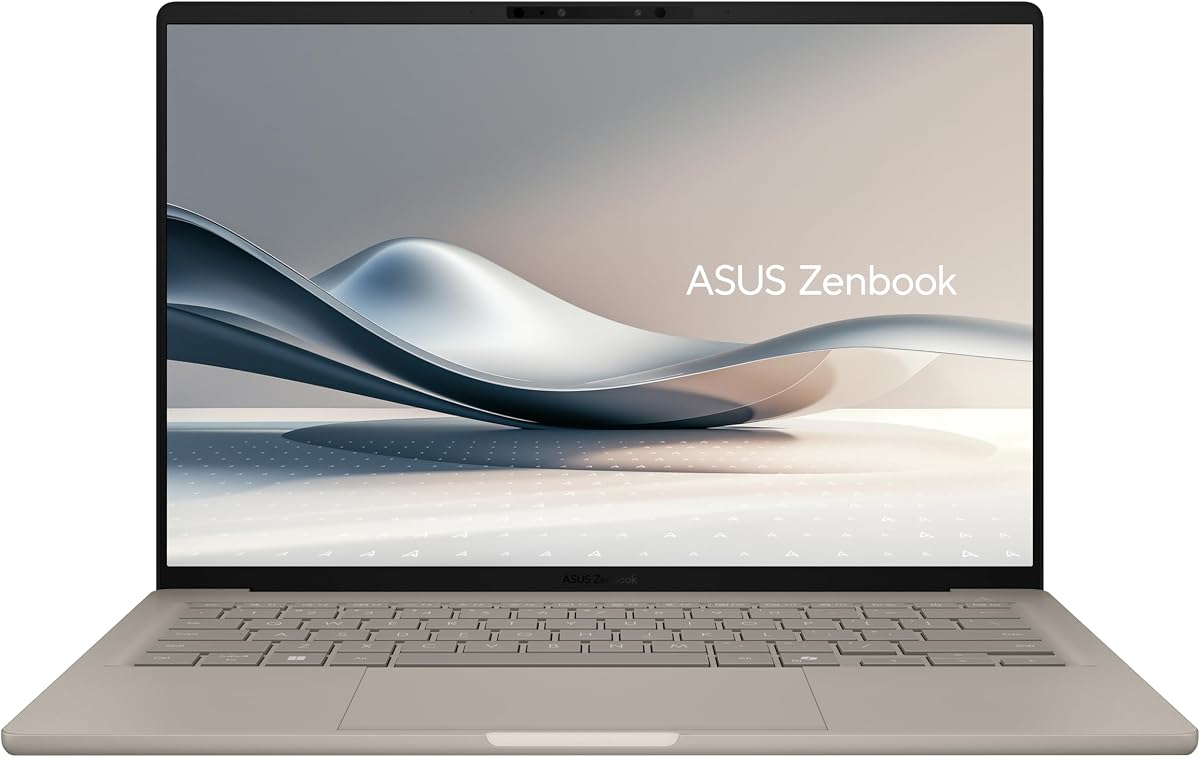
This is the pinnacle of portable design weighing just 980 grams making it exceptionally light. It features an OLED display that delivers vibrant colors and deep blacks for media viewing. The Zabriskie Beige finish gives it a unique and sophisticated look.
We may earn a commission when you buy through this link, at no additional cost to you.
The Ceraluminum body is 30% lighter and stronger than standard aluminum ensuring durability without weight. The Snapdragon X processor powers advanced AI features for productivity and creative tasks. The battery life is rated up to 32 hours of offline video playback.
The 16GB RAM and 512GB SSD ensure fast performance and ample storage space. Wi-Fi 6E provides the fastest wireless speeds available for seamless cloud access. The Copilot+ PC capabilities allow for next-gen AI interactions and security features.
Ideal for executives or creatives who demand the lightest possible device with high-end specs. It is a statement piece that combines style with substance. Consider this if budget is less of a concern than getting the absolute best portability and battery.
At under one kilogram this is the lightest 14-inch Copilot+ PC available on the market.
Ceraluminum offers a unique texture and superior strength ensuring your device lasts longer.
We may earn a commission when you buy through this link, at no additional cost to you.
Selecting the right lightweight laptop requires balancing several key factors to ensure it meets your specific needs without adding unnecessary weight.
The processor determines how fast your laptop can handle tasks ranging from web browsing to video editing. For lightweight ASUS laptops the AMD Ryzen 3 and Ryzen 5 offer great value for daily use while Intel i3 and i5 provide solid reliability. Newer models with Snapdragon X processors bring AI capabilities and better battery efficiency which is ideal for users who need to stay on the go for long periods. Prioritize a processor that matches your workload to avoid overspending on power you do not need.
Match the CPU to your primary tasks to get the best balance of speed and battery life.
Memory or RAM is crucial for multitasking allowing you to run multiple applications at once without slowing down. 8GB is the minimum standard for general use but 16GB ensures smooth performance for heavier workloads or future software needs. Storage should ideally be a SSD for fast boot times and file access with 512GB being a comfortable capacity for most users. If you choose a model with less storage consider using cloud services to keep your files accessible everywhere.
Aim for 16GB RAM and 512GB SSD to future-proof your device for years of reliable use.
A good display makes a huge difference in how you experience your work and entertainment. Look for Full HD resolution or higher to ensure text is sharp and images are clear. The aspect ratio also matters with 16:10 panels offering more vertical space for productivity tasks like document editing. Consider brightness levels if you work outdoors as higher nits ensure visibility in bright environments.
Choose an IPS panel with at least FHD resolution for clear visuals and wide viewing angles.
Battery life is a key factor for portable laptops as it defines how long you can work without a power source. Modern lightweight models often claim 10 hours or more but actual performance depends on usage patterns and screen brightness. Newer chips like Snapdragon X significantly improve efficiency allowing for multi-day battery life in some cases. Always check reviews to understand real-world usage rather than relying solely on manufacturer claims.
Look for laptops with 10+ hours of real-world battery life to stay productive throughout the day.
A lightweight laptop should still be robust enough to withstand daily travel and handling. Many ASUS models feature military-grade durability testing which ensures they can resist shocks and temperature changes. Materials like Ceraluminum or magnesium alloys offer strength without adding extra weight to the chassis. Check for reinforced hinges and spill-resistant keyboards to protect your investment from accidental damage.
Prioritize military-grade testing and quality materials to ensure your laptop survives daily wear and tear.
Connectivity ensures you can easily connect peripherals and access the internet at high speeds. Look for USB-C ports which support data transfer and charging in one cable for convenience. Wi-Fi 6 or Wi-Fi 6E support provides faster and more stable wireless connections for modern networks. HDMI ports are also useful for connecting to external monitors for presentations or extended workspaces.
Ensure the laptop has USB-C and Wi-Fi 6 to stay connected with modern devices and networks.
Since you will be typing frequently a comfortable keyboard is essential for productivity. Look for chiclet keys with good travel distance to reduce finger fatigue during long sessions. A precision touchpad with gesture support helps navigate Windows efficiently without needing a mouse. Backlit keyboards are a valuable feature for working in low-light environments like airplanes or dim rooms.
Choose a model with a comfortable chiclet keyboard and backlit keys for typing comfort in any light.
The operating system and built-in features can enhance your workflow and security. Windows 11 Home is standard but Copilot+ PC features bring advanced AI tools to your laptop. Privacy features like webcam shutters are vital for protecting your privacy during video calls. Additional software tools from ASUS like SonicMaster audio enhance the multimedia experience significantly.
Check for essential software features like webcam shutters and AI tools to maximize productivity.
To keep your lightweight ASUS laptop in top condition always handle it with care when moving around. Use a protective sleeve or case to shield it from scratches and impacts during transit. Avoid placing heavy objects on top of the bag as this can damage the screen or internal components.
Maintain optimal battery health by using the recommended charger and avoiding extreme temperatures. Try not to drain the battery completely before charging as lithium-ion batteries perform best when kept between 20 and 80 percent. Update your software regularly to ensure you have the latest security patches and performance improvements.
Clean the display and keyboard gently using a microfiber cloth to avoid scratches. Use compressed air to remove dust from the keyboard and ports regularly. Keep the laptop on a hard surface to prevent overheating and ensure proper ventilation for long-term performance.
Most lightweight ASUS laptops are designed for productivity and casual use rather than heavy gaming. However models with AMD Ryzen 5 or 16GB RAM can handle light gaming and older titles. For intensive gaming consider a dedicated gaming series as lightweight models usually lack powerful dedicated graphics cards.
Battery life varies by model but most options offer 8 to 11 hours of typical use. Newer Snapdragon models claim up to 32 hours for video playback but actual usage depends on brightness and app load. Check specific reviews for real-world battery performance to manage your expectations.
Many lightweight ASUS laptops have soldered RAM which means it cannot be upgraded after purchase. Storage options vary with some models allowing SSD upgrades while others are fixed. Always check the specifications before buying to ensure the initial configuration meets your long-term needs.
Copilot+ PC brings advanced AI capabilities to your laptop allowing for smarter search and content creation tools. It enables features like Recall which helps you find content from your past sessions quickly. These features are designed to streamline workflows and offer a more intuitive user experience.
Yes many models in this list feature military-grade durability testing to withstand daily wear and tear. They use robust materials and reinforced hinges to ensure longevity. Using a protective case is still recommended for extra safety during travel.
Most models include a mix of USB-A and USB-C ports for versatile connectivity. HDMI ports are common for connecting to external monitors. Some models also have dedicated audio jacks for headphones ensuring you can connect various peripherals without dongles.
We have explored ten excellent options that cater to a range of needs from budget-conscious students to professionals seeking premium features. The ASUS Vivobook Go series offers great value for entry-level users while the Zenbook A14 stands out for its ultra-portable design. The Snapdragon models provide a glimpse into the future of AI computing with impressive efficiency.
When making your final decision prioritize the factors that matter most to your daily workflow. If battery life is critical look at the Snapdragon X models for their endurance. If you need more power and connectivity the Intel models may suit you better. Consider your budget and future needs to choose a device that serves you well.
Remember that prices and availability change frequently so verify current listings before making a purchase. Always check the latest reviews to ensure the model fits your specific requirements. With the right choice you will have a powerful and portable tool to enhance your productivity.