
HP 14 inch Laptop
4.5Editor score
Intel N150 Processor
14 inch Display
Lightweight Chassis
Finding a laptop with no fan noise is essential for users who value a peaceful computing environment. Whether you work in a quiet office or study late at night, silent operation ensures uninterrupted focus without distracting hums.
We compared ten top-rated devices and accessories based on performance, design, and acoustic efficiency. Our analysis focuses on models known for quiet operation alongside cooling solutions that maintain silence while managing heat effectively.
Each pick highlights unique features like fanless designs or ultra-quiet cooling. Prices and availability change frequently, so verify details before purchasing to ensure you get the best silent experience for your needs.
4.5Editor score

4.8Editor score

4.4Editor score
As an Amazon Associate we earn from qualifying purchases.
This side-by-side comparison highlights key specifications and features across ten selected products designed for quiet operation or enhanced silent cooling performance.




The HP 14 inch Laptop offers reliable performance in a quiet package suitable for everyday tasks. With a strong rating, it balances cost and functionality effectively for users seeking minimal noise during operation.
We may earn a commission when you buy through this link, at no additional cost to you.
Its Intel N150 CPU ensures efficient multitasking without requiring aggressive cooling solutions that generate noise. The slim design and lightweight chassis make it easy to carry, while the anti-glare display reduces eye strain in various lighting.
While RAM limitations may hinder heavy workloads, this model excels in basic productivity and web browsing where silence matters most. The extensive port selection adds versatility for connecting peripherals without needing adapters.
Ideal for students and home office users prioritizing portability and quiet operation. This laptop delivers value through its balance of essential features and silent reliability for daily use.
The Intel N150 processor provides up to 4.4 GHz speed, ensuring smooth operation for standard office tasks without generating excessive heat or noise.
At just 3.24 pounds and 0.71 inches thin, this laptop fits easily into bags for travel, supporting silent productivity on the go.
We may earn a commission when you buy through this link, at no additional cost to you.
The Aurant laptop delivers stable performance for daily tasks with a focus on convenience and silent operation. Its high rating reflects user satisfaction with reliable hardware that keeps noise to a minimum.
We may earn a commission when you buy through this link, at no additional cost to you.
Powered by an AMD Ryzen R5 processor, it handles web browsing and multitasking efficiently. The full-size keyboard with backlight aids typing in dim environments, while the lightweight body ensures easy portability.
Storage capacity is modest, but external options can supplement this limitation. The fingerprint unlock and ample ports enhance security and connectivity without adding complexity or noise to your workflow.
Perfect for users seeking a balance of performance and silence for basic computing. This model proves that affordable laptops can still offer quiet, efficient experiences for school or work.
The built-in full size keyboard with independent numeric keypad and backlight design supports smooth control and private data protection via fingerprint unlock.
Built-in Bluetooth 4.2 and 5G WiFi support secure stable network signals for daily online work and entertainment without interruption or distraction.
We may earn a commission when you buy through this link, at no additional cost to you.
This ASUS Vivobook stands out for its focus on silent communication and performance. With AI noise-canceling audio, it minimizes background noise during calls, making it ideal for remote work and study in quiet spaces.
We may earn a commission when you buy through this link, at no additional cost to you.
The AMD Ryzen 5 processor ensures smooth multitasking while the fast DDR5 memory improves startup speeds. The 15.6-inch FHD display provides comfortable viewing with slim bezels for an immersive experience.
Privacy features like the shutter and noise-canceling mic are valuable for security and clarity. While not the cheapest option, the blend of productivity tools and quiet operation justifies the investment.
Recommended for professionals and students needing reliable silent computing. Its design prioritizes user comfort and clear communication, delivering a premium experience without distracting fan noise.
ASUS AI Noise-Canceling Audio minimizes background noise for clearer voice calls, virtual meetings, and online classes to ensure focused collaboration.
The 15.6-inch FHD anti-glare display with NanoEdge bezels offers an 84% screen-to-body ratio for comfortable online classes and entertainment.
We may earn a commission when you buy through this link, at no additional cost to you.
The HP OmniBook 3 combines high-end processing with intelligent noise management. Its AI noise reduction for cameras ensures clear calls, while the powerful core maintains performance without constant loud cooling cycles.
We may earn a commission when you buy through this link, at no additional cost to you.
With a 16-inch touchscreen and advanced connectivity, it suits creative professionals needing silence during content creation. The design resists fingerprints and includes smart display features for seamless multitasking.
While heavier than some models, the premium build quality and speed offset the weight. The included adapter and modern ports make it versatile for demanding workflows that require quiet environments.
Best suited for power users seeking top-tier silent performance. Its integration of AI features and robust hardware makes it a standout choice for professional productivity.
Integrated Intel AI Boost NPU accelerates AI workloads for lightning-fast performance in Microsoft Copilot and multitasking while maintaining thermal quietness.
Wi-Fi 7 and Thunderbolt-Class ports deliver unprecedented speeds and ultra-low latency for rock-solid reliability even in congested networks.
We may earn a commission when you buy through this link, at no additional cost to you.
This cooling pad ensures laptops stay cool without adding internal fan noise. Its whisper-quiet fans create a noise-free environment, allowing focus on work or entertainment without distractions.
We may earn a commission when you buy through this link, at no additional cost to you.
With five fans and adjustable settings, it adapts to different laptop sizes. The ergonomic design with six height settings supports comfortable posture during long sessions.
The dual USB hub expands connectivity, reducing cable clutter. While it adds some desk space, the benefit of silent cooling for high-performance devices makes it a practical investment.
Ideal for users with gaming or heavy work laptops prone to noise. This accessory restores silence while protecting your device from overheating effectively.
The laptop cooling stand also serves as an ergonomic stand, offering 6 adjustable height settings that enable you to customize the angle for optimal comfort.
Features 5 built-in fans all with blue LEDs. Two On/Off switches enable simultaneous control of all 5 fans and LEDs.
We may earn a commission when you buy through this link, at no additional cost to you.
The HP Everyday Slim focuses on portability and quiet operation for basic tasks. Its thin profile and long battery life make it a companion for quiet environments like libraries or offices.
We may earn a commission when you buy through this link, at no additional cost to you.
Equipped with temporal noise reduction for video calls, it ensures clear communication without background noise. The full-size keyboard and multi-touch Imagepad support effortless navigation.
While hardware is entry-level, it meets daily needs efficiently. This laptop suits users who prioritize silence and mobility over heavy processing power.
Perfect for casual users and remote workers needing a lightweight, quiet device. Its design emphasizes comfort and essential features for seamless daily experiences.
Stay clear and confident in virtual meetings with the HP True Vision 720p HD camera featuring temporal noise reduction and dual array microphones.
Microsoft Copilot key and multi-touch HP Imagepad provide effortless navigation for a secure and easy-to-manage work experience.
We may earn a commission when you buy through this link, at no additional cost to you.
This cooling pad delivers ultra-quiet fans that create a noise-free environment for work or entertainment. Its slim design makes it easy to protect your investment wherever you go.
We may earn a commission when you buy through this link, at no additional cost to you.
Dual adjustable height settings provide ergonomic comfort, while the metal mesh ensures stability. The extra USB port supports additional devices, reducing connection issues.
It is ideal for users who need a compact solution for noise reduction. The straightforward design focuses on essential cooling without unnecessary features or noise.
Best for travelers or those with limited desk space. It effectively maintains device temperature while keeping your workspace silent and organized.
Slim, portable, and light weight allowing you to protect your investment wherever you go while ensuring stability with metal mesh surface.
Extra USB port and power switch design allows for connecting more USB devices with a standard USB to USB connection.
We may earn a commission when you buy through this link, at no additional cost to you.
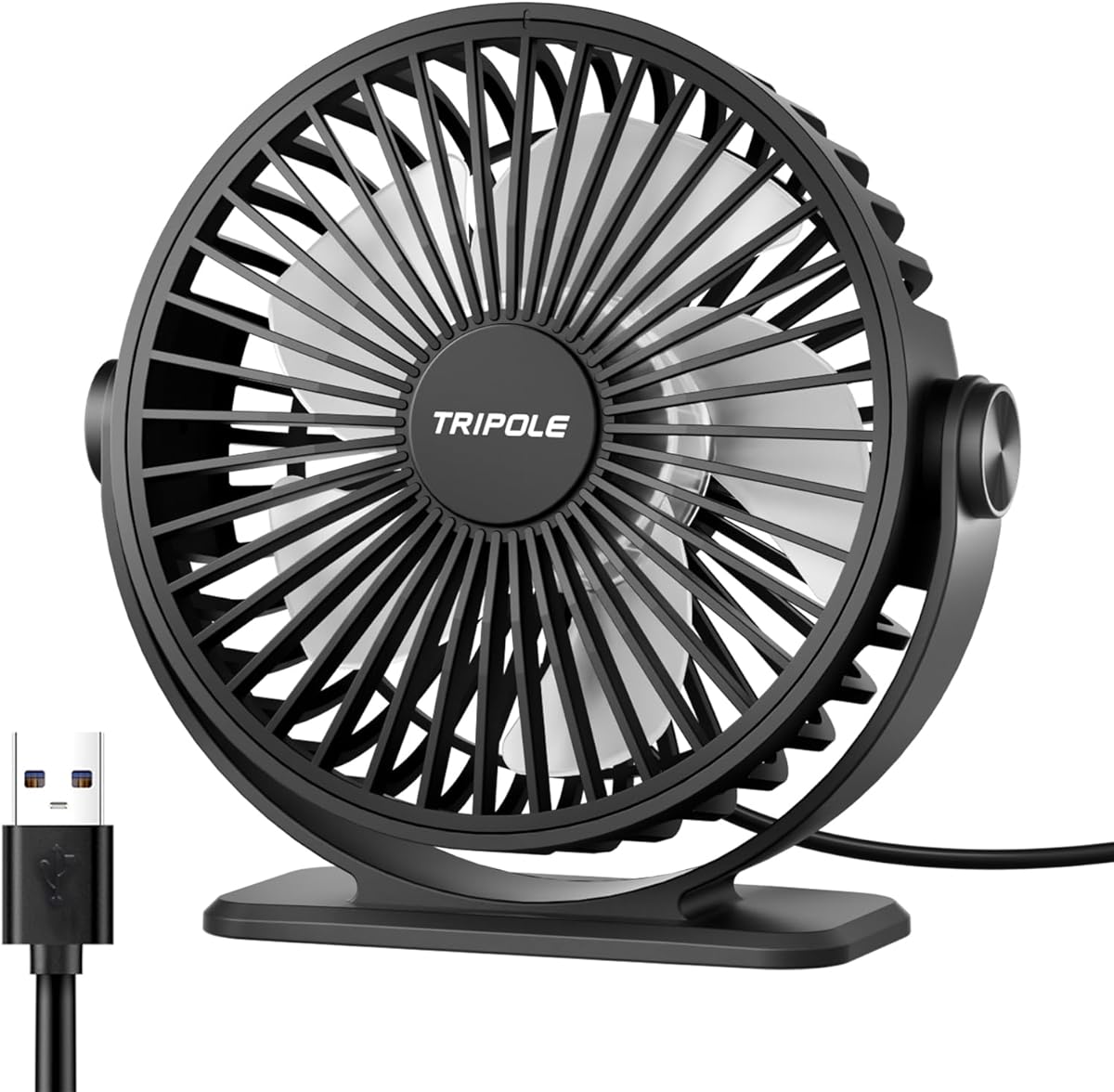
A personal fan for targeted cooling without relying on loud laptop fans. Its compact size and 360-degree rotation allow flexible positioning to suit your needs effectively.
We may earn a commission when you buy through this link, at no additional cost to you.
With three speed wind modes, you control airflow intensity. The stable base with silicone pads reduces vibration and noise during use, maintaining a quiet environment.
It is USB powered for convenience and portability. Regular cleaning of the mask and blades ensures a refreshing breeze every time you use it.
Great for personal desks or nightstands needing quick cooling. This fan provides rapid relief without introducing excessive noise to your workspace.
With the three speed wind modes you have the flexibility to choose the airflow intensity that suits your needs by pressing the button.
The wide fan base keeps this personal fan firm on desk and four silicone pads at the bottom reduce vibration and decrease noise.
We may earn a commission when you buy through this link, at no additional cost to you.
This chill mat provides comfort while keeping laptops cool for extended use. Dual fans powered via USB-A offer efficient heat dispersion without generating distracting noise.
We may earn a commission when you buy through this link, at no additional cost to you.
The soft neoprene bottom delivers cushioned comfort on your lap. Open mesh tops allow quick airflow to prevent overheating during heavy work.
Rubber stops ensure stability for different laptop sizes. It combines ergonomic typing support with practical cooling features for a quiet, comfortable workspace.
Perfect for users working on the go or from the sofa. It ensures both device safety and personal comfort without added noise.
Soft neoprene material on the bottom provides cushioned comfort while the Chill Mat is sitting on your lap.
The dual fans are powered using a standard USB-A connection that can also be connected to your laptop or computer using a USB cable.
We may earn a commission when you buy through this link, at no additional cost to you.
This business laptop balances performance with quiet operation. With ample RAM and a large display, it supports multitasking without excessive fan noise, ideal for professional environments.
We may earn a commission when you buy through this link, at no additional cost to you.
The 17.3-inch display offers sharp details for detailed work. Long battery life and fast charge features ensure productivity throughout the day without constant power access.
Built-in AI Copilot helps organize tasks efficiently. Its durable silver finish complements the sleek design, making it suitable for modern business settings.
Recommended for professionals needing a larger screen and silent performance. Its robust specs and quiet operation make it a reliable daily companion.
Experience high performance with a stunning 17.3 inch FHD anti-glare display with sharp details and vivid color for multitasking.
Built-in AI Copilot helps you quickly organize tasks, summarize information, and create content for enhanced productivity.
We may earn a commission when you buy through this link, at no additional cost to you.
Selecting a quiet laptop involves evaluating several factors beyond price. This guide helps you understand what influences noise levels and how to find the right match for your needs.
Processors with better thermal efficiency generate less heat, reducing the need for aggressive fan speeds. Look for models with optimized cores and low-power profiles that maintain performance without loud cooling.
Prioritize efficient CPUs to ensure your system runs quietly even under moderate loads.
Effective thermal design includes quality heatsinks and airflow paths that dissipate heat passively. Laptops designed with these features minimize reliance on high-speed fans.
Check reviews for thermal management performance to confirm quiet operation over time.
Sturdy chassis materials can dampen vibrations from internal components. Good build quality prevents rattling and ensures fans operate smoothly without noise.
Invest in devices with solid construction to avoid unnecessary mechanical sounds.
Modern operating systems and firmware include power management tools that control fan behavior. Devices with advanced settings allow you to limit noise during idle periods.
Ensure the system supports custom power profiles to manage noise levels effectively.
Accessories like cooling pads can lower temperatures without adding noise to the main unit. These tools improve airflow and reduce fan load on the laptop itself.
Consider external solutions if you need extra cooling for performance-heavy tasks.
Larger laptops often accommodate better cooling systems but may be heavier. Balance the need for silence with portability based on your primary usage environment.
Choose a size that fits your workspace while supporting quiet operation.
Long battery life often correlates with efficient hardware that generates less heat. Efficient energy usage reduces strain on cooling systems, maintaining a quieter experience.
Look for models offering extended battery to support silent productivity sessions.
Reviews from other users provide insight into real-world noise performance. Look for consistent mentions of quiet operation or lack of distracting sounds.
Use verified feedback to confirm the device meets your silent computing expectations.
Keep your device in a well-ventilated area to prevent heat buildup. Dust and debris can clog vents, forcing fans to work harder and create more noise over time.
Use software tools to monitor temperature and power settings. Adjusting these parameters allows you to maintain performance while prioritizing quiet operation during daily tasks.
Regularly clean external ports and surfaces with appropriate tools. Keeping the exterior free of grime ensures cooling systems function efficiently without excess noise.
Modern laptops use passive cooling and efficient processors to prevent overheating. As long as vents remain clear and usage is moderate, silent devices maintain safe temperatures effectively.
Not necessarily. Efficient models offer strong performance for everyday tasks without loud cooling. High-end options balance silence with speed using advanced thermal management.
Use a cooling pad or adjust power settings to lower fan speed. Keeping the device clean and in a cool area also minimizes noise caused by heat buildup.
Many are, but it depends on the internal design. Some thin models use active cooling that can be audible under load. Check reviews for noise feedback before purchasing.
Processor efficiency, airflow design, and workload intensity all influence noise. Efficient hardware and optimized software reduce reliance on high-speed fans for cooling.
Yes, for devices that run hot. They improve airflow and reduce internal fan load, helping maintain silence while protecting your laptop from overheating.
Disabling the fan risks overheating. Instead, use software to limit speeds or rely on passive cooling designs in silent devices to maintain safety.
Often, they prioritize stable, efficient designs. Business-class models usually include better thermal solutions to support professional environments where noise is a concern.
Choosing the right silent device ensures a focused and comfortable computing experience. Whether you need a budget option or premium performance, the top picks offer reliable noise-free operation.
Prioritize efficient hardware and positive user reviews to confirm quiet performance. A well-designed laptop supports productivity without distracting sounds during critical tasks.
Prices and stock levels change regularly, so verify details before buying. Take time to compare features to find the best match for your silent computing needs.