
AULA WIN68 HE Mechanical Gaming Keyboard 60%, Hall Effect Magnetic Switch
4.5Editor score
Eight thousand hertz polling rate
Web based driver support
Adjustable actuation points
This guide compares the top 10 keyboards for Valorant ranked by speed accuracy and features to help competitive players choose the right gear for their setup.
Finding the right keyboard for Valorant is crucial for competitive success in this tactical shooter. Players need instant reaction times precise counter strafing and reliable actuation to secure kills. The best boards offer rapid trigger magnetic switches and low latency to keep you ahead in every clutch.
We evaluated the top ten keyboards currently available based on performance build quality and specific FPS features. Our analysis focuses on polling rates actuation points and ergonomic design suitable for intense gaming sessions. Each product brings unique strengths to the table for different budget levels and player preferences.
Every pick highlights key benefits ideal for players who value precision and speed in their gameplay. We also include detailed buying advice to help you navigate complex technical specifications confidently. Remember that prices and availability change frequently so check current listings before making your final purchase.
4.5Editor score
5.0Editor score

4.6Editor score
This side-by-side comparison highlights the distinct technical specifications and layout options across all ten keyboards. You will see differences in switch technology connectivity modes and additional features designed to enhance competitive performance in fast-paced tactical shooters.







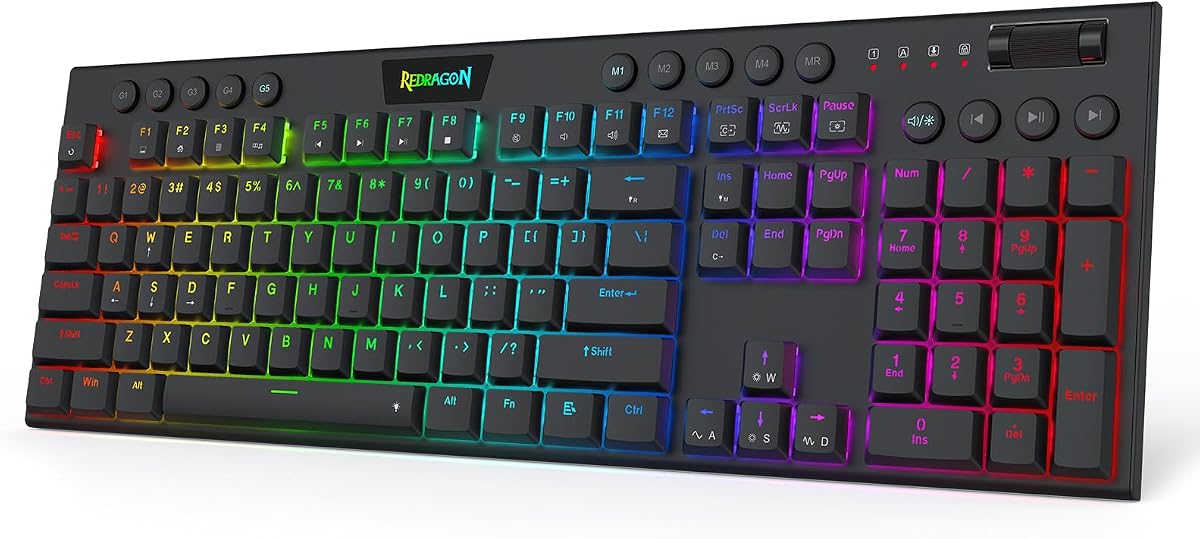
The Redragon K618 HE stands out as the top pick for Valorant players seeking speed and precision. It achieves a perfect five star rating thanks to its innovative low-profile magnetic switches that prioritize rapid actuation. This keyboard removes the friction from your inputs so you can peek and fire with absolute confidence during intense fights.
We may earn a commission when you buy through this link, at no additional cost to you.
Its standout quality is the ability to sense keypresses without physical contact which drastically reduces latency. The dedicated 4×5 macro zone allows you to record combos instantly without installing extra software first. This level of control is essential for tactical shooters where every millisecond determines whether you win or lose a round.
While it offers exceptional performance for the price there are minor trade-offs to consider. The lack of wireless connectivity means your desk space needs to accommodate a cable. However the included software allows for precision tuning of actuation profiles ensuring your setup stays consistent across all your games.
This keyboard is ideal for players who want top-tier magnetic tech without breaking the bank. Its low profile design also reduces wrist strain during long sessions. If you value speed and simplicity this board delivers a competitive edge that rivals much more expensive options on the market.
The low-profile design shortens travel distance significantly allowing keystrokes to register quicker than standard boards.
The dedicated macro zone lets you record complex combos or adjust media without needing to download any drivers.
We may earn a commission when you buy through this link, at no additional cost to you.
The Redragon K673 HE features next-gen UltraMag POM magnetic switches that sense keypresses without physical contact. This technology is built specifically for stop-and-shoot moments where timing is critical. A single control knob adjusts backlight and media making management simple without memorizing extra combos.
We may earn a commission when you buy through this link, at no additional cost to you.
Its dual-module floating structure pairs anti-wobble design with dampening layers for a soft Hi-Fi bounce sound. The 8000Hz hyper-polling transmits inputs up to eight times faster than standard keyboards. Dynamic key activation cuts redundant keystrokes during quick direction changes ensuring cleaner movement in competitive matches.
One limitation is the slightly lower rating compared to other options which might indicate some user variability. The software-powered precision tuning allows you to save actuation profiles between 0.1mm and 3.4mm for personalized control. However the non-detachable cable restricts transport flexibility if you plan to play at LAN events.
This board offers robust features for players wanting magnetic tech at an affordable price point. The noise dampening creates a quieter typing experience which is great for streamers. If you want reliable performance for peek-and-fire timing this keyboard delivers consistent execution when it matters most.
This design reduces wobble and adds dampening layers for a softer more premium typing feel.
Inputs transmit up to eight times faster than standard boards for near instant registration.
We may earn a commission when you buy through this link, at no additional cost to you.
The Redragon K686 HE is explicitly built for stop-and-shoot moments found in tactical shooters like Valorant. Its next-gen UltraMag POM magnetic switches sense keypresses without physical contact ensuring your peek-and-fire timing lands exactly when you mean it. A single knob simplifies lighting and media adjustments without memorizing combos.
We may earn a commission when you buy through this link, at no additional cost to you.
The dual-module floating structure provides noise dampening for a soft silky bounce rather than a harsh clack. You can save multiple actuation profiles via software to calibrate switches for different game modes. Dynamic key activation reduces redundant keystrokes helping you execute clean counter-strafing movements during clutch plays.
While the performance is strong it requires access to a desktop driver for full tuning which might delay quick setups. The lack of wireless connectivity limits mobility for portable setups. However these trade-offs are acceptable given the competitive speed and reliable magnetic technology available at this price point.
This keyboard suits players who prioritize raw speed and sound quality during matches. The software precision tuning keeps your setup consistent across games for better muscle memory. If you want a board that feels solid and fast without premium pricing this is a reliable choice.
Calibrate magnetic switches via desktop or web driver to keep your setup consistent across all games.
Independent switch-plate design ensures keypresses feel stable and smooth even during rapid fire.
We may earn a commission when you buy through this link, at no additional cost to you.
The Corsair Clipper PRO MINI 60 offers advanced hall effect control specifically designed for competitive FPS games. Rapid Trigger enables instant reset for rapid taps while Smart Tap gives you consistent execution and reduced finger fatigue. Its 60% layout maximizes mouse space for low-sensitivity aiming which is vital for precision shots.
We may earn a commission when you buy through this link, at no additional cost to you.
The AXON hyper-processing delivers up to 8000Hz polling ensuring near-instant input registration. FlashTap SOCD enables cleaner directional inputs and sharper counter-strafing. Durable PBT double-shot keycaps resist wear through extended sessions making this a long-term investment for serious players who demand reliability.
One downside is the higher price point which might be steep compared to budget alternatives. The 60% layout means you sacrifice numpad keys and function row which can affect non-gaming tasks. However for pure gaming performance the compact design and superior build quality justify the cost for dedicated users.
This keyboard is ideal for players who want durability and speed in a compact form factor. The IP57 rating provides peace of mind against spills during intense gaming. If you value precision and need extra mouse room this board is a top-tier choice for competitive setups.
This feature enables cleaner directional inputs and sharper counter-strafing for more accurate aiming.
Built to handle intense gameplay with water and dust resistance for long sessions without worry.
We may earn a commission when you buy through this link, at no additional cost to you.
The Razer Huntsman Mini uses optical beam-based actuation that registers key presses at the speed of light. This technology is fifteen to thirty percent shorter than other linear switches providing faster responses. The Snap Tap feature prioritizes the latest input between assigned keys enhancing in-game movement without complex macros.
We may earn a commission when you buy through this link, at no additional cost to you.
Its fully customizable RGB lighting syncs with popular games and Philips Hue gear for total immersion. The oil-resistant double-shot PBT keycaps resist grime buildup maintaining a textured finish. The matte aluminum top frame increases structural integrity ensuring the board feels sturdy during aggressive play.
Snap Tap is OFF by default and must be toggled on via Synapse which requires some setup. Full programmability needs software access which might not appeal to those who prefer on-the-fly controls. However the speed and build quality make it a favorite for competitive players who demand top performance.
This keyboard suits players who want premium feel and ecosystem integration. The #1 selling brand status indicates trust and reliability. If you value speed and aesthetics this Mini offers a powerful experience that helps you execute complex combos effortlessly.
Prioritize the latest input between assigned keys for responsive movement without needing complex macros.
Fully syncs with games and hardware to create immersive lighting that matches your gameplay.
We may earn a commission when you buy through this link, at no additional cost to you.
The Aula WIN60 HE features self-developed magnetic switches delivering polling rates of up to 8000Hz for ultra-fast response times. This hall effect technology eliminates wear and tear associated with traditional mechanical switches providing unmatched precision and reliability. The web-based driver ensures seamless customization without bulky software downloads.
We may earn a commission when you buy through this link, at no additional cost to you.
Its ultra-low RT step distance of just 0.02mm ensures lightning-fast response times for complex combos. The 60% layout saves desk space without sacrificing functionality ideal for travel or work. Dynamic RGB lighting illuminates PBT keycaps allowing you to create stunning lighting effects for your gaming setup.
The driver supports Windows systems but does not support MAC which limits cross-platform compatibility. It requires a wired connection which might be inconvenient for wireless setups. However for competitive gamers seeking speed and customization this board offers high-end specs at a budget-friendly price.
This keyboard is ideal for players who want magnetic tech without spending a fortune. The web-based customization puts precision and convenience at your fingertips. If you need a reliable gaming keyboard that handles high-stakes moments the WIN60 HE delivers clear advantages.
Remap keys and customize RGB without downloading software ensuring hassle-free personalization across devices.
Delivers ultra-fast response times giving you a competitive edge with near-instant input registration.
We may earn a commission when you buy through this link, at no additional cost to you.
The AULA WIN68 HE offers an industry-leading 8000Hz polling rate and 8x faster response time than traditional keyboards. Combined with ultra-low latency of 0.3ms it ensures commands take effect instantly. Adjustable actuation points range from 0.02mm to 3.44mm allowing you to match personal keystroke habits precisely.
We may earn a commission when you buy through this link, at no additional cost to you.
Web driver customization allows you to manage RT and SOCD functions without needing a download. The south-facing LEDs provide better visual experience with 16.8 million RGB colors. The detachable USB cable enhances connectivity stability and makes the keyboard portable for business trips.
The driver does not support MAC systems limiting its use for Apple device owners. The compact 60% design saves space but removes dedicated function keys. However for those who value raw speed and customizable performance this board provides an edge in competitive gaming.
This keyboard is ideal for coders and gamers who want efficiency. The one-stop management interface simplifies personalization. If you need ultra-precise keying without bulk the WIN68 HE is a reliable choice for intense matches.
Commands take effect instantly with 0.3ms latency giving you a real edge in fast-paced games.
Personalize each key to the smallest unit for an ultra-precise keying experience across games.
We may earn a commission when you buy through this link, at no additional cost to you.
The AULA F75 Pro works with Bluetooth 5.0 2.4GHz wireless and USB wired connection allowing five device connections. Its hot-swappable base supports 3-pin or 5-pin switches replacement letting beginners DIY their keyboards easily. The multi-function knob switches gaming mode or office mode seamlessly.
We may earn a commission when you buy through this link, at no additional cost to you.
Side-prined PBT keycaps use double injection molding and heat sublimation for durable sweat-proof surfaces. Five layers of filling silencer counteract cavity noise providing a solid feel. The 4000mAh large-capacity battery ensures long-lasting battery life for both work and gaming sessions.
Wireless connectivity introduces slightly higher latency than wired boards for competitive play. It lacks rapid trigger mode which may limit top-tier FPS performance. However the build quality and customization features make it ideal for hybrid users needing versatility.
This keyboard suits professionals who game occasionally. The tri-mode connection meets all needs from mobile to desktop. If you value style and comfort over raw speed this board brings a very different usage experience.
Connect to five devices at once and switch effortlessly between PC tablet and phone.
Five layers of filling silencer effectively counteract cavity noise for a solid feel.
We may earn a commission when you buy through this link, at no additional cost to you.
The ATTACK SHARK X68 HE features customizable dynamic keystroke and rapid trigger function allowing you to bind four functions according to pressing degrees. True 8000Hz polling rates and 0.01mm RT accuracy reduce latency to 0.125ms ensuring ultra-response for rhythm games and FPS.
We may earn a commission when you buy through this link, at no additional cost to you.
Top mount structure with aluminum alloy anodizing process provides a quiet stable and smooth typing operation. South-facing LEDs ensure superior shine-through capabilities with 16.8 million colors. It retains separate arrow keys and curved wrist rest for ergonomic design.
The web driver requires internet access but allows deep customization for fast inputs. The non-slip mat stabilizes usage on various surfaces. However it remains a wired device which limits mobility for portable setups.
This keyboard is ideal for fast-paced games where precision matters. The detachable streamer tool adds utility. If you want a board that feels stable and accurate this model delivers revolutionary control.
Delivers ultra-response ensuring flexibility for rhythm games and FPS like Valorant.
Aluminum alloy positioning plate enhances gaming efficiency with a quiet and stable feel.
We may earn a commission when you buy through this link, at no additional cost to you.
The ASUS ROG Strix Scope II 96 offers a compact design retaining keys and number pad from a 96 percent keyboard. Tri-Mode Connectivity allows you to connect via Bluetooth or 2.4GHz wireless or USB. Pre-programmed hotkeys provide convenient control over Xbox Game Bar and recording functions.
We may earn a commission when you buy through this link, at no additional cost to you.
Integrated sound-dampening foam absorbs pinging noises and echoes resulting in improved keystroke acoustics. Hot swappable pre-lubed ROG NX Snow linear switches provide smooth thocky keystrokes for enhanced stability. The multi-function wheel allows intuitive media and lighting adjustments.
This keyboard is ideal for professionals who need full-size functionality without the bulk. The exceptional battery life supports long sessions. However the higher price point and large footprint may not suit every desk.
If you want comfort and reliability this board supports streaming and daily work seamlessly. The ergonomic comfort and tilt positions reduce strain. For high-end setups this keyboard is a top choice.
Seamlessly connect via Bluetooth 2.4GHz wireless or USB compatible with both PC and Mac.
Foam and pads absorb pinging noises and echoes improving keystroke acoustics.
We may earn a commission when you buy through this link, at no additional cost to you.
Selecting the best keyboard for Valorant requires understanding the technical specs that directly impact your in-game performance. This guide breaks down the critical factors you must consider before making a purchase.
The polling rate determines how often the keyboard sends data to your PC. For Valorant a rate of 8000Hz is ideal as it ensures inputs are registered instantly reducing input lag. Lower rates may cause delays during critical moments like peeking around corners.
Look for keyboards that advertise high polling rates and low latency to ensure your movements happen exactly when you intend them to.
Magnetic hall effect switches allow you to adjust actuation points which is crucial for counter strafing. Being able to reset keys faster than standard switches gives you a competitive edge in tactical shooters. Linear optical switches are also fast but may not offer the same level of customization.
Choose switches that offer rapid trigger and adjustable actuation to tailor the keyboard to your playstyle and reaction speed.
Valorant players often prefer 60% or TKL layouts to free up mouse space for low sensitivity aiming. A smaller footprint allows for better ergonomic positioning and reduces the need to move your arm constantly. Full-size keyboards might limit your mouse movement area.
Select a layout that balances essential keys with the freedom to move your mouse without obstruction.
Competitive gaming involves intense usage so durable keycaps and a sturdy frame are essential. PBT keycaps resist wear and shine better than ABS over time. Aluminum frames add structural integrity ensuring the board feels solid during rapid inputs.
Invest in a board with robust construction to ensure it lasts through thousands of hours of intense gameplay.
Advanced customization options allow you to set macros and profile-specific settings. Look for software that supports profile saving and on-the-fly adjustments. Web-based drivers offer convenience as they do not require installing bulky software on your system.
Ensure the keyboard offers intuitive software for remapping keys and adjusting lighting to suit your personal preferences.
Wired connections generally provide the most stable signal for competitive play without any interference. Wireless options offer freedom of movement but may introduce latency. Choose a board with multi-mode connectivity to switch between wired and wireless as needed.
Prioritize wired modes for ranked matches to guarantee the lowest possible latency during critical rounds.
Some players prefer a silent typing experience while others enjoy mechanical feedback. Look for keyboards with sound dampening layers to reduce noise during matches. This ensures your setup does not disturb teammates or streaming audiences.
Consider keyboards with dampening foam or silent switches to keep your setup distraction-free.
Prices range from budget-friendly options to premium models with advanced features. Determine how much you are willing to spend based on the specific features you need. High-end boards offer better longevity and customization while budget options still provide solid performance.
Compare features against cost to ensure you are getting the best value for your specific needs.
Always install the latest drivers to access features like rapid trigger and macros. This ensures your keyboard communicates effectively with your system.
Keep the surface clean by using a compressed air blower to remove dust between keycaps. Regular maintenance extends the lifespan of the switches and keycaps.
Adjust your actuation points in the software to match your playstyle. Start with a lower point for faster responses and increase it if you need more control.
The best polling rate for Valorant is 8000Hz as it offers near-instant input registration. This high rate ensures your actions are processed by the game as soon as you press a key.
Yes magnetic switches allow for adjustable actuation points and rapid trigger. This helps with counter-strafing and quick movements essential for tactical shooters.
Wired keyboards are generally preferred for competitive Valorant due to lower latency. Modern wireless boards are good but wired options remain the gold standard.
A 60% or TKL layout is best for low-sensitivity aiming as it frees up desk space for mouse movement. This allows you to use lower DPI settings effectively.
Clean it regularly with compressed air and wipe the surface with a microfiber cloth. Avoid exposing it to liquids or extreme temperatures.
Rapid trigger is highly recommended for Valorant as it resets the key immediately upon release. This allows for faster direction changes and smoother gameplay.
Choosing the best keyboard for Valorant ultimately depends on your specific needs and budget. Our top pick is the Redragon K618 HE for its perfect balance of speed affordability and features.
Prioritize high polling rates and adjustable actuation to get the competitive edge you need. These specs are critical for executing precise movements during intense ranked matches.
Always check current prices and availability as deals change frequently. Your ideal setup is just a click away so start upgrading your gear today.