
Air Mouse Remote MX3 Pro
3.8Editor score
Plug and play setup
Mini keyboard included
Affordable price point
This guide compares the top 10 air mouse for Android TV Box devices to help you find the best wireless remote with keyboard and voice control.
Finding the right air mouse for Android TV Box can transform your entertainment experience significantly. These devices combine gesture control with typing ease, making navigation intuitive and fast for any smart home setup.
We evaluated ten leading models based on connectivity, battery life, and build quality. Our analysis focuses on real-world performance metrics and user feedback to ensure you get reliable technology without unnecessary complexity.
Each pick highlights unique strengths like voice search or IR learning capabilities. Keep in mind that stock levels and pricing fluctuate frequently, so always verify current offers before finalizing your purchase decision online.
3.8Editor score

4.5Editor score

4.2Editor score
The following table provides a side-by-side comparison of key specifications for all ten models reviewed in this comprehensive guide to help you make an informed choice quickly.
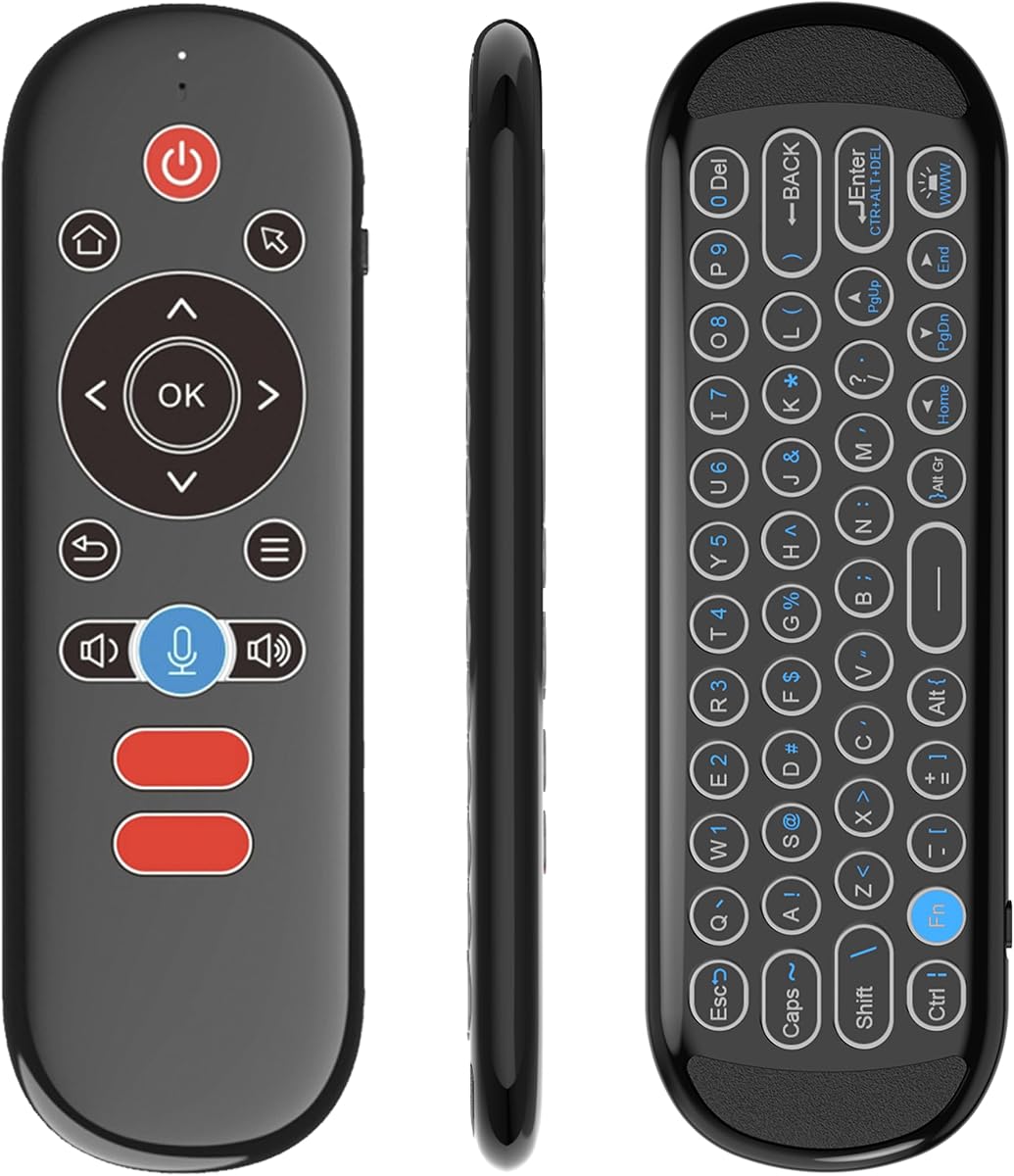


This model stands out as the Editor's Choice due to its robust feature set and high user rating. It effectively balances advanced motion control with straightforward remote functionality for daily media tasks.
We may earn a commission when you buy through this link, at no additional cost to you.
The included USB receiver ensures a stable connection up to ten meters while the built-in voice assistant helps you search for content quickly. Its dual connectivity options offer flexibility across different Android TV systems.
Users note that it requires some initial setup for IR learning but the process is manageable and well-documented. The electronic manual on the back provides instant access to troubleshooting tips when needed.
If you want a reliable remote that handles both mouse navigation and traditional remote tasks efficiently this option delivers excellent value for the price point today.
Switch between BT and 2.4G RF modes for flexible device compatibility across your home entertainment setup.
The built-in 6-axis gyroscope lets you move the cursor with natural wrist movements for smooth precise control.
We may earn a commission when you buy through this link, at no additional cost to you.
This budget-friendly option proves you do not need to spend a lot to get essential air mouse features. It delivers reliable motion control and typing capability for standard smart TV navigation.
We may earn a commission when you buy through this link, at no additional cost to you.
The 2.4G wireless connection works without drivers while the mini keyboard on the back speeds up text entry during searches. Five programmable IR keys allow you to manage your TV alongside the box.
Reviewers mention that the build feels lightweight and durable enough for casual use without extra bulk. It is a great starter device for those who want basic cursor control immediately.
For households seeking an economical solution to navigate streaming apps and type queries this remote provides core functionality at a very competitive price point.
Just plug the USB receiver into your device and start moving the cursor with your hand movements instantly.
The built-in mini keyboard lets you type words easily when searching for movies or logging into accounts on TV.
We may earn a commission when you buy through this link, at no additional cost to you.
This premium model brings advanced features like dual firmware modes and enhanced voice control to your setup. It offers a higher level of customization that appeals to tech-savvy users.
We may earn a commission when you buy through this link, at no additional cost to you.
The device includes a USB receiver for easy setup and supports IR learning for all buttons to replace your existing remotes. You can switch between standard and PC modes to adapt to different environments.
While the voice function works best with specific TVs like Google TV or Shield TV it significantly speeds up search queries. The design prioritizes comfort during long viewing sessions.
If you need a versatile controller that adapts to multiple device types and offers deep control options this model is an excellent premium investment.
Press the OK and Mouse buttons to toggle between standard TV mode and PC mode for broader device compatibility.
The remote supports IR learning for all buttons ensuring maximum compatibility with most AOSP devices and smart TVs.
We may earn a commission when you buy through this link, at no additional cost to you.
This device offers a dual-sided rechargeable design that eliminates the need for frequent battery replacements. The backlit keyboard provides clear visibility in dim lighting conditions for comfortable use.
We may earn a commission when you buy through this link, at no additional cost to you.
With a built-in 3-axis gyroscope and accelerometer it delivers ultra-smooth and precise pointing across various screen types. The true plug and play setup means you can start using it immediately without software.
Users appreciate the 7-color backlight which helps when typing passwords or searching for content in the dark. Its compatibility extends to Windows macOS and Linux systems as well.
For those who want an eco-friendly rechargeable solution with a well-lit keyboard this remote is a strong contender for modern smart home environments.
Dual-sided rechargeable design offers convenient power management without the hassle of buying new batteries constantly.
The QWERTY keyboard features a bright LED backlight for quick searching and logging in even in low-light environments.
We may earn a commission when you buy through this link, at no additional cost to you.
This remote focuses on delivering a high-fidelity microphone experience for voice commands. It aims to simplify text entry and search tasks through spoken input rather than physical typing.
We may earn a commission when you buy through this link, at no additional cost to you.
The 2.4GHz RF technology ensures a stable connection while the 17-key air remote keyboard covers essential navigation and volume control needs. It works across Windows Android Mac and Linux systems.
Reviewers find that the voice search function is effective within built-in apps but less flexible for custom configurations. The compact design makes it easy to stash in a side table.
If you prioritize voice navigation over complex typing features this device provides a straightforward and reliable solution for daily smart TV usage.
The built-in high fidelity microphone lets you chat with friends or input words via voice clearly and quickly.
Compatibility with Linux Android Windows and Mac OS ensures you can use it across different operating systems easily.
We may earn a commission when you buy through this link, at no additional cost to you.
This model features a vibrant RGB backlight that makes typing easy in dark rooms. Its dual-mode connectivity supports both Bluetooth and 2.4GHz wireless for flexible pairing options.
We may earn a commission when you buy through this link, at no additional cost to you.
The 6-Axis Gyroscope ensures precise cursor control and the Type-C port allows for convenient recharging without disposable batteries. It serves well as a compact remote for laptops and PCs too.
Users note that the lighting is bright and customizable but requires testing on specific TVs for full compatibility. The support team is available for troubleshooting any setup issues.
For users who want a stylish backlight feature and rechargeable convenience this model is a top choice for media center PCs.
The RGB backlight lets you cycle colors or turn them off via Fn and Space keys for personal preference.
Powered by a long-lasting built-in rechargeable battery with a Type-C port to reduce battery waste.
We may earn a commission when you buy through this link, at no additional cost to you.
This Rii model is popular for its motion sensor features that make gaming on TV easier. The fly mouse design allows for smooth cursor movement in horizontal and vertical modes.
We may earn a commission when you buy through this link, at no additional cost to you.
It connects via a 2.4GHz wireless dongle and supports infrared learning for five specific keys including power and color buttons. The range reaches up to ten meters reliably.
Reviewers appreciate the professional customer service team and the compact size that fits comfortably in one hand. However TV note that a few keys might not function on all devices.
If you want to play somatosensory games or prefer motion control for navigation this model offers solid performance at a mid-range price point.
The 3-Gyro and 3-G sensor allow accurate motion sensing for gaming and general navigation tasks.
It learns up to five keys from your TV IR remote using the NEC protocol for convenient control.
We may earn a commission when you buy through this link, at no additional cost to you.
This version features an LED backlight double-faced design that makes typing in the dark much easier. It offers a risk-free buying option with a 30-day money back guarantee to build trust.
We may earn a commission when you buy through this link, at no additional cost to you.
The 2.4GHz RF technology ensures a stable transmission up to ten meters while the mini keyboard allows quick character entry. It supports multiple systems including Windows Linux and Mac OS.
Users find that the backlight is bright enough for low-light use but note some incompatibility with certain smart TV brands. The after sales service is available for any issues.
If you need a reliable remote with good backlight features and a solid return policy this is a practical choice for most users.
The LED backlight double-faced design helps you type in the dark and input correct information accurately.
Support for Windows Android Mac OS and Linux ensures it works with many different operating systems.
We may earn a commission when you buy through this link, at no additional cost to you.
This remote features a single-sided design that prioritizes simplicity and ease of use. The buttons are designed to be wear-resistant and permanent for long-term reliability.
We may earn a commission when you buy through this link, at no additional cost to you.
The gyroscope core compensation algorithm helps identify gestures accurately reducing shake and tremor during movement. It supports Bluetooth mode which is useful for Android systems specifically.
Users note that the button arrangement is well thought out but pairing in Bluetooth mode requires disconnecting the USB receiver first. It is a solid choice for Android-centric setups.
For those who want a straightforward remote without extra complexity this model offers a clean interface and reliable gesture control.
The gyroscope core compensation algorithm identifies gestures accurately to reduce tremor and shake during use.
The permanent wear resisting buttons and simple layout make it easy to use for daily media control.
We may earn a commission when you buy through this link, at no additional cost to you.
This model is widely compatible with Android Windows Linux and Mac OS systems making it versatile for mixed environments. It offers a 1-year no-reason return and exchange policy for buyer peace of mind.
We may earn a commission when you buy through this link, at no additional cost to you.
The key learning function lets you teach the remote up to five keys from your old TV remote. It works with 2.4G wireless technology for a stable connection without drivers.
Users find that it works well for searching movies and navigating menus but must learn the power key first to turn devices on. The mini wireless keyboard supports typing easily.
If you need a versatile remote that works across many systems and includes a long return policy this is a safe buy for most setups.
Compatible with Android Windows Linux and Mac OS systems to work across different devices easily.
The key learning function allows you to learn up to five keys from your TV old remote for easier control.
We may earn a commission when you buy through this link, at no additional cost to you.
Selecting the right air mouse requires evaluating several key factors that influence how well it works with your specific entertainment setup.
Look for devices that support 2.4G RF or Bluetooth for reliable signal transmission. These standards ensure stable communication without the need for extra drivers.
Bluetooth offers greater flexibility for mobile devices but RF ensures consistent performance on TVs.
The quality of the gyroscope determines how accurately the cursor follows your hand. A 6-axis gyroscope provides better control than simpler 3-axis models.
Better motion sensing translates to a smoother navigation experience for menus and games.
A mini keyboard is essential for searching content and entering passwords. Ensure the layout is intuitive and fits comfortably in your hand.
Keyboard models with backlighting are valuable for using the remote in dark viewing environments.
IR learning allows the remote to control other devices like your TV or soundbar. This reduces the need to juggle multiple remotes.
Check how many buttons can be programmed to ensure your main functions are covered.
Built-in microphones enable voice search for apps and shows. Confirm which operating systems support this feature on your device.
Voice input can significantly speed up navigation if your Android TV system supports it well.
Decide between disposable batteries and rechargeable options. Rechargeable models offer long-term savings but may require extra charging cables.
Disposable batteries are convenient for immediate use without waiting for charging cycles.
Verify that the remote supports your specific Android TV box or smart TV. Some remotes exclude certain proprietary platforms like Fire Stick or Roku.
Read the compatibility list carefully to avoid returns due to unsupported systems.
A generous return policy ensures you can try the device risk-free. Look for at least a 30-day window for testing.
This protection is vital since performance can vary depending on your specific hardware.
Begin by inserting the USB receiver into your TV box or PC and powering on the remote. Wait for the connection to establish before starting to use.
Gently wave the device in the air to move the cursor and press keys to confirm selections. Keep it away from water and direct sunlight.
Regularly check battery levels and clean the exterior with a soft dry cloth. Update firmware if available to maintain optimal performance.
Most air mice are designed to work with 99% of standard Android TV boxes but some proprietary devices may be excluded. Always check the product compatibility list before purchasing to ensure it supports your specific brand and model.
Press the IR learning button on the air mouse and point your original remote at it to transmit the key codes. Follow the specific steps in the user manual to program the buttons successfully.
Yes many models offer a PC mode or dual connectivity to work with Windows and Linux systems. Switch the mode via specific button combinations to enable standard mouse functionality.
Most universal air mice do not work with Amazon Fire Stick devices due to proprietary security. Look for remotes that explicitly state Fire Stick support to avoid compatibility issues.
Battery life depends on usage patterns and whether the remote uses disposable or rechargeable cells. Expect weeks of standard use before needing to replace or recharge the power source.
Cursor shakiness often results from low batteries or strong signal interference near the device. Replace batteries or move the USB receiver closer to reduce connection issues.
Voice search depends on the apps installed on your Android TV system. It works best in built-in search boxes and supported streaming apps for quick text entry.
No drivers are needed for most 2.4G models as they support plug and play functionality. Simply insert the receiver and the device will be recognized automatically by your system.
We highlighted ten reliable models ranging from budget to premium options for different needs. The BOXPUT BPR2S Plus remains our top choice for its versatile features and strong user ratings.
Focus on connectivity and motion sensing quality to ensure smooth navigation. Consider whether you need a keyboard or voice control based on how you use your TV.
Check current prices and stock before buying since offers change frequently. Investing in the right device now will make your smart TV setup more efficient and enjoyable.