
ORICO 5.25 Trayless Hot Swap Mobile Rack
4.1Editor score
Fits all 3.5 inch SATA drives
Tool-free mounting process
Durable stainless steel construction
Finding a reliable hot swap SATA mobile rack is essential for professionals who need frequent drive access without system downtime. These enclosures allow you to insert and remove drives quickly from the front of your server or desktop case. A good model ensures secure connections, adequate cooling, and durability for daily use.
We evaluated ten top-rated mobile rack enclosures based on build quality, compatibility, ease of use, and thermal management. Our analysis focuses on trayless designs, tool-less installation, and support for both SATA and SAS interfaces. This list covers options ranging from single bays to multi-bay configurations for various storage demands.
Each pick highlights specific strengths like active power technology, fan control, or compact designs. We also note trade-offs to help you match a model to your workflow. Remember that availability and pricing can change frequently, so verify current stock before purchasing your next storage solution.
4.1Editor score

4.4Editor score

5.0Editor score
As an Amazon Associate we earn from qualifying purchases.
The following table provides a side-by-side comparison of all ten mobile rack models. It highlights key specifications such as drive capacity, interface support, and unique features to help you distinguish between options quickly.




The StarTech 3.5in SATA Trayless Mobile Rack stands out as a reliable solution for frequent drive swaps. It holds a standard 3.5 inch SATA drive in a front accessible 5.25 inch bay without needing separate trays. With a rating of 4.4 stars, it is a trusted choice for technicians.
We may earn a commission when you buy through this link, at no additional cost to you.
Its standout quality is the innovative trayless design which lets you install or remove hard drives without opening the chassis. This saves significant time during maintenance tasks. The internal rubber shock absorbers protect drives from vibration while the solid aluminum construction ensures longevity over years of use.
While it supports only one drive, that limitation is acceptable for users needing quick access to a single backup drive. The lockable drive bay adds a layer of physical security often missing in basic models. The high insertion rating means connectors stay reliable even after thousands of swaps.
This model is ideal for IT professionals who need to manage data backups or drive testing efficiently. We recommend it for workstations where drive access speed matters more than multi-drive density. Always check compatibility with your specific chassis bay size before ordering.
The trayless design eliminates the need for mounting screws or trays, allowing bare drives to slide directly into the bay for faster access.
Rubber shock absorbers and aluminum construction combine to protect drives from physical stress and ensure the rack withstands heavy daily use.
We may earn a commission when you buy through this link, at no additional cost to you.
ICY DOCK dual bay dock serves users who need to swap 2.5 inch SSDs or HDDs quickly. It fits into a standard 3.5 inch drive bay and supports both SATA and SAS interfaces. The 4.3 rating reflects its strong performance in professional environments.
We may earn a commission when you buy through this link, at no additional cost to you.
The tool-less hot-swap function allows you to insert drives without tools or trays. Individual large drive eject buttons come with activity indicator lights built in for real-time status. Active Power Technology ensures power is only supplied when a drive is present, saving energy and reducing heat.
The door-less design speeds up access but may expose drives to dust in very dirty environments. It is best for controlled server rooms or desktop labs. The 3-Year Manufacturer Warranty adds confidence for long-term deployment in business systems.
Buy this if you manage multiple portable drives for testing or backup in a 3.5 bay. It simplifies workflow by removing tray handling. Ensure your system supports SAS if you plan to use SAS drives for full compatibility.
APT powers up the LED only when a drive is installed, which reduces unnecessary power draw and helps prevent overheating in idle bays.
It accepts bare drives ranging from 5mm to 9.5mm thick, making it compatible with most 2.5 inch SSDs and slim laptop HDDs.
We may earn a commission when you buy through this link, at no additional cost to you.
StarTech backplane turns a single 3.5in bay into a hot-swappable interface for two 2.5 drives. It supports SATA I/II/III SSDs and HDDs without extra drivers. This 4.1 rated device is practical for technicians needing dual drive access in limited space.
We may earn a commission when you buy through this link, at no additional cost to you.
Its key strengths include dedicated front eject buttons and individual LEDs for each slot. The open-top design and vented slot divider promote passive heat dissipation to maintain optimal temperature. The aluminum construction matches the durability of other StarTech mobile racks.
The trade-off is that you must route power and data cables inside the case. This might complicate installation in tightly packed systems. However the included screw kit and cables simplify setup compared to buying components separately.
This rack suits small servers or desktops needing dual drive capacity in a single bay. We recommend it for backup tasks where speed and accessibility are priorities. Verify your power supply has enough connectors before installation.
The open-top design and vented slot divider allow airflow to pass through the drives, helping prevent overheating during heavy data transfers.
It comes with LP4 to SATA power and 7-pin data cables, reducing the need to source additional cables for immediate use.
We may earn a commission when you buy through this link, at no additional cost to you.
Kingwin mobile rack enables hot swapping of two 2.5 SSD/HDD drives in a 3.5 bay. It supports SATA and SAS interfaces up to 6Gbps. With a 4.5 rating, it offers strong performance and durability for professional applications.
We may earn a commission when you buy through this link, at no additional cost to you.
Its standout features include high quality ABS and metal material that aids heat dissipation and protects drives. The key lock feature keeps data safe by preventing unauthorized removal. LED indicators for power and HDD activity provide visual status at a glance.
The non-scratch connectors aim to improve insertion rates but require careful handling to avoid damage. It is ideal for enterprise systems needing reliable drive access without trays. Compatibility with all PC and server cases adds flexibility.
This cage works well for cloud computing storage and security systems where drive swapping is routine. It balances cost and features effectively. Ensure your system has a clear 3.5 bay before purchasing for installation.
The key lock feature allows you to secure drives physically, which is useful in shared environments or public facing servers.
Materials and structure promote excellent heat dissipation helping drives stay within safe operating temperatures during continuous use.
We may earn a commission when you buy through this link, at no additional cost to you.
ICY DOCK six bay enclosure supports up to 6 x 2.5 SATA/SAS HDDs in a single 5.25 bay. It features a perfect 5.0 rating for reliability. Tool-less SSD mounting and dual fans make it a top choice for dense storage needs.
We may earn a commission when you buy through this link, at no additional cost to you.
The ExpressTray system offers removable trays for easy installation while maintaining stability. Active Power Technology powers drives only when present. Individual blue LEDs and three-speed fan control provide precise management. This ensures optimal cooling for high capacity drives.
While it needs a 5.25 bay which is less common in small towers, the density is unmatched in desktop units. The price is justified by the cooling system and tray stability. It is best for rackmount or large desktop servers.
We recommend this for data center rackmount computers needing quick access to many drives. Verify your case has a 5.25 bay before buying. The fan control helps manage noise in office environments.
Dual user-upgradeable 40mm fans ensure effective cooling for six drives preventing thermal throttling during heavy workloads.
ExpressTray offers tray-less convenience with optional bottom screws for extra stability when using heavier mechanical HDDs.
We may earn a commission when you buy through this link, at no additional cost to you.
ICY DOCK ExpressCage fits four 2.5 SATA/SAS HDDs in a 5.25 bay. With a 4.6 rating it offers reliable hot-swappable bays. Tool-less mounting and individual LEDs make it convenient for frequent access.
We may earn a commission when you buy through this link, at no additional cost to you.
It supports drive heights up to 12.5mm which covers most enterprise drives. The locking latch design secures connectors and prevents accidental dislodging. Durable metal and ABS construction ensure reliability. The single power connector simplifies cabling.
The three-speed fan control helps balance cooling and noise. While limited to four drives it is more compact than six bay options. It is ideal for mid-range server needs.
Choose this if you need balanced capacity and reliability. Verify your system has a 5.25 bay. It is excellent for data centers requiring quick maintenance access.
Accommodates 2.5 drives up to 12.5mm height making it compatible with enterprise SSDs that often use thicker chassis.
Locking latches on both data and power connectors ensure secure connections that resist vibration and accidental pulls.
We may earn a commission when you buy through this link, at no additional cost to you.
ORICO mobile rack fits all 3.5 inch SATA hard drives in a front-accessible 5.25 inch bay. It is a budget-friendly tool-free solution. The 4.1 rating indicates good value for basic storage expansion.
We may earn a commission when you buy through this link, at no additional cost to you.
Its key strength is the tool-free process which locks your drive in without screws. It supports hot swapping for plug and play access. The stainless steel construction aids heat dissipation. An on/off switch allows power control without rebooting.
The trade-off is limited security compared to lockable models. It is best for personal or office backups. The design is simple and effective for occasional drive swaps.
Buy this for personal backup tasks. It offers essential hot swap function. Verify your bay is empty before installation.
Plug and play support ensures you can swap drives without shutting down the system keeping productivity high.
Stainless steel construction helps dissipate heat effectively maintaining safe drive temperatures during operation.
We may earn a commission when you buy through this link, at no additional cost to you.
Rosewill enclosure converts three 5.25 bays into four drive bays. It supports SATA and SAS. A 120mm exhaust fan ensures reliable cooling. The 4.3 rating reflects its utility in server cases.
We may earn a commission when you buy through this link, at no additional cost to you.
Its smart space saver design maximizes storage density. It accommodates 3.5 or 2.5 HDDs for flexible configuration. The durable steel and ABS materials ensure years of use. Hot-swap support avoids system shutdown.
It requires significant front space which may limit use in smaller towers. The fan is effective but may add noise. It is best for multi-bay servers.
Choose this for dense storage expansion. Verify your case has three contiguous bays. It is practical for storage servers.
A single rear 120mm exhaust fan produces effective airflow keeping drives cool during heavy I/O operations.
Supports both 3.5 and 2.5 drives allowing you to mix HDDs and SSDs based on budget and speed needs.
We may earn a commission when you buy through this link, at no additional cost to you.
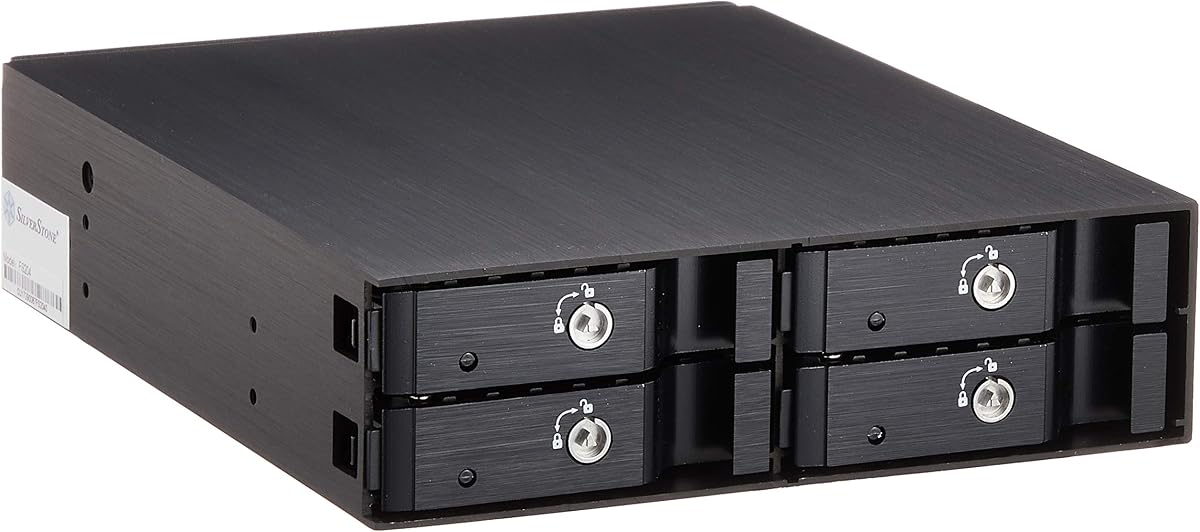
Silverstone fits four 2.5 drives in a 5.25 bay. Individual key locks secure each drive. All aluminium body and built-in fan ensure durability. A 4.2 rating confirms quality construction.
We may earn a commission when you buy through this link, at no additional cost to you.
Its standout feature is individual metal key locks for extra security. The independent LEDs show status. The aluminium body offers excellent heat dissipation. It is designed for professional use.
The high price may limit it for budget users. It is best where security matters. The 5.25 bay requirement is standard for servers.
Buy this for secure multi-drive setups. It is ideal for shared offices. Verify your case has a 5.25 bay.
Individual metal key locks for each drive prevent unauthorized removal and protect sensitive data in shared environments.
The beautiful hairline brushed finish gives the unit a professional look suitable for open-case servers.
We may earn a commission when you buy through this link, at no additional cost to you.
LYNICESHOP mobile rack uses three contiguous optical bays to expand to five drive positions. It supports SATA and SAS. The 5.0 rating indicates high satisfaction. Aluminum construction ensures durability.
We may earn a commission when you buy through this link, at no additional cost to you.
Its space-saving design is efficient. The dual power supplies make operation safer. Excellent heat dissipation extends service life. It serves well for hot-swap or stand-alone boxes.
It requires three bays which may be limited in modern cases. However capacity is strong. The aluminum alloy resists corrosion.
Choose this for high density in limited space. Verify your case has three contiguous bays. It is great for NAS expansion.
The design only takes up three contiguous optical bays to expand to five hot-swap positions which is more space-saving than standard cages.
Dual power supplies make operation safer and more stable ensuring consistent power delivery to all drives.
We may earn a commission when you buy through this link, at no additional cost to you.
Selecting the right mobile rack requires attention to several factors beyond price. Here we cover what matters most for reliability and performance.
The first factor is ensuring the rack fits your drive sizes and available bays. Most desktops have 5.25-inch bays but servers may offer 3.5-inch bays. Check if the unit supports 2.5-inch, 3.5-inch, or both. Ensure your case has the correct number of contiguous bays before ordering.
Verify your case has the exact bay size required by the unit.
Interfaces determine which drives you can use. Some racks only work with SATA while others support SAS. SAS offers higher durability for 24/7 use. If you plan to use enterprise drives check the model specs for SAS compatibility to avoid mismatched connections.
Confirm interface compatibility with your planned drives.
Trayless models allow faster access but may lack stability for heavy drives. Tray-based options secure drives with screws reducing vibration. If you swap drives often trayless may be best. If you need long-term stability trays are safer.
Pick trayless for speed and trays for stability.
Heat affects drive health significantly. Some racks include dedicated cooling fans while others rely on passive airflow. If you plan to house multiple drives ensure the unit has fan support or vents. Good cooling prevents thermal throttling and extends drive life.
Ensure adequate cooling to prevent drive overheating.
Materials like aluminum or steel offer better durability than plastic. Look for units with strong connector protection. A robust chassis protects your drives from physical damage and reduces vibration issues. Check user feedback on long-term reliability before buying.
Choose aluminum or steel for better durability.
If you store sensitive data consider racks with key locks. Physical locks prevent unauthorized removal of drives. This is essential for shared environments. Basic units often omit locks so prioritize this feature if data security is a requirement.
Prioritize key locks for sensitive data security.
Not all enclosures support hot swapping. True hot swap allows removing drives without shutting down the system. Confirm the unit supports hot swap for your interface type. This feature is critical for 24/7 uptime in professional setups.
Ensure true hot swap support for your use case.
Internal cable routing can be tricky. Some racks include cables or provide space for neat routing. Others require extra connectors. Look for locking connectors to prevent accidental disconnections. Clean routing improves airflow and reduces clutter.
Look for locking connectors and cable management support.
To begin installing a mobile rack open your computer case and locate an empty drive bay that matches your unit size. If your rack comes with mounting screws secure it firmly to the case frame to prevent vibration during operation. Connect the SATA power and data cables from your power supply to the rack connectors making sure they are fully inserted.
Once connected you can insert your drives without tools if it is a trayless design. Align the SATA connectors with the backplane and gently slide the drive into place until it clicks. Most units include LED indicators showing power and activity so you can verify successful connection visually before closing the case.
Regular maintenance includes cleaning dust from fans and vents using compressed air. Check that screws and connectors remain tight to avoid loose drives. Ensure your BIOS or OS supports hot swap so you can remove drives safely. Keeping the rack cool extends the life of your drives.
A hot swap SATA mobile rack is an enclosure that fits into a computer drive bay and allows you to insert and remove SATA drives without shutting down the system. It uses hot swap connectors so drives can be detected dynamically. This is ideal for backups or testing.
Standard SATA power connectors usually work. However if the rack includes fans you may need an extra fan power connector. Check your power supply has enough connectors to power both drives and any fans included in the rack.
Some racks support both but many are built for one size. Always check the specs to see if it accepts 2.5 or 3.5 drives. Adapters exist but native support ensures better stability and heat dissipation for your drives.
Most modern operating systems like Windows and Linux support hot swap with SATA drives. However your motherboard BIOS should enable hot plug if available. Without OS support you might need to eject drives safely before removal.
No these racks use SATA or SAS connectors. NVMe drives use M.2 or U.2 interfaces which are different. You will need an NVMe specific enclosure to support those drives. Check your drive interface before buying.
Trayless racks use spring-loaded connectors to secure drives. Some include locking latches or key locks. If your model has screws use them to secure the tray. Always follow the manufacturer instructions to avoid damage.
Using a mobile rack does not void warranties if installed correctly. Damage from improper handling may not be covered. Ensure the rack is stable and connectors are clean before insertion to avoid physical damage that voids warranty.
You can install multiple racks if your case has enough contiguous bays. Ensure your power supply can handle the combined load. Check cable management to avoid airflow blockages. Some cases support up to six bays for high density.
We reviewed ten top mobile rack options covering single bay to multi-bay solutions. The StarTech 3.5in Trayless Rack is our top pick for overall reliability and ease of use. The ORICO option is best for budget buyers while the ICY DOCK 6-Bay is best for premium needs.
Prioritize factors like drive compatibility and cooling before buying. If you need secure data choose a model with key locks. Ensure your case has the correct bay size to avoid compatibility issues during installation.
Prices and availability change quickly. Check current stock and verify specs on the retailer page before purchasing. With the right rack you can upgrade storage access speed and reliability without downtime.