
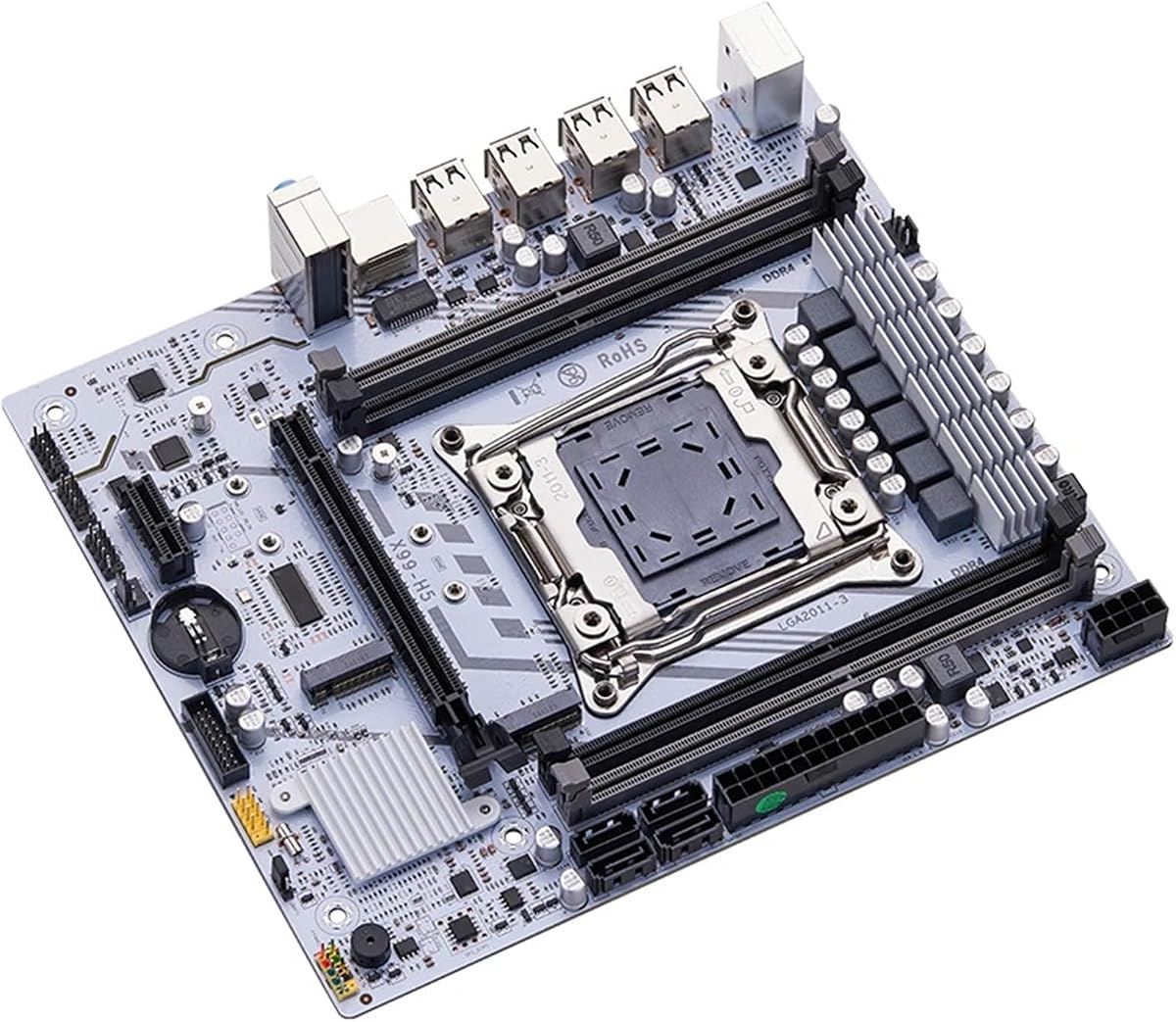
X99 LGA 2011-3 Motherboard for Intel Xeon E5 V3/V4 and Core i7 Series Processors
3.9Editor score
Dual Channel DDR4 Support
M.2 NVME Slot Included
High Performance PCB Design
This guide compares the top ten Lga 3 X99 Motherboard models available this month to help buyers find the best server and workstation platform options.
Finding the right Lga 3 X99 Motherboard can be challenging for enthusiasts seeking high core counts and multi-threaded performance. This platform supports powerful Xeon and Core i7 processors that deliver exceptional multitasking capabilities for demanding workloads.
We evaluated ten distinct models based on socket compatibility, memory support, expansion slots, and overall build quality. Our analysis focuses on features that matter most for server builds, workstations, and budget gaming rigs needing raw processing power.
Each pick highlights specific strengths and weaknesses to help you match a board to your CPU and budget needs. Keep in mind that pricing and stock levels fluctuate frequently on major online marketplaces for these specialized components.
3.9Editor score

4.1Editor score

3.7Editor score
The following table provides a side-by-side overview of key specifications across all ten models to help you quickly identify which board fits your specific CPU and memory requirements.



This MACHINIST board offers a compelling entry point into the X99 ecosystem with solid specs for the price. It supports a wide range of Xeon and Core i7 processors while providing four-channel DDR4 memory support for high throughput.
We may earn a commission when you buy through this link, at no additional cost to you.
The inclusion of three NVME M.2 slots is rare in this price bracket and allows for rapid storage arrays. The 6-phase power delivery combined with VRM cooling ensures the CPU receives stable power even under heavy multi-core loads.
Users should be aware that the package does not include a CMOS battery or a printed manual which requires downloading files separately. Compatibility checks for desktop versus server RAM are critical since mixing types can prevent booting.
For builders seeking maximum performance per dollar with server-grade CPU options this motherboard delivers significant value. It remains a strong choice for workstations needing multiple storage drives without breaking the bank.
The three NVME M.2 slots provide excellent bandwidth for high-speed SSDs and allow flexible RAID configurations.
A 6-phase VRM with cooling armor protects against thermal throttling during extended rendering or compute tasks.
We may earn a commission when you buy through this link, at no additional cost to you.
The X99 PR9-H White stands out for its clean aesthetic and compact M-ATX form factor which fits many mid-tower cases easily. It supports the full range of LGA 2011-3 CPUs and provides dual-channel DDR4 memory support for efficient data handling.
We may earn a commission when you buy through this link, at no additional cost to you.
Its M.2 NVME slot runs at PCIe 3.0 x4 speeds delivering fast storage access for operating systems and frequently used applications. The onboard Realtek audio codec provides decent sound quality for general use and media consumption.
While it lacks a printed manual and includes the CMOS battery the pre-assembled I/O shield simplifies the build process significantly. The 6-layer PCB ensures signal integrity and reliable power delivery for stable system operations.
This board is ideal for builders who want a tidy look without sacrificing server-grade CPU support. It balances cost and features effectively making it a top recommendation for versatile workstation builds.
The Micro ATX layout saves space while retaining essential connectivity and support for powerful processors.
Integrated Realtek LAN and audio provide reliable connectivity and sound for daily tasks and entertainment.
We may earn a commission when you buy through this link, at no additional cost to you.
ASUS brings its workstation expertise to this EATX board with features tailored for professional rendering and multi-GPU configurations. The 4-Way PCI-E Gen3 x16 link supports extensive graphics scaling for heavy visual workloads.
We may earn a commission when you buy through this link, at no additional cost to you.
Integration of USB 3.1 provides twice the speed of USB 3.0 which helps when transferring large media files or using external storage. The 5-Way Optimization feature simplifies tuning for performance and cooling with a single click.
Maintenance is easier with the Q Code Logger and Dr. Power LED that help diagnose power issues quickly. While larger and costlier the build quality and component efficiency reflect a higher tier of engineering.
For users requiring maximum GPU bandwidth and reliable storage connectivity this board justifies its premium. It remains a top choice for professional environments where downtime and performance are critical factors.
Support for SLI and CrossFireX with four lanes of Gen3 x16 bandwidth enables robust graphics scaling.
Onboard Q Code Logger and power LEDs assist technicians in quickly identifying system status and errors.
We may earn a commission when you buy through this link, at no additional cost to you.
The ASUS X99-A ATX balances mainstream features with workstation potential through its OC Socket design which pushes CPU and DDR4 performance further. It is a solid ATX option for users who prefer branded reliability and tuning features.
We may earn a commission when you buy through this link, at no additional cost to you.
Crystal Sound 2 and Intel Gigabit Ethernet provide a game-winning combo for networking and audio clarity. The inclusion of SATA Express alongside M.2 ensures flexibility for legacy and modern storage drives.
While it may not have the newest USB speeds the Dual Intelligent Processors 5 simplify system optimization. It remains a dependable choice for those building around existing X99 CPUs without needing extreme GPU scaling.
This board fits well in standard cases and offers consistent performance for daily compute tasks. Its combination of connectivity and tuning tools makes it a safe option for mixed-use builds.
OC Socket and Dual Intelligent Processors 5 allow easy overclocking and performance optimization with minimal effort.
Support for both M.2 and SATA Express ensures compatibility with a wide variety of existing storage hardware.
We may earn a commission when you buy through this link, at no additional cost to you.
This model distinguishes itself by supporting dual Xeon E5 CPUs which significantly increases core counts for server workloads. With eight DDR4 slots it offers extensive memory capacity for virtualization or large data processing tasks.
We may earn a commission when you buy through this link, at no additional cost to you.
The presence of two PCI-E X16 slots allows for dual GPU configurations or dedicated network and storage expansion cards. Integrated RTL8111H gigabit NIC provides reliable wired connectivity for network attached storage or servers.
Lack of visible ratings or detailed specs suggests caution and thorough compatibility checks before purchase. Users planning multi-socket builds will appreciate the expanded slot count and CPU support options.
Ideal for advanced server builds this board provides the raw expansion needed for complex setups. It is best suited for experienced builders who understand dual CPU power requirements.
Dual CPU and eight DIMM slots enable massive memory and processing power for intensive computing tasks.
Integrated Gigabit LAN ensures stable network performance for server or workstation networking needs.
We may earn a commission when you buy through this link, at no additional cost to you.
Tangxi offers a gaming-focused approach to the X99 platform with a compact M-ATX design that saves case space. It supports 4 channel DDR4 memory up to 128GB which helps with high throughput gaming and rendering.
We may earn a commission when you buy through this link, at no additional cost to you.
The M.2 NVME slot supports up to 3600MB/s speeds for quick boot times and level loading. An 8-layer PCB and 6 phase power supply aim to ensure stable operation during extended gaming sessions.
User feedback suggests checking compatibility carefully since ratings vary. The board provides modern storage options in a budget-friendly package but quality control may differ from mainstream brands.
For gamers on a budget seeking X99 CPU support this board is worth considering with caution. It balances performance features with affordability in a smaller footprint.
High-speed M.2 NVME slot ensures minimal wait times for system boot and application launches.
8-layer PCB and 6-phase power provide stable delivery for CPU performance and overclocking potential.
We may earn a commission when you buy through this link, at no additional cost to you.
This variant similarly targets dual-socket builds with eight DIMM slots allowing high memory capacity for servers. It includes two PCI-E X16 slots for GPU or NIC expansion alongside standard X1 slots.
We may earn a commission when you buy through this link, at no additional cost to you.
The inclusion of 6 channel audio and Gigabit LAN covers basic peripheral needs for headless servers or workstations. Build details are minimal so verifying BIOS support for specific CPUs is essential before ordering.
With lower ratings and limited public documentation this board carries more risk. It serves niche builders needing extra slots and CPU support without standard brand costs.
Use this option only when specific slot and CPU counts are required by your workload. Thorough research and vendor support should precede purchase.
Eight DIMM slots allow up to 256GB of memory supporting heavy virtualization and data workloads.
Two X16 slots plus two X1 slots offer flexible expansion for GPUs or specialized hardware.
We may earn a commission when you buy through this link, at no additional cost to you.
This board claims support for both DDR3 and DDR4 which is rare and could help reuse existing memory stock. Dual M.2 NVME slots allow for high-speed storage arrays without needing additional adapters.
We may earn a commission when you buy through this link, at no additional cost to you.
Claims of improved data processing and multitasking suggest firmware optimizations for lower latency. A passive chipset heatsink and aluminum heatsinks aim for silent cooling under moderate loads.
The price is higher than typical X99 boards so verify the DDR3 claim carefully as it may depend on CPU support. This model targets niche users with specific legacy RAM or storage needs.
Consider this board only when dual memory type support is a strict requirement. Its feature set is unique in a crowded market of similar X99 options.
Compatibility with DDR3 and DDR4 allows reuse of older memory modules if CPU supports legacy standards.
Dual M.2 NVME slots provide ample bandwidth for parallel SSD operations and fast storage access.
We may earn a commission when you buy through this link, at no additional cost to you.
A straightforward M-ATX board with essential X99 features it supports E5 V3 V4 CPUs and DDR4 RAM. An M.2 NVME slot offers fast boot and app launch options while keeping the form factor small.
We may earn a commission when you buy through this link, at no additional cost to you.
Minimal spec descriptions make exact port counts unknown but core connectivity appears present for standard builds. This simplicity may benefit users who prefer fewer features to manage.
Lack of detailed documentation suggests verifying BIOS compatibility and memory support before purchase. It is a basic choice for budget builds prioritizing size and core CPU support.
Use this model if compact size is a primary constraint and advanced features are not required. It serves simple server or workstation tasks well.
M-ATX form factor saves space while maintaining essential connectivity and CPU compatibility.
Includes M.2 NVME and Gigabit LAN for modern connectivity in a simple design.
We may earn a commission when you buy through this link, at no additional cost to you.
The E5 MR9A V1.0 emphasizes safety and cooling for stable operation under load. ATX form factor offers more expansion flexibility than smaller boards while supporting NVME M.2 storage.
We may earn a commission when you buy through this link, at no additional cost to you.
Multiple safety protections guard against power surges and overheating making it suitable for office or gaming environments. Complete external interfaces ensure peripheral compatibility for various use cases.
With limited public reviews buyers should check vendor support for firmware and BIOS. It serves as a general purpose ATX option with basic modern storage and memory support.
Choose this board for standard ATX builds prioritizing safety features and compatibility. It balances essential X99 capabilities with a focus on stability.
Multiple protections ensure reliable operation and protect components against power or thermal issues.
Complete external interfaces including USB 3.0 provide broad peripheral support for standard setups.
We may earn a commission when you buy through this link, at no additional cost to you.
Selecting the right motherboard for Lga 3 X99 systems involves evaluating CPU compatibility, memory type support, and expansion needs for your specific workload and case size.
Ensure the motherboard explicitly supports your chosen Xeon E5 or Core i7 processor. Some boards restrict certain CPUs or require specific BIOS versions for proper functionality.
Check the manufacturer's CPU support list before purchase to avoid incompatibility issues that may prevent the system from booting.
Verify whether the board supports ECC, RECC, or non-ECC DDR4 memory since mixing types can cause instability. Decide between dual or quad channel configurations based on memory throughput needs.
Higher memory channel counts deliver greater bandwidth for data-intensive tasks such as rendering or virtualization workloads.
Look for M.2 NVME slots that support PCIe 3.0 x4 speeds to enable fast boot and storage performance. Some models include multiple M.2 slots for RAID or multi-drive storage arrays.
Confirm SATA 3.0 port availability if you plan to use traditional hard drives for bulk storage capacity.
Count the number of PCIe x16 and x1 slots needed for GPUs and additional network or capture cards. Some boards allow multiple GPUs for SLI or CrossFireX setups.
Ensure slot lane distribution matches your expansion card requirements to maintain full bandwidth for performance devices.
Choose between ATX and M-ATX based on case size and airflow needs. M-ATX boards save space but may limit expansion slot counts compared to full ATX models.
Match the motherboard size with your case to ensure proper mounting and adequate room for airflow and cooling components.
Examine VRM phase counts and heatsink design to ensure stable power delivery under load. Boards with active cooling or thick armor dissipate heat more effectively.
Robust power delivery minimizes throttling and extends component lifespan during extended multi-core computing tasks.
Check USB port types and counts to match peripheral requirements including keyboard, mouse, and storage devices. Gigabit LAN is standard but some boards may lack newer wireless features.
Adequate rear panel connectivity reduces reliance on front panel headers or internal adapters for common peripherals.
Verify that firmware updates and BIOS files are available online since many X99 boards do not include printed manuals. Good vendor support helps resolve compatibility and stability issues.
Download manuals and BIOS ahead of time to streamline the build and troubleshoot potential boot problems.
Install the motherboard into a compatible case with standoffs to avoid shorts and ensure stable mounting. Secure all power cables including CPU 8-pin and ATX 24-pin connectors firmly for reliable startup.
Update the BIOS immediately upon building using a USB drive to ensure maximum CPU and memory compatibility. Check manufacturer websites for the latest firmware before installing expensive components.
Keep the system well ventilated and clean dust regularly to maintain VRM and chipset cooling efficiency. Monitor temperatures during stress tests to confirm thermal protection works as expected.
Some boards allow non-ECC DDR4 but others require ECC or RECC server memory depending on CPU support. Mixing memory types often leads to boot failures so verify compatibility carefully before purchasing RAM.
Most modern X99 boards include at least one M.2 NVME slot running at PCIe 3.0 speeds. Check product details for exact lane distribution since some may share bandwidth with SATA or PCIe slots.
Common supported processors include Xeon E5 V3 and V4 series and Intel Core i7 5th and 6th generation models. Always cross-reference CPU names on manufacturer support lists for accurate compatibility confirmation.
Standard boards offer four to eight DDR4 slots depending on form factor and whether dual or quad channel memory is supported. Higher slot counts allow greater total capacity for virtualization or database workloads.
Windows may install basic drivers automatically but chipset, audio, and LAN drivers should be downloaded for optimal performance. Using updated drivers helps stabilize networking and storage features on the board.
Most X99 boards do not support BIOS flashback so a compatible CPU is needed for firmware updates. Use the current BIOS version provided or flash carefully using a supported processor.
Many models offer two or more PCIe x16 slots for SLI or CrossFireX but lane bandwidth may be split. Check PCIe x16 distribution and BIOS settings for proper GPU configuration.
Most X99 boards sold online exclude the CR2032 CMOS battery so purchase one separately. It is required to retain BIOS settings and system time when the PC is powered off.
Our top picks include the ASUS EATX X99-E WS for premium workstation needs the X99 PR9-H White for value and the MACHINIST X99 V9S for budget builders seeking M.2 NVME flexibility.
Prioritize CPU compatibility and memory type support first since these factors dictate overall system stability. Match expansion slots and form factor to your case and future upgrade plans for a balanced build.
Prices and availability change regularly so review current listings and warranty options before purchasing. Verify BIOS support and package contents to avoid unexpected delays or extra costs after your order.