
Epson Workforce ES-50
4.3Editor score
Lightweight single-sheet design
USB-powered portability
5.5 second scan speed
This guide compares the top 10 document scanners compatible with iPhone 18 workflows, featuring portable mobile scanners and cloud-ready devices for seamless
Finding a document scanner for iPhone 18 requires balancing portability with high-quality output. Modern users need devices that integrate smoothly with mobile workflows while delivering crisp, searchable PDFs for professional use.
We evaluated ten top-rated scanners based on speed, connectivity, and software compatibility. Each product was assessed for its ability to handle receipts, contracts, and photos while maintaining a compact form factor for travel.
Every pick below highlights key features, pros, and cons to help you choose wisely. Remember that prices fluctuate often, so check current listings before making your final decision on the right device for your needs.
4.3Editor score
4.4Editor score

4.3Editor score
This side-by-side comparison highlights the key specifications and strengths of each scanner to help you find the ideal match for your iPhone 18 mobile workflow and office needs.





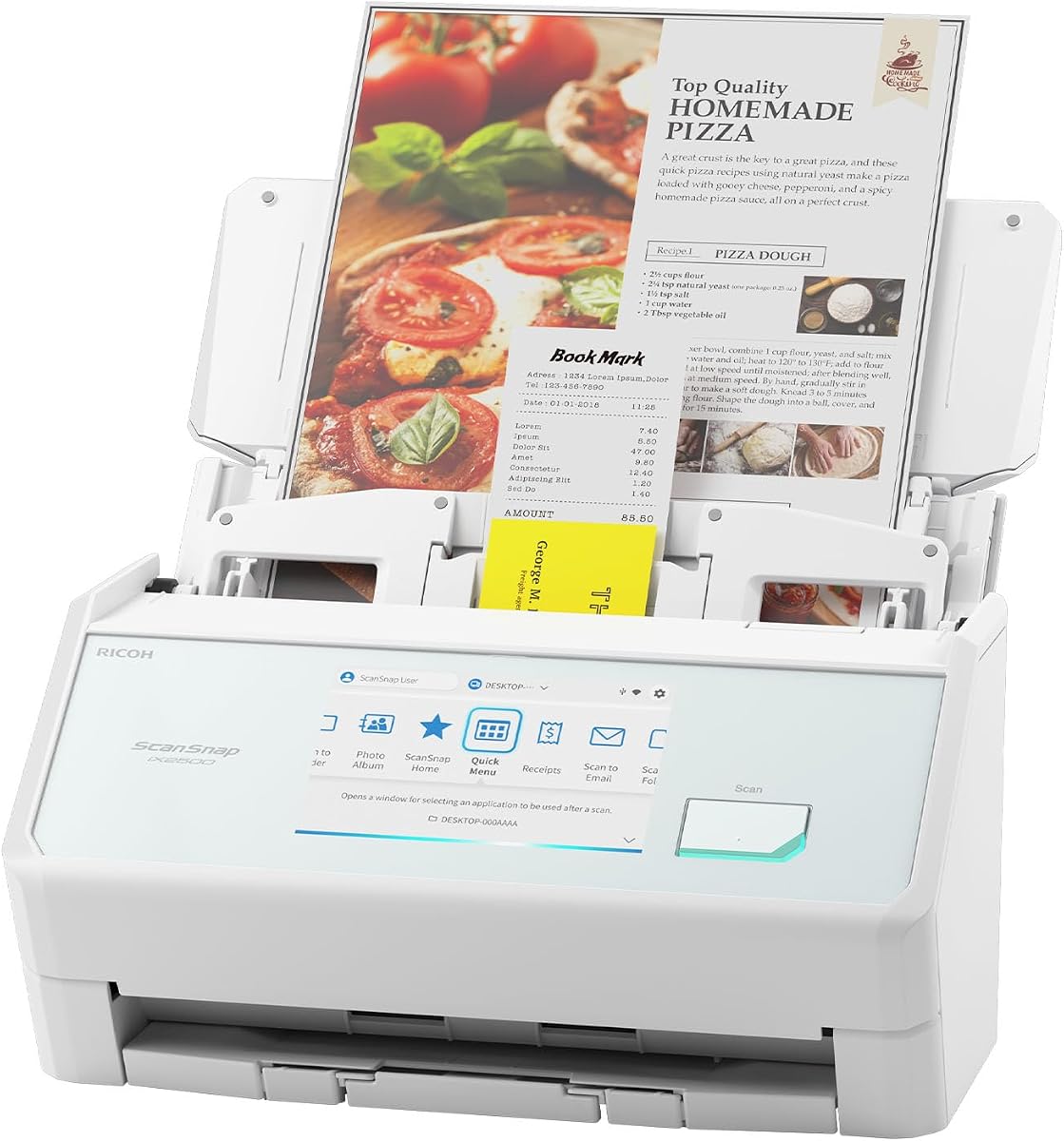
The ScanSnap iX2500 stands out as the premier choice for iPhone users needing high-speed digital workflows. With a 4.4 rating from thousands of users, it delivers consistent performance for converting physical documents into searchable digital assets quickly.
We may earn a commission when you buy through this link, at no additional cost to you.
Its 45ppm double-sided speed ensures you process large batches without delay. The included Wi-Fi 6 allows direct connections to mobile devices, making it easy to send scans to your iPhone 18 without needing a computer intermediary.
While it is a significant investment, the included software reduces manual organization effort. The brake roller system prevents jams, ensuring reliability even during heavy daily use for business professionals or students.
Buy this if you need speed and seamless cloud integration. It is the best overall option for those who value efficiency and are willing to pay a premium for top-tier hardware and software support.
Direct Wi-Fi to your iPhone 18 without a computer for instant access to scanned files.
Smart cropping and color adjustment keep your files looking professional automatically.
We may earn a commission when you buy through this link, at no additional cost to you.
The Epson Workforce ES-50 offers incredible value for budget-conscious users seeking reliable mobile scanning. It receives a 4.3 rating for its ability to digitize receipts and papers without complex setup or heavy equipment.
We may earn a commission when you buy through this link, at no additional cost to you.
Its USB power means you never need to buy batteries, keeping operational costs low. You can plug it directly into a laptop to scan documents and then transfer them to your iPhone 18 for cloud storage.
Though it requires manual feeding for each sheet, the 5.5-second speed is reasonable for occasional use. This limitation makes it ideal for travelers or freelancers who need a backup scanner on the go.
Choose this if you need a simple, affordable tool for scanning receipts. It is the best budget pick for those who prioritize portability and low upfront cost over high-speed duplex capabilities.
USB connection powers the scanner so you can use it indefinitely without recharging.
Small enough to fit in a backpack, it keeps your mobile workspace organized and tidy.
We may earn a commission when you buy through this link, at no additional cost to you.
The Brother DS-640 is a premium mobile solution known for balancing speed with a tiny footprint. It holds a 4.3 rating for its ability to scan color documents rapidly, ensuring professional output quality for all file types.
We may earn a commission when you buy through this link, at no additional cost to you.
Its 16ppm speed applies to both color and black-and-white scans, which is rare in this size. The compact design allows you to slip it into a pocket or purse, making it perfect for daily commuting or travel.
While it lacks a built-in battery, the USB 3.0 connection provides sufficient power. The iPrint&Scan app allows direct sending to email or cloud services, simplifying the workflow when connected to a PC.
Invest in this if you need a portable color scanner for business. It is the best premium pick for professionals who demand speed and color fidelity without sacrificing desk or travel space.
Scan color documents as fast as black and white, saving time on mixed batches.
Its narrow form factor fits easily on cluttered desks or small mobile workstations.
We may earn a commission when you buy through this link, at no additional cost to you.
The CZUR Shine Ultra specializes in scanning thick books and documents quickly using a camera-based design. It is rated 4.2 for its innovative ability to flatten curved pages digitally, preserving text legibility without damage.
We may earn a commission when you buy through this link, at no additional cost to you.
With a 13MP camera and one-second scan speed, it processes pages significantly faster than traditional feeders. This makes it ideal for researchers or students who need to digitize libraries of books efficiently.
However, its software currently lacks direct iOS compatibility, which may limit iPhone 18 users. You will need a computer as a bridge to manage files before transferring them to your phone for storage.
Select this if you have many books to digitize. It is the best book scanner option for those willing to work around connectivity constraints to achieve high-quality, flat page scans.
Advanced algorithms correct curved page distortion automatically for clean digital copies.
The 13MP sensor captures fine details in text and photos effectively.
We may earn a commission when you buy through this link, at no additional cost to you.
The Brother DS-740D offers reliable duplex scanning in a compact mobile package. It maintains a 4.3 rating for its ability to scan both sides of a page in one pass, saving time for users with double-sided documents.
We may earn a commission when you buy through this link, at no additional cost to you.
Its Desk Saving Design allows it to sit flush against a wall, reducing the footprint on your workspace. This feature is perfect for small home offices where desk space is at a premium.
Despite the lack of internal batteries, the USB power connection ensures consistent operation. The software suite includes tools for optimizing image quality automatically, ensuring professional results without manual editing.
Opt for this if you need duplex capabilities on a budget. It is an excellent choice for businesses needing to digitize contracts or reports efficiently without investing in larger models.
Scan both sides of a document simultaneously to halve your scanning time.
Save over 11 inches of desk space with its unique layout design.
We may earn a commission when you buy through this link, at no additional cost to you.
The Canon imageFORMULA R10 is a solid portable scanner designed for ease of use. It carries a 4.1 rating for its straightforward setup and ability to handle various media types, including business cards and plastic cards.
We may earn a commission when you buy through this link, at no additional cost to you.
Its 20-sheet automatic feeder allows you to load a small stack and walk away. The duplex scanning feature ensures that both sides of receipts are captured, which is crucial for accounting and expense tracking.
While it lacks wireless features, the USB connection remains stable for transfers. The built-in software requires no installation, allowing you to start scanning immediately after plugging in to your device.
Choose this if you want simplicity and reliability. It is a great option for small business owners or students who need a feeder-based scanner without complex configuration steps.
Digitize plastic cards, receipts, and standard paper without jams or issues.
Pre-installed software means you can start digitizing documents immediately.
We may earn a commission when you buy through this link, at no additional cost to you.
The Epson Perfection V19 II is designed for high-fidelity image scanning, particularly for photos. With a 4800 dpi resolution, it captures fine details, making it a top choice for photographers and hobbyists archiving images.
We may earn a commission when you buy through this link, at no additional cost to you.
Its flatbed design allows you to scan books or fragile documents without bending pages. The high-rise lid accommodates thicker items like photo albums, providing versatility beyond standard paper documents.
Speed is slower than feeders since you must place and scan pages manually. However, for archival work where image quality is the priority, this limitation is a reasonable trade-off for superior output.
Select this if you need to digitize photos. It is the best photo scanner for preserving memories and art with professional-level detail on a compact, portable device.
4800 dpi ensures sharp, detailed scans for enlargements and archival.
One-click Easy Photo Fix restores faded colors to old prints.
We may earn a commission when you buy through this link, at no additional cost to you.
The Epson Workforce ES-60W is designed for users who need full wireless flexibility. With a 4.1 rating, it stands out for its ability to scan directly to iOS devices, making it ideal for iPhone 18 users on the move.
We may earn a commission when you buy through this link, at no additional cost to you.
Its four-second scan speed ensures rapid processing of receipts and documents. The auto-detect connectivity feature switches between USB and battery power seamlessly, so you rarely have to change cables or settings manually.
While it requires battery management compared to USB-only models, the freedom of wireless operation is valuable. The included software supports cloud uploads, enabling you to organize documents on the fly.
Buy this if you need true wireless scanning. It is the best choice for remote workers who want to digitize files without being tethered to a computer or desk outlet.
Wirelessly connect to iPhones and iPads for direct cloud uploads.
The scanner detects USB or battery modes automatically for seamless workflow.
We may earn a commission when you buy through this link, at no additional cost to you.
The Handheld Scanner Blue is the ultimate option for ultra-lightweight scanning tasks. It is rated 3.9 for its simplicity, allowing you to scan text and images directly to an SD card without any computer intervention.
We may earn a commission when you buy through this link, at no additional cost to you.
Powered by standard AA batteries, it is perfect for field work where outlets are unavailable. You simply press the scan button and roll the device over the document to capture content quickly.
While it requires a steady hand for even scans, it is incredibly convenient for quick tasks. The included 16G SD card provides immediate storage, and files can be transferred to your iPhone later.
Choose this if you need maximum portability. It is the best pick for travelers or students who want a lightweight tool for quick scans without carrying a full-sized device.
Scan directly to SD card without a PC for ultimate mobility.
Uses common AA batteries, so you can swap power easily in the field.
We may earn a commission when you buy through this link, at no additional cost to you.
The Handheld Scanner Silver offers the same ultra-portable features as the blue variant in a different color. It is rated 3.9 for its ability to capture text and images quickly without requiring a computer connection.
We may earn a commission when you buy through this link, at no additional cost to you.
It runs on AA batteries and saves files directly to the included 16G SD card. This independence makes it a useful backup tool for professionals who need to capture notes or receipts on the go.
While it relies on manual scrolling for accuracy, the simplicity of operation is a major plus. For quick tasks where high-speed automation is not required, this device serves well as a personal digitizer.
Select this for budget-friendly mobile scanning. It is the best value option for users needing a secondary scanner for occasional use or quick reference digitization.
Files save directly to SD card for easy access without cables.
Lightweight design makes it easy to slip into a travel bag.
We may earn a commission when you buy through this link, at no additional cost to you.
Choosing the right document scanner involves evaluating connectivity, speed, and portability needs specific to mobile workflows.
Ensure the scanner supports wireless transfer or USB connections that work with your mobile setup. Some models connect directly via Wi-Fi, while others require a computer bridge.
Look for apps or drivers compatible with iOS to facilitate easy file transfer to your iPhone 18.
Fast scanners reduce time spent digitizing large batches of documents. Models with 10+ pages per minute are ideal for frequent use.
Prioritize speed if you handle contracts or invoices daily to maintain productivity.
For travelers, size and weight matter significantly. Compact devices that fit in a bag or pocket are essential.
Consider models that are USB-powered to avoid carrying heavy batteries or adapters.
Auto-feeders handle multiple sheets at once, saving time compared to manual feeding. Choose based on your volume needs.
If you mostly scan receipts, a single-sheet feeder is sufficient and saves space.
Good scanning software should allow you to save files directly to cloud services used on iPhone 18.
Ensure the vendor provides support for iOS apps or web-based management tools.
Optical Character Recognition converts images into editable text, which is vital for searching documents later.
Choose models with built-in OCR to avoid needing additional third-party apps on your phone.
High resolution ensures text is legible and photos remain clear. 300 DPI is standard for text, but 4800 DPI is better for photos.
Match the resolution to your use case; high detail is not always necessary for simple receipts.
Decide between battery-powered and USB-powered devices. Battery units offer more freedom but require recharging or buying cells.
USB power is convenient if you always have access to a laptop or portable charger.
Before first use, install the provided software or app on your device to ensure all drivers are active. Connect the scanner via USB or Wi-Fi as per the manual instructions.
Clean the scanner glass and rollers regularly with a dry cloth to prevent streaks or jams. Dust can accumulate quickly in portable devices used in various environments.
Store the scanner in a protective case when traveling to avoid drops. Keep it away from extreme temperatures to maintain electronic performance over time.
Many modern scanners support direct Wi-Fi connection to iOS devices without a computer. Check the product specifications for iOS app support or cloud integration features.
Not always. Wireless models send files directly to the cloud or email, while USB models typically require a PC to bridge the connection.
300 DPI is generally sufficient for clear text documents. Higher resolutions are reserved for photos or detailed diagrams.
Most reviewed models support both macOS and Windows. Verify driver availability before purchasing to ensure seamless integration.
Most scanner software includes an option to combine pages. Enable this feature in the settings to save a multi-page PDF.
Some use USB power only, while others have built-in batteries. USB-powered models are lighter and cheaper, while battery models offer more freedom.
Whether you choose the high-speed ScanSnap iX2500 or the budget-friendly Epson Workforce ES-50, the right scanner enhances your mobile workflow significantly.
Prioritize connectivity and speed to ensure your documents are digitized quickly and easily. Consider your specific needs, such as book scanning or wireless transfer, when making a choice.
Remember that prices and availability change often, so review current listings before buying. Invest in a reliable device that will serve your iPhone 18 workflow efficiently for years to come.