
ARCTIC Case Fan Hub
4.7Editor score
Ten PWM fan slots
Direct SATA power input
Compact internal design
This expert guide compares the top 10 fan control hubs for PC builds, evaluating port counts, PWM support, ARGB compatibility, and power delivery features.
Building a high-performance PC often requires multiple cooling fans to maintain optimal temperatures under load. A reliable fan control hub for PC ensures every fan runs smoothly while keeping your internal wiring organized and safe from electrical issues.
We compared ten top-rated hubs based on port capacity, power delivery stability, RGB lighting support, and ease of installation. Each product was analyzed for its ability to handle modern cooling setups without overwhelming your motherboard headers.
Each pick shows specific strengths like magnetic mounting or dedicated PWM control. Keep in mind that prices and availability change frequently, so always verify current details before purchasing your next cooling component.
4.7Editor score
4.6Editor score

4.7Editor score
The following table provides a side-by-side comparison of all ten selected fan control hubs. Review the port counts, power requirements, and unique features to determine which hub fits your specific cooling and lighting needs.


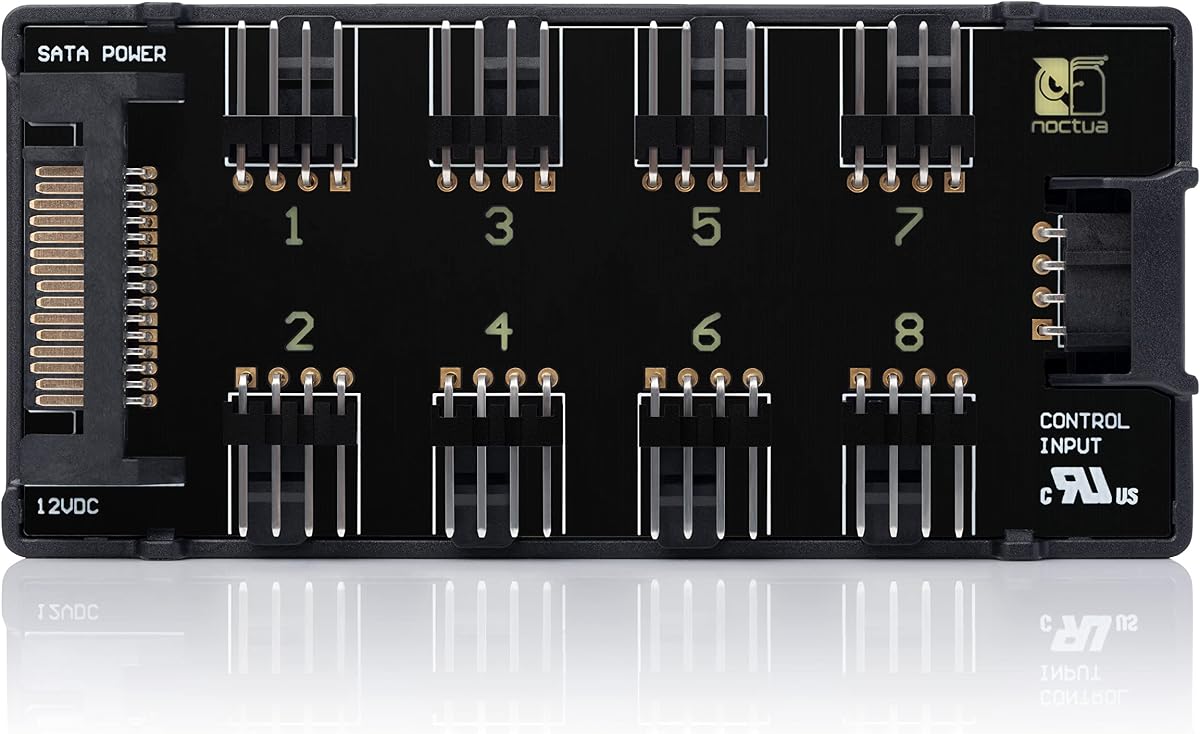
The Noctua NA-FH1 is a robust 8-port PWM fan hub designed for users prioritizing reliability and safety. It features a magnetic mounting system that simplifies installation on steel case panels. With safety fuses included, it protects against overcurrent and short-circuits effectively.
We may earn a commission when you buy through this link, at no additional cost to you.
This hub supports both 5V and 12V fans, offering versatile connectivity options. The 4-pin and S-ATA inputs can be used simultaneously, allowing users to power fans via S-ATA while controlling them through the 4-pin interface. This separation ensures stable RPM readings and PWM signals.
While it is more expensive than many budget hubs, the build quality justifies the cost. The compact design fits easily inside most cases. The 6-year warranty further demonstrates Noctua's confidence in the product's long-term performance and durability.
Anyone building a high-end PC with multiple fans will appreciate this hub's stability. It is ideal for those who want a 'set and forget' solution without worrying about electrical issues. We recommend it for silent and efficient system builds.
Integrated safety fuses protect your hardware from electrical failures, ensuring safe operation over time.
Simultaneous support for 4-pin and S-ATA inputs allows for flexible power and control configurations.
We may earn a commission when you buy through this link, at no additional cost to you.
The ARCTIC Case Fan Hub is a budget-friendly solution that expands your motherboard capabilities with ten additional slots. It connects directly to the power supply via SATA, ensuring smooth fan operation without voltage loss. This design keeps your build neat and organized.
We may earn a commission when you buy through this link, at no additional cost to you.
Synchronous fan control means your set PWM signal is passed to all connected fans. While only the first slot's RPM is read back to the system, this is sufficient for basic thermal management. It allows you to use more fans than motherboard headers normally permit.
Installation is straightforward with the included cabling. The hub can be placed invisibly inside the housing. This product is perfect for users who want to maximize cooling capacity without spending much on a controller. It eliminates the need for multiple Y-splitters.
We highly recommend this hub for entry-level and mid-range builds on a tight budget. It provides reliable performance for standard case fans. If you need a simple way to add fans without complex wiring, this hub is an excellent choice.
Achieve extensive cooling setups without breaking the bank or complicating your cabling.
Centralizes connections to one cable, reducing clutter inside your PC case significantly.
We may earn a commission when you buy through this link, at no additional cost to you.
The ARCTIC Fan Controller stands out by offering individual PWM control for every port, unlike standard hubs that sync all fans. This allows precise airflow management for each fan location. It supports native drivers for both Windows and Linux operating systems.
We may earn a commission when you buy through this link, at no additional cost to you.
With up to 2 A per port and a total of 4.5 A, it can power demanding fan setups easily. The magnetic or adhesive mounting provides flexibility in placement. This level of control ensures superior performance for custom cooling configurations requiring different fan speeds.
While it requires software installation, the benefit of individual control outweighs the setup effort. Users can customize cooling profiles based on specific zones in the case. This hub is particularly useful for complex builds where airflow optimization is critical for performance.
We recommend this controller for enthusiasts who need granular control over their cooling system. It bridges the gap between basic hubs and complex pump controllers. If you value precision and software integration, this is the top choice for advanced users.
Adjust each fan individually to optimize cooling efficiency and noise levels for your build.
Works seamlessly with both Windows and Linux, making it ideal for versatile computing needs.
We may earn a commission when you buy through this link, at no additional cost to you.
This Thermalright hub expands both fan and lighting connections, supporting eight groups of ARGB fans. The strong paste installation mode with double-sided stickers ensures the hub stays fixed to the chassis. It uses SATA power for direct transmission, maintaining stable output under load.
We may earn a commission when you buy through this link, at no additional cost to you.
The device supports fan speed reading and PWM regulation, though only the single fan in the red interface is recognized by the motherboard. It is ideal for synchronizing light efficiency across multiple 5V 3-pin devices. The compact design helps keep cables neat.
Users must note that 12V 4-pin RGB devices are not supported. Inserting them in the wrong direction can damage equipment. Careful attention to plug arrows is required during installation. Despite this, it offers a great balance of power and lighting control.
We suggest this hub for builds focusing on ARGB synchronization with minimal clutter. It is effective for users needing both power and light expansion. If your setup relies on 5V addressable lighting, this hub simplifies the wiring process effectively.
Connect and sync multiple ARGB light strips and fans for a cohesive visual aesthetic.
Secure the hub reliably inside your case using strong double-sided stickers.
We may earn a commission when you buy through this link, at no additional cost to you.
The X12 IR White Hub supports up to 12 groups of CPU fans, making it suitable for extensive cooling and lighting setups. It features SATA direct outputs to maintain stable performance under high loads. The hub connects power and lighting interfaces for 12 PC fans simultaneously.
We may earn a commission when you buy through this link, at no additional cost to you.
It includes 4PIN interfaces and 3PIN ARGB interfaces on both sides for plug-and-play setup. Users can keep cables neat by connecting lighting and power together. The red interface allows for speed recognition, though only one fan speed is read by the motherboard IC.
Note that the SATA wire must be purchased separately as it is not included with this product. This adds a small step to the installation process. However, the hub simplifies the situation of insufficient ARGB lighting interface and fan power supply on motherboards.
We recommend this hub for large builds requiring significant RGB coverage and fan capacity. It is ideal for those who want a clean look with many fans. If you need to expand your system beyond standard limits, this hub provides the necessary connectivity.
Accommodates up to 12 fans and lighting strips, perfect for large chassis builds.
Features both PWM and ARGB connectors on each side for simplified routing.
We may earn a commission when you buy through this link, at no additional cost to you.
This dual-control hub manages 9x PWM fans and 5V ARGB devices in one compact unit. The built-in magnets secure the hub effortlessly inside cases or on any iron surface. A front-facing RGB panel syncs with ARGB fans via remote for customized colors.
We may earn a commission when you buy through this link, at no additional cost to you.
The SATA-powered design ensures stable output even at full load with all devices connected. The kit includes the remote, SATA cable, and PWM/ARGB cables for a complete plug-and-play setup. This simplifies the process of building a custom RGB PC.
The remote control allows easy adjustment of lighting effects without reaching inside the case. However, fan speeds are generally controlled via the motherboard header. This setup is efficient for users who prioritize aesthetics and ease of lighting management.
We suggest this hub for builds focused on RGB synchronization and simple mounting. The remote is a nice touch for quick changes. If you want a hub that simplifies lighting control and offers flexible placement, this kit is a strong contender.
Adjust lighting effects and colors quickly using the included RF remote control.
Get everything you need for setup, including cables and remote, in one box.
We may earn a commission when you buy through this link, at no additional cost to you.
This Thermalright hub supports the installation of 10 groups of fans, simplifying wiring significantly. The strong paste installation mode with a double-sided sticker keeps it fixed to the chassis. It uses SATA power direct transmission for efficient performance under high load.
We may earn a commission when you buy through this link, at no additional cost to you.
It supports fan speed reading, though only the speed of a single fan in the red interface is recognized. The small body and large capacity design keep cables in order. It is a functional unit for managing multiple cooling devices efficiently.
The SATA cable needs to be purchased separately, which is a minor inconvenience. Despite this, the overall colour and stable function make it a reliable choice. It helps solve the problem of insufficient fan power supply interface on motherboards.
We recommend this hub for users needing more PWM ports at an affordable price. It is ideal for simple cooling expansion without RGB. If your priority is managing ten fans in an organized way, this hub performs the task reliably.
Accommodates up to ten fans in a small footprint suitable for any case.
SATA direct input ensures fans receive consistent power without motherboard limitations.
We may earn a commission when you buy through this link, at no additional cost to you.
This hub supports 8 ARGB fans and 8 PWM fans simultaneously, serving as both a lighting and power hub. The direct output of SATA power supply maintains stable output under high load conditions. It features 4 lighting connectors and fan power connectors on each side.
We may earn a commission when you buy through this link, at no additional cost to you.
After connecting to the motherboard, it achieves lamp effect synchronization of 3PIN 5V light interfaces and synchronous speed of PWM fans. The strong double-sided stickers allow simple and safe installation. The compact black design ensures stable functionality inside the chassis.
Users should note that SATA cables are not included with this product. Also, 12V 4PIN RGB interface devices are not supported and cannot be plugged in. This hub is designed specifically for 5V ARGB and PWM fans to avoid compatibility issues.
We suggest this hub for builds needing both lighting and cooling expansion. It is ideal for users who want a clean solution for mixed fan types. If you need to manage multiple ARGB and PWM fans efficiently, this hub offers a practical solution.
Connect both ARGB lighting and PWM fans in one hub for better integration.
Designed to maintain output stability even when running multiple devices at once.
We may earn a commission when you buy through this link, at no additional cost to you.
This fan hub supports 10 sets of ARGB fans and features an RF remote for easy control. The magnetic suction mounting makes installation simple inside any case. It uses SATA power direct transfer to ensure safe and secure operation for connected devices.
We may earn a commission when you buy through this link, at no additional cost to you.
The hub prevents stray currents and ensures smoother fan operation. It supports fan speed reading for one fan inserted into the red interface. The size is compact, making it easy to keep internal wiring tidy without obstruction.
Note that the controller only switches lights and does not adjust fan speeds directly. You must connect to the motherboard for PWM control. This hybrid setup is useful for those wanting light control without complex wiring solutions.
We recommend this hub for users prioritizing RGB control via remote. It simplifies managing lighting in large builds. If you want a hub that offers easy light access and good fan power support, this is a solid choice.
Change light modes and colors easily using the included RF remote control.
Direct SATA input prevents voltage loss and stray currents for safety.
We may earn a commission when you buy through this link, at no additional cost to you.
This hub serves to expand fan and lighting interfaces for users with limited motherboard headers. It features a direct SATA output for stable power under load. The black color and compact design ensure it fits well inside any chassis.
We may earn a commission when you buy through this link, at no additional cost to you.
After connecting to the motherboard, it achieves lamp effect synchronization and synchronous speed for PWM fans. The double-sided stickers allow secure placement. It is simple, safe, and guaranteed to work with standard 5V ARGB and PWM devices.
Users must note that this HUB cannot adjust fan speed or fan light colors. These must be controlled via the motherboard headers. SATA cable must be purchased separately. This is a functional expansion tool rather than a standalone controller.
We suggest this hub for basic connectivity needs. It is ideal for users needing more ports without spending a lot. If your goal is to simplify your cabling for multiple fans and lights, this hub provides a reliable solution.
Expand your available ports without complex wiring using this direct hub connection.
Synchronize lighting effects across multiple ARGB devices easily.
We may earn a commission when you buy through this link, at no additional cost to you.
Selecting the right fan control hub for PC involves considering several key factors. This guide walks you through what to look for to ensure your fans run efficiently and your build remains organized.
The most critical factor is the number of ports your hub offers. Ensure it supports enough fans for your current and future cooling needs. Hubs range from 4 ports to over 10, so match this to your setup.
Always choose a hub with more ports than your current fan count to allow for upgrades without needing another hub later.
PWM hubs control fan speed via 4-pin headers. Verify your hub supports PWM for dynamic speed control. Not all hubs can read RPM, so check specifications carefully.
Look for hubs that explicitly mention PWM speed recognition to ensure proper cooling performance monitoring.
If you have addressable ARGB lighting, ensure the hub supports 5V 3-pin inputs. Avoid hubs that only support 12V 4-pin RGB unless your setup uses standard RGB.
Check if the hub can sync lighting effects with your motherboard software for a unified look.
Hubs powered directly by SATA connections are more stable than those drawing power from the motherboard header. This ensures consistent performance even under high loads.
Confirm the hub uses direct SATA power to avoid voltage drops and ensure safe operation.
Consider how the hub attaches inside your case. Magnetic mounting offers flexibility, while adhesive stickers provide a fixed spot. Choose what suits your case layout best.
Strong magnetic mounting is preferred for ease of installation and repositioning if needed.
Durability matters for long-term safety. Look for hubs with safety fuses or overcurrent protection. High-quality plastics or metal casings ensure better heat dissipation and protection.
Choose reputable brands known for electronics safety and stability.
Some hubs offer independent control via software drivers. If you need granular control over each fan, select a hub with driver support for Windows or Linux.
Check for compatibility with existing system monitoring tools.
A good hub should reduce cable clutter. Look for designs that consolidate connections into a single SATA cable and motherboard header.
Prioritize hubs that include necessary cables or clearly state what is missing.
Begin by installing the hub inside your PC case near the power supply or a mounting area. Use magnetic or adhesive methods to secure it firmly. Connect the SATA power cable from your PSU to the hub.
Plug your fans into the hub's ports ensuring they are oriented correctly. Connect the hub to the motherboard fan header using the included cable. This allows the system to control fan speeds via PWM signals.
Care for your hub by avoiding excessive force when plugging in connectors. Ensure all connections are tight and secure to prevent loose contacts. Regularly check cables for any signs of wear or damage.
A fan control hub is a device that connects multiple case fans to a single motherboard header. It simplifies wiring and allows you to expand your cooling setup beyond the available headers on your motherboard.
Most hubs require a SATA power cable to ensure stable operation under load. This power source prevents voltage drops that could occur if all fans drew power from the motherboard headers.
Yes, but only if the hub supports 5V 3-pin ARGB. Standard 12V 4-pin RGB devices usually require a different type of hub or adapter to function correctly.
Standard hubs sync all fan speeds together. Some premium hubs offer individual PWM control per port allowing different fan speeds for specific fans.
No, hubs do not increase noise. They simply replicate the speed signal to fans. Proper wiring can actually reduce noise by ensuring smoother fan operation.
Most hubs support between 4 to 10 fans. Check the current limit of the hub to ensure your fan load does not exceed its rated capacity.
Yes, as long as the hub is designed for PC use and includes safety features like fuses. Ensure you match the correct voltage and connection types to avoid damage.
Most hubs are designed for desktop PC cases with available SATA power. Laptops lack internal SATA power connections, so using a hub inside a laptop is not feasible.
We reviewed ten top-rated hubs offering diverse features from magnetic mounting to RGB synchronization. The Noctua NA-FH1 stands out for reliability and safety, while the ARCTIC Case Fan Hub offers excellent budget value.
When choosing a hub, prioritize port count and power stability. Ensure it supports your specific fan and lighting needs to avoid compatibility issues later. Proper selection ensures a clean and efficient system build.
Prices for these hubs vary so check current listings before buying. Keep in mind that availability may change quickly. Verify your requirements match the hub capabilities to ensure satisfaction.