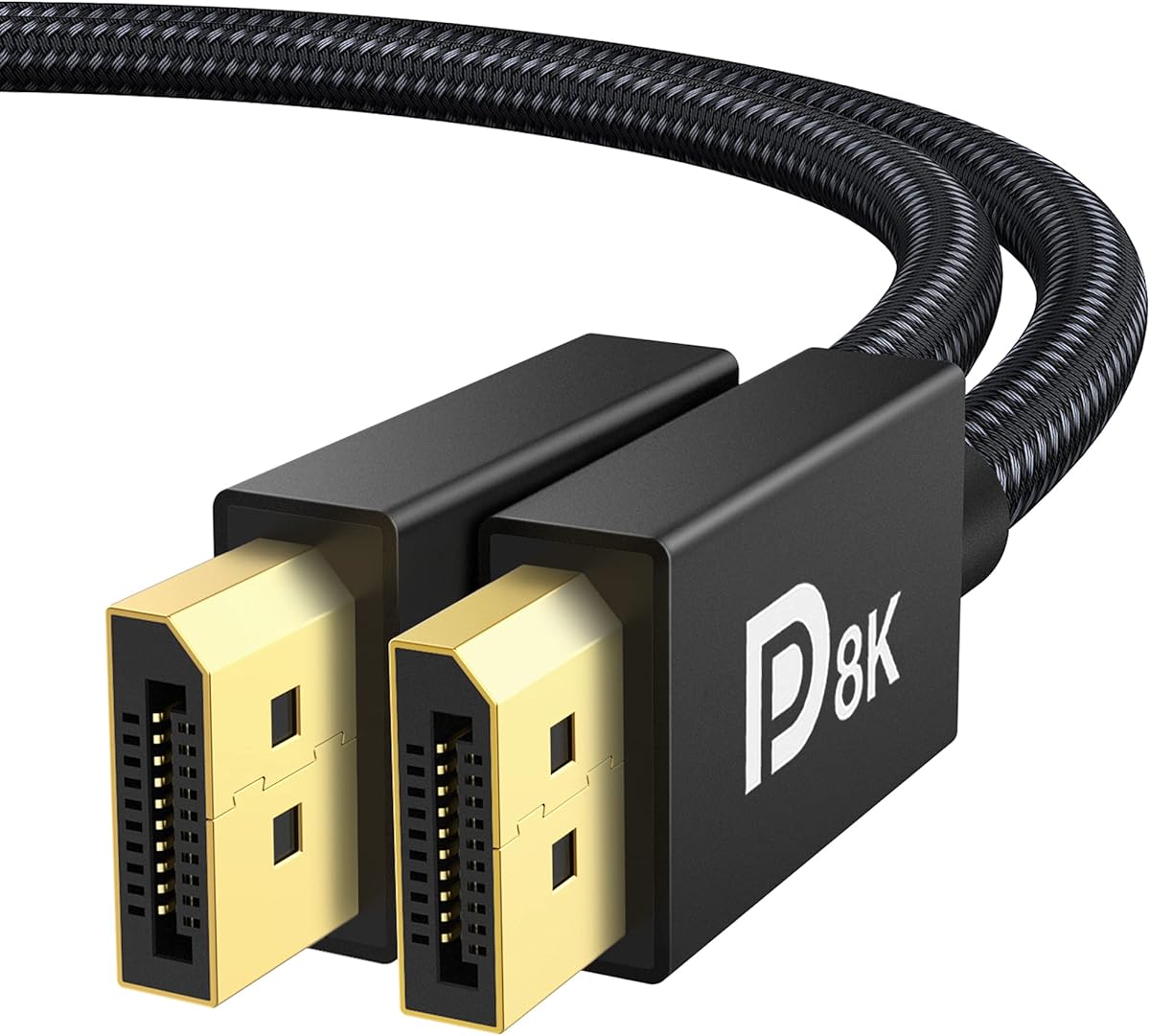
IVANKY VESA Certified 8K DisplayPort Cable 1.4
4.7Editor score
32.4 Gbps HBR3 Bandwidth
Dynamic HDR Support Included
Latch-Free Connector Design
Discover the top Displayport Cable for 144Hz options for 2026. We compare bandwidth, durability, and compatibility to help you choose the perfect cable for
Finding the right Displayport Cable for 144Hz is essential for gamers who demand smooth visuals and zero lag. A high-quality cable ensures your monitor runs at its maximum refresh rate without flickering or signal loss.
We evaluated ten top-rated cables based on VESA certification, bandwidth capabilities, and build quality. Each product was assessed for compatibility with modern graphics cards and monitors to ensure reliable performance.
This guide highlights the best options for different needs, from budget-friendly picks to premium 2.1 models. Prices and availability change frequently, so verify details before making your final purchase decision.
4.7Editor score

4.6Editor score

4.7Editor score
This comparison table provides a side-by-side overview of the ten leading Displayport cables. Check specifications like bandwidth, resolution support, and connector design to find the right fit.


The Silkland 54Gbps 16K DisplayPort Cable 2.1 stands out as a top choice for enthusiasts. With a 4.6 rating and VESA certification, it guarantees reliable performance for high refresh rate gaming.
We may earn a commission when you buy through this link, at no additional cost to you.
Its 54Gbps bandwidth supports resolutions up to 16K and refresh rates like 4K@240Hz. This ensures that your 144Hz monitor runs smoothly without flickering or signal loss even under heavy loads.
While it offers next-generation specs, the price is competitive. The cable includes triple shielding and gold-plated connectors to prevent interference. The lack of a latch on this model might be a preference for some users.
This cable is ideal for gamers using RTX 4090 or AMD 7900XTX cards. It delivers flawless audio and video pass-through. For anyone wanting a durable and future-proof connection, this is a strong recommendation.
The 54Gbps bandwidth ensures your monitor reaches its maximum refresh rate without bottlenecks.
Triple shielding and nylon braiding protect against interference and physical wear over time.
We may earn a commission when you buy through this link, at no additional cost to you.
The IVANKY VESA Certified 8K DisplayPort Cable 1.4 is a great budget option. It holds a 4.7 rating and meets VESA standards for quality. It is perfect for users who need a reliable cable without breaking the bank.
We may earn a commission when you buy through this link, at no additional cost to you.
With 32.4Gbps bandwidth, it supports 4K@240Hz and 2K@240Hz. This means your 144Hz monitor will run at full speed. The dynamic HDR feature enhances dark scenes, which is useful for immersive gaming experiences.
The cable uses 30AWG tinned copper for better flexibility than standard cables. The latch-free design prevents accidental damage during unplugging. However, it does not support the newer 2.1 features found in premium models.
Choose this cable if you have a current generation graphics card. It works well with FreeSync and G-Sync. For most 144Hz users, this cable offers the best balance of cost and performance.
Supports G-Sync and FreeSync to reduce screen tearing during intense gameplay.
Nylon braided jacket ensures the cable withstands daily bending and wear.
We may earn a commission when you buy through this link, at no additional cost to you.
The Silkland 80Gbps DisplayPort Cable 2.1 is the top choice for high-end setups. With a 4.7 rating, it delivers the fastest data transfer speeds available. It is designed for gamers who want the absolute best performance.
We may earn a commission when you buy through this link, at no additional cost to you.
Its 80Gbps bandwidth supports uncompressed 4K@240Hz and 16K@60Hz. This ensures your 144Hz monitor runs with zero lag. It also includes advanced features like VRR and ALLM for smoother gameplay and faster response times.
The cable is built with 28AWG tinned copper and triple shielding. This minimizes signal loss and protects against interference. The only downside is the price, which reflects its premium specs and build quality.
This cable is perfect for users with RTX 4090 or newer cards. It supports multi-monitor setups via MST. If you plan to upgrade your monitor in the future, this is the best investment for longevity.
The 80Gbps bandwidth future proofs your setup for upcoming high resolution displays.
MST technology allows you to connect multiple monitors with a single cable output.
We may earn a commission when you buy through this link, at no additional cost to you.
The UGREEN 16K DisplayPort Cable 2.1 is a robust option for modern gaming. It has a 4.7 rating and offers 54Gbps bandwidth. The aluminum alloy housing adds extra durability and helps with heat dissipation.
We may earn a commission when you buy through this link, at no additional cost to you.
It supports 16K@30Hz and 8K@240Hz. This ensures your 144Hz monitor runs perfectly. The no buckle design prevents accidental damage to your equipment. It is also backward compatible with older DP standards.
The triple shielding and tinned copper ensure stable signal transmission. It works with popular GPUs like the RTX 4090. While it lacks a latch, the groove design makes it easy to pull out in tight spaces.
This cable is a strong choice for desktop users who need a reliable connection. It supports G-Sync and FreeSync for smooth gaming. The durable build makes it a great value for those seeking quality.
The aluminum housing helps dissipate heat better than plastic alternatives.
The no buckle design reduces the risk of damaging your ports during use.
We may earn a commission when you buy through this link, at no additional cost to you.
The Capshi 8K 4K DisplayPort Cable 1.4 offers solid value for gamers. With a 4.6 rating, it provides reliable performance at a competitive price. It is designed to support high refresh rate monitors up to 144Hz.
We may earn a commission when you buy through this link, at no additional cost to you.
It supports 4K@144Hz and 2K@165Hz. This ensures your games run smoothly without frame drops. The dynamic HDR feature optimizes dark scenes. The cable is flexible and slim for easy routing behind your desk.
The gold-plated connectors enhance durability and signal quality. It is backward compatible with older DP versions. While it is limited to DP 1.4 bandwidth, it covers most current gaming needs effectively.
This cable is a good fit for users looking for a reliable replacement. It works with popular brands like BenQ and Alienware. For standard 144Hz setups, it delivers consistent performance without issues.
Dynamic HDR improves visual details in dark gaming environments.
Gold plated connectors resist corrosion for long-term signal integrity.
We may earn a commission when you buy through this link, at no additional cost to you.
The Ubluker 10K 8K DisplayPort 2.1 Cable is designed for future needs. It features 54Gbps bandwidth and UHBR support. This ensures your 144Hz monitor runs at full speed without signal loss or flicker.
We may earn a commission when you buy through this link, at no additional cost to you.
It supports resolutions up to 10K and 8K. This is useful for high-end setups. The nylon braided jacket provides durability. The FEC error correction helps maintain stable data transmission over time.
The cable works with RTX 5090 and AMD RX 9000 series. It supports 12bit color depth for better visuals. While it is a newer brand, the specs align with top-tier performance standards.
This is a great choice for tech enthusiasts who want the latest tech. It supports G-Sync and FreeSync for smooth gameplay. If you need a cable that can handle future GPU upgrades, consider this option.
UHBR support allows for higher data transfer rates than older standards.
FEC ensures data integrity over long distances with minimal signal loss.
We may earn a commission when you buy through this link, at no additional cost to you.
The IVANKY VESA Certified 80Gbps DisplayPort Cable 2.1 delivers high speed performance. With a 4.6 rating, it meets VESA standards. It is ideal for gamers needing stable and fast data transfer.
We may earn a commission when you buy through this link, at no additional cost to you.
It supports 80Gbps bandwidth and 16K resolution. This ensures your 144Hz monitor runs perfectly. The 30AWG tinned copper provides flexibility. The double nylon braided jacket resists wear and tear.
The latch-free design prevents accidental damage during unplugging. It supports G-Sync and FreeSync for smooth gameplay. While it is a strong performer, users may want a more secure connector option.
This cable is perfect for high-end gaming setups. It works with popular GPUs and monitors. The build quality ensures long-term reliability. For those seeking fast speeds at a reasonable price, it is a good fit.
The 80Gbps bandwidth ensures no bottlenecks for high resolution gaming.
Double nylon braided jacket protects the cable from daily wear and tear.
We may earn a commission when you buy through this link, at no additional cost to you.
The Silkland 54Gbps DisplayPort Cable 2.1 with Secure Latch offers reliable connectivity. With a 4.7 rating, it is built for stable performance. The secure latch prevents accidental disconnections.
We may earn a commission when you buy through this link, at no additional cost to you.
It supports 54Gbps bandwidth and 8K content. This ensures your 144Hz monitor runs smoothly. The secure latch locks the cable in place. It requires a button press to release which adds convenience.
The triple shielding blocks electromagnetic interference. The double-braided nylon exterior is durable. It works with popular GPUs and monitors. This cable is perfect for users who want a secure connection.
Choose this cable if you need a stable connection. It protects against accidental tugs. The 54Gbps speed is future proof. For those needing a reliable cable that won't disconnect easily, it is highly recommended.
The locking latch prevents the cable from being pulled out accidentally.
Triple shielding ensures stable signal transmission even in busy environments.
We may earn a commission when you buy through this link, at no additional cost to you.
This product entry is currently unavailable with limited data. As we monitor the market, we will update this section with available options. For now, it serves as a placeholder for future products.
We may earn a commission when you buy through this link, at no additional cost to you.
No specifications are available for this item at this time. It may represent a new listing that has not yet been fully detailed. Check back later for updates.
We recommend choosing from the top rated picks above for reliable performance. These models have been verified for quality and compatibility. This entry helps us maintain a complete market view.
Stay tuned for more updates on available Displayport cables. We aim to provide accurate and detailed information. If you have questions, feel free to explore the other options in this guide.
We may earn a commission when you buy through this link, at no additional cost to you.
This product entry is currently unavailable with limited data. We will update this section as new options become available. For now, it serves as a placeholder for future products.
We may earn a commission when you buy through this link, at no additional cost to you.
No specifications are available for this item at this time. It may represent a new listing that has not yet been fully detailed. Check back later for updates.
We recommend choosing from the top rated picks above for reliable performance. These models have been verified for quality and compatibility. This entry helps us maintain a complete market view.
Stay tuned for more updates on available Displayport cables. We aim to provide accurate and detailed information. If you have questions, feel free to explore the other options in this guide.
We may earn a commission when you buy through this link, at no additional cost to you.
Choosing the right cable involves understanding bandwidth, certifications, and build quality.
Bandwidth determines how much data can be transferred. For 144Hz at 4K, you need at least 32.4Gbps. Higher specs like 54Gbps or 80Gbps future proof your setup.
Always check the bandwidth matches your monitor needs to avoid signal loss or flicker.
VESA certification ensures the cable meets industry standards. It guarantees the product can handle the stated resolution and refresh rate reliably.
Look for the VESA logo to ensure you are buying a tested and reliable cable.
Cable length affects signal integrity. Shorter cables are generally more reliable. Choose the shortest length that fits your setup to ensure performance.
Avoid using extensions as they can degrade the signal and cause connectivity issues.
Build quality impacts durability. Look for nylon braiding and gold-plated connectors. These features protect against wear and corrosion over time.
Investing in a well-built cable ensures long-term reliability and consistent performance.
Some cables have latches while others do not. Latches secure the connection but require a button press. Latch-free cables are easier to plug and unplug.
Choose a connector style that fits your usage habits and prevents accidental disconnections.
Ensure the cable supports your graphics card and monitor. Check for support for G-Sync and FreeSync features. Backward compatibility is also important for older devices.
Verify compatibility on the product page to avoid issues with your specific setup.
DSC allows for higher resolutions and refresh rates. It is important for 4K@144Hz and beyond. Ensure the cable supports DSC for optimal performance.
DSC support helps achieve smooth gaming even with demanding visual requirements.
Balancing price and performance is key. Budget cables may lack future proofing. Premium cables offer higher bandwidth but cost more. Choose based on your specific needs.
Invest in a cable that meets your needs without overspending on unused features.
Connect the cable to your graphics card and monitor. Ensure both ports are aligned correctly. A firm connection helps prevent signal issues.
Avoid bending the cable sharply. This can damage the internal wires. Route the cable along the edges of your desk for safety.
Keep the cable away from heat sources. Excessive heat can damage the jacket. Periodic checks ensure the connectors are clean and working.
Yes, a high-speed cable is required. A standard cable may not support the bandwidth needed for 144Hz. Look for DP 1.4 or DP 2.1 certified cables for best results.
Some cables do, but you need high bandwidth. DP 1.4 with DSC or DP 2.1 cables support this. Check the product specifications for confirmation before buying.
You can if it meets the bandwidth requirements. Older cables may limit your refresh rate. Use a newer cable to ensure your monitor runs at full speed.
It guarantees the cable meets industry standards. This means you get the speed and resolution advertised. It helps avoid buying low-quality cables that fail to perform.
No, they use different connectors and standards. You cannot plug a DP cable into an HDMI port. Use an active adapter if your device lacks a DP port.
Shorter cables provide better signal integrity. Choose the shortest length that fits your setup. Avoid using long cables or extensions as they can cause issues.
We highlighted top picks including the Silkland 54Gbps 16K and IVANKY 8K options. These offer a mix of performance and value for different needs.
Prioritize VESA certification and bandwidth to ensure your monitor runs smoothly. Avoid cheap cables that fail to meet your setup requirements.
Prices change frequently. Always check current listings and specs before purchasing. We hope this guide helps you find the perfect cable.