
WD 2TB My Passport
4.6Editor score
Password Protection and Hardware Encryption
Defense Against Ransomware Software
Slim Durable Design
This guide compares the top encrypted secure external hard drives available in October 2026, evaluating hardware encryption, ruggedness, and speed for your
In today's digital landscape, protecting sensitive information is more critical than ever. An encrypted secure external hard drive offers a robust solution for individuals and businesses needing to safeguard their data from unauthorized access and physical theft.
We have meticulously evaluated ten top-rated models based on encryption standards, build quality, transfer speeds, and ease of use. Our comparison focuses on FIPS validation, hardware-based security, and real-world durability to ensure you find the perfect fit.
Each selection below highlights key strengths and potential limitations to help you make an informed decision. Keep in mind that availability and specifications may shift over time, so always verify the latest details before finalizing your purchase.
4.6Editor score

4.5Editor score

4.8Editor score
This side-by-side comparison breaks down the specifications and unique selling points of each drive to help you quickly identify the model that aligns best with your security requirements and storage capacity needs.



The Apricorn 1TB Aegis Padlock stands out as a top choice for users seeking robust hardware encryption without software dependencies. It features military-grade FIPS PUB 197 validated encryption algorithms that ensure your data remains secure against advanced threats while maintaining high performance levels for daily operations.
We may earn a commission when you buy through this link, at no additional cost to you.
Its superfast USB 3.0 connection allows for data transfer speeds up to ten times faster than USB 2.0, making it efficient for moving large files. The sealed epoxy coating protects internal components from physical attacks, and the brute force self-destruct feature adds an extra layer of security if someone tries to guess your PIN repeatedly.
While the keypad is wear-resistant, heavy usage over years might show signs of wear. Additionally, the rugged design makes the drive slightly heavier than standard portable drives, which could be a minor consideration for ultralight travelers. However, these trade-offs are acceptable given the superior security features offered.
This drive is ideal for professionals handling sensitive data who need a reliable, no-software solution. If you prioritize security and durability over minimal weight, this model provides the peace of mind you need for protecting critical information on the go.
Since no admin rights or software installation is needed, you can plug the drive into any computer and access your files immediately after entering your PIN. This simplicity reduces vulnerability to malware that often targets software-based encryption tools.
The tough epoxy coating seals the drive against physical tampering, ensuring that even if the device is lost or stolen, the internal data remains inaccessible without the correct PIN. This physical layer of defense complements the digital encryption effectively.
We may earn a commission when you buy through this link, at no additional cost to you.
The Apricorn 2TB Aegis Padlock Fortress brings FIPS 140-2 Level 2 validation to your portable storage needs, offering a higher tier of certification for government and enterprise use. This drive combines robust 256-bit hardware encryption with a user-friendly design that includes an integrated USB cable for added convenience.
We may earn a commission when you buy through this link, at no additional cost to you.
Users benefit from the brute force self-destruct feature which wipes data if multiple incorrect PIN attempts are made. The wear-resistant keypad ensures longevity, and since it is made in the USA, quality control standards are generally high. The integrated cable reduces the risk of losing connectors during travel.
The integrated cable means that if it gets damaged, replacing it might be more difficult compared to detachable cables. Also, the price point is higher than some non-FIPS drives, but this reflects the additional security compliance and build quality. For regulated environments, this cost is often justified by the compliance requirements.
Choose this drive if you need verified compliance with federal standards and reliable physical security. It is particularly suited for government contractors or businesses that require auditable security measures for their external storage devices.
FIPS 140-2 Level 2 validation means the drive meets strict security standards required by many government agencies. This makes it an excellent choice for professionals who must adhere to specific regulatory frameworks for data protection.
Having the USB cable built into the chassis eliminates the need to carry separate cables or worry about misplacing them. This design choice enhances portability and ensures you always have a connection method available when you need it.
We may earn a commission when you buy through this link, at no additional cost to you.
The Apricorn 5TB Aegis Fortress L3 represents the pinnacle of security with FIPS 140-2 Level 3 validation, which is the highest level for physical security and tamper evidence. With 5TB of storage, it allows for significant data hoarding while maintaining rigorous encryption standards suitable for enterprise environments.
We may earn a commission when you buy through this link, at no additional cost to you.
Its separate admin and user mode structure provides granular control over who can access and modify data. The two read-only modes offer flexibility for sharing files without risking accidental changes. As the fastest and most rugged 256-bit AES XTS encrypted drive, it delivers performance alongside protection.
The physical size is larger to accommodate the higher capacity and robust shielding, which might affect portability in tight bags. The premium price tag reflects the top-tier certification and storage. For organizations managing critical databases, these drawbacks are negligible compared to the security benefits.
This drive is best suited for IT administrators needing large-scale secure storage that meets strict federal guidelines. If your priority is maximizing capacity without compromising on the highest levels of hardware security, this model is the definitive choice.
FIPS Level 3 validation ensures that any attempt to physically tamper with the drive will be evident and will trigger security protocols. This level of assurance is crucial for high-value data that could be targeted by sophisticated physical attacks.
Separate admin and user modes allow you to delegate access while maintaining oversight. Admins can manage users and policies while regular users only access their assigned files, reducing the risk of internal data breaches or accidental deletions.
We may earn a commission when you buy through this link, at no additional cost to you.
The WD 2TB My Passport offers an excellent entry point for users needing basic security features without breaking the bank. It includes password protection and hardware encryption to help secure your files, while the included device management software adds defense against ransomware to keep your data safe.
We may earn a commission when you buy through this link, at no additional cost to you.
Its slim durable design makes it incredibly easy to carry in a laptop bag or pocket. Users appreciate the high reliability and the simple setup process that involves installing the software on your computer. This drive is compatible with both USB 3.1 and USB 3.0 ports for broad versatility.
Security relies on software installation which means you must set it up before using it on a new computer. If you need to use the drive on an untrusted machine, you might not be able to access your data without the software. This is acceptable for personal backups where you control the environment.
For budget-conscious consumers who want reliable storage with built-in password protection, this is a top pick. It balances cost, capacity, and essential security features effectively for everyday personal use cases.
The included software offers a layer of defense specifically against ransomware threats, which are increasingly common. By backing up your files regularly with this tool, you ensure that you have clean copies available even if your main system gets compromised.
WD designed this drive to be as thin and light as possible, making it ideal for travelers. Despite its compact form factor, it maintains durability against everyday bumps and drops, ensuring your data stays safe during transit.
We may earn a commission when you buy through this link, at no additional cost to you.
The WD 5TB My Passport is perfect for users who need vast amounts of space but still want essential security features like password protection and hardware encryption. Like its smaller sibling, it includes device management software with defense against ransomware, ensuring your valuable media and documents are protected.
We may earn a commission when you buy through this link, at no additional cost to you.
Its capacity allows you to store thousands of photos, videos, and documents without worrying about running out of space. The slim design ensures it remains portable even with the larger platters inside. Users benefit from a three-year limited warranty that adds value to the purchase.
The drive is slightly heavier than lower capacity models due to the additional internal components. The reliance on software setup means you cannot use the encryption on any computer instantly without prior configuration. These factors are minor for home users who mostly use the drive with their main workstation.
Choose this drive if you need maximum storage at a competitive price while keeping basic security in place. It serves well as a family backup drive or a personal media library where large file sizes are common.
With 5TB of storage, you can back up entire system images or archive years of family photos and videos. This capacity is ideal for photographers or video editors who need to store large project files efficiently without external cloud dependencies.
The device management software allows you to create separate user accounts and schedules for different family members. This ensures that everyone's files are backed up regularly and securely, keeping the whole household's digital life protected.
We may earn a commission when you buy through this link, at no additional cost to you.
The Apricorn 2TB Aegis Padlock DT distinguishes itself with separate admin and user modes, offering a layered security approach. This allows administrators to enforce policies while granting limited access to regular users, making it suitable for small business teams sharing data securely.
We may earn a commission when you buy through this link, at no additional cost to you.
Features like data recovery PINs and programable brute-force defense provide flexibility in managing security risks. If a user loses their PIN, recovery options exist without needing to replace the drive. The keypad access ensures no software installation is required on the host computer.
The setup process can be complex for non-technical users who just want a simple plug-and-play experience. Additionally, the price is higher than standard drives. However, for teams needing controlled access levels, the extra complexity is a necessary trade-off for better data governance.
This drive is recommended for small business owners who need to secure shared data without implementing a full server infrastructure. It strikes a balance between usability and enterprise-grade control features that fit smaller budgets.
By separating admin and user modes, you can prevent regular users from changing security settings or formatting the drive. This segregation ensures that critical policies remain intact while allowing everyday tasks to be performed without administrative privileges.
Data recovery PINs allow administrators to reset access if a user forgets their credentials without destroying all data. This feature is invaluable for preventing data loss due to human error in shared environments where access is vital.
We may earn a commission when you buy through this link, at no additional cost to you.
The Apricorn 2TB Aegis Desktop Padlock is engineered for stationary use, featuring a solid aluminum enclosure that provides robust physical protection. It maintains FIPS 140-2 Level 2 validated security standards, ensuring enterprise-grade protection for files stored on your desk.
We may earn a commission when you buy through this link, at no additional cost to you.
Secure pin number access and brute force self-destruct features protect against unauthorized access attempts. The drive is compatible with any operating system and offers high-speed USB 3.0 connectivity. Its TAA compliance makes it a viable option for government procurement needs.
Its larger desktop footprint means it does not fit easily into backpacks for travel. While this limits portability, it increases stability and cooling efficiency for desktop use. For office environments where the drive stays in one place, this design is advantageous.
This drive is ideal for office workstations where physical security is key. It offers the same high encryption standards as portable models but in a form factor optimized for permanent placement on a desk.
The solid aluminum enclosure not only adds a premium look but also dissipates heat effectively during heavy data transfers. This durability ensures that the drive can handle long operating hours without overheating or failing.
Being compatible with any OS ensures that you can use this drive across Windows, Mac, and Linux machines without driver issues. This universality makes it a flexible choice for mixed-technology office environments.
We may earn a commission when you buy through this link, at no additional cost to you.
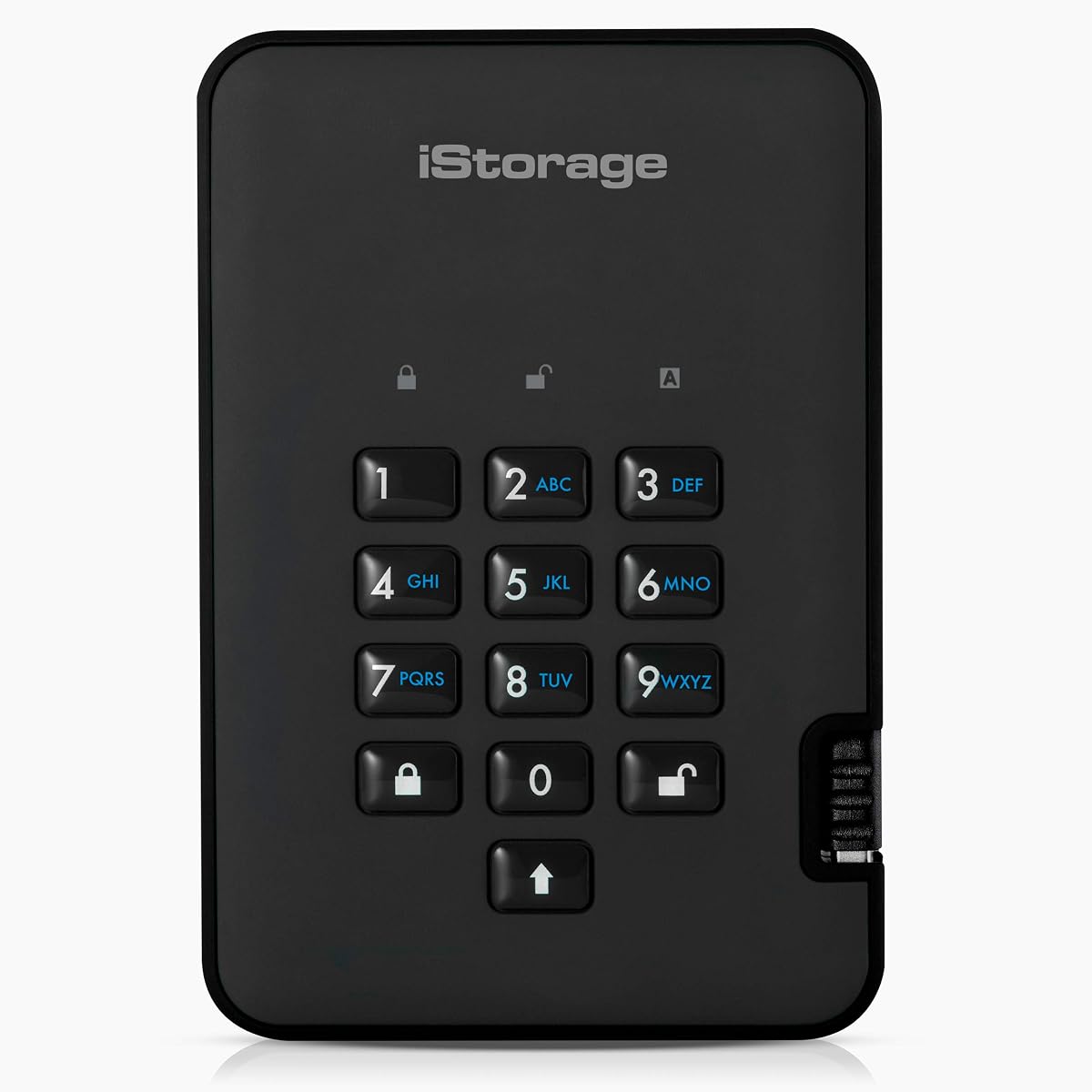
The iStorage diskAshur2 is designed for users who work in harsh environments, offering IP56 certified ruggedness that protects against dust and water. It provides AES-XTS 256-bit hardware encryption to keep your data safe from unauthorized access regardless of where you are.
We may earn a commission when you buy through this link, at no additional cost to you.
Its simple PIN entry system works without software, making it compatible with Windows, macOS, Linux, and mobile devices. The secure microprocessor ensures that your data is encrypted in real time and cannot be accessed even if the device is lost. This makes it reliable for fieldwork.
Write speeds are slightly slower compared to some competitors, which might be noticeable during large file transfers. Additionally, the rating is lower than others. However, the physical durability and cross-platform support often outweigh these minor performance trade-offs for specific use cases.
Choose this drive if you need protection against environmental hazards like rain or dust. It is a great choice for construction workers, photographers, or travelers who need reliable storage in unpredictable conditions.
IP56 certification means the drive can withstand powerful water jets and dust ingress, ensuring reliability in extreme climates. This robustness protects your data even when the physical environment threatens to damage standard electronic devices.
Because no specific driver is required, you can plug this drive into a tablet, smartphone, or desktop instantly. This universality is critical for professionals who switch between multiple devices and operating systems frequently.
We may earn a commission when you buy through this link, at no additional cost to you.
The DataLocker DL4 FE 2TB SSD offers a modern approach to security with an interactive touchscreen that simplifies complex password entry. It holds the FIPS 140-3 validated status, which is the most recent and stringent federal standard for cryptographic modules available in hardware.
We may earn a commission when you buy through this link, at no additional cost to you.
With USB-C connectivity, it aligns with current device standards for high-speed data transfer. The drive supports remote management features via SafeConsole, enabling audit capabilities that are rare in standard drives. This makes it highly suitable for corporate environments needing centralized oversight.
The premium price tag and the separate cost for management software can be high for individuals. However, businesses often find value in the remote device detonation feature that secures data if a drive is lost. This level of control justifies the cost for regulated sectors.
This drive is best for tech-savvy professionals or organizations needing the latest security standards and remote manageability. If you want a sleek, future-proof interface with maximum compliance, this is the top tier choice.
The interactive touchscreen allows you to enter complex alphanumeric passwords easily without needing external software. This user-friendly design reduces errors during authentication and makes the drive accessible for users of all technical levels.
Remote management features let IT teams monitor and control access to drives across an organization. If a drive is compromised, it can be remotely disabled to prevent data breaches, providing a layer of security standard drives cannot offer.
We may earn a commission when you buy through this link, at no additional cost to you.
The Apricorn 4TB Aegis Padlock SSD combines high-speed solid-state performance with top-tier security features. With read and write speeds up to 350 MBPS, it is significantly faster than traditional HDDs, allowing for quick backups and seamless file transfers even for large datasets.
We may earn a commission when you buy through this link, at no additional cost to you.
It includes 256-bit hardware encryption, separate admin and user modes, and data recovery PINs to ensure robust protection. The high user rating of 4.8 indicates satisfaction with both its performance and reliability. This makes it a premium choice for demanding professionals.
The premium price tag is the main drawback, as it costs significantly more than HDD-based options. However, the speed and reliability often pay off in productivity gains. If speed is critical to your workflow, the investment is usually worthwhile.
Choose this drive if you need fast performance and large capacity with strong security. It is perfect for video editors, engineers, or anyone who needs quick access to large encrypted files without compromising on safety.
SSDs offer much faster read and write speeds than traditional spinning drives, reducing wait times when opening or saving files. This speed boost is essential for workflows where time efficiency directly impacts project delivery schedules.
By combining hardware encryption with flexible user modes, you get comprehensive security that adapts to your needs. This mix ensures that your data is safe from external threats while remaining accessible to authorized users efficiently.
We may earn a commission when you buy through this link, at no additional cost to you.
Choosing the right encrypted external drive involves balancing security standards, storage capacity, and physical durability to meet your specific needs.
Look for drives that use hardware-based encryption like AES 256-bit to ensure your data remains safe even if the drive is lost. Hardware encryption is generally more secure and efficient than software-based options because it does not rely on the host computer's resources or antivirus software.
Always prioritize models with FIPS validation if you need to meet strict regulatory compliance for your industry or government contracts.
FIPS 140-2 and 140-3 validations indicate that the encryption module has been tested by an accredited lab. Level 3 offers the highest physical security and is ideal for government work, while Level 2 is standard for many businesses.
If you are in a regulated industry, check the specific level required by your compliance framework before making a purchase.
Consider the build quality of the drive, including shock resistance and water protection. Drives with rugged casings and IP ratings can withstand drops, dust, and splashes, which is essential for field use or travel.
Select a model with a protective shell if you plan to carry your drive frequently or work in harsh environments.
USB 3.0, USB 3.1, and USB-C interfaces offer faster transfer speeds than older versions. Ensure your computer has the necessary ports or that the drive includes adapters for compatibility with your devices.
Modern USB-C connectivity is becoming standard and future-proofs your purchase as older USB-A ports become less common on new laptops.
Check that the drive works with your operating system without requiring complex drivers. Many hardware encrypted drives are OS-independent, meaning they work out of the box with Windows, macOS, and Linux.
Avoid software-dependent drives if you frequently use untrusted or shared computers where installing software is not possible.
Choose a storage capacity that accommodates your current files plus future growth. Large files like videos and images consume space quickly, so opting for more capacity now might save you from buying another drive later.
Balance capacity with price since larger drives generally cost more, especially those with SSD technology.
Some drives use physical keypads while others rely on software screens for PIN entry. Keypads offer the advantage of software independence, while touchscreens can make complex password entry easier.
Pick an interface that feels intuitive and secure to you to ensure you use the encryption features consistently.
A longer warranty period indicates the manufacturer's confidence in the product's durability. Check for support resources that help you resolve issues if the drive fails or you lose access to your data.
Ensure the company has a reputation for reliable customer service before committing to a purchase.
Begin by setting up your PIN immediately after connecting the drive to your computer. For hardware encrypted drives, enter your PIN on the keypad or screen to unlock access. Avoid using simple combinations like 1234 to prevent brute force attacks.
Always safely eject the drive before unplugging it to ensure all data is written correctly and to prevent corruption. For hardware encrypted models, this ensures that the data remains in an encrypted state before disconnection.
Store the drive in a cool, dry place away from magnetic fields and extreme temperatures. Regularly backup your data to a secondary location to ensure you have a copy if the drive is damaged or lost.
Software encryption relies on your computer's CPU to encrypt data, which can slow down performance. Hardware encryption processes data on the drive itself using a dedicated chip, which is faster and does not rely on the host computer's security software.
No, a PIN is required to unlock the drive before any data can be accessed. Without the correct PIN, the drive will appear empty or unreadable, ensuring your files remain private even if the device is lost or stolen.
FIPS validation is not strictly necessary for personal use unless you have very sensitive data. However, it ensures a higher standard of encryption testing, which can provide extra peace of mind for protecting personal files or financial data.
Most hardware drives have a recovery PIN or master PIN that can be set up during initial configuration. If you lose your PIN and do not have a recovery code, the data may be permanently inaccessible to ensure security.
Many hardware encrypted drives are OS-independent and work on both Mac and Windows computers. However, always check the specific product details to confirm compatibility, as some software-based encryption solutions may require separate drivers.
Firmware updates usually come through the manufacturer's official software or website. Check for updates regularly to patch security vulnerabilities and improve performance, but ensure your drive is securely backed up before applying updates.
SSD drives are generally faster and more durable against physical shocks compared to HDDs. If speed and reliability are top priorities for you, an SSD option is better. Otherwise, an HDD option may provide more capacity for a lower price.
Hardware encryption has minimal impact on transfer speeds compared to software encryption. Modern drives with USB 3.0 or higher interfaces can still deliver fast performance even while encrypting and decrypting data in real time.
The Apricorn 1TB Aegis Padlock offers the best balance of security and ease of use for most users. Its hardware encryption and durable design make it a top choice for those needing reliable data protection on the go.
When choosing a drive, prioritize the security features that match your specific needs rather than just storage capacity. FIPS validation and hardware-based encryption should be key factors in your decision to ensure your data remains safe from threats.
Always verify current pricing and availability before purchasing since these factors can change frequently. By selecting a model with strong encryption and a warranty, you invest in peace of mind for your valuable digital assets.