
4K Vlogging Camera Pocket Digital Camera
4.4Editor score
330-degree rotating lens design
Built-in WiFi for easy transfer
Includes accessories and warranty
Discover the top cameras for social media content creators in October 2026. This guide compares features, video quality, and portability to help you choose.
Creating engaging content requires the right tools to capture high-quality video and photos. A good camera ensures your audience sees every detail clearly. Whether you are a beginner or a pro, having reliable gear makes a significant difference in your workflow and final output quality.
We have carefully selected and compared ten top-rated cameras designed specifically for content creators. Our evaluation focuses on video resolution, stabilization, ease of use, and connectivity features. This list covers a wide range of options from budget-friendly pocket cams to advanced vlogging kits.
Each pick highlights specific strengths tailored to different social media platforms and shooting styles. You will find detailed insights on what makes each model stand out in a crowded market. Please note that availability and pricing can change frequently, so checking current listings is always recommended.
4.4Editor score

4.5Editor score

4.3Editor score
This side-by-side comparison helps you quickly identify the key specifications and unique selling points of each camera model. We have organized the data to highlight resolution, screen features, and connectivity options so you can make an informed decision based on your specific needs.


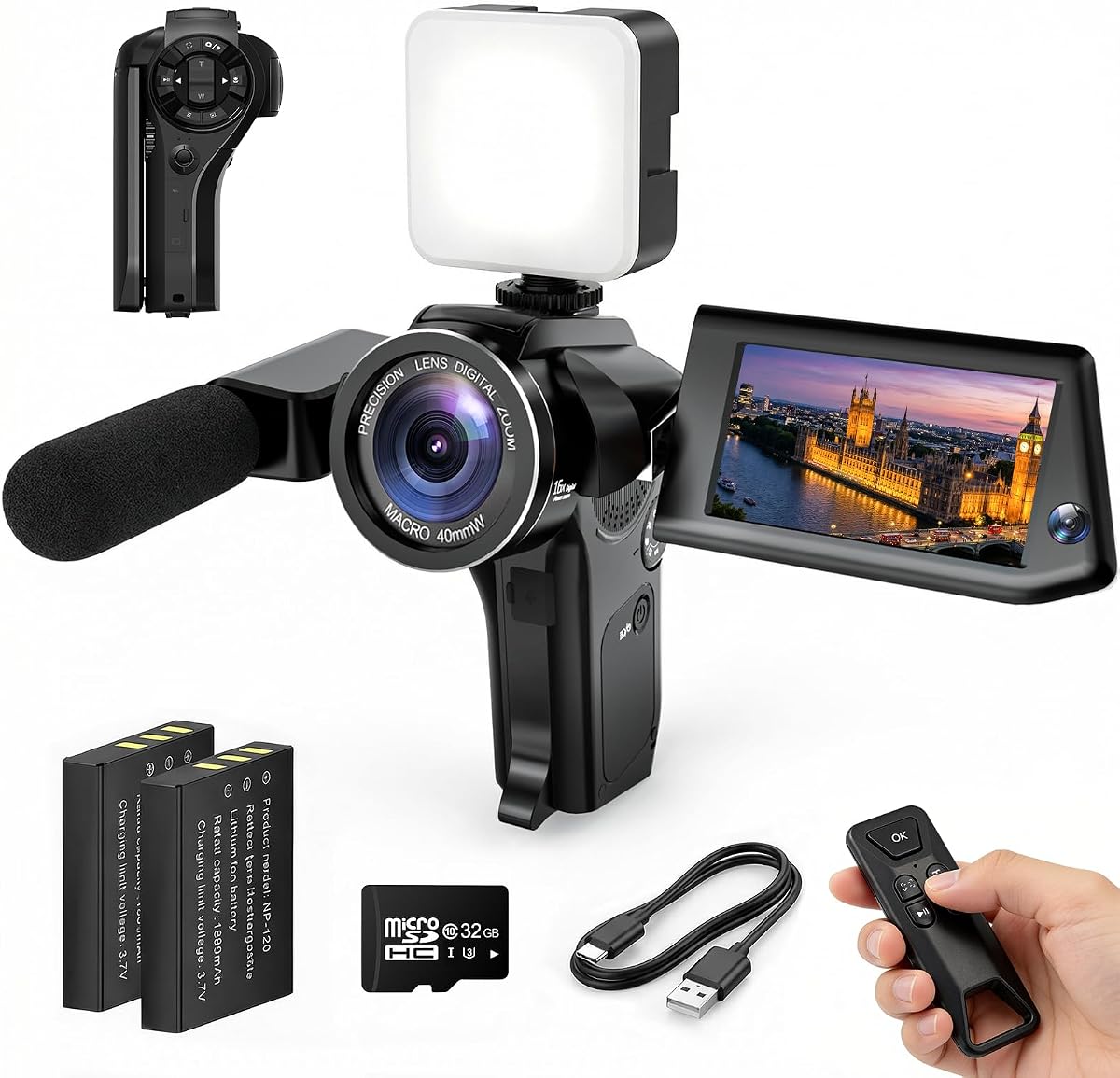


This camera is designed for beginners and first-time content creators who need a straightforward way to start vlogging. It offers 4K video and 75MP photos which are impressive for its size. The 330-degree rotating lens allows for versatile framing without moving the entire camera.
We may earn a commission when you buy through this link, at no additional cost to you.
Its portability makes it ideal for travel vlogs and daily recording. The built-in WiFi enables quick transfers to your smartphone for immediate editing and sharing. This connectivity feature ensures you can get your content online faster. The included kit with a tripod and SD card means you can start filming right out of the box.
While it lacks some advanced features found in higher-end models, it excels in ease of use. The wide-angle lens ensures your shots are stable and sharp. The lack of professional-grade audio is a trade-off for such a compact and affordable package. However, the visual quality is sufficient for most social media platforms.
If you are looking for an entry-level tool that does not require technical expertise, this is a solid choice. It removes the complexity often associated with camera settings and focuses on capturing moments effortlessly. We recommend it for anyone wanting to start creating content without a steep learning curve or high investment.
The unique lens rotation lets you frame shots from different angles without physically moving the camera body.
Everything you need to start is included in the box so you avoid buying extra gear immediately.
We may earn a commission when you buy through this link, at no additional cost to you.
The DJI Osmo Pocket 3 stands out as a powerhouse for creators who need professional quality in a portable package. Its 1-inch CMOS sensor captures stunning detail even in low light. The ability to record 4K video at 120fps allows for smooth slow-motion effects that elevate your storytelling significantly.
We may earn a commission when you buy through this link, at no additional cost to you.
Stabilization is handled by an advanced 3-axis mechanical gimbal which keeps footage buttery smooth. Whether you are walking, running, or dancing, the camera compensates for movement effectively. The active tracking feature keeps you centered in the frame so you can move freely without holding the camera manually.
This model supports advanced color grading with D-Log M and 10-bit color depth. This means you have more flexibility in post-production to achieve a cinematic look. The audio capabilities are also enhanced by direct connections to DJI mics which ensures crystal-clear sound for your videos.
For serious creators who demand the best image quality and reliability, this camera is worth the investment. It bridges the gap between smartphones and cinema cameras. While the cost is higher, the reduction in post-processing time and the quality of output justify the expense for professionals.
The larger sensor allows for better dynamic range and detail in challenging lighting conditions.
The gimbal design makes handheld shooting look like it was filmed on a steady rig.
We may earn a commission when you buy through this link, at no additional cost to you.
This camcorder offers an impressive array of features for the price including 8K video recording capabilities. While the frame rate at 8K is lower, the detail captured is significant for still frames and cropping later. The IR night vision allows you to capture footage in completely dark environments which is rare at this price point.
We may earn a commission when you buy through this link, at no additional cost to you.
It functions well as a webcam for live streaming or video calls when connected to a computer. The external microphone included helps to reduce wind and background noise for clearer audio. The remote control and stabilizer accessories make it versatile for various shooting scenarios from tutorials to outdoor adventures.
The device is larger than pocket cameras but provides more manual control options. The touch screen makes navigation intuitive even for beginners. Having two batteries included means you can swap them out during long recording sessions without interruption. This ensures your workflow remains consistent.
If you need a dedicated camera that does not rely on your phone for recording, this is a strong candidate. It balances high-resolution specs with practical features like night vision. While it may not match the processing power of a smartphone, the optical zoom and battery life make it a robust tool for content creation.
The IR feature allows you to film in the dark without external lighting sources.
You can use it for both outdoor recording and indoor streaming sessions seamlessly.
We may earn a commission when you buy through this link, at no additional cost to you.
This camera blends photography and videography into one compact device. It boasts 96MP photo resolution which allows for detailed stills suitable for print or web. The flip screen makes it easy to frame yourself for vlogs and selfies. The auto-focus system ensures that subjects remain sharp even in changing light conditions.
We may earn a commission when you buy through this link, at no additional cost to you.
The built-in flash and HDR support help in managing contrast and lighting in various environments. This is particularly useful for outdoor shooting where shadows can be harsh. The WiFi transfer feature allows you to sync your content quickly to your phone for social media posting. The ergonomic design makes it comfortable to hold for extended periods.
While the video quality is high, the focus on photography makes it versatile for creators who shoot both. The 20X zoom allows you to get close to subjects without physically moving. However, the battery life is manageable but requires the included second battery for long days of shooting.
For creators who prioritize high-quality still images alongside their video content, this model is excellent. It simplifies your gear bag by reducing the need for a separate camera. The ease of use and connectivity features make it a friendly option for beginners who want professional-looking results.
High resolution photos mean you can crop and edit without losing significant detail.
The flip screen ensures you always look in the frame while recording video.
We may earn a commission when you buy through this link, at no additional cost to you.
This mini camcorder is designed for simplicity and portability above all else. It fits easily in a pocket and is ready to record with a single button press. The 7-hour battery life is a standout feature that allows for long recording sessions without needing a recharge. It is perfect for capturing spontaneous moments throughout the day.
We may earn a commission when you buy through this link, at no additional cost to you.
The 180-degree rotating lens enables hands-free recording and POV shots. You can place it on a table or shelf to capture activities from a unique angle. The lack of complex setup means you do not need to download apps or connect to a phone to start filming. It is a straightforward tool for documenting life.
While it does not offer the highest video resolution, it is sufficient for social media clips that prioritize presence over cinematic quality. The included memory card ensures you have space ready to use immediately. Its light weight makes it ideal for travel where carrying heavy gear is not practical.
If your priority is capturing memories without the burden of technical settings, this camera is ideal. It removes barriers to entry and lets you focus on the content. It is an excellent secondary camera or a primary device for casual creators who value convenience and ease of use over advanced features.
Record for hours on a single charge so you never miss a moment during travel.
No app pairing required so you can start filming immediately upon taking it out of the box.
We may earn a commission when you buy through this link, at no additional cost to you.
This model offers 4K video which ensures sharp and detailed footage for your social media channels. The 330-degree rotating lens allows for unique angles that are hard to achieve with fixed lenses. It is perfect for solo vloggers who need to frame themselves without moving the camera. The focus system is fast and keeps up with movement well.
We may earn a commission when you buy through this link, at no additional cost to you.
In addition to standard recording, it supports time-lapse and slow-motion features. These modes add dynamic elements to your videos that engage viewers. The wide-angle lens captures more of the environment which is great for travel and landscape shots. The camera is lightweight and fits easily in a bag or pocket.
The connectivity options allow you to transfer files to your phone quickly for editing. This streamlined workflow helps you publish content faster. While the audio is not professional grade, it is adequate for casual vlogging. The included accessories like a wrist strap and bag add to its convenience.
For creators who want to experiment with different storytelling techniques without buying multiple cameras, this is a great option. It balances quality and ease of use effectively. The rotating lens feature alone makes it a compelling choice for those who want more creative freedom in their framing.
Time-lapse and slow-motion add professional flair to your videos without extra effort.
The rotating lens allows you to see yourself and adjust your framing easily.
We may earn a commission when you buy through this link, at no additional cost to you.
This camera introduces a Picture-in-Picture mode that captures both the scene and your reaction simultaneously. This is a unique feature that adds a personal layer to your content. It is perfect for tutorials, reviews, and family memories where the emotion is as important as the action. The screen flips to help you frame the shot correctly.
We may earn a commission when you buy through this link, at no additional cost to you.
The inclusion of reaction recording makes your videos more engaging and authentic. Viewers can see your expressions in real time while watching the main subject. This dual-view approach helps build a stronger connection with your audience. The high resolution ensures both views are clear and detailed.
Using this mode requires a bit of practice to get the balance right between the two views. However, once mastered, it becomes a signature style for your channel. The camera is easy to use and the WiFi connectivity helps you manage files efficiently. It stands out in a market of standard cameras.
If you want to differentiate your content with a creative recording style, this camera is a strong choice. It simplifies the process of reaction videos which usually requires complex editing. This tool brings that creative capability directly into the capture process making it accessible for everyone.
Show your audience what you see and how you feel in one seamless shot.
Stand out on social media with a format that adds personality to your vlogs.
We may earn a commission when you buy through this link, at no additional cost to you.
This kit provides everything you need to start vlogging with your smartphone. It includes a wireless microphone and an RGB fill light which significantly improve audio and lighting. The flexible tripod allows for creative angles that standard tripods cannot achieve. The phone clamp ensures your device stays secure during recording.
We may earn a commission when you buy through this link, at no additional cost to you.
The wireless microphone connects easily and provides clear sound without cables. This freedom allows you to move around and interact naturally with your audience. The light has multiple color modes to help you achieve the right tone for your video. The tripods are sturdy and set up quickly for different locations.
Having all these accessories in one package saves you the hassle of buying them separately. It is a cohesive solution for creators who want to upgrade their phone setup. The remote control helps you start and stop recording from a distance. This convenience is valuable for solo creators.
If you already have a good smartphone but lack the peripherals, this kit is the perfect addition. It transforms your phone into a professional-looking recording device. The combination of audio and lighting upgrades ensures your content looks polished and ready for publication on any platform.
The wireless mic ensures your voice is heard clearly without background noise interference.
Adjustable RGB light allows you to set the mood for different types of videos.
We may earn a commission when you buy through this link, at no additional cost to you.
This kit features an auto face tracking tripod that keeps you in focus as you move. The gesture control allows you to start or pause tracking without touching the phone. It is designed for hands-free recording which is perfect for tutorials and product reviews. The dual LED lights ensure your face is always well-lit.
We may earn a commission when you buy through this link, at no additional cost to you.
The tripod extends to 70 inches allowing for high-angle shots. This height is useful for overhead content or standing presentations. The dual wireless microphones ensure that audio is captured clearly even if you move away from the device. The setup is straightforward once you understand the controls.
The combination of tracking and lighting removes the need for a second person to operate the camera. It gives you the freedom to focus entirely on your content. The storage design makes it easy to carry the parts to different locations. It is a robust solution for serious content creators.
If you need a reliable setup that tracks movement and ensures consistent lighting, this kit is excellent. It simplifies the technical side of recording so you can focus on performance. The included accessories make it a complete package for professional-looking videos from home or on the go.
Let the tripod follow your movements so you stay in focus without manual adjustment.
Integrated lights ensure consistent quality without needing external equipment.
We may earn a commission when you buy through this link, at no additional cost to you.
This webcam is designed for streaming and meetings directly from your computer. It offers Full HD 1080p video quality which is sharp and clear. The Auto-Light Balance feature adjusts brightness automatically so you look your best in different rooms. The privacy cover gives you control over when the camera is active.
We may earn a commission when you buy through this link, at no additional cost to you.
It is easy to set up with a simple plug-and-play connection via USB. No drivers or complex software are required to get started. The built-in microphone captures audio clearly for calls and broadcasts. It is a reliable tool for daily streaming needs on platforms like Zoom or Teams.
While it does not have the flexibility of a standalone camera, it is optimized for desktop use. The fixed position means you need to ensure your lighting and framing are correct beforehand. However, the consistency of image quality is high and reduces the need for constant adjustments during calls.
For streamers who work primarily from a desk, this webcam is an efficient choice. It ensures your audience sees you clearly without technical issues. The privacy feature adds a layer of security which is valuable for frequent video users. It is a dependable option for professional communication.
Consistent 1080p performance ensures your stream looks professional and stable.
The physical slide cover provides instant privacy control without software settings.
We may earn a commission when you buy through this link, at no additional cost to you.
Choosing the right camera involves understanding your specific content needs and budget constraints. Here are the key factors to consider to make an informed decision.
Video resolution determines the clarity and detail of your footage. Higher resolutions like 4K allow for better cropping and future-proofing. While 1080p is sufficient for many platforms, 4K ensures a sharper look on high-definition displays.
Always aim for at least 1080p with 4K being the preferred choice for high-quality content.
Stabilization is crucial for smooth handheld footage. Cameras with built-in optical or electronic stabilization reduce shake and jitters. This feature is especially important if you often record while walking or moving.
Look for 3-axis mechanical or advanced electronic stabilization to ensure professional results.
WiFi and Bluetooth connectivity allow you to transfer files quickly to your smartphone. This speeds up your workflow by enabling immediate editing and posting. Check if the camera supports the specific apps you use for social media management.
Built-in WiFi is essential for creators who need to post content rapidly after recording.
Good audio is just as important as good video. Built-in microphones can be limited by wind and background noise. Consider a camera that supports external microphones for better sound control.
Always check if the camera has a mic input jack for external audio solutions.
If you travel frequently, a compact and lightweight camera is vital. Pocket-sized models are easier to carry and less obtrusive. Heavier cameras may offer better quality but can be cumbersome for daily carry.
Prioritize a size that fits comfortably in your bag for spontaneous recording.
Long battery life ensures you can record for extended periods without recharging. Look for cameras that offer hours of continuous recording. Having removable batteries can also help if you plan on shooting all day.
Choose a model with at least 4 hours of battery life for reliable sessions.
A user-friendly interface helps you focus on the content rather than settings. Touchscreens and simple menus make navigation easier. Auto modes allow you to get good shots without manual adjustments.
Beginners should look for cameras with auto-focus and auto-exposure features.
Determine your budget before shopping to narrow down options. There are excellent entry-level options that offer great value. Higher-end models offer more features but may be unnecessary for starting out.
Set a realistic budget that balances cost with the features you need.
Start by familiarizing yourself with the basic buttons and settings on your camera. Test the auto-focus and stabilization features in different lighting conditions. This helps you understand the capabilities and limits before a real shoot.
Keep your lens clean and protected from dust and scratches. Use a microfiber cloth to wipe it gently. Avoid touching the glass with your fingers to prevent smudges that degrade image quality.
Store your camera in a cool, dry place when not in use. Remove the battery if you will not be using it for a long time to preserve its health. Regular updates to the firmware can also improve performance and stability.
While 4K is not strictly necessary for all platforms it provides better quality for future proofing. Many platforms compress videos which can benefit from higher source resolution. It allows for better cropping without losing detail in your final frame.
If you prioritize audio quality a separate microphone is highly recommended. Built-in mics are convenient but often suffer from wind noise. External options ensure your voice remains clear and professional.
Battery life varies but expect between 2 to 7 hours depending on the model. Compact cameras tend to have shorter life due to size. Always carry a spare battery for long recording days.
Many cameras support Wi-Fi apps that allow your phone to act as a viewfinder. This is useful for checking framing without getting too close. Check compatibility with your smartphone OS before buying.
3-axis mechanical stabilization is the most effective for smooth footage. Electronic stabilization is common in smaller cameras but can crop the image. For walking shots mechanical is superior for professional results.
Most of the cameras listed are not waterproof. They are designed for indoor or dry outdoor use. If you need waterproof options consider an action camera with a housing.
We hope this guide helped you identify the best camera for your social media goals. Each option offers unique strengths suitable for different types of creators and budgets. The top picks cover a wide range of needs from beginners to advanced professionals.
Prioritize features that matter most to your workflow such as stabilization or portability. Consider how often you will use the camera and where you will shoot most. Investing in quality gear early can save you from needing upgrades sooner.
Prices and availability change frequently so always check the latest listings before purchasing. Take advantage of any sales or bundles that might offer extra value. Choosing the right tool sets the foundation for successful content creation.