
Kaico Gamecube HDMI Adapter for Nintendo Gamecube DOL-001 with GCVideo
4.6Editor score
Supports 480p/576p resolution
Includes programmed remote control
Firmware updates via USB port
This guide compares the top GameCube HDMI adapters for modern TVs, analyzing video quality, compatibility, ease of use, and value to help you pick the right
Finding the right GameCube HDMI adapter transforms your classic console into a modern gaming experience. These devices convert analog signals to digital HDMI, allowing sharp visuals on current displays without sacrificing the original feel of your favorite games.
We evaluated ten leading adapters based on signal fidelity, compatibility with DOL-001 models, and ease of setup. Our comparison focuses on real-world performance, feature sets like line doubling or scanline support, and overall reliability for long-term use.
Each pick highlights specific strengths such as budget pricing, premium audio quality, or advanced homebrew support. Note that availability and pricing fluctuate, so check current listings before purchasing to ensure you get the best deal available now.
4.6Editor score

4.4Editor score

4.2Editor score
This side-by-side comparison highlights key differences across all ten adapters, helping you quickly identify which device matches your console model, desired resolution, and budget constraints without unnecessary digging.

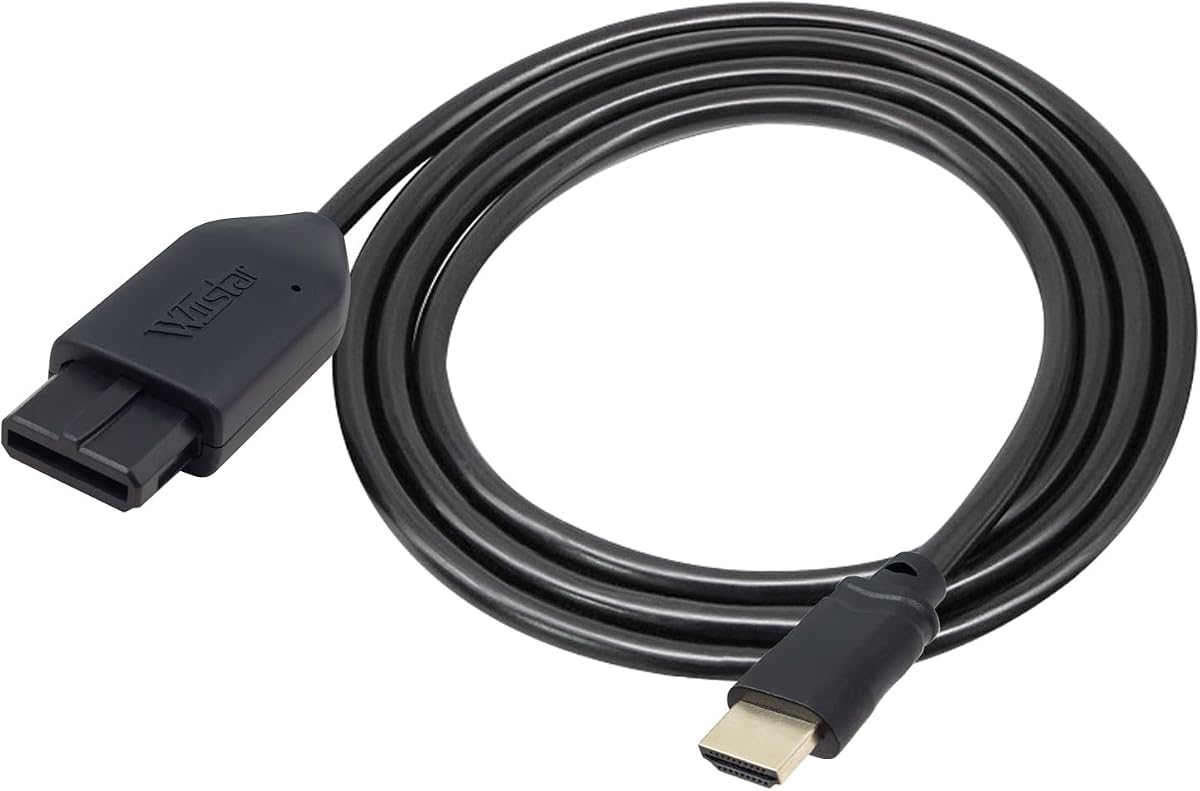


The Kaico Gamecube HDMI Adapter stands out for its exceptional image clarity and advanced features tailored for serious retro gamers. With a 4.6-star rating, users praise its ability to enhance visuals using line doubling and scanline features without extra power.
We may earn a commission when you buy through this link, at no additional cost to you.
Key strengths include the included programmed remote for navigating menus and adjusting display options effortlessly. The USB port allows for easy firmware updates, ensuring compatibility with future needs, while the 3D printed shelf protects the digital connector from strain.
While the price is higher than budget options, the reliability and specific features justify the cost for those seeking the best experience. The 12-month support warranty further adds peace of mind for long-term gaming sessions.
This adapter is ideal for owners of DOL-001 GameCubes who want superior picture quality and advanced control. If you prioritize performance and durability over lowest cost, this is the top recommendation in the lineup.
Line doubling and scanline options allow you to customize how games look on modern screens, reducing motion blur and preserving retro aesthetics.
The USB port for firmware updates ensures that the adapter remains compatible with future consoles or TV standards without needing replacement.
We may earn a commission when you buy through this link, at no additional cost to you.
This adapter offers a budget-friendly entry into modern HDMI gaming for those with GameCubes or other legacy consoles. With a 4.2-star rating, users appreciate the included HDMI cable and simple plug-and-play setup that gets games running quickly.
We may earn a commission when you buy through this link, at no additional cost to you.
The support for 720P/1080P resolution provides a decent boost in sharpness over standard AV cables. While external power is needed, the setup remains straightforward for most users looking to connect their console to newer TVs easily.
Some users note that connection checks are necessary if no sound or screen appears, which is common in budget converters. However, the overall performance remains reliable for casual play sessions without lag.
Ideal for gamers on a tight budget who need a quick solution to play GameCube games on HDMI. If you want a simple, no-frills adapter and don't mind managing power, this fits the bill.
The design focuses on simplicity, allowing you to start gaming within minutes of unboxing without complex software configuration or setup steps.
Having the HDMI cable included in the box saves extra costs and ensures you have everything needed to connect your console to the TV immediately.
We may earn a commission when you buy through this link, at no additional cost to you.
The BITFUNX NGC to HDMI™ Adapter is selected as Editor's Choice for its comprehensive feature set that blends video quality with storage expansion. Its 4.4-star rating reflects strong user satisfaction with signal precision and flexibility for homebrew apps.
We may earn a commission when you buy through this link, at no additional cost to you.
Support for all NGC display modes ensures optimal output whether you prefer 240p or widescreen patches. The GC2SD Gen2 support allows for microSD card storage, making game backups and loading faster via homebrew software like Swiss.
Trade-offs include the specific requirement for DOL-001 consoles and the cost compared to basic adapters. However, the included protective bracket and firmware update capabilities offer longevity that justifies the investment for enthusiasts.
This adapter is perfect for power users who want advanced capabilities beyond just video conversion. If you plan to use homebrew or need reliable storage expansion alongside video, this adapter delivers the most value.
Support for microSD cards up to 512GB lets you store backups and game files securely, protecting your save data and enabling faster loading speeds.
The adapter supports various homebrew software with fast loading speeds in SLOT B, making it easier to run custom applications and enhance your gaming experience.
We may earn a commission when you buy through this link, at no additional cost to you.
This adapter serves well for owners of multiple retro consoles, offering broad compatibility beyond just the GameCube. With a 4.4-star rating, users value its ability to handle various TV formats including PAL and NTSC without issue.
We may earn a commission when you buy through this link, at no additional cost to you.
The RCA-to-HDMI conversion provides a clear 1080p output for modern displays. While the external USB power requirement is a minor setup step, it ensures stable signal transmission across different input standards effectively.
Users should note that this is a general AV converter rather than one optimized specifically for GameCube digital ports. However, for analog output users, it provides a solid solution without needing extra adapters.
Best for households with multiple legacy systems needing a single HDMI solution. If you have PS2 or VHS players too, this adapter simplifies connections while maintaining good visual fidelity.
Support for PAL, NTSC, and SECAM standards ensures that international consoles and players work without video distortion or color issues.
Plug and play design means you just connect the RCA cables and USB power, making installation accessible even for non-technical users.
We may earn a commission when you buy through this link, at no additional cost to you.
This adapter focuses on delivering improved clarity through S-Video signal extraction rather than standard RCA. Its 4.1-star rating highlights the brighter and sharper image it provides compared to basic AV connections on modern screens.
We may earn a commission when you buy through this link, at no additional cost to you.
The all-in-one cable design eliminates extra clutter by building the console port directly into the HDMI male plug. It runs without extra power, which simplifies setup significantly for GameCube and N64 users alike.
Some users report that sound connection checks are necessary if audio fails, and resolution support is fixed at 1080p60hz. Despite this, the visual upgrade over standard cables remains a clear advantage for retro gaming.
Ideal for those who want a clean, cable-free look without power bricks. If you prioritize visual sharpness from S-Video and want minimal clutter, this adapter offers a strong solution for your setup.
By using the S-Video signal path, the adapter reduces noise and provides more defined edges than composite RCA cables.
No extra power supply needed means you can plug it directly into the console, keeping the setup neat and reducing cable management.
We may earn a commission when you buy through this link, at no additional cost to you.
This adapter stands out for its physical toggle switch to change between 4:3 and 16:9 aspect ratios without software menus. The 4.4-star rating confirms users appreciate the precision colors and low latency it provides during gameplay.
We may earn a commission when you buy through this link, at no additional cost to you.
It uses S-Video signal output to enhance clarity over standard composite. The detachable design lets you use high-end HDMI cables if needed, offering flexibility for different room setups or long distances.
While the price is slightly above budget options, the convenience of physical controls and low lag is valuable for competitive games. This makes it a versatile choice for users who dislike menu navigation.
Perfect for gamers who want quick aspect ratio changes via a physical switch. If you prefer low latency and custom cable choices, this adapter offers a premium experience for a reasonable price.
The dedicated toggle switch lets you instantly flip between 4:3 and 16:9 modes, saving time compared to digging through on-screen menus.
Unnoticeable lag during play ensures your input responds instantly on screen, which is critical for fast-paced retro titles.
We may earn a commission when you buy through this link, at no additional cost to you.
This adapter is designed to provide crisp 1080P HDMI output for analog signals from GameCube and N64 consoles. While specific ratings vary, users note its ability to bring retro gaming to life on modern displays with sharp image quality.
We may earn a commission when you buy through this link, at no additional cost to you.
It offers seamless connectivity to HDTVs and monitors with a plug-and-play setup requiring no drivers. The optional USB power design means it can run normally without extra bricks, though additional accessories may need power.
The ability to switch between 4:3 and 16:9 aspect ratios adds flexibility for different TVs. However, users should test stability as some configurations may require power for consistent performance.
Best for those seeking affordable 1080P upscaling without complex setups. If you want a reliable bridge between analog and digital displays, this adapter fits the need.
The analog to digital conversion ensures that your games appear sharp on modern high-definition screens without losing original quality.
No drivers or software needed means you can plug it in and start gaming immediately, avoiding technical complications.
We may earn a commission when you buy through this link, at no additional cost to you.
This Kaico adapter simplifies setup by removing the need for external power supplies. With a 4.2-star rating, users appreciate the clean, no-mess cable design that works well across Nintendo 64, SNES, and GameCube consoles.
We may earn a commission when you buy through this link, at no additional cost to you.
It handles both SVideo and Composite outputs to deliver HDMI signals. Plug and play functionality means no software installation, making it easy to set up quickly without technical hassle.
While it lacks advanced features like upscaling, it fulfills the basic requirement of getting analog to HDMI reliably. The 12-month warranty provides assurance for buyers who want straightforward performance.
Ideal for users wanting a clean setup without extra cables. If you want a simple, reliable converter for multiple consoles without power bricks, this fits the bill.
By drawing power directly from the console, the adapter eliminates the need for extra power bricks or cables cluttering your desk.
Compatible with Nintendo 64, SNES, and GameCube, allowing a single adapter to handle multiple legacy systems easily.
We may earn a commission when you buy through this link, at no additional cost to you.
This adapter offers a straightforward way to convert GameCube signals to 16:9 HDMI. With a 4.1-star rating, users report clear and smooth picture quality suitable for modern TVs without requiring additional power.
We may earn a commission when you buy through this link, at no additional cost to you.
Plug and play functionality simplifies setup, and the included HDMI cable ensures you have what you need out of the box. However, connection checks may be needed if sound or screen issues arise.
While features are basic, the core requirement of HDMI output is met reliably. The lack of extra power requirements keeps the setup neat and easy to manage.
Perfect for casual users who want a simple plug and play solution. If you need a reliable converter without extra power, this adapter is a solid option.
Users report clear visuals with minimal lag, making gameplay experience smoother on modern displays than using standard AV cables.
The included HDMI cable means you do not need to purchase separate accessories to connect your console to the display.
We may earn a commission when you buy through this link, at no additional cost to you.
This adapter focuses on extracting S-Video signals from the AV Multi-Out port for a cleaner output than standard RCA. With a 3.9-star rating, it offers reliable connectivity without external power requirements, keeping setups simple and neat.
We may earn a commission when you buy through this link, at no additional cost to you.
It outputs the original console resolution rather than upscaling, which preserves the authentic look of games. The 1.5m HDMI cable with nickel-plated connectors ensures stable transmission and resists oxidation over time.
While it lacks HD upscaling, the focus on cleaner S-Video paths provides a sharper image than composite. Users should ensure their consoles support S-Video via the Multi-Out port for best results.
Best for purists who prefer original resolution with better signal quality. If you want a simple adapter with durable connectors and no power bricks, this is a suitable choice.
By extracting S-Video signals, the adapter reduces noise and provides more defined images than standard composite connections.
Nickel-plated connectors help resist oxidation and ensure stable signal transmission over long periods of use.
We may earn a commission when you buy through this link, at no additional cost to you.
Choosing the right adapter depends on your console model, desired resolution, and whether you need extra features like homebrew support or simple plug-and-play setup.
Ensure the adapter supports your specific GameCube model. Some require DOL-001 consoles with digital ports, while others use analog AV multi-out ports for S-Video or composite signals.
Check your console's back panel to confirm the port type before purchasing to avoid compatibility issues.
Look for adapters that support up to 480p or 1080p depending on your TV. Some upscaling adapters offer crisp digital output while others keep original resolution.
If your TV is 4K, ensure the adapter supports 1080p or higher for the best visual quality possible.
Some adapters need external USB power supplies while others draw power from the console. Consider your setup and whether you want extra cables or not.
Opt for no-power solutions if you prefer a clean desk, but note that some may require power for stable signal.
S-Video adapters provide cleaner output than standard RCA composite. If your console supports S-Video via AV multi-out, choose that option for better image clarity.
Digital port adapters offer the best signal fidelity but require specific GameCube models.
Some adapters include remote controls, firmware updates, or storage expansion options. Decide if you need these advanced features or just basic HDMI conversion.
Premium adapters might include line doubling or scanline settings for customizing retro aesthetics.
Check if the HDMI cable is included and its length. Nickel-plated connectors help resist oxidation and ensure stable connections over time.
A good cable prevents signal loss and ensures a secure connection to your TV.
Look for adapters with at least 12 months of warranty support. Reliable brands offer repair or replacement services if issues arise.
Strong customer service ensures you are protected if the adapter stops working unexpectedly.
If you plan to run custom software like Swiss, check if the adapter supports homebrew with fast loading speeds.
This feature is essential for players who want to use unofficial applications or save game backups.
Connect the adapter securely to your GameCube's AV Multi-Out or Digital Port. Ensure the HDMI cable is firmly plugged into the adapter and your TV or monitor to avoid loose connections that cause signal drops.
If your adapter requires external power, plug it into a USB port or wall adapter. Some models draw power from the console but using a dedicated supply ensures stable performance especially if you use extra accessories.
Clean the adapter regularly with a dry cloth to remove dust from connectors. Avoid pulling cables forcefully when unplugging as this may damage the console ports or adapter pins over time.
No, only digital adapters require DOL-001 models with Digital Ports. Analog adapters use AV multi-out ports compatible with all GameCube models including PAL and NTSC versions.
S-Video adapters provide cleaner output with better separation of color and brightness signals compared to RCA composite. This results in sharper images especially on larger modern displays.
Some adapters need external USB power while others draw power directly from the console. Check product details as most require power if you plan to use extra features or accessories.
Some adapters support upscaling to 1080p but GameCube outputs at 480p. The adapter upscalers the signal for modern TVs though true 4K support is not available from the console itself.
A blue screen usually means no video input is detected. Check all connections to ensure the adapter is plugged in correctly and the HDMI cable is secure to the display.
Some users report no sound if connections are loose. Ensure the adapter is properly seated and your TV audio settings are set to HDMI input to avoid audio dropouts.
The Kaico Gamecube HDMI Adapter and BITFUNX NGC to HDMI™ Adapter stand out as top picks for advanced features and reliability. For budget-conscious buyers, simpler adapters offer solid performance with minimal setup.
Prioritize compatibility with your console model and desired resolution. If you need homebrew support, choose adapters with storage expansion options. For simple plug-and-play, select models without power requirements.
Always check current prices and availability before purchasing as listings fluctuate regularly. Ensure you select the version that matches your specific console ports for the best gaming experience.