
Logitech Alto Keys K98M
4.4Editor score
Wireless mechanical typing
Gasket mount comfort
Multi-device connectivity
Finding the right 1800 compact keyboard can transform your workspace by saving space without sacrificing essential keys. These layouts offer a full-size feel in a tighter footprint, ideal for gamers and professionals alike.
We evaluated ten leading models based on build quality, switch types, connectivity options, and user feedback. Our analysis focuses on how well each device balances portability with functional completeness for daily tasks.
Each pick highlights unique strengths tailored to different needs like gaming, typing, or travel. Keep in mind that availability and offers may shift, so verify current details before making your final purchase decision today.
4.4Editor score

4.6Editor score
4.6Editor score
As an Amazon Associate we earn from qualifying purchases.
This side-by-side comparison highlights the core specifications and unique attributes of each selected model to help you quickly identify the best fit for your specific workflow and environment.




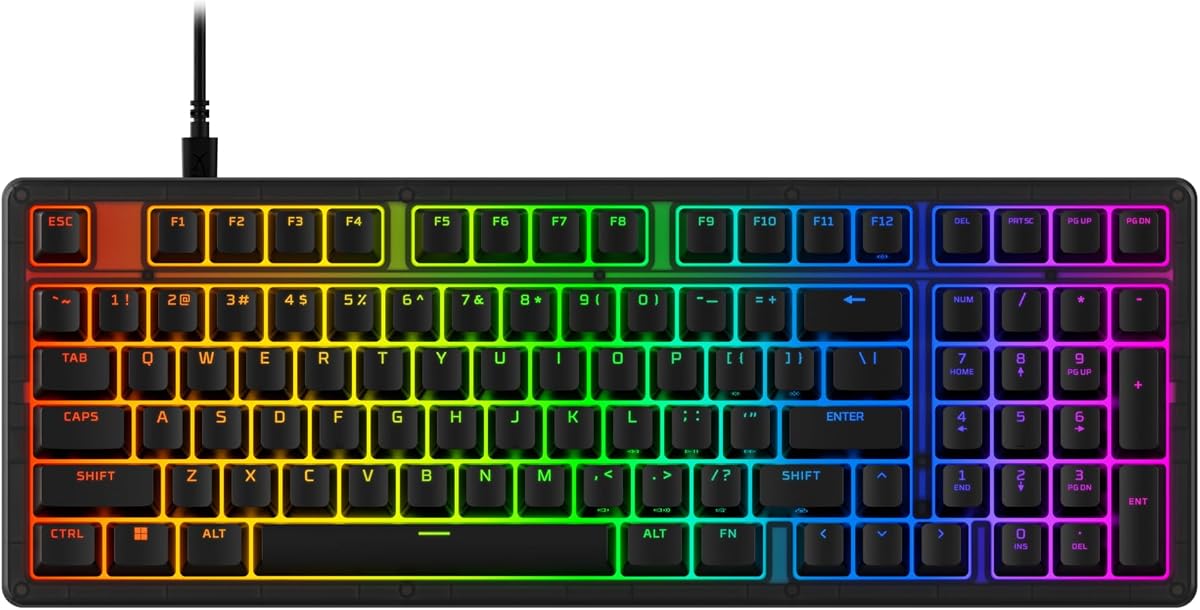
The HyperX Origins 2 1800 stands out as a top pick for users who want deep customization without compromising on performance. It combines a compact 1800 layout with mechanical switches and an 8k polling rate for instant response.
We may earn a commission when you buy through this link, at no additional cost to you.
Its hotswap sockets let you change switches easily while the O ring mount and removable silicon weight improve typing feel. The swappable housing design means you can refresh your desk look without buying a new board.
While it comes with a higher price tag than basic models, the engineering behind its stability and speed justifies the cost. The included software allows for complex macros and lighting effects that enhance gaming and productivity.
This keyboard is ideal for enthusiasts and gamers who value precision and want a board that evolves with their needs. If you seek a balance of features and durability, this model delivers an outstanding experience.
The hotswap feature allows users to test different switch types effortlessly, ensuring the perfect typing feel without technical hassle.
With an 8k polling rate and vibrant housing options, this keyboard ensures both competitive advantage and aesthetic satisfaction for your setup.
We may earn a commission when you buy through this link, at no additional cost to you.
The Logitech Alto Keys K98M offers a luxurious typing experience with its wireless mechanical design and gasket mount construction. It brings together comfort and efficiency in a sleek compact layout that suits both work and play.
We may earn a commission when you buy through this link, at no additional cost to you.
Its hot-swappable switches allow for personalization while the Bluetooth and Logi Bolt options ensure seamless connectivity across devices. The transparent top case adds a modern touch that complements any professional or creative workspace setup.
Although the price reflects its premium build and wireless convenience, the value lies in its comfort and versatility. Users appreciate the smooth keystrokes and the ability to connect multiple devices without cable clutter on their desk.
This keyboard is perfect for professionals who prioritize typing comfort and wireless freedom. If you are looking for a high-end solution that merges style with function, this model is a compelling choice for daily use.
The gasket mount absorbs vibrations to provide a satisfying bounce and deeper sound, making long typing sessions more pleasant and less fatiguing.
With both Bluetooth and Logi Bolt support, you can switch between computers effortlessly, ensuring smooth workflow across your multi-device environment.
We may earn a commission when you buy through this link, at no additional cost to you.
The HyperX Eve 1800 delivers excellent value for gamers seeking a compact layout without breaking the bank. It features a full-size keyboard feel in a tighter design with vibrant RGB lighting to match your setup aesthetic.
We may earn a commission when you buy through this link, at no additional cost to you.
Its membrane switches provide cushioned keystrokes with anti-ghosting to ensure reliable input during intense gaming sessions. Dedicated media buttons allow quick control over volume and profiles, adding convenience to your daily tasks.
While it lacks mechanical switches, the performance remains solid for casual to mid-level gaming needs. The customization options via HyperX NGENUITY software let you tailor lighting and macros to suit your preferences effectively.
This model is ideal for budget-conscious users who still want style and function. If you need a reliable gaming keyboard that saves space and looks great, the Eve 1800 is a smart starting point.
With 10 zones of customizable lighting, you can sync colors with your games or create unique patterns that reflect your personal style.
Dedicated buttons for volume and profiles mean you can adjust sound without interrupting your workflow or leaving your game to use your mouse.
We may earn a commission when you buy through this link, at no additional cost to you.
The Cherry G80-1800 is built for continuous use in demanding environments with its robust mechanical construction. It offers a compact design that fits into tight spaces while maintaining full functionality for various systems.
We may earn a commission when you buy through this link, at no additional cost to you.
With gold crosspoint contacts and MX Black switches, it ensures reliable performance over millions of keystrokes. The dual connectivity options including USB and PS/2 make it versatile for older Unix computers and modern setups alike.
Its straightforward design focuses on function over flair, which suits industrial or office settings where consistency is key. The long cable and included adapter provide flexibility for placement without compromising signal quality during operation.
This keyboard is best for users who need a dependable tool for heavy-duty tasks. If you require a workspace that withstands constant use and fits legacy systems, this model delivers solid performance.
Designed for continuous use, its high-quality components ensure that the keyboard remains functional and reliable even under demanding work conditions.
The PS/2 adapter included allows this keyboard to connect to Unix computers and older systems, ensuring it remains useful across different hardware generations.
We may earn a commission when you buy through this link, at no additional cost to you.
The Cherry G80-1800LPCEU-2 provides a reliable solution for industrial settings needing mechanical precision in a compact form. It adheres to international standards ensuring quality and durability for professional environments.
We may earn a commission when you buy through this link, at no additional cost to you.
Its mechanical keyswitches deliver consistent feedback while the USB and PS/2 interface options ensure compatibility with a wide range of systems. The compact size saves valuable desk space for other essential equipment or accessories.
Although it does not have consumer reviews, its industrial focus suggests it is built for longevity and function. This makes it a strong candidate for users requiring a workspace that meets specific operational standards.
This model is suitable for professionals working in controlled environments where reliability is paramount. If you need a keyboard that combines mechanical feel with strict quality compliance, this option is worth considering.
Built to meet ISO standards, this keyboard ensures high quality manufacturing that supports consistent performance in professional and industrial contexts.
Its compact dimensions help maintain an organized workspace by reducing clutter while still providing full access to necessary keys for daily tasks.
We may earn a commission when you buy through this link, at no additional cost to you.
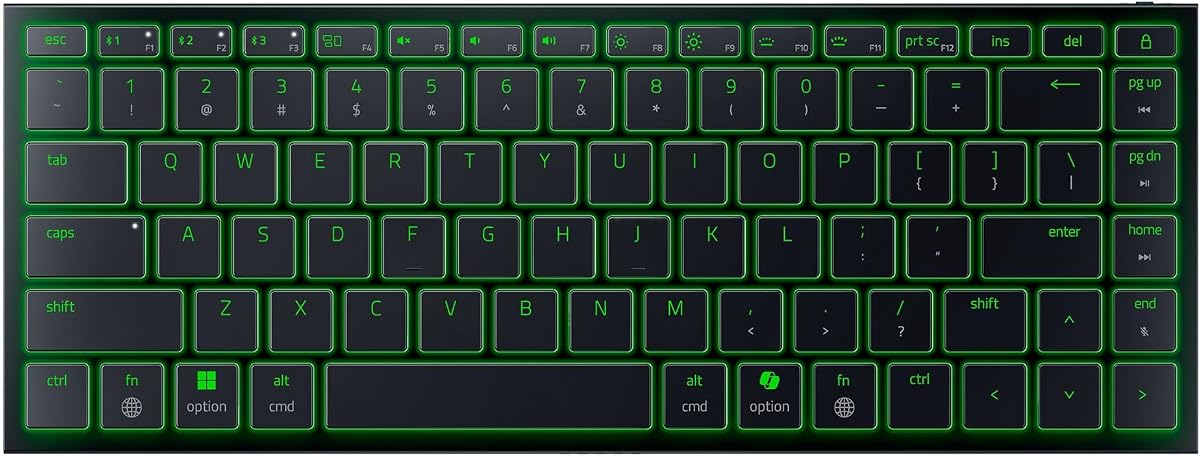
The Razer Joro Wireless is designed for gamers on the go who need a portable compact solution without sacrificing key features. It fits a function row and arrow keys into a slim lightweight package that travels easily.
We may earn a commission when you buy through this link, at no additional cost to you.
Ultra low profile switches provide quick actuation with minimal strain making it comfortable for long work or gaming sessions. Chroma RGB adds personalization while the Bluetooth connection allows seamless switching between multiple devices.
Its battery life supports extended use but may vary depending on lighting and usage patterns. For travel or shared workspaces, its thin design and lightweight build make it easy to carry and store away when not in use.
This keyboard is perfect for travelers or those with limited desk space. If you need a compact keyboard that balances portability with gaming features, the Joro offers a versatile option for your daily needs.
At just 16.5 mm thin, this keyboard slides easily into bags or sleeves ensuring you can type comfortably anywhere without bulk.
Bluetooth 5.0 connectivity allows you to pair up to three devices making it easy to switch between your laptop and tablet instantly.
We may earn a commission when you buy through this link, at no additional cost to you.
The Cherry G80-1800LPCEU-0 offers a full 104 key layout in a compact industrial design suitable for precise control tasks. It features high-quality contacts and ergonomic build to support extended use in various settings.
We may earn a commission when you buy through this link, at no additional cost to you.
Its gold crosspoint contacts ensure reliable connectivity and durability over time. The ergonomic design helps maintain a natural typing position which reduces strain during long working hours in professional environments.
While it lacks modern features like RGB or wireless connectivity, its focus is on stability and longevity. This makes it a dependable tool for users who prioritize function and reliability above aesthetic customization.
This keyboard is ideal for industrial or office settings requiring a full numeric pad in a compact frame. If you need a sturdy and reliable keyboard for frequent data entry or technical tasks, this model is a solid option.
The ergonomic design aligns with natural hand positions to help reduce fatigue and maintain comfort throughout extended work sessions.
Gold crosspoint contacts provide a reliable electrical connection that ensures consistent performance and a long service life for every key.
We may earn a commission when you buy through this link, at no additional cost to you.
The Cherry Stream Wired keyboard is engineered for quiet efficiency with its scissor technology and compact TKL design. It delivers a precise typing experience that is gentle on the ears in shared spaces.
We may earn a commission when you buy through this link, at no additional cost to you.
Its slim profile and lack of a number pad bring the mouse closer for better ergonomics. The multimedia keys provide easy access to volume and other controls making daily tasks more convenient for users.
The GS mark certification assures safety and quality which adds confidence to its use. While it is not designed for gaming its reliability and smooth feedback make it excellent for office work or light productivity tasks.
This model is perfect for users who value silence and simplicity. If you need a keyboard that is easy to use and quiet enough for an open office, the Stream Wired is a practical choice.
The SC scissor technology ensures that keystrokes are smooth and quiet reducing noise distractions for you and those around you.
Removing the number pad shortens the keyboard width allowing your mouse to sit closer for a more natural arm position while typing.
We may earn a commission when you buy through this link, at no additional cost to you.
The Logitech Pebble Keys 2 K380s brings modern design to portable typing with its slim profile and Bluetooth connectivity. It supports multiple devices making it easy to switch between phone tablet and laptop seamlessly.
We may earn a commission when you buy through this link, at no additional cost to you.
Its scooped round keys offer a familiar laptop-like typing feel that is comfortable for quick messages. The eco-friendly design uses recycled plastic to reflect a commitment to sustainability without compromising on quality.
Battery life is robust with auto-sleep features to conserve power when not in use. While it may not suit heavy typing, its convenience and ease of connection make it ideal for travelers and mobile professionals.
This keyboard is best for those who need a simple portable typing solution. If you want a lightweight keyboard that connects easily to multiple devices, the Pebble Keys 2 K380s is a smart pick.
Easy-Switch buttons let you switch between three devices instantly without complex pairing steps keeping your workflow smooth and efficient.
With recycled plastic parts, this keyboard helps reduce environmental impact while providing a reliable typing experience for daily use.
We may earn a commission when you buy through this link, at no additional cost to you.
The ProtoArc XK04 Foldable is a travel-friendly keyboard designed for mobile devices with a compact foldable layout. It unfolds to a practical size for typing notes on phones and tablets anywhere you go.
We may earn a commission when you buy through this link, at no additional cost to you.
A PU leather cover protects the keys during transport while adding a premium look to your carry gear. Its rechargeable battery lasts for months due to auto-sleep standby ensuring it is ready whenever you need it.
Bluetooth connectivity simplifies pairing and allows switching between devices without extra cables. For travelers or commuters who need physical typing on mobile devices this keyboard is a convenient and practical addition.
This model is perfect for users who value portability and protection. If you need a keyboard that fits easily in a bag and supports mobile productivity, the XK04 offers a great portable solution.
Its foldable design reduces the keyboard to a small form that fits easily in bags or pockets making it ideal for on-the-go typing.
The included PU leather cover shields the keyboard from scratches and adds durability ensuring it stays in great condition during travel.
We may earn a commission when you buy through this link, at no additional cost to you.
Selecting the right keyboard involves understanding your specific needs for portability, typing feel, and features. This guide breaks down the essential factors to consider before making your decision.
Mechanical switches offer tactile feedback and longevity ideal for gaming and typing while membrane switches are quieter and more affordable for general use. Consider the noise level and durability required for your environment when choosing.
Prioritize mechanical for long-term value and membrane for budget savings.
Wired keyboards provide stable connection for gaming whereas wireless options offer flexibility and desk space savings. Check for Bluetooth or Logi Bolt support if you plan to switch between multiple devices regularly.
Choose wired for zero latency and wireless for clutter-free setups.
The 1800 compact layout saves desk space while retaining function keys and a numpad if needed. Ensure the dimensions fit your desk and allow your mouse to sit comfortably without straining your arm.
Measure your workspace before finalizing size choices.
Look for keyboards with RGB lighting software support or hot-swap switches if you want to change the look and feel over time. These features enhance personalization and extend the keyboard's lifespan.
Select models that allow easy hardware or software updates.
Materials like aluminum or sturdy plastic impact durability and typing stability. Check for features like rubberized feet or metal plates that reduce vibration and slipping during intense typing or gaming sessions.
Opt for sturdier materials if you type heavily or move often.
For wireless models consider how long the battery lasts on a single charge and how easy it is to recharge. Some offer months of usage with auto-sleep features which reduces maintenance needs.
Pick a battery that matches your usage frequency.
Comfort features like adjustable feet or gasket mounts can reduce strain during long sessions. Ensure the keyboard height and angle support natural hand positions to avoid wrist fatigue over time.
Focus on comfort features for daily typing comfort.
Verify the keyboard supports your operating system whether Windows macOS or Linux. Also check for PS/2 support if you use older systems to ensure seamless connection without extra adapters.
Confirm OS support before purchasing.
Connect your keyboard securely to your device using USB or pair via Bluetooth for wireless models. Ensure drivers or software like Logi Options or HyperX NGENUITY are installed to access all features.
Clean the surface regularly with a soft dry cloth and avoid liquid spills to maintain longevity. If possible remove keycaps gently to clean underneath for better hygiene and smooth keystrokes.
Store the keyboard in a dry safe place when not in use especially if it is portable. Use protective covers or cases to prevent dust and scratches that could impact performance over time.
A 1800 compact keyboard retains the full-size layout including a number pad but in a more condensed footprint. It saves desk space while keeping essential keys accessible for productivity and gaming needs.
Mechanical switches provide better durability and tactile feedback which is beneficial for frequent typing. Membrane switches are quieter and cost-effective so choose based on your priority for sound and feel.
Many models support Bluetooth allowing connection to tablets and phones for portable typing. Check compatibility details and battery life if you plan to use them on mobile devices regularly.
Regular cleaning with a soft cloth and occasional keycap removal for deeper cleaning helps maintain performance. Avoid liquids and dust accumulation to extend the keyboard lifespan significantly.
Modern wireless keyboards have low latency suitable for most gaming. However wired models still offer the most consistent response for competitive gaming if precision is your main priority.
Most keyboards work across Windows and Mac systems but verify key mapping and shortcut support. Models with software often offer specific Mac profiles to ensure seamless integration with macOS.
Our top picks include the HyperX Origins 2 1800 for customization, the Logitech Alto Keys K98M for premium wireless comfort, and the HyperX Eve 1800 for budget-friendly gaming.
Prioritize features like switch type and connectivity based on whether you value durability portability or price. Consider how you will use the keyboard daily to choose the best fit.
Prices and availability may change so check current offers before buying to get the best deal for your chosen model today.