
SCRIB3D P1 3D Printing Pen with Display
4.4Editor score
Stepless speed control
Includes starter filament
Auto sleep function
This guide compares the top 3D printing pens for kids, evaluating safety, ease of use, and creative features to help parents choose the perfect STEM tool.
3D printing pens offer a unique way for children to transform flat sketches into tangible three-dimensional creations. These tools blend art with technology, fostering creativity while introducing basic engineering concepts in a fun, hands-on manner suitable for young minds.
We analyzed ten leading models based on safety features, filament compatibility, and user feedback from parents and educators. Our selection process prioritized pens with cool-touch nozzles for younger users and advanced controls for older kids ready to tackle complex projects independently.
Each product overview highlights specific strengths, potential drawbacks, and ideal use cases to match your child's skill level. Please note that pricing and availability fluctuate frequently, so verify current details before making your final purchase decision online.
4.4Editor score
4.4Editor score
4.5Editor score
The following table provides a side-by-side overview of key specifications for each model, helping you quickly identify the right fit for your child's age and creative interests.


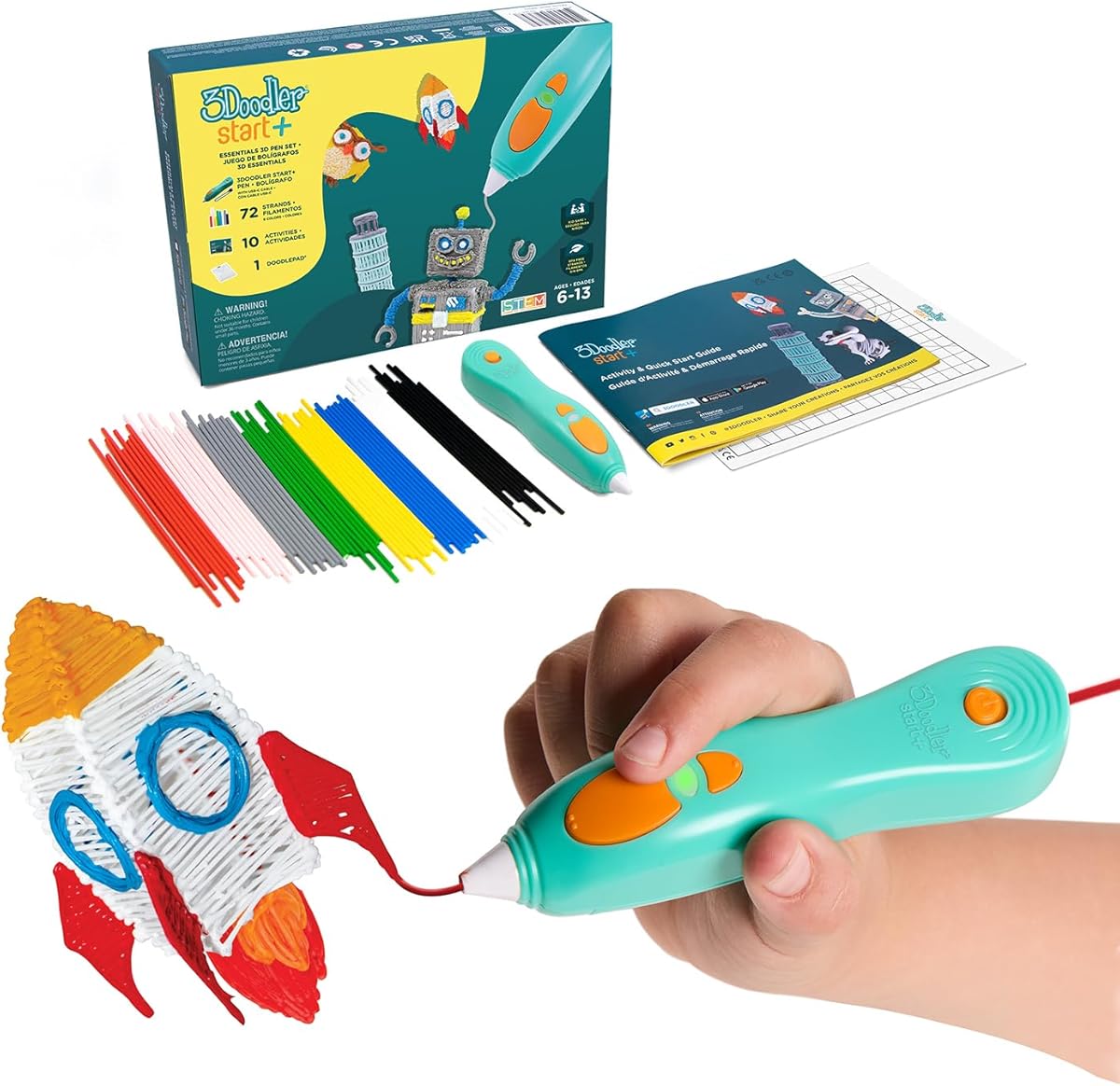
The 3Doodler Start+ Essentials set stands out as the safest option for young children aged six and up. Its unique design eliminates hot parts entirely, allowing kids to touch the nozzle and plastic without burn risks. This makes it the top recommendation for parents prioritizing safety above all else.
We may earn a commission when you buy through this link, at no additional cost to you.
Beyond safety, this kit offers an upgraded experience with more plastics and stencils than previous versions. The slimmer pen is easier to hold, and the fast charging feature ensures minimal downtime during creative sessions. It is designed specifically as a fun, screen-free learning tool that connects play to STEM concepts.
While it is highly safe, the system is locked to 3Doodler Start filaments, which can be costlier than generic options. Additionally, the initial investment is higher than basic pens, though the included accessories justify the cost for a complete educational kit.
This set is ideal for younger kids or beginners who need a safe entry point into 3D art. We highly recommend it for families seeking a stress-free, educational toy that encourages creativity without the worry of hot surfaces.
The nozzle and plastic are designed to be touched safely, removing burn risks entirely for young users.
Kids make real-world connections to STEM concepts while enjoying hours of screen-free play and learning.
We may earn a commission when you buy through this link, at no additional cost to you.
The SCRIB3D P1 offers a high-quality 3D printing experience at a very accessible price point. It is an excellent gift for the whole family, helping to improve spatial thinking and artistic skills. The stepless speed function ensures optimal control whether working on intricate projects or faster infill work.
We may earn a commission when you buy through this link, at no additional cost to you.
This pen includes a complete ready-to-use kit with three starter colors of PLA filament. The ceramic nozzle ensures safety and performance without clogging, while the auto sleep function adds convenience. The controls are intuitive, making it easy for beginners to start creating three-dimensional masterpieces quickly.
It requires plugging into an adapter, which limits portability compared to battery-operated pens. The warm-up time of two to three minutes might also feel slow for impatient users, but the results are consistent and reliable.
Ideal for budget-conscious families or beginners, this pen delivers premium features without the premium price tag. We recommend it for those wanting a practical tool for handmade gifts or household fixes.
The stepless speed slider allows for optimal adjustment tailored to any specific task or project complexity.
Ceramic nozzle and premium motor ensure safety and high performance without clogging issues.
We may earn a commission when you buy through this link, at no additional cost to you.
The MYNT3D Professional Pen brings precise control to 3D printing with its OLED display and adjustable feed. It allows you to regulate speed and flow for optimal control of material while drawing. This model is perfect for those who want watch imagination come to life with professional-grade tools.
We may earn a commission when you buy through this link, at no additional cost to you.
Temperature adjustment is highly granular, changing in 1-degree increments from 140 to 230 Celsius. This fine-tuning capability helps achieve a wide variety of effects. The large OLED display lets you monitor material temperature easily, ensuring you stay within safe operating ranges.
This pen is on the pricier side and includes only a few colors of filament. It is a specialized tool more suited for serious hobbyists or older kids who want precise control over their creations.
Recommend it for advanced users or those interested in engineering concepts. The precision and display features make it a standout choice for detailed work.
Temperature adjusts in 1 degree increments, allowing for precise fine-tuning of your creative projects.
A large OLED display lets you monitor material temperature to ensure consistent printing results.
We may earn a commission when you buy through this link, at no additional cost to you.
The MYNT3D Super 3D Pen turns ordinary drawings into 3D works of art with high versatility. It supports both ABS and PLA filaments, giving users more material options. The ultrasonic sealed nozzle is nearly clog-proof, providing market-leading durability for long-term use.
We may earn a commission when you buy through this link, at no additional cost to you.
A stepless speed slider lets you regulate flow for optimal control of material while you're drawing. This feature ensures smooth transitions and precise lines. The pen is slim and ergonomic, designed to be comfortable for artists and engineers of all ages.
Without a display, you must estimate temperature settings manually. While it is robust, the lack of visual feedback might be challenging for beginners needing guidance. However, the durability compensates for this minor inconvenience.
We recommend this pen for intermediate users who want material flexibility. It is a great choice for projects requiring the toughness of ABS plastic.
Supports both ABS and PLA filaments, offering versatility for different project requirements.
Ultrasonic sealed nozzle ensures market-leading durability and reduces clogging issues.
We may earn a commission when you buy through this link, at no additional cost to you.
The SCRIB3D Advanced Pen is designed for making accurate and creative 3D models and structures. It features a soft touch surface intended for optimal doodling comfort, fitting your hand perfectly. The LCD screen helps monitor heat, ensuring correct settings for consistent results.
We may earn a commission when you buy through this link, at no additional cost to you.
Variable speed control with eight different speed options allows you to regulate flow for optimal control of line thickness. This precision is great for creative 3D models. The kit is ready-to-use, including five colors of filament and a stencil book.
It is heavier than basic models due to its additional features. The price is also higher than the P1, though the comfort and speed options may justify the cost for frequent users.
Ideal for those who prioritize comfort during long creative sessions. We recommend it for users ready to level up from basic pens.
Soft touch surface and curvature ensure the most comfortable 3D drawing experience available.
Eight different speed options allow for precise regulation of line thickness during creation.
We may earn a commission when you buy through this link, at no additional cost to you.
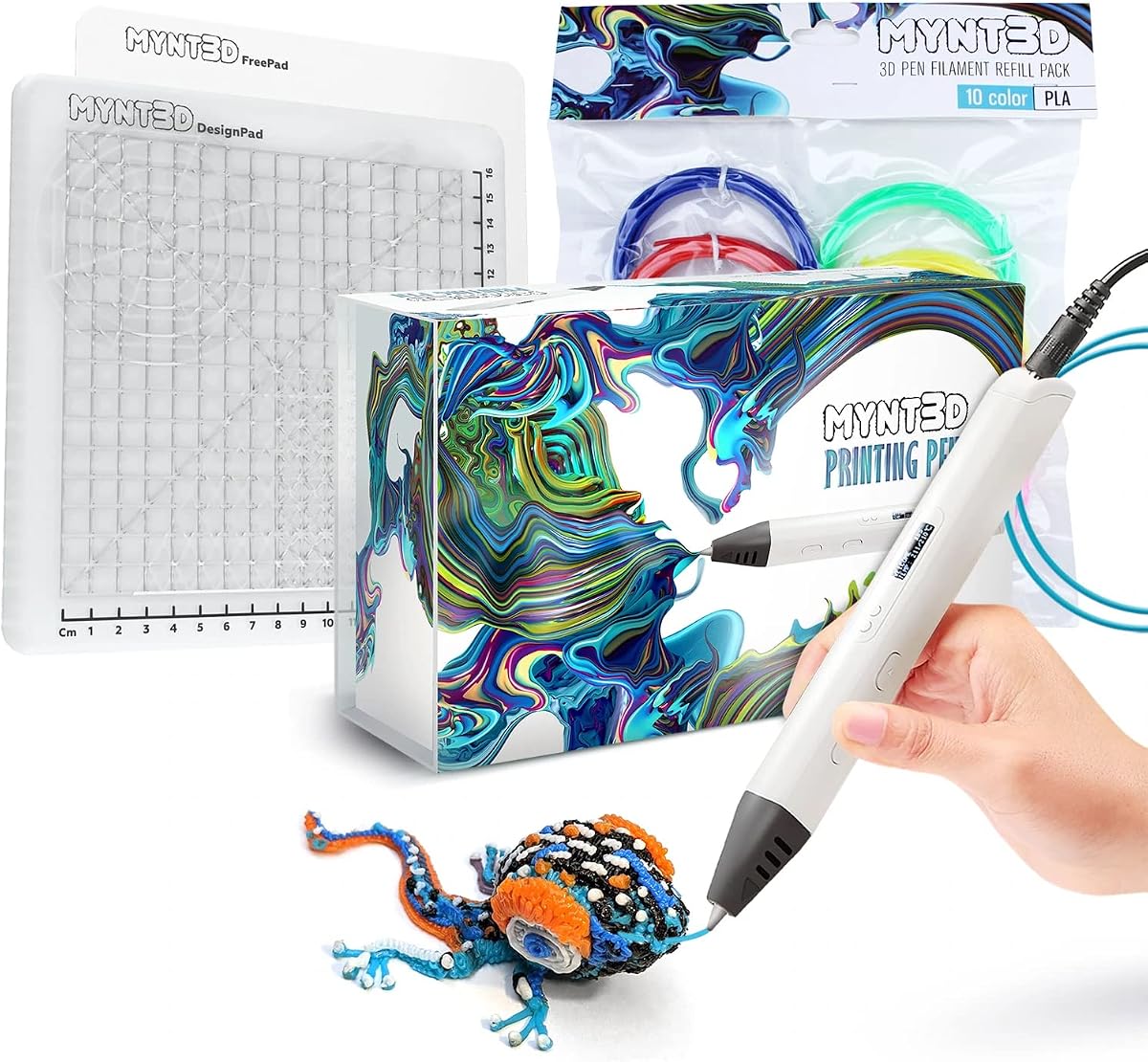
The MYNT3D Pro Bundle is a complete set for creating like a pro. It includes the PRO 3D Pen with stepless speed control and a full design kit. The vacuum sealed PLA refills ensure high quality, with ten vibrant colors available right out of the box.
We may earn a commission when you buy through this link, at no additional cost to you.
The DesignPad mat offers a double-sided silicone surface with channels for perfect geometric shapes. FreePad lets you trace favorite patterns or create own designs. This bundle provides everything needed for a seamless doodling experience with unlimited creative potential.
It is a premium investment, which might be steep for casual users. The setup involves more components than simpler pens, requiring more initial time to organize.
Recommend this bundle for serious creators who want a complete ecosystem. The value of included accessories and filament is unmatched in this price range.
Includes pen, refills, and DesignPad mat for a full creative experience.
Vacuum sealed PLA refills ensure consistent quality and color vibrancy.
We may earn a commission when you buy through this link, at no additional cost to you.
The MYNT3D Super Bundle features stepless speed control for enhanced flow regulation and temperature adjustability for ABS or PLA. This material compatibility offers significant versatility. The kit includes a DesignPad mat and ten color PLA refills for immediate use.
We may earn a commission when you buy through this link, at no additional cost to you.
The replaceable sealed nozzle design ensures clog-free and long-lasting operation. You can trace your favorite patterns or create own designs with the included FreePad. It is everything you need to create like a pro in one bundle.
It is on the heavier side, which might be uncomfortable for younger hands. The cost is high, but the included accessories and filament quantity provide great value.
Recommend for users needing specific material types. It is ideal for those who want both flexibility and a full set of accessories.
Temperature adjustability for ABS or PLA offers significant versatility for project types.
Complete with DesignPad mat and ten colors to start creating immediately.
We may earn a commission when you buy through this link, at no additional cost to you.
The 3Doodler Flow is the most reliable 3D printing pen with multi-functional compatibility. It works with 1.75mm filaments like PLA, ABS, and wood. The integrated LCD provides real-time temperature monitoring, ensuring smooth 3D printing for teens and adults.
We may earn a commission when you buy through this link, at no additional cost to you.
Designed to be user-friendly, it requires no complicated software. Just plug it in, insert plastic, and start creating. It is compact and light-weight, making it easy to take on-the-go for creative sessions.
It is priced higher than standard models, which may be a barrier for some. The reliance on external power instead of internal battery might limit portability.
Recommend this pen for older kids and teens ready for more complex projects. It is ideal for those wanting professional features in a portable format.
Compatible with 1.75mm filaments like PLA, ABS, and wood for versatile projects.
Integrated LCD provides real-time temperature monitoring to ensure smooth printing.
We may earn a commission when you buy through this link, at no additional cost to you.
The SCRIB3D P1 Bundle adds a flexible heat-resistant drawing pad to the standard kit. The silicone mat features built-in shapes and patterns to help guide designs. It ensures a cleaner workspace and better support for consistent 3D pen work.
We may earn a commission when you buy through this link, at no additional cost to you.
This complete creative bundle includes starter PLA filament, stencil book, project guide, and power adapter. The reusable mat is easy to wipe clean, making it practical for repeated use. It is designed for use with P1, Advanced, and PRO pens.
The added weight might make it less portable. The price is slightly higher than the standalone pen, though the mat offers good value for practice.
Recommend this bundle for beginners who need guidance. The mat is a great addition for those struggling with consistency.
Silicone mat features built-in shapes to help guide designs and ensure consistency.
Reusable and heat-resistant mat is easy to wipe clean after every session.
We may earn a commission when you buy through this link, at no additional cost to you.
The 3Doodler Start+ Kit ensures you never run out of plastic with over 1250 ft of additional filament. It is completely child-safe with no hot parts. Compatible with the free 3Doodler app, it offers stencils and step-by-step instructions.
We may earn a commission when you buy through this link, at no additional cost to you.
Includes the pen, DoodlePad, 72 strands of filament, USB-C cable, and activity guide. This bundle encourages screen-free play and learning of STEM skills. It brings ideas to life in a creative and fun way.
It is expensive due to the large filament supply. The bulk might be cumbersome to store, but the value for long-term use is high.
Recommend for families wanting a long-term solution. The app integration and filament supply make it a winner for extended play.
Over 1250 ft of additional plastic filament ensures long creative sessions.
Free 3Doodler app provides templates and instructions for enhanced learning.
We may earn a commission when you buy through this link, at no additional cost to you.
Selecting the right pen requires evaluating safety, ease of use, and material options to match your child's age and skill level.
Safety is the primary concern for children. Look for pens with cool-touch nozzles or enclosed heating elements to prevent burns. Some models are specifically designed to be entirely safe for younger kids aged six and up.
Always prioritize models with clear safety certifications and non-toxic materials to ensure a safe creative environment.
Consider the setup process and user interface. Pens with intuitive controls, clear displays, and plug-and-play functionality are better for beginners. Features like auto-sleep and easy loading mechanisms simplify the creative workflow.
Choose pens that match your child's technical comfort level to avoid frustration.
Check which filaments the pen supports. Some pens only work with proprietary plastics, while others support standard PLA or ABS. Proprietary options may offer consistency but cost more per unit.
Standard compatible pens offer more flexibility and lower long-term costs for creative projects.
Adjustable speed and temperature settings allow for more precise control. Stepless speed sliders are excellent for managing flow and line thickness. Temperature adjustments help prevent jams and improve finish quality.
Look for pens that offer these controls if your child plans to tackle complex projects.
Wired pens offer continuous power but limit portability. Battery-operated pens allow for on-the-go creativity but may have shorter run times. Consider where your child is likely to use the pen most often.
A balanced option or dual power source is often the most versatile choice.
Many kits come with stencils, mats, guides, and extra filament. These accessories provide immediate value and support early learning. A good kit saves you from buying add-ons separately.
Review what is included in the box to gauge the true value of the product.
A pen that withstands daily use without clogging is crucial. Look for models with sealed nozzles or replaceable parts. A solid warranty policy ensures support if issues arise after purchase.
Prioritize brands with responsive customer service to handle any technical questions.
Start by plugging the pen into the power adapter or ensuring the battery is fully charged. Insert the filament from the back until it feeds smoothly into the nozzle, waiting for the warm-up indicator to signal readiness before beginning.
Press and hold the forward button to start extruding material and release to stop. For continuous flow, double-click or use the speed slider. Always lift the pen off the surface immediately after finishing a stroke to prevent adhesion.
After use, let the pen cool down and store it in a safe place away from heat. Clean the nozzle periodically with a soft cloth and avoid bending the filament to prevent clogging inside the motor.
Yes, many pens are designed with safety in mind featuring cool-touch nozzles and enclosed heating elements. Models like the 3Doodler Start are specifically certified for children aged six and up without burn risks.
Most pens use PLA filament which is biodegradable and easy to use. Some advanced models also support ABS or specialty filaments like wood for varied textures and finishes.
Charging times vary by model but typically take two to three hours. Some newer options like the Start+ charge 50% faster to reduce downtime during play sessions.
Most kits include starter plastic which lasts for several sessions. However, you will need to purchase refills eventually depending on how often your child uses the pen.
Yes, you can create large structures by layering lines or using templates. The size depends on the filament length and your patience for building supports and layers.
PLA is easier to print with and biodegradable while ABS is stronger and heat resistant. PLA is generally better for kids due to lower printing temperatures and fewer fumes.
We have reviewed the top 10 options ranging from safe beginner sets to advanced professional bundles. The 3Doodler Start+ remains the top choice for safety while the SCRIB3D P1 offers the best budget value for families.
Prioritize safety features and ease of use when selecting a pen for younger children. For older kids, consider models with adjustable settings and compatibility with various filament types to encourage growth.
Prices for these tech gadgets change frequently so always check current listings before purchasing. Use this guide to match a specific model to your child's unique creative needs and budget.