
Creality CR-Scan Ferret Pro
3.7Editor score
WiFi 6 wireless support
Anti-shake tracking system
Full color scanning
Choosing the right 3D scanner can transform how you capture and replicate real world objects digitally with precision and ease for diverse creative and industrial projects.
We compared ten leading models based on accuracy speed ease of use and versatility to help you find the perfect tool for your specific scanning needs and budget.
Each pick highlights key strengths ideal use cases and potential trade-offs so you can make an informed decision before investing in this rapidly evolving technology.
3.7Editor score

5.0Editor score

As an Amazon Associate we earn from qualifying purchases.
This side by side comparison highlights the key specifications and features of each model to help you quickly identify the best fit for your requirements.


The Creality Pika stands out as a top choice for users seeking professional-grade accuracy with user-friendly features like AI body completion and dual-mode scanning capabilities.
We may earn a commission when you buy through this link, at no additional cost to you.
Its ability to capture fine details with 0.03mm accuracy alongside AI tools that retexure and fill holes makes it a powerhouse for reverse engineering and detailed 3D modeling projects.
While the price point is higher than entry-level options the investment pays off in time saved during post-processing and the ability to scan challenging surfaces like metal without spray.
This scanner is ideal for professionals and enthusiasts who need reliable high-quality scans for printing CAD work or digital archiving without extensive manual cleanup work.
The built-in AI completes body scans in seconds and repairs holes automatically saving hours of manual editing work for complex objects.
Switch between blue laser for fine details and NIR structured light for full-body scans to handle any object size from miniatures to life-size models.
We may earn a commission when you buy through this link, at no additional cost to you.
The Revopoint POP 4 delivers industrial-grade accuracy with five distinct scanning modes making it a robust solution for professional reverse engineering and large-scale object capture.
We may earn a commission when you buy through this link, at no additional cost to you.
Its AI segmentation feature streamlines the workflow by automatically isolating the target object while its high frame rate ensures smooth uninterrupted scanning for complex geometries.
Although the companion software offers powerful tools the paid requirements for advanced design features may be a consideration for budget-conscious users looking for full suites.
This scanner is best suited for professionals working in construction archaeology or manufacturing who need reliable performance in diverse lighting environments without sacrificing precision.
Choose from five modes including VCSEL and blue laser to adapt to different surfaces from shiny metals to dark objects without needing spray.
Operate confidently in bright sunlight up to 100000 lux ensuring stable scanning results outdoors for fieldwork or site inspections.
We may earn a commission when you buy through this link, at no additional cost to you.
The Revopoint INSPIRE 2 is designed for portability and outdoor use making it an excellent choice for heritage preservation and field work where weight matters.
We may earn a commission when you buy through this link, at no additional cost to you.
Its optical zoom allows you to capture intricate details on mixed surfaces while the infrared laser ensures scanning works well even on reflective or dark materials.
While it may not match the sub-micron accuracy of industrial units its balance of price performance and ease of use makes it attractive for hobbyists and small studios.
Ideal for users needing a lightweight solution that can handle various object sizes and lighting conditions without compromising on color texture capture quality.
Adjustable zoom lets you focus light on small details expanding the scanner's capability for diverse geometry types without changing hardware.
Built-in Wi-Fi 6 enables streaming scans to mobile devices for real-time preview and control during remote or field operations.
We may earn a commission when you buy through this link, at no additional cost to you.
The Revopoint MetroY Ultra prioritizes speed without sacrificing accuracy delivering up to 90 frames per second for rapid industrial inspection and reverse engineering tasks.
We may earn a commission when you buy through this link, at no additional cost to you.
Its blue laser technology ensures precise data capture on shiny or dark surfaces eliminating the need for scanning spray and keeping the inspection environment clean.
Users benefit from wireless connectivity and a battery grip that supports extended field work although achieving peak speeds requires compatible hardware for best performance.
This model is a strong candidate for professionals needing quick turnaround times on precision parts or large components with tight tolerance measurement requirements.
Capture data at up to 90 fps reducing scan time significantly for complex objects or large surfaces to boost overall productivity.
Maintains 0.01mm single-frame precision for reliable dimensional data suitable for quality control and engineering documentation needs.
We may earn a commission when you buy through this link, at no additional cost to you.
The Revopoint MetroX Pro features an auto turntable for one-click automated scans reducing manual effort and ensuring consistent data capture for complex industrial objects.
We may earn a commission when you buy through this link, at no additional cost to you.
Its blue laser system and multiple tracking modes make it versatile for various surface types while real-time streaming allows for immediate feedback on scan quality.
The need for additional accessories like the turntable and paid software for advanced workflows may add to the initial setup cost and learning curve for new users.
This scanner is perfect for production environments where repetitive scanning of parts is required and consistency and speed are critical for maintaining workflow efficiency.
Use the auto turntable mode to scan complex shapes with one click simplifying the process and reducing human error in data capture.
Stream scans to mobile devices via Revo Mirror for easy detection of data gaps and flexible movement during the scanning process.
We may earn a commission when you buy through this link, at no additional cost to you.
The 3DMakerpro Fox offers an accessible entry point for hobbyists needing reliable scanning with AI visual tracking that helps recover if you move too fast.
We may earn a commission when you buy through this link, at no additional cost to you.
Its medium format capabilities cover a good range of objects while the accompanying software integrates scanning and editing seamlessly for a streamlined workflow.
While it may lack some advanced industrial features its balance of price and performance makes it a solid choice for basic prototyping and hobbyist projects.
Ideal for beginners or small studios starting with 3D scanning who want a tool that is easy to use without breaking the bank initially.
If you move too fast the AI relocks on the object allowing you to resume scanning without starting over from scratch.
JMStudio software handles pre and post data processing in one package simplifying the path from scan to printable model.
We may earn a commission when you buy through this link, at no additional cost to you.
The Creality Otter Lite features a quad-camera system allowing you to scan everything from coins to cars with eye-safe infrared making full-body scans safe for humans.
We may earn a commission when you buy through this link, at no additional cost to you.
Its ability to capture vibrant full color textures enhances realism for figurines or heritage preservation while requiring no spray for shiny or dark surfaces.
Though the software is straightforward and supports common formats users may find the lack of advanced editing tools requires third-party software for complex repairs.
This scanner is well-suited for users wanting to capture large objects or full bodies with color detail without dealing with complex setups or safety concerns.
Dual long and short focal lenses balance detail capture with broad coverage enabling scans from 0.8 to 78 inches easily.
Class I eye-safe infrared technology lets you scan faces or full bodies securely without any risk to the subject's eyes.
We may earn a commission when you buy through this link, at no additional cost to you.
The Creality Ferret SE emphasizes stability with anti-shake tracking that improves success rates for beginners capturing objects without needing perfect hand steadiness.
We may earn a commission when you buy through this link, at no additional cost to you.
Its color camera captures vivid textures while the no-spray capability for black or metal surfaces saves prep time and keeps workspaces clean during use.
While its accuracy is sufficient for many hobbyist needs it may lack the precision required for tight tolerance engineering or detailed reverse engineering applications.
This unit is an excellent choice for those new to 3D scanning who want a forgiving tool that produces good visual results for general modeling.
One-shot 3D imaging technology increases success rates even with shaky hands or rapid movements ensuring smooth error-free scanning results.
Optimized for black and metal objects allowing direct capture without powder or spray which simplifies prep and keeps surfaces clean.
We may earn a commission when you buy through this link, at no additional cost to you.
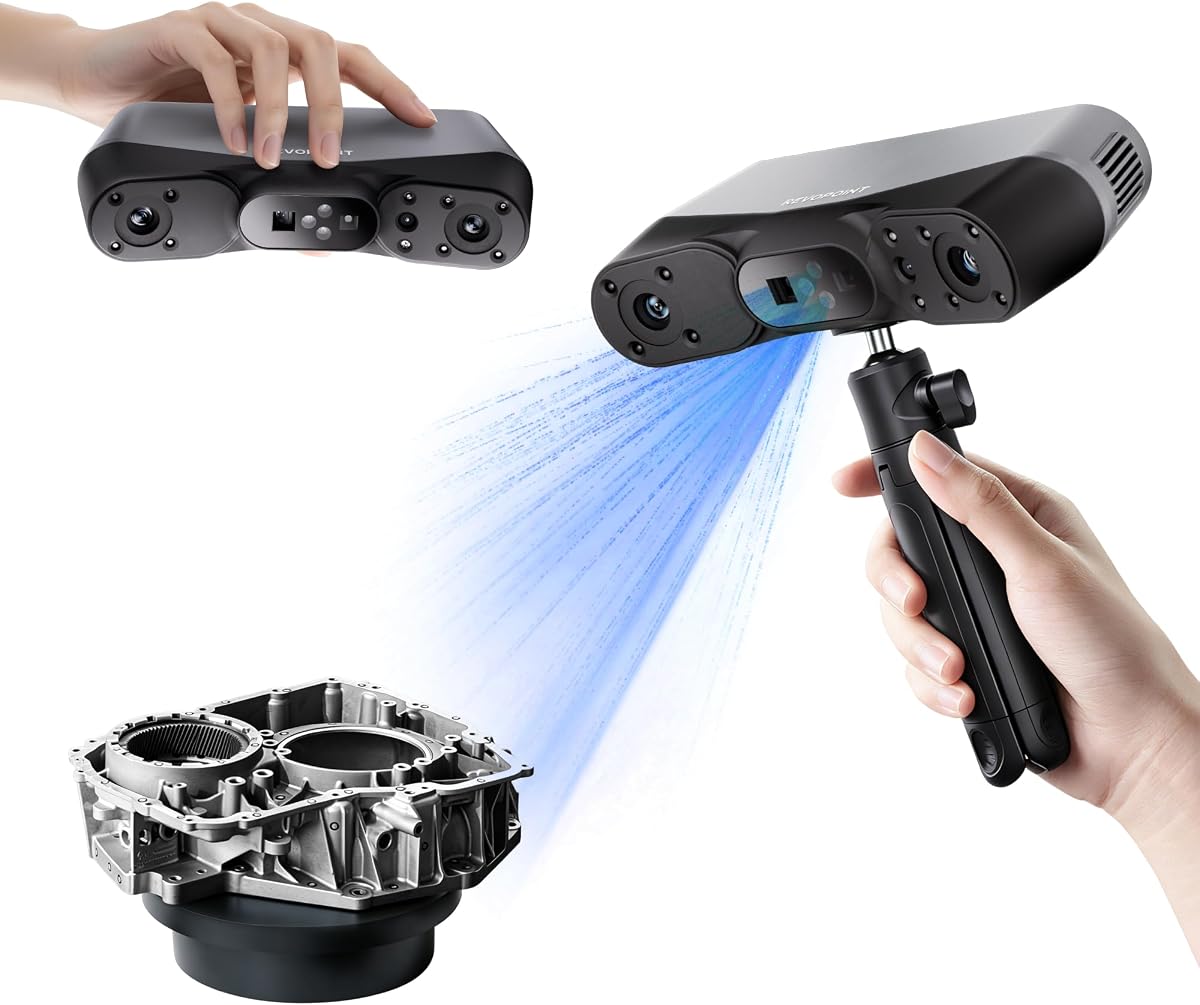
The Creality Ferret Pro enhances mobility with a dedicated WiFi 6 bridge allowing wireless data transfer to Android and iPhone devices for true handheld freedom.
We may earn a commission when you buy through this link, at no additional cost to you.
Its anti-shake tracking ensures smooth scanning while the ability to export common formats like OBJ and PLY supports integration into various 3D workflows.
While it offers great flexibility the need for a separate bridge and lower resolution compared to premium models may limit its use for high-precision work.
This scanner is ideal for users needing portable scanning capabilities for general projects and on-the-go use across multiple platforms and devices easily.
Advanced WiFi 6 bridge offers speeds three times faster than WiFi 5 ensuring stable efficient data transfer for high-precision scanning.
Scan on iPhone Android or PC with flexible connectivity options making it easy to integrate into diverse digital workflows.
We may earn a commission when you buy through this link, at no additional cost to you.
The Revopoint MIRACO Plus stands out as an all-in-one solution with integrated photogrammetry allowing detailed large object scanning without external equipment.
We may earn a commission when you buy through this link, at no additional cost to you.
Its 48MP camera and infrared zoom deliver lifelike textures while the flip screen and strong battery life make it comfortable for extended field scanning sessions.
While the included software is capable users may need paid options for CAD conversion but the hardware offers comprehensive capabilities for many professional tasks.
This scanner is perfect for professionals needing a portable self-contained tool for complex measurements and high-quality texture capture across various environments.
Use coded targets and scale bars for length accurate measurements ensuring precise large object scans without extra hardware.
Process data on the device with its powerful processor and 6-inch flip screen reducing dependency on external PCs for editing.
We may earn a commission when you buy through this link, at no additional cost to you.
Choosing a 3D scanner involves balancing accuracy speed and connectivity to match your specific project needs and budget.
Accuracy determines how closely the digital model matches the physical object so consider if your project requires millimeter-level details or just general shape capture for your needs.
Higher accuracy is essential for engineering or medical uses whereas hobbyists might prefer slightly lower specs for cost savings without sacrificing visual quality.
Faster frame rates like 30fps or higher allow for smooth captures reducing the chance of motion blur or missed spots during handheld scanning sessions.
Look for scanners with high FPS ratings if you plan to scan moving subjects or large objects quickly without losing data integrity during the process.
Different modes such as laser structured light or VCSEL enable you to tackle various surfaces from shiny metal to dark plastics without needing spray.
Multiple modes increase versatility so choose a model that offers at least one specialized mode for the materials you encounter most often in your workflow.
Wireless support via Wi-Fi 6 offers more freedom to move while tethered USB connections may provide more stable data transfer for complex high-resolution scans.
Decide if you need mobility for field work or a stationary setup for studio use when choosing connectivity options for your scanner hardware.
Ensure the scanner works with your operating system and that the software supports exporting to formats like STL OBJ or PLY for your 3D printing or CAD needs.
Check if advanced features require paid add-ons or specific systems like Windows only which could limit your workflow flexibility across devices.
Longer battery life supports extended field sessions without interruptions while fast charging can minimize downtime between projects for continuous productivity.
Look for built-in batteries that offer several hours of use if you plan to scan outdoors or away from power outlets regularly during your work.
Full color texture capture brings your 3D models to life with realistic shading and surface details essential for product design or heritage preservation projects.
Prioritize models with high-resolution RGB cameras if accurate color representation is critical to your final output and digital archiving requirements.
Prices vary widely from entry-level units to professional systems so consider the total cost of ownership including accessories and software upgrades for your use.
Invest in a scanner that meets your core needs now but allows for growth so you don't outgrow the tool quickly as skills improve.
Start by calibrating your scanner according to the manufacturer instructions to ensure accurate data capture and consistent results across all sessions.
Clean lenses and sensors regularly with a soft microfiber cloth to prevent dust or smudges from affecting the quality of your scans and imaging.
Store the scanner in a protective case away from extreme temperatures and moisture to maintain its electronic components and extend its overall lifespan.
Most modern scanners feature specialized laser modes that capture dark or metallic surfaces without spray saving prep time. Check for features like blue laser or infrared modes to confirm spray-free scanning is supported.
For hobby projects like tabletop figurines or basic prototyping accuracy around 0.1mm is usually sufficient. Higher precision is recommended for engineering parts requiring tight tolerances.
Many handheld models can capture large objects by scanning in sections and merging them later. Look for wide fields of view or photogrammetry capabilities for best results on big surfaces.
Yes scanners typically come with proprietary software for processing and exporting scans. Ensure the software supports your OS and export formats before purchasing for seamless integration.
Some scanners use eye-safe infrared technology allowing safe scanning of faces. Check for Class I laser safety ratings if scanning people regularly to ensure safety compliance.
Scanning times vary by model and object size from seconds to minutes. Faster frame rates and automated turntables reduce capture time while complex details may require longer processing.
Some software benefits from GPU acceleration for faster processing but many models run on average PCs. Check system requirements especially for AI features or high-resolution scans.
Many modern scanners support mobile apps via Wi-Fi for viewing and control on phones or tablets. Check for iOS or Android compatibility before buying for mobile scanning use.
Our top picks like the Creality Pika and Revopoint MIRACO Plus offer standout features for diverse needs from high precision to all-in-one versatility.
Consider what matters most whether speed accuracy or ease of use to select a scanner that aligns with your workflow and project goals.
Prices and specs may change so check current offerings and user reviews before buying to ensure you get the best value available today.