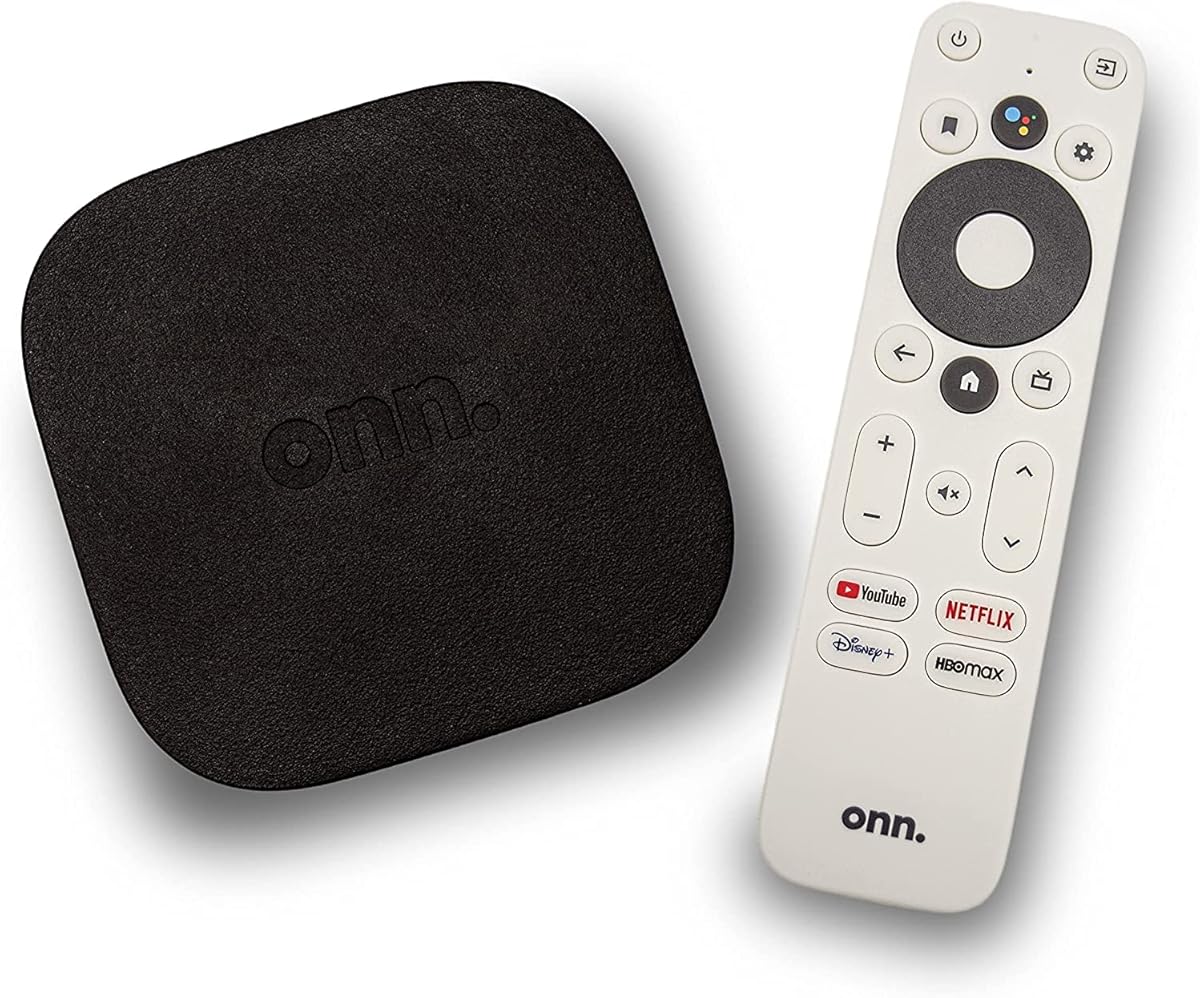
ONN Android TV 4K UHD
4.4Editor score
Android TV OS
Voice Remote Control
High Speed HDMI
This guide compares the top 4K Kodi Box options for 2026, evaluating performance, features, and value to help you choose the perfect streaming device.
Finding the right 4K Kodi Box can transform your home entertainment experience significantly. You want a device that delivers crisp visuals and smooth streaming without unnecessary complexity. This guide helps you navigate the options available today for 2026.
We analyzed ten leading models based on their hardware specifications and software capabilities. Our comparison focuses on resolution support, processing power, and connectivity options. Each product was evaluated for its ability to handle demanding streaming tasks efficiently.
Each pick highlights specific strengths tailored to different user needs and budgets. Remember that prices fluctuate often so verify current deals before purchasing. These selections represent the most reliable choices for upgrading your TV setup this year.
4.4Editor score

4.4Editor score

4.2Editor score
The following table provides a side-by-side comparison of all ten selected models. Review each specification carefully to understand how they differ in performance and capabilities.


The Xiaomi TV Box S 3rd Gen stands out as a top contender for 4K Kodi Box seekers. With a 4.4 rating users appreciate its seamless integration with Google services and robust hardware capabilities.
We may earn a commission when you buy through this link, at no additional cost to you.
Its support for Dolby Vision and Atmos ensures a cinematic experience at home. The Google TV platform offers personalized recommendations and easy access to thousands of streaming apps without friction.
While the internal storage is modest at 32GB the system runs smoothly for most users. The lack of an Ethernet port means you rely on dual-band Wi-Fi which remains stable in most environments.
This box is ideal for those wanting premium visuals and smart features without paying top dollar. It balances performance and usability exceptionally well for everyday streaming needs.
Dolby Vision and Atmos support provide vivid colors and rich audio that enhance your viewing sessions significantly.
Google TV unifies content discovery across apps making navigation faster and more intuitive for all users.
We may earn a commission when you buy through this link, at no additional cost to you.
The ONN Android TV 4K UHD offers exceptional value for budget conscious buyers. It delivers reliable 4K streaming with a familiar Android TV interface that feels polished and responsive.
We may earn a commission when you buy through this link, at no additional cost to you.
Features like voice remote control and Chromecast built-in add significant convenience. The included high speed HDMI cable simplifies setup ensuring you start watching content quickly.
Although the design is simple it plugs directly into your TV without issues. Compatibility spans most major brands making it a versatile choice for various household setups.
This device is perfect for casual viewers who prioritize functionality over premium build quality. It proves that great streaming performance does not require a high price tag.
Use voice commands to find content instantly and cast photos or videos from your phone effortlessly.
Plug into the HDMI port and configure Wi-Fi to begin streaming in minutes without extra tools.
We may earn a commission when you buy through this link, at no additional cost to you.
The Raxxio MAG544w3 delivers professional grade streaming performance for enthusiasts. Its Amlogic chipset ensures buttery smooth navigation and high bitrate 4K content playback without stuttering.
We may earn a commission when you buy through this link, at no additional cost to you.
Dolby Digital Plus audio supports up to seven speakers creating a true cinematic sound environment. The hardware only design focuses purely on video delivery without unnecessary software bloat.
Note that it runs on Linux and does not support Android apps directly. This makes it best for users with existing streaming service accounts who value raw performance over app variety.
If you want a device that excels at delivering high quality video reliably this is a top choice. It justifies the cost with consistent performance and robust connectivity options.
Surround sound support allows detailed audio tracking that enhances action scenes and dialogue clarity.
The Amlogic chipset handles demanding codecs with ease ensuring your favorite shows run smoothly.
We may earn a commission when you buy through this link, at no additional cost to you.
This onn 4K Pro model improves on the base version with significant performance upgrades. The extra RAM allows for smoother multitasking and faster app loading times compared to standard models.
We may earn a commission when you buy through this link, at no additional cost to you.
The inclusion of an Ethernet port provides a stable wired connection for uninterrupted streaming. Combined with WiFi 6 support you have flexible options to maintain high quality bandwidth consistently.
Find My Remote with backlight is a thoughtful touch for dark room viewing. The Google TV interface remains intuitive while offering advanced search features powered by Gemini technology.
Buyers seeking more power and reliability than basic models will find this box ideal. It strikes a great balance between cost and high end features for serious streamers.
Wired Ethernet ensures stable speeds while WiFi 6 offers fast wireless for modern home networks.
A backlit remote makes navigation easy in low light without losing your device.
We may earn a commission when you buy through this link, at no additional cost to you.
The R69 Max provides substantial storage for users with extensive local media libraries. With 64GB ROM and 4GB RAM it handles heavy multitasking and large app installations with ease.
We may earn a commission when you buy through this link, at no additional cost to you.
Support for 8K decoding positions it well for future video standards even if 4K remains common today. The Android 14 OS brings improved security and privacy features to your home theater setup.
WiFi 6 ensures fast data transfer rates for high bitrate streams. You can also expand storage via a TF card slot offering flexibility for large file archives.
While current user ratings are modest the hardware specs are compelling. It is a strong contender for tech savvy users who need storage and raw power.
Keep thousands of photos and videos locally without worrying about running out of space.
8K decoding ensures compatibility with higher resolution content as it becomes available.
We may earn a commission when you buy through this link, at no additional cost to you.
This box offers unique visual features like 3D support and HDR10 for richer color reproduction. The H.265 codec support increases network efficiency making 4K streaming smoother on limited connections.
We may earn a commission when you buy through this link, at no additional cost to you.
Equipped with 4GB RAM it ensures stable system performance without frequent restarts. Two USB ports allow connections for keyboards or external drives adding versatility to your setup.
While 3D content is less common now the capability remains a niche benefit. The RK3528 CPU provides adequate power for standard entertainment tasks and light gaming.
If you value visual technologies and efficient networking this model delivers value. It caters to users who want enhanced processing for media playback.
H.265 technology boosts speed and reduces file sizes for a faster streaming experience.
HDR10 and 3D features bring lifelike contrast and depth to compatible content sources.
We may earn a commission when you buy through this link, at no additional cost to you.
Xiaomi enhances this model with a 360° Bluetooth remote for effortless control from any angle. The HDMI 2.1 port ensures compatibility with next generation displays and gaming consoles seamlessly.
We may earn a commission when you buy through this link, at no additional cost to you.
Audio options include Dolby Atmos and DTS:X for immersive surround sound effects. This dual support lets you choose the format that works best with your home theater receiver.
Performance remains smooth thanks to efficient processing and dual band WiFi 6. The device fits discreetly behind TVs while offering reliable access to major streaming services.
This box is perfect for users who want reliable connectivity and strong audio capabilities. It simplifies daily use with a versatile remote and modern interface standards.
HDMI 2.1 provides bandwidth for higher refresh rates and advanced gaming features.
DTS:X support adds spatial awareness to soundtracks for a more engaging experience.
We may earn a commission when you buy through this link, at no additional cost to you.
The HK1 box offers a compelling mix of specs at a competitive price point. You get 4GB RAM and 32GB storage out of the box which is generous for this category.
We may earn a commission when you buy through this link, at no additional cost to you.
H.265 decoding helps save bandwidth while streaming high quality video. WiFi 6 support ensures modern networking speeds for smoother playback without interruptions.
The Allwinner processor delivers stable performance for media consumption though it is not as powerful as top tier chips. Android 12 provides a secure and updated software environment.
This is a smart buy for budget focused buyers who want strong raw specs. It serves well as a secondary device or primary streamer depending on your needs.
Get generous RAM and storage without paying for premium brand pricing.
H.265 codec efficiency reduces buffering and improves video quality on slower networks.
We may earn a commission when you buy through this link, at no additional cost to you.
The KP1 is Google Certified ensuring full compatibility with all major streaming apps. This certification prevents errors often seen on generic devices providing a reliable entertainment experience.
We may earn a commission when you buy through this link, at no additional cost to you.
Voice search allows you to control smart home devices directly from the remote. Chromecast built-in makes sharing content from your mobile device to the TV seamless and instant.
Bluetooth 5.0 supports wireless headsets and controllers with low latency. The design is compact and blends well with modern TV setups aesthetically.
Buyers prioritizing software stability and smart features will appreciate this model. It is a trustworthy choice for households invested in the Google ecosystem.
Manage smart lights and thermostats alongside video playback with a single voice command.
Cast photos or videos from phones instantly for a larger and clearer viewing experience.
We may earn a commission when you buy through this link, at no additional cost to you.
This model runs Android 14 providing the latest security patches and interface improvements. It is among the first devices to offer this OS for home entertainment in 2026.
We may earn a commission when you buy through this link, at no additional cost to you.
With 4GB RAM it handles multiple apps efficiently without lag. The included keyboard and mouse allow this device to double as a lightweight workstation for light tasks.
Wi-Fi 6 and DLNA support ensure fast wireless streaming and local file playback. Rockchip processors deliver dependable performance for video decoding and multitasking.
If you want the newest software and maximum RAM this box is a solid pick. It caters to early adopters who value cutting edge specifications over brand prestige.
Android 14 ensures better privacy controls and app compatibility for newer services.
Included keyboard and mouse enable basic typing and web browsing comfortably.
We may earn a commission when you buy through this link, at no additional cost to you.
Selecting the right device requires understanding several key factors that affect performance and usability.
Most devices use Android TV or Google TV which offer extensive app support and user friendly interfaces. Linux based boxes like the Raxxio are faster but limited to specific provider apps.
Check that the OS supports the streaming services you use most often to ensure full compatibility.
Look for devices that explicitly support 4K at 60fps to avoid frame rate drops during action scenes. HDR10 and Dolby Vision support enhance color depth and brightness significantly.
Ensure the box has HDMI 2.1 to pass through these signals properly to modern televisions.
At least 2GB of RAM is necessary for smooth app navigation while 4GB is better for heavy multitasking. Internal storage should be at least 32GB to install multiple streaming apps comfortably.
Prefer models with expandable storage options like SD card slots for local media archives.
Ethernet ports provide the most stable connection for high bitrate streaming while Wi-Fi 6 reduces interference. Ensure the device supports dual band frequencies to avoid congestion on the 2.4GHz band.
Bluetooth version matters for connecting peripherals; aim for Bluetooth 5.0 or higher for better range.
Dolby Atmos and DTS:X support allows the box to output surround sound to external systems. Dolby Digital Plus is also valuable for streaming services that prioritize this format.
Verify that the HDMI output can pass these audio formats through to your receiver or soundbar.
Hardware decoding for H.265 and AV1 improves efficiency and reduces load on the CPU. This support prevents buffering when watching high bitrate videos from local or network sources.
Check the processor specs to ensure it handles these codecs without overheating or throttling.
Remote controls with dedicated mic buttons make searching for content much faster. Integration with Google Assistant or similar services allows smart home device control directly.
Choose a remote with backlighting if you often use the device in dark environments for convenience.
Reputable brands usually offer better support and more regular software updates for security. Check warranty terms to protect against hardware failures within the first year.
Read user reviews to gauge long term reliability and customer service responsiveness.
Start by connecting the device to your TV via the included HDMI cable and plugging it into a power outlet. Ensure you select the correct HDMI input on your TV remote to see the setup screen.
Follow the on-screen instructions to connect to your Wi-Fi network and sign in to your Google account. Install the streaming apps you use most like Netflix or YouTube from the Play Store immediately.
Keep the device ventilated to avoid overheating by not placing it in enclosed cabinets. Update the system software regularly to maintain security and access the latest features.
A 4K Kodi Box is a streaming device that allows you to watch content in Ultra High Definition resolution. It connects to your TV and runs an operating system like Android or Linux to access various media apps.
You need a TV with an HDMI port to connect these devices. For the best experience use a TV that supports 4K and HDR features to match the box's output capabilities.
Most streaming apps take up between 200MB to 1GB each. Having at least 16GB of storage is recommended to install multiple apps without filling the drive quickly.
Yes many of these devices support Android games and streaming gaming services. However dedicated gaming consoles offer better controls and graphics optimization than TV boxes.
An Ethernet connection provides more stable speeds and lower latency which reduces buffering. Wi-Fi 6 is also very fast but wired connections remain superior for consistent 4K playback.
Updates usually happen automatically in the background. You can also check manually in the settings menu under the system update section to force a check.
Most boxes come with the HDMI cable and power adapter. You might want an Ethernet cable or a mouse for easier navigation if you prefer physical controls.
Yes the devices themselves are fully legal. You must use authorized apps and services to access content to comply with copyright laws.
We reviewed ten models offering a range of options from budget friendly choices to premium performance devices. The Xiaomi TV Box S 3rd Gen stands out for its balance of features while the ONN offers excellent value.
When choosing prioritize resolution support and RAM capacity to ensure smooth performance for years. Consider connectivity options like Ethernet if your Wi-Fi signal is inconsistent in your living room.
Verify current deals before purchasing as prices can shift frequently on online marketplaces. Selecting the right box will ensure your home theater delivers the best possible entertainment experience.