
ASUS ProArt PA32QCV
3.9Editor score
Factory calibrated color accuracy
Thunderbolt 4 connectivity
MacBook color matching
Finding the right display can transform your workflow and creative output. A 6K monitor offers unparalleled resolution and pixel density, making it ideal for detailed editing and immersive productivity. These screens deliver sharp text and vibrant colors that standard displays simply cannot match.
We analyzed ten leading models based on panel technology, color accuracy, and connectivity options. Our comparison focuses on real-world performance for professionals who need reliable tools. Each entry includes verified specifications and practical insights to help you make an informed decision.
Every pick highlights specific strengths tailored to different use cases like design or gaming. We also note trade-offs to ensure transparency about what each model offers. Keep in mind that availability and configurations may shift over time as technology evolves rapidly.
3.9Editor score

4.1Editor score

4.5Editor score
As an Amazon Associate we earn from qualifying purchases.
This side-by-side comparison highlights the key specifications and unique features of each selected 6K monitor. Use this table to quickly identify which model aligns with your specific workflow requirements and technical needs.




The ASUS ProArt PA32QCV stands out as a reliable choice for professionals seeking high resolution without compromising on color fidelity. It carries a rating that reflects its balance of features and performance for creative tasks. The 6K resolution ensures sharp text and fine details are visible without scaling issues.
We may earn a commission when you buy through this link, at no additional cost to you.
Its factory calibration delivers Delta E under two which is critical for graphic design and video editing workflows. The MacBook Color Matching preset simplifies the experience for Apple users who need consistent color between devices. Connectivity is robust with dual Thunderbolt 4 ports supporting daisy chaining and power delivery.
While the contrast ratio is standard for IPS panels it does not offer the deep blacks of OLED or IPS Black technologies. The ambient light sensor helps maintain consistent brightness which mitigates eye strain during long sessions. These trade-offs are acceptable given the price position and overall feature set.
This monitor is ideal for designers and video editors who prioritize color accuracy and seamless integration with Mac ecosystems. The included Adobe subscription adds immediate value for creatives starting new projects. It is a strong recommendation for those needing a professional display without extreme premium pricing.
Factory calibration ensures colors match industry standards out of the box reducing setup time and guesswork for users.
The dedicated preset mode aligns the display with MacBook screens ensuring consistent visuals across your workspace.
We may earn a commission when you buy through this link, at no additional cost to you.
The Dell 52-Inch 6K monitor offers an expansive workspace that caters to users needing multiple windows or cinematic experiences. Its curved design wraps around the field of view enhancing immersion and reducing eye movement during multitasking. The IPS Black panel delivers superior contrast compared to traditional IPS displays.
We may earn a commission when you buy through this link, at no additional cost to you.
With a 120Hz refresh rate this model supports smooth motion which benefits video editing and light gaming alongside productivity. The Thunderbolt hub provides significant power delivery enabling you to charge high-performance laptops with a single cable. Hardware low blue light technology ensures comfort during extended work sessions.
The size of the monitor means it requires a deep desk and a significant viewing distance to avoid neck strain. It may also demand higher system resources to drive the 6K resolution effectively in demanding applications. These factors are manageable for dedicated workstations where space is not a constraint.
This screen is perfect for media professionals and power users who value screen real estate and visual comfort. The combination of high refresh rate and accurate color makes it versatile for creative and entertainment use. It represents a premium choice for those ready to invest in a large high-fidelity display.
The curvature enhances focus and reduces edge distortion making it ideal for long editing sessions and multitasking.
This panel technology offers deeper blacks and better contrast providing more vibrant visuals than standard IPS.
We may earn a commission when you buy through this link, at no additional cost to you.
The G32P model delivers a high density of pixels that results in crisp text and sharp imagery for detailed work. Its glossy finish enhances color vibrancy making it appealing for media consumption and creative tasks where contrast matters. The 500 nit brightness ensures visibility even in well-lit environments.
We may earn a commission when you buy through this link, at no additional cost to you.
Color accuracy is supported by coverage of 99 percent of both sRGB and DCI-P3 standards which is sufficient for most professional needs. The USB-C port allows for single cable connectivity charging your laptop while delivering the video signal. This simplifies desk setups and reduces cable clutter effectively.
The glossy coating can reflect ambient light and attract fingerprints which may require frequent cleaning. Port selection is less versatile than some competing models limiting direct connection options for legacy devices. These minor drawbacks do not outweigh the performance and value provided for the intended price point.
This monitor is well suited for photographers and general creatives seeking high resolution without a premium price tag. The robust build and ergonomic adjustments support comfortable long-term use. It is an excellent entry point into the 6K category for budget-conscious professionals.
With over 200 pixels per inch text and images appear exceptionally sharp reducing eye strain during detailed editing.
Power and data transmit over one cable keeping your desk organized and simplifying connection to laptops.
We may earn a commission when you buy through this link, at no additional cost to you.
Samsung introduces a unique Dual Mode feature allowing users to switch between high resolution and high refresh rate on demand. This flexibility is rare in the 6K market making it a strong candidate for users who game and create content equally. The Fast IPS panel ensures quick response times to reduce motion blur.
We may earn a commission when you buy through this link, at no additional cost to you.
G-Sync compatibility helps synchronize the display with your GPU to prevent tearing and stuttering during intense gaming sessions. HDR10+ support enhances dynamic range in compatible content providing more detail in highlights and shadows. The stand offers robust physical adjustments for ergonomic positioning during extended use.
Some users report color settings may need calibration to reach professional standards compared to dedicated creative monitors. The gaming centric branding might not appeal to purely professional workflows requiring absolute color neutrality. However the performance benefits remain significant for hybrid workloads involving interactive media.
This display is best for gamers and creative professionals who want a single screen for both entertainment and work. The ability to prioritize speed or resolution on the fly adds valuable versatility. It stands out as a unique option in a market dominated by single-purpose devices.
Switch between 6K visuals and high refresh speeds instantly to suit your current task or game needs.
Adaptive sync technologies ensure fluid motion and eliminate screen tearing for an immersive interactive experience.
We may earn a commission when you buy through this link, at no additional cost to you.
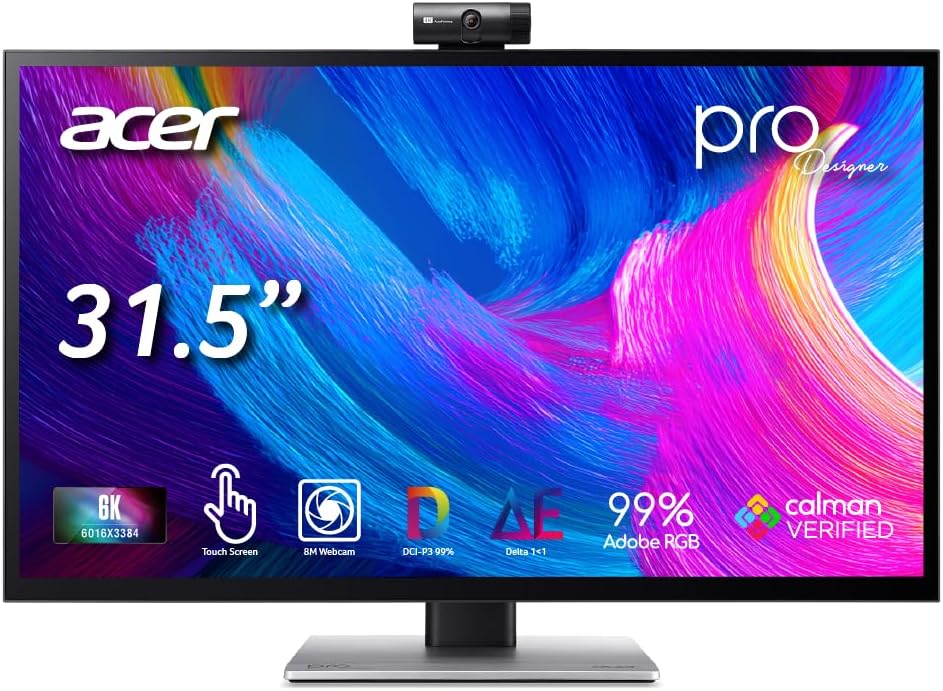
The Acer ProDesigner PE320QXT integrates touch capability into a professional 6K monitor reducing the need for separate drawing tablets. It features a Quantum-Dot IPS panel that delivers vibrant and accurate colors across a wide range of color spaces. This all-in-one design streamlines workflows for designers who sketch directly on screen.
We may earn a commission when you buy through this link, at no additional cost to you.
A built-in webcam and microphone array eliminate extra hardware requirements for client calls and creative reviews. The USB-C connectivity supports charging and signal transmission through a single cable which reduces desk clutter. DisplayHDR 600 certification ensures you can preview high dynamic range content accurately before delivery.
While the touch experience is responsive the stylus must be purchased separately which adds to the initial cost. The density of features can be overwhelming for users who only need a standard display without interactive elements. These considerations are minor compared to the productivity gains for touch-centric professionals.
This monitor is perfect for illustrators and architects who benefit from direct manipulation of digital assets. The high resolution and color accuracy support precise editing while touch adds an intuitive layer of control. It is a recommended solution for those seeking to modernize their creative workstation.
Touch support allows direct interaction with designs removing the disconnect between cursor and screen input.
Built-in peripherals ensure you can communicate and create from one device without extra adapters or cameras.
We may earn a commission when you buy through this link, at no additional cost to you.
The G32X model is recognized for its clean aesthetic and reliable performance in professional environments. Users appreciate the minimal bezel design which maximizes screen real estate and fits well in modern office setups. It delivers solid color accuracy suitable for photo editing and general productivity tasks.
We may earn a commission when you buy through this link, at no additional cost to you.
Color coverage of 98 percent of DCI-P3 ensures that images look vibrant and true to life. The USB-C port supports high wattage charging allowing you to power connected laptops without separate adapters. An anti-glare coating helps maintain visibility in varied lighting conditions without sacrificing clarity.
The interface options are streamlined which may require docks for users with many legacy devices. The stand adjustments are limited compared to some competitors but still provide necessary ergonomic benefits. These factors are balanced by the strong overall performance and positive user feedback ratings.
This monitor suits professionals who value aesthetics and straightforward functionality in their workspace. It is a reliable choice for those needing high resolution without complex configuration. The positive user reception confirms its value for consistent daily use.
Minimal bezels and a sleek stand create a tidy appearance that complements modern desk setups.
Consistent color and sharp resolution ensure professional output without needing extensive calibration or adjustments.
We may earn a commission when you buy through this link, at no additional cost to you.
The Dell U5226KW offers a massive display area designed to enhance productivity for users managing multiple systems. It features dual Thunderbolt 4 ports allowing seamless switching between computers without moving cables. The KVM functionality lets you control two machines with a single keyboard and mouse.
We may earn a commission when you buy through this link, at no additional cost to you.
High power delivery of up to 140 watts ensures that even high-performance laptops can run fully powered from a single connection. The IPS Black panel provides improved contrast over standard options ensuring better depth in images and video. This makes it suitable for both professional editing and media consumption.
The size and weight of the unit require a sturdy desk and adequate room which may not suit compact offices. The price is high which reflects its specialized features and large size. These factors are acceptable for enterprise users or power users needing maximum productivity tools.
This monitor is ideal for developers or executives who need to manage multiple workflows efficiently. The large screen and advanced connectivity streamline complex tasks and reduce hardware clutter. It is a robust investment for those prioritizing efficiency and workflow optimization.
KVM support allows control of multiple PCs with one set of peripherals saving space and reducing complexity.
High wattage charging and multiple ports keep your devices connected and powered with minimal wiring.
We may earn a commission when you buy through this link, at no additional cost to you.
The LG UltraFine evo series stands at the forefront of display technology with support for Thunderbolt 5 connectivity. This ensures future readiness for faster data transfer rates and higher performance requirements. The Nano IPS Black panel delivers exceptional color accuracy and contrast for professional visual work.
We may earn a commission when you buy through this link, at no additional cost to you.
Color coverage includes over 98 percent of DCI-P3 and 99 percent of Adobe RGB which meets strict industry standards. The high pixel density provides sharp text and fine details making it ideal for graphic design and print preparation. Integrated KVM functionality supports multi system environments for greater efficiency.
Thunderbolt 5 is a new standard so existing cables and devices may not fully utilize its potential immediately. The price reflects this advanced technology positioning it as a premium option for early adopters. These factors are acceptable for those investing in long term performance and compatibility.
This display is perfect for professionals needing top tier color accuracy and connectivity for advanced workflows. The combination of high resolution and future proof ports makes it a smart long term investment. It is recommended for studios and high end workstations.
Thunderbolt 5 ensures you are prepared for upcoming high speed data and display requirements without upgrades.
Wide color coverage ensures your output looks consistent across print and digital media formats accurately.
We may earn a commission when you buy through this link, at no additional cost to you.
The Dell U3224KB UltraSharp offers a balanced approach to 6K displays with a focus on reliability and warranty support. The inclusion of an extended protection pack adds peace of mind for professional deployments or long term use. Brightness levels are sufficient for office environments and standard creative tasks.
We may earn a commission when you buy through this link, at no additional cost to you.
USB-C transmission allows for quick data transfer alongside video which helps simplify laptop connections. The image output is sharp and clear supporting detailed work in documents and design files. Response times are adequate for general use though not optimized for high speed gaming.
Connectivity options are standard which may require adapters for specific peripheral connections. The protection bundle adds value but does not change the core performance characteristics of the display. These aspects make it a solid choice for businesses requiring dependable hardware support.
This monitor is suitable for enterprise users and general professionals seeking reliable performance and warranty coverage. The bundle ensures long term durability for the investment. It is a pragmatic option for those prioritizing service and standard functionality.
Extended protection ensures you have support for repairs or replacements reducing downtime risks significantly.
Consistent brightness and resolution ensure steady performance for daily professional tasks without issues.
We may earn a commission when you buy through this link, at no additional cost to you.
The renewed version of the Dell U5226KW provides access to a large 6K display without the cost of a new unit. It requires a VESA mount which offers flexibility for arm installation and space saving setups. The Thunderbolt 4 hub retains the connectivity features found in the standard model.
We may earn a commission when you buy through this link, at no additional cost to you.
With a 120Hz refresh rate it supports smooth visuals for both productivity and media. This makes it a versatile option for users who do not need the built-in stand. The renewed status often comes with specific warranty terms that should be checked before purchase.
Lack of a stand means additional investment in a mount or arm is necessary. The condition of renewed products can vary so understanding seller policies is essential. These factors are manageable for technically savvy users looking to save on high end hardware.
This option is ideal for users needing a large display who already have mounting solutions in place. It allows access to premium features at a more accessible price point. It is a strategic choice for budget conscious professionals seeking quality hardware.
VESA compatibility allows you to choose a monitor arm that fits your specific ergonomic and space needs.
Renewed hardware provides premium performance while reducing initial costs for your setup budget.
We may earn a commission when you buy through this link, at no additional cost to you.
Selecting the right 6K monitor involves balancing technical specifications with your specific workflow needs. Understanding panel types, color accuracy, and connectivity options will help you find the perfect fit.
IPS panels are common in 6K monitors due to their color accuracy and wide viewing angles. Newer IPS Black panels offer improved contrast which reduces the washed-out look in dark scenes. OLED technology is less common in this size range but provides superior blacks and response times. Consider your lighting conditions and content type when choosing the panel type.
Choose IPS for general productivity and IPS Black for improved contrast in media editing.
Professional work requires accurate color representation which is often measured by Delta E values. Lower Delta E values indicate better color fidelity compared to standard reference colors. Look for monitors with factory calibration and verification from industry standard software. Wide color gamuts like DCI-P3 and Adobe RGB are essential for design and video workflows.
Prioritize monitors with Delta E under two for professional color critical tasks.
Thunderbolt 4 or 5 ports allow for single cable solutions that deliver both power and video. Check the wattage supported for charging your laptop to ensure it meets your device requirements. Multiple inputs like HDMI and DisplayPort provide flexibility for connecting various devices. A good USB hub adds value for connecting peripherals directly to the monitor.
Ensure you have enough Thunderbolt ports for your laptop and daisy chaining needs.
Standard 6K monitors often come with 60Hz refresh rates which are sufficient for most productivity tasks. However 120Hz options exist and provide smoother scrolling and motion for video or gaming. If you perform visual work involving animation or gaming a higher refresh rate reduces motion blur. For static text editing 60Hz is typically adequate.
Opt for higher refresh rates if you work with motion graphics or gaming.
Adjustable stands with tilt swivel and height settings are crucial for long-term comfort. Some models offer pivot functionality allowing vertical orientation for reading code or documents. VESA mount compatibility gives you the flexibility to use third party arms if the stand is insufficient. Poor ergonomics can lead to neck strain during extended work sessions.
Look for full ergonomic adjustability to maintain healthy posture throughout the day.
6K monitors range from 32 inches to 52 inches or more which dictates your desk footprint. Larger screens offer more workspace but require appropriate viewing distances to avoid eye strain. Ensure your room can accommodate the monitor without causing clutter or obstruction. Consider the aspect ratio if you need specific horizontal or vertical real estate.
Select a size that fits your desk space and viewing distance comfortably.
Built-in calibration tools simplify the process of maintaining color accuracy over time. Some monitors include software that assists in calibrating the display to specific profiles. External calibrators are still recommended for critical workflows to ensure ongoing precision. A self calibrating monitor can save time and reduce dependency on external hardware.
Choose monitors with software support to keep colors accurate over the long term.
Professional monitors should come with robust warranties to cover potential defects or issues. Look for extended warranty options or on-site service for business critical deployments. Support quality can vary between brands so check reviews regarding customer service responsiveness. Bundled protection plans can offer peace of mind for long-term investments.
Verify warranty terms and support options before purchasing to ensure reliability.
Proper calibration is essential for maximizing the color accuracy of your 6K display. Use the built-in tools or external calibrators to set the correct color space for your workflow. This ensures that what you see on screen matches your final output accurately.
Keep the screen clean using a soft microfiber cloth to avoid scratching the panel. Avoid harsh chemicals which can damage coatings or filters on the glass surface. Regular dusting prevents buildup that can affect visibility and image clarity over time.
Adjust brightness based on ambient lighting to reduce eye strain during long sessions. Use the monitor's ambient light sensor if available for automatic adjustments. Position the monitor so that reflections are minimized for a clearer view.
A 6K monitor is highly beneficial for professionals working with detailed design or video editing. The increased pixel density reduces eye strain and allows for precise zooming without losing detail. While 4K is sufficient for many tasks 6K provides extra real estate and clarity for complex projects.
Running a 6K resolution requires a capable graphics card and sufficient system memory. Older computers may struggle to drive the full resolution at high refresh rates smoothly. Check the manufacturer's compatibility list to ensure your system can handle the load effectively.
You typically need a DisplayPort 1.4 or higher cable to achieve 6K resolution at standard refresh rates. Thunderbolt cables also work well and provide power delivery options for laptops. Ensure the cables are certified to handle the required bandwidth for the best performance.
6K offers significantly more screen real estate allowing multiple windows to be visible without resizing. This boosts productivity by reducing the need for constant window management and scrolling. It is particularly useful for multitasking workflows involving spreadsheets and editing tools simultaneously.
Curved monitors provide a more immersive experience and can reduce eye movement across large screens. They are often preferred for media consumption and general productivity. Flat panels are standard for tasks requiring consistent geometry and accurate image rendering.
Daisy chaining depends on the monitor's ports and bandwidth capabilities. Thunderbolt 4 and 5 models support chaining allowing you to connect multiple displays with one cable. Verify the specific bandwidth requirements to ensure all screens maintain their resolution properly.
Most high-quality monitors last between five to seven years with regular use. Factors like brightness levels and usage duration affect longevity. Regular maintenance and proper ventilation help extend the life of the display significantly.
Many 6K models support HDR standards like DisplayHDR 600 for better dynamic range. This allows for richer colors and deeper blacks in compatible content. Check the specific HDR rating to ensure it meets your visual requirements for media consumption.
We reviewed ten top 6K monitors ranging from budget-friendly options to high-end professional displays. The ASUS ProArt and Dell 52-inch models stood out for their color accuracy and versatility. Each model offers unique benefits depending on your specific workflow requirements.
Prioritize color accuracy and connectivity if you work with video or graphic design regularly. For gaming or media consumption look at refresh rates and contrast ratios to enhance your experience. Ensure your computer can handle the resolution to avoid performance bottlenecks.
Always check the current availability and pricing before making a purchase decision. Monitor technology evolves quickly so verifying specs and support is crucial. These options provide excellent value for professionals seeking high resolution performance.