
Creality Ender 3 V3 SE
3.8Editor score
CR Touch Auto Leveling
250mm/s Printing Speed
Sprite Direct Extruder
Compare the top 10 auto bed leveling 3D printers for beginners in 2026, featuring models like Creality Ender 3 V3 SE and FLASHFORGE Adventurer 5M.
Finding the right 3D printer can be overwhelming for newcomers. Auto bed leveling technology simplifies the setup process, ensuring consistent first layers without manual adjustments. This guide highlights models designed for ease of use and reliable performance.
We evaluated ten top-rated printers based on speed, build quality, and leveling accuracy. Each entry offers unique features tailored to different needs, from budget-friendly options to advanced machines capable of handling diverse materials and complex projects with minimal effort.
Every pick includes detailed specifications and real-world insights to help you decide. Note that prices fluctuate based on availability and promotions. Always check current listings before purchasing to ensure you get the best value for your specific requirements and budget constraints.
3.8Editor score

4.3Editor score

4.3Editor score
This side-by-side comparison showcases key specifications across all ten selected models to help you identify the right fit for your workspace and project goals.


The FLASHFORGE Adventurer 5M stands out as a top contender for beginners seeking speed and simplicity. With a rating of 4.3, it promises a stress-free experience right out of the box. The one-click auto leveling feature ensures that the first layer is always perfect, eliminating the frustration of manual calibration.
We may earn a commission when you buy through this link, at no additional cost to you.
Speed is a major highlight here. The Core XY system allows for prints up to 600mm/s, meaning you spend less time waiting. The vibration compensation technology actively reduces ghosting, ensuring that even at high speeds, your prints remain sharp and detailed. This is ideal for users who need to produce parts quickly without sacrificing quality.
While the open frame is great for ventilation, it might not be suitable for all environments. Additionally, operating at maximum speed can generate more noise compared to slower models. However, the ability to print quickly and accurately often outweighs these minor inconveniences for most hobbyists.
If you value efficiency and ease of use, this printer is an excellent choice. It bridges the gap between entry-level machines and professional tools. The robust design supports a wide range of materials, making it versatile for various projects from educational models to functional prototypes.
This feature calibrates the bed automatically every time you start a print, ensuring perfect adhesion without manual tweaks.
The motion system moves quickly and precisely, reducing print times significantly compared to traditional Cartesian printers.
We may earn a commission when you buy through this link, at no additional cost to you.
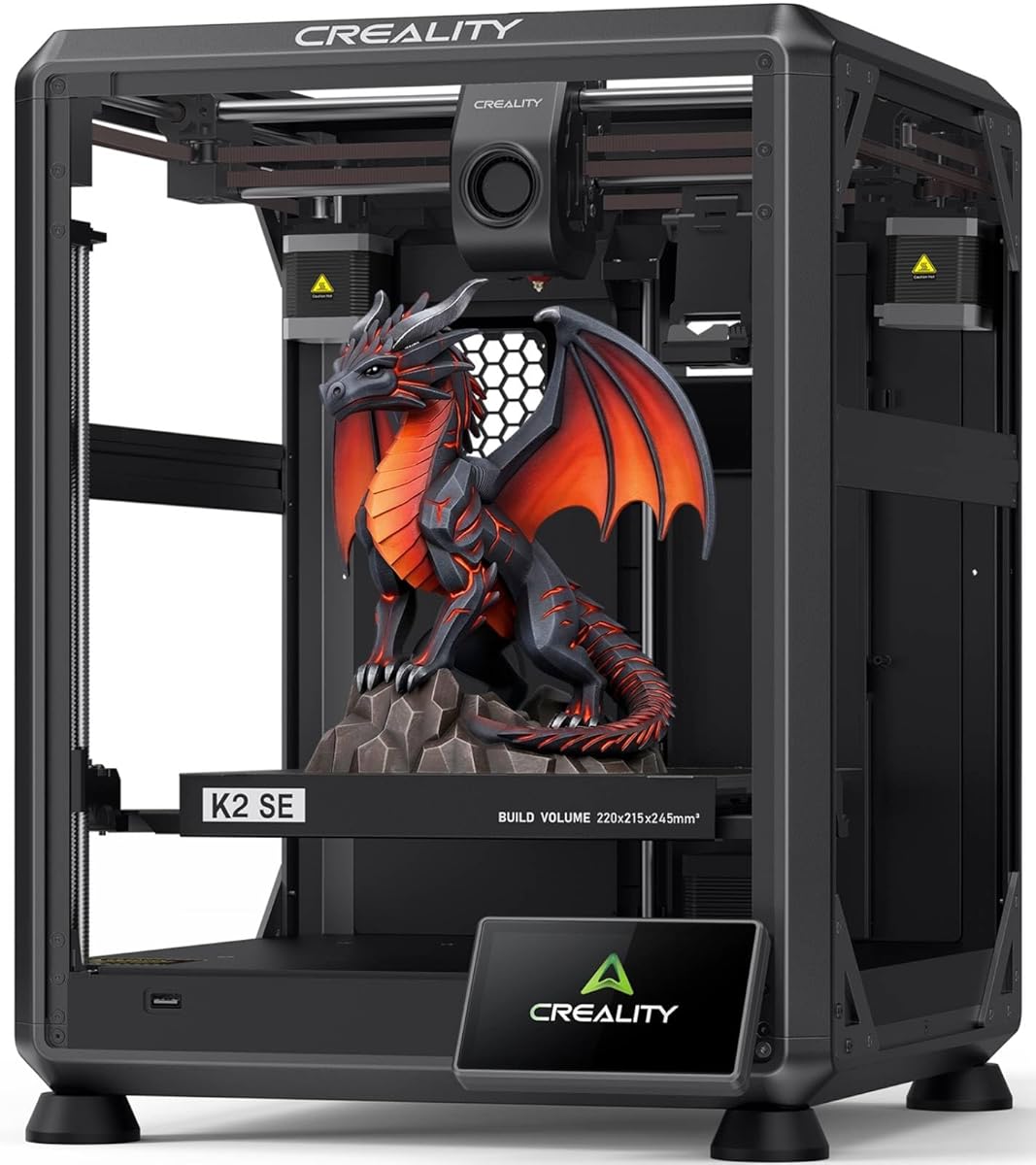
The Creality K2 SE offers a robust solution for those looking to grow into multicolor printing. With a solid metal build, it provides the stability needed for high-speed printing without flexing. The auto leveling system simplifies setup, making it approachable for new users who want reliability.
We may earn a commission when you buy through this link, at no additional cost to you.
Its ability to support the Creality CFS system is a unique selling point. This allows for future upgrades to multicolor printing, which is rare at this price point. The 500mm/s speed ensures efficiency, while the vibration sensor keeps prints smooth. This makes it a future-proof option for enthusiasts.
However, the rating is slightly lower than some other models, suggesting potential quality control or software issues that users should be aware of. Additionally, the multicolor capability requires purchasing the CFS separately, which adds to the total cost. Beginners should consider if they need this feature immediately.
For those who want a sturdy machine that can evolve with their skills, the K2 SE is compelling. The direct drive extruder handles flexible filaments well, and the large build volume accommodates bigger projects. It is a solid investment for users planning long-term involvement in 3D printing.
The printer is designed to work with the CFS system, allowing for multicolor prints with minimal user intervention.
The die-cast aluminum frame ensures rigidity, preventing vibration and warping during high-speed printing operations.
We may earn a commission when you buy through this link, at no additional cost to you.
While not a printer itself, the E-Leveler 2 is essential for beginners using machines with manual leveling. It provides visual feedback through LED lights, making the process of leveling the bed straightforward and precise. This tool is ideal for ensuring your printer starts on the right foot.
We may earn a commission when you buy through this link, at no additional cost to you.
The updated design addresses previous issues, offering a stronger battery holder and improved indicators. It fits most 3D printers with adjustable beds, making it a versatile accessory. By helping you achieve a perfectly level bed, it significantly reduces failed prints caused by poor first layers.
Since it requires manual adjustment, it might not be as convenient as fully automatic systems found in newer printers. It also does not work with resin or Delta printers, which limits its universal application. However, for standard FDM printers, it remains a reliable and cost-effective solution.
If you are buying a printer that requires manual leveling, this tool is a valuable addition. It teaches you the nuances of bed leveling, which is a fundamental skill. Over time, this knowledge helps you troubleshoot issues and improve your overall printing success rate without extra cost.
The LED light guides you on when the bed is level, reducing guesswork and ensuring accuracy every time.
Designed to work with most FDM printers, it is a handy tool for workshops with multiple machines or upgradable setups.
We may earn a commission when you buy through this link, at no additional cost to you.
The AD5M combines speed with ease of maintenance. Its full auto calibration ensures accuracy without manual intervention, perfect for beginners. The all-metal CoreXY structure guarantees stability, while the quick-swap nozzle allows you to change diameters in seconds, minimizing downtime during projects.
We may earn a commission when you buy through this link, at no additional cost to you.
Maintenance is often a pain point for new users, but Flashforge addresses this with tool-free parts. The nozzle can be changed without tools, and the PEI plate is flexible for easy model removal. This reduces the frustration of stuck prints or tedious maintenance tasks significantly.
On the downside, the nozzle options are somewhat fixed, which might limit specific use cases compared to interchangeable systems. Additionally, utilizing the full potential requires the Flash Maker app, which may be a barrier for those preferring physical interfaces. However, the reliability remains high.
For those prioritizing low-maintenance printing, this model is a top choice. The power loss recovery feature ensures that long prints are not ruined by outages. The combination of high speed and user-friendly design makes it an excellent all-rounder for home workshops and schools.
Change nozzles in seconds without tools, allowing you to switch between precision and speed modes effortlessly.
If power is lost, the printer saves progress and resumes where it left off, saving material and time on long jobs.
We may earn a commission when you buy through this link, at no additional cost to you.
The QIDI Q2 is designed for those ready to push into advanced materials. Its 370°C nozzle and 65°C heated chamber allow for printing tough materials like PPS-CF without warping. For beginners wanting professional quality and future scalability, this machine offers unmatched performance and reliability.
We may earn a commission when you buy through this link, at no additional cost to you.
The self-leveling nozzle sensor eliminates the need for separate sensors, providing precision without extra parts. The closed chamber minimizes warping, crucial for ABS and Nylon. The AI camera and triple filtration ensure safety and remote monitoring, adding professional polish to the workflow and user experience.
The high price point might be steep for absolute beginners on a tight budget. Additionally, the sheer number of features can be overwhelming for those just starting. It requires careful setup to leverage the full benefits. However, it eliminates the need for upgrades later.
If your goal is to print functional parts or high-performance prototypes, this is a wise investment. It removes the limits of standard printers and allows for a wide range of materials. For serious makers, it offers the tools to grow without needing to replace equipment soon.
The 370°C nozzle unlocks hard-to-print materials like carbon fiber reinforced filaments for strong functional parts.
A G3 pre-filter, HEPA13, and activated carbon filter ensure clean air, making it safe for indoor home use.
We may earn a commission when you buy through this link, at no additional cost to you.
The AD5M Pro excels in quiet and clean operation. Perfect for shared spaces, it runs at or below 50 dB, allowing you to work nearby without distraction. The full-auto calibration ensures consistent results, and the dual filtration system improves air quality during prints, making it safer for homes.
We may earn a commission when you buy through this link, at no additional cost to you.
Included nozzle bundles let you switch between precision and speed without buying extras later. The CoreXY structure keeps vibration low. Remote monitoring via the app lets you check progress from anywhere. This makes it versatile for busy users who cannot watch every print.
Despite being a strong model, its rating is slightly lower than the base AD5M, possibly due to feature complexity. The enclosed design is beneficial but may limit ventilation for certain plastics if not managed. Still, it remains a balanced choice for general household use and needs.
This printer suits families or offices where noise and air quality are concerns. It offers professional features without the bulk. The combination of auto leveling and filtration makes it a hassle-free option for those who want quality prints without constant monitoring.
Special low-speed silent mode ensures minimal noise, allowing uninterrupted work or study sessions nearby the printer.
HEPA and carbon filters block 99% of particles and VOCs, ensuring a clean and safe environment for users.
We may earn a commission when you buy through this link, at no additional cost to you.
The Ender 3 V3 SE is a powerhouse for budget seekers. With CR Touch auto leveling and the reliable Sprite extruder, it offers high-end features at an entry-level price. Assembly is quick, and the dual Z-axis prevents wobbling, ensuring consistent prints even for new users.
We may earn a commission when you buy through this link, at no additional cost to you.
Its auto filament loading simplifies material changes. The 250mm/s speed is decent for the price, saving time compared to older models. The direct extruder handles TPU and other flexible filaments well. This makes it versatile for learning without breaking the bank or requiring tools.
While it offers much value, the lower rating suggests some variability in build quality. It may not be as fast as flagship models. However, for beginners focused on learning the basics of 3D printing, it strikes the right balance between performance and affordability for most home users.
If you want to start printing without a huge investment, this is the logical choice. The reliability of the extruder and leveling system means fewer failed prints. It remains one of the most recommended entry-level options for those entering the hobby this year.
The Sprite extruder offers better grip on filament, reducing clogs and improving performance on flexible materials.
Simply press a button to load or unload filament, saving time and effort when switching colors or types.
We may earn a commission when you buy through this link, at no additional cost to you.
For existing Ender owners, this kit transforms a manual printer into an auto-leveling one. The CR Touch uses multi-point detection to map the bed, compensating for uneven surfaces. This significantly improves first-layer success without the cost of buying a new machine.
We may earn a commission when you buy through this link, at no additional cost to you.
The kit includes everything needed for installation, including brackets and nozzles. Once installed and firmware is updated, it works reliably for hundreds of thousands of uses. This extends the life of your printer, saving money on replacements while adding modern convenience features.
The main drawback is the technical requirement of flashing firmware. Beginners may find this intimidating. Also, compatibility is limited to specific board versions. Always verify your motherboard before buying. However, those comfortable with DIY upgrades will find this extremely rewarding and effective.
If you already have an Ender printer, this is the best way to add auto leveling. It is a low-cost entry point into automatic calibration. The high rating reflects its reliability when installed correctly. It is a smart move for budget-conscious users with existing hardware.
The sensor measures multiple points on the bed to build a virtual plane, ensuring accurate compensation across the surface.
Works with many popular Ender and CR 10 models, making it a versatile upgrade for large existing user bases.
We may earn a commission when you buy through this link, at no additional cost to you.
The AD5X brings true multicolor printing to a more accessible price point. The Intelligent Filament System manages four colors automatically, refilling and detecting filaments seamlessly. This allows for vibrant models without expensive external systems or manual swaps during prints.
We may earn a commission when you buy through this link, at no additional cost to you.
At 600mm/s, it maintains high productivity. The CoreXY structure ensures stability. The 300°C nozzle supports a range of materials. Auto leveling keeps the first layer perfect. This makes it ideal for creators focused on aesthetics and detailed, colorful designs for personal projects.
It is limited to four colors, which might restrict complex multicolor needs. The higher cost than basic models requires justification by needing color. However, for hobbyists who want to create vibrant parts out of the box, it offers a unique value proposition in the market.
If visual impact matters for your projects, this printer is a standout choice. It simplifies multicolor workflows that usually require advanced setups. The auto leveling and speed ensure you spend more time designing and less time troubleshooting. It is a great tool for creative hobbyists.
The IFS detects and refills filament automatically, reducing interruptions and making multicolor prints easier to manage.
With support for four colors, you can create visually striking models that capture attention and detail without manual swaps.
We may earn a commission when you buy through this link, at no additional cost to you.
Reinforcing its value, this version of the Ender 3 V3 SE emphasizes ease of use. With CR Touch auto leveling and automatic Z-offset, setup is minimized. The quiet mainboard ensures a peaceful environment, while the spring steel plate makes removing prints effortless and safe.
We may earn a commission when you buy through this link, at no additional cost to you.
The dual synchronized Z-axis reduces vibration, leading to consistent quality over long runs. The Sprite extruder is proven reliable for PLA, PETG, and TPU. This combination of features creates a low-friction experience for beginners who want to start printing immediately without technical hurdles.
While similar to the standard SE, this version might offer slight refinements or bundled access for certain regions. The build size is standard. If you need larger prints, it might be limiting. However, for typical model sizes, it provides more than enough space and functionality for daily tasks.
This printer is ideal for those prioritizing a simple, stress-free setup. It removes the technical barriers often associated with 3D printing. The quiet operation makes it suitable for bedrooms or offices. It remains a strong recommendation for anyone new to the technology.
The printer automatically calibrates the Z-height, ensuring consistent adhesion without manual paper checks or adjustments.
A 32-bit silent board reduces noise, allowing you to place the printer in shared spaces without disrupting others.
We may earn a commission when you buy through this link, at no additional cost to you.
Selecting the right printer involves balancing speed, features, and ease of use. Here are the key factors to consider.
Auto leveling is crucial for beginners. Look for one-click systems or CR Touch sensors that map the bed automatically. These reduce setup time and improve print success rates significantly.
Always check that the system includes automatic calibration to avoid manual adjustments.
Higher speeds like 600mm/s save time. However, ensure the printer has good stability to avoid vibration artifacts at high speeds. Balance speed with print quality for your needs.
Prioritize models with vibration compensation for smoother results at higher velocities.
Standard PLA prints with 240°C nozzles. Advanced users may need 370°C nozzles for materials like PETG-CF or Nylon. Check the max temperature before buying to avoid limitations.
Ensure the nozzle supports the materials you plan to use for your specific projects.
A larger build volume allows for bigger prints. Most beginners need at least 220x220x220mm. Consider your typical project size to determine if you need a larger space.
Choose a volume that fits your largest expected prints without needing to split models.
Look for features like run-out sensors and auto loading. These prevent wasted time if the spool runs out or during color changes. A direct drive extruder handles flexible filaments better.
Ensure the system supports easy filament changes and reliable feeding for consistent prints.
Enclosed printers provide stability for ABS, while filters reduce odors and particles. If you print indoors, look for HEPA and carbon filters to ensure safety.
Consider a closed design if you plan to print with sensitive materials or in shared spaces.
Quick-swap nozzles and flexible build plates simplify cleaning and part removal. Tool-free adjustments save time during maintenance tasks.
Select models with user-friendly designs to minimize downtime and effort during upkeep.
Active communities and responsive customer support are vital for troubleshooting. Choose brands with strong online resources and tutorials.
Prioritize manufacturers known for reliability and helpful technical assistance for long-term success.
Start by loading your filament into the extruder and running the auto-leveling sequence through the printer's interface. Watch the first layer closely to ensure adhesion before leaving it unattended for a long print.
Clean the build plate regularly with isopropyl alcohol to remove oils. Check nozzles for blockages and swap them if prints show inconsistent layers or poor flow.
Store filament in a dry environment to avoid moisture absorption. Update firmware periodically to access the latest features and performance improvements.
In most cases, no. Auto leveling systems handle the calibration. However, ensuring the bed is physically flat during initial setup remains important for best results.
CR Touch uses a physical probe to touch the bed, while inductive sensors detect metal plates nearby. Both map the bed, but CR Touch works with any surface.
Yes, you can buy an upgrade kit like the Creality CR Touch. It requires installing the sensor and updating the firmware manually.
It ensures consistent first layers, reducing failed prints caused by poor adhesion. This saves time and material while building confidence in the printing process.
You should run it every time you start a new print or if the bed is bumped. Most modern printers do this automatically before every job.
It can take a few minutes, but it is more accurate than manual leveling. Over time, the consistency it provides saves time by reducing failed prints.
We have reviewed ten top models ranging from budget-friendly options like the Ender 3 V3 SE to advanced machines like the QIDI Q2. Each offers unique benefits tailored to different skill levels and project needs.
For most beginners, prioritize ease of use and reliable auto leveling. Ensure the printer supports the materials you want to use and has enough build volume for your typical projects.
Remember to check current prices and availability before purchasing. The market changes quickly, and promotions can make high-performance printers more accessible than expected for new users.