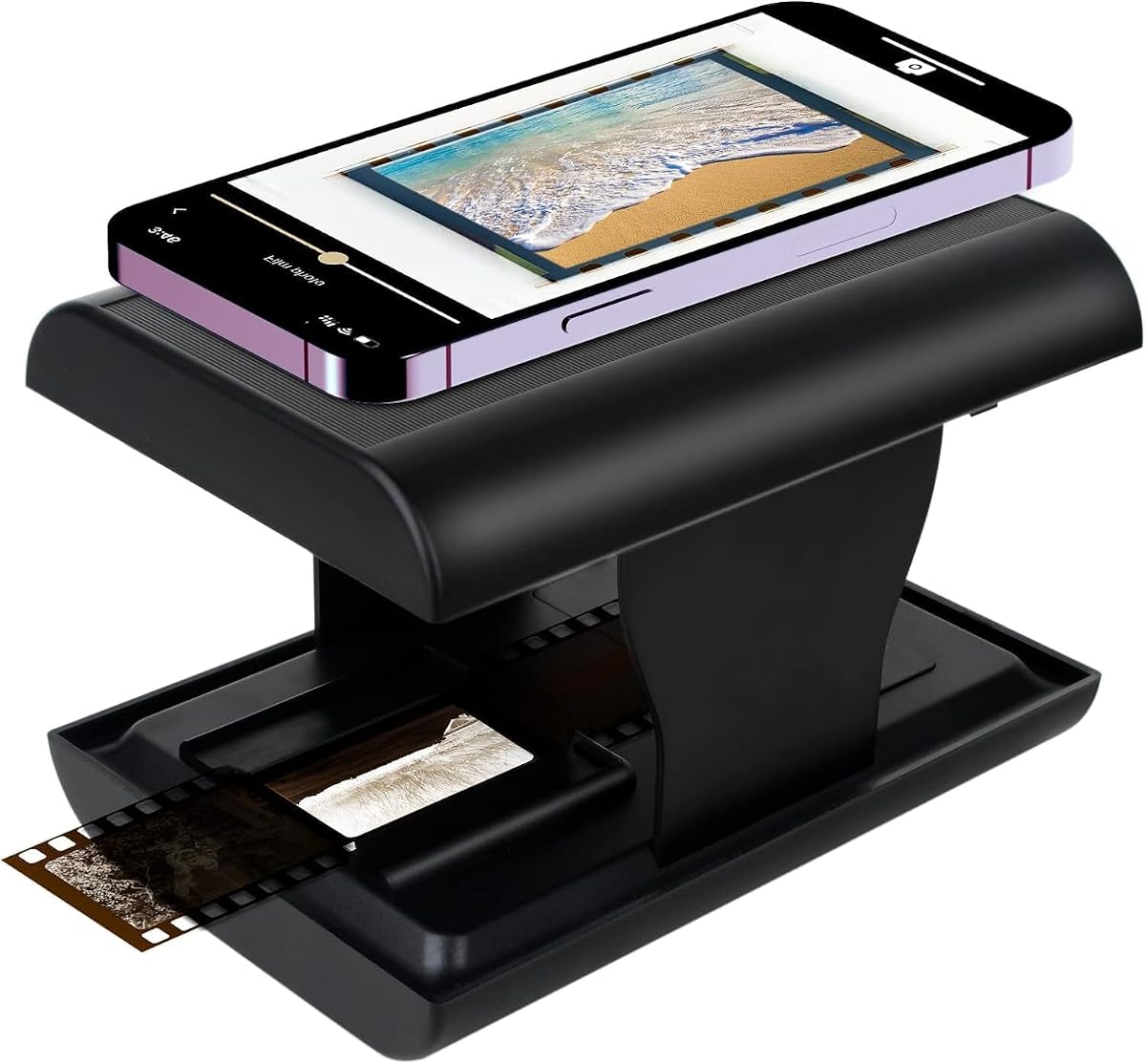
TCNEWCL 35mm Negative Slide Scanner
4.3Editor score
Smartphone compatibility
Foldable design
Built-in LED light
Free app support
Preserving analog memories requires the right tools to convert film into digital formats. A quality black and white negative scanner ensures your cherished photos remain vibrant and accessible for future generations to enjoy.
We evaluated ten leading scanners based on resolution, ease of use, and compatibility with various film types. Our analysis focuses on practical performance, features, and value to help you find the ideal device.
Each pick highlights unique strengths suited to different needs and budgets. Please note that prices and availability can change frequently, so checking current listings is recommended before making your final purchase decision.
4.3Editor score

4.3Editor score

4.2Editor score
As an Amazon Associate we earn from qualifying purchases.
The following table provides a side-by-side comparison of the ten scanners analyzed in this guide, highlighting their key specifications and primary features for quick reference.



The Magnasonic All-in-One 24MP Film Scanner stands out as a top choice for serious digitizers. With a 4.3 rating, it promises high resolution 24MP JPEG files directly from 35mm and other film types without needing a computer.
We may earn a commission when you buy through this link, at no additional cost to you.
Its standout feature is the large 5-inch LCD screen, which allows you to preview and edit images right on the device. You can adjust brightness and color correction instantly, plus use HDMI to view scans on a TV for a nostalgic slideshow experience.
The trade-off is the cost, which is higher than basic models, but you gain significant convenience and quality. The lack of an included SD card is minor given the device's expandable memory support up to 128GB for storing thousands of photos.
If you want a dedicated scanner that balances quality with ease of use for preserving family history, this model is highly recommended. It is ideal for those who value screen previews and high fidelity output without software hassles.
Adjust brightness, RGB color, and flip images directly on the scanner to save time on post-processing later.
Supports 35mm, 126, 110, and Super 8 film along with multiple slide formats for comprehensive archival needs.
We may earn a commission when you buy through this link, at no additional cost to you.
The TCNEWCL 35mm Negative Slide Scanner offers an incredibly budget-friendly way to revive old memories. Rated 4.3, it converts slides and negatives by leveraging your existing smartphone camera and a simple foldable shell.
We may earn a commission when you buy through this link, at no additional cost to you.
Its key strength is portability and cost; you fold it into a small box and insert film into the shell. You then hold your phone over the lens, turn on the LED light, and use a free app to capture and edit the image on the spot.
The limitation is that image quality relies on your phone's camera resolution, which might not match dedicated scanners. However, for casual users or kids exploring family albums, this trade-off is acceptable given the low price and fun factor.
This is the perfect gift for parents or anyone wanting to start digitizing without a big investment. It simplifies the process to just three steps and allows immediate sharing to social media for quick nostalgia trips.
Fits in a pocket or drawer making it ideal for travel or small storage spaces at home.
Use recommended apps like Snapseed to adjust color, contrast, and filters before saving.
We may earn a commission when you buy through this link, at no additional cost to you.
The KODAK Slide N Scan Max Film Scanner delivers professional-level digitization with a focus on efficiency. Its 4.2 rating reflects solid performance in converting 135, 110, and 126mm film and slides to digital files up to 22MP interpolated resolution.
We may earn a commission when you buy through this link, at no additional cost to you.
The streamlined scanning tray moves film smoothly without constant repositioning, making batch processing much faster. You can save directly to SD cards up to 32GB and use one-touch editing to resize or adjust images without complex menus or driver installations.
While it comes at a higher price point, the convenience of a computer-free workflow justifies the cost for many users. The only minor con is that some advanced software features may still require a PC if you want more than the basic on-device controls.
For those seeking a reliable, high-quality scanner for archiving large collections, this model is a strong premium choice. It balances speed with image fidelity and offers the trusted Kodak brand heritage in a modern portable package.
The smooth moving tray feeds film continuously to reduce interruptions during long scanning sessions.
Handles color, black and white negatives and slides across multiple vintage film sizes seamlessly.
We may earn a commission when you buy through this link, at no additional cost to you.
The BEONEGLOBAL ClearScan MINI Film Scanner is designed for comfort and speed in a compact package. With a 4.2 rating, it captures 16MP images using a premium CMOS sensor and features front-facing buttons below the 2.31 inch screen for natural operation.
We may earn a commission when you buy through this link, at no additional cost to you.
Its ergonomic layout eliminates awkward hand movements, letting you scan 126 and 135 film in seconds. You can adjust brightness and flip images directly on the scanner before saving to an SD card, making it easy to share memories instantly.
The main trade-off is the smaller screen compared to larger models, which might make fine adjustments trickier. However, for portable use and quick digitization tasks, its size and ease of use offer significant advantages for on-the-go scanning.
This device suits travelers or casual users who need a reliable mini scanner without bulk. It preserves film memories anytime without hassle and delivers clear true-to-life images for digital albums or social media posts.
Front facing buttons below the screen allow comfortable operation without twisting wrists.
Save directly to SD card and transfer photos quickly to share with family online.
We may earn a commission when you buy through this link, at no additional cost to you.
The Memory Vault Box Negative Scanner is built for simplicity and at-home use by all ages. Rated 3.4, it focuses on turning old 35mm film and slides into JPEG files without complicated software or expensive services.
We may earn a commission when you buy through this link, at no additional cost to you.
Its key strength is the built-in LCD preview screen and simple buttons, making it easy for grandparents or parents to use comfortably. Advanced enhancement technology automatically improves brightness and color to restore faded memories directly on the device.
The rating is lower due to its basic functionality compared to higher-end models, but the complete kit including cleaning brushes helps you start immediately. The trade-off is less manual control but more automation for users who prioritize ease over customization.
This scanner is ideal for families wanting a straightforward way to digitize history without learning complex tools. It helps preserve irreplaceable memories quickly and lets you view results instantly for safe storage and sharing.
Simple buttons and preview screen make it accessible for users with no technical experience.
Automatically improves image detail and color to bring faded slides back to life.
We may earn a commission when you buy through this link, at no additional cost to you.
The HP Film and Slide Scanner HPFS500 combines modern connectivity with high image clarity. Rated 4.3, it features a 5-inch touch screen and USB-C power, allowing you to preview and edit images directly while viewing them in gallery mode as a picture frame.
We may earn a commission when you buy through this link, at no additional cost to you.
Equipped with a 13MP CMOS sensor and 22MP interpolation, it delivers exceptional detail for both color and black and white film. The quick load tray supports 135, 126, and 110 formats, and you can save results to an SD card effortlessly.
The reliance on USB power might limit standalone use, but the touchscreen offers intuitive control for editing and gallery viewing. This trade-off is acceptable for users who want a sleek interface and modern connectivity options for their setup.
This device fits those who appreciate touchscreen simplicity and versatile power options. It transforms scanned memories into vibrant digital displays and ensures every detail is captured with professional-quality results easily.
Use gallery mode to display your favorite scans as a vibrant picture frame on your desk.
Connect via USB type-C to PC or adapter for flexible power options anywhere.
We may earn a commission when you buy through this link, at no additional cost to you.
This product listing currently shows limited public data, so specific details about its performance are not available yet. It appears as a potential option in the market, and checking the current Amazon listing is advised to understand its capabilities.
We may earn a commission when you buy through this link, at no additional cost to you.
Without confirmed specs or ratings, it is difficult to assess its strengths or weaknesses compared to other scanners. The trade-off is uncertainty, but new models may offer updated features that warrant closer inspection upon release.
For now, this entry serves as a placeholder for emerging products. We recommend visiting the provided link to see if additional information such as resolution, connectivity, or film support has been updated recently.
This option is suitable for early adopters willing to research new listings. Proceed with caution and verify current user feedback before purchasing to ensure it meets your scanning needs.
Visit the product page to check for any updates on specs or user feedback.
Weigh unknown features against established scanners to make an informed decision.
We may earn a commission when you buy through this link, at no additional cost to you.
Selecting the right scanner depends on several key factors that affect image quality, speed, and ease of use.
Resolution determines the level of detail your scanned images will capture. Look for scanners with at least 13MP CMOS sensors or higher to ensure sharp details in film grain and text. Higher resolution is especially important for enlarging photos or archiving fine details.
Ensure the scanner supports your specific film types such as 35mm, 126, or 110 formats. Versatile models handle both slides and negatives, reducing the need for multiple devices. Compatibility affects which memories you can digitize without buying extra adapters.
A user-friendly interface with preview screens or simple buttons makes scanning less tedious for beginners. Devices with built-in editing options save time by letting you adjust images before saving. Consider how intuitive the controls are for your skill level and workflow.
Connectivity determines how you transfer scans to your computer or cloud. Options include SD cards, USB-C, or HDMI for direct TV viewing. Wireless features can enhance flexibility but may add complexity. Choose based on your preferred storage method.
Built-in editing tools like color correction or brightness adjustment help restore faded photos immediately. Some models require computer software, while others let you edit on-device. On-device editing is convenient for quick sharing without additional apps.
If you plan to scan outside or travel, a compact and foldable design is essential. Larger units with bigger screens offer better previews but may be cumbersome. Balance the need for mobility against the size of the display and controls.
Cost varies widely from budget-friendly options to premium models with advanced features. Determine your budget and prioritize features that matter most such as resolution or speed. A higher price often means better build quality and longevity for frequent use.
Check user feedback to understand real-world performance and reliability issues. Strong manufacturer support ensures you can troubleshoot problems or get replacement parts easily. Reviews often reveal practical insights not found in official specifications.
Store your scanner in a dry cool place away from direct sunlight when not in use. Regularly clean the glass or sensor area with a soft cloth to maintain image clarity. Keep the device firmware updated if applicable for best performance and compatibility.
Yes, most modern negative scanners support both color and black and white film. The sensors and software convert the negative into a positive image preserving original tones. Some models even offer specific enhancements for B&W photos to increase contrast and clarity.
Many scanners today allow computer-free operation using SD cards or direct USB connections. You can preview and edit images directly on the device screen without installing software. However, a computer may still be useful for organizing and editing scans in detail.
A resolution of at least 13MP to 24MP is ideal for high-quality prints up to 8×10 inches. Higher resolution captures more detail and allows for enlarging without pixelation. Check your intended print size to choose a scanner with appropriate specs.
Most models come with straightforward plug-and-play setups requiring minimal configuration. Just connect power and insert film into the tray then press scan. User manuals and on-screen prompts guide beginners through the basic steps effectively.
Use a soft anti-static cloth to wipe the scanner glass gently before use. For film, a soft brush removes dust without damaging the emulsion. Avoid using chemical cleaners on film which may strip the coating or cause scratches.
Many scanners include built-in editing tools for brightness color adjustment and flipping. These options let you make quick changes before saving to SD card or computer. Some apps complement scanners further if you want advanced editing capabilities.
Remember to check current prices and availability since deals change frequently. Reading recent customer reviews can also help confirm the latest performance trends. Choose the scanner that best fits your workflow to preserve your memories for years to come.