
Nyko Charging Station for Xbox Series XS
4.2Editor score
Dual Port Charging
Extra USB Port
LED Status Lights
Compare the top 10 Controller Charging Station for Xbox models for 2026. We review battery life, charging speed, safety features, and design to help you choose
Finding a reliable Controller Charging Station for Xbox is essential for gamers who want uninterrupted play sessions. A good dock ensures your controllers are always ready and protected from damage while charging efficiently.
We compared ten top-rated charging stations based on battery capacity, charging speed, safety certifications, and compatibility. Each model was evaluated for ease of use, design quality, and overall value for money in the current market.
Each pick highlights key features, pros, and cons to help you decide quickly. Note that product availability and prices can change frequently, so verify current details before purchasing to ensure you get the best deal available today.
4.2Editor score

4.6Editor score

4.4Editor score
This side-by-side comparison evaluates all ten charging stations based on capacity, speed, compatibility, and design features to help you find the perfect match for your gaming setup.




The Upgraded Controller Charger Station stands out as the top choice for Xbox gamers seeking reliable power. With a 4.6 rating, it offers robust features including high capacity batteries and intuitive LED status indicators.
We may earn a commission when you buy through this link, at no additional cost to you.
Its standout quality is the massive 6200mWh capacity per battery, ensuring up to 25 hours of play per charge. The X shaped LED indicators provide a clear visual check without disturbing gameplay or rest periods.
While batteries are stored on the dock bottom which might be slightly inconvenient for some setups, the safety features compensate fully. The multi-protection system guards against overheating and overcharging ensuring device longevity.
This station is ideal for households with multiple players needing consistent uptime. It balances high performance with safety and convenience making it the best overall choice for serious Xbox users.
The large 6200mWh capacity allows gamers to play for hours without interruption compared to standard AA batteries.
The X shape LED lights show status clearly without being too bright or distracting during gameplay.
We may earn a commission when you buy through this link, at no additional cost to you.
The Fosmon Fast Charging Dock offers excellent value with dual slots and strong performance. Rated 4.5 stars it delivers consistent charging with SGS certification ensuring peace of mind for users.
We may earn a commission when you buy through this link, at no additional cost to you.
Its dual 2 Max design allows two controllers to charge simultaneously. The smart charging board automatically stops charging when full protecting batteries from damage and extending their usable life significantly.
The main limitation is incompatibility with the newer Elite 2 controller which restricts usage for some power users. However for most standard controllers it provides reliable and fast charging performance.
Ideal for families or duos who game together the Fosmon dock keeps controllers ready without hassle. Its balance of price features and safety makes it a strong contender in the market.
SGS certification ensures the product meets high international safety standards for battery charging and usage.
The intelligent board prevents overcharging by stopping the process automatically once batteries are full.
We may earn a commission when you buy through this link, at no additional cost to you.
The PowerA Solo Charging Stand is the go to choice for single controller setups seeking official quality. With a 4.6 rating it ensures compatibility and reliability for Xbox Series X and Xbox One users.
We may earn a commission when you buy through this link, at no additional cost to you.
Its officially licensed status guarantees perfect fit and function. The included 1100mAh battery provides decent playtime while eliminating the constant need to buy disposable batteries which saves money over time.
While it only supports one controller at a time making it less suitable for group gaming the warranty offers reassurance. This makes it a safe bet for solo gamers or as a backup dock.
Recommend this for users prioritizing brand reliability and simplicity. The clean design and guaranteed compatibility make it a solid investment for maintaining controller health effectively.
Being officially licensed means the stand is tested to work flawlessly with genuine Xbox controllers.
The two year warranty covers defects giving buyers confidence in the durability of the product.
We may earn a commission when you buy through this link, at no additional cost to you.
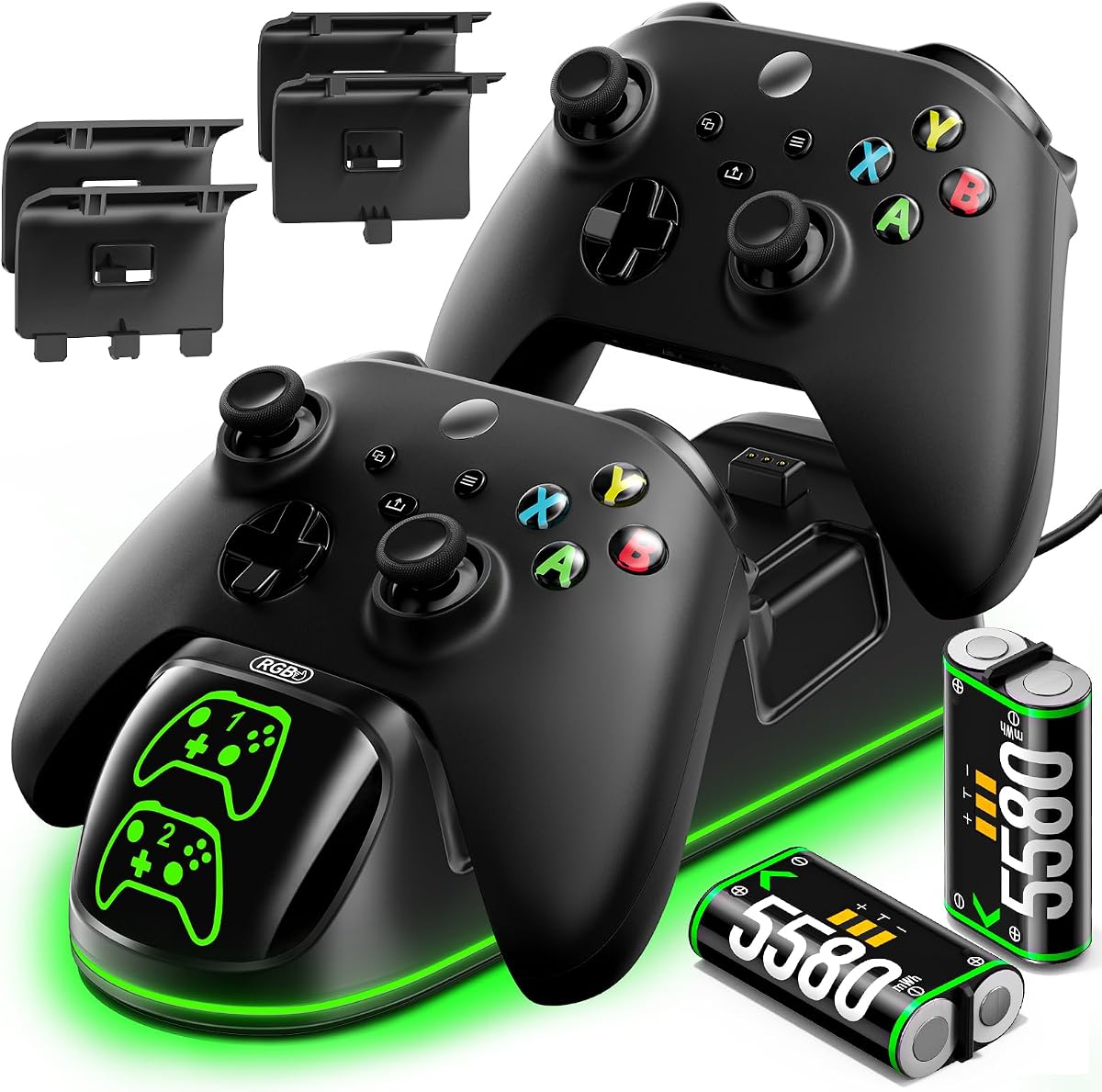
The OlVO XSX Controller Charger boasts a perfect 5.0 rating reflecting high user satisfaction. Its standout feature is the rapid 2.5 hour charge time allowing quick turnaround between gaming sessions.
We may earn a commission when you buy through this link, at no additional cost to you.
With 5580mWh capacity per battery you get around 20 hours of play time. The high 3000 cycle durability means these batteries last significantly longer than standard rechargeable options available elsewhere.
Installation requires attention to polarity which can be tricky for some users but the clear instructions help. It does not support older 360 controllers but covers all modern Xbox Series and One models well.
Ideal for players who need fast refills and long battery life. The USB-C cable future proofs the setup making this a top choice for tech savvy gamers.
The fast 2.5 hour charge means controllers are ready to go again quickly after use.
USB-C support ensures compatibility with current charging cables and hubs easily.
We may earn a commission when you buy through this link, at no additional cost to you.
The 8BitDo Charging Dock excels with its magnetic secure charging mechanism. With a 4.6 rating it ensures your controller stays connected firmly during charging which improves reliability.
We may earn a commission when you buy through this link, at no additional cost to you.
The seamless design complements Xbox controllers perfectly fitting right into your setup. The LED indicators change color to show status clearly while the light adjustment feature prevents glare in dark rooms.
It only holds one controller and the included 1100mAh battery offers standard performance. However the magnetic design eliminates connection issues that can occur with metal prong docks making it very convenient.
Best for single player setups wanting a premium look and reliable connection. The official licensing and clean design make it a stylish and functional addition to any gaming corner.
The magnetic contacts ensure the controller docks every time without needing careful alignment.
Adjustable LED lights allow users to control brightness to suit their room lighting.
We may earn a commission when you buy through this link, at no additional cost to you.
The Charger Station with 5520mWh batteries offers unique style and solid performance. With a 4.6 rating the robot helmet inspired aesthetic adds a fun element to your gaming desk setup.
We may earn a commission when you buy through this link, at no additional cost to you.
Features include LED indicators that can be toggled off easily. The USB-C cable ensures fast charging while the battery storage compartment prevents losing spare packs which is a common issue.
While the design is bold and might not fit minimalist setups the functionality is excellent. 18 to 25 hours of play time per charge is competitive and sufficient for most sessions.
Recommend for gamers who value unique design alongside practical features. It is a fun yet functional choice that keeps your controllers charged and organized effectively.
The robot helmet inspired design makes this dock stand out visually among standard black models.
Built in storage keeps extra batteries safe and close by when you need them.
We may earn a commission when you buy through this link, at no additional cost to you.
The Nyko Charging Station provides excellent value as the best budget option. With a 4.2 rating it delivers basic functionality effectively without extra frills or high costs.
We may earn a commission when you buy through this link, at no additional cost to you.
Its key benefit is the extra USB port which allows you to charge other peripherals like headsets. The dual drop and charge design is straightforward making it easy for anyone to use.
The 1100mAh batteries offer around 15 hours of play which is less than high capacity models. However for casual gamers this is sufficient and the extra port adds versatility to the setup.
Ideal for budget conscious shoppers needing a dual dock. Its simplicity and added port make it a practical choice for expanding your charging options affordably.
The additional USB port allows simultaneous charging of other gaming accessories like headsets.
The drop and charge design makes it simple to dock controllers without fiddling with cables.
We may earn a commission when you buy through this link, at no additional cost to you.
The Controller Gear Pulse Red Stand is perfect for users with matching Pulse Red controllers. With a 4.6 rating it ensures a seamless look and feel that blends perfectly with your existing hardware.
We may earn a commission when you buy through this link, at no additional cost to you.
Designed with ergonomic engineering it allows one hand navigation of the dashboard while docked. The magnetic contacts ensure a secure connection every time reducing wear on controller ports.
It only supports one controller and the battery capacity is standard. However the aesthetic and build quality are top tier making it a premium choice for style focused gamers.
Recommend for those wanting a unified visual setup. The attention to color matching and design details makes this stand a standout accessory for specific controller users.
Matching the Pulse Red color creates a cohesive and stylish look for your gaming setup.
You can still navigate menus while the controller is charging for better accessibility.
We may earn a commission when you buy through this link, at no additional cost to you.
The Razer Universal Quick Charging Stand offers top tier build quality and universal fit. With a 4.4 rating it stands out for its compatibility and reliable charging features across most Xbox models.
We may earn a commission when you buy through this link, at no additional cost to you.
Its magnetic system ensures quick attachment without alignment issues. The stand charges fully in under three hours which is fast enough for most users and includes protection against overheating.
The price is higher than average but the build quality and convenience justify it for many. Not supporting Elite 2 limits slightly but covers a wide range of other official controllers well.
Ideal for gamers wanting a reliable versatile dock for multiple controller types. Its mix of speed and protection makes it a premium choice for serious users.
Supports nearly all Xbox controllers making it versatile for different controller collections.
Built in protection prevents overheating ensuring safety even when left on the stand.
We may earn a commission when you buy through this link, at no additional cost to you.
The Controller Charger Station with RGB brings vibrant lighting and high power. With a 4.5 rating it combines performance with visual flair suitable for immersive gaming environments.
We may earn a commission when you buy through this link, at no additional cost to you.
Features 9 RGB modes to match your setup and 6200mWh batteries for up to 30 hours play. The auto power adjustment protects controllers from overcharging and voltage issues safely.
While some may find RGB lights too flashy the effect is customizable to turn off. Battery life is excellent reducing frequent swaps and the covers included add value for versatility.
Recommend for gamers seeking both performance and atmosphere. It is a fun and functional dock that elevates the gaming vibe while keeping controllers powered.
The RGB lighting adds a dynamic visual element to your gaming setup and setup.
Large batteries ensure longer play time reducing the frequency of charging cycles.
We may earn a commission when you buy through this link, at no additional cost to you.
Choosing the right charging station involves considering battery capacity charging speed and safety features to ensure your controllers stay powered up and protected.
Look for stations with rechargeable battery packs that offer sufficient capacity to last multiple hours. Higher capacity like 6200mWh allows longer play time reducing interruptions during critical game moments.
Prioritize packs with high cycle durability to save money over time.
Fast charging capabilities ensure controllers are ready quickly after short breaks. Stations that charge in under three hours reduce wait times significantly compared to standard overnight charging options.
Check product specs for full charge times to match your gaming pace.
Ensure the dock includes built in safety protections such as overcharge and overheating safeguards. Certifications like SGS provide independent verification of safety standards reducing risks to your hardware.
Safety features protect both the dock and your expensive controllers from damage.
Verify compatibility with your specific Xbox controller model such as Series X or Elite. Some stations do not support Elite 2 or older 360 models so check support lists before buying.
Always confirm support for all controllers you plan to use.
Consider the visual design and how it fits your gaming setup. Some docks have unique themes like RGB lighting or specific color matching that can enhance or detract from your room's look.
Choose a style that matches your personal taste and room decor.
Decide between single or dual port stations based on household needs. Dual docks allow simultaneous charging which is vital for multiplayer households while single docks suit solo players.
Match port count to your usage habits for optimal convenience.
Modern docks often use USB-C for faster and more reliable charging. USB-C provides better future proofing compared to older micro USB or proprietary connectors.
Check cable type included to ensure compatibility with your existing hubs.
Look for products with solid warranties to protect your purchase. A longer warranty period like two years or limited lifetime offers peace of mind regarding quality and durability.
Always review warranty terms and support contacts before purchasing.
Start by plugging the station into a power source via USB or wall adapter ensuring secure connection. Place each controller gently into the dock slots aligning them with the contact points so charging begins immediately.
Monitor LED indicators to confirm charging status. Green typically means fully charged while red indicates active charging. Remove controllers once full to maintain battery health and prolong usable lifespan.
Regularly inspect battery packs for wear or swelling and replace them if damaged. Keep the dock away from direct sunlight or heat sources to prevent overheating during extended use periods.
Most dual kit models include rechargeable battery packs while single stands may vary. Always check product listings to confirm if batteries are included or sold separately before purchase.
Some models explicitly exclude Elite 2 support so verify compatibility before buying. Most dual ports work with standard Xbox One and Series X but check listings for Elite limitations.
Rechargeable battery packs can last thousands of cycles often over 2000 times before needing replacement. This is far longer than disposable AA batteries making them more eco-friendly and cost-effective.
Yes if the dock has built in overcharge protection which stops power flow when full. Look for safety certifications to ensure safe overnight use without risking battery damage.
Many newer stations use USB-C for faster charging while older ones use micro USB. Check the product details for cable type to ensure compatibility with your power sources.
Most docks have LED indicators showing status but some allow toggling off via switches. This lets you avoid distraction during gameplay while still benefiting from visual status updates.
We reviewed ten top charging stations with the Upgraded Controller Charger Station leading as the best overall for its high capacity and safety features. Each model offers unique strengths to fit different gaming needs and budgets.
Prioritize battery capacity and safety certifications to ensure reliable performance. Consider design preferences like RGB lighting or color matching if style is important for your setup.
Check current prices and availability on Amazon to secure the best deal today. With the right station your controllers stay ready and your gaming experience remains uninterrupted.