
Surface Docking Station Triple Displays
4.1Editor score
Triple display output
12-in-1 ports
72W power adapter
This guide compares the top docking stations for Surface Pro devices to help you find the perfect connectivity solution for your workspace needs today.
Finding the right docking station for your Surface Pro is essential for transforming a tablet into a full desktop workstation. The ideal dock offers seamless connectivity for monitors, peripherals, and charging without cluttering your desk with multiple cables.
We have evaluated the leading options on the market based on port variety, charging speed, display support, and build quality. This list covers a range of models from official Microsoft hardware to versatile third-party hubs designed for modern productivity.
Each pick highlights key strengths and potential trade-offs to help you decide which dock fits your specific workflow. Please note that availability and stock levels can change frequently, so check current listings for the latest details.
4.1Editor score

4.4Editor score

4.5Editor score
This side-by-side comparison highlights the key specifications and unique features of each top-rated docking station to help you make an informed decision for your setup.




The Microsoft Surface Thunderbolt 4 Docking Station stands out as a premium solution for professionals seeking maximum connectivity and speed. With a solid rating, it delivers high-performance docking that transforms your Surface Pro into a powerful workstation effortlessly.
We may earn a commission when you buy through this link, at no additional cost to you.
Its Thunderbolt 4 connectivity ensures lightning-fast data transfer and video streaming capabilities. The station supports up to two 4K monitors, providing stunning visuals for creative work or multitasking. Additionally, the quick charge feature powers up your laptop in just 2.5 hours, keeping you productive all day without interruption.
While the price is higher than many competitors, the build quality and eco-friendly design using 20% recycled ocean-bound plastic justify the investment. The tactile indicators on each port make connections intuitive, preventing fumbling in low-light environments.
This dock is ideal for users who need reliable dual-monitor setups and fast charging without compromising on aesthetics. If you want a top-tier docking experience that aligns with sustainability, this is the clear recommendation.
Thunderbolt 4 ports allow you to transfer data, stream media, and charge devices rapidly, ensuring no downtime during critical tasks.
Made with 20% recycled ocean-bound plastic, this dock balances top-of-the-line performance with a commitment to environmental responsibility.
We may earn a commission when you buy through this link, at no additional cost to you.
The Microsoft Surface Dock offers a straightforward and reliable way to expand connectivity for older Surface devices. With a high rating, it remains a popular choice for those needing essential ports without complexity.
We may earn a commission when you buy through this link, at no additional cost to you.
Its magnetic Surface Connect cable makes plugging in effortless, transforming your tablet into a desktop PC instantly. The dock includes four USB 3.0 ports for peripherals, a Gigabit Ethernet port for stable internet, and Mini DisplayPorts for external monitors.
While it lacks modern USB-C ports, it maintains broad compatibility with various Surface models including the Surface Pro 3 through 6. The external power supply ensures stable operation even with multiple devices connected simultaneously.
This dock is perfect for users who prioritize simplicity and reliability over cutting-edge features. If you have legacy Surface devices and need a no-fuss docking solution, this is an excellent budget-friendly option.
The magnetic cable transforms your Surface into a desktop PC by plugging in with ease, ensuring a secure connection every time.
With four USB 3.0 ports, you can connect multiple peripherals and transfer files at high speeds without bottlenecks.
We may earn a commission when you buy through this link, at no additional cost to you.
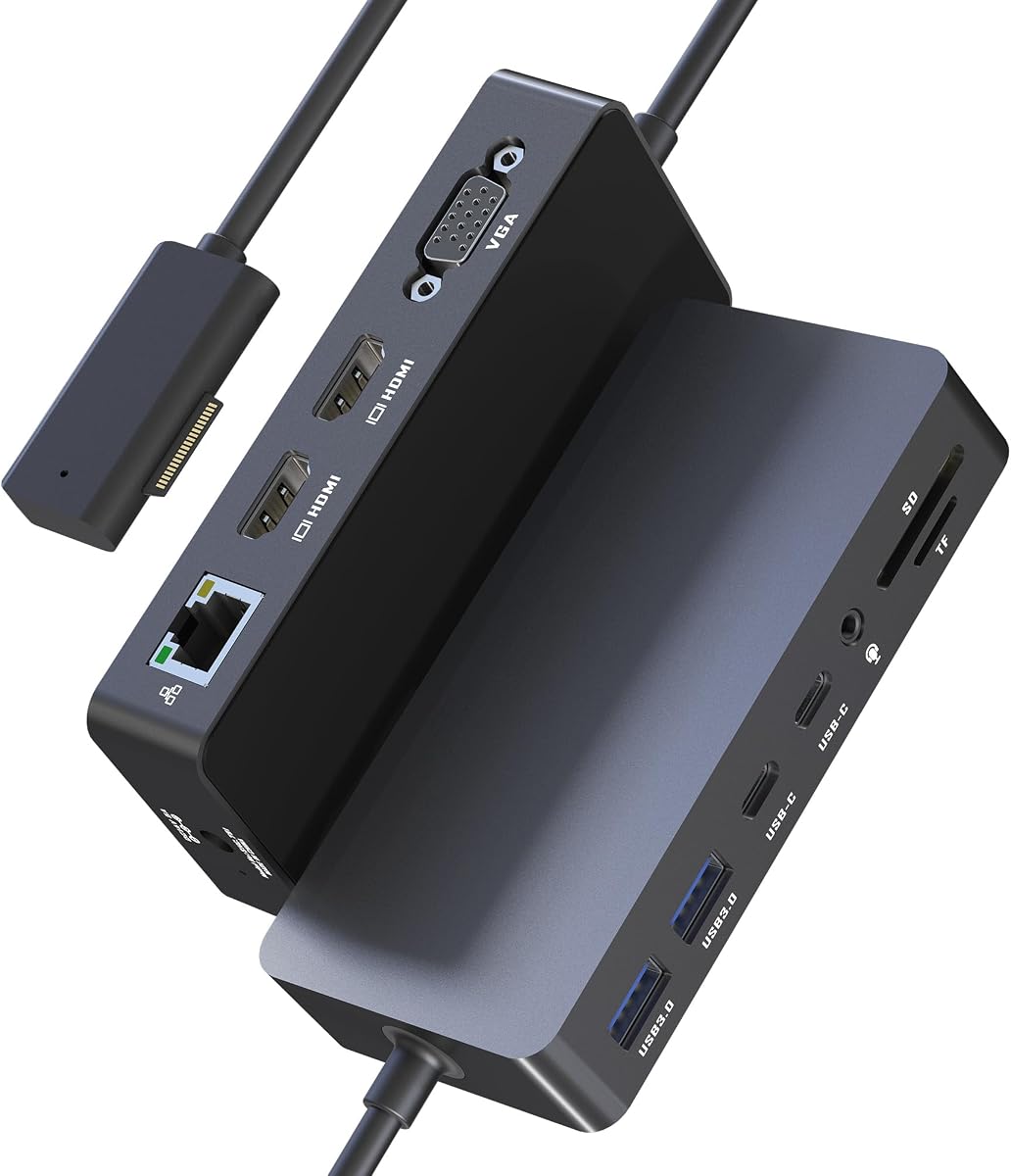
The Surface Docking Station Triple Displays is designed for users who need extensive multi-monitor capabilities. Rated well, it provides a robust 12-in-1 solution that enhances productivity significantly with triple screen outputs.
We may earn a commission when you buy through this link, at no additional cost to you.
Equipped with Surface Connection technology, it offers 2x HDMI 4K outputs and a VGA port, allowing you to extend your display across three monitors simultaneously. The station also includes USB-C and USB-A ports for fast data transfer up to 5Gbps.
You can transfer photos and files quickly with integrated SD/TF card slots, which support speeds up to 104MB/s. The 3.5mm audio jack and 10/100Mbps Ethernet port ensure you stay connected to networks and audio devices seamlessly.
This docking station is ideal for professionals requiring a clutter-free desk with multiple screens and quick file access. While you may need to turn off the Surface screen for three external displays, the workflow efficiency gain is substantial.
Boost your efficiency three times with triple display support featuring 4K HDMI and VGA ports for crystal-clear visuals.
With USB 3.0 and USB-C ports delivering 5Gbps speeds, you can transfer files in seconds from external drives.
We may earn a commission when you buy through this link, at no additional cost to you.
This Surface Docking Station is highly rated for its ability to transform a mobile device into a professional workstation effortlessly. Its features emphasize productivity with triple display support and rapid data transfer capabilities for various users.
We may earn a commission when you buy through this link, at no additional cost to you.
The 12-in-1 design includes 2x HDMI 4K ports and a VGA port, enabling you to boost efficiency by connecting multiple screens. The 72W power supply ensures your Surface stays charged while running peripherals simultaneously, eliminating the need for extra chargers.
Data transfer is blazing fast with USB 3.0 and USB-C ports delivering 5Gbps speeds, perfect for moving large design files or footage. The integrated SD/TF card slots support speeds up to 104MB/s, making it ideal for photographers and designers.
If you need a reliable dock that balances power and connectivity without cluttering your desk, this model is a strong contender. Its minimalist design and comprehensive warranty add peace of mind for daily office use.
Boasting 2x HDMI 4K and VGA ports, this dock elevates daily workflow efficiency in seconds for mobile professionals.
A 10/100Mbps Ethernet port and 3.5mm headphone jack ensure seamless connectivity and precise audio editing anywhere.
We may earn a commission when you buy through this link, at no additional cost to you.
Designed for creatives needing extensive screen real estate, this dock supports dual 4K HDMI outputs plus a VGA port for triple setups. It delivers high resolution and reliable connectivity for design and video editing workflows.
We may earn a commission when you buy through this link, at no additional cost to you.
The 72W fast charging capability keeps your device powered all day, removing the need for an original charger. With 5Gbps data transfer speeds on USB-C and USB-A ports, you can move large files efficiently without lag or bottlenecks.
Integrated SD/TF card slots allow direct access to photos and videos from camera cards at speeds up to 104MB/s. The 100Mbps Ethernet port guarantees a stable, low-latency connection perfect for video conferencing or streaming content.
This dock is recommended for anyone looking to maximize productivity with a streamlined workspace. Its universal compatibility and 18-month warranty make it a versatile choice for various Surface devices and professional needs.
Maximize multitasking with crystal-clear multi-screen viewing featuring dual 4K HDMI and 1080P VGA for extended setups.
Transfer files from external drives in seconds with 5Gbps speeds and dedicated SD/TF card slots for immediate access.
We may earn a commission when you buy through this link, at no additional cost to you.
The NEW Microsoft Surface Dock 2 brings next-gen ports to transform your Surface into a desktop PC instantly. With exceptional ratings, it offers high power delivery and dual monitor support that meets demanding professional requirements.
We may earn a commission when you buy through this link, at no additional cost to you.
Its 199W power supply and longer 80 cm Surface Connect cable ensure extended reach and reliable charging for your device. The dock supports dual 4K monitors at 60Hz, delivering immersive visuals for high-resolution work or entertainment.
With two front-facing and two rear-facing USB-C ports, plus USB-A ports, it provides versatile connectivity options for all your peripherals. The Gigabit Ethernet port and security lock support add stability and protection for office environments.
If you need a powerful docking solution with robust connectivity and high-speed display support, this dock is a top choice. It simplifies your workspace while maximizing functionality for hybrid work and professional presentations.
Plug in the Surface Connect cable to access external monitors, a keyboard, mouse, and more with a single cable.
Enjoy dual 4K monitors at 60Hz for high-resolution, immersive visuals that enhance your workflow and experience.
We may earn a commission when you buy through this link, at no additional cost to you.
The SVS-00001/1917 Microsoft Surface Dock 2 provides instant desktop transformation with next-gen ports and high power output. It is highly rated for its ability to connect multiple devices seamlessly with superior performance and design.
We may earn a commission when you buy through this link, at no additional cost to you.
It includes a 199W power supply and an 80 cm Surface Connect cable for extended reach and stable power delivery. You can enjoy dual 4K monitors at 60Hz for immersive visuals, paired with versatile port options including USB-C and Ethernet.
Compatible with a wide range of Surface devices from Pro 4 to Studio, this dock ensures versatile use across your ecosystem. The Kensington-compatible security lock support adds essential protection for devices in shared or office environments.
For users seeking a high-performance docking station that supports modern displays and robust connectivity, this model is ideal. Its seamless connectivity and durable design make it a reliable choice for professionals and creatives alike.
Plug in the Surface Connect cable to connect to external monitors, keyboard, mouse, and more effortlessly.
Equipped with multiple USB-C and USB-A ports, plus Ethernet and audio jack for extensive peripheral connectivity.
We may earn a commission when you buy through this link, at no additional cost to you.
This Surface Thunderbolt 4 Docking Station is an elite 12-in-1 expansion that transforms your device into a desktop powerhouse. It is rated highly for its visual clarity and dedicated charging capabilities for intensive workloads.
We may earn a commission when you buy through this link, at no additional cost to you.
The dock features dual 4K@60Hz HDMI ports and a VGA port, enabling triple display support for enhanced multitasking efficiency. It comes with a dedicated 100W DC charging adapter to keep your laptop fast-charged while powering all connected devices reliably.
Data transfer is ultra-fast with dual 5Gbps USB 3.0 and USB-C ports, plus SD/TF card slots supporting up to 2TB storage. The Gigabit Ethernet port ensures lightning-fast internet connections for smooth video conferencing and high-speed downloads.
Ideal for video editors and traders demanding superior screen real estate and power, this dock bridges the gap between mobile and desktop. Its plug-and-play experience requires no extra drivers, making setup quick and hassle-free.
Elevate your visual experience with dual 4K@60Hz HDMI and 1080P VGA outputs for crystal-clear resolutions.
Move massive files in seconds with 5Gbps USB ports and rapid photo offloading at speeds up to 104MB/s.
We may earn a commission when you buy through this link, at no additional cost to you.
This renewed Microsoft Surface Dock 2 offers a complete bundle with a 199W power adapter and USB-C cable for instant setup. It is highly rated for delivering high-performance connectivity and efficiency for diverse Surface devices.
We may earn a commission when you buy through this link, at no additional cost to you.
It features multi-port high-efficiency expansion including 2x USB-C, 2x USB-A, and audio in/out for versatile connectivity. The dock supports dual 4K@60Hz display output via Surface Connect, enabling you to charge and connect multiple devices through one cable.
Rigorously tested for durability, it includes integrated thermal management to ensure consistent performance in various workspaces. The 1-year limited hardware warranty adds assurance for those seeking a cost-effective yet reliable docking solution.
If you want premium features without paying full retail price, this renewed option is a smart choice. It delivers robust connectivity and fast data transfer, making it suitable for professionals needing a stable desktop setup.
With multiple USB-C and USB-A ports plus audio, you get a comprehensive range of connectivity options for all needs.
Supports dual 4K@60Hz display output via Surface Connect, delivering high-speed data transfer and power.
We may earn a commission when you buy through this link, at no additional cost to you.
This Surface Dock uses Surface Connection technology to keep your desktop tidy with minimal design and fast transmission of video, audio, and data. It provides a straightforward way to connect peripherals and monitors efficiently.
We may earn a commission when you buy through this link, at no additional cost to you.
The docking station has two Mini DP ports to connect external monitors, supporting 4K at 60Hz or 1080P at 60Hz simultaneously. With 4x USB 3.0 ports, you can connect multiple devices like U disks and charge mobile phones easily.
A Gigabit network card port supports high-speed internet access, while the 3.5mm audio port allows connection to speakers or headphones. It is compatible with a wide range of Surface Pro, Laptop, Book, and Go models for broad utility.
For users seeking an easy-to-use docking station with stable compatibility and scalable power, this is a solid option. The 1 Year warranty with replacement coverage ensures peace of mind when expanding your workspace.
The docking station uses Surface Connection technology to keep your desktop tidy with efficient video, audio, and data transmission.
Ten interfaces can be used at the same time to meet your expansion needs while maintaining stable compatibility.
We may earn a commission when you buy through this link, at no additional cost to you.
Selecting the right docking station requires understanding your specific connectivity needs, budget, and the devices you plan to connect.
Modern docking stations offer various port options such as USB-C, USB-A, HDMI, VGA, and Mini DisplayPort. Ensure the dock supports the specific connectors your monitors and peripherals use to avoid needing extra adapters. Some models provide Thunderbolt 4 support for maximum speed and versatility, which is essential for high-performance workflows.
Prioritize a dock that offers a balanced mix of video outputs and data ports to match your setup requirements.
Check the wattage of the power supply included with the dock. Higher wattage ensures your Surface Pro stays charged while running multiple peripherals. Some docks offer 72W or 199W supplies, which can replace your original charger completely. Insufficient power may lead to battery drain or device disconnects during heavy use.
Look for a power supply that meets or exceeds the original charger specifications for reliable operation.
Determine how many external monitors you need to support. Docks vary from single-monitor to triple-display capabilities. Resolution and refresh rate support, such as 4K at 60Hz versus 30Hz, impact visual quality and smoothness. Ensure the dock can drive your preferred monitors at the desired resolution without performance drops.
Choose a dock that supports your monitor configuration and resolution needs for a seamless visual experience.
Data transfer speeds are critical for moving large files quickly. USB 3.0 and USB-C ports typically offer speeds up to 5Gbps, while Thunderbolt 4 provides even faster rates. If you work with large design files or video, high-speed ports reduce wait times. SD and TF card slots can also enhance workflow for photographers.
Select a dock with fast data transfer options to maintain productivity when handling large datasets.
A durable dock with good thermal management ensures long-term reliability. Compact designs help reduce desk clutter and fit easily in different environments. Some models use recycled materials to align with sustainability goals. A minimalist aesthetic often blends better with modern workspaces.
Invest in a well-built dock with a design that complements your workspace and ensures stable operation.
Verify that the dock is compatible with your specific Surface model. Some docks work best with newer models having USB-C or Surface Connect ports. Cross-compatibility with other Surface devices like Laptop or Go can be a plus. Ensuring compatibility prevents setup issues and maximizes the utility of your investment.
Always confirm compatibility lists to ensure the dock will work seamlessly with your device.
Ethernet ports provide stable, low-latency internet connections essential for video conferencing and large downloads. Look for Gigabit or 2.5G Ethernet support for faster speeds. Some docks also include audio jacks for direct connection to speakers or headphones without extra adapters.
Prioritize docks with Ethernet ports for reliable internet connectivity especially when wireless options are limited.
Consider the total cost of ownership including any extra cables or adapters needed. Warranties range from 1 year to 18 months and offer protection against defects. A higher price often correlates with better build quality and features. Weigh the value of features against the budget to make a balanced decision.
Choose a dock that offers a good warranty and fits your budget without compromising essential features.
To use your docking station, connect the power supply first, then plug your monitors and peripherals into the appropriate ports. Next, connect the Surface Connect cable or USB-C cable to your Surface Pro to establish the link.
Ensure all cables are securely seated to prevent connection drops. For optimal performance, keep firmware updated on both your Surface device and the dock if applicable. This ensures compatibility with new features and security patches.
Regularly clean dust from the ports and surface using a soft, dry cloth. Avoid exposing the dock to extreme temperatures or humidity. Store it in a safe place when not in use to extend its lifespan and maintain reliability.
Most docks come with an integrated power supply that charges your Surface while connected. Check the wattage to ensure it matches your device's needs. Some smaller hubs rely on bus power but might not fully charge during heavy use. Always verify the included adapter specifications.
Yes, many docks support dual or triple monitors via HDMI, VGA, or Mini DisplayPort. Confirm that your chosen dock supports the desired resolution and refresh rates for each screen. Some models allow extending displays while others mirror. Check the specs for maximum monitor support.
Thunderbolt 4 docks offer faster data transfer speeds and support higher resolution displays compared to standard USB-C. They are backward compatible with USB-C but may cost more. For high-performance needs, Thunderbolt 4 is preferable. USB-C is sufficient for general use.
Check the manufacturer's compatibility list before purchasing. Most docks list supported Surface Pro versions. If your model has Surface Connect ports, use docks with that feature. USB-C docks work broadly but might vary in performance. Always review the details.
Many docking stations include integrated SD and TF card slots for easy access to camera media. Ensure the dock supports your card type and offers fast transfer speeds. This feature eliminates the need for external card readers. It is especially useful for photographers.
Ensure your cables are properly connected and support the required resolution. Some docks require turning off the Surface screen when using three displays. Update graphics drivers on your Surface. Check that the monitor settings are correct for the signal received.
We have explored ten top-rated docking stations that cater to various needs from budget-conscious users to high-performance professionals. Each option offers unique strengths in connectivity, power, and display support to enhance your workflow.
When deciding, prioritize factors like power delivery, monitor support, and compatibility with your specific Surface model. Investing in a reliable dock ensures stability and efficiency, transforming your tablet into a true desktop workstation.
Remember to check current availability and stock levels as these can change frequently. Selecting the right dock will elevate your productivity and make your workspace more organized and versatile for daily tasks.