
Antec Flux Pro
4.7Editor score
Six PWM fans included
Multi-directional vents
Wood and glass texture
This guide compares the top Dual System PC Cases for enthusiasts needing maximum cooling and component separation in a single chassis build.
Dual system PC cases offer a unique solution for enthusiasts who demand maximum flexibility and cooling performance. These chassis designs separate components into distinct chambers to optimize airflow and reduce thermal interference.
We evaluated ten top-rated models based on build quality, cooling capacity, and support for high-end hardware configurations. Each entry was chosen for its ability to handle complex builds with style and efficiency.
Each pick highlights specific strengths like cable management, radiator support, or dual GPU capabilities. Prices vary by retailer so check current listings before purchasing to ensure the best deal.
4.7Editor score

4.7Editor score

4.3Editor score
Here is a side-by-side comparison of all ten selected cases to help you choose the right fit for your specific hardware needs and aesthetic preferences.


The NZXT H9 Flow RGB+ stands out as a top choice for modern PC enthusiasts seeking both performance and aesthetics. This dual-chamber case separates power components from the main build to enhance airflow significantly.
We may earn a commission when you buy through this link, at no additional cost to you.
Its optimized airflow design uses perforated steel panels to ensure high-performance builds stay cool under load. The ten-fan capacity allows for extensive custom liquid cooling setups if you desire maximum thermal headroom.
While the case is priced higher than standard options the included RGB fans and control hub offset the cost for many users. The seamless wraparound glass provides a pristine view without visible seams.
Build this case if you want a high-end solution that combines easy cable routing with exceptional cooling capabilities for your next system.
Perforated panels ensure efficient cooling for high-performance builds.
Wraparound tempered glass showcases every detail of your build.
We may earn a commission when you buy through this link, at no additional cost to you.
The Antec Flux Pro offers incredible value by including six PWM fans right out of the box. Its unique combination of metal glass and wood creates a high-quality texture that distinguishes it from plain steel cases.
We may earn a commission when you buy through this link, at no additional cost to you.
This full-tower case supports the simultaneous installation of a 420mm radiator and a 360mm radiator. This capacity is rare in this price range making it ideal for custom cooling enthusiasts.
The iShift PSU mount allows for a 90-degree rotation which can simplify cable routing in certain configurations. However the multi-directional vent design adds complexity to the assembly process.
Choose this case if you need massive cooling potential and unique aesthetics without spending a fortune on high-end premium models.
Crafted with metal glass and wood for a high-quality texture.
Supports simultaneous installation of 420mm and 360mm radiators.
We may earn a commission when you buy through this link, at no additional cost to you.
The ROG Strix Helios II is designed for showcase builds with its dual tempered glass side panels and diamond-grille front. This case provides optimal thermal performance through pre-installed performance fans.
We may earn a commission when you buy through this link, at no additional cost to you.
It supports graphics cards up to 450mm long ensuring compatibility with the longest modern hardware. The rear detachable PSU bracket simplifies the building process significantly for custom loops.
The advanced I/O panel includes two 20Gbps Type-C ports which are rare in many standard cases. While pricey the build quality justifies the cost for enthusiasts wanting a flagship chassis.
Select this model if you require a premium aesthetic with maximum hardware clearance and top-tier connectivity options for your rig.
Aluminum front panel features diamond-grille design and structured filter.
Supports graphics cards up to 450mm long and 420mm radiators.
We may earn a commission when you buy through this link, at no additional cost to you.
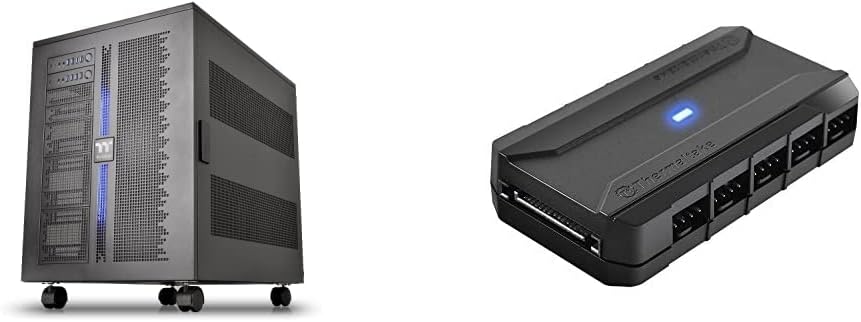
The Thermaltake Core W200 is a true dual system chassis that allows installing two separate systems in a back-to-back configuration. This unique feature is perfect for virtualization or multi-OS testing setups.
We may earn a commission when you buy through this link, at no additional cost to you.
It supports up to two 600mm radiator applications which is unprecedented for standard builds. The fully modular design ensures you can break down the construction for maintenance or transport.
Included is a Commander FP fan hub that powers up to ten PWM fans simultaneously. This ensures every component has sufficient airflow despite the dual system complexity.
Opt for this chassis if you strictly need two separate systems in one box rather than a standard single motherboard dual chamber design.
Supports installing two separate systems in a back-to-back configuration.
Supports up to 2x 600mm radiator applications for custom liquid cooling.
We may earn a commission when you buy through this link, at no additional cost to you.
The HAF II 500 prioritizes high airflow with its oversized Mighty40 cooling system. It utilizes two 220mm front intake fans and a large 180mm rear exhaust fan for maximum throughput.
We may earn a commission when you buy through this link, at no additional cost to you.
The MasterRail mounting system supports multiple fan and radiator sizes at the front and top of the case. This flexibility allows for diverse cooling configurations tailored to your needs.
A Dual-Mode GPU Holder clamps a single GPU or supports two GPUs up to 3.6 slots thick. This makes it a great choice for multi-GPU workstation builds.
Choose this case if raw cooling performance and flexibility are your main priorities over flashy aesthetic features.
Oversized Mighty40 cooling with large fans and low resistance.
Dual-Mode GPU holder supports up to two 3.6 slot cards.
We may earn a commission when you buy through this link, at no additional cost to you.
The TUF Gaming GT502 uses a Dual-Chamber Design to separate main components from the PSU and rear chamber. This separation allows for cleaner builds and independent cooling zones for the CPU and GPU.
We may earn a commission when you buy through this link, at no additional cost to you.
It supports a vertical GPU mount to showcase the graphics card proudly. The tool-free side panels make it easy to access the interior for upgrades.
USB 3.2 Gen 2 Type-C and 2X USB 3.0 on the front panel ensure modern connectivity. The tinted glass provides a tactfully clear view of the main components.
Ideal for gamers who want a stylish mid-tower with robust TUF reliability and independent cooling zones.
Divided into two chambers allowing independent cooling zones for CPU and GPU.
USB 3.2 Gen 2 Type-C front high-speed connectivity.
We may earn a commission when you buy through this link, at no additional cost to you.
The HAVN HS 420 features a unique Hybrid Structure designed to direct cool air from the bottom intake onto the GPU. This balanced airflow design improves cooling efficiency significantly.
We may earn a commission when you buy through this link, at no additional cost to you.
It fits a total of eleven 140mm fans across top right and bottom. The SimpliCable Routing System with top-to-bottom grooved guides keeps cables pristine.
The heat-formed UniSheet Glass Panel provides a panoramic view with minimal visual distortion. This engineering challenge results in a clear continuous view inside the case.
Pick this case for a modern hybrid approach to airflow and clean cable management.
Directs cool air from bottom intake onto the centrally positioned GPU.
SimpliCable routing system cleanly routes your cables for a pristine appearance.
We may earn a commission when you buy through this link, at no additional cost to you.
The NZXT H6 RGB+ brings dual-chamber benefits to a more compact footprint. A dedicated secondary chamber isolates power and cables from your main build for a clean look.
We may earn a commission when you buy through this link, at no additional cost to you.
Its seamless curved glass is a single-piece tempered glass bent to a tight radius. This eliminates seams for an elegant aesthetic.
Standardized mounts across top front-right bottom and rear allow for flexible cooling configurations with ten 120mm fan support. An integrated anti-sag bracket ensures stability for heavy GPUs.
Choose this for a space-saving solution that does not compromise on dual-chamber airflow benefits.
Seamless curved glass bent to a tight radius for minimal distortion.
Integrated adjustable anti-sag bracket keeps heaviest GPUs supported.
We may earn a commission when you buy through this link, at no additional cost to you.
The Thermaltake Capo X is a true dual system chassis that delivers parallel operation from a single chassis. It can house two independent mATX systems simultaneously.
We may earn a commission when you buy through this link, at no additional cost to you.
Each system features its own I/O consisting of power reset HD Audio and USB ports. This individual I/O allows for fully independent operations.
It supports up to thirteen 120mm fans and up to 420mm/360mm radiators. Hidden connector support ensures cables remain hidden for a cleaner look.
Select this if you need two distinct systems to run side by side in one chassis footprint.
Each system features its own I/O located at top and bottom of chassis.
Delivering the ability for parallel operation from a single chassis.
We may earn a commission when you buy through this link, at no additional cost to you.
The View 380 offers a dual chamber case with pillarless front and side tempered glass panels. This design maximizes visibility of the main components inside.
We may earn a commission when you buy through this link, at no additional cost to you.
It supports Hidden-Connector Motherboards to hide cables completely for a pristine look. Four hydraulic bearing 120mm ARGB Lite Fans are pre-installed to save on extra costs.
It supports a max radiator size of 360mm and a max VGA length of 415mm. This makes it a solid choice for mid-range gaming builds.
Opt for this if you prioritize visibility and hidden-connector aesthetics without needing extreme cooling capacity.
Dual chamber case with pillarless front and side tempered glass panel.
Compatible with Hidden-Connector Motherboards to hide cables.
We may earn a commission when you buy through this link, at no additional cost to you.
Selecting the right case requires understanding your hardware needs and cooling goals. We outline key factors to consider before making a purchase.
Dual chamber cases separate power supply units from main components to improve airflow. Look for designs that offer independent cooling zones.
Ensure the chamber layout matches your component layout for best thermal results.
Check radiator support and fan mounts to ensure your components stay cool. High-end systems need 420mm+ radiators for liquid cooling.
Verify fan clearance and airflow directions before buying a case for thermal loads.
Modern cases should include USB 3.2 Type-C ports for faster data transfer. I/O placement affects your desk setup ergonomics.
Prioritize cases with robust front panel connectivity to match your peripherals.
Look for wide channels Velcro straps and routing guides to hide cables cleanly. Good cable management improves airflow significantly.
Simplify your build with cases that include dedicated cable routing features.
Graphics cards are heavier so ensure the case has a sturdy anti-sag bracket. Long GPUs require extended length clearance inside the chassis.
Check for vertical mounting options if you want to showcase your GPU.
Decide between glass tempered panels and mesh front designs for your style. Glass offers visibility while mesh prioritizes airflow.
Choose based on your preference for looks versus pure cooling performance.
Thick steel panels and durable hinges prevent rattling and improve longevity. Premium materials often justify higher price points.
Check reviews for build durability to ensure the case lasts long.
Cases supporting hidden connector motherboards offer cleaner builds with less visible cabling. This feature hides cables behind the motherboard.
This option is ideal for those who prioritize a clutter-free aesthetic look.
Start by installing the PSU in the designated compartment to keep cables tidy. Route power cables through the dedicated channels to avoid clutter.
Use the fan hubs and headers to control cooling speeds efficiently. Ensure all fans are securely mounted to avoid vibrations.
Clean the dust filters regularly to maintain optimal airflow performance. Check your system components every few months for dust buildup.
A dual system PC case allows you to install two separate systems in one chassis. This is useful for virtualization or multi-OS setups.
No special motherboard is required for most dual chamber cases. They support standard motherboards but often work better with hidden connector options.
Dual chamber cases separate power and cables from main components. This improves thermal performance and cable management significantly.
Yes many cases support up to 420mm radiators or more. Check specs before buying to confirm cooling capacity for your needs.
Cable management is often easier with dedicated channels and routing guides. Look for cases with wide channels and Velcro straps.
Noise depends on the fans and case design. Look for cases with rubber pads to isolate fans from the chassis.
We reviewed ten top cases ranging from budget options to premium models with unique features. Each case offers specific benefits like airflow or dual-system support.
Prioritize your needs whether that is cooling performance aesthetics or cable management. High-end builds often justify spending more on better materials.
Remember to check current prices and availability before purchasing. Ensure your chosen case fits your specific motherboard and GPU sizes perfectly.