
64GB exFAT32 USB 3.0 Flash Drive
4.5Editor score
USB 3.0 with C adapter
Metal heat dissipation design
exFAT default format
This guide compares ten top-rated exfat USB flash drives for speed, durability, and compatibility to help you choose the right storage solution for your needs.
Choosing the right external storage is essential for modern workflows. An exfat USB flash drive offers the perfect balance of compatibility across Windows, Mac, and Linux systems. Whether you need to transfer large files or store backups, reliability matters.
We evaluated ten high-performance models based on speed, build quality, and real-world usability. Our analysis focuses on drives that maintain consistent performance under load. We considered user feedback and technical specifications to ensure accuracy.
Each pick highlights specific strengths like dual connectors or rugged designs. You will find options for budget shoppers and professionals alike. Prices and availability change frequently, so check current listings before purchasing your next drive.
4.5Editor score

4.7Editor score

4.6Editor score
The following table provides a side-by-side comparison of all ten selected drives. It highlights key specifications like interface type, speed capabilities, and durability features. Use this overview to quickly identify which model aligns with your specific storage requirements.



This affordable drive delivers reliable performance for everyday tasks. It arrives pre-formatted with exFAT to ensure immediate cross-platform compatibility. The included USB-C adapter makes it versatile for modern laptops and phones.
We may earn a commission when you buy through this link, at no additional cost to you.
Its read speeds reach up to 120MB per second for quick file access. The metal housing helps dissipate heat during prolonged transfers. Users appreciate the textured design which prevents slipping during handling.
Write speeds are decent but slower than premium models. This is acceptable for occasional backups or document transfers. The 64GB limit may not suit large video libraries.
Buy this if you need a simple plug-and-play solution without extra cost. It works well for students or office workers sharing files between devices.
The added USB-C adapter extends use to newer devices without needing a separate dongle.
Metal casing ensures longevity and better thermal management compared to plastic alternatives.
We may earn a commission when you buy through this link, at no additional cost to you.
SanDisk continues to lead in storage reliability with this Ultra Flair model. It offers solid 150MB per second read performance for fast data retrieval. The sleek metal finish adds a premium feel suitable for professional environments.
We may earn a commission when you buy through this link, at no additional cost to you.
SecureAccess software allows you to password protect sensitive files using AES encryption. This is valuable for business users handling confidential documents. The 128GB capacity covers most personal backup needs effectively.
It lacks a USB-C connector which limits use on tablets or newer MacBooks. The password software is not built into the drive so extra steps are needed for setup.
Choose this drive for robust everyday storage with security features. It is a strong middle-ground option for those prioritizing brand trust.
Built-in encryption tools let you lock private data without third-party apps.
The metal body resists scratches and impacts better than standard plastic drives.
We may earn a commission when you buy through this link, at no additional cost to you.
This drive stands out for its exceptional speed and durability ratings. Samsung uses in-house DRAM and NAND components for consistent performance. The 400MB per second read speed handles large video files effortlessly.
We may earn a commission when you buy through this link, at no additional cost to you.
Its rugged metal body resists water, shocks, and extreme temperatures. This makes it ideal for fieldwork or outdoor use where equipment might face harsh conditions. The keyring loop ensures you can attach it securely to keys.
While pricier than budget options, the five-year warranty justifies the investment. It lacks a USB-C port so adapters are required for modern tablets. Performance remains stable even under heavy usage loads.
Buy this for professional workflows needing reliability and speed. It is the best choice for photographers and videographers requiring fast access to raw files.
Resists water, dust, and magnetic fields to keep data safe in any environment.
Transfers gigabytes of data in seconds thanks to optimized USB 3.1 technology.
We may earn a commission when you buy through this link, at no additional cost to you.
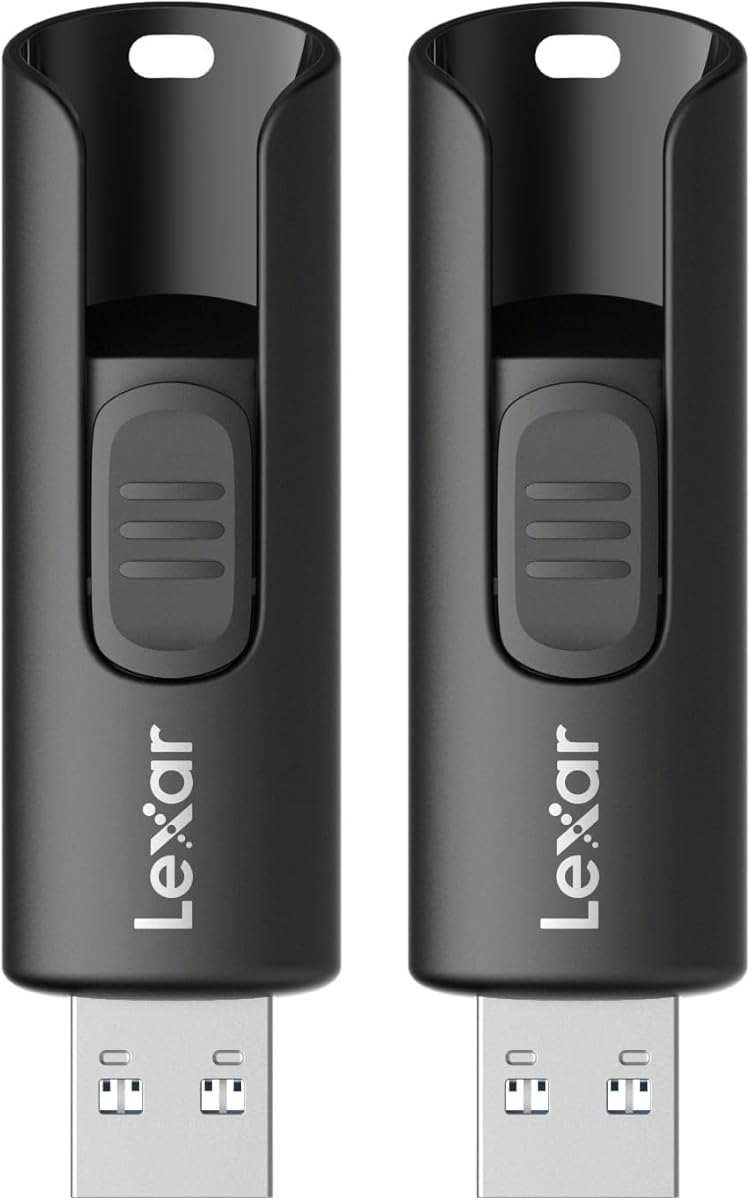
This pack offers two drives for the price of one making it a practical choice for families or teams. The drives weigh just 7.41 grams so they are easy to carry. DataShield software provides a password-protected safe for sensitive files.
We may earn a commission when you buy through this link, at no additional cost to you.
With speeds up to 100MB per second it handles standard office documents well. The retractor mechanism protects the connector from damage during transport. It is compatible with tablets, laptops, and Macs without extra drivers.
Performance is adequate but not the fastest compared to premium rivals. The lack of USB-C might limit utility for modern device users. The value of getting two units often outweighs speed concerns.
Choose this if you need multiple drives for shared use or backup redundancy. It is ideal for budget-conscious buyers needing reliable storage for general tasks.
The retractable connector keeps the port safe from dirt and impact without a cap.
Lexar DataShield creates encrypted zones to keep private data secure from prying eyes.
We may earn a commission when you buy through this link, at no additional cost to you.
Dual connectors make this drive exceptionally useful for modern hybrid workflows. You can plug directly into USB-A ports or USB-C devices without adapters. Performance reaches 400MB per second read and 360MB per second write speeds.
We may earn a commission when you buy through this link, at no additional cost to you.
The Lexar App offers an easy way to back up photos from Android or iOS devices. The metal housing protects the internal components from daily wear and tear. It is designed to be cable-free for ultimate portability.
It might feel slightly heavy compared to standard flash drives due to dual ports. The capacity caps at 128GB which is less than some premium competitors. However the flexibility of the connectors often justifies this trade-off.
Select this for seamless transfers between phones and computers. It is perfect for users who frequently move media between different operating systems.
Works with both USB-A and USB-C systems to eliminate adapter clutter on your desk.
Download the Lexar app to automatically back up media from your smartphone directly.
We may earn a commission when you buy through this link, at no additional cost to you.
This two-pack offers an economical entry point for basic storage needs. The drives default to exFAT so they work across Windows and Mac systems out of the box. LED lights provide visual feedback when data is being accessed.
We may earn a commission when you buy through this link, at no additional cost to you.
USB 2.0 speeds are sufficient for text files or small images but not large videos. The included lanyards help prevent loss while carrying them in bags. The cap design allows secure locking to the body to avoid misplacement.
Build quality is basic compared to metal options so it may feel less premium. Transfer speeds are notably slower than USB 3.0 competitors. The value lies in quantity and compatibility with older ports.
Buy this for low-cost bulk storage or legacy device compatibility. It suits users who need simple drives for occasional data swaps.
LED indicators show when the drive is active so you know it is safe to remove.
Works without extra drivers on almost all major operating systems including Windows and Linux.
We may earn a commission when you buy through this link, at no additional cost to you.
This drive represents the peak of portable flash storage performance. With read speeds up to 1000MB per second it rivals external hard drives for speed. The dual ports ensure it fits any computer regardless of port type.
We may earn a commission when you buy through this link, at no additional cost to you.
A sophisticated metal design provides both style and resilience against physical drops. Encryption tools help safeguard critical documents and business files. The Memory Zone app simplifies automatic backups on supported devices.
Its high price is justified for professionals handling massive media projects. The physical size might not be pocket-friendly like ultra-slim drives. It requires a robust USB 3.0 port to reach top speeds.
Choose this for professional video editing or critical data backups. It is the ultimate choice for users prioritizing speed and capacity above all.
Handles 4K video files in seconds thanks to advanced high bandwidth transfer capabilities.
Use the Memory Zone app to automatically back up files so you never lose important data.
We may earn a commission when you buy through this link, at no additional cost to you.
The unique clip design lets you attach the drive directly to bags or collars. It comes with a USB-C adapter to support modern devices alongside standard laptops. Performance offers up to 85MB per second read speeds for everyday use.
We may earn a commission when you buy through this link, at no additional cost to you.
TEWENE brings years of manufacturing experience to ensure consistent quality. The drive is light and easy to slip into pockets without bulk. It supports exFAT format for seamless sharing across Windows and Mac systems.
Write speeds are moderate so large file transfers take longer than premium drives. The 64GB capacity is best for documents rather than extensive media libraries. The clip mechanism may feel less secure than a retractable cap.
Select this for students or travelers needing a clip-on storage solution. It offers a practical balance of features and cost for general sharing needs.
Clip the drive to your backpack or belt loop to keep data secure while commuting.
Includes a USB-C adapter so you can connect to phones without extra accessories.
We may earn a commission when you buy through this link, at no additional cost to you.
This dual port drive bridges the gap between legacy and modern devices efficiently. It delivers read speeds up to 550MB per second for quick access to media. The zinc alloy shell resists drops and abrasion during daily travel.
We may earn a commission when you buy through this link, at no additional cost to you.
Double-head protective covers guard both ports when not in use. It works with Windows, Mac, and Android systems without any software installation. You can expand phone storage directly using OTG compatible devices.
It does not support Apple Lightning ports so iPhone users need a different adapter. The small covers can be lost if not handled carefully. Performance remains stable across various host devices.
Buy this for versatile storage across multiple device types. It is ideal for Android users needing fast transfers to and from PCs.
Zinc alloy shell withstands rough handling and protects connectors from accidental bumps.
Works with major operating systems without requiring drivers or setup software.
We may earn a commission when you buy through this link, at no additional cost to you.
This drive is designed to stay plugged in without obstructing nearby ports. Its compact form factor makes it ideal for desktops or laptops used daily. With 256GB capacity it stores a large library of photos and videos.
We may earn a commission when you buy through this link, at no additional cost to you.
The rugged body resists water, shocks, and temperature changes just like the BAR Plus. This ensures data safety even in unpredictable environments. Performance reaches 300MB per second read speeds for fast loading.
It lacks a USB-C port so it is limited to traditional USB-A ports. The low profile might block adjacent USB ports on some smaller laptops. However its reliability and capacity are strong for permanent setups.
Choose this for reliable permanent storage on laptops or cars. It is perfect for users needing extra space without carrying a bulky external drive.
The tiny plug-in design lets you leave the drive connected without interfering with other ports.
Built to withstand water and shock so your data remains safe in various environments.
We may earn a commission when you buy through this link, at no additional cost to you.
Selecting the right exfat USB flash drive involves balancing several technical factors. This guide explains the key considerations to help you make an informed decision for your storage needs.
Consider whether you need a standard USB-A connector or a dual USB-C and USB-A option. Dual connectors offer greater flexibility for modern laptops and smartphones but may cost more. Check your devices to see which ports they support before purchasing.
Always verify your devices have the right ports or plan to buy adapters.
Capacities range from 64GB to 512GB and beyond. Larger drives store high-resolution videos and complete system backups easily. Smaller capacities suit text files and school documents but fill up quickly with media.
Choose a size that matches the largest file you plan to store regularly.
Read and write speeds impact how fast you can move data. USB 3.0 and 3.1 drives offer significantly faster performance than USB 2.0 models. For large media files prioritize drives with read speeds above 300MB per second.
Faster speeds save time during frequent backups or media transfers.
Look for metal housings and waterproof ratings if you travel often. Rugged designs protect against drops and extreme weather conditions. Plastic models are lighter but less resistant to physical damage over time.
Metal and rugged builds are essential for fieldwork or outdoor use.
exFAT allows compatibility across Windows, Mac, and Linux systems seamlessly. Some drives come pre-formatted but others might require reformatting for your system. Ensure the drive supports the format you need before writing data to it.
Check if the drive comes pre-formatted with exFAT to save setup time.
Some models include software for password protection and encryption. This feature is critical if you store sensitive business or personal files. Without encryption anyone with physical access can read your data on any computer.
Prioritize drives with built-in encryption for confidential or private data.
Leading brands offer warranties from two to five years. A longer warranty signals confidence in the product's longevity. Reliable customer support helps resolve issues quickly if the drive fails prematurely.
Opt for drives with longer warranties to protect your investment.
Prices vary widely based on speed, capacity, and brand reputation. A multi-pack might offer better value if you need multiple drives for different uses. Balance your needs with your budget to avoid overspending on unnecessary features.
Compare the cost per gigabyte to find the most value for your money.
Always eject the drive safely through your operating system before unplugging it. This prevents data corruption or partial file transfers that could damage your files. Use the 'Safely Remove Hardware' icon on Windows or 'Eject' on Mac.
Keep the connectors clean and free of dust to ensure stable connections. Use the protective caps or covers when not in use to shield metal pins from debris. Regularly clean the exterior with a soft dry cloth to remove oils and dirt.
Avoid exposing the drive to extreme heat, moisture, or strong magnetic fields. Store it in a cool dry place away from direct sunlight when not in use. Regularly back up your data to a secondary source to protect against drive failure.
exFAT is a file system that works across Windows, Mac, and Linux without limitations. Unlike older FAT32 formats, it supports large files over 4GB which is vital for video and backups. Most modern drives come pre-formatted in exFAT for immediate cross-platform compatibility.
Yes USB 3.0 drives work perfectly in USB 2.0 ports on older devices. However the transfer speed will be limited to USB 2.0 performance levels. You get full speed only when using a USB 3.0 port on your computer.
Use built-in software like SanDisk SecureAccess or Lexar DataShield for password protection. Some drives support hardware encryption which encrypts data directly on the chip. Always store a backup of your passwords separately in case you forget them.
Yes if you have a USB-C adapter or a dual connector drive like the Lexar D50E. Enable USB OTG settings on your phone to read the external storage. This lets you move files directly between your computer and mobile device seamlessly.
Modern flash drives can handle over 100,000 write cycles before degradation. Most last many years for regular personal use but extreme conditions may shorten life. Avoid keeping the drive plugged in for months at a time to prevent connector wear.
Dual connectors allow you to plug into both standard USB-A and modern USB-C ports. This eliminates the need for separate adapters and simplifies transfers between devices. It ensures the drive works with both legacy computers and newer smartphones.
We highlighted ten versatile options ranging from budget-friendly picks to high-speed professional drives. The Samsung BAR Plus offers the best balance of speed and durability for general users. SanDisk and Lexar provide strong alternatives with unique features like dual connectors.
Consider your specific needs such as capacity, speed, and physical durability before deciding. For heavy media work prioritize read speeds over 300MB per second. For travelers look for metal casings and waterproof ratings to ensure longevity.
Prices and availability change frequently so verify current listings before purchasing. Always check user reviews for recent performance updates specific to the latest batch. Your right exfat USB flash drive should simplify your data management without compromising reliability.