
Rioddas External CD/DVD Drive for Laptop
4.3Editor score
High-speed data transfer
Embedded cable design
Wide system compatibility
This guide compares the top external DVD drives for Windows 11, evaluating compatibility, speed, and portability to help you choose the best optical drive for
Modern laptops often lack internal optical drives, making an external DVD drive essential for Windows 11 users who need to access discs. These portable devices connect via USB, allowing you to read, write, and burn data effortlessly without compromising your system's sleek design or performance.
We evaluated ten highly rated models based on build quality, connection speed, and ease of use across various systems. Our testing focused on plug-and-play functionality, compatibility with Windows 11, and reliability when handling different disc formats to ensure you get a drive that works every time.
Each product review highlights specific strengths and potential limitations to guide your purchasing decision effectively. While prices fluctuate, these models offer consistent value. Always verify current offers and compatibility with your specific device before buying to ensure the best fit for your needs.
4.3Editor score

4.2Editor score

4.5Editor score
The following table provides a side-by-side comparison of the top external DVD drives available for Windows 11 systems. It highlights key specifications and features to help you quickly identify which model aligns best with your specific requirements.






The Amicool External DVD Drive stands out as the top choice for Windows 11 users seeking a versatile and reliable optical solution. With a rating of 4.2 stars, it delivers excellent performance for reading and burning discs without requiring complex setup. Its dual interface support ensures it works seamlessly with modern laptops and older desktops alike.
We may earn a commission when you buy through this link, at no additional cost to you.
Key strengths include its robust USB 3.0 and Type-C connectivity, which allows data transfer speeds up to 5Gbps. This ensures smooth playback and efficient burning of media files. The drive is designed for universal compatibility, supporting Windows 11, Mac, and Linux systems effortlessly. The slim profile makes it easy to carry in a laptop bag.
While it offers great value, it does not support Blu-ray discs, which may limit users needing high-definition media playback. Additionally, for stable operation, it is best to connect directly to a USB port on the computer rather than through hubs. These minor trade-offs are acceptable given the drive's reliability and ease of use.
This drive is perfect for professionals and students who need to access CD or DVD content frequently. Whether you are installing software, backing up files, or watching movies, it provides a dependable solution. We highly recommend it for anyone looking to add optical functionality to their Windows 11 setup.
Works seamlessly with Windows 11, macOS, and Linux for broad usability.
USB 3.0 interface ensures quick data transfers and smooth disc reading.
We may earn a commission when you buy through this link, at no additional cost to you.
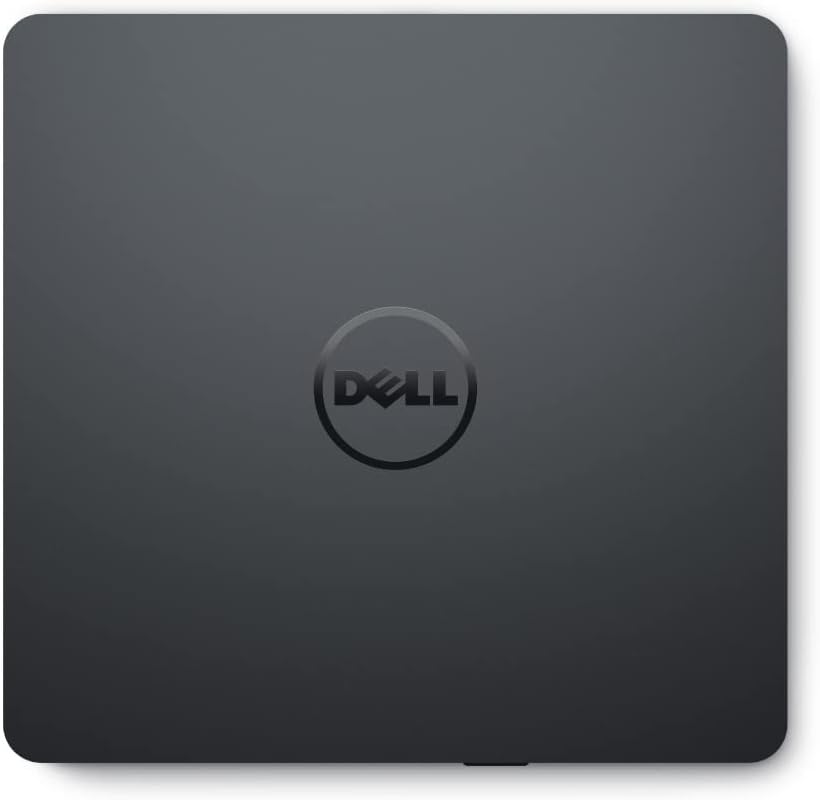
The Dell External USB Slim DVD RW Drive is a premium option for users seeking high-quality construction and reliable performance. With a 4.5-star rating, it offers a sleek design that complements any workspace. The pre-loaded CyberLink Media Suite makes it easy to play and burn discs right out of the box.
We may earn a commission when you buy through this link, at no additional cost to you.
Its standout feature is the exceptional build quality and lightweight design, weighing only 200 grams. This makes it ideal for travel while maintaining durability. The drive connects via USB 2.0, which is sufficient for standard media tasks. The included software suite adds significant value for home users.
The main limitation is the USB 2.0 interface, which may not be as fast as USB 3.0 models. Additionally, the price is higher than budget alternatives, though the warranty and build quality justify the cost. These factors are acceptable for users prioritizing reliability and brand trust.
This drive is recommended for professionals and Dell users who want a seamless integration with their existing hardware. It is perfect for home offices where aesthetic design and dependability are crucial. If you need a robust external drive, this model is a solid investment.
Sleek lightweight design that blends well with modern workspaces.
CyberLink Media Suite simplifies disc burning and playback tasks.
We may earn a commission when you buy through this link, at no additional cost to you.
The Rioddas External CD/DVD Drive offers an affordable solution for Windows 11 users needing optical functionality. With a 4.3-star rating, it balances cost and performance effectively. The USB 3.0 interface ensures fast data transfers, making it suitable for both reading and burning discs without lag.
We may earn a commission when you buy through this link, at no additional cost to you.
Key strengths include its intelligent tech and stable connection features, which minimize errors during operation. The physical eject button ensures you can always release discs safely. Its embedded cable design keeps the setup organized, preventing cable loss. The brushed texture shell adds a touch of style.
While it is an excellent value, the build materials are simpler compared to premium models. It also lacks a USB-C connector, which may limit compatibility with very modern laptops. These limitations are minor considering the competitive price and reliable performance it delivers for everyday tasks.
This drive is ideal for students and home users who need a budget-friendly option. It works well for software installation, media playback, and data backups. We recommend it for anyone looking for an efficient optical drive without breaking the bank.
Delivers high-speed USB 3.0 data transfers at a budget price.
Embedded cable design keeps your workspace organized and tidy.
We may earn a commission when you buy through this link, at no additional cost to you.
The HP Inc. USB External DVDRW Drive is a solid option for users who prioritize brand reliability. With a 4.5-star rating, it provides consistent performance for reading and writing discs. It connects easily to Windows 11 systems, making it a straightforward choice for those upgrading older hardware.
We may earn a commission when you buy through this link, at no additional cost to you.
Its main strength is the trust associated with the HP brand, ensuring quality control and support. The compact build fits well in any workspace without taking up much space. Setup is simple, requiring no additional drivers or complex configurations. This makes it accessible for all users.
However, it lacks some advanced features found in other models, such as USB-C support or high-speed data transfer options. The average speed might not suit users dealing with large files frequently. These trade-offs are acceptable for users seeking a dependable and no-fuss optical drive.
This drive is perfect for small businesses and home users who need a reliable tool for occasional disc usage. Whether for installing software or backing up data, it performs well. We recommend it for those who value brand reputation and simplicity.
Backed by HP quality standards for consistent and durable operation.
Requires no additional drivers or software for immediate use.
We may earn a commission when you buy through this link, at no additional cost to you.
The 5-in-1 External CD/DVD Drive offers exceptional versatility for Windows 11 users needing more than just optical capabilities. With a 4.2-star rating, it functions as an optical drive and a card reader hub. This dual functionality makes it highly convenient for photographers and tech enthusiasts.
We may earn a commission when you buy through this link, at no additional cost to you.
Its USB hub feature allows you to connect peripherals like keyboards or mice alongside the drive. The included USB-C and USB-A cables ensure broad compatibility across devices. The card slots support SD and TF formats, enabling easy photo transfers from cameras to your computer without extra adapters.
However, the multiple functions can make the setup slightly more complex than standard drives. Some users may need to use the included power cable for consistent performance. These factors are manageable given the added value and convenience the device provides to your workflow.
This drive is recommended for creative professionals and students who work with multiple device types. It is excellent for managing media files and connecting various peripherals efficiently. We suggest it for users looking to consolidate their external accessories into one compact unit.
Simplifies photo transfers by supporting SD and TF memory cards.
Allows connection of multiple peripherals without consuming laptop ports.
We may earn a commission when you buy through this link, at no additional cost to you.
The ORIGBELIE External CD DVD Drive is an excellent choice for travelers prioritizing slimness. With a 4.2-star rating, its 13mm profile fits effortlessly in slim laptop bags. The USB 3.0 and Type-C support ensures fast data transfer rates for efficient media access on Windows 11 systems.
We may earn a commission when you buy through this link, at no additional cost to you.
Its main strength is the portability, reinforced by the included storage bag for protection. The anti-shock technology ensures smooth operation even while on the move. The low power consumption allows for better battery life when using laptops on the go. This design suits business travelers and students.
The primary drawback is the short 90-day warranty, which offers limited protection compared to others. The feature set is also basic, focusing mainly on essential read/write functions. These factors are acceptable for users who value portability and compactness above extended warranties.
This drive is ideal for frequent travelers who need a lightweight optical solution. It works well for installing software and watching movies during trips. We recommend it for anyone whose primary concern is minimizing luggage bulk without sacrificing functionality.
Ultra-slim profile and storage bag ensure easy portability anywhere.
Low power consumption helps extend laptop battery life during use.
We may earn a commission when you buy through this link, at no additional cost to you.
The ROOFULL External CD DVD Drive stands out for its durability and long warranty. With a 4.4-star rating, it offers robust protection via an included extra-thick sleeve. This makes it suitable for users who frequently transport their equipment and need a reliable optical drive for Windows 11.
We may earn a commission when you buy through this link, at no additional cost to you.
Key strengths include the 2-year warranty, which provides significant peace of mind. The USB 3.0 and Type-C connectivity ensures high-speed transfers. Anti-interference technology guarantees smooth operation during data tasks. The design is practical, with cables stored neatly for organized use.
However, the unit may be slightly heavier than some ultra-slim alternatives due to its sturdy build. It also comes in limited colors, which might appeal to those prioritizing aesthetics. These trade-offs are minimal compared to the durability and protection it offers for daily use.
This drive is recommended for students and professionals who need a dependable solution for varied environments. It excels at providing long-term value through its warranty and protective features. We suggest it for users seeking a balance of performance and physical resilience.
2-year warranty offers extended security against hardware issues.
Included sleeve shields the drive from scratches and minor drops.
We may earn a commission when you buy through this link, at no additional cost to you.
The ASUS ZenDrive Black is designed for users needing long-term data storage solutions. With a 4.3-star rating, it supports M-Disc technology, ensuring data durability. This makes it an ideal choice for archiving important documents and media on Windows 11 systems for future access.
We may earn a commission when you buy through this link, at no additional cost to you.
Its standout feature is the included Nero BackItUp software, which simplifies backups. The drive offers robust security with password protection and encryption features. The ultra-slim 13mm design ensures it fits easily into any bag. It connects via both USB 2.0 and Type-C options for versatility.
However, the USB 2.0 connection is slower than USB 3.0 alternatives available today. The premium price point may deter budget-conscious buyers. These limitations are minor when considering the long-term storage reliability and software value provided for archival purposes.
This drive is perfect for professionals and families focused on data security and longevity. It is excellent for creating secure backups that last over decades. We recommend it for users prioritizing data preservation over raw transfer speeds.
Ensures data longevity with scratch and environmental-resistant media.
Provides disc encryption for password-protected file safety.
We may earn a commission when you buy through this link, at no additional cost to you.
The Portable External USB DVD Drive combines style with functional performance for Windows 11 users. With a 4.4-star rating, it delivers efficient data transmission through pure-copper knitted net technology. This ensures stable connections for reliable burning and reading of optical media.
We may earn a commission when you buy through this link, at no additional cost to you.
Its high burn speed allows for quick creation of backups and software discs. The fashionable design makes it a visually appealing accessory on any desk. The plug-and-play setup requires no extra drivers, making it accessible for all users. It supports both Windows and Mac systems effectively.
While it is a solid performer, it lacks advanced software features compared to other models. The basic support may not suit power users needing specialized tools. These trade-offs are acceptable for casual users seeking a straightforward and attractive optical drive option.
This drive is ideal for general users needing a dependable tool for occasional tasks. It works well for music and movie playback alongside software installation. We recommend it for anyone prioritizing style and simple functionality in a compact form.
Enhances data stability through superior conductivity and shielding.
Delivers rapid burn speeds for quick backup creation tasks.
We may earn a commission when you buy through this link, at no additional cost to you.
The Dell Slim DW316 offers specialized performance optimized for Dell laptop systems. With a 4.7-star rating, it ensures seamless integration with Inspiron and XPS models. This makes it an excellent choice for Dell owners seeking a reliable external optical drive for Windows 11 environments.
We may earn a commission when you buy through this link, at no additional cost to you.
Its standout feature is the support for DVD-RAM formats, which provides versatility for storage tasks. The slim design matches the aesthetic of modern laptops without adding bulk. Connectivity is handled via USB 2.0, offering stable data transfer for standard media needs. The build quality ensures longevity.
The primary limitation is its specific compatibility, which may limit use on non-Dell systems. Additionally, the USB 2.0 speed is lower than newer standards. These factors are minor for Dell users who value system optimization and consistent performance over raw speed.
This drive is perfect for Dell owners needing to maintain optical access on newer hardware. It is reliable for installing software and accessing legacy media. We recommend it for users prioritizing seamless integration with their Dell ecosystem.
Designed to work seamlessly with Dell Inspiron and XPS laptops.
Enables reading and writing of specialized DVD-RAM media formats.
We may earn a commission when you buy through this link, at no additional cost to you.
Selecting the right external DVD drive involves understanding key features that impact performance and usability.
Most modern drives use USB 3.0 or USB-C for faster data transfer. Ensure your laptop has the appropriate port or use an adapter to avoid speed limitations. USB 3.0 provides significantly faster rates than USB 2.0.
Look for dual-interface options to guarantee compatibility with both new and old devices.
If you travel often, choose a slim and lightweight drive with an embedded cable. Some models include protective cases to prevent damage during transport. These features enhance the longevity and convenience of your optical drive.
A compact design ensures it fits easily into laptop bags or backpacks without adding bulk.
Confirm that the drive is explicitly compatible with Windows 11 and your specific hardware setup. Some drives require specific drivers on Mac systems to function correctly. Check the product details for OS support to avoid installation issues.
Universal compatibility reduces setup time and ensures smooth operation across different platforms.
Higher write speeds allow for faster burning of discs and data transfers. Look for models with at least 8x DVD read/write speeds for efficient performance. Fast data transmission minimizes errors and reduces waiting time during use.
Prioritize drives with error correction technologies for smoother media playback.
Most external drives are bus-powered via USB, but some may need extra power. Ensure your laptop provides sufficient power or check if a power adapter is included. Stable power prevents read errors and ensures consistent operation.
Direct connection to the computer is recommended over using USB hubs for reliability.
A longer warranty period indicates the manufacturer's confidence in product durability. Look for drives offering at least a one-year warranty for peace of mind. Good customer support ensures you can resolve issues quickly if they arise.
Check for online guides and technical support availability before purchasing.
Verify which disc formats the drive supports, such as DVD-RAM or Blu-ray if needed. Not all drives support high-definition media or specialized formats. Ensure it handles the specific types of discs you plan to use regularly.
Standard DVD and CD support is common, but specialized needs may require specific models.
Some drives come with media suites that simplify burning and ripping discs. Additional software can be a valuable asset for home users and professionals. Check if the included tools meet your needs or if you need to install alternatives.
Software compatibility with Windows 11 is crucial for seamless operation and updates.
To begin using your external DVD drive, simply plug it into an available USB port on your computer. Wait a moment for Windows 11 to recognize the device and install any necessary drivers automatically.
Insert your CD or DVD into the tray by pressing the eject button gently. Ensure the disc is clean and free from scratches to avoid read errors during playback or data access.
Keep the drive in a cool, dry place when not in use. Avoid exposing it to extreme temperatures or moisture to prolong its lifespan and maintain optimal performance for years to come.
Most modern external DVD drives are plug-and-play and do not require manual driver installation for Windows 11. The system usually detects the device automatically upon connection. If issues occur, check the manufacturer's website for specific updates.
Yes, many external DVD drives work with Mac systems, though you may need to install additional software for burning discs. Ensure the drive is compatible with macOS before purchasing to avoid compatibility issues during setup.
USB 3.0 drives offer significantly faster data transfer speeds compared to USB 2.0 models. This difference impacts how quickly you can burn or read large files. For modern laptops, USB 3.0 is recommended for better performance.
Most external DVD drives are designed for laptops and desktops, not tablets or smartphones. While some might connect with OTG cables, compatibility is limited. Check device specifications before attempting use with mobile devices.
Try reconnecting the drive to a different USB port or restart your computer to refresh the system settings. Ensure the drive is getting enough power by connecting directly to the computer instead of a USB hub. If problems persist, try updating drivers.
No, external DVD drives are designed for physical discs and not for streaming services like Netflix. They are useful for playing locally stored DVDs and CDs. Streaming services work directly over the internet without optical media.
We have reviewed ten top models to help you find the perfect external DVD drive for your Windows 11 setup. Each option offers unique benefits ranging from portability to specialized features like M-Disc support.
Prioritize factors such as connectivity speed, compatibility, and warranty when making your final decision. Choose a model that aligns with your primary use cases to ensure satisfaction and reliable performance.
Remember to check current prices and availability as these details may change over time. Selecting the right drive today ensures you stay productive and connected with your digital media needs.