
SUNLU Filament Dryer Box 2026 New Upgrade S1 Plus, Black
4.3Editor score
Fast drying with fan
Visual LCD display
Personalized temperature settings
This guide compares the top filament dryer box options for 3D printing, evaluating heating speed, capacity, and moisture control to help you choose the best
Filament dryer boxes are essential tools for maintaining print quality by removing moisture from 3D printing materials. They prevent issues like stringing and bubbling that ruin detailed projects and waste expensive spools.
We evaluated ten leading models based on heating technology, capacity, and user interface. Our analysis focuses on how well each unit dries different filament types while keeping them safe during storage.
Each pick highlights specific strengths for various user needs. Prices fluctuate frequently so check current listings before buying. These units offer reliable solutions for consistent printing results.
4.3Editor score

4.6Editor score
4.4Editor score
This table compares the top ten models side by side. It highlights key specifications like capacity and heating speed to help you find the right fit.


This SUNLU box offers an affordable entry into active drying. It features a fan to speed up moisture removal while displaying key metrics on a screen.
We may earn a commission when you buy through this link, at no additional cost to you.
The fan design helps expel excess water quickly. You can adjust temperature and time to suit different materials. This improves layer adhesion and reduces stringing.
Its max temperature is lower than some premium models. It still handles common filaments like PLA and PETG well. The design is simple but effective.
Budget users should find this unit useful. It solves wet filament issues without a high cost. Add it to your cart to secure the price.
The fan design speeds up the discharge of excess water significantly.
The LCD screen displays temperature time and humidity accurately for easy tracking.
We may earn a commission when you buy through this link, at no additional cost to you.
This unit handles high volume printing with four spools. It features dual heating chambers for faster moisture removal. The touch UI allows precise control over settings.
We may earn a commission when you buy through this link, at no additional cost to you.
It dries filament thirty percent faster than single chambers. You can monitor spools through an illuminated window. The silicone seal prevents moisture reabsorption.
The size might be too large for small desks. It costs more than single spool options. The efficiency is worth it for heavy users.
High volume users will appreciate the capacity. It keeps your filament ready for multiple printers. This is a solid investment for consistency.
Independent chambers remove moisture faster and allow different filament types.
It actively maintains humidity during pauses without breaking the seal.
We may earn a commission when you buy through this link, at no additional cost to you.
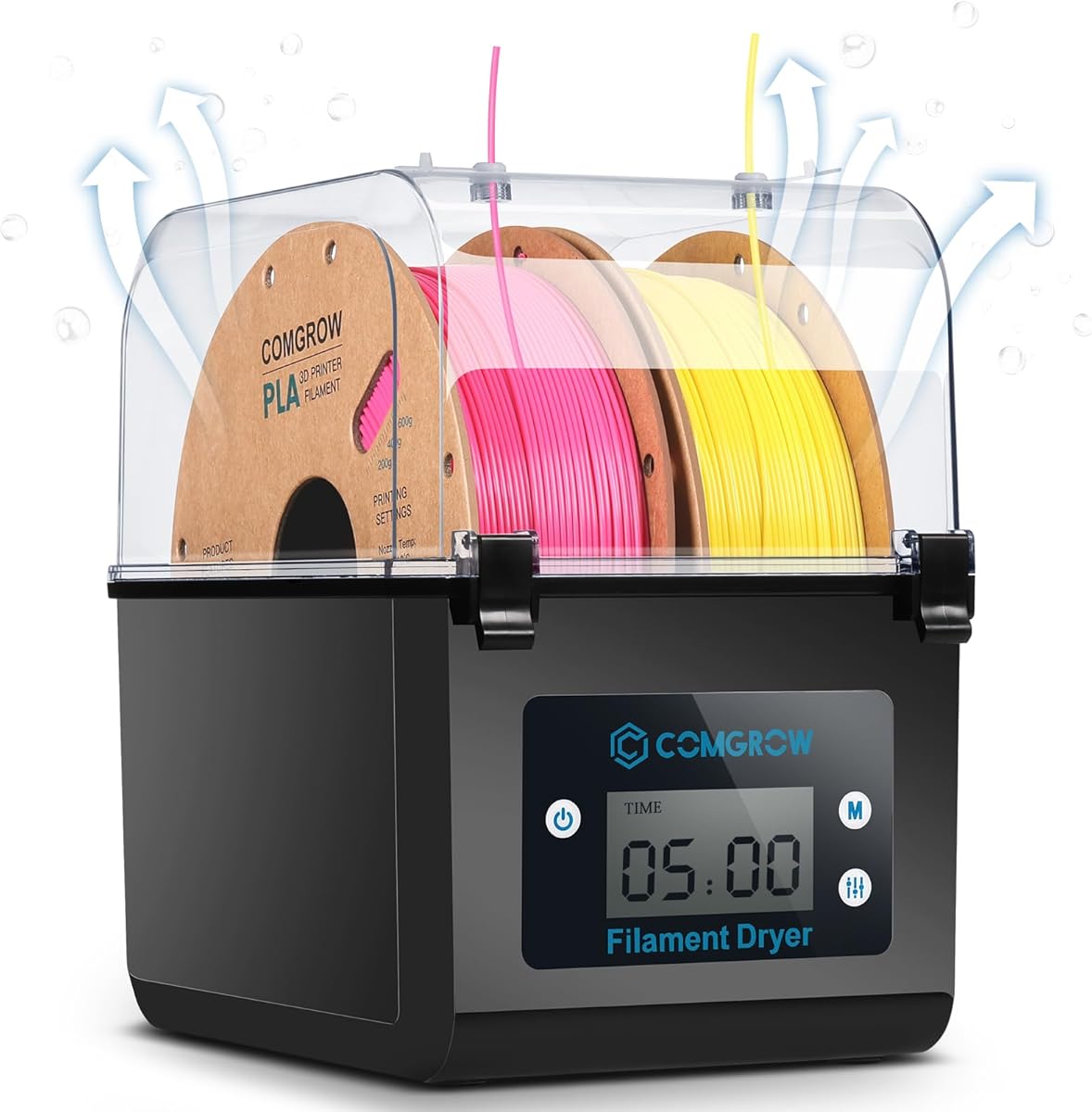
The Comgrow SH01 provides large storage volume for two rolls. It uses internal heating to keep filament dry while printing. The LCD screen offers comprehensive info display.
We may earn a commission when you buy through this link, at no additional cost to you.
You can set temperature and duration via touch buttons. The silicone sheath ensures a smooth outlet. It prevents entanglement and clogging issues.
It shuts down automatically if the mode is not displayed. Error codes like E0 may require checking sockets. This can be confusing for new users.
Users needing storage and drying should consider this. It fits standard spools well. The sealing design protects consumables effectively.
It fits 2 rolls of 1kg spools comfortably.
The 2-inch LCD screen shows temperature and humidity clearly.
We may earn a commission when you buy through this link, at no additional cost to you.
This box focuses on consistent protection between uses. It uses a sealed enclosure with desiccant support. A built-in hygrometer helps you monitor conditions easily.
We may earn a commission when you buy through this link, at no additional cost to you.
You can print without breaking the seal. This keeps the environment cleaner and more convenient. It fits up to 1kg spools well.
It lacks active heating for damp filament. You must rely on desiccant alone for moisture control. This may take longer than active dryers.
Users who need storage between jobs will like this. It helps lower moisture issues. It works with many filament types like ABS.
The airtight design helps lock out moisture effectively.
The visible humidity reading allows easier judgment of conditions.
We may earn a commission when you buy through this link, at no additional cost to you.
The S2 dryer enhances printing results by removing moisture. It features a built-in spindle for even drying. The translucent lid allows checking filament without opening.
We may earn a commission when you buy through this link, at no additional cost to you.
You can customize time and temperature easily. It spins the filament continuously for even heat. This revives damp filament that has been stored.
It has a smaller capacity compared to boxes. You cannot dry multiple spools at once. This is better for immediate needs.
Users in humid locations will find this vital. It keeps filament dry during printing. This optimizes the process significantly.
The spindle ensures the filament spins continuously for uniform heat.
It is especially important for printers in basements.
We may earn a commission when you buy through this link, at no additional cost to you.
This box uses a 150W PTC heater for speed. Hot air circulates 360 degrees for uniform heating. It saves space and time with two drying holes.
We may earn a commission when you buy through this link, at no additional cost to you.
It reaches 50 degrees in seven minutes quickly. You get one key settings for nine filament types. An alarm sounds if the fan stops.
It might not reach high temps for PC. Some need higher heat than 70 degrees. This is great for PLA and PETG.
Dual printer users will save space with this. It meets wide range needs. The safety protection is robust.
The fan circulates hot air 360 degrees for uniform drying.
Just press one key to choose the filament type.
We may earn a commission when you buy through this link, at no additional cost to you.
This dryer uses a 110W PTC heater for efficiency. It avoids uneven drying typical of pads. The 3.7-inch touch screen makes tracking conditions simple.
We may earn a commission when you buy through this link, at no additional cost to you.
You can set temps from 45 to 70 degrees. It supports 12 types including composites. Settings are remembered after a power outage.
The wattage is lower than larger models. It might take longer for heavy loads. This is still a very efficient unit.
Gift buyers will appreciate the Christmas note. High speed printers pair well with this. It offers consistent prints.
It ensures uniform drying and is energy-saving.
The device restarts and remembers previous material and temperature settings.
We may earn a commission when you buy through this link, at no additional cost to you.
This Plus model adds a humidity monitor. It dries two spools at once. The real-time display helps track conditions accurately.
We may earn a commission when you buy through this link, at no additional cost to you.
The 110W PTC heater ensures energy savings. It has 12 presets for various types. The touch screen supports Celsius and Fahrenheit.
The temperature caps at 70 degrees. Some engineering filaments need more. This is a solid step up from standard.
Dual printer users will find this useful. It keeps spools ready for different materials. The monitoring adds value.
It tracks conditions without relying on guesswork alone.
The dual-spool design meets needs for two printers.
We may earn a commission when you buy through this link, at no additional cost to you.
This model reaches 85 degrees for engineering filaments. It holds 4 spools efficiently. The fan circulates hot air for rapid drying.
We may earn a commission when you buy through this link, at no additional cost to you.
It handles ABS and PC effectively. You can monitor humidity in real-time. The touch UI allows customization of temps.
The size is large for small spaces. It costs more than standard boxes. This is necessary for high quality results.
Advanced users needing PC support should buy this. It reduces waste and improves print quality. It is worth the investment.
It unlocks advanced filaments like PC and PAHT.
It holds 4 standard 1kg spools.
We may earn a commission when you buy through this link, at no additional cost to you.
This official model offers dual 200W heaters. It allows printing on four printers simultaneously. You can choose single or dual modes for energy savings.
We may earn a commission when you buy through this link, at no additional cost to you.
It reaches 85 degrees for engineering types. It saves up to 40 percent energy in single mode. The design supports high efficiency.
It requires heat resistant trays for other brands. This can be a limitation for mixed setups. The cost is significant.
Users needing maximum efficiency should choose this. It handles high volume and high temp. This is the top pick.
Single chamber operation saves up to 40 percent energy.
It allows simultaneous drying of two filament types.
We may earn a commission when you buy through this link, at no additional cost to you.
Choosing the right dryer box depends on your filament types and volume needs. Consider heating tech and capacity to ensure efficiency.
Look for PTC heaters which provide uniform heat. Heaters that use pads might result in uneven drying. A built-in fan helps circulate air better.
Choose PTC heaters for energy efficiency and speed.
Decide if you need to dry one or four spools. Large boxes are better for high volume printers. Smaller boxes save desk space.
Match capacity to your typical print volume needs.
Ensure the max temp suits your materials. Engineering filaments need 85 degrees. PLA works at lower temperatures.
Check that the unit reaches your required temp.
A silicone seal prevents moisture reabsorption. It keeps filament dry during pauses. Look for multiple sealing rings.
Sealing is crucial for long term storage.
A touch screen makes setting temps easier. Presets simplify the process for common types. A humidity monitor adds value.
An easy interface saves time daily.
Look for safety features like alarms. Fan failure alerts prevent module burnout. Overheat protection is important.
Safety features protect your filament investment.
Dual chambers allow energy savings. Some units allow single mode. This is eco-friendly and cost-effective.
Check power usage if you run it often.
Ensure it fits your spool width. Check the max diameter for 3.00mm. Most support 1.75mm and 2.85mm.
Verify size fits your current setup.
Set the temperature based on your filament type. Consult the manufacturer guidelines for safe limits. Use presets if available for common materials.
Close all seals tightly before starting. If you print, leave the outlet open to drain moisture. Plug it when not in use to retain dryness.
Check the fan and outlets regularly. Keep the unit clean to ensure airflow. This maintains performance over time.
It typically takes 4 to 8 hours for standard materials. Engineering filaments may take longer due to higher moisture content. Using a fan speeds up this process significantly.
Yes many models allow printing without breaking the seal. Some units actively maintain humidity during pauses. It serves both as dryer and storage effectively.
PLA usually needs around 45 to 60 degrees Celsius. Higher temperatures might damage the material. Check your specific filament guidelines for best results.
Active heating units do not need desiccant. However sealed storage boxes might use them. It helps lock out moisture between prints.
Most units have timers and safety alarms. You can set the duration to avoid over heating. Safety features help protect filament and equipment.
You can dry damp filament to revive it. The unit removes excess moisture safely. It prevents wasting expensive spools due to dampness.
The top models include the SUNLU S1 for budget and Creality Space Pi X4 for high volume. Both offer distinct advantages for different user needs.
Prioritize capacity and heating speed for your volume. Consider the temperature range for engineering filaments. These factors ensure consistent print quality.
Prices and availability change frequently. Always check current listings before purchasing. This ensures you get the best value.