
SUNLU Filament Dryer S2
4.3Editor score
Large capacity storage
Fast heating element
Simple touch interface
This guide compares the top filament dryer for 3D printing models to help you choose the best option for moisture control and print quality improvements.
Choosing the right filament dryer for 3D printing is essential for achieving consistent results and avoiding common printing issues caused by moisture absorption in materials like nylon and PETG.
We have evaluated ten leading models based on their drying efficiency, storage capacity, temperature control precision, and overall value to help you find the perfect match for your setup and needs.
Each selection highlights unique strengths and limitations so you can make an informed decision, keeping in mind that specific pricing and availability may fluctuate over time on major retail platforms.
4.3Editor score

4.5Editor score

4.6Editor score
The following table provides a side-by-side comparison of all ten selected filament dryers to help you quickly identify key differences in capacity, heating technology, and user features.


The SUNLU S4 filament dryer stands out as a top choice for users needing to dry multiple spools at once while maintaining consistent temperature across the chamber.
We may earn a commission when you buy through this link, at no additional cost to you.
Its 350W PTC heater combined with three circulation fans ensures that heat is distributed evenly, preventing cold spots that could leave filament moisture content inconsistent.
While it lacks built-in humidity sensors, the eight exit holes allow you to run filament directly to multiple printers, making it highly efficient for busy workshops.
This unit is ideal for users who print frequently with various materials and need a reliable solution that handles high volume drying without compromising on temperature stability.
Drying four spools at once significantly reduces preparation time for large prints or multi-color projects.
The PTC heater offers higher safety and efficiency compared to traditional heating elements found in older models.
We may earn a commission when you buy through this link, at no additional cost to you.
The Creality Space Pi X4 is designed for professionals who need to dry high-performance materials like ABS or polycarbonate that require higher temperatures.
We may earn a commission when you buy through this link, at no additional cost to you.
With dual independent heating chambers and a maximum temperature of 85C, it removes moisture faster than standard dryers and supports a wider range of filament types.
The illuminated window allows you to check on spools without breaking the seal, which is crucial for maintaining humidity control during long drying cycles.
This model is best suited for users investing heavily in filament who want the fastest drying times and advanced features to protect their supply.
The 85C capability unlocks the ability to dry engineering plastics that typically struggle with lower temperature dryers.
Sealed storage prevents moisture re-absorption after drying is complete, extending the life of your filament spools.
We may earn a commission when you buy through this link, at no additional cost to you.
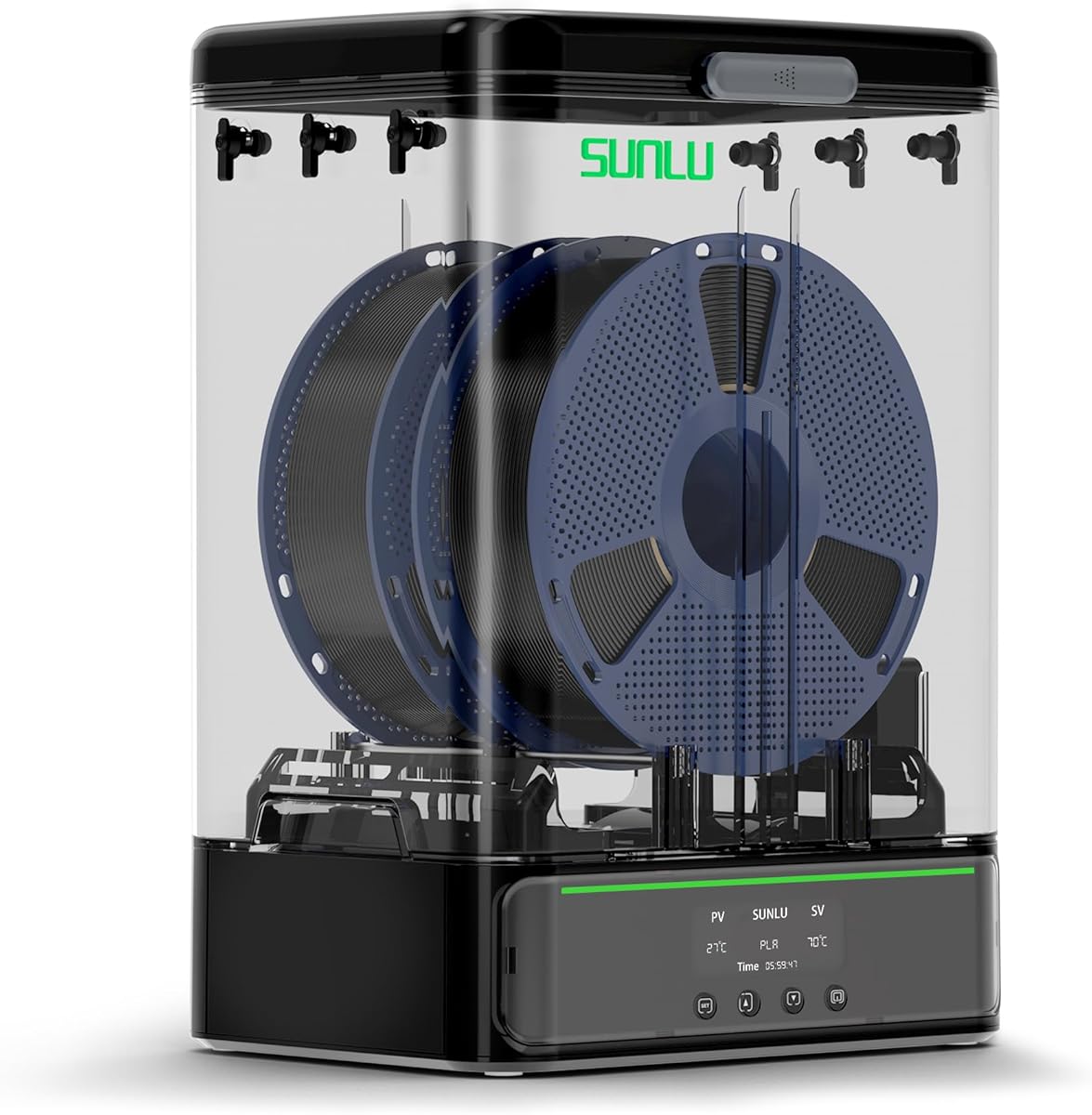
The SUNLU S2 offers a reliable entry point into filament drying without a high financial commitment, making it great for hobbyists just starting out.
We may earn a commission when you buy through this link, at no additional cost to you.
Its built-in spindle ensures the filament rotates continuously during the drying process, which helps moisture escape from all sides of the spool effectively.
The translucent lid lets you check the filament status without opening the box, helping you maintain the internal environment during the drying cycle.
For those who print with standard materials and do not need multi-spool capability, this unit provides excellent value and consistent performance for the price.
Spinning the spool during drying ensures even heat distribution and faster moisture removal from the entire filament.
The large touch screen simplifies settings adjustments, making it easy for anyone to set temperature and time quickly.
We may earn a commission when you buy through this link, at no additional cost to you.
The SUNLU SP2 is specifically designed to accommodate larger 3kg spools which are increasingly common for industrial or heavy usage printing projects.
We may earn a commission when you buy through this link, at no additional cost to you.
With fast heating that reaches 70C in just 15 minutes, it reduces the wait time before you can start your next print job or dry filament rapidly.
The detachable base allows you to separate the drying unit from the storage box, making it convenient to store dried filament in a controlled environment.
This model is perfect for users who buy bulk filament and need a dryer that can handle the physical weight and size of larger spools efficiently.
Rollers and a bar holder support weights up to 3kg, preventing strain on standard holders that might break under weight.
The 250W PTC element ensures the chamber reaches the desired temperature quickly, saving energy and time.
We may earn a commission when you buy through this link, at no additional cost to you.
The Comgrow SH01 is a straightforward solution for users who want to dry two spools without complex settings or advanced features.
We may earn a commission when you buy through this link, at no additional cost to you.
Its internal heating system creates a dry environment that prevents moisture absorption during printing, which is essential for maintaining print quality on sensitive materials.
The silicone cable sheath allows you to route filament cleanly to your printer without compromising the seal of the box during operation.
This unit is recommended for beginners who want a reliable storage and drying solution that is easy to use and fits standard 1kg spools well.
The snap button structure and sealed outlet ensure that once the box is closed, ambient humidity cannot easily enter.
Compatible with PLA PETG and ABS it covers the most common filaments used in home and hobbyist printing environments.
We may earn a commission when you buy through this link, at no additional cost to you.
The Creality Space PI Plus brings modern features like one-touch presets for common filament types, simplifying the drying process significantly for users.
We may earn a commission when you buy through this link, at no additional cost to you.
Its 360 degree hot air circulation ensures that heat reaches every part of the spool, which helps in drying the filament evenly without hot spots.
Real-time humidity monitoring gives you data on the internal conditions, so you can be sure the filament is truly dry before using it.
This model is excellent for tech-savvy users who want to minimize manual adjustments and rely on smart presets for different printing materials.
Selecting a preset adjusts temperature and time automatically, reducing the risk of incorrect settings damaging your filament.
Seeing the humidity level helps you verify drying effectiveness, which is often missing in simpler units.
We may earn a commission when you buy through this link, at no additional cost to you.
The SUNLU S1 Plus includes an upgraded fan design that speeds up the discharge of water vapor from the filament during the drying process.
We may earn a commission when you buy through this link, at no additional cost to you.
This active airflow helps to reduce the time needed to dry damp filament effectively, which is especially useful in humid environments where moisture absorption is high.
The visual display keeps you updated on temperature and time settings, ensuring you can monitor the progress without opening the box.
This dryer is well-suited for users who need a compact unit that actively works to remove moisture rather than just providing static heat.
The internal fan circulates air to carry moisture out of the chamber, enhancing the efficiency of the heater.
It accepts diameters from 1.75mm up to 3.00mm, making it compatible with most standard filament brands available.
We may earn a commission when you buy through this link, at no additional cost to you.
The Polymaker Polydryer focuses on precise humidity control, making it a strong choice for materials that are highly sensitive to moisture like Nylon and PA.
We may earn a commission when you buy through this link, at no additional cost to you.
By combining drying with a sealed storage solution, it ensures that once the filament is dried, it stays dry until you are ready to use it next.
The integrated hygrometer allows you to track the humidity level inside, giving you confidence that the environment remains ideal for filament health.
This dryer is recommended for users who prioritize material integrity and need a specialized solution for sensitive engineering filaments rather than general use.
The combination of heat seal and desiccant provides a comprehensive approach to keeping filament dry over time.
It is specifically designed to handle tough materials like Nylon which require careful moisture management for successful printing.
We may earn a commission when you buy through this link, at no additional cost to you.
The Creality Space Pi SE features thermal insulation cotton on the inner walls which helps maintain a stable temperature during the drying cycle.
We may earn a commission when you buy through this link, at no additional cost to you.
This stability is crucial for consistent results because it prevents the temperature from fluctuating due to external drafts or ambient changes in the room.
The insulation also prevents the outer shell from getting hot, reducing the risk of accidental burns during handling of the unit while it is running.
This unit is suitable for users who want a simple and safe drying experience with clear indicators for humidity to ensure filament is dry.
Insulation ensures the heater does not need to cycle on and off as often, saving energy and reducing noise.
The anti-scald design makes it safer to have the dryer in a workspace where hands might touch it accidentally.
We may earn a commission when you buy through this link, at no additional cost to you.
This variant of the SUNLU S4 offers similar core performance to the standard S4 but emphasizes the versatility of multiple exit points for simultaneous printing.
We may earn a commission when you buy through this link, at no additional cost to you.
With eight exit holes, you can route filament to multiple printers from a single source, which is a significant advantage for farms or multi-printer setups.
The 350W PTC heater ensures that even with four spools loaded, the temperature remains consistent, avoiding the common issue of under-drying lower layers.
This model is best for workshops that require a central drying hub for multiple machines and need high capacity without compromising on heating power.
Eight holes allow you to feed multiple printers without needing separate boxes, simplifying your workspace organization.
The build quality supports heavy use and potential modifications such as adding larger spool rollers for industrial needs.
We may earn a commission when you buy through this link, at no additional cost to you.
Selecting the right filament dryer involves considering your specific printing needs, the types of materials you use, and the volume of spools you need to manage.
Capacity refers to how many spools the dryer can hold at once. Some models hold only one or two spools while others can accommodate four or even three kilogram spools. You should consider your workspace size and how many spools you typically dry before printing. If you work with large rolls or need to dry multiple colors for a single project choose a model with higher capacity to save time.
Look for models that fit your largest spool size if you use custom or industrial spools.
Heating technology varies between standard heating elements and PTC heaters which are safer and more efficient. The temperature range determines which materials you can dry. Standard materials like PLA need lower temperatures around 50C while advanced materials like ABS or Nylon may need up to 85C. Check the maximum temperature to ensure it matches the requirements of your specific filament.
Choose a unit with a high enough temperature range for your engineering plastics if you use them.
Moisture monitoring includes built-in hygrometers that display humidity levels inside the chamber. This feature helps you know exactly when the filament is dry instead of guessing based on time alone. Models with real-time monitoring are more precise but may cost more than basic units. It is useful if you print with hygroscopic materials that absorb moisture quickly.
Prioritize models with humidity sensors if you work with sensitive materials like Nylon.
Storage features ensure that the dried filament remains dry after the process ends. A good seal prevents ambient humidity from re-entering the box once drying is complete. Some units combine drying and storage into one device saving you from transferring spools. This keeps your filament in optimal condition for longer periods between prints.
Look for silicone seals or locking mechanisms to maintain a dry environment.
Filament exit refers to the holes or tubes that allow you to feed filament to your printer while it dries. More exit holes give you flexibility to connect to multiple printers or different angles. Some models include PTFE tubes that help guide the filament smoothly. Proper routing prevents tangles and ensures a consistent feed rate during printing.
Select a dryer with enough exit holes to support your printer setup.
The control interface determines how easy it is to set temperature and time. Touch screens provide modern control but knobs and simple displays are also effective. Some units come with presets for common filament types which simplifies setup. Ensure the interface is intuitive so you can adjust settings quickly without confusion.
Check if the control type fits your preference for simplicity or advanced settings.
Safety features include thermal insulation that prevents the outer shell from getting too hot to touch. Durability refers to the build quality which affects how long the unit lasts under regular use. Look for features like anti-scald designs and robust materials that withstand frequent handling. Safety is critical if the dryer sits on a workbench where it might be touched accidentally.
Ensure the unit is well-insulated and has a solid build for long-term use.
Price varies widely based on the features included in the dryer. Basic models are affordable but lack advanced features like humidity monitoring or high capacity. High-end units offer more functionality but cost more. Evaluate the features you truly need versus those that are nice to have to get the best value for your budget.
Balance the cost with the features you need to avoid overspending on unnecessary options.
To begin using your filament dryer place the spool inside the chamber and close the lid securely to ensure no outside air can enter during the cycle.
Set the temperature and time according to the material you are drying such as 50C for PLA or higher for engineering plastics like ABS.
Regularly check the filament exit tubes and ensure they are not blocked to maintain smooth feeding to your printer during the drying process.
A filament dryer is highly recommended if you use materials like Nylon PETG or ABS that absorb moisture from the air. Moisture in filament can cause bubbling stringing and poor layer adhesion during printing. Using a dryer ensures your prints are consistent and free from defects caused by damp filament.
The drying time depends on the material and the humidity level. Typically PLA may take a few hours while Nylon can take up to 24 hours. Many dryers allow you to set timers so you can monitor the process without manual supervision to ensure proper results.
Yes many modern filament dryers are designed to allow you to feed filament directly to your printer while it dries. This means you can print continuously without needing to pause to dry the material first which improves efficiency in your workflow.
For PLA a temperature around 45C to 50C is usually sufficient to remove moisture without damaging the filament. Always refer to the specific guidelines from your filament manufacturer as some formulations may require slightly different settings.
Most dryers are designed for standard 1kg spools but some models support larger 3kg spools or smaller sizes with adapters. Check the internal dimensions and capacity specifications of the dryer to ensure it fits your specific spool type.
Modern dryers include safety features like automatic shut-off and thermal insulation to prevent overheating but it is generally safer to check the unit periodically. If you are new to using a dryer start with short cycles until you understand how the unit behaves in your environment.
We have reviewed ten top filament dryers ranging from budget friendly options to high capacity premium models to help you find the right fit for your printing needs.
Prioritize features like temperature range and capacity based on the materials you use most frequently to ensure you get the best value for your investment.
Remember to check current availability and prices as they may change over time so verify the details before making your final purchase decision.