
Ethernet Adapter for Fire TV Stick
4.7Editor score
Universal Micro USB compatibility
Plug and play setup
Aluminum alloy housing
This guide compares the top Fire TV Stick Ethernet Adapter options for reliable wired connections, featuring detailed reviews of budget and premium models
Stable internet is crucial for smooth streaming on your Fire TV Stick. A good Ethernet adapter eliminates buffering by providing a direct wired connection to your router, ensuring consistent speeds and lower latency for high definition content playback without interruptions.
We evaluated ten popular adapters based on compatibility, build quality, and connection reliability. Our analysis covers devices ranging from standard micro USB models to modern USB-C options, ensuring you find the right fit for your specific Fire TV generation and networking needs.
Each pick highlights key features like speed ratings and power delivery options to help you decide quickly. Prices and availability fluctuate regularly, so please check the current listings before purchasing to ensure you get the best deal on your chosen accessory today.
4.7Editor score

4.5Editor score

4.3Editor score
The following table provides a side-by-side comparison of the top ten Ethernet adapters for Fire TV devices, highlighting key specifications and compatibility notes to help you make an informed decision quickly.


This Micro-USB Ethernet adapter stands out as a reliable solution for older Fire TV Stick models that lack USB-C connectivity. With a strong rating from users, it offers a direct wired connection that significantly improves streaming stability and reduces buffering during high-definition playback.
We may earn a commission when you buy through this link, at no additional cost to you.
Its primary strength lies in its broad compatibility with various Fire TV generations including the 4K and 4K Plus models. Users appreciate the simple plug-and-play setup that allows them to connect an Ethernet cable directly from their router to their TV for instant activation.
While it does not work with the latest USB-C devices, its performance on supported models is consistent. The need for a compatible power adapter is a minor trade-off that ensures the adapter receives sufficient power for optimal network performance during extended viewing sessions.
This adapter is ideal for anyone with a micro USB-based Fire Stick looking to eliminate Wi-Fi interference. It provides a cost-effective way to upgrade your network experience without replacing your existing streaming device entirely.
Supports Fire TV Stick Lite, 2nd Gen, 4K, and Cube models for versatile use.
Direct Ethernet connection ensures consistent speeds and minimizes latency issues.
We may earn a commission when you buy through this link, at no additional cost to you.
This Right Angle USB-C adapter is specifically designed for the newest Fire TV Stick HD models that utilize USB-C connectivity. Its premium build quality and specialized design make it a top choice for users wanting a sleek and efficient wired connection solution.
We may earn a commission when you buy through this link, at no additional cost to you.
The right angle design is a key feature that saves space behind your television and reduces cable clutter. It supports speeds up to 480Mbps which is well within the capabilities of standard streaming tasks and ensures smooth video playback without interruptions.
Although it comes at a slightly higher cost than standard micro USB adapters, the convenience and modern compatibility justify the investment. It ensures your latest streaming hardware performs at its best with a stable wired network connection.
Buyers with the newest Fire TV Stick HD should consider this adapter for its tailored fit and reliable performance. It offers a premium experience that aligns with the updated hardware capabilities of modern streaming devices.
Designed specifically for Fire TV Stick HD 2nd Gen with USB-C ports.
Right angle plug reduces cable bulk behind your TV setup.
We may earn a commission when you buy through this link, at no additional cost to you.
The ELECTOP adapter offers an impressive 1000Mbps speed rating which is rare for adapters at this price point. It is an excellent budget choice for users who want to maximize their network potential without spending much on premium hardware features.
We may earn a commission when you buy through this link, at no additional cost to you.
Its aluminum alloy body helps dissipate heat effectively during long streaming sessions ensuring stable performance. The included LED indicator light allows you to quickly check your connection status without needing to navigate device menus.
While it does not work with USB-C devices, it covers many popular micro USB models effectively. Users should ensure they have a sufficient power supply since high-speed transfers can sometimes demand more power than the TV port provides alone.
This adapter is best for users on a budget who still want high-speed wired internet for their streaming setup. It balances cost and performance well making it a smart pick for value-conscious shoppers.
1000Mbps speed ensures smooth 4K streaming and fast downloads.
Aluminum casing keeps the device cool during extended use.
We may earn a commission when you buy through this link, at no additional cost to you.
This adapter has earned a strong rating from users due to its reliability and straightforward design. It offers a universal fit for micro USB-based Fire TV devices ensuring that most users can use it without compatibility issues or complex setup steps.
We may earn a commission when you buy through this link, at no additional cost to you.
The aluminum alloy housing provides durability and helps with heat dissipation during prolonged use. Additionally the included self-adhesive tapes allow you to secure the adapter in place preventing loose connections that can lead to network drops.
While it does not support USB-C ports the performance on compatible devices is consistently praised. The lack of driver requirements means you can start streaming faster as soon as you plug it into your router and TV.
It is a solid choice for anyone seeking a dependable adapter that works out of the box. The high user rating reflects its ability to deliver consistent performance for daily streaming needs.
Included tapes help keep the adapter stable behind the TV.
Aluminum housing protects internal components and dissipates heat efficiently.
We may earn a commission when you buy through this link, at no additional cost to you.
ZEXMTE delivers a compact adapter that blends well with small Fire TV devices without adding bulk. Users praise its quick setup time and stable connection which eliminates the frustration of Wi-Fi dropouts during critical streaming moments.
We may earn a commission when you buy through this link, at no additional cost to you.
The smart status lights offer instant visual confirmation that your connection is active and working correctly. The aluminum casing ensures the device stays cool even after hours of binge-watching your favorite shows on demand.
This adapter is a straightforward solution for micro USB devices that need a reliable network link. While it does not offer gigabit speeds its 100Mbps capability is more than sufficient for 4K streaming and general internet browsing.
It is best for users who want a simple effective adapter without extra bulk or setup steps. The compact design makes it easy to hide behind your TV for a clean look.
Connect and configure in under a minute for immediate streaming.
Status lights provide instant network connection confirmation.
We may earn a commission when you buy through this link, at no additional cost to you.
UGREEN is a trusted brand known for quality cable accessories and this adapter continues that reputation. The standout feature is the long 3.3 ft power cable which provides much needed flexibility when your TV outlet is far away.
We may earn a commission when you buy through this link, at no additional cost to you.
The included USB-A power cord ensures your device receives enough power for a stable connection. This is particularly helpful if you plan to use it with devices that demand more current than the TV port alone can provide.
It offers reliable performance for standard streaming tasks with consistent speeds up to 100Mbps. The setup is completely driver-free meaning you can start using it immediately after plugging in the necessary cables.
This adapter is ideal for setups where cable length is a constraint. The extra reach makes it easier to position your adapter and TV in a way that looks neat and functions well.
3.3 ft power cable provides flexibility for hard to reach outlets.
USB-A power cord ensures consistent power delivery for stability.
We may earn a commission when you buy through this link, at no additional cost to you.
This adapter is marketed for its gigabit capabilities which can support high speed internet plans effectively. The aluminum shell and protection features suggest a focus on durability and safety for long term use in busy homes.
We may earn a commission when you buy through this link, at no additional cost to you.
Visual status indicators help you monitor the connection at a glance without guessing if the wired link is active. Users appreciate the elimination of buffering when connected via this adapter over wireless connections.
It is worth noting that compatibility excludes Fire TV Cube and some specific models so check your device first. The rating suggests mixed experiences with power delivery on some setups but potential for high speed.
Buyers with gigabit internet plans might prefer this for the speed potential. It remains a strong contender for those needing faster wired connectivity on supported micro USB devices.
1000Mbps capability supports fast broadband plans and large downloads.
Over-voltage and over-current protection ensure safe operation.
We may earn a commission when you buy through this link, at no additional cost to you.
Cable Matters is known for dependable networking accessories and this adapter lives up to the brand standards. It provides a reliable wired connection for Fire TV Stick and other streaming devices that use a micro USB port.
We may earn a commission when you buy through this link, at no additional cost to you.
The three foot power cable offers flexibility for routing power from a nearby outlet. This helps keep the setup neat and ensures the adapter gets the power it needs without dangling cables.
Performance is consistent for streaming and general browsing without unexpected drops. The plug and play nature means you can install it quickly and start watching your content without technical delays.
This is a solid standard choice for most users who need a dependable adapter. Its combination of brand reputation and practical design makes it a safe buy for reliable streaming.
Established brand known for consistent networking hardware quality.
3-foot cable simplifies power access near your TV setup.
We may earn a commission when you buy through this link, at no additional cost to you.
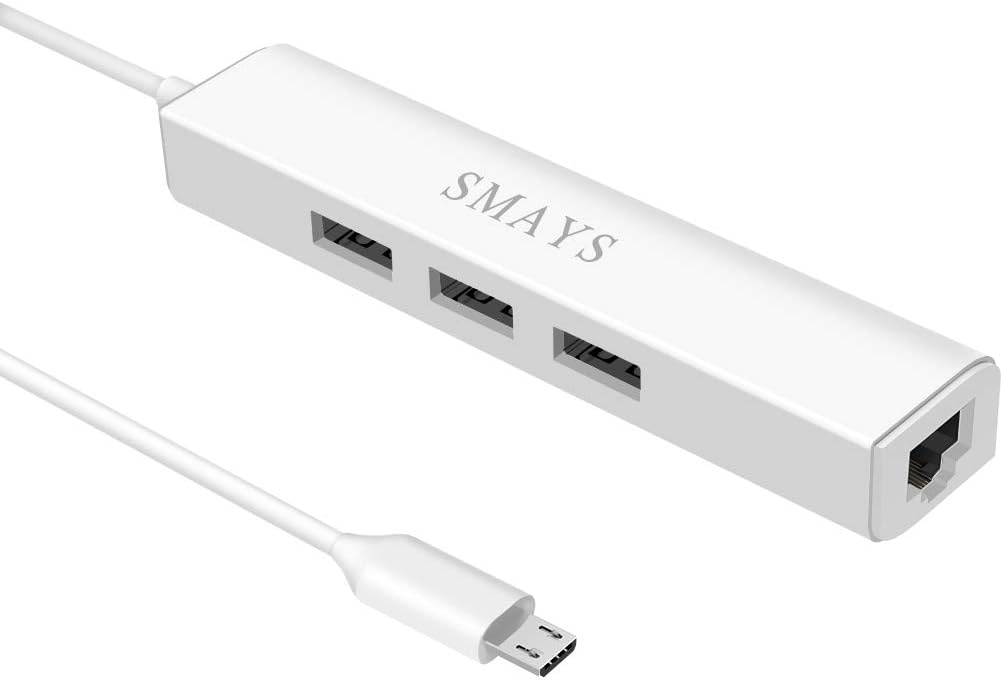
This adapter is unique because it combines an Ethernet port with multiple USB ports for added versatility. It allows you to connect external drives or peripherals while maintaining a wired network connection for your Fire Stick.
We may earn a commission when you buy through this link, at no additional cost to you.
The OTG functionality expands what you can do with your streaming stick beyond just video playback. It is a useful tool for users who want to access local media files from a USB drive stored behind their TV.
Keep in mind this unit is larger than a single port adapter so you may need space behind the TV. The 5V power cord is essential to ensure both the hub and your Fire Stick get enough power to run properly.
It is best for power users who need extra connectivity options alongside their Ethernet connection. This hub provides utility beyond a basic adapter for expanded device functionality.
Combines Ethernet and USB hubs for expanded device connectivity.
Supports USB drives and peripherals for local file access.
We may earn a commission when you buy through this link, at no additional cost to you.
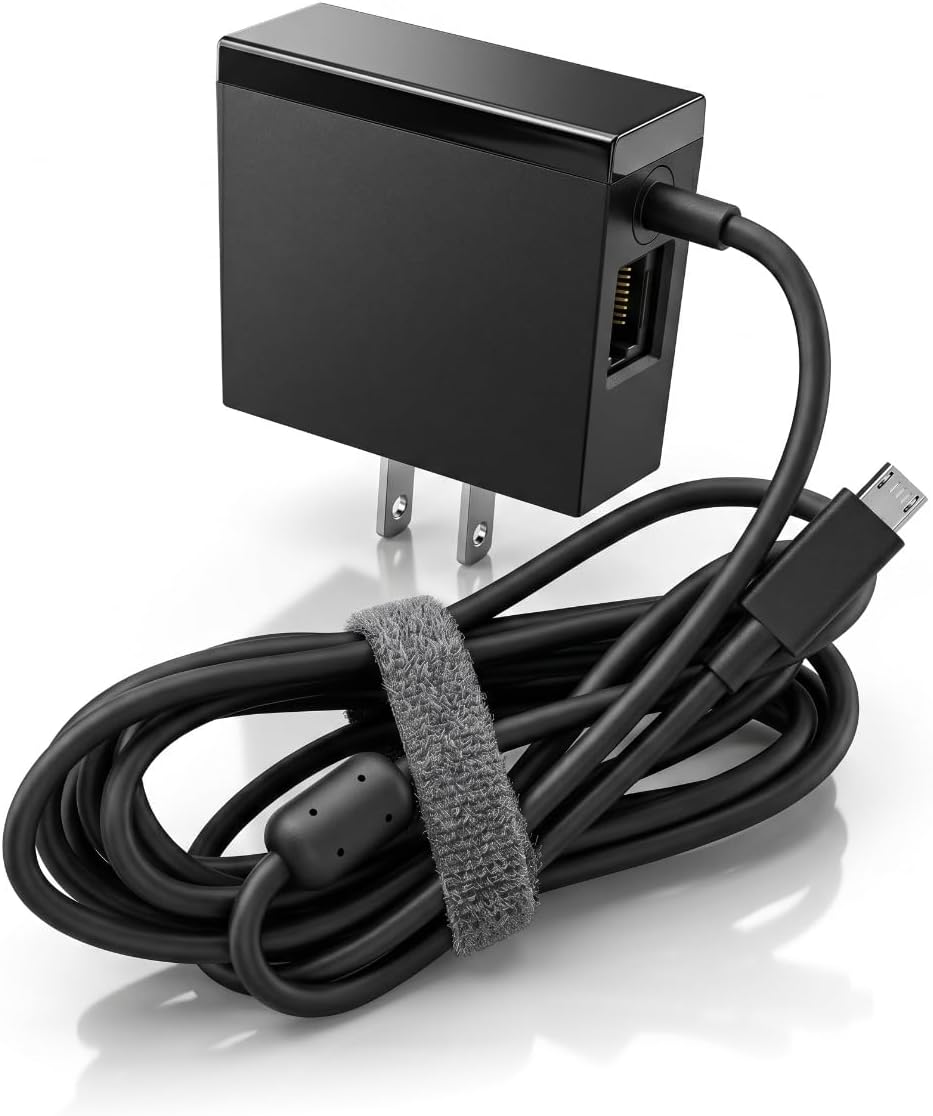
This all-in-one power adapter includes a built-in Ethernet port which simplifies your setup by reducing cable clutter. It handles both power and networking in a single compact unit making it convenient for users with limited wall outlets.
We may earn a commission when you buy through this link, at no additional cost to you.
The stable signal transmission ensures your content arrives without loss or delay which is key for 4K viewing. It is compatible with a wide range of Fire TV generations making it a versatile choice for many households.
Since it combines two functions into one unit it saves space on your power strip and desk. This design is particularly helpful for those who prefer a minimalistic setup without multiple power bricks.
This is a practical solution for users who want simplicity and reliability. It offers a streamlined way to connect your Fire TV to both power and the internet efficiently.
Integrates power and network functions into a single unit for convenience.
Ensures consistent power and network signal for uninterrupted streaming.
We may earn a commission when you buy through this link, at no additional cost to you.
Selecting the right Ethernet adapter depends on your specific Fire TV model and your home network setup. This guide breaks down the essential factors to consider before making a purchase.
The most critical factor is ensuring the adapter matches your device port type. Older Fire TV Sticks use micro USB while newer models like the Stick HD 2nd Gen use USB-C. Check your device generation to avoid buying an incompatible adapter.
Always verify the port type on your streaming device before purchasing to ensure a proper physical connection.
Adapters typically support speeds of 10/100Mbps or 1000Mbps. While 100Mbps is enough for 4K streaming, 1000Mbps is better if you have a high-speed internet plan and want future-proof performance for gaming or large file transfers.
Choose an adapter speed that matches your internet plan to avoid bottlenecks during peak usage times.
Some adapters draw power directly from the TV stick which can lead to instability. Others include a USB power cable that connects to a wall outlet for stable power delivery. If the adapter is not powered properly it may disconnect during use.
Select an adapter with its own power source if possible for more reliable performance during long sessions.
Look for aluminum alloy housings which help dissipate heat and prevent the device from overheating. Plastic models can become hot during extended use leading to connection drops or reduced lifespan over time.
A sturdy build ensures your adapter stays cool and lasts longer under daily streaming loads.
Most modern adapters are plug and play requiring no drivers or complex software. This allows you to connect the Ethernet cable and start streaming immediately. Avoid models that require specific software downloads for basic operation.
Prioritize simple plug and play models to avoid technical hurdles during installation.
Consider the length of any included power cables and whether the adapter has a right angle design. These features help reduce clutter behind your TV and prevent cables from bending or disconnecting accidentally.
Choose a design that fits your physical space to maintain a clean and organized entertainment center.
Prices vary based on speed capabilities and build quality. While budget options work well for standard streaming, investing in a slightly more expensive model with better heat dissipation and power support can prevent frustration later.
Balance your budget with the features that matter most to your specific streaming habits and device needs.
Established brands often provide better quality control and customer support. Reading verified reviews can help identify common issues like connectivity drops or power problems specific to certain models.
Research the brand and recent user feedback to ensure you are buying a reliable product that meets expectations.
To set up your adapter, simply plug the micro USB or USB-C end into the corresponding port on your Fire TV Stick. Then connect one end of an Ethernet cable to the adapter and the other end to an available port on your router.
If your adapter includes a USB power cable, connect it to a USB wall charger rather than the TV stick port to ensure stable power. This extra step prevents connection drops during high-usage periods.
Keep the adapter in a well-ventilated spot to avoid overheating. If you notice slow speeds or disconnections, try restarting both the Fire TV Stick and your router to refresh the network handshake.
No, adapters must match your device's port type. Older sticks use micro USB while newer ones use USB-C. Always check your model number before buying to ensure compatibility.
Most adapters are plug and play and do not require any driver installation. Just connect the hardware and the Fire TV OS will automatically recognize it as a wired network connection.
Disconnects often occur due to insufficient power from the TV stick. Using a separate wall power outlet for the adapter usually resolves stability issues and improves reliability.
Yes, many of these adapters support Chromecast models that use micro USB ports. However, newer Chromecasts with USB-C require a specific USB-C compatible adapter to function correctly.
Yes, wired connections reduce interference and latency compared to Wi-Fi. This results in faster load times and fewer buffering interruptions especially during high-definition video playback.
A 10/100Mbps adapter is sufficient for 4K streaming. You do not need gigabit speeds unless you have a very fast internet plan and perform large downloads simultaneously.
Some USB hubs include Ethernet ports which can work as an alternative. However, dedicated adapters usually offer better power management and connection stability for streaming devices.
Choosing the right adapter ensures your Fire TV Stick performs at its best without wireless interruptions. The options listed above cover a range of needs from basic micro USB compatibility to modern USB-C connectivity.
Prioritize models that offer stable power delivery and proper heat dissipation to maintain consistent performance. These features are often more important than raw speed ratings for smooth daily streaming.
Prices and availability change regularly so check the current listings before finalizing your purchase. This ensures you get the best deal on a product that meets your specific hardware requirements.