
Redragon K556 Wired RGB Mechanical Gaming Keyboard, 104-Key Aluminum Board
4.6Editor score
Brushed aluminum board frame
Hot-swappable switch sockets
Vibrant RGB lighting modes
Discover the 10 best full metal keyboard options for gaming and work. This expert guide compares top models with aluminum frames, durability, and performance.
Finding a durable typing solution starts with a full metal keyboard. These devices offer robust construction and premium feel. They stand up to intense gaming sessions and heavy daily use without compromising on quality or style.
We evaluated ten top models based on build quality, switch performance, and user feedback. Our analysis covers various layouts from compact to full size. Each entry highlights key features like aluminum frames, RGB lighting, and wireless connectivity options.
Every pick showcases specific strengths for different needs. Prices fluctuate often on retailer sites. Always check current listings before purchasing to ensure you get the best value for your investment in a reliable typing device.
4.6Editor score

4.1Editor score

4.8Editor score
The following table provides a side-by-side overview of the top ten full metal keyboards available today. Compare key specifications and features to find the right match for your setup.



The SteelSeries USB Apex 5 combines premium metal durability with hybrid switch technology. It features a robust aircraft-grade aluminum alloy frame and a functional OLED smart display. With a 4.6 rating users appreciate its build quality and unique features for gaming.
We may earn a commission when you buy through this link, at no additional cost to you.
The hybrid blue switches offer a tactile click with smooth membrane action. This ensures reliability for 20 million keypresses while maintaining a satisfying feel. The OLED display allows customization with game info and GIFs for a personalized setup.
The magnetic wrist rest provides full palm support reducing fatigue. The aluminum frame ensures the keyboard stays steady during intense sessions. RGB lighting is vibrant and fully customizable across keys.
Buy this if you want a durable metal keyboard with visual flair. It suits gamers seeking reliability and customizable display features. It is a solid investment for long-term use.
The aluminum alloy frame resists flex and ensures long-lasting durability for daily heavy use.
The display shows game info and messages adding functional utility to your desk setup.
We may earn a commission when you buy through this link, at no additional cost to you.
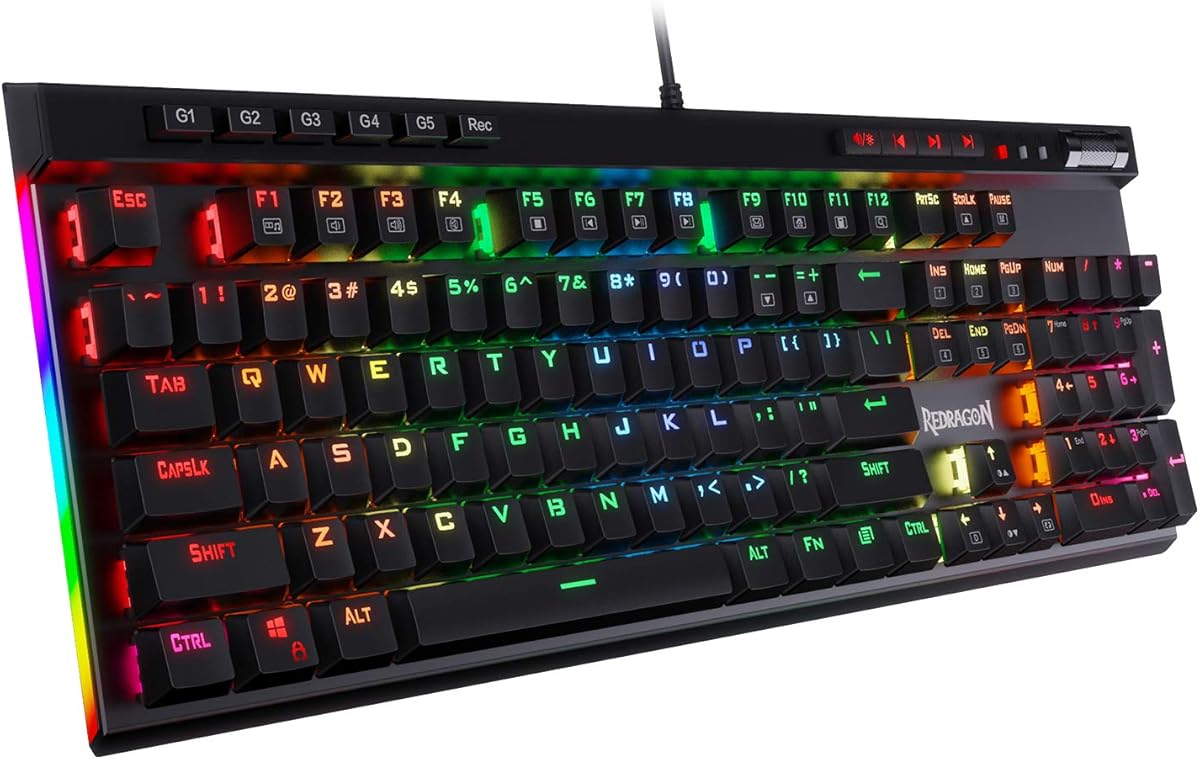
The Redragon K556 offers a tank-solid brushed aluminum board at an accessible level. It delivers 104 keys with hot-swappable sockets and vibrant RGB modes. With a 4.6 rating it is a popular choice for budget-conscious gamers.
We may earn a commission when you buy through this link, at no additional cost to you.
The aluminum frame keeps keystrokes steady unlike plastic alternatives. You can swap switches without soldering thanks to the upgraded socket. The Brown switches provide a comfortable tactile bump for all-day typing.
Lighting modes add an eSports vibe with adjustable brightness. The anti-ghosting ensures accurate input during rapid combos. Mac and Windows users can plug it in without drivers.
Choose this for a sturdy metal frame and customization flexibility. It works well for gaming rigs needing reliable typing. The value proposition is strong for the price.
The board eliminates flex ensuring precise input even during aggressive gaming.
Change switches easily to tailor the feel without technical soldering skills.
We may earn a commission when you buy through this link, at no additional cost to you.
The Cherry KC 200 MX is a wired office keyboard with an anodized metal plate. It features improved Cherry MX2A Brown switches for a precise feel. With a 4.2 rating it balances durability with practical office functions.
We may earn a commission when you buy through this link, at no additional cost to you.
The tactile switches offer noticeable feedback without loud clicks. Over 100 million actuations per key ensure longevity. The metal plate adds rigidity to the chassis.
White status LEDs are tasteful for lock indicators. Laser-etched keycaps resist wear over years. It handles rapid input with anti-ghosting technology.
Pick this for a reliable metal keyboard for work environments. It suits professionals valuing build quality. The simplicity fits well in clean office setups.
The MX2A switches provide a smooth yet responsive typing experience.
The anodized plate prevents unwanted flex during typing.
We may earn a commission when you buy through this link, at no additional cost to you.
The Keychron K10 HE blends classic feel with magnetic switch tech. It features full-size layout and wireless tri-mode connectivity. A 4.3 rating highlights its performance and refined organic design for users.
We may earn a commission when you buy through this link, at no additional cost to you.
Hall Effect switches detect presses without contact for durability. The launcher web configurator allows custom actuation points. Rapid trigger improves responsiveness for competitive actions.
PBT keycaps resist shine and wear effectively. Wood sidings add a unique organic touch. Compatibility with Mac Windows and Linux is strong.
Ideal for wireless setups wanting metal reliability. It suits professionals and gamers needing multi-device switching. The design offers a distinctive look.
Hall Effect technology reduces wear and tear on internal components.
Seamlessly switch between devices using Bluetooth or wired connections.
We may earn a commission when you buy through this link, at no additional cost to you.
The Corsair Vanguard 96 uses a compact 96% layout with MLX Plasma switches. It includes an LCD screen and Virtual Stream Deck features. A 4.4 rating reflects its high-speed performance and utility for gamers.
We may earn a commission when you buy through this link, at no additional cost to you.
The LCD screen displays animations and system specs. 8000Hz polling eradicates input lag for fast games. G-keys allow deep customization for macros.
FlashTap SOCD resolves accidental inputs effectively. The compact frame fits more mouse space. Connectivity and customization are robust.
Buy this for high-performance gaming in a smaller frame. It suits streamers and FPS players. The features are advanced for power users.
8000Hz polling ensures near-instantaneous input registration.
The screen adds visual feedback and system monitoring capabilities.
We may earn a commission when you buy through this link, at no additional cost to you.
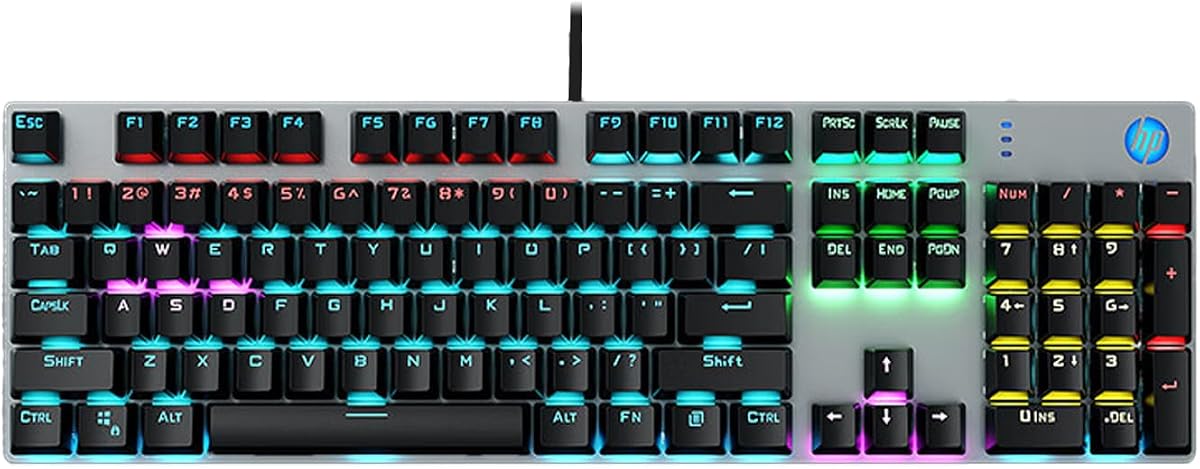
The HP GK400F features a sturdy metal panel for stability. It uses Brown switches with N-key rollover and ice blue backlight. A 4.2 rating highlights its suitability for business and gaming use.
We may earn a commission when you buy through this link, at no additional cost to you.
The metal structure supports precise input without flex. Double-shot injection molded keycaps resist wear. The ice blue backlight aids visibility in low light.
Anti-slip pads keep the unit secure on desks. Two-stage adjustable feet help customize typing angles. Plug-and-play wired USB ensures zero signal delay.
Choose this for office work needing durable metal build. It offers reliable performance for daily typing. The simplicity makes setup easy.
The panel provides structural stability for heavy typing sessions.
Brown switches deliver crisp feedback without loud noise.
We may earn a commission when you buy through this link, at no additional cost to you.
The Keychron Q6 Pro is a full-metal custom keyboard with QMK/VIA support. It offers 1000 Hz polling and hot-swappable switches. A 4.1 rating acknowledges its premium build and deep customization options.
We may earn a commission when you buy through this link, at no additional cost to you.
The aluminum case and gasket design provide acoustic comfort. Double-shot PBT keycaps resist shine over time. You can remap keys via software for complex macros.
Screw-in stabilizers ensure smooth large key inputs. Wireless modes offer 90 Hz polling rates. The system works across Mac Windows and Linux.
Invest in this for full control over your typing experience. It suits enthusiasts wanting premium metal build. The customization is limitless for experts.
Full programmability allows unique macros and layouts tailored to you.
Silicone pads dampen resonance for a richer thock sound.
We may earn a commission when you buy through this link, at no additional cost to you.
The Logitech G413 SE features a brushed aluminum-magnesium alloy top case. It includes PBT keycaps for heat resistance. A 4.5 rating shows high satisfaction with its performance and sleek design.
We may earn a commission when you buy through this link, at no additional cost to you.
The tactile switches offer consistent performance without noise. Media controls allow quick adjustment of volume and playback. Anti-ghosting ensures 6-key rollover reliability.
The aluminum magnesium alloy provides a robust backbone. It resists flex during heavy gaming. FN keys handle basic functions effectively.
Buy this for a clean durable metal gaming setup. It fits well with minimalist desks. The reliability makes it a safe choice.
The black-brushed top case resists scratches and looks professional.
PBT keycaps prevent shine and wear over years.
We may earn a commission when you buy through this link, at no additional cost to you.
The OOCTPK Chilkey SF60 is an aerospace-grade aluminum full-metal keyboard. It uses WS Flux Poseidon magnetic switches with rapid trigger. A 4.8 rating highlights its premium craftsmanship and deep typing feel.
We may earn a commission when you buy through this link, at no additional cost to you.
The CNC case and metal keycaps create a thocky sound. Rapid Trigger 0.001mm precision allows for fast competitive gaming. The 8000Hz polling rate reduces latency significantly.
The gasket design reduces resonance for comfort. AI-driven operating system adapts to your play. It supports mixed switch setups.
Invest in this for top-tier competitive performance. It suits enthusiasts wanting the best materials. The aluminum build ensures cool touch.
Magnetic detection allows instant reset for rapid key presses.
Precision machining ensures perfect fit and premium finish.
We may earn a commission when you buy through this link, at no additional cost to you.
The Redragon K580 offers macro keys and a media wheel on a metal frame. It includes hot-swappable sockets and RGB lighting. A 4.6 rating shows reliability for daily heavy gaming use.
We may earn a commission when you buy through this link, at no additional cost to you.
Five macro keys let you save combos without software. The media wheel handles playback and volume control. Blue switches deliver a distinct click feedback.
Double-shot keycaps resist fading over time. Full anti-ghosting ensures accurate multi-key combos. The hot-swap socket allows future switch customization.
Choose this for versatile control features. It suits gamers wanting quick macros. The metal build adds stability to the design.
5 macro keys streamline complex shortcuts for productivity.
A dedicated wheel allows precise volume and track control.
We may earn a commission when you buy through this link, at no additional cost to you.
Selecting the right full metal keyboard requires understanding key factors like construction, switches, and features. This guide simplifies the process to help you find the ideal model.
Look for keyboards with aircraft-grade aluminum or stainless steel frames. These materials resist bending and provide a premium feel. Check if the keycaps are double-shot to ensure longevity.
Prioritize models with sturdy metal panels to prevent flex during intense typing.
Consider whether you prefer tactile, clicky, or linear switches. Brown switches offer a middle ground for work and gaming. Ensure the switches are rated for high durability like 50 million strokes.
Choose switches that match your environment to avoid unnecessary noise.
Hot-swappable sockets allow you to change switches without soldering. This feature adds flexibility and value over the long term. It lets you experiment with different feels later.
Opt for hot-swap models if you plan to upgrade switches later.
Full RGB lighting allows for personalized desk aesthetics and visibility. Look for modes that suit your vibe like wave or breathing effects. Ensure the software allows customization of individual keys.
Pick vibrant RGB options if visual flair is important to you.
Decide between full-size, TKL, or compact 60% layouts based on desk space. Full-size includes a numpad for data entry. Compact layouts save space for more mouse movement.
Select a layout that fits your desk and workflow needs.
Wired USB offers zero latency which is ideal for competitive gaming. Wireless or Bluetooth options provide clean setups for multiple devices. Some models offer tri-mode for maximum flexibility.
Choose wired for gaming or wireless for a cleaner desk.
Robust software allows for macros, remapping, and lighting control. Some advanced keyboards use QMK or VIA for open-source customization. Ensure the software is stable and easy to use.
Look for strong software support if you need deep personalization.
Check for adjustable feet or wrist rests to reduce fatigue. PBT keycaps offer a better texture and durability than ABS. A comfortable angle improves long typing sessions.
Prioritize ergonomic features for extended daily use comfort.
Start by connecting the keyboard via USB or pairing via Bluetooth. Use the included software to set up RGB colors and macros if available. Adjust the tilt feet for a comfortable typing angle.
Clean the metal surface regularly with a dry cloth to remove dust. Use a keycap puller if you need to clean underneath switches. Avoid liquids to prevent damage to internal electronics.
Store the keyboard in a cool dry place when not in use. Cover it to prevent dust accumulation on the keycaps. Replace any worn keycaps or switches if you have hot-swap capabilities.
Yes, full metal keyboards are worth the cost because they offer superior durability and a premium typing feel. The aluminum frames resist flex and ensure long-lasting performance. They also retain value better than plastic alternatives over time.
Not all metal keyboards support switch swapping, but many modern ones do. Look specifically for 'hot-swappable' in the product description to confirm. This feature allows you to change switches without soldering or voiding warranties.
Metal keyboards often produce a deeper, more resonant sound due to the rigid casing. However, this depends on internal foam and gaskets used inside. High-end models add dampening layers for a cleaner sound profile.
Yes, metal keyboards are heavier due to the aluminum construction which adds stability. While they are sturdy for desk use, they may be less convenient for travel. Consider a dedicated case if you move them frequently.
Most modern full metal keyboards work seamlessly with Mac via USB or Bluetooth. Many include dedicated Mac keys and layouts for better compatibility. Always check the product specs for Mac support before purchasing.
Use a soft dry microfiber cloth to wipe down the aluminum surface regularly. Avoid harsh chemicals that might strip the anodized coating. For stubborn spots, use a slightly damp cloth and dry immediately.
We have reviewed ten excellent full metal keyboards that combine durability with performance. From the Redragon K556 for budget builds to the OOCTPK SF60 for premium features there is a model for everyone.
Prioritize factors like hot-swap sockets, switch type, and build quality when making your choice. A solid metal frame ensures your keyboard lasts for years of heavy use without flexing.
Prices fluctuate often so check current listings before you buy. Investing in a quality metal keyboard improves your daily workflow and gaming experience significantly.