
RedThunder One Handed Gaming Keyboard RGB Backlit
4.4Editor score
35 Keys Anti-Ghosting
Macro Recording Keys Included
Ergonomic Design with Wrist Rest
This guide compares the top 10 gaming keypads available in October 2026 to help you find the perfect one-handed controller for your setup.
Gaming keypads have evolved into essential tools for competitive players seeking precision and speed. These specialized devices replace traditional keyboards with compact layouts designed for rapid command execution. Whether you play MMOs or FPS titles, the right keypad enhances your performance significantly.
We evaluated ten standout models based on switch technology, ergonomics, and customization options. Our analysis covers wired and wireless designs, ensuring options for every preference and budget. Each product was scrutinized for build quality, latency, and software support to provide accurate recommendations.
Every pick includes detailed insights into features, pros, and cons to guide your decision. Note that availability and pricing fluctuate frequently across retailers. Always verify current stock and costs before purchasing to ensure you get the best value for your investment today.
4.4Editor score

4.4Editor score

4.3Editor score
The following table provides a side-by-side comparison of all ten models we reviewed. It highlights key specifications like switch types, key counts, and connectivity options to help you quickly identify the right fit for your gaming needs.




The Redragon K585 Wired stands out as a top contender for gamers seeking value and performance. With a rating of 4.4 stars, it delivers a robust feature set including 42 keys and extensive macro support. Its tactile switches and RGB lighting make it a versatile choice for both gaming and creative workflows.
We may earn a commission when you buy through this link, at no additional cost to you.
Key strengths include the ability to swap switches without soldering, allowing for personalized feel adjustments. The USB pass-through port keeps your desk organized by reducing cable clutter. Additionally, the detachable wrist rest ensures comfort during long sessions without compromising desk space.
While the software offers deep customization, new users might find the initial setup slightly complex. The RGB lighting is vibrant but may require adjustment for darker rooms. These trade-offs are minor given the price and feature richness.
This keypad is ideal for MMO players who need quick access to abilities. We recommend it for those wanting a reliable, affordable option with room for hardware customization. It balances functionality and ergonomics exceptionally well.
The hot-swap socket accepts various switch types, letting you tailor tactile feedback easily.
USB pass-through and wrist rest designs maximize your mouse area for better movement control.
We may earn a commission when you buy through this link, at no additional cost to you.
RedThunder offers a highly accessible entry point into one-handed gaming with its 35-key layout. Rated 4.4 stars, it focuses on essential features like anti-ghosting and macro recording without unnecessary complexity. The portable design makes it easy to transport to LAN parties or different setups.
We may earn a commission when you buy through this link, at no additional cost to you.
Its primary strength lies in simplicity and speed. The built-in game chip ensures a 3ms response time for smooth gameplay. The ergonomic wrist rest provides comfort during extended use, while the RGB lighting adds a nice aesthetic touch without needing software drivers.
The macro system is functional but less flexible than higher-end models. Lighting options are limited to static and breath modes. These limitations are acceptable given the budget-friendly price tag.
Buyers looking for a no-fuss keypad should consider this model. It works well for gamers who prioritize reliability over advanced features. It is an excellent starter device for new players.
No drivers are required for basic functions, ensuring immediate plug-and-play compatibility.
The small footprint allows for easy storage and transport between different gaming locations.
We may earn a commission when you buy through this link, at no additional cost to you.
The AZERON Gaming Keypad represents a unique approach to one-handed control with its analog thumbstick. With a 4.3 rating, it offers advanced adjustability for a personalized fit. The Hall Effect thumbstick allows for precise movement control akin to game controllers.
We may earn a commission when you buy through this link, at no additional cost to you.
Key strengths include the elimination of stick drift and support for 360-degree analog movement. The keypad features 30 individually mappable inputs and customizable dead zones for fine-tuned performance. Its modular design supports future software updates and hardware enhancements.
The price reflects the premium technology involved, which may not suit all budgets. Initial calibration and setup require time to perfect the feel for your hand size. However, the resulting precision is unmatched in this category.
This model is perfect for serious FPS or RPG enthusiasts seeking granular control. It stands out for those needing analog inputs alongside traditional key commands. It justifies the investment with unmatched flexibility and build quality.
The thumbstick enables smooth directional control for games supporting analog inputs like shooters.
Adjustable parts ensure comfort for hand sizes ranging from 6.3 to 7.5 inches.
We may earn a commission when you buy through this link, at no additional cost to you.
Razer's Tartarus V2 Left-Handed version offers a comfortable experience for gamers preferring left-hand input. With a 4.3 rating, it combines mecha-membrane switches with a fully programmable layout. The 8-way thumbpad enhances movement control for console-style players.
We may earn a commission when you buy through this link, at no additional cost to you.
Strengths include Razer Hypershift for complex macro execution and Chroma sync for immersive lighting. The soft-cushioned membrane switches provide a balance of comfort and feedback. It works seamlessly with other Razer hardware and supported third-party devices.
The left-handed orientation limits versatility for ambidextrous users. Software features rely heavily on Razer Synapse for full functionality. These factors may deter users preferring standalone hardware solutions.
This keypad is ideal for dedicated Razer ecosystem users. It delivers reliable performance and customization for MMOs and RPGs. The ergonomic design ensures comfort during extended gaming sessions.
Chroma sync allows coordination with Philips Hue and other supported accessories for immersion.
The directional thumbpad offers natural movement controls similar to traditional gamepads.
We may earn a commission when you buy through this link, at no additional cost to you.
The Redragon K585 PRO brings wireless freedom to one-handed gaming with its 2.4GHz connectivity. Rated 4.2 stars, it retains the feature-rich design of the wired version including 42 keys and macro support. The 15-20 hour battery life supports uninterrupted gameplay.
We may earn a commission when you buy through this link, at no additional cost to you.
Strengths include the ability to position the keypad anywhere without cable constraints. Hot-swap switches allow for tactile tuning while maintaining wireless convenience. The detachable wrist rest supports ergonomic comfort during long sessions.
Users must manage charging cycles for continued use. Wireless connectivity might introduce negligible latency for competitive play. These are reasonable compromises for the freedom offered.
Ideal for gamers wanting a clutter-free desk, this model delivers performance without cables. It suits those who prioritize setup flexibility over wired reliability. The battery life ensures minimal interruptions.
Wireless connectivity allows placing the keypad to suit your natural hand position.
A single charge provides up to 20 hours of continuous play for extended use.
We may earn a commission when you buy through this link, at no additional cost to you.
Keychron's C0 HE targets competitive FPS players with its Hall Effect switches and rapid trigger tech. Rated 4.2 stars, it delivers ultra-low latency with an 8K polling rate. The web-based configurator removes the need for local software installation.
We may earn a commission when you buy through this link, at no additional cost to you.
Strengths include adjustable actuation points for precise control and rapid reset on key release. The magnetic switches prevent physical wear, ensuring consistency over time. It works seamlessly on Windows and macOS without extra drivers.
Browser dependency for customization may inconvenience some users. Advanced settings require time to understand fully. These factors are offset by the performance benefits for serious gamers.
Recommended for competitive players needing precise movement control, this keypad excels. It provides modern features without software bloat. The adjustable actuation offers a tailored experience.
No installation is needed as settings are managed through a simple browser interface.
Keys reset instantly when lifted, allowing for faster repeated inputs in games.
We may earn a commission when you buy through this link, at no additional cost to you.
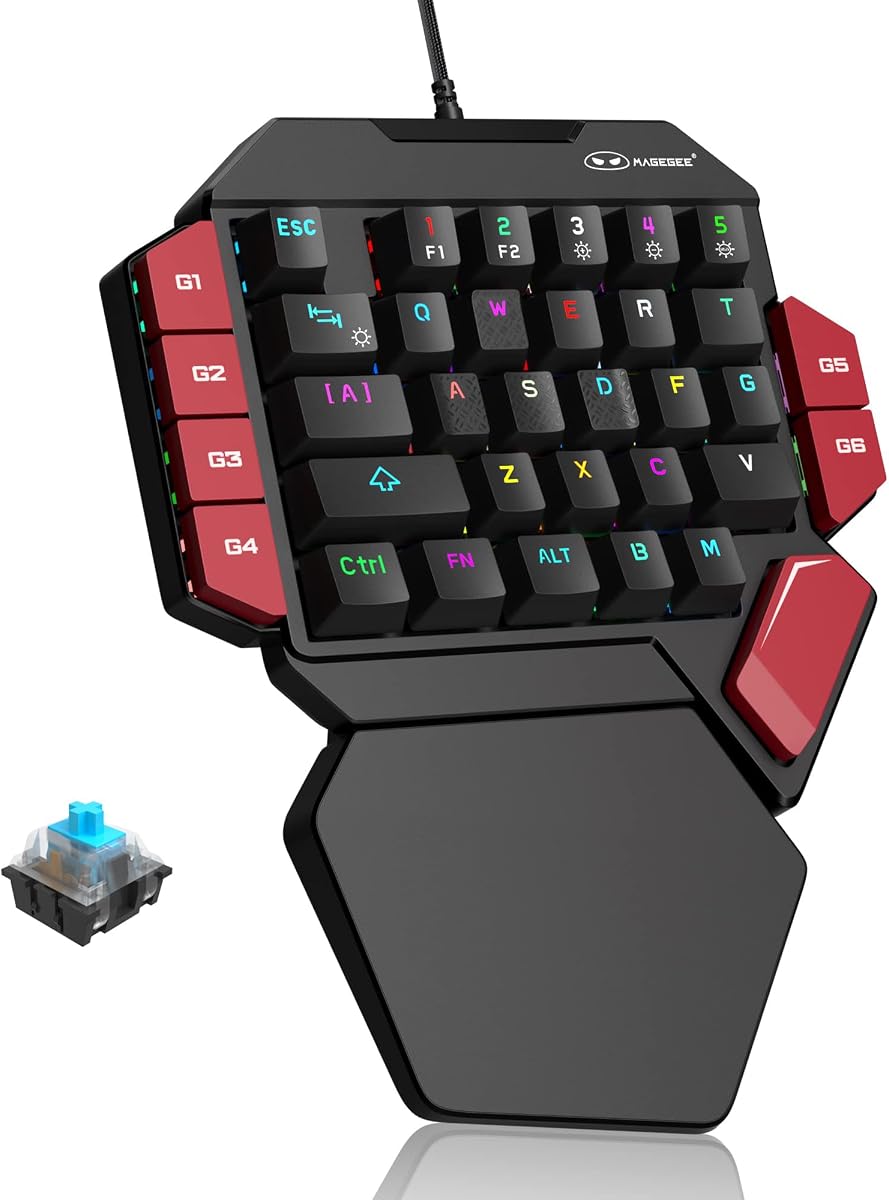
MageGee provides a solid mechanical experience with its blue switches and 35-key layout. Rated 4.3 stars, it offers a satisfying click and tactile feedback for gaming. The six macro recording keys support essential customization for complex games.
We may earn a commission when you buy through this link, at no additional cost to you.
Strengths include long switch life and anti-ghosting capabilities for reliable input. The ergonomic palm rest reduces hand fatigue during prolonged use. RGB lighting modes add visual appeal without needing software.
The loud click may disturb others in shared spaces. Macro count is lower than competitors. These are minor drawbacks for those prioritizing mechanical feel.
Ideal for gamers loving tactile feedback, this model delivers quality at a low cost. It suits users who prefer physical switches over membranes. The build quality ensures longevity.
Blue switches provide distinct feedback that many gamers enjoy for precise inputs.
Plug and play compatibility ensures immediate use without extra drivers or software.
We may earn a commission when you buy through this link, at no additional cost to you.
AJAZZ offers an ultra-compact design with the AK029, saving desk space without sacrificing performance. Rated 4.5 stars, it features Hall Effect switches with zero dead zones. The 29-key layout is ideal for minimalists needing essential controls.
We may earn a commission when you buy through this link, at no additional cost to you.
Strengths include an 8KHz polling rate for rapid response and web-based customization. The aluminum-reinforced build ensures durability and stability. SOCD support provides a competitive edge in strategy games.
Smaller hand users may find it tight. Limited keys restrict complex macro setups. These are acceptable trade-offs for portability.
Perfect for travelers and minimal setups, this keypad balances size and features well. It suits competitive players valuing portability. The high polling rate ensures responsive input.
The 29-key layout saves significant desk space for larger mouse movements.
An 8KHz polling rate provides faster response times for competitive gaming.
We may earn a commission when you buy through this link, at no additional cost to you.
Razer continues to offer a reliable option with this Tartarus V2 model. Rated 4.2 stars, it features 32 programmable keys and an analog thumbstick for versatile control. The mecha-membrane switches provide a balance of tactile feedback and comfort.
We may earn a commission when you buy through this link, at no additional cost to you.
Strengths include seamless sync with other Razer hardware and deep customization via Synapse. The analog thumb allows supports varied inputs for complex games. Build quality ensures longevity with daily use.
Dependency on Razer software limits flexibility for non-Razer users. The price may be high for budget buyers. These are typical of premium branded gear.
Ideal for Razer enthusiasts, this keypad offers consistent performance. It suits users valuing brand ecosystem integration. The analog input adds unique versatility.
The thumbstick provides variable input speed useful for movement control in games.
Razer Synapse allows detailed customization and lighting synchronization across devices.
We may earn a commission when you buy through this link, at no additional cost to you.
Redragon introduces a unique variant with the RM104, featuring a multifunction control knob. Rated 4.4 stars, it offers tri-mode connectivity and a massive 4000mAh battery. The smart knob simplifies volume and lighting adjustments efficiently.
We may earn a commission when you buy through this link, at no additional cost to you.
Strengths include seamless switching between Bluetooth and 2.4GHz for flexible setups. Anti-ghosting ensures accurate inputs during intense play. The battery supports long periods of wireless use without charging.
It functions more as a compact keyboard than a standard keypad. Some may prefer dedicated one-handed layouts. However, the versatility suits mixed usage needs.
Ideal for users needing quick media and gaming control, this model stands out. It is great for streamers or mixed-purpose setups. The battery life ensures consistent performance.
Rotating the knob adjusts volume smoothly, improving workflow speed significantly.
Tri-mode wireless supports multiple devices, switching seamlessly between PC and mobile.
We may earn a commission when you buy through this link, at no additional cost to you.
Selecting the right gaming keypad requires understanding specific features that align with your gameplay style. Here are the key factors to consider for an informed purchase.
Switches define the feel and speed of your inputs. Mechanical switches offer tactile feedback, while membrane options provide quiet, smooth typing. Hall Effect switches are gaining popularity for their durability and programmable actuation points.
Choose switches that match your preference for clickiness or smoothness to ensure comfort.
The number of keys determines how many macros or commands you can access. Compact layouts save space but may limit complexity. Ensure the layout fits your hand size and intended game types.
Prioritize layouts with enough keys for your most-used commands without unnecessary clutter.
Software support allows remapping keys to execute complex actions. Look for onboard memory to save profiles on the device itself. High-quality software makes it easier to set up and adjust bindings.
Check for intuitive software that supports deep customization and easy profile management.
Wired connections offer stability, while wireless provides flexibility. Consider battery life for wireless models. Some units support multiple modes like Bluetooth and 2.4GHz for broader compatibility.
Select connectivity based on your tolerance for latency and need for a clutter-free desk.
Comfort is vital for long sessions. Features like detachable wrist rests and adjustable angles help reduce fatigue. A proper fit ensures your hand rests naturally during extended use.
Look for ergonomic designs that support your wrist and fingers for prolonged play.
Materials affect longevity and stability. Aluminum frames offer rigidity while plastic keeps costs down. Check for keycap durability to withstand heavy gaming usage.
Invest in sturdy builds that resist wear and tear over time.
Visual customization can enhance immersion. Per-key lighting allows unique designs, while preset modes offer simplicity. Ensure brightness is adjustable to match your room lighting.
Choose lighting features that complement your setup and personal style preferences.
Budget ranges vary widely. Determine which features matter most to avoid overspending. Sometimes cheaper models offer the best value if core features are sufficient.
Balance your budget with necessary features to get the best performance per dollar.
Proper setup involves connecting the device securely and installing necessary drivers. Follow the manufacturer's guide to configure macro keys correctly. This ensures all features work as intended from the start.
Cleaning the keypad regularly prevents dust buildup that can affect key response. Use a soft cloth and air duster to maintain cleanliness. Avoid liquids to prevent damage to internal components.
For longevity, store the device in a dry place when not in use. If using wireless models, charge the battery fully before long sessions. Regular maintenance keeps performance consistent over time.
Yes, gaming keypads are worth it for players who need faster access to abilities. They reduce hand movement and allow complex macro execution. This improves reaction times in competitive titles like MMOs or FPS games.
Many gaming keypads support console use via USB or Bluetooth compatibility. Check product specifications for specific console support. Some require adapters to bridge the connection properly.
Gaming keypads can double as productivity tools for shortcuts and macros. They are especially useful for streamers or video editors. Customizing layouts helps streamline non-gaming workflows.
Clean your keypad with a microfiber cloth and a mild cleaner. Use compressed air to remove dust between keys. Avoid spraying liquids directly to prevent internal damage.
Modern wireless keypads offer reliable performance comparable to wired ones. High polling rates minimize latency. Battery life varies, so check specs to ensure they last through your playtime.
Hall Effect switches use magnets to detect key presses without physical contact. This design prevents wear and allows adjustable actuation. They offer precise control ideal for competitive gaming.
We highlighted ten top gaming keypads that cater to different needs and budgets. From the Redragon K585's versatility to the AZERON's premium precision, there is something for everyone. Each offers unique benefits for enhancing gaming performance.
Consider your primary gaming genres and budget when making a decision. Comfort and customization are just as critical as raw performance. Prioritize features that match your daily usage habits.
Remember to verify the latest pricing and availability before purchasing. Deals fluctuate frequently across different online retailers. Staying updated ensures you secure the best value for your setup.