
HDMI Tester Portable High Definition
4.4Editor score
Tests HDMI and RJ45 cables
Main and remote unit design
Battery or USB power source
This guide compares the top HDMI cable and port testers for 2026 to help you choose the right tool for diagnosing connectivity issues.
Finding the right tool to diagnose HDMI connectivity issues is essential for technicians and enthusiasts alike. A reliable tester ensures your cables function correctly without expensive replacement costs or signal loss.
We evaluated ten leading models based on accuracy, port compatibility, and ease of use. Our analysis covers budget-friendly options and professional-grade units with advanced signal analysis capabilities.
Each pick highlights specific strengths and ideal use cases for different users. Please note that product availability and features may change over time as manufacturers update their lineups.
4.4Editor score

4.8Editor score

4.5Editor score
The following table provides a side-by-side look at all ten tested models. Review each specification carefully to determine which unit aligns with your specific testing needs and budget.


This unit ranks highest due to its combination of precision and portability. It offers a 4.8 rating from verified users who appreciate its quick analysis capabilities.
We may earn a commission when you buy through this link, at no additional cost to you.
The tester adapts to micro HDMI and mini HDMI specifications including HDMI 1.2V through 2.0V. Its LED indicator zones simplify troubleshooting by showing abnormal points immediately.
While it lacks audio ports, the focused design ensures reliable video signal checks. The automatic power-off after ten minutes helps preserve battery life effectively.
Technicians seeking a lightweight field tool should consider this model. It balances cost with professional-grade diagnostics for common HDMI continuity issues.
The system scans 19 wires to identify short-circuits disconnections and mis-sequences. This feature significantly reduces troubleshooting time during installation.
A blue light flashes when battery voltage drops below 7.2V. This warning ensures the device remains operational when you need it most.
We may earn a commission when you buy through this link, at no additional cost to you.
This device provides essential HDMI and network cable testing at an accessible price point. It scores 4.4 stars for its practicality in home and light commercial setups.
We may earn a commission when you buy through this link, at no additional cost to you.
Users can test HDMI 1.2V through 2.0V plus RJ45 cables efficiently. The main unit powers via AAA battery or USB phone charger for added convenience.
The design separates the main and remote units which might require careful handling. However, the remote stores conveniently on the side of the main unit.
Buyers prioritizing value over advanced features will find this unit sufficient. It serves well for verifying basic connectivity before installation.
Beyond HDMI it handles network cables with RJ45 connectors effectively. This versatility makes it a go-to tool for general wiring checks.
Powering the main unit via USB charger eliminates battery dependency. This feature ensures continuous operation in power available environments.
We may earn a commission when you buy through this link, at no additional cost to you.
This patented handheld device stands out for its built-in HD LCD screen and audio capability. It allows full video and audio assurance without a separate display unit.
We may earn a commission when you buy through this link, at no additional cost to you.
The unit features a ruggedized housing resistant to dust water and shock. Its tempered glass display protects against scratches and shattering during daily use.
It includes three HDMI ports for flexible source and test configuration. The micro USB port charges the 2300mAH battery for 3 to 4 hours of use.
Professionals who require on-site visual verification will appreciate this model. It simplifies installation checks by confirming signal integrity directly at the source.
The HD LCD screen provides both audio and video output instantly. This allows immediate verification of content delivery without external displays.
Constructed with a hybrid dual layer of silicone rubber and plastic. This design ensures longevity in demanding field conditions.
We may earn a commission when you buy through this link, at no additional cost to you.
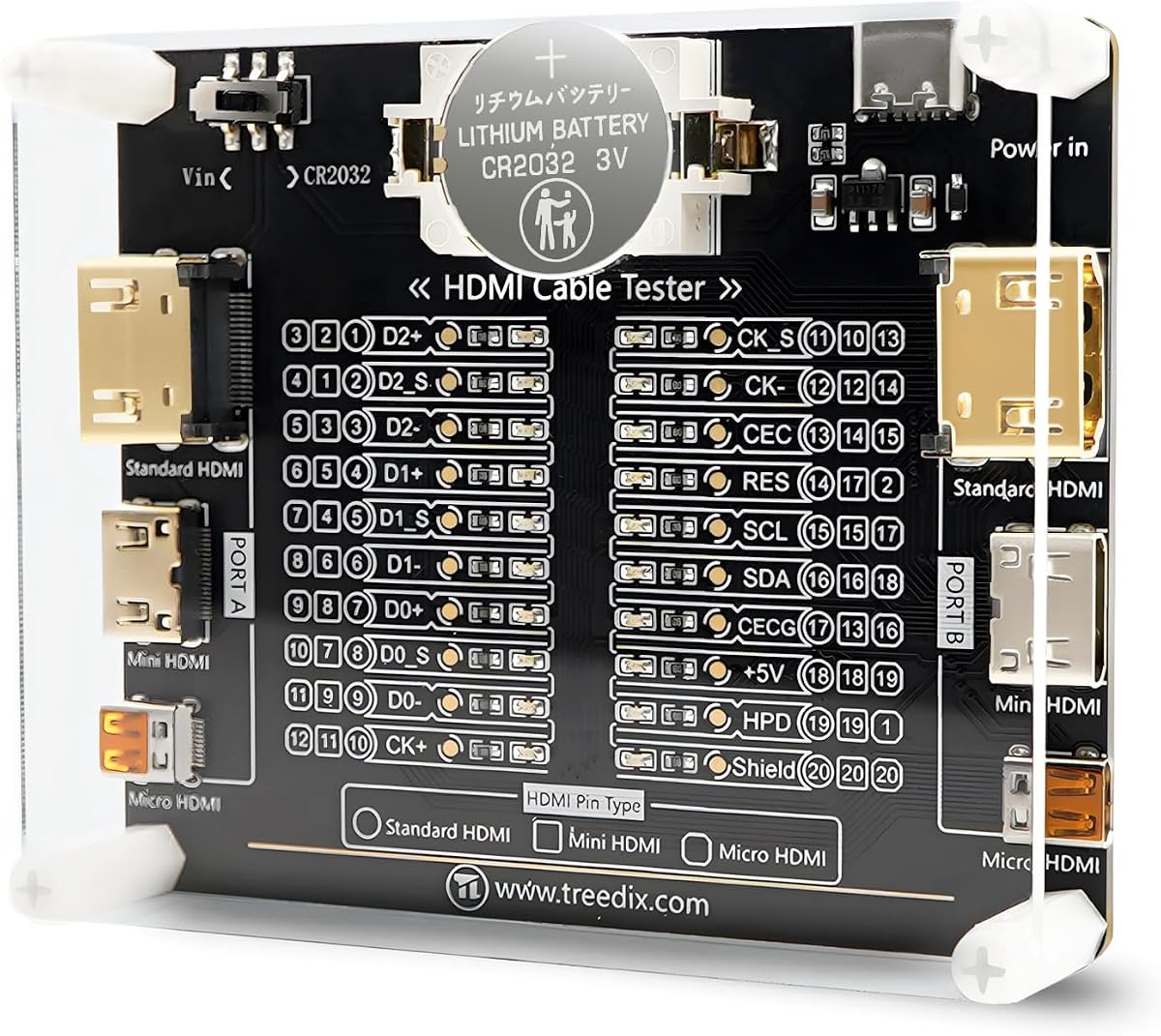
This board is specifically designed for detecting abnormality in HDMI cables efficiently. It scores 4.6 stars for its accuracy in identifying short or open circuits.
We may earn a commission when you buy through this link, at no additional cost to you.
Supporting versions from 1.0 to 2.1 it accommodates Type A Mini and Micro interfaces. The 20 LED indicators correspond to each pin for precise fault location.
Its power supply range of 3 to 12V offers flexibility for various work environments. However, it requires an external power supply rather than just a battery.
Technicians needing a detailed pin-by-pin breakdown will find this useful. It serves as a reliable maintenance tool for complex cable issues.
The board accommodates various interfaces including Standard Type A and Mini Type C. This ensures compatibility across different HDMI cable generations.
Each pin corresponds to one LED light for easy diagnosis. This system helps users understand the function of the cable quickly.
We may earn a commission when you buy through this link, at no additional cost to you.
This model is perfect for evaluating HDMI cables for shorts and incorrect pairings. Its 4.4 rating reflects high satisfaction among users needing precise diagnostics.
We may earn a commission when you buy through this link, at no additional cost to you.
The remote can be detached from the main unit allowing testing of installed cables. This feature is ideal for testing very long cables up to 500 meters.
It includes scan mode for individual connections and full display mode for all at once. This dual approach provides flexibility depending on the testing scenario.
Professionals handling complex installations will appreciate the detailed wire evaluation. It reduces guesswork by identifying exact wire pairings and errors.
The detachable remote allows easy testing of installed or long cables. This saves time by enabling quick checks without moving heavy equipment.
Users can choose between scanning each connection or viewing all at once. This choice enhances efficiency based on the specific testing requirement.
We may earn a commission when you buy through this link, at no additional cost to you.
This device can be used as an HDMI signal generator or display emulator analyzer. It supports various resolutions including 4K at 60Hz with different chroma subsampling.
We may earn a commission when you buy through this link, at no additional cost to you.
A 4-pin DIP switch sets video resolution and HDCP content for specific needs. This allows precise control over the signal being generated for compatibility testing.
It provides four different test patterns for HDCP versions to ensure content protection works. This feature is critical for validating secure signal transmission.
Technicians verifying signal quality beyond continuity will find this unit valuable. It bridges the gap between simple testers and full signal analyzers.
It supports 4K 60Hz 4:4:4 and 4:2:0 along with 1080p outputs. This versatility ensures compatibility with most high definition displays.
The device allows testing of HDCP off 1.4 and 2.2 outputs. This is essential for ensuring proper content protection on modern devices.
We may earn a commission when you buy through this link, at no additional cost to you.
This unit offers essential HDMI and network cable testing with convenient features. It scores 3.9 stars for basic reliability in everyday checking tasks.
We may earn a commission when you buy through this link, at no additional cost to you.
It features an automatic shut-down after ten minutes of inactivity. This saves battery life and makes it a convenient and energy-efficient tool to use.
Users can choose between fast scan mode and full display mode for testing. This provides flexibility depending on how detailed the inspection needs to be.
For those needing a simple tool that covers both video and network lines this works. It balances functionality with ease of use for quick checks.
The auto shut-down function preserves battery life effectively. This feature is beneficial for technicians working long hours without recharge access.
Selecting between fast scan and full display mode optimizes workflow. This choice ensures quick checks or comprehensive inspections as needed.
We may earn a commission when you buy through this link, at no additional cost to you.
This professional cable tester supports audio video and network cables with one switch. Its 4.5 rating highlights its utility for complex multi-device environments.
We may earn a commission when you buy through this link, at no additional cost to you.
It features XLR HDMI USB RCA BNC and Type-C connections. The detachable design allows split testing of cables in different locations effectively.
The LED display system provides instant visual feedback on connectivity. The durable metal housing ensures the device withstands frequent transport.
Technicians needing to test multiple cable types beyond HDMI will value this. It serves as a comprehensive tool for diverse AV setups.
Features XLR HDMI USB RCA BNC TRS Jack and Type-C connections. This extensive compatibility eliminates the need for multiple dedicated testers.
LED indicators provide instant feedback on connectivity status. This simplifies troubleshooting by showing pin configuration status immediately.
We may earn a commission when you buy through this link, at no additional cost to you.
This tester diagnoses the cause of color shift sparkle or missing picture. It earns 4.3 stars for being easy to use and portable for on-site checks.
We may earn a commission when you buy through this link, at no additional cost to you.
Simply plug cables into the testers DVI-F and HDMI-F connectors. The tester can be located at the source or display end of the system.
It displays the status of each HDMI signal component for clear diagnostics. This helps identify exactly where a signal fault is occurring.
Users looking for a straightforward tool to find visual artifacts will like this. It is practical for general troubleshooting without complex setup.
The tool specifically identifies color shift or missing picture causes. This targeted approach helps fix specific video quality issues.
You can place the tester at the source or display end of the system. This flexibility aids in isolating faults within the cable run.
We may earn a commission when you buy through this link, at no additional cost to you.
This tool achieves a perfect 5.0 rating for its reliable performance in testing. It offers quick testing for HDMI and Network cables including RJ45.
We may earn a commission when you buy through this link, at no additional cost to you.
The main unit can be powered by a single 9V battery or USB charger. This dual power source ensures the unit is always ready to work.
It includes a remote unit that stores conveniently on the side of the main unit. This design makes transport easier for mobile technicians.
Users needing a highly rated budget option should consider this model. It balances affordability with the essential features needed for daily work.
The 5.0 rating reflects high user satisfaction with its reliability. This indicates a high probability of consistent performance in real-world tasks.
Using either a 9V battery or phone USB charger provides versatility. This ensures operation even when one power source is unavailable.
We may earn a commission when you buy through this link, at no additional cost to you.
Selecting the right tester requires evaluating your specific technical needs and testing environments. Below are key factors to consider when making your final decision.
Ensure the tester supports the specific HDMI versions you work with such as 1.4V 2.0V or 2.1V. Higher versions include different bandwidth requirements that older tools may not verify properly.
Choose a unit that covers the latest standards to future-proof your investment and avoid obsolescence as technology evolves.
Check if the device supports Type A Mini and Micro HDMI connectors. Some models are limited to standard ports which may not fit smaller electronic devices.
Select a tester with versatile port adapters to ensure you can test all your equipment without buying additional tools.
Consider whether you need to test network cables like RJ45 alongside HDMI. Many budget units offer dual functionality which can save money and space in your toolkit.
Prioritize models that support the specific Ethernet categories you use such as Cat5e or Cat6 for complete connectivity verification.
Look for clear LED indicators or LCD screens that show status details. Basic LEDs are quick but advanced displays provide precise pin-by-pin fault location.
A display that shows visual video signals can help verify signal integrity beyond simple electrical continuity for advanced users.
Check if the unit runs on standard batteries or includes a rechargeable system. USB power options are often more convenient for field work where batteries run out quickly.
Opt for a model with auto shut-down features to maximize battery life during extended periods of inactivity.
Weight and size matter if you carry the tool frequently. Portable units often include cases or compact housings to protect the device during transport.
Look for ruggedized designs with shock-resistant features if you work in harsh environments that may damage electronics.
Some testers offer signal generation or HDCP content settings for detailed analysis. These are valuable if you need to verify video quality beyond electrical connection.
Evaluate whether advanced features justify the higher cost for your specific professional workflow requirements.
Metal housings generally offer better durability than plastic alternatives. High build quality ensures the unit lasts longer and withstands daily wear and tear.
Check for warranty options that cover defects to ensure protection for your purchase against manufacturing issues.
Connect one end of the cable to the main unit and the other to the remote if applicable. Ensure all ports are clean and free from debris before testing.
Power on the unit and observe the LED indicators to verify connectivity. Look for consistent flashing patterns that indicate a successful wire pass.
Store the device in a protective case when not in use. Keep it dry and away from extreme temperatures to maintain internal electronic reliability.
Most basic continuity testers verify wiring but not bandwidth. However, advanced models like the Monoprice unit can generate 4K signals for verification. Always check the specs for resolution support before buying.
If you work with HDMI 2.1 cables you should choose a tester that explicitly supports that version. Many budget testers stop at 2.0V which might not cover the latest high-speed requirements.
You will need a tester with a detachable remote unit. This allows you to connect the main unit at one end and the remote at the other end of the installed run.
A red or non-flashing LED typically indicates a broken wire or short circuit. Consult the manual for specific color codes to identify the exact fault location.
Yes most standard testers work on any 19-wire HDMI cable regardless of brand. However, custom cables with unusual pinouts may not align correctly with the tester pins.
Battery operated testers are reliable if you carry spare batteries. Models with USB power options are often preferred for long days without access to wall outlets.
The UT681 HDMI Cable Tester stands out as the top pick for its balance of portability and precision. It delivers reliable results for most standard testing needs without unnecessary bulk.
If you need a budget-friendly solution the HDMI Tester Portable High Definition offers essential features at a low price. For advanced needs the STEREN Handheld provides visual signal verification that others lack.
Remember to verify the specific HDMI version requirements of your work before purchasing. Current prices may vary so always check the product details on the official page for the most up-to-date information.