
HDMI Splitter 1 in 3 Out 4K Distributor
4.6Editor score
Zero latency mirroring
LED status indicators
USB-C powered design
This guide compares the top HDMI splitter for 3 monitors to help you choose the right device for seamless multi-screen setups without signal loss or lag.
Finding the right HDMI splitter for 3 monitors can transform your workspace or entertainment setup. Whether you need extended displays for productivity or mirrored screens for presentations, the right device ensures stable video transmission across all connected screens.
We evaluated ten leading models based on resolution support, build quality, compatibility, and ease of use. Each product was analyzed for its ability to handle modern display standards like 4K and HDR while maintaining reliable performance during extended use.
Each pick highlights key strengths and limitations to help you match a device to your specific needs. Prices and availability can change frequently, so checking the latest details before purchasing ensures you get the best value for your setup.
4.6Editor score

4.4Editor score

4.2Editor score
The following table provides a side-by-side comparison of all ten models evaluated in this guide. Review each specification carefully to determine which device aligns best with your resolution requirements and connection needs.



The UANTIN DisplayPort to HDMI Splitter stands out as a top choice for users needing to expand a single DisplayPort output across three monitors. With a solid rating and robust build, it delivers reliable performance for both productivity and entertainment.
We may earn a commission when you buy through this link, at no additional cost to you.
Its key strength lies in supporting extended screen modes, allowing distinct content on each monitor. This is crucial for multitasking or professional workflows where mirroring alone falls short. The device handles 4K@60Hz effectively when paired with a compatible graphics card.
While the performance is strong, users must ensure their GPU supports at least 18Gbps bandwidth for optimal results. Additionally, macOS compatibility is restricted to mirroring only, which might limit appeal for Apple users seeking extended displays.
This adapter is ideal for desktop users with DP-capable GPUs looking for a straightforward solution to triple-screen setups. If your workflow demands independent windows across monitors, this device offers the necessary hardware support to make it happen.
Unlike standard duplicators, this unit supports MST for extended displays, letting you run unique windows on each monitor for enhanced productivity.
The all-aluminum casing and gold-plated ports ensure stable signal transmission and resist interference during long-term operation.
We may earn a commission when you buy through this link, at no additional cost to you.
The NEWCARE 4K@60Hz HDMI Splitter offers a streamlined solution for duplicating a single source across three screens. It is particularly well-suited for applications where identical content is needed simultaneously, such as digital signage or retail displays.
We may earn a commission when you buy through this link, at no additional cost to you.
Its ability to handle 4K@60Hz with support for advanced features like HDR10 and Dolby Vision makes it a strong contender for high-quality video distribution. The included 4ft HDMI cable adds immediate value for quick setup without extra purchases.
However, the lack of extended display capability means it cannot be used for multitasking across different screens. Additionally, it does not support connecting external audio devices, which limits its utility for setups requiring separate sound systems.
For users focused purely on synchronized video output, this splitter provides a reliable and feature-rich option. Just ensure your displays can handle the resolution and that you do not need extended desktop functionality.
Support for HDR10, Dolby Vision, and 3D ensures vibrant colors and detail across all connected screens for an immersive viewing experience.
The package includes a 4ft HDMI cable and power adapter, making it a complete kit ready for immediate use out of the box.
We may earn a commission when you buy through this link, at no additional cost to you.
The MT-ViKI 4K HDMI Splitter is designed for robust distribution to four displays, making it versatile for larger setups than just three monitors. It emphasizes stability and long-term reliability with a focus on signal integrity.
We may earn a commission when you buy through this link, at no additional cost to you.
Its standout feature is the support for cascading and long-distance transmission up to 100ft total, which is ideal for setups where screens are spread across a room. The built-in amplifier ensures signals remain strong even over longer cable runs.
Limitations include the lack of extended mode and the absence of a remote control, which requires manual access to adjust settings. Additionally, users will need separate audio equipment as the unit does not include a built-in speaker or audio output.
This unit is best suited for commercial environments or home theaters where identical content across multiple screens is essential. Its durability and signal boosting make it a solid choice for demanding applications.
The built-in amplifier supports cable setups up to 100ft total, allowing flexible placement of screens without signal degradation.
You can cascade this unit to connect even more screens, expanding its utility for large-scale broadcasting or security monitoring.
We may earn a commission when you buy through this link, at no additional cost to you.
The THANDBLE DisplayPort to HDMI Splitter offers flexibility for users needing to connect three monitors from a single DP source. It supports both mirroring and extended modes, catering to a wider range of productivity needs.
We may earn a commission when you buy through this link, at no additional cost to you.
Key strengths include backward compatibility with 2K and 1080P resolutions and the inclusion of a USB-C power cable for stable operation. The aluminum alloy shell and braided cables enhance durability and heat management.
However, it is not compatible with macOS for extended displays, limiting its appeal for Mac users. Additionally, direct connection to a graphics card is required, as it does not work with docking stations or hubs.
This adapter is a strong option for Windows-based desktops where screen expansion is critical. Ensure your GPU supports multi-screen output and consider the power requirements before purchasing.
Support for both mirroring and extended modes allows users to choose the best layout for their specific workflow or entertainment needs.
Nylon braided cables and an integrated aluminum shell provide superior durability and heat dissipation for long-term use.
We may earn a commission when you buy through this link, at no additional cost to you.
This HDMI splitter 1 in 3 Out is a budget-friendly option that does not compromise on essential features. With a high user rating, it delivers consistent performance for mirroring content across multiple displays reliably.
We may earn a commission when you buy through this link, at no additional cost to you.
The independent LED indicators on each output port are a standout feature, allowing for easy troubleshooting to identify any disconnected or inactive screens. The full aluminum casing ensures the device stays cool even during continuous operation.
While it lacks extended display support and does not include a power adapter (only the cable), these trade-offs are acceptable for the price point. Users must ensure the USB-C power cable is connected properly to avoid signal issues.
Ideal for home entertainment or basic office setups where mirrored content is sufficient. Its plug-and-play nature makes it accessible for non-technical users who want a quick solution.
Each port has its own LED light to instantly show which displays are active, simplifying troubleshooting without needing software tools.
The full aluminum alloy casing provides excellent heat dissipation, ensuring stable performance during long periods of continuous operation.
We may earn a commission when you buy through this link, at no additional cost to you.
This model focuses on delivering zero latency mirroring for smooth playback across three screens. Its compact design makes it easy to fit into tight spaces without compromising on build quality or signal stability.
We may earn a commission when you buy through this link, at no additional cost to you.
The solid aluminum alloy build keeps the unit cool and protects against electromagnetic interference. Users report reliable performance even in high-traffic environments, and the brand offers strong after-sales support for any issues.
One limitation is the inability to connect external audio devices through the output ports. Additionally, 4K resolution is limited to 30Hz, which may not be sufficient for high-motion content requiring higher refresh rates.
Best for static content displays or general media viewing where high refresh rates are not critical. It is a practical choice for those needing a simple, dependable solution for screen duplication.
Designed to deliver real-time syncing with no lag, ensuring smooth playback for gaming and video content across all screens.
At just 3.26 x 2.16 x 0.78 inches, it fits anywhere and saves valuable desk or entertainment center space.
We may earn a commission when you buy through this link, at no additional cost to you.
The OREI UltraHD 1×4 Splitter is designed for high-bandwidth performance, ensuring crisp video quality across four displays. Its strong rating reflects consistent reliability for professional and home theater applications.
We may earn a commission when you buy through this link, at no additional cost to you.
With support for 18Gbps bandwidth and advanced audio formats, it handles demanding content with ease. The heavy-duty metal enclosure ensures longevity and better heat management, while EDID management prevents flickering or black screens.
While it is limited to mirror mode and lacks audio extraction, these do not detract from its core video distribution capabilities. It is a solid choice for setups where video fidelity and stability are top priorities.
Ideal for conference rooms or classrooms where multiple screens need to show identical content simultaneously. Its plug-and-play setup makes it accessible for non-technical users.
Supports LPCM, Dolby-AC3, and DTS formats for immersive sound quality synchronized with video across all outputs.
Optimized for cables up to 30 ft, ensuring reliable performance over practical connection lengths without signal loss.
We may earn a commission when you buy through this link, at no additional cost to you.
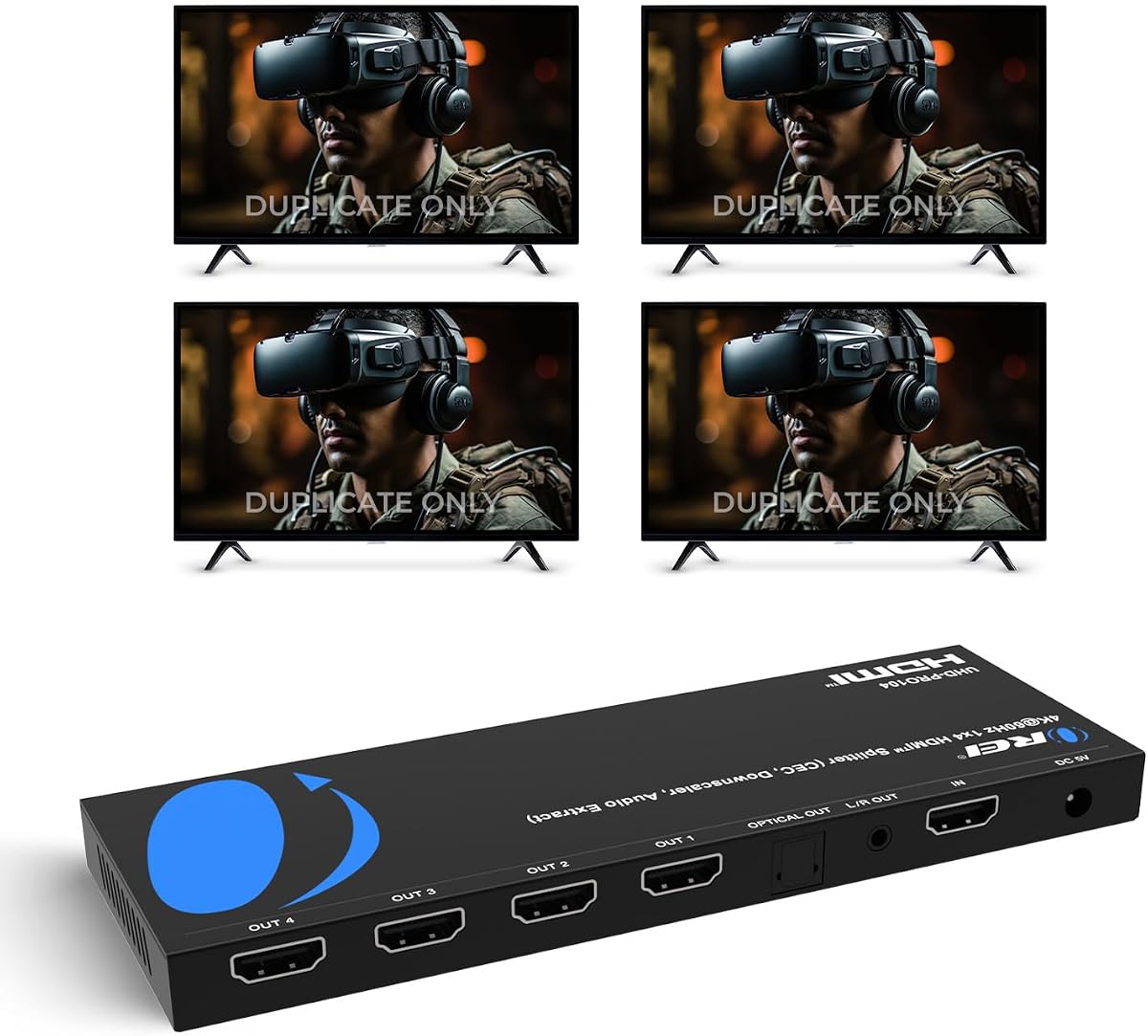
This OREI splitter stands out with integrated audio extraction, allowing for flexible audio routing. It is a feature-rich device that caters to users needing both video distribution and separate audio solutions.
We may earn a commission when you buy through this link, at no additional cost to you.
Support for HDR10+, Dolby Vision, and downscaling makes it versatile for mixed-resolution setups. The ability to extract audio via optical or analog outputs is a significant advantage for home theater enthusiasts.
The additional features come at a higher price point and may require more configuration. However, for users who need these capabilities, the convenience and performance justify the investment.
Perfect for AV installations where both visual and audio distribution are required. Ensure your displays are compatible with the supported HDR standards for best results.
Optical S/PDIF and analog outputs let you route audio to separate systems, perfect for setups needing external speakers.
Built-in downscaling allows 4K sources to work seamlessly with 1080p displays, simplifying mixed-resolution configurations.
We may earn a commission when you buy through this link, at no additional cost to you.
This 8K@60Hz Splitter represents the cutting edge of display distribution, supporting HDMI 2.1 standards for next-gen gaming and media. It is designed for users with high-end displays and sources.
We may earn a commission when you buy through this link, at no additional cost to you.
The ability to handle 4K@120Hz and VRR makes it ideal for gaming setups where smooth motion is critical. Smart EDID management allows flexible resolution settings, improving compatibility with different display configurations.
While powerful, it is limited to mirroring and requires a robust HDMI 2.1 source. If your setup does not need these high refresh rates, a cheaper option might offer better value.
Best for enthusiasts with 4K monitors and consoles or PCs that support HDMI 2.1. Ensure all cables and displays are compatible to fully utilize its capabilities.
VRR and 120Hz support ensure smooth, tear-free visuals for high-frame-rate gaming on compatible monitors.
Four switching modes let you optimize output signals for different resolutions, improving stability and compatibility across devices.
We may earn a commission when you buy through this link, at no additional cost to you.
The UGREEN HDMI Splitter offers a robust four-output solution with solid video performance and broad compatibility. It is a well-rounded option for distributing content to multiple screens in various environments.
We may earn a commission when you buy through this link, at no additional cost to you.
With 18Gbps bandwidth and support for HDR and 3D, it handles modern content standards. EDID control helps prevent flickering and black screens, ensuring a stable setup even with different display resolutions.
Power must be kept connected during use, and audio extraction is not available. These minor limitations are typical for splitters at this tier and do not detract from its core functionality.
Ideal for offices or home theaters needing four synchronized screens. Its compatibility with major gaming and streaming devices makes it a versatile choice for multimedia setups.
Manage display compatibility easily to avoid black screens or flickering across connected monitors with adjustable settings.
Works with a wide range of devices from PCs to consoles and streaming sticks, making it versatile for any media source.
We may earn a commission when you buy through this link, at no additional cost to you.
Selecting the right splitter requires understanding your display needs and device compatibility. Consider these key factors to ensure optimal performance.
Ensure the splitter supports the highest resolution and refresh rate your monitors require. For modern setups, look for 4K@60Hz or higher to avoid bottlenecks.
Always check that the device supports your target resolution to prevent degraded video quality or compatibility issues.
Most splitters only duplicate signals. If you need independent screens for productivity, seek devices with DisplayPort MST support.
Verify extended mode capability before purchase if you plan on multitasking across different screens.
External power adapters provide more stable signal transmission than USB-only models. This is critical for reliable performance.
Ensure the device has a proper power source to avoid flickering or blackouts.
Aluminum casings dissipate heat effectively and protect against interference. This is essential for long-term reliability.
Invest in a model with robust construction to ensure consistent performance over time.
Some models lack audio output ports. If you need separate sound, look for units with audio extraction features.
Confirm audio compatibility if your setup requires external speakers or audio routing.
Check that the splitter matches your source device ports, such as HDMI or DisplayPort. Mismatched connections can render the device unusable.
Ensure your source and display devices are compatible with the splitter's specifications.
Longer cables can degrade signals. Choose a splitter that supports your required cable lengths for stable transmission.
Use high-quality cables to maintain signal integrity across all connected monitors.
Reputable brands often offer better warranties and customer support. This helps if you encounter technical issues.
Look for brands with positive user reviews and responsive after-sales service for peace of mind.
Connect the splitter to your source device using the appropriate HDMI or DisplayPort cable. Ensure the power adapter is plugged in for stable performance.
Link all monitors to the splitter outputs and power them on. Your system should recognize the displays automatically if the splitter supports EDID.
Avoid overloading the splitter with excessive heat sources. Regularly check connections for wear and keep the vents clear for cooling.
Most HDMI splitters only mirror the same image across all screens. For extended displays, you need a DisplayPort MST hub or specific software. Always check product specifications for extended mode support before purchasing.
Flickering often results from insufficient power or long cables. Ensure the splitter is connected to a stable power source and use shorter, high-quality cables. Check that all devices support the selected resolution.
Yes, most splitters require external power for stable performance. While some use USB power, dedicated adapters provide better signal consistency. Always follow the manufacturer's power recommendations.
The resolution depends on the source and splitter capabilities. Higher-end models support 4K@60Hz, while budget ones might cap at 1080P. Check both the splitter and source device limits.
Macs often have limited MST support for extended displays. Some splitters work for mirroring only. Verify macOS compatibility in the product description before buying to avoid restrictions.
Yes, high-speed HDMI cables are required for 4K resolutions. Standard cables may not carry enough bandwidth. Ensure your cables meet the HDMI 2.0 standard or higher.
Choosing the right splitter involves balancing resolution support with your need for extended or mirrored displays. The UANTIN and THANDBLE models offer extended modes for productivity, while others focus on high-quality mirroring.
Prioritize power stability and build quality to ensure long-term performance. Devices with external power and aluminum casings generally provide more reliable operation than budget-only options.
Prices and specifications may change, so verify current details on product pages. Select the model that best aligns with your setup requirements for the most effective experience.