
NOYAFA NF-488 POE Cable Tester
4.5Editor score
RJ45 continuity checking
Backlit LCD screen
Loop-back POE detection
This guide compares the top 10 Inline POE Tester tools for network pros, covering voltage, current, power readings, and compatibility with 802.3af/at/bt
Inline POE testers are essential tools for network professionals who need to verify power delivery over Ethernet cables. They help identify voltage, current, and power levels without disrupting data flow.
We compared ten leading models based on accuracy, display clarity, battery-free operation, and support for various PoE standards. Each entry includes detailed specifications and real-world use cases.
Every pick shows key features like OLED screens, LED indicators, and cable testing modes. Prices change frequently so check current offers before purchasing your ideal testing device.
4.5Editor score

4.1Editor score

The following table provides a side-by-side comparison of all ten Inline POE Tester models. It highlights key specifications such as testing modes, display types, and compatibility standards to help you choose the right tool for your network needs.

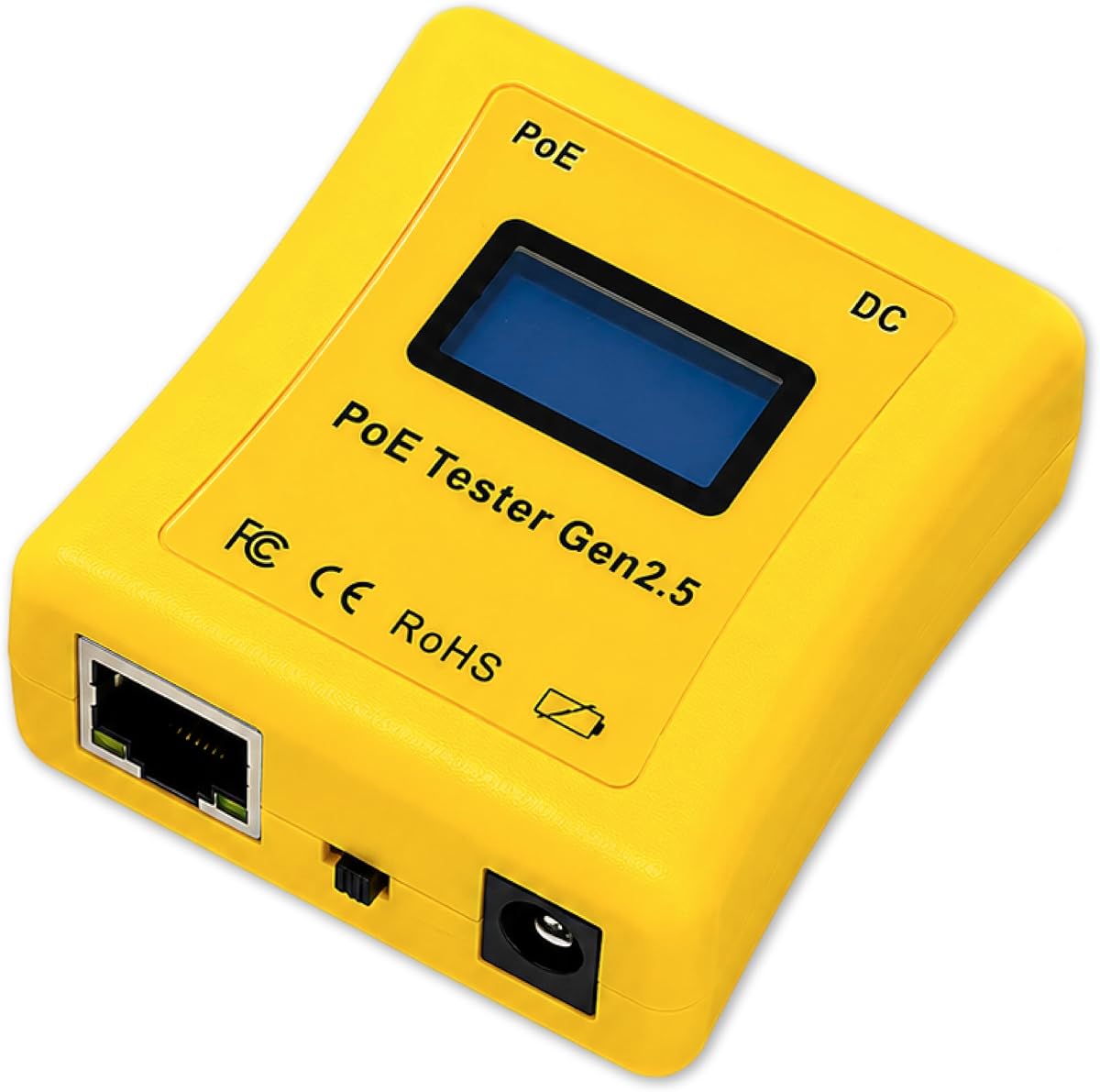
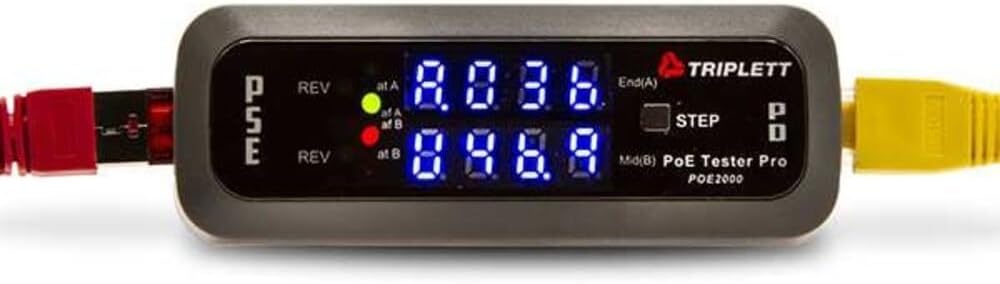


The TRENDnet Inline PoE Tester TC-NTP1 is a reliable tool for network professionals. With a 4.1 rating it stands out for its NDAA compliance and robust testing modes.
We may earn a commission when you buy through this link, at no additional cost to you.
It offers three distinct testing functions T-mode N-mode and I-mode allowing you to check PSE devices non-standard passive PoE and inline power details. The step button lets you lock displays for real-time monitoring.
While it lacks cable length measurement its battery-free operation ensures continuous use without charging. Its compact size makes it easy to carry for field testing across different installations.
Ideal for government customers and IT staff who need compliant and accurate PoE validation. This tester balances functionality with ease of use effectively making it a top choice.
Compliance ensures the tester meets requirements for US and Canadian government network installations securing trusted and approved hardware.
I-mode displays voltage amperage and wattage instantly helping you verify power delivery without interrupting network operations.
We may earn a commission when you buy through this link, at no additional cost to you.
The PoE-T100 features a bright OLED display that shows voltage current power and polarity on a single page. Its self-powered design draws energy directly from the PoE line.
We may earn a commission when you buy through this link, at no additional cost to you.
It supports PD Inline and DC modes covering a wide range of network setups from standard 802.3af/at/bt to non-standard passive devices. This versatility accelerates installation and troubleshooting.
The OLED screen offers superior visibility compared to older LCDs but may rely more on internal components. Still it provides immediate diagnostic data critical for efficient network management.
Best for engineers needing a clear quick read on power delivery. Its ability to differentiate between standard and non-standard PoE makes it a practical tool.
The OLED screen ensures measurements are visible in various lighting conditions aiding quick identification of power issues.
PD Inline and DC modes allow comprehensive testing of powered devices PSE equipment and DC power supplies seamlessly.
We may earn a commission when you buy through this link, at no additional cost to you.
PoE Texas tester offers a Simulate PoE Device mode for testing managed switches without a powered device. Its ergonomic design makes it comfortable to hold during extended jobs.
We may earn a commission when you buy through this link, at no additional cost to you.
The device measures power consumption from DC supplies and detects voltage across 20 to 56 volts. Mode A and B readings help identify wiring issues quickly and accurately.
While the curved body is ergonomic it might feel bulkier for some users. However its ability to detect cable power loss adds significant diagnostic value.
Choose this for its ability to simulate PDs and measure loss. It is a robust choice for detailed troubleshooting in complex network environments.
Activate this mode to test managed or auto-negotiating switches effectively even when no powered device is attached.
Diagnose power loss in Ethernet cables by observing voltage drops and identifying potential wiring problems.
We may earn a commission when you buy through this link, at no additional cost to you.
The NOYAFA NF-488 is a budget-friendly option with strong continuity checking features. It detects POE network cables and Ethernet issues with a remote wiring function.
We may earn a commission when you buy through this link, at no additional cost to you.
Its large LCD backlit screen makes results visible in dark areas. It supports measuring shielded wires and checks for open circuits short circuits and crossovers.
While it needs batteries for operation its anti-slip casing and illumination are practical. The circuit test function adds value for switch connectivity diagnostics.
Perfect for technicians needing reliable continuity and basic POE checks without high costs. Its balance of price and features makes it a top budget pick.
Test cables remotely to identify opens shorts and crossovers efficiently saving time during large installations.
The clear screen with backlight ensures readable results even in poorly lit server rooms or conduits.
We may earn a commission when you buy through this link, at no additional cost to you.
The Triplett POE2000 uses dual LEDs to indicate power source type and polarity. It is straightforward and quick for identifying standard or non-standard passive PoE.
We may earn a commission when you buy through this link, at no additional cost to you.
Two yellow LEDs highlight reversed polarity helping avoid incorrect connections. The display alternates between voltage current and power with a step button for selection.
Despite a lower rating it remains useful for basic detection tasks. Its simplicity makes it easy to learn and use for routine network checks.
Ideal for users who prefer a simple tool over advanced features. It provides essential PoE data without complexity.
Clear LED signals show End Span or Mid Span power sources for quick identification of PSE type.
Yellow LEDs warn of reversed polarity allowing you to correct connections before damaging equipment.
We may earn a commission when you buy through this link, at no additional cost to you.
The Triplett POE3000 simplifies PoE system troubleshooting with visual LED indicators. It shows 802.3af and at/bt standards clearly for rapid diagnosis.
We may earn a commission when you buy through this link, at no additional cost to you.
It incorporates inline power level monitoring displaying voltage current and power with a step button. This aids in monitoring power levels during installation.
The N/A rating might reflect limited user feedback but its features are robust for professionals. It is versatile for determining standard and passive PoE compatibility.
Choose this premium tool for its clarity and inline monitoring capabilities. It is suited for network engineers prioritizing visual cues and accurate detection.
Four LEDs indicate IEEE 802.3af or at/bt standards giving instant visual confirmation of network power standards.
Track voltage current and power alternately to ensure devices receive adequate power levels during deployment.
We may earn a commission when you buy through this link, at no additional cost to you.
The Jonard Tools POE-1 offers comprehensive testing for PoE presence voltage and standards. It also verifies cable continuity for Cat5e Cat6 and Cat6a cables.
We may earn a commission when you buy through this link, at no additional cost to you.
It is battery-free when powered by PoE but uses an AA battery for unpowered cables. The kit includes a cable remote female adapter and batteries.
Its compact lightweight design with a belt clip ensures easy portability. The ability to measure resistance helps identify cable quality issues beyond power delivery.
Ideal for network techs needing both PoE and cable verification in one tool. The included accessories add value for field work.
Verify flawless data transmission by measuring resistance and continuity across standard Ethernet cables.
The lightweight form factor and included belt clip make it easy to carry during daily on-site tasks.
We may earn a commission when you buy through this link, at no additional cost to you.
This tester verifies standard and non-standard PoE and measures cable lengths from 5 to 300 meters. It features port flash detection and a rechargeable 1500mAh battery.
We may earn a commission when you buy through this link, at no additional cost to you.
Port flash detection helps locate active ports quickly. Load validation ensures connected devices receive stable power reducing troubleshooting time.
The rechargeable battery and auto-shutoff settings make it practical for long sessions. Its clear low-battery indicator prevents unexpected shutdowns during use.
Best for installers needing to confirm cable runs and PoE delivery. Its battery life and port flash feature enhance field efficiency.
Verify cable runs up to 300 meters to ensure installations meet distance requirements for reliable network performance.
Identify active ports instantly by detecting flash signals for faster troubleshooting and network mapping.
We may earn a commission when you buy through this link, at no additional cost to you.
This inline tester is designed for CAT5 and CAT6 panel testing with DVM power capabilities. It is a professional-grade tool for network diagnostics.
We may earn a commission when you buy through this link, at no additional cost to you.
It supports network PoE testing allowing verification of power and data lines. The DVM power panel adds precision for voltage checks.
While description details are minimal its professional grade suggests it suits high-demand environments. It is likely built for durability and frequent use.
Ideal for enterprise installations needing reliable panel testing. Its DVM features make it a precise choice for voltage and PoE verification.
Built for high-demand environments ensuring reliable results in enterprise-level network panel verification.
Digital Volt Meter capabilities provide precise voltage checks alongside standard PoE testing for thorough diagnostics.
We may earn a commission when you buy through this link, at no additional cost to you.
The NF-488 network tester checks short circuits crossovers and open circuits for CAT5 and CAT6 cables. It includes an LED lamp for illumination in dark spaces.
We may earn a commission when you buy through this link, at no additional cost to you.
It features loop-back tests and power current voltage testing with ranges up to 180 watts. Customer service is highlighted with a 24-hour response promise.
The LED lamp and lifetime service add significant user value. It is a versatile tool for both cable integrity and power verification.
Best for users valuing support and low-light visibility. Its multi-functional testing ensures quick fault finding in network and power setups.
Lifetime friendly customer service with 24-hour responses ensures you get help whenever you face issues.
An LED lamp illuminates dark environments making it easier to inspect cables and ports during installations.
We may earn a commission when you buy through this link, at no additional cost to you.
Selecting the right Inline POE Tester involves understanding key factors like power support display type and testing modes. This guide helps you evaluate what matters most for your work.
Ensure the tester supports 802.3af/at/bt as well as passive PoE and 4PPoE. This ensures accurate identification of power sources and prevents equipment damage from mismatched standards.
Look for models that clearly distinguish between standard and non-standard voltages for safer installations.
OLED or backlit LCD screens improve readability in dimly lit server rooms. Clear displays help you monitor voltage current and power without straining your eyes.
Prioritize testers with lock features for real-time monitoring of specific readings.
Different modes like PD or and DC allow you to test powered devices PSE equipment and DC supplies. More modes mean greater versatility across varied network scenarios.
Choose a model that includes at least two modes to cover common field use cases.
Battery-free testers powered directly from PoE lines reduce downtime and maintenance. However some may require AA batteries for unpowered cable checks.
Opt for rechargeable or battery-free designs to ensure continuous operation in the field.
Some testers also verify cable continuity continuity length and faults. These features add value when you need to check both power and data lines in one tool.
Look for remote wiring functions if you work with long cable runs.
Ergonomic designs and compact sizes make testers easier to carry and use. Anti-slip casings and belt clips enhance usability during long work sessions.
Choose a tool built to withstand drops and daily handling.
Reversed polarity can damage connected devices. A tester that highlights polarity issues with visual indicators prevents costly mistakes.
Prioritize models that clearly show reversed polarity with LED alerts.
Manufacturer protection and responsive customer support ensure help when issues arise. Look for warranties and English speaking tech teams for reliable service.
Check for at least two years of warranty for peace of mind.
Start by connecting the tester between the PSE source and the powered device. Ensure the connections are secure to avoid loose readings.
Use the appropriate mode such as Inline or PD depending on your task. Cycle through readings to check voltage current and power levels.
Store the tester in a dry place and avoid exposure to extreme temperatures. Clean connectors regularly to ensure optimal performance and accuracy.
An Inline POE Tester verifies that power over Ethernet is being delivered correctly. It shows voltage current and power levels to help troubleshoot devices like cameras phones and access points.
Many models are battery-free and draw power from the PoE line. Some include AA or rechargeable batteries for unpowered cable checks or display operation.
Yes most testers support non-standard passive PoE ranges like 12 to 57V. Always check the device specs to ensure it covers your specific setup requirements.
PD mode simulates a powered device to test PSE output. Inline mode passes power through the device and measures power levels for real-time monitoring.
Some advanced testers can detect open circuits shorts and crossovers. Others focus only on power delivery so choose based on your testing needs.
Incorrect polarity can damage connected devices. Testers with polarity alerts ensure you identify reversed wiring before powering on sensitive equipment.
Keep connectors clean and store the device in a protective case. Avoid extreme temperatures and check the manual for specific maintenance guidelines.
The top picks like the TRENDnet TC-NTP1 NOYAFA NF-488 and Triplett POE3000 offer distinct advantages for professionals. Each model balances features and price to suit specific needs.
Prioritize compatibility with your PoE standards and a clear display for accurate readings. Battery-free operation and cable testing modes add extra value.
Check current availability before purchasing as prices and models may change. A reliable Inline POE Tester ensures smooth and safe network installations.