
Apple Magic Keyboard
4.5Editor score
Floating cantilever design
Built-in trackpad
Pass-through charging
This guide compares the top iPad Air Folio Case with Keyboard options for 2026, evaluating trackpads, backlights, and protection to help you choose.
Finding the right accessory can transform your iPad Air into a powerful workstation. A quality Folio case with a built-in keyboard offers the versatility of a laptop while maintaining the portability you love. These cases provide protection, typing comfort, and often include trackpads for easier navigation.
We have carefully selected and analyzed ten leading options available in the market today. Our comparison focuses on compatibility across different iPad Air generations, build quality, typing experience, and additional features like trackpads or backlighting. Each product was evaluated based on user feedback and technical specifications.
Every pick in this list highlights specific strengths to help you match a case to your workflow. Whether you need a premium experience or a budget-friendly solution, you will find a suitable choice here. Please note that prices and availability can change frequently, so check current listings before purchasing.
4.5Editor score

4.5Editor score
4.3Editor score
This table provides a side-by-side look at the key specifications and features of each top-rated case. It helps you quickly compare compatibility, standout features, and overall ratings to narrow down your choice based on what matters most to you.




The Logitech Flip Folio stands out as a top-tier option for those seeking a premium typing experience. With a 4.5-star rating, it offers a high-precision trackpad and a backlit keyboard that adapts to your environment. Its four use modes make it incredibly versatile for various tasks.
We may earn a commission when you buy through this link, at no additional cost to you.
The trackpad supports multi-touch gestures like swipe and pinch, making navigation faster and more intuitive. The backlight automatically adjusts to lighting conditions, ensuring comfort in any setting. The case provides sturdy protection meeting military standards while keeping the iPad lightweight and accessible.
While it excels in functionality, the price is higher compared to some competitors. Additionally, it does not charge the Apple Pencil directly like some other cases. However, it offers ample space to store the Pencil securely without removing the case from your iPad.
This case is ideal for users who need a laptop-like experience with robust protection. It is perfect for professionals and students who type frequently and value precision navigation. If you want a reliable and versatile case, the Logitech Flip Folio is a strong recommendation.
The trackpad allows you to use familiar gestures, reducing reliance on the screen and enhancing productivity.
Switch between typing, sketching, viewing, and reading modes easily to match your current task needs.
We may earn a commission when you buy through this link, at no additional cost to you.
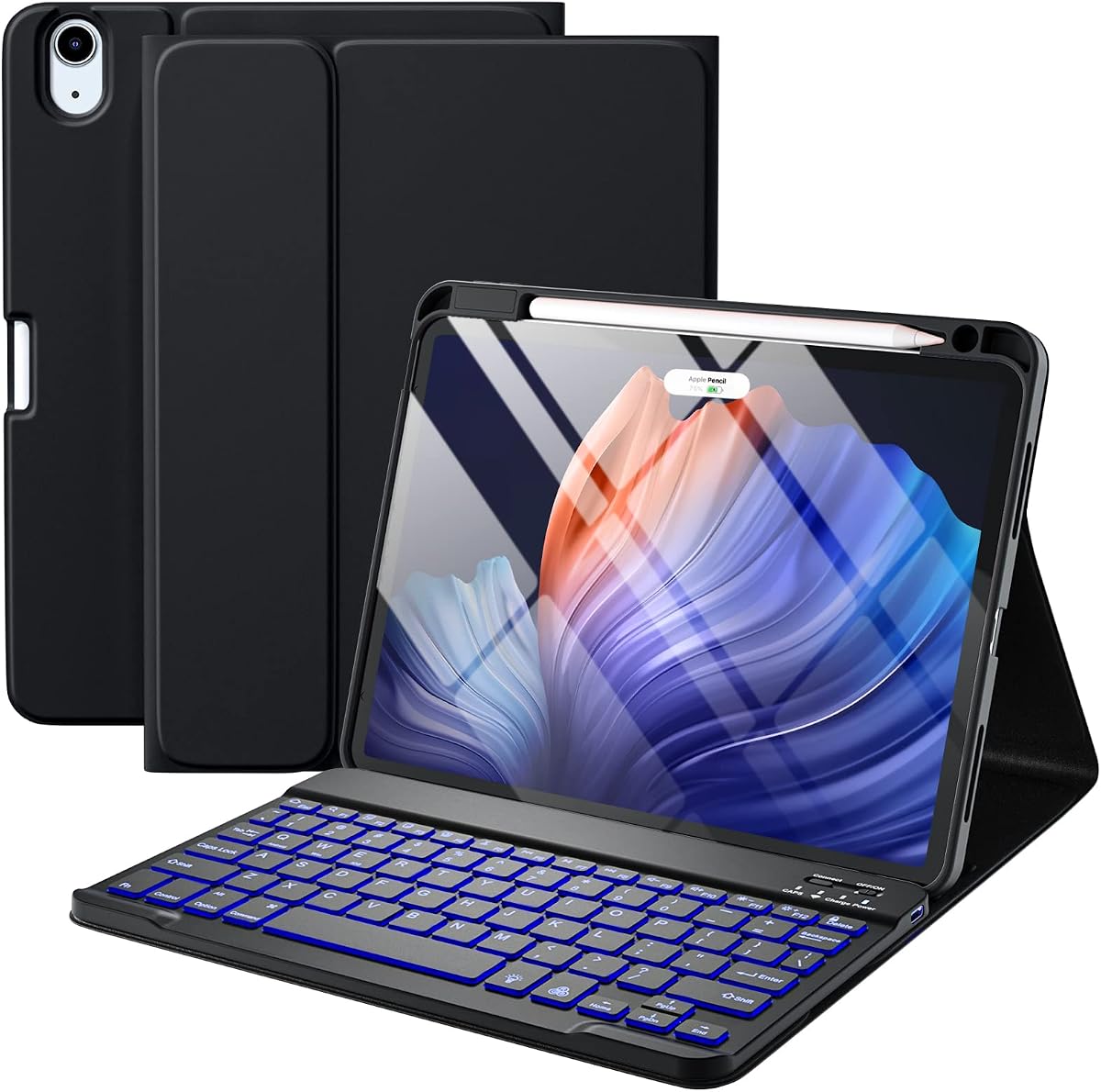
The Harvopu Keyboard Case is a fantastic choice for budget-conscious buyers who do not want to compromise on features. It offers a detachable backlit keyboard that can be used via Bluetooth. The case supports the Apple Pencil charging directly, adding significant value.
We may earn a commission when you buy through this link, at no additional cost to you.
The keyboard features a rechargeable battery that lasts long on a single charge. You can choose from seven breathing backlight colors to suit your style or lighting needs. The case itself protects the tablet with a honeycomb design for heat dissipation and shock absorption.
Since the keyboard connects via Bluetooth, it needs to be paired before use, which might take a moment. The build quality is good but feels slightly lighter than premium options. Despite this, it provides a stable typing surface with adjustable viewing angles for comfort.
This case is perfect for students or casual users looking for great value. It covers all the essentials including backlighting and protection at a fraction of the cost. If you want a versatile and affordable solution, the Harvopu case is an excellent pick.
Remove the keyboard when you need a pure tablet mode for reading or drawing without taking off the case.
Keep your Pencil charged and ready by placing it in the built-in tray while the case is on.
We may earn a commission when you buy through this link, at no additional cost to you.
The Apple Magic Keyboard is the ultimate accessory for users seeking the best possible typing experience. It features a floating cantilever design that allows smooth adjustment of viewing angles. The full-size keyboard includes a trackpad and a function row for complete control.
We may earn a commission when you buy through this link, at no additional cost to you.
Its construction is premium, ensuring durability and stability. The trackpad is large and responsive, supporting all multi-touch gestures. Since it pairs via Smart Connector, you do not need to charge the keyboard separately, reducing daily maintenance and ensuring it is always ready.
The high price tag may be a barrier for many buyers. Additionally, the case adds some weight to the iPad, which might affect portability. However, the typing comfort and functionality it provides are unmatched, making it worth the investment for power users.
This keyboard is best suited for professionals who rely heavily on their iPad for work. If you need a seamless laptop replacement with premium materials and features, this is the top choice. It transforms the iPad Air into a true productivity machine effortlessly.
The hinge allows you to angle the screen to your preference while typing, improving ergonomics significantly.
Access iPadOS shortcuts quickly without using the screen, speeding up your workflow with ease.
We may earn a commission when you buy through this link, at no additional cost to you.
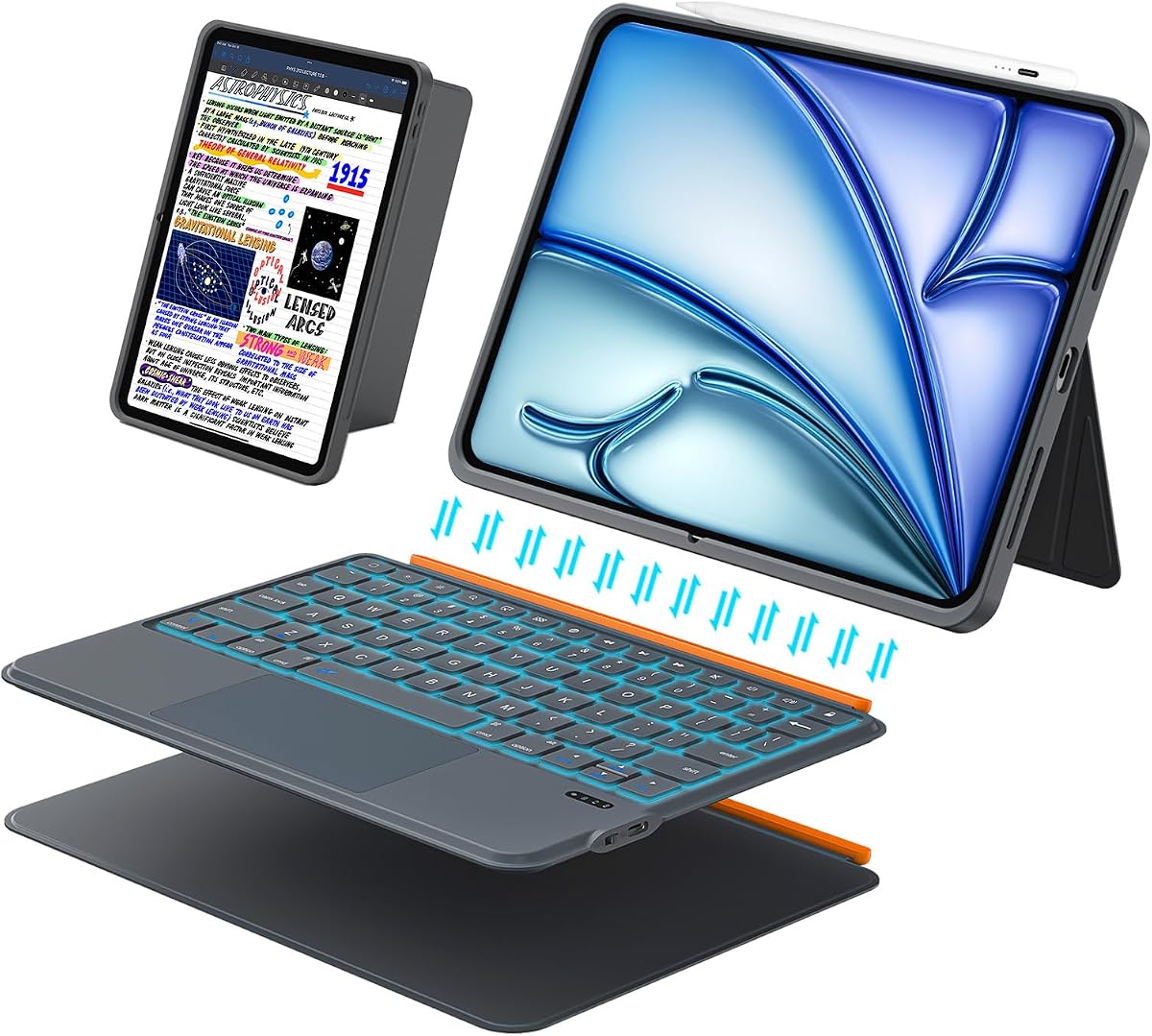
The ESR Ultra-Light keyboard is designed for users who prioritize portability above all else. Weighing very little, it is easy to carry anywhere. It features an extra-large trackpad that offers 65% more space than standard options, enhancing navigation significantly.
We may earn a commission when you buy through this link, at no additional cost to you.
The keyboard is detachable via strong magnets, allowing you to switch between tablet and laptop modes quickly. It offers two fixed viewing angles that work well for most tasks. The case provides solid protection against drops and scratches with reinforced corners.
One drawback is the lack of a backlight, which might make typing in low light difficult. Also, there are only two viewing angles, limiting flexibility compared to other models. However, the slim design and responsive trackpad make it a great option for travelers.
This case is perfect for students or professionals on the go. If you want something slim and functional without adding bulk, it is a strong contender. It balances weight and features well for daily use and travel scenarios.
The expanded surface area makes swiping and scrolling easier, giving you more room to maneuver your cursor.
The strong magnetic hold keeps the keyboard stable while typing but allows quick removal when needed.
We may earn a commission when you buy through this link, at no additional cost to you.
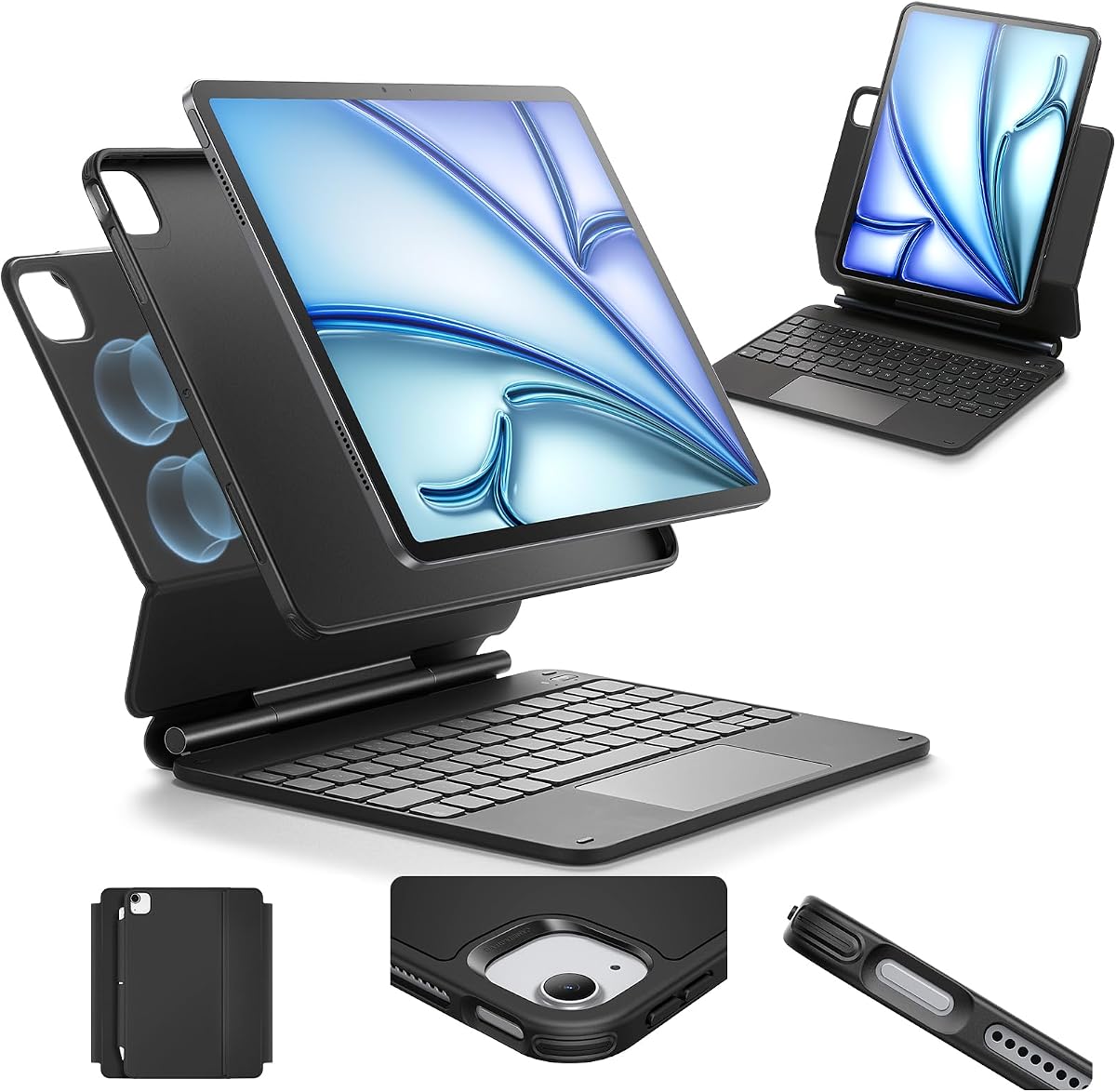
The Magic-Style Magnetic Keyboard Case offers a floating stand similar to premium options but at a mid-range price. It features a multi-touch trackpad that supports gestures for better navigation. The battery life is impressive, allowing extended use without frequent recharging.
We may earn a commission when you buy through this link, at no additional cost to you.
The keyboard has a backlight with three brightness levels to suit different environments. It attaches magnetically to the case for a secure typing setup. The case provides enhanced protection with synthetic vegan leather, ensuring durability for daily use and travel.
It is heavier than ultra-thin cases and requires Bluetooth pairing. The build is sturdy but adds weight to the iPad setup. Still, the features like the floating stand and good battery life make it a strong competitor in the mid-range market.
This case is ideal for users who want a laptop-like feel without the highest price. It works well for students and professionals who need typing comfort and protection. If you want a versatile and well-featured case, this is a great option.
The 750mAh battery supports weeks of use on a single charge, reducing the need to carry a charger.
Adjust the backlight brightness easily to reduce eye strain during late-night work sessions.
We may earn a commission when you buy through this link, at no additional cost to you.
This versatile case supports a wide range of iPad models including Air and Pro. It features a stand that adjusts up to 160 degrees, offering incredible flexibility for viewing. The Bluetooth 5.3 ensures a fast and stable connection for smooth typing.
We may earn a commission when you buy through this link, at no additional cost to you.
The keyboard uses a scissor structure for quiet and comfortable typing. It works in both portrait and landscape modes, accommodating different workflows. The trackpad supports full multi-touch gestures, making navigation intuitive and efficient without screen taps.
The many compatibility options can be confusing to verify before purchase. The case is a bit complex compared to simpler models. However, the adjustability and connectivity options make it a powerful tool for users who need flexibility.
It is suitable for users who need specific viewing angles or use multiple iPad models. If you want a case that grows with your needs, this is a solid choice. It balances features and functionality well for a broad audience.
Adjust the stand angle precisely to reduce neck strain during long typing sessions.
Connect quickly and reliably without lag, ensuring a smooth and responsive typing experience.
We may earn a commission when you buy through this link, at no additional cost to you.
The Apple Smart Keyboard Folio is a renewed option that provides a straightforward typing solution. It requires no charging or pairing, attaching via Smart Connector for instant use. The keyboard folds into a stand and serves as a protective cover.
We may earn a commission when you buy through this link, at no additional cost to you.
Its design is lightweight and simple, making it easy to carry. However, it lacks a trackpad and adjustable viewing angles compared to newer cases. Despite this, it remains a reliable choice for basic typing needs and protection at a lower price point.
Buying renewed means you save money but must check the condition carefully. The lack of a trackpad means you rely on gestures for navigation. It works best for users who prioritize simplicity and Apple compatibility over advanced features.
This is a good option for those who want a classic Apple accessory. If you prefer minimalism and cost savings, it is worth considering. It provides a basic but functional upgrade to your iPad setup.
Skip the hassle of charging the keyboard separately since it draws power directly from your iPad.
The case folds to protect both the front and back of your tablet during transport.
We may earn a commission when you buy through this link, at no additional cost to you.
The Logitech Folio Touch is a renewed option offering a high-precision trackpad and backlit keys. It connects via Smart Connector, so it powers directly from the iPad without separate charging. The case offers four versatile use modes for typing and viewing.
We may earn a commission when you buy through this link, at no additional cost to you.
The trackpad supports multi-touch gestures making navigation smooth. The backlight adjusts to your environment for comfort. While it is a renewed product, it retains the sturdy build and military-grade protection known from this model.
It does not support charging the Apple Pencil, only storage. Being renewed, there might be minor signs of use though functionality is tested. It remains a great choice for those wanting trackpad features without a premium price.
This is ideal for users who prioritize trackpad navigation. If you want a reliable case with good typing experience and protection, this fits well. It offers a balanced set of features for daily use and work.
Use familiar touch gestures to scroll, zoom, and navigate your iPad easily with precision.
Never worry about charging the keyboard as it gets power from the iPad itself.
We may earn a commission when you buy through this link, at no additional cost to you.
This Harvopu model features a unique seven-color backlight option that adds style to your setup. The trackpad is highly sensitive, allowing precise navigation. The keyboard can be detached magnetically, offering flexibility between typing and tablet modes.
We may earn a commission when you buy through this link, at no additional cost to you.
The keyboard connects via Bluetooth and supports quick pairing. It includes adjustable viewing angles for comfort. The build provides protection for the iPad and supports standard tasks efficiently without issues.
Since it uses Bluetooth, pairing is required and the keyboard needs charging. The style of the backlight may not suit professional settings. However, for those who value customization and flexibility, it offers good value for the price.
This case works well for creative users who enjoy personalization. If you want a case with fun features and functionality, it is a good choice. It provides a mix of style and practical features for everyday use.
Choose from seven colors to match your mood or decor and add flair to your workspace.
Switch between laptop mode and tablet mode instantly by detaching the keyboard when needed.
We may earn a commission when you buy through this link, at no additional cost to you.
The ESR Multi-Mode case features a quick-set stand that uses strong magnets for stability. It includes an extended trackpad for precise control and navigation. The case detaches to allow hands-on access while keeping the tablet protected.
We may earn a commission when you buy through this link, at no additional cost to you.
It supports multiple view modes including raised screen view for posture and portrait mode for calls. The trackpad is ultra-sensitive and supports gestures for smooth operation. The build is sturdy and protects your iPad from scratches and bumps.
The lack of backlight might be a downside for low-light use. The angle options are limited but functional for standard tasks. It offers a reliable mix of features that make the iPad more versatile for various activities.
This case is suitable for users needing posture-friendly setups. If you want good trackpad performance and easy access to your iPad, it is a strong option. It balances protection and functionality for daily use well.
Set up the case to raise the screen for better posture and reduce strain during long sessions.
The extended trackpad gives you more room to tap and swipe accurately for efficient control.
We may earn a commission when you buy through this link, at no additional cost to you.
Choosing the right keyboard case involves weighing features against your specific needs. Consider compatibility, typing experience, trackpads, and protection levels to find the best match for your workflow.
Ensure the case matches your iPad Air model number like M4 M3 M2 or 4th and 5th generation. Some cases are designed for specific generations and will not fit others. Check the model number on the back of your tablet or in settings before purchasing.
Always verify compatibility lists to avoid fitting issues that can lead to returns.
Look for keys with good travel distance and spacing for comfortable typing. Scissor mechanisms offer stability while membrane keys may feel mushy. The layout should include necessary iPadOS shortcuts for productivity.
Test key feel if possible or read reviews on comfort for long typing sessions.
A trackpad allows you to navigate without touching the screen using gestures. Multi-touch support is essential for smooth scrolling and app switching. Some trackpads are larger than others providing more room for movement.
If you use productivity apps frequently, a trackpad is a worthwhile investment.
Backlighting is useful for typing in low light environments. Some keyboards offer adjustable brightness while others have fixed or color options. Check if the backlight dims automatically or requires manual adjustment.
Prioritize adjustable backlight if you work in varied lighting conditions.
Cases powered by Smart Connector do not need charging while Bluetooth models require battery management. Bluetooth allows detachment but needs pairing. Consider your preference for convenience versus flexibility.
Smart Connector options are more convenient but less flexible for tablet use.
Check for case materials like PU leather or TPU back covers that offer shock absorption. Military-grade protection standards indicate better durability against drops. Reinforced corners and secure latches add to protection.
Choose a case with robust materials if you travel frequently or have young users.
Adjustable stands improve ergonomics by allowing you to set the screen height and angle. Multiple angle options help with typing and viewing tasks. Some cases have limited angles which may affect comfort.
Opt for stands with multiple settings for better flexibility in your workspace.
Determine your budget early to narrow options. Premium cases cost more but offer better build quality and features. Budget cases provide essentials but may lack trackpads or durability.
Balance cost against features you need regularly to get the best value.
Start by ensuring your iPad model matches the case specifications and install any required software updates. Connect the keyboard via Bluetooth or Smart Connector as per instructions. Once connected, test keys and trackpad gestures to confirm proper function.
Adjust the stand to a comfortable angle to reduce neck strain. Use the trackpad to navigate rather than tapping the screen to conserve battery and protect touch sensors. If using backlight, set it to auto-adjust to save power.
Clean the case regularly with a soft dry cloth to remove dust. Avoid harsh chemicals on the keys and trackpad. Store the case in a cool dry place when not in use to prolong the life of materials and electronics.
Most cases listed support the 2026 2025 and 2024 iPad Air models including M4 M3 and M2 chips. Always check the product compatibility list to confirm fit for your specific model number. Some cases may only support older generations like 4th or 5th Gen.
Some cases have built-in trays for Apple Pencil but only select models support charging through the case. Others provide storage slots without charging. Check product specs for charging support before buying.
Cases like the Apple Smart Keyboard Folio provide a keyboard without a trackpad and are good for basic typing. They are lightweight and do not require separate charging but lack gesture navigation. Suitable if you prefer on screen controls.
For detachable keyboard cases you can remove the keyboard magnetically to use tablet mode. For non-detachable cases you fold the keyboard flat. This allows you to use touch controls freely without typing interference.
Some cases support portrait orientation while others are designed primarily for landscape. Check if the case has portrait stand modes or magnetic alignment. Not all models support vertical use comfortably.
Bluetooth keyboards pair initially and reconnect automatically when turned on if within range. Smart Connector models do not use Bluetooth and connect instantly. Pairing is not needed each time for Smart Connector cases.
We have covered ten top options ranging from budget to premium choices. The Apple Magic Keyboard offers the best overall experience for professionals while Harvopu provides excellent value for students. Logitech stands out for trackpad precision and versatility.
Consider your typing needs, budget, and portability requirements when selecting. If you need premium features and build, go for Apple or Logitech. For affordability with solid features, Harvopu or ESR are smart picks.
Prices can fluctuate so check current listings before finalizing your purchase. Ensure compatibility with your iPad model to avoid issues. We hope this guide helps you find the perfect accessory to enhance your iPad Air experience.