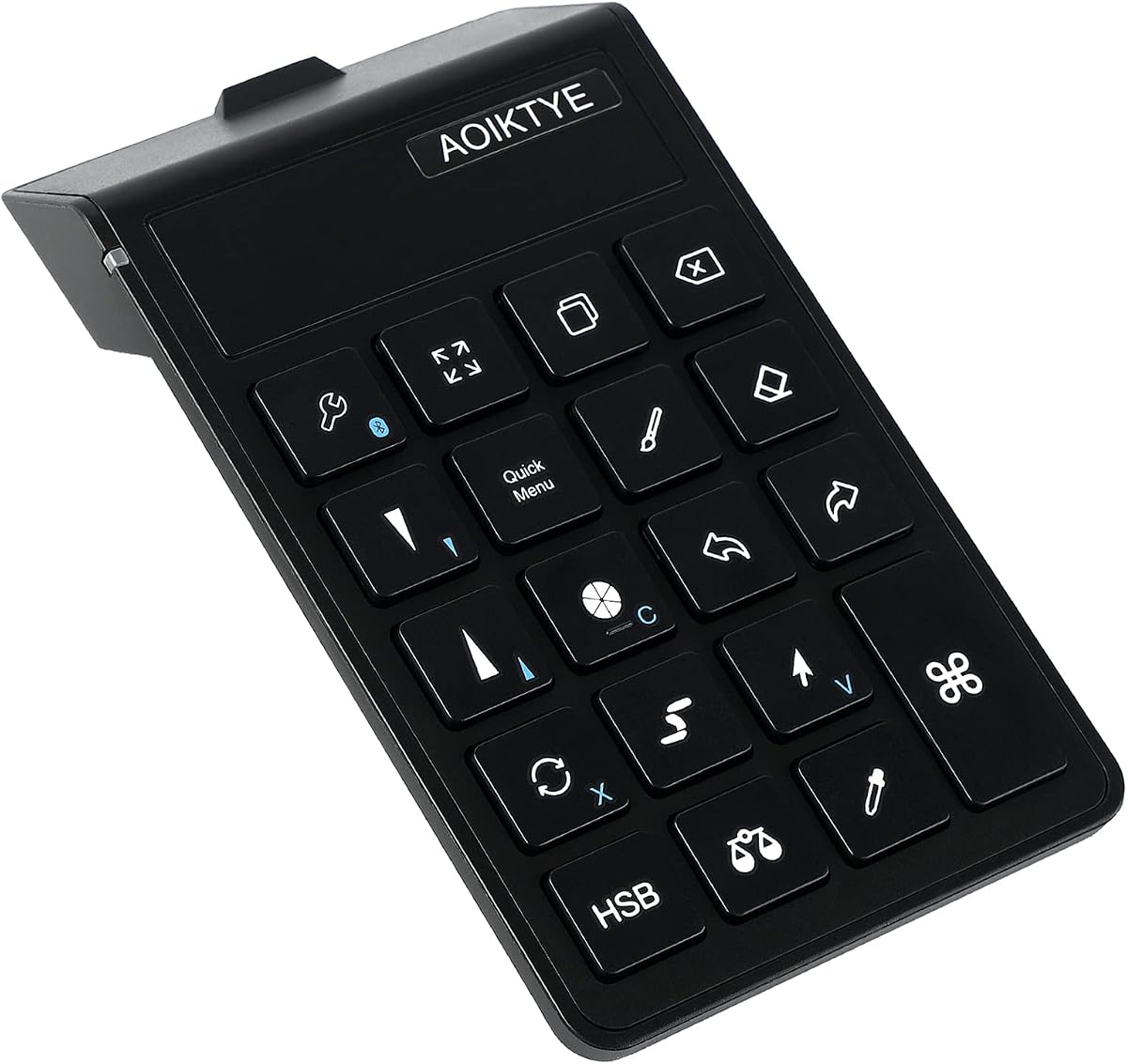
Keyboard for Procreate
4.5Editor score
22 shortcut keys
84-hour battery
Procreate optimized
Wireless connectivity
This guide compares the top ten iPad Drawing Bluetooth Controller options to help digital artists find the best programmable shortcut keyboard for their
Digital artists need efficient tools to speed up their workflow on iPads. A good iPad Drawing Bluetooth Controller lets you access shortcuts without switching apps or touching the screen constantly. This helps maintain focus on your creative process while reducing physical strain during long sessions.
We evaluated ten top-rated Bluetooth controllers and shortcut keyboards compatible with iPad drawing apps. Our analysis considers battery life, connectivity stability, customization options, and ergonomic design. Each product was assessed based on user feedback and technical specifications to ensure reliable performance.
Each pick highlights specific strengths like dual dials or app-specific optimization for Procreate. Prices and availability change frequently so check current listings before buying. These controllers transform how you interact with creative software on tablets by streamlining repetitive tasks efficiently.
4.5Editor score

5.0Editor score

4.4Editor score
Here is a side-by-side comparison of all ten controllers to help you quickly identify the right fit for your iPad drawing needs based on features and compatibility.


The DIGIDRAW K30 stands out as the top choice with its unique dual dial design and perfect five-star rating. This controller excels at offering tactile positioning for blind operation so artists can keep eyes on the canvas.
We may earn a commission when you buy through this link, at no additional cost to you.
Its lightweight 82 gram body fits comfortably in one hand while dual dials allow precise brush and zoom adjustments. The 11 custom keys combined with up to 40-hour battery life make it ideal for long creative sessions.
Trade-offs include the need to download drivers for full customization which adds setup time. Still the ergonomic design and clear feedback justify this small effort for serious digital artists.
Buy this if you want premium control and portability. It delivers unmatched efficiency for drawing apps without cluttering your workspace.
Two dials let you adjust size and opacity simultaneously without reaching for menus.
Raised markers on keys ensure you press the right command even during intense work.
We may earn a commission when you buy through this link, at no additional cost to you.
This keyboard delivers excellent value with a four point five star rating and direct focus on Procreate users. It features twenty-two shortcut keys including color adjustment and brush size changes for faster workflows.
We may earn a commission when you buy through this link, at no additional cost to you.
The standout feature is its eighty-four-hour battery life which supports weeks of use between charges. Upgrades include key repositioning for better access and OTA support for future improvements.
Some users may find build quality basic compared to higher end models. However for casual artists or students the price and app optimization make it a smart investment.
Choose this for affordable efficiency if you primarily use Procreate. It streamlines common drawing tasks effectively without breaking the budget.
Keys are mapped specifically for Procreate actions like color picking and layer switching.
Charges in two hours to provide continuous use for over a month.
We may earn a commission when you buy through this link, at no additional cost to you.
The TourBox Lite brings premium build quality and design with its wireless freedom and refined eight-key layout. It offers a unified control approach across apps reducing the need to reconfigure settings constantly.
We may earn a commission when you buy through this link, at no additional cost to you.
Its ergonomic design supports long sessions while the knob wheel and raised buttons provide clear tactile feedback. Built-in presets detect active apps to switch setups automatically for smooth transitions.
Cost is higher than competitors which may deter budget-conscious buyers. Additionally setup requires downloading the TourBox Console which adds initial time.
Invest in this if you want a stylish reliable tool for creative work. It enhances productivity through intuitive control across multiple apps.
Cable-free connection lets you create anywhere without desk limitations.
Auto-detection changes controls based on the app you are using.
We may earn a commission when you buy through this link, at no additional cost to you.
HUION Keydial Mini combines eighteen customizable keys with a versatile dial for efficient workflow control. Its Bluetooth upgrade offers reliable connectivity up to ten meters away.
We may earn a commission when you buy through this link, at no additional cost to you.
The dial can be set to three different functions allowing quick toggling between brush size and timeline navigation. Anti-ghosting ensures five keys press simultaneously for complex shortcuts.
Users may find setup requires using Huion drivers which adds initial steps. Limited dial functions may feel restrictive for power users wanting more flexibility.
Select this for customizable shortcuts and broad software support. It suits editors and designers needing reliable keyboard functions.
Allows five key presses at once for efficient multi-step shortcuts.
Popup shows current button functions to avoid memorizing shortcuts.
We may earn a commission when you buy through this link, at no additional cost to you.
XPPen Mini Keydial provides an incredibly long three hundred-hour battery life within a lightweight seventy-five gram package. Ten keys offer extensive customization when paired with the driver software.
We may earn a commission when you buy through this link, at no additional cost to you.
Its dial offers clear tactile clicks for zooming and canvas rotation. Multiple connection options including Bluetooth dongle or cable ensure versatility across devices.
iOS users must download specific apps to configure settings which adds steps. Anti-ghosting works well but limited keys may frustrate those needing more controls.
Choose this for portable long-lasting creative control. It suits users prioritizing battery efficiency and compact size.
Large 1000 mAh battery supports months of standby and continuous use.
Clear click feedback ensures precise brush and zoom adjustments.
We may earn a commission when you buy through this link, at no additional cost to you.
This remote offers a trackpad for mouse-like cursor control and media buttons for presentations. It works with iPhone and iPad allowing seamless navigation without touch gestures.
We may earn a commission when you buy through this link, at no additional cost to you.
Trackpad movement enables precise selection for drawing apps while Home button access simplifies app switching. Bluetooth 5.0 ensures stable connections up to ten meters.
Users focused on advanced drawing shortcuts may find features too basic. Media controls limit creativity for dedicated artists requiring specialized keys.
Use this for presentations and media control alongside light drawing. It bridges gap between mouse and remote control.
Mouse-like cursor moves across iPad screen for precise control.
Buttons for volume and playback add utility for presentations.
We may earn a commission when you buy through this link, at no additional cost to you.
Clip Studio Tabmate 2 targets artists using Clip Studio Paint with dedicated buttons for frequent operations. It includes a single device license enhancing value for new users.
We may earn a commission when you buy through this link, at no additional cost to you.
Bluetooth Low Energy 5.1 ensures efficient power use while cross-platform support covers iPad and Windows. Handheld design fits naturally in hand during drawing sessions.
Battery dependency requires AA purchases separately and older CSP versions lack support. Limited app support reduces versatility beyond Clip Studio.
Buy this if you use Clip Studio Paint exclusively. It simplifies workflows with tailored shortcuts.
Single device debut license included adds value for new artists.
Low Energy 5.1 maintains connection while saving battery life.
We may earn a commission when you buy through this link, at no additional cost to you.
Wacom Intuos Small offers industry-leading performance with a battery-free pen and precision EMR technology. It works across all software supporting drawing editing and marking documents.
We may earn a commission when you buy through this link, at no additional cost to you.
Bluetooth allows wireless use via USB cable ensures stable connection. Included software and training enhance value for beginners starting digital art.
Bluetooth functionality is not compatible with iPad limiting mobile use. Traditional tablet may need adjustment for touch-only users.
Use this for desktop workflows needing precision. It offers trusted quality for professional art.
Battery-free pen feels like natural pen on paper.
Registration unlocks software and online training resources.
We may earn a commission when you buy through this link, at no additional cost to you.
ShanWan controller offers keyboard mouse support for drawing control and works across platforms. Precise analog sticks and triggers enable accurate performance.
We may earn a commission when you buy through this link, at no additional cost to you.
Comfortable grip reduces fatigue and rechargeable battery provides uninterrupted use. Custom mapping adds flexibility for specific creative apps.
Lacks dedicated drawing shortcuts compared to specialized tools. Basic support may require setup adjustments for optimal results.
Choose this for versatile cross-platform needs. It suits users wanting multi-device control.
Maps controller buttons to keyboard shortcuts for drawing apps.
Analog sticks enable smooth brush size and selection adjustments.
We may earn a commission when you buy through this link, at no additional cost to you.
This controller features durable Hall Effect sticks and six-axis gyroscope for precision. It supports motion controls and vibration for immersive interaction.
We may earn a commission when you buy through this link, at no additional cost to you.
Console-size buttons and sticks provide comfort and universal fit suits many tablets. Customizable magnetic parts allow personalization of look and function.
Price reflects premium gaming focus and drawing customization requires effort. Vibration may distract during detailed creative work.
Use this if you want advanced control and durability. It bridges gaming and creative tablet control.
Magnetic sensors ensure smooth accurate long-lasting stick control.
Extendable design adapts to many tablet sizes easily.
We may earn a commission when you buy through this link, at no additional cost to you.
Selecting the right controller depends on your workflow and preferred drawing apps.
Bluetooth controllers offer flexibility while wired options ensure stability. Look for Bluetooth 5.0 or newer for low latency.
Prioritize Bluetooth if you move between setups regularly.
Controllers vary from 40 to 300 hours per charge. Longer life reduces interruptions during creative sessions.
Choose models with USB-C charging for faster power-ups.
Programmable keys and dials let you tailor shortcuts. Check if drivers or apps are required.
More customization means better workflow optimization.
Comfortable grip reduces fatigue. One-handed designs suit tablet users.
Lightweight builds improve portability.
Some controllers work best with specific apps like Procreate. Verify supported software list.
Universal compatibility offers flexibility.
Prices range widely based on features. Balance cost with essential capabilities.
Budget options often cover basic needs.
Pair your controller via iPad Bluetooth settings and allow permissions for keyboard access.
Download any required apps to map shortcuts for your preferred drawing apps.
Keep firmware updated and clean buttons regularly to maintain responsiveness.
Most controllers work with major apps like Procreate and Photoshop but check compatibility lists. Some require specific apps for configuration.
Bluetooth offers freedom while wired ensures stable connection. Choose based on mobility needs.
Battery life ranges from 40 to 300 hours depending on model. Quality builds can last years.
Many support multiple devices like PC and Android. Verify compatibility before buying.
Basic pairing is simple but advanced features may need apps. Follow manufacturer instructions.
Restart device and reconnect Bluetooth. Check for firmware updates or battery issues.
Top picks include the DIGIDRAW K30 and Budget Keyboard for Procreate.
Prioritize compatibility with your main apps and battery life needs.
Check current prices and availability before purchasing your controller.