
2 in 2 Out USB 3.0 Switch
4.6Editor score
5Gbps data transfer speed
One-button switch with LED
Plug and play compatible
Discover the top keyboard and mouse switch for 2 computers to streamline your workflow with seamless device sharing between dual workstations efficiently.
Managing dual workstations often means juggling cables and constantly unplugging peripherals. A quality keyboard and mouse switch for 2 computers solves this by letting you share devices effortlessly. This guide explores the best options to keep your desk tidy and your workflow smooth.
We evaluated ten top-rated USB switchers and KVM solutions based on build quality, compatibility, and ease of use. Each product was assessed for data transfer speed, port variety, and reliability. Our goal is to help you find the perfect match for your specific dual PC setup needs today.
Each pick highlights key strengths, potential limitations, and ideal use cases for every model. Prices and availability change frequently so always verify current details before purchasing. We aim to provide transparent insights to guide your decision without unnecessary hype or confusion.
4.6Editor score

4.0Editor score

4.3Editor score
This side-by-side comparison outlines the core specifications and unique features of each model. Use it to quickly identify which switch meets your port count and speed requirements without reading every detail individually.


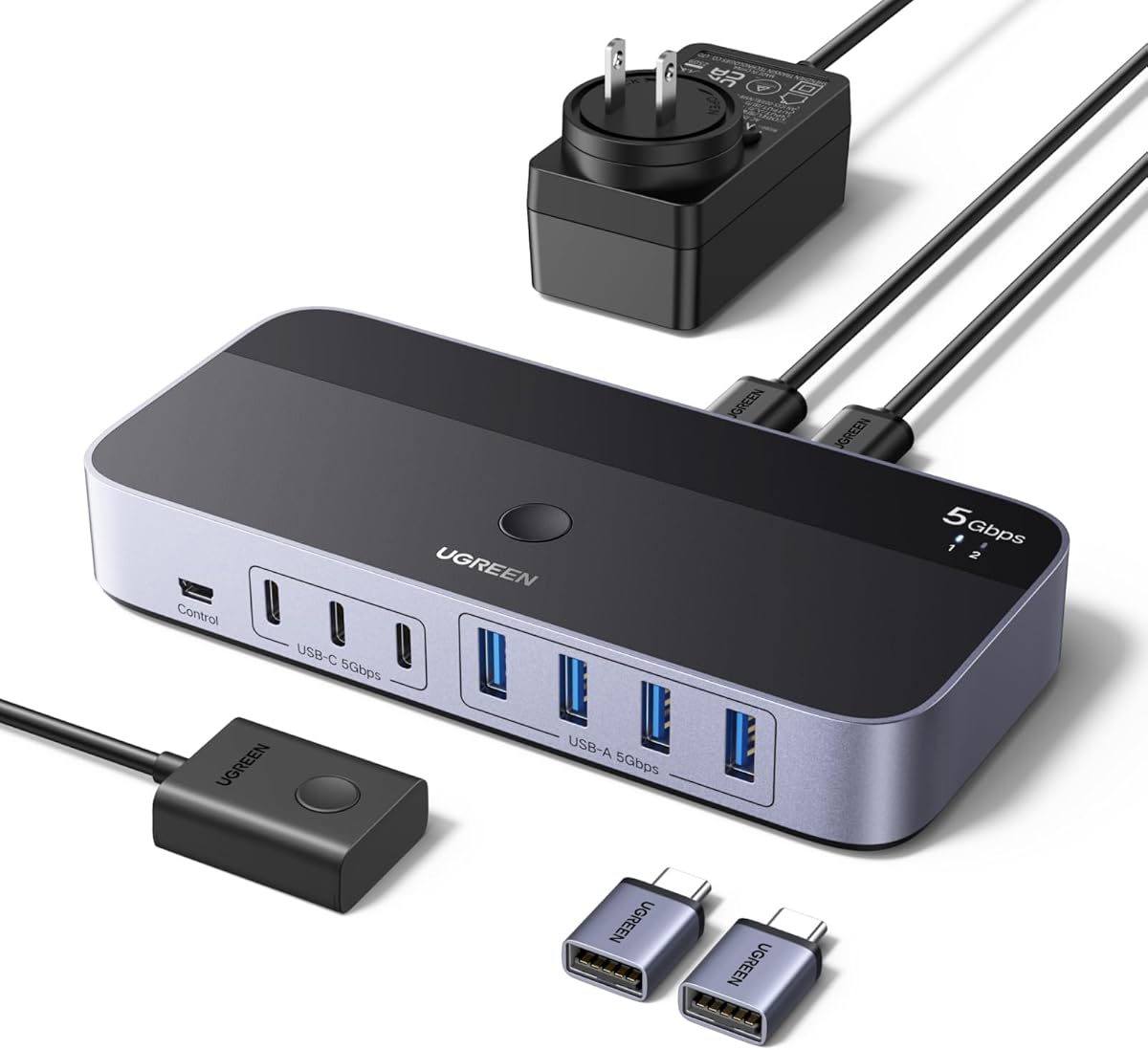

The UGREEN USB 3.0 Switch stands out as a versatile solution for dual PC setups. It allows seamless sharing of keyboards, mice, and printers without constant cable swapping. Users appreciate its robust design and ability to handle various peripheral types efficiently.
We may earn a commission when you buy through this link, at no additional cost to you.
Its unique combination of USB C and A ports makes it ideal for modern mixed environments. The included external controller offers flexibility for desktop or hidden setups. Data transfer speeds reach 5Gbps ensuring fast file access between connected machines.
While it lacks video output capabilities, this limitation is typical for dedicated USB switchers. Power stability relies on external sources for high-demand devices. These trade-offs are acceptable given its primary focus on peripheral management and simplicity.
Ideal for professionals needing quick device access across two systems. This switch balances functionality and ease of use effectively. It remains a top recommendation for those prioritizing peripheral sharing over video management.
Choose between on-device buttons or a remote controller based on your desk layout preferences.
Connect both legacy USB A and modern USB C devices simultaneously without extra adapters.
We may earn a commission when you buy through this link, at no additional cost to you.
This compact switch offers excellent value for users needing basic peripheral sharing. It handles keyboards and mice effortlessly with reliable performance. The aluminum shell ensures durability while keeping heat dissipation effective during operation.
We may earn a commission when you buy through this link, at no additional cost to you.
Its one-button operation simplifies daily workflow significantly. The LED indicator clearly shows which computer is active. Users find it easy to integrate into existing setups without technical hurdles or driver installations.
While port count is limited, it suits minimal setups well. The lack of video output means separate handling for displays. These constraints are minor compared to the cost savings and simplicity it delivers.
Best for home offices or light dual PC tasks. It provides reliable connectivity without breaking the bank. Consider this if you prioritize budget and straightforward functionality above advanced features.
Get reliable switching performance at a fraction of the cost of premium models.
The aluminum alloy housing protects internal components and extends product lifespan.
We may earn a commission when you buy through this link, at no additional cost to you.
This premium switch delivers exceptional speed and connectivity for demanding environments. Its 10Gbps transfer rate ensures rapid file access between machines. The seven port design accommodates extensive peripheral needs without extra hubs.
We may earn a commission when you buy through this link, at no additional cost to you.
Included power adapter guarantees stable operation for high-drain devices like drives. USB C compatibility makes it future-proof for modern laptops. Users report smooth switching and consistent performance during intensive tasks.
The higher cost reflects its advanced capabilities. Video transmission remains unsupported so monitor sharing requires separate solutions. These trade-offs are reasonable for users needing maximum port flexibility and speed.
Perfect for power users with multiple peripherals across two systems. It combines speed and capacity in one reliable package. Choose this if performance and connectivity options are your top priorities.
Experience 10Gbps speeds for quick data moves between connected computers instantly.
Connect up to seven devices simultaneously including USB A and C types.
We may earn a commission when you buy through this link, at no additional cost to you.
BENFEI offers a solid mid-range solution for sharing peripherals between two PCs. Its four port design covers most basic needs effectively. Users value the strong warranty and responsive customer support provided.
We may earn a commission when you buy through this link, at no additional cost to you.
The power supply slot helps maintain stability with high consumption devices. LED indicators give clear visual feedback on active connections. Performance remains consistent across different operating systems without glitches.
Not including a power adapter requires separate purchase for some setups. Lack of video output limits it to peripheral sharing only. These are standard constraints for dedicated USB switchers in this category.
Suitable for office environments needing dependable switching. It balances cost and functionality well. Consider this if you want brand reliability without premium pricing.
Benefit from an 18-month unconditional warranty for peace of mind.
Add external power easily when using energy-heavy peripherals like external drives.
We may earn a commission when you buy through this link, at no additional cost to you.
This model simplifies sharing printers and basic peripherals efficiently. Its compact form fits neatly on any desk. Users find the five foot cables reduce clutter effectively without needing extensions.
We may earn a commission when you buy through this link, at no additional cost to you.
Operation is straightforward with a single button press. LED indicators confirm which system is currently active. Setup requires no software making it ideal for non technical users.
Port count limits it to essential peripherals only. Video output is not possible so monitor needs separate handling. These limitations are typical for entry level switches of this type.
Great for small offices needing printer and keyboard sharing. It offers UGREEN reliability at a lower cost. Choose this for simple setups requiring minimal connectivity.
Use as a dedicated splitter to share one printer between two machines.
Five foot cables provide flexibility in cable PC and peripheral placement.
We may earn a commission when you buy through this link, at no additional cost to you.
This KVM switch combines video and peripheral control in one unit. It allows two computers to share a single monitor seamlessly. Users appreciate the 4K resolution support for crisp visual clarity.
We may earn a commission when you buy through this link, at no additional cost to you.
The wired remote makes switching convenient even when the unit is hidden. Adaptive EDID ensures display settings optimize automatically. Performance remains stable during routine switching tasks.
Setup involves more cables than standard USB switchers. Video integration adds complexity but delivers comprehensive control. This makes it best suited for users needing display sharing too.
Ideal for setups needing both monitor and peripheral access. It solves the dual PC display challenge effectively. Consider this if video sharing is part of your workflow.
Manage monitor, keyboard, and mouse through one integrated switch device.
Enjoy 4K visuals at 60Hz for sharp and smooth displays.
We may earn a commission when you buy through this link, at no additional cost to you.
This USB 2.0 switch caters to older peripheral needs effectively. It maintains compatibility with legacy hardware that modern ports lack. Users find it reliable for basic office tasks and older printers.
We may earn a commission when you buy through this link, at no additional cost to you.
One button swapping keeps daily use simple. The included cables are long enough to reach most setups. LED lights provide instant feedback on which PC is active.
Speed limitations are expected for USB 2.0 tech. Not suitable for large file transfers requiring high bandwidth. These constraints make it best for light usage scenarios.
Great for environments with older peripherals needing sharing. It provides stable connectivity without speed expectations. Consider this if legacy support is your primary requirement.
Connect older USB 2.0 devices seamlessly without needing adapters.
Switch with one button click and clear visual confirmation.
We may earn a commission when you buy through this link, at no additional cost to you.
This four port switch offers a balance of capacity and speed. It handles typical office peripherals with consistent results. Users appreciate its plug and play nature across various systems.
We may earn a commission when you buy through this link, at no additional cost to you.
The power port supports higher demand devices when needed. One button operation makes daily switching quick and easy. Reliability remains high even during extended use periods.
Video sharing is not supported so monitor remains separate. External power must be sourced for heavy loads. These are standard trade-offs for USB switchers of this class.
Well suited for mixed environments needing four ports. It offers dependable performance without complex setup. Choose this for reliable peripheral sharing at reasonable cost.
Four ports accommodate multiple keyboards, mice, and drives together.
No software needed for setup ensuring immediate usability across OS.
We may earn a commission when you buy through this link, at no additional cost to you.
This model excels in port count with seven connections available. It handles extensive peripheral needs without requiring extra hubs. Users value the included power adapter and controller for convenience.
We may earn a commission when you buy through this link, at no additional cost to you.
USB C compatibility ensures compatibility with modern laptops. The controller simplifies switching for shared desk setups. Setup remains straightforward with no driver requirements.
Physical footprint is larger due to port density. Video output is not supported limiting it to USB sharing. These are minor compromises given the connectivity advantages.
Ideal for power users with many devices to share. It consolidates connectivity needs effectively. Choose this if port count and convenience are top priorities.
Seven ports allow sharing nearly all your peripherals across systems.
Power adapter and controller included to start using right away.
We may earn a commission when you buy through this link, at no additional cost to you.
This switch provides essential sharing for basic peripherals. It works reliably for keyboards and mice without complexity. Users find the included controller helpful for accessible switching.
We may earn a commission when you buy through this link, at no additional cost to you.
Setup is minimal with included cables. LED indicators confirm active connections clearly. Performance remains consistent for everyday office tasks.
Port count limits it to core peripherals. Video output is not an option for display sharing. These constraints keep it affordable and focused.
Best for users needing simple keyboard mouse switching. It avoids unnecessary features while delivering core functionality. Choose this for basic sharing needs at low cost.
Focuses on sharing core inputs without extra features.
Use the external controller for easy desktop access.
We may earn a commission when you buy through this link, at no additional cost to you.
Selecting the right switch requires understanding your port needs, speed requirements, and budget. This guide breaks down key factors to ensure you pick a model that fits your workflow.
Assess how many devices you need to share between computers. Basic switches offer two ports while advanced ones provide four or more. Choose a model that accommodates your current peripherals without needing extra hubs.
Prioritize switches with enough ports for your keyboard mouse printer and other devices.
USB 3.0 switches offer 5Gbps speeds ideal for general peripherals and moderate file transfers. USB 3.2 models go up to 10Gbps for faster data movement. Match speed to your file access needs to avoid bottlenecks.
Opt for higher speed models if you transfer large files frequently between systems.
Check if the switch supports both USB A and C devices. Modern laptops often lack USB A so compatibility matters. Ensure the model works with your operating system without extra drivers.
Choose a switch that supports mixed device types for future proofing.
Some switches rely on bus power while others need external adapters. High power devices like external drives require stable power sources. Verify if the switch includes a power adapter or requires separate purchase.
Select models with power ports if using multiple high consumption devices.
Options include buttons on the device, remote controllers, or automatic switching. Controllers offer flexibility to place controls where needed. Choose based on desk layout and personal preference for ease of access.
Consider controllers if you prefer keeping the unit hidden under the desk.
USB switches handle data peripherals only not video signals. If you need to share a monitor look for KVM switches with HDMI support. This distinction is critical to avoid purchasing the wrong type.
Choose KVM models if video sharing is part of your setup requirements.
Metal housings offer better heat dissipation and durability. Plastic models may be lighter but less robust. Check warranty length as brands often provide 18 months or more for peace of mind.
Prioritize metal builds and longer warranties for long term reliability.
Prices range from affordable entry level to premium high performance models. Set a budget based on your needs rather than buying unnecessary features. Balance cost with essential specs to get the best value.
Focus on core features you need to avoid overspending on unused capabilities.
Connect your computers to the switch first using included or compatible cables. Ensure each PC connects to the designated input ports. Then plug your peripherals into the output ports. This order prevents connection issues.
Use the switch button or controller to toggle between systems. The LED indicator will show which computer is active. Test keyboards and mice to confirm functionality. Simple plug and play works for most setups.
Avoid overloading the switch with too many high power devices without external power. Dust the unit regularly with a soft cloth. Store it in a dry place when not in use. Proper care extends its lifespan significantly.
No standard USB switches only handle data peripherals like keyboards and mice. To share a monitor you need a KVM switch with HDMI or DisplayPort output. These models combine video and USB control in one unit.
Most modern USB switches are plug and play and require no drivers. They work automatically across Windows, Mac, and Linux systems. Simply connect the cables and start switching devices immediately.
USB 3.0 switches offer faster data speeds of 5Gbps compared to 480Mbps on USB 2.0. They are also backward compatible with older devices. Choose 3.0 for better performance especially with storage devices.
Each port supports one device so exceeding port count requires external hubs. Connecting multiple devices to one port may cause instability. Always ensure enough ports for your active peripherals.
Power needs depend on connected devices. Simple keyboards work without external power. High power devices like external hard drives may require the switch power port. Check specifications for your setup needs.
Yes most USB switches are compatible with Mac systems. They work automatically without special drivers. Ensure you have the right cables for your Mac ports if using USB C devices.
Selecting the right switch depends on your specific port needs and speed requirements. Options like the 2 in 2 Out USB 3.0 Switch offer great value for simple setups while premium models provide more capacity.
Prioritize switches that match your device types and power needs. Ensure compatibility with your operating system for seamless integration. Avoid unnecessary features that add cost without benefit.
Always check current pricing and availability before purchasing. Prices fluctuate so verify details to get the best deal. With the right switch you can streamline your dual PC workflow effectively.